
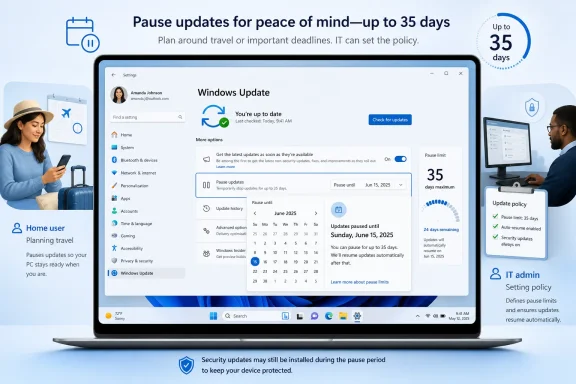
Windows 11’s new pause-updates experience lets users pick a specific resume date in Settings > Windows Update, but Microsoft still caps each pause window at 35 days and expects updates to resume when that window ends. The practical change is not an “indefinite updates off” switch; it is a friendlier calendar picker wrapped around the same temporary-pause model. For home users, that means fewer surprise restarts during travel or crunch time. For endpoint teams, it means the operational burden shifts from “Can we pause?” to “Who owns the re-pause, policy reset, and compliance trail?”
The concrete path is straightforward: open Settings > Windows Update, use the Pause updates control, and choose a date from the calendar. If the newer experience is available on your device, the control presents a specific end date rather than forcing you to think in vague weekly increments. When the pause is already active, returning to the same Windows Update page lets you select a new end date within the supported window.
That is the feature users came looking for. It is also where the most viral interpretation of the change starts to drift. Microsoft says the calendar can go up to 35 days, and that users can re-pause as many times as needed. Microsoft Support now describes the same calendar-based behavior for Windows 11 and Windows 10, with the selectable dates constrained by the supported pause period and the maximum extension window limited to 35 days from the current date.
The distinction matters because “re-pause as many times as needed” is not the same thing as “disable updates forever.” Windows Update still has a clock. The new UI makes that clock easier to set, easier to understand, and easier to extend before a deadline, but it does not remove the clock from the system.
For ordinary users, this is still a meaningful improvement. A date picker maps better to real life than “pause for one week” or “pause until Windows decides the next interval.” People plan around a conference, a trip, an exam week, a production deadline, or a machine they do not want rebooting while it is attached to a projector. Microsoft is finally making Windows Update speak that language.
To extend an existing pause, return to Settings > Windows Update and select a new end date on the pause calendar. The important detail is that the new end date can be up to 35 days from today; previously paused time does not accumulate into a longer entitlement. If you paused last week and extend today, the meaningful window is recalculated from today, not from the start of the original pause.
During the pause, updates that might require a restart are not downloaded or installed until the pause ends. The device should not automatically restart to finish those updates while the pause is active. If updates are already in progress when the pause is applied, Microsoft says those updates are canceled.
When the pause expires, Windows checks for updates again and may download and install the latest available updates. Users can also resume manually before the selected date. That combination gives the feature its real shape: it is a scheduling control, not a permanent opt-out.
This is why the calendar is both better and less dramatic than some headlines suggest. It solves the old usability problem of unclear timing. It does not solve the administrative problem of sustained deferral, risk acceptance, or fleet-wide patch orchestration.
That is the connective tissue many quick write-ups miss. The Windows Settings UI may now look more flexible, but the endpoint-management model continues to treat update pauses as bounded exceptions. Microsoft is not turning Windows Update into a user-managed patch repository where updates can be ignored indefinitely without policy consequences.
For admins, the useful mental model is “rolling deferral,” not “permanent pause.” A user at a single PC can re-pause. An endpoint team can use policy to pause feature or quality updates temporarily. But in both cases, the organization needs a deliberate mechanism to revisit the decision before the 35-day window runs out.
That revisit matters because patch state is no longer just a technical preference. It is part of audit posture, cyber insurance questionnaires, incident response readiness, and the mundane but real obligation to explain why a machine was allowed to sit behind the current update baseline. A re-pause without a reason is not a strategy; it is a calendar reminder waiting to be missed.
In managed environments, the question is not whether the pause can be extended. The question is who is authorized to extend it, under what conditions, and where that decision is recorded. If a test ring needs more time because a line-of-business application failed after a quality update, that is a legitimate operational pause. If every frustrated user can keep pushing the date out because updates are inconvenient, the estate gradually loses the very baseline Windows Update is meant to maintain.
This is where Intune and MDM mapping becomes more important than the Settings screenshot. Microsoft’s policy documentation makes clear that quality-update and feature-update pauses are temporary fields with a 35-day life from the chosen start date unless cleared sooner. Admins should therefore think in terms of start dates, expiration dates, and ownership rather than one-time toggles.
The cleaner operational pattern is to pair any pause with a remediation owner and a planned review date. If updates are paused to validate a driver issue, the owner should know when the next decision point arrives. If updates are paused because a device group is entering a critical business period, the end of that period should be part of the change record. If updates are paused because an update is suspected of breaking something, the organization needs a test plan, not just a new calendar selection.
WindowsForum readers have already been circling this distinction in earlier discussions of the date-based pause experience and the broader Windows Update enforcement model. The community instinct is right: the interesting story is not whether Microsoft added a nicer control, but whether that control reduces friction without teaching users the wrong lesson.
Microsoft’s own framing is about reducing disruption while keeping devices secure by default. That phrase can sound like corporate wallpaper, but it accurately describes the compromise. Windows Update is allowed to get less annoying, but not to become optional infrastructure.
The more precise UI also reduces a class of user mistakes. Someone preparing for travel can choose the day after returning, rather than guessing how many weekly pause increments cover the trip. Someone using a workstation for an event can set the pause through the event window and then let updates resume. The feature is more useful precisely because it aligns with human calendars rather than update jargon.
But that friendliness has a second-order effect. When users see they can keep extending the date, they may infer that Microsoft has quietly blessed indefinite deferral. It has not. The difference between “repeatable” and “unlimited” is small in casual speech and enormous in endpoint governance.
There are already clear boundaries. Microsoft’s Insider announcement described the feature as rolling out in preview channels, while Support documentation now describes the calendar-based pause experience for Windows 11 and Windows 10. The company also said it would have more to share about how these features light up for commercial customers and what controls admins will have around them. That sentence is doing a lot of work.
In practice, endpoint teams should verify the experience on their own rings before writing user guidance. A device with policies applied may not expose the same control that an enthusiast sees on a personal machine. A user may see unavailable dates because the calendar only permits selections within the supported pause period. A device that has pending or in-progress update activity may behave differently from one that is idle and fully scanned.
The safest advice is boring and therefore useful: test the exact combination you manage. Test an unmanaged Windows 11 device, a policy-managed pilot device, and any device class where restart timing is business-critical. Record what the user can see, what the admin can override, and what happens when the pause expires.
That exercise also helps support desks. “Pick a date in Windows Update” is a simple instruction until the user’s calendar does not show the date they want, the control is hidden by policy, or the pause is already near its maximum extension. A good help-desk article should explain not just where to click, but why some dates are not selectable.
Patch compliance programs depend on bounded exceptions. A vulnerability-management team can usually live with a documented delay while a fix is tested or a business process is protected. What it cannot live with is a fleet of devices where update age is extended repeatedly without a durable reason. The new pause picker makes that scenario easier at the edge unless policy reins it in.
The distinction between feature updates and quality updates matters here, even if the new Settings UI does not force users to think that way. Quality updates are the monthly security-and-reliability rhythm most organizations watch closely. Feature updates carry broader compatibility and lifecycle implications. Microsoft’s Policy CSP exposes separate pause controls for those categories, and both are temporary under the documented 35-day model.
That separation gives admins a better control surface than the consumer UI. An organization may have reasons to delay a feature update more cautiously while still allowing quality updates to move on schedule. Conversely, it may need to pause a quality update briefly while investigating a regression. The blunt user-facing experience should not become the model for enterprise policy design.
This is also where audit evidence matters. If a device falls behind because the pause was extended, the organization should be able to show whether that extension came from user action, admin policy, or a deliberate change process. Without that record, the calendar picker becomes one more place where convenience erodes accountability.
That makes the feature politically clever. It gives users a visible improvement they can understand immediately. It also preserves the company’s ability to say Windows remains secure by default. The system bends around the user’s week, but it does not abandon the update pipeline.
The same pattern appears in the surrounding update-experience changes Microsoft described for Insiders: clearer power options, more predictable restart behavior, and more information about available updates. These are not anti-update features. They are anti-surprise features. The goal is to reduce the number of moments when Windows feels like it has taken the keyboard away from its owner.
For enthusiasts, that is welcome. Windows Update’s worst moments have often been failures of timing and communication rather than patching itself. If the platform can give users a clean restart choice and a clear pause end date, it removes some of the emotional charge from maintenance.
For admins, however, the enforcement principle is still intact. Microsoft is not giving organizations a free pass to drift. It is giving them a more legible deferral mechanism, and legibility cuts both ways: it helps users plan, and it helps administrators see that deferral is still supposed to end.
The right response is not to ban the feature out of reflex. There are legitimate cases where a user-level pause reduces disruption without increasing meaningful risk. A presenter, executive assistant, lab operator, field technician, or developer running a time-sensitive demo may be better served by a visible pause date than by a surprise restart prompt.
But organizations should decide where that flexibility belongs. On shared kiosks, regulated endpoints, production control systems, and high-risk user groups, unmanaged pause behavior may be unacceptable. On general productivity devices, allowing short user-driven pauses may be reasonable if compliance monitoring catches devices that fall behind.
The administrative question is therefore granular. Which device groups can users pause? Which groups are governed only by policy? Which update categories can be paused, and who can approve an extension? What happens when the 35-day window expires during a blackout period? These are the decisions the new UI makes more urgent, not less.
The worst possible outcome would be treating the calendar picker as a substitute for endpoint management. It is not. It is a nicer front end to a bounded exception model, and bounded exceptions still need owners.
For enthusiasts, the feature is worth using when timing matters. Set a date that corresponds to the real end of the disruption window, then let updates resume. If you keep extending the pause, understand that you are making a recurring maintenance decision, not flipping Windows into a different servicing mode.
For IT teams, the next step is to map the user-facing behavior to MDM policy. Compare what a user can do in Settings with what PauseFeatureUpdates and PauseQualityUpdates allow through Policy CSP. Then decide whether your support scripts, Intune profiles, user documentation, and compliance reports all tell the same story.
 Microsoft Turns the Pause Button Into a Calendar, Not an Escape Hatch
The concrete path is straightforward: open Settings > Windows Update, use the Pause updates control, and choose a date from the calendar. If the newer experience is available on your device, the control presents a specific end date rather than forcing you to think in vague weekly increments. When the pause is already active, returning to the same Windows Update page lets you select a new end date within the supported window.That is the feature users came looking for. It is also where the most viral interpretation of the change starts to drift. Microsoft says the calendar can go up to 35 days, and that users can re-pause as many times as needed. Microsoft Support now describes the same calendar-based behavior for Windows 11 and Windows 10, with the selectable dates constrained by the supported pause period and the maximum extension window limited to 35 days from the current date.
The distinction matters because “re-pause as many times as needed” is not the same thing as “disable updates forever.” Windows Update still has a clock. The new UI makes that clock easier to set, easier to understand, and easier to extend before a deadline, but it does not remove the clock from the system.
For ordinary users, this is still a meaningful improvement. A date picker maps better to real life than “pause for one week” or “pause until Windows decides the next interval.” People plan around a conference, a trip, an exam week, a production deadline, or a machine they do not want rebooting while it is attached to a projector. Microsoft is finally making Windows Update speak that language.
The Exact Procedure Is Simple, and the Limit Is the Point
To pause updates on a machine with the current calendar-based experience, go to Start, open Settings, choose Windows Update, and select Pick a date on the Pause updates control. Choose the end date offered by the calendar. Windows will then delay update activity until that date, subject to the supported pause period.To extend an existing pause, return to Settings > Windows Update and select a new end date on the pause calendar. The important detail is that the new end date can be up to 35 days from today; previously paused time does not accumulate into a longer entitlement. If you paused last week and extend today, the meaningful window is recalculated from today, not from the start of the original pause.
During the pause, updates that might require a restart are not downloaded or installed until the pause ends. The device should not automatically restart to finish those updates while the pause is active. If updates are already in progress when the pause is applied, Microsoft says those updates are canceled.
When the pause expires, Windows checks for updates again and may download and install the latest available updates. Users can also resume manually before the selected date. That combination gives the feature its real shape: it is a scheduling control, not a permanent opt-out.
This is why the calendar is both better and less dramatic than some headlines suggest. It solves the old usability problem of unclear timing. It does not solve the administrative problem of sustained deferral, risk acceptance, or fleet-wide patch orchestration.
The Old 35-Day Policy Is Still Hiding Under the New Interface
The consumer-facing setting and the management policy story point in the same direction. Microsoft Learn documents the MDM and Policy CSP pause settings as temporary. PauseFeatureUpdates and PauseQualityUpdates remain in effect for 35 days from the specified start date or until the field is cleared.That is the connective tissue many quick write-ups miss. The Windows Settings UI may now look more flexible, but the endpoint-management model continues to treat update pauses as bounded exceptions. Microsoft is not turning Windows Update into a user-managed patch repository where updates can be ignored indefinitely without policy consequences.
For admins, the useful mental model is “rolling deferral,” not “permanent pause.” A user at a single PC can re-pause. An endpoint team can use policy to pause feature or quality updates temporarily. But in both cases, the organization needs a deliberate mechanism to revisit the decision before the 35-day window runs out.
That revisit matters because patch state is no longer just a technical preference. It is part of audit posture, cyber insurance questionnaires, incident response readiness, and the mundane but real obligation to explain why a machine was allowed to sit behind the current update baseline. A re-pause without a reason is not a strategy; it is a calendar reminder waiting to be missed.
Endpoint Teams Should Treat Re-Pause as a Workflow, Not a Click
The new calendar picker is attractive because it makes deferral feel lightweight. That is good for an individual user trying to get through a high-stakes week. It is dangerous if an organization interprets the same convenience as permission to let patch decisions become informal.In managed environments, the question is not whether the pause can be extended. The question is who is authorized to extend it, under what conditions, and where that decision is recorded. If a test ring needs more time because a line-of-business application failed after a quality update, that is a legitimate operational pause. If every frustrated user can keep pushing the date out because updates are inconvenient, the estate gradually loses the very baseline Windows Update is meant to maintain.
This is where Intune and MDM mapping becomes more important than the Settings screenshot. Microsoft’s policy documentation makes clear that quality-update and feature-update pauses are temporary fields with a 35-day life from the chosen start date unless cleared sooner. Admins should therefore think in terms of start dates, expiration dates, and ownership rather than one-time toggles.
The cleaner operational pattern is to pair any pause with a remediation owner and a planned review date. If updates are paused to validate a driver issue, the owner should know when the next decision point arrives. If updates are paused because a device group is entering a critical business period, the end of that period should be part of the change record. If updates are paused because an update is suspected of breaking something, the organization needs a test plan, not just a new calendar selection.
WindowsForum readers have already been circling this distinction in earlier discussions of the date-based pause experience and the broader Windows Update enforcement model. The community instinct is right: the interesting story is not whether Microsoft added a nicer control, but whether that control reduces friction without teaching users the wrong lesson.
The Calendar Makes Windows Update More Honest About Time
One reason this change lands better than older pause controls is that dates are honest. A date says, “Updates come back on this day.” A duration says, “You probably need to do math.” For users who have been trained to distrust Windows Update timing, a visible resume date is a small but important act of translation.Microsoft’s own framing is about reducing disruption while keeping devices secure by default. That phrase can sound like corporate wallpaper, but it accurately describes the compromise. Windows Update is allowed to get less annoying, but not to become optional infrastructure.
The more precise UI also reduces a class of user mistakes. Someone preparing for travel can choose the day after returning, rather than guessing how many weekly pause increments cover the trip. Someone using a workstation for an event can set the pause through the event window and then let updates resume. The feature is more useful precisely because it aligns with human calendars rather than update jargon.
But that friendliness has a second-order effect. When users see they can keep extending the date, they may infer that Microsoft has quietly blessed indefinite deferral. It has not. The difference between “repeatable” and “unlimited” is small in casual speech and enormous in endpoint governance.
The Device-State Caveats Are Where Real Deployments Get Messy
The public documentation gives the main behavior, but thin facts still leave operational gray areas. Microsoft has not provided a full commercial-device matrix for every version, channel, policy state, and management scenario in the material at hand. That means admins should resist assuming identical behavior across unmanaged PCs, Insider builds, domain-managed devices, Intune-managed devices, and machines subject to update compliance policies.There are already clear boundaries. Microsoft’s Insider announcement described the feature as rolling out in preview channels, while Support documentation now describes the calendar-based pause experience for Windows 11 and Windows 10. The company also said it would have more to share about how these features light up for commercial customers and what controls admins will have around them. That sentence is doing a lot of work.
In practice, endpoint teams should verify the experience on their own rings before writing user guidance. A device with policies applied may not expose the same control that an enthusiast sees on a personal machine. A user may see unavailable dates because the calendar only permits selections within the supported pause period. A device that has pending or in-progress update activity may behave differently from one that is idle and fully scanned.
The safest advice is boring and therefore useful: test the exact combination you manage. Test an unmanaged Windows 11 device, a policy-managed pilot device, and any device class where restart timing is business-critical. Record what the user can see, what the admin can override, and what happens when the pause expires.
That exercise also helps support desks. “Pick a date in Windows Update” is a simple instruction until the user’s calendar does not show the date they want, the control is hidden by policy, or the pause is already near its maximum extension. A good help-desk article should explain not just where to click, but why some dates are not selectable.
Compliance Teams Will Care About the Word “As Needed”
The phrase “as many times as needed” is user-friendly language. It is also a compliance trap if lifted out of context. Needed by whom? Needed for what? Needed according to which risk owner?Patch compliance programs depend on bounded exceptions. A vulnerability-management team can usually live with a documented delay while a fix is tested or a business process is protected. What it cannot live with is a fleet of devices where update age is extended repeatedly without a durable reason. The new pause picker makes that scenario easier at the edge unless policy reins it in.
The distinction between feature updates and quality updates matters here, even if the new Settings UI does not force users to think that way. Quality updates are the monthly security-and-reliability rhythm most organizations watch closely. Feature updates carry broader compatibility and lifecycle implications. Microsoft’s Policy CSP exposes separate pause controls for those categories, and both are temporary under the documented 35-day model.
That separation gives admins a better control surface than the consumer UI. An organization may have reasons to delay a feature update more cautiously while still allowing quality updates to move on schedule. Conversely, it may need to pause a quality update briefly while investigating a regression. The blunt user-facing experience should not become the model for enterprise policy design.
This is also where audit evidence matters. If a device falls behind because the pause was extended, the organization should be able to show whether that extension came from user action, admin policy, or a deliberate change process. Without that record, the calendar picker becomes one more place where convenience erodes accountability.
Microsoft Is Selling Control While Preserving Enforcement
There is a broader Windows story here. Microsoft has spent years tightening the update model because unpatched Windows machines are a systemic risk, not merely a personal preference. At the same time, users have spent years resenting update behavior that arrives at the worst possible moment. The calendar picker is Microsoft’s attempt to soften the experience without surrendering the enforcement principle.That makes the feature politically clever. It gives users a visible improvement they can understand immediately. It also preserves the company’s ability to say Windows remains secure by default. The system bends around the user’s week, but it does not abandon the update pipeline.
The same pattern appears in the surrounding update-experience changes Microsoft described for Insiders: clearer power options, more predictable restart behavior, and more information about available updates. These are not anti-update features. They are anti-surprise features. The goal is to reduce the number of moments when Windows feels like it has taken the keyboard away from its owner.
For enthusiasts, that is welcome. Windows Update’s worst moments have often been failures of timing and communication rather than patching itself. If the platform can give users a clean restart choice and a clear pause end date, it removes some of the emotional charge from maintenance.
For admins, however, the enforcement principle is still intact. Microsoft is not giving organizations a free pass to drift. It is giving them a more legible deferral mechanism, and legibility cuts both ways: it helps users plan, and it helps administrators see that deferral is still supposed to end.
The Better UI Does Not Replace Rings, Deadlines, and Policy
A date picker is not a deployment strategy. It is a local control that may or may not be visible depending on device state and policy. Serious endpoint teams still need rings, deferral policies, deadlines, restart behavior, monitoring, and exception handling.The right response is not to ban the feature out of reflex. There are legitimate cases where a user-level pause reduces disruption without increasing meaningful risk. A presenter, executive assistant, lab operator, field technician, or developer running a time-sensitive demo may be better served by a visible pause date than by a surprise restart prompt.
But organizations should decide where that flexibility belongs. On shared kiosks, regulated endpoints, production control systems, and high-risk user groups, unmanaged pause behavior may be unacceptable. On general productivity devices, allowing short user-driven pauses may be reasonable if compliance monitoring catches devices that fall behind.
The administrative question is therefore granular. Which device groups can users pause? Which groups are governed only by policy? Which update categories can be paused, and who can approve an extension? What happens when the 35-day window expires during a blackout period? These are the decisions the new UI makes more urgent, not less.
The worst possible outcome would be treating the calendar picker as a substitute for endpoint management. It is not. It is a nicer front end to a bounded exception model, and bounded exceptions still need owners.
The Work Now Moves From Settings to Governance
The immediate recommendation for WindowsForum readers is practical: check whether your devices expose the new calendar picker, document the exact Settings path for users, and do not describe the feature internally as “indefinite pause.” That language will create confusion later. Call it a repeatable 35-day pause and build your process around that phrase.For enthusiasts, the feature is worth using when timing matters. Set a date that corresponds to the real end of the disruption window, then let updates resume. If you keep extending the pause, understand that you are making a recurring maintenance decision, not flipping Windows into a different servicing mode.
For IT teams, the next step is to map the user-facing behavior to MDM policy. Compare what a user can do in Settings with what PauseFeatureUpdates and PauseQualityUpdates allow through Policy CSP. Then decide whether your support scripts, Intune profiles, user documentation, and compliance reports all tell the same story.
- Windows 11’s new pause control lets users choose a specific resume date, but each selectable window remains limited to 35 days from the current date.
- Re-pausing can be repeated, but that repeatability should be treated as a new deferral decision each time, not as an indefinite update disablement.
- The Settings path users need is Settings > Windows Update, then the Pause updates control and its date picker when the new experience is available.
- MDM-managed environments should map the user experience to PauseFeatureUpdates and PauseQualityUpdates, which Microsoft documents as temporary 35-day policy pauses.
- Help desks should warn users that some calendar dates will be unavailable because the picker only exposes dates inside the supported pause period.
- Compliance teams should require a reason, owner, and review date for repeated pauses on managed endpoints.
References
- Primary source: learn.microsoft.com
Update Policy CSP | Microsoft Learn
Learn more about the Update Area in Policy CSP.learn.microsoft.com - Independent coverage: support.microsoft.com
Pause updates in Windows | Microsoft Support
Under Settings, you can pause the Windows Update from being downloaded and installed for a period of time. You can also select a convenient time to restart your device after the updates are downloaded and installed.support.microsoft.com - Independent coverage: blogs.windows.com
Your Windows update experience just got updated
Hey Windows Insiders, Today, we’re excited to share some improvements to the Windows Update experience that are now starting to roll out. These improvements are the direct result of your feedback. We are continually reading the feedback submittedblogs.windows.com - Primary source: WindowsForum
Windows 11 Update Pause by Date: Better Control, Not End of Mandatory Updates | Windows Forum
Microsoft may be inching toward the most user-friendly Windows Update change in years, but the reality is more nuanced than the headline suggests. The...windowsforum.com