
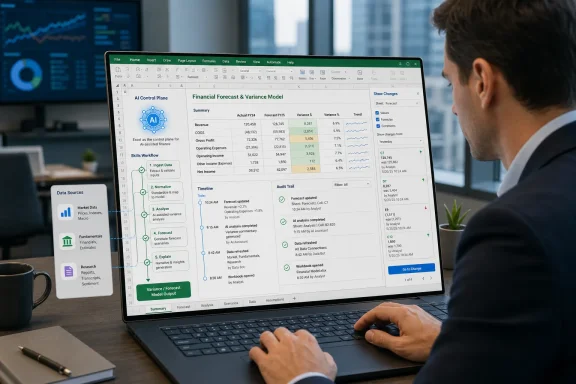
Microsoft on June 25, 2026, announced new finance-focused Copilot in Excel capabilities for Microsoft 365 Copilot customers, including repeatable workflow “skills,” additional financial data connectors, planning and traceability features, and broader availability across Excel for the web, Windows, and Mac. The move is less about adding another chatbot to a spreadsheet than about trying to make Excel the operating surface for AI-assisted finance work. Microsoft is betting that finance teams will trust generative AI only when it can follow process, cite its inputs, and leave an audit trail. That is the right problem to attack — and also the hardest one in the building.
Excel has always been the place where enterprise software gets translated into human judgment. ERP systems may hold the official record, data warehouses may claim the clean model, and dashboards may provide the executive gloss, but the argument usually ends in a workbook. Someone exports, reconciles, adjusts, annotates, and explains the numbers there.
That is why Microsoft’s latest Copilot in Excel update matters. The company is not merely giving users a more fluent way to ask for a chart or a formula. It is trying to wrap AI around the messy, repeatable routines that define finance work: variance analysis, board reporting, forecast updates, discounted cash flow models, portfolio reviews, deal screening, and close processes.
The new “skills” concept is the centerpiece. A skill gives Copilot instructions for how to perform a recurring task, effectively turning a team’s preferred process into reusable guidance. Instead of asking Copilot from scratch to build a model or prepare a variance explanation, a finance team can define the steps, structure, formatting conventions, and analytical expectations once, then call that skill again later.
That sounds modest until you consider the problem it addresses. Most failed enterprise AI pilots do not collapse because the model cannot write a paragraph. They collapse because the model does not know the house style, the approval path, the reporting convention, the naming scheme, or the analyst’s implicit assumptions. Microsoft is trying to move Copilot away from improvisation and toward repeatable procedure.
That phrase is easy to overuse, but it fits here. Finance professionals already live in spreadsheets because spreadsheets allow them to combine structured data, assumptions, commentary, judgment, and presentation in one place. Microsoft’s pitch is that Copilot should not drag those users into a separate AI workspace; it should meet them inside the workbook and understand the surrounding business context.
This is why the connectors matter. Microsoft says Copilot in Excel is expanding its access to financial data sources beyond the LSEG and Moody’s connectors announced in May, adding partners such as CB Insights, Daloopa, FactSet, Morningstar, PitchBook, and S&P Global’s Kensho-powered deterministic retrieval technology. FactSet is described as being in preview, with general availability expected in July.
That roster is not accidental. These are not generic productivity integrations. They are the kinds of sources used by investment analysts, corporate development teams, FP&A groups, treasury staff, and finance organizations that need market data, fundamentals, private-company intelligence, ratings, research, transcripts, deal history, or audit-ready figures.
The strategic aim is obvious: reduce the copy-and-paste tax that haunts finance teams. Microsoft wants Copilot to retrieve trusted data into the workbook, combine it with internal context, and help generate the first draft of analysis. If that works, the value is not that AI “does finance.” The value is that analysts spend less time reconstructing the data trail and more time deciding whether the story makes sense.
This is Microsoft’s practical answer to a problem that every serious Copilot deployment has encountered: prompts do not scale well as institutional knowledge. A clever analyst can write a detailed prompt to produce a usable output. But if every analyst has to rediscover that prompt, refine it, remember it, and teach it to new hires, the organization has not automated a workflow. It has created a folklore problem.
Skills make the prompt more like a documented process. They can encode preferred steps for a three-statement model, a monthly reporting update, a variance analysis, or a board package. They can also help standardize output so that Copilot does not produce one analyst’s preferred structure on Monday and another analyst’s preferred structure on Thursday.
For sysadmins and Microsoft 365 administrators, this is where the announcement becomes more than a finance story. Skills are a governance object in disguise. Once partners can develop and deploy them through Microsoft Marketplace and the Microsoft 365 admin center, organizations will need policies for who can publish skills, who can approve them, where they are stored, what data they are allowed to touch, and how changes are reviewed.
The history of Excel is a history of empowering users faster than IT can govern them. Macros, linked workbooks, ODBC connections, Power Query, and add-ins all followed that arc. Copilot skills may follow it too, unless Microsoft and enterprise administrators treat them as process automation assets rather than personal productivity tricks.
But connectors also raise the stakes. A bad answer from a chatbot is embarrassing. A bad number in a model can become a wrong forecast, a flawed investment memo, a misstated board deck, or a compliance headache. The more Copilot looks like a data pipeline, the more it must behave like one.
That means licensing, entitlement, freshness, provenance, and permissions matter. Microsoft notes that third-party connectors and providers may require separate subscriptions. In the real world, that caveat is not administrative fine print. It determines whether Copilot can access the same data an analyst is entitled to use, whether that access is logged, and whether sensitive licensed data leaks into places it should not.
There is also a subtler risk: source blending. Finance professionals routinely combine internal forecasts, external market data, analyst expectations, and subjective assumptions. AI tools are good at making blended narratives sound coherent. They are less naturally good at preserving the hard boundaries between what came from the general ledger, what came from a market data provider, what came from a forecast memo, and what the model inferred.
Microsoft’s answer is to emphasize traceability, planning, and change attribution. That is the correct direction. But the test will not be whether Copilot can say where a number came from in a demo. The test will be whether a reviewer under deadline can inspect a workbook, understand what changed, and trust the lineage without becoming a forensic prompt engineer.
That is the feature finance leaders should focus on. Generative AI tends to be marketed through output: the polished summary, the finished chart, the magically completed model. Finance work, by contrast, is often judged through process. A reviewer wants to know what changed, why it changed, who changed it, and whether the change was consistent with the approved methodology.
This is where Microsoft’s institutional memory with Office may help. Excel is not a greenfield AI app chasing consumer virality. It is a decades-old business substrate with collaboration, versioning, permissions, auditing expectations, and a user base that knows exactly how dangerous a hidden assumption can be. Copilot in Excel succeeds only if it respects that culture.
The planning step is especially important because it turns Copilot from a black-box editor into a proposal engine. Before it modifies a model, it can tell the user what it intends to touch. That gives the analyst a chance to catch scope errors, incorrect assumptions, or dangerous edits before they land in the workbook.
This does not make AI deterministic. It does not eliminate hallucinations, stale data, bad prompts, or misunderstood business context. But it changes the relationship from “the AI did something” to “the AI proposed a workflow, then executed changes that can be reviewed.” In finance, that difference is not cosmetic. It is the difference between a toy and a tool.
This is a familiar Microsoft move. The company often uses its own internal deployments as credibility builders, especially when selling enterprise software. In this case, the claim is plausible and strategically useful. If Microsoft cannot make Copilot useful for its own finance teams, it will struggle to persuade banks, insurers, manufacturers, and multinational enterprises to trust it with theirs.
Still, internal adoption is not the same thing as universal readiness. Microsoft’s finance organization has deep product access, unusually close feedback loops, and a level of internal expertise most customers cannot replicate. A feature that works well inside Microsoft may still require significant enablement, governance, training, and data cleanup elsewhere.
The company also says it has worked with the Financial Modeling Institute to evaluate Copilot against real-world financial modeling cases. That is a smart acknowledgement that finance AI cannot be judged only by generic benchmark scores. A model that writes fluent text but breaks a waterfall, misapplies a convention, or fails to preserve an audit trail is not useful in high-value finance work.
The open question is how transparent those evaluations will be to customers. Enterprise buyers do not need another glossy AI benchmark. They need practical evidence: where Copilot performs reliably, where it needs human review, which workflows are appropriate, and which remain too risky. The more Microsoft can be precise about those boundaries, the more credible the product becomes.
Partner-developed skills are expected in the third quarter of 2026. That timing matters because the finance use cases Microsoft is describing will become more powerful when partners can package industry-specific or vendor-specific workflows. A generic variance skill is useful; a skill tuned for a particular ERP, data provider, planning tool, or industry reporting pattern could be much more valuable.
But availability in Microsoft’s language rarely means every tenant sees every feature on day one. The company says rollout is progressive and that specific availability, supported regions, and licensing requirements may vary. For IT departments, that means the announcement should trigger an assessment, not an assumption.
Administrators should verify licensing, tenant settings, app update channels, data connector availability, and compliance requirements before finance teams begin designing processes around these features. The worst outcome would be a scattered rollout in which a few power users build workflows that cannot be supported, audited, or reproduced across the organization.
There is also a platform split to watch. Excel for the web, Windows, and Mac are all included in Microsoft’s availability language, but feature parity across Excel clients has historically been uneven. Finance teams that rely on desktop Excel add-ins, complex models, or established local workflows will need to test how Copilot behaves in their actual environment, not in Microsoft’s idealized product surface.
That has practical consequences for IT. Finance users are often among the heaviest Excel users in an enterprise, and they are also among the most likely to depend on legacy add-ins, protected workbooks, macro-heavy files, mapped network locations, and carefully controlled data flows. Introducing Copilot into that environment is not the same as enabling a grammar assistant in Word.
Security teams will need to think about oversharing. Copilot’s usefulness depends on access to work content, but finance data is rarely meant to be broadly discoverable. If permissions in SharePoint, OneDrive, Teams, or connected systems are too loose, Copilot may surface information users technically can access but were never expected to assemble so easily.
That is not a new problem created by Copilot. It is an old Microsoft 365 governance problem made visible by AI. The assistant does not necessarily break permissions; it makes permission mistakes more consequential. A file sitting unnoticed in a permissive library is one risk. An AI system that can reason across that file and combine it with other financial material is another.
Endpoint management also remains relevant. Copilot features depend on supported Office builds, update channels, account types, licensing, and sometimes preview participation. Organizations that want to deploy these finance capabilities responsibly will need coordination between finance operations, Microsoft 365 admins, security, compliance, and desktop engineering. This is not a feature to let drift into production by accident.
That strategy is powerful because work does not happen in a vacuum. A finance analyst’s model depends on emails, Teams meetings, planning documents, ERP data, market feeds, prior decks, and last quarter’s commentary. Microsoft’s advantage is not just Excel. It is the graph of work around Excel.
Copilot’s Work IQ branding is Microsoft’s way of naming that context layer. The idea is that Copilot should understand not only the workbook, but also the surrounding work artifacts that explain why the workbook exists. In theory, that lets an analyst ask for a forecast update that reflects approved assumptions, recent planning materials, and current market data.
In practice, this is both the promise and the risk. Context is useful only when it is relevant, authorized, current, and inspectable. The more Copilot pulls from a broad work graph, the more important it becomes to show which pieces of context influenced the output. Otherwise, users get an elegant answer with a mysterious ancestry.
Specialist finance tools may still have an advantage in controlled workflows, regulatory depth, and domain-specific precision. Microsoft’s counterpunch is ubiquity. If Copilot can become “good enough” inside Excel while respecting governance and traceability, many organizations will prefer improving the tool their employees already use over introducing another system of record-adjacent application.
Microsoft appears to understand this, at least rhetorically. The announcement repeatedly emphasizes trusted data, reviewable changes, methodology, and visibility. That language is a welcome shift from the broad early Copilot promise that AI would simply help users “do more.”
But finance users will still need discipline. Copilot can accelerate a variance analysis, but it should not become the final authority on why margins moved. It can help construct a DCF, but the assumptions still belong to the analyst. It can retrieve data, but entitlement, freshness, and source quality remain business responsibilities.
The human-in-the-loop cliché is often used as a liability shield. In finance, it has to become an operating model. Organizations should decide which Copilot outputs require review, which workflows can be reused, who approves custom skills, and how Copilot-generated edits are documented during close, planning, and reporting cycles.
If Microsoft wants Copilot in Excel to be trusted, it should resist the temptation to oversell autonomy. The product’s best role is not replacing the analyst. It is making the analyst’s work faster to assemble, easier to check, and more consistent across cycles.
Partner skills arriving through Microsoft Marketplace and deployment through the Microsoft 365 admin center could become a crucial inflection point. If handled well, finance teams will gain reusable, vetted workflows that reflect industry practice and vendor-specific integrations. If handled poorly, organizations may find themselves with a new class of semi-automated spreadsheet processes that no one owns.
The comparison to macros is unavoidable. Macros made Excel enormously powerful and notoriously risky. Copilot skills may be safer in some ways because they can be documented, centrally managed, and tied into Microsoft 365 governance. But they also introduce natural-language ambiguity into processes that may affect financial reporting.
That does not mean organizations should avoid them. It means they should treat them as governed automation. A skill that updates a monthly reporting model deserves the same scrutiny as a Power Automate flow, an Excel add-in, or a planning-system integration. The fact that it is written in markdown rather than code does not make it operationally harmless.
Microsoft’s challenge is to give customers enough control without burying the feature in administrative complexity. Finance teams want speed; IT wants guardrails; compliance wants evidence. Copilot in Excel has to satisfy all three without turning the workbook into a battleground.
 Microsoft Moves Copilot From Spreadsheet Assistant to Finance Workflow Engine
Excel has always been the place where enterprise software gets translated into human judgment. ERP systems may hold the official record, data warehouses may claim the clean model, and dashboards may provide the executive gloss, but the argument usually ends in a workbook. Someone exports, reconciles, adjusts, annotates, and explains the numbers there.That is why Microsoft’s latest Copilot in Excel update matters. The company is not merely giving users a more fluent way to ask for a chart or a formula. It is trying to wrap AI around the messy, repeatable routines that define finance work: variance analysis, board reporting, forecast updates, discounted cash flow models, portfolio reviews, deal screening, and close processes.
The new “skills” concept is the centerpiece. A skill gives Copilot instructions for how to perform a recurring task, effectively turning a team’s preferred process into reusable guidance. Instead of asking Copilot from scratch to build a model or prepare a variance explanation, a finance team can define the steps, structure, formatting conventions, and analytical expectations once, then call that skill again later.
That sounds modest until you consider the problem it addresses. Most failed enterprise AI pilots do not collapse because the model cannot write a paragraph. They collapse because the model does not know the house style, the approval path, the reporting convention, the naming scheme, or the analyst’s implicit assumptions. Microsoft is trying to move Copilot away from improvisation and toward repeatable procedure.
The Spreadsheet Is Becoming the Control Plane
The more interesting part of the announcement is not that Copilot can now do more in Excel. It is that Microsoft wants Excel to become the control plane for financial AI.That phrase is easy to overuse, but it fits here. Finance professionals already live in spreadsheets because spreadsheets allow them to combine structured data, assumptions, commentary, judgment, and presentation in one place. Microsoft’s pitch is that Copilot should not drag those users into a separate AI workspace; it should meet them inside the workbook and understand the surrounding business context.
This is why the connectors matter. Microsoft says Copilot in Excel is expanding its access to financial data sources beyond the LSEG and Moody’s connectors announced in May, adding partners such as CB Insights, Daloopa, FactSet, Morningstar, PitchBook, and S&P Global’s Kensho-powered deterministic retrieval technology. FactSet is described as being in preview, with general availability expected in July.
That roster is not accidental. These are not generic productivity integrations. They are the kinds of sources used by investment analysts, corporate development teams, FP&A groups, treasury staff, and finance organizations that need market data, fundamentals, private-company intelligence, ratings, research, transcripts, deal history, or audit-ready figures.
The strategic aim is obvious: reduce the copy-and-paste tax that haunts finance teams. Microsoft wants Copilot to retrieve trusted data into the workbook, combine it with internal context, and help generate the first draft of analysis. If that works, the value is not that AI “does finance.” The value is that analysts spend less time reconstructing the data trail and more time deciding whether the story makes sense.
Skills Are Microsoft’s Answer to Prompt Fatigue
The word “skills” may sound like yet another AI product label, but the mechanism is important. Microsoft says Copilot in Excel can use predefined skills and custom skills, with custom skills defined through a markdown file saved in OneDrive. A user or organization can create aSKILL.md file that tells Copilot when and how to apply a particular workflow.This is Microsoft’s practical answer to a problem that every serious Copilot deployment has encountered: prompts do not scale well as institutional knowledge. A clever analyst can write a detailed prompt to produce a usable output. But if every analyst has to rediscover that prompt, refine it, remember it, and teach it to new hires, the organization has not automated a workflow. It has created a folklore problem.
Skills make the prompt more like a documented process. They can encode preferred steps for a three-statement model, a monthly reporting update, a variance analysis, or a board package. They can also help standardize output so that Copilot does not produce one analyst’s preferred structure on Monday and another analyst’s preferred structure on Thursday.
For sysadmins and Microsoft 365 administrators, this is where the announcement becomes more than a finance story. Skills are a governance object in disguise. Once partners can develop and deploy them through Microsoft Marketplace and the Microsoft 365 admin center, organizations will need policies for who can publish skills, who can approve them, where they are stored, what data they are allowed to touch, and how changes are reviewed.
The history of Excel is a history of empowering users faster than IT can govern them. Macros, linked workbooks, ODBC connections, Power Query, and add-ins all followed that arc. Copilot skills may follow it too, unless Microsoft and enterprise administrators treat them as process automation assets rather than personal productivity tricks.
Data Connectors Solve One Problem and Expose Another
The new financial data connectors are the most enterprise-friendly part of the update because they attack an old, boring, expensive problem. Finance teams waste enormous time gathering and normalizing data before the analytical work begins. If Copilot can reliably pull company fundamentals, market signals, research, fund data, private-market intelligence, and transcript-derived insights directly into Excel, it reduces friction in the place where friction is most visible.But connectors also raise the stakes. A bad answer from a chatbot is embarrassing. A bad number in a model can become a wrong forecast, a flawed investment memo, a misstated board deck, or a compliance headache. The more Copilot looks like a data pipeline, the more it must behave like one.
That means licensing, entitlement, freshness, provenance, and permissions matter. Microsoft notes that third-party connectors and providers may require separate subscriptions. In the real world, that caveat is not administrative fine print. It determines whether Copilot can access the same data an analyst is entitled to use, whether that access is logged, and whether sensitive licensed data leaks into places it should not.
There is also a subtler risk: source blending. Finance professionals routinely combine internal forecasts, external market data, analyst expectations, and subjective assumptions. AI tools are good at making blended narratives sound coherent. They are less naturally good at preserving the hard boundaries between what came from the general ledger, what came from a market data provider, what came from a forecast memo, and what the model inferred.
Microsoft’s answer is to emphasize traceability, planning, and change attribution. That is the correct direction. But the test will not be whether Copilot can say where a number came from in a demo. The test will be whether a reviewer under deadline can inspect a workbook, understand what changed, and trust the lineage without becoming a forensic prompt engineer.
Traceability Is the Feature Finance Will Actually Buy
Microsoft’s most sober addition may be its least glamorous: the ability to plan with Copilot before acting, then trace changes after they happen. The company says Copilot can outline the ranges, worksheets, formulas, and assumptions it intends to update, ask clarifying questions, and then attribute edits to Copilot in Excel’s Show Changes pane.That is the feature finance leaders should focus on. Generative AI tends to be marketed through output: the polished summary, the finished chart, the magically completed model. Finance work, by contrast, is often judged through process. A reviewer wants to know what changed, why it changed, who changed it, and whether the change was consistent with the approved methodology.
This is where Microsoft’s institutional memory with Office may help. Excel is not a greenfield AI app chasing consumer virality. It is a decades-old business substrate with collaboration, versioning, permissions, auditing expectations, and a user base that knows exactly how dangerous a hidden assumption can be. Copilot in Excel succeeds only if it respects that culture.
The planning step is especially important because it turns Copilot from a black-box editor into a proposal engine. Before it modifies a model, it can tell the user what it intends to touch. That gives the analyst a chance to catch scope errors, incorrect assumptions, or dangerous edits before they land in the workbook.
This does not make AI deterministic. It does not eliminate hallucinations, stale data, bad prompts, or misunderstood business context. But it changes the relationship from “the AI did something” to “the AI proposed a workflow, then executed changes that can be reviewed.” In finance, that difference is not cosmetic. It is the difference between a toy and a tool.
Microsoft’s Own Finance Team Is the Proof Point and the Sales Pitch
Microsoft says its own finance organization has been using Copilot in Excel across FP&A, accounting, tax, compliance, and treasury workflows. That internal-use claim is central to the company’s argument. The message is that these features have not been designed only in a product lab; they have been pressure-tested by a large finance function with real reporting demands.This is a familiar Microsoft move. The company often uses its own internal deployments as credibility builders, especially when selling enterprise software. In this case, the claim is plausible and strategically useful. If Microsoft cannot make Copilot useful for its own finance teams, it will struggle to persuade banks, insurers, manufacturers, and multinational enterprises to trust it with theirs.
Still, internal adoption is not the same thing as universal readiness. Microsoft’s finance organization has deep product access, unusually close feedback loops, and a level of internal expertise most customers cannot replicate. A feature that works well inside Microsoft may still require significant enablement, governance, training, and data cleanup elsewhere.
The company also says it has worked with the Financial Modeling Institute to evaluate Copilot against real-world financial modeling cases. That is a smart acknowledgement that finance AI cannot be judged only by generic benchmark scores. A model that writes fluent text but breaks a waterfall, misapplies a convention, or fails to preserve an audit trail is not useful in high-value finance work.
The open question is how transparent those evaluations will be to customers. Enterprise buyers do not need another glossy AI benchmark. They need practical evidence: where Copilot performs reliably, where it needs human review, which workflows are appropriate, and which remain too risky. The more Microsoft can be precise about those boundaries, the more credible the product becomes.
Availability Looks Broad, but the Fine Print Still Matters
Microsoft says personalization, workbook rules, predefined skills, federated Copilot connectors, Plan with Copilot, and Copilot attribution in Show Changes are generally available for Microsoft 365 Copilot customers using Excel for the web, Windows, and Mac. Custom skills are available through the Insider channel for Windows and Mac now, with general availability expected next month across Excel for the web, Windows, and Mac.Partner-developed skills are expected in the third quarter of 2026. That timing matters because the finance use cases Microsoft is describing will become more powerful when partners can package industry-specific or vendor-specific workflows. A generic variance skill is useful; a skill tuned for a particular ERP, data provider, planning tool, or industry reporting pattern could be much more valuable.
But availability in Microsoft’s language rarely means every tenant sees every feature on day one. The company says rollout is progressive and that specific availability, supported regions, and licensing requirements may vary. For IT departments, that means the announcement should trigger an assessment, not an assumption.
Administrators should verify licensing, tenant settings, app update channels, data connector availability, and compliance requirements before finance teams begin designing processes around these features. The worst outcome would be a scattered rollout in which a few power users build workflows that cannot be supported, audited, or reproduced across the organization.
There is also a platform split to watch. Excel for the web, Windows, and Mac are all included in Microsoft’s availability language, but feature parity across Excel clients has historically been uneven. Finance teams that rely on desktop Excel add-ins, complex models, or established local workflows will need to test how Copilot behaves in their actual environment, not in Microsoft’s idealized product surface.
The Windows Angle Is Really an Enterprise Desktop Angle
For WindowsForum readers, the significance is not that this is a Windows feature in the narrow sense. It is that Microsoft is continuing to turn the Windows-and-Microsoft-365 desktop into the privileged surface for AI-mediated work. Copilot in Excel is another example of the assistant moving from a sidebar novelty into application logic, data access, and workflow orchestration.That has practical consequences for IT. Finance users are often among the heaviest Excel users in an enterprise, and they are also among the most likely to depend on legacy add-ins, protected workbooks, macro-heavy files, mapped network locations, and carefully controlled data flows. Introducing Copilot into that environment is not the same as enabling a grammar assistant in Word.
Security teams will need to think about oversharing. Copilot’s usefulness depends on access to work content, but finance data is rarely meant to be broadly discoverable. If permissions in SharePoint, OneDrive, Teams, or connected systems are too loose, Copilot may surface information users technically can access but were never expected to assemble so easily.
That is not a new problem created by Copilot. It is an old Microsoft 365 governance problem made visible by AI. The assistant does not necessarily break permissions; it makes permission mistakes more consequential. A file sitting unnoticed in a permissive library is one risk. An AI system that can reason across that file and combine it with other financial material is another.
Endpoint management also remains relevant. Copilot features depend on supported Office builds, update channels, account types, licensing, and sometimes preview participation. Organizations that want to deploy these finance capabilities responsibly will need coordination between finance operations, Microsoft 365 admins, security, compliance, and desktop engineering. This is not a feature to let drift into production by accident.
The Real Competition Is Not Another Spreadsheet
It is tempting to frame this as Microsoft defending Excel against specialist finance platforms or AI-native spreadsheet startups. That is part of the story, but it undersells the larger competitive move. Microsoft is trying to make the productivity suite the place where enterprise AI actually acts.That strategy is powerful because work does not happen in a vacuum. A finance analyst’s model depends on emails, Teams meetings, planning documents, ERP data, market feeds, prior decks, and last quarter’s commentary. Microsoft’s advantage is not just Excel. It is the graph of work around Excel.
Copilot’s Work IQ branding is Microsoft’s way of naming that context layer. The idea is that Copilot should understand not only the workbook, but also the surrounding work artifacts that explain why the workbook exists. In theory, that lets an analyst ask for a forecast update that reflects approved assumptions, recent planning materials, and current market data.
In practice, this is both the promise and the risk. Context is useful only when it is relevant, authorized, current, and inspectable. The more Copilot pulls from a broad work graph, the more important it becomes to show which pieces of context influenced the output. Otherwise, users get an elegant answer with a mysterious ancestry.
Specialist finance tools may still have an advantage in controlled workflows, regulatory depth, and domain-specific precision. Microsoft’s counterpunch is ubiquity. If Copilot can become “good enough” inside Excel while respecting governance and traceability, many organizations will prefer improving the tool their employees already use over introducing another system of record-adjacent application.
The Accounting Department Will Be the Harshest AI Evaluator
Finance is an unforgiving domain for generative AI because fluency is not the same as correctness. A sales team may tolerate a first draft that needs rewriting. A finance team may not tolerate a model that looks right but contains an untraceable assumption. The spreadsheet’s greatest virtue is also its greatest danger: it lets users inspect almost everything, but only if they know where to look.Microsoft appears to understand this, at least rhetorically. The announcement repeatedly emphasizes trusted data, reviewable changes, methodology, and visibility. That language is a welcome shift from the broad early Copilot promise that AI would simply help users “do more.”
But finance users will still need discipline. Copilot can accelerate a variance analysis, but it should not become the final authority on why margins moved. It can help construct a DCF, but the assumptions still belong to the analyst. It can retrieve data, but entitlement, freshness, and source quality remain business responsibilities.
The human-in-the-loop cliché is often used as a liability shield. In finance, it has to become an operating model. Organizations should decide which Copilot outputs require review, which workflows can be reused, who approves custom skills, and how Copilot-generated edits are documented during close, planning, and reporting cycles.
If Microsoft wants Copilot in Excel to be trusted, it should resist the temptation to oversell autonomy. The product’s best role is not replacing the analyst. It is making the analyst’s work faster to assemble, easier to check, and more consistent across cycles.
Excel’s AI Future Will Be Governed in the Admin Center, Not the Demo Stage
The next phase of Copilot in Excel will be defined less by flashy prompts and more by boring controls. That is good news. Enterprise software becomes real when admins can govern it, auditors can inspect it, and users can depend on it without treating every output as a magic trick.Partner skills arriving through Microsoft Marketplace and deployment through the Microsoft 365 admin center could become a crucial inflection point. If handled well, finance teams will gain reusable, vetted workflows that reflect industry practice and vendor-specific integrations. If handled poorly, organizations may find themselves with a new class of semi-automated spreadsheet processes that no one owns.
The comparison to macros is unavoidable. Macros made Excel enormously powerful and notoriously risky. Copilot skills may be safer in some ways because they can be documented, centrally managed, and tied into Microsoft 365 governance. But they also introduce natural-language ambiguity into processes that may affect financial reporting.
That does not mean organizations should avoid them. It means they should treat them as governed automation. A skill that updates a monthly reporting model deserves the same scrutiny as a Power Automate flow, an Excel add-in, or a planning-system integration. The fact that it is written in markdown rather than code does not make it operationally harmless.
Microsoft’s challenge is to give customers enough control without burying the feature in administrative complexity. Finance teams want speed; IT wants guardrails; compliance wants evidence. Copilot in Excel has to satisfy all three without turning the workbook into a battleground.
The Numbers Will Still Need a Human Signature
The practical lesson from this announcement is that Microsoft is no longer positioning Copilot in Excel as a clever assistant for isolated tasks. It is pushing the product toward structured, data-connected, reviewable financial workflows. That is a more serious ambition, and it deserves a more serious deployment model.- Microsoft’s June 25 update makes Copilot in Excel more relevant to finance teams by adding repeatable skills, expanded financial connectors, planning features, and change attribution.
- Custom skills turn recurring prompts into reusable workflow instructions, but they should be governed like automation rather than treated as personal shortcuts.
- The new connector strategy is designed to reduce manual data gathering, yet it also makes licensing, permissions, provenance, and source quality more important.
- Traceability features such as planning before edits and Copilot attribution in Show Changes may matter more to finance users than the AI-generated output itself.
- IT departments should validate client support, licensing, rollout status, tenant permissions, and connector availability before encouraging broad adoption.
- Copilot’s best near-term role in finance is to accelerate preparation and review, not to replace professional judgment over assumptions, methodology, or final numbers.
References
- Primary source: Investing.com South Africa
Published: 2026-06-25T18:50:29.018080
Microsoft’s Copilot in Excel adds skills and data connectors for finance work By Investing.com
Microsoft’s Copilot in Excel adds skills and data connectors for finance workza.investing.com - Official source: support.microsoft.com
Copilot in Excel skills | Microsoft Support
Use skills with Copilot in Excel to complete repeatable tasks and extend capabilities.support.microsoft.com - Official source: learn.microsoft.com
Import financial data into Excel | Microsoft Learn
Microsoft 365 Copilot for Finance gets insights into financial data that can now be brought directly from your financial system.learn.microsoft.com - Official source: techcommunity.microsoft.com
Introducing federated Copilot connectors for LSEG and Moody's in Excel | Microsoft Community Hub
Earlier this month, we announced Microsoft 365 Copilot federated connectors were coming to Copilot in Excel. Built on the emerging industry standard... techcommunity.microsoft.com
- Official source: microsoft.com
Introducing Microsoft Copilot for Finance in Microsoft 365| Microsoft 365 Blog
Transform your financial processes with Microsoft Copilot for Finance in Microsoft 365—now in public preview. Learn more.www.microsoft.com - Official source: enablement.microsoft.com
Finance scenario: Financial insights (Copilot Scenario Library) – Microsoft Adoption
In Excel, use Copilot for Finance to gather financial data from SAP or Dynamics 365 to reconcile data entries across systems.enablement.microsoft.com
- Official source: news.microsoft.com
Copilot en Excel: Creado para la era de Frontier Finance - Source LATAM
 news.microsoft.com
- Related coverage: learnsignal.com
- Related coverage: nexairi.com
Copilot Finance Controls Before Excel Close | Nexairi
Microsoft Copilot can reconcile accounts and explain variances in Excel. Finance teams need review rules, evidence trails and exception checks before close. www.nexairi.com
- Related coverage: citizendevelopmentacademy.com
Copilot for Finance Teams: Where It Fits the Function (2026)
Copilot for finance teams: the Excel, reporting, and close work it actually speeds up, why team consistency matters, and how to verify the numbers. citizendevelopmentacademy.com
- Related coverage: pcgamer.com
Microsoft launches Copilot AI function in Excel, but warns not to use it in 'any task requiring accuracy or reproducibility' | PC Gamer
You can have Copilot generate your formulas in Excel now, but it doesn't sound ready for prime time.www.pcgamer.com - Related coverage: techradar.com
No escape from AI now - Microsoft is shoving Copilot into every Excel cell | TechRadar
Excel gets a new =COPILOT functionwww.techradar.com - Related coverage: windowscentral.com
Microsoft’s AI upgrade for Excel has a catch | Windows Central
Microsoft Excel’s Copilot AI is good with content, but bad with accuracy.www.windowscentral.com - Official source: cdn-dynmedia-1.microsoft.com
Microsoft Copilot for Microsoft 365
Microsoft Copilot for Microsoft 365cdn-dynmedia-1.microsoft.com