
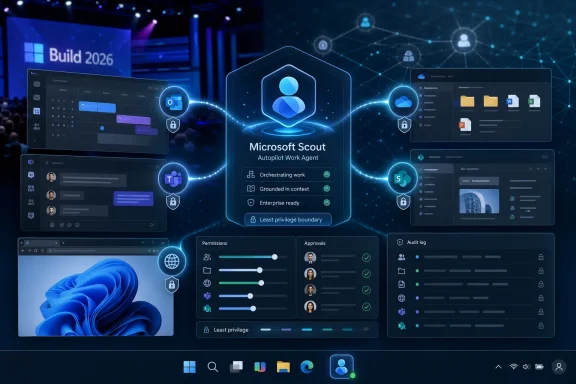
Microsoft announced Microsoft Scout on June 2, 2026, during Build 2026 as an always-on “Autopilot” work agent for Microsoft 365 customers, designed to act across apps and services with its own identity and administrator-controlled permissions. The important part is not that Microsoft has another AI assistant. It is that the company is trying to move AI from a chat window into the operating rhythm of work itself. For Windows users and IT departments, Scout is less a product announcement than a warning shot: the next AI battleground is not answers, but delegated action.
For the past three years, most mainstream AI products have been built around a familiar exchange: the user asks, the model answers, the user decides what to do next. Copilot, ChatGPT, Gemini, Claude, and their many workplace cousins have all tried to make the response better, faster, more grounded, more multimodal, and more deeply embedded in the tools people already use.
Scout changes the emphasis. Microsoft’s pitch is that a useful agent should not merely wait for a request. It should understand the user’s priorities, watch the relevant work streams, and act when action is needed.
That is why Microsoft’s choice of the word Autopilot matters. “Copilot” implied assistance beside a human operator; “Autopilot” implies delegated control within defined limits. The difference is not cosmetic. It shifts the trust model from “Should I accept this suggestion?” to “What is this system allowed to do while I am not looking?”
That question lands directly on the WindowsForum audience because Windows has always been the place where productivity ambition meets administrative reality. A background agent that can see files, interact with browser workflows, touch Microsoft 365 data, and run commands is not just another app. It is a new kind of principal on the machine and in the tenant.
That is a sensible place to start. The value proposition for an always-on agent is strongest where work is repetitive, context-heavy, and spread across too many applications. Meeting preparation, calendar triage, document retrieval, follow-up drafting, and task coordination are precisely the chores that make modern office work feel less like expertise and more like clerical glue.
But Scout’s Microsoft 365 integration also reveals the bigger ambition. Microsoft is not merely bolting an assistant onto Outlook. It is treating the Microsoft 365 graph, identity layer, and collaboration fabric as the substrate on which agents can operate.
That makes Scout strategically different from a browser extension or a chatbot with plugins. If Microsoft can make the agent’s identity, permissions, auditability, and context native to the Microsoft stack, it gets to define the safest-looking version of workplace autonomy. Competitors may offer more impressive demos, but Microsoft owns the dull infrastructure that CIOs already have to govern.
Agentic AI changes that. A useful autonomous assistant needs access to local context, browser sessions, documents, workflows, notifications, credentials, and application state. In other words, it needs the very messiness that the desktop has always contained.
Scout’s reported desktop presence on Windows 11 and macOS is therefore not incidental. It is Microsoft acknowledging that the next layer of automation cannot live entirely inside a web chat box. If agents are going to “work where you work,” they need a foothold in the operating environment where work actually happens.
That creates an opportunity for Windows, but also a risk. Windows has a long history of background processes, shell integrations, startup items, scheduled tasks, enterprise agents, endpoint tools, sync clients, and security products all claiming legitimate reasons to run continuously. Scout enters a crowded and sometimes hostile habitat.
The promise is that an AI agent can unify some of that sprawl. The danger is that it becomes yet another privileged resident competing for resources, attention, telemetry, and trust.
An agent with its own identity can be governed. It can be assigned permissions, constrained by policy, monitored in logs, and theoretically held apart from the human user whose work it performs. That is essential because “the AI did it” is not an acceptable audit trail.
The old model of automation often hid behind a user account, a service account, or a brittle script. Scout points toward a cleaner model: the agent is a recognizable actor. It has a role, a scope, and a set of allowed actions.
That does not solve the hard problems, but it names them. If Scout deletes a file, sends a message, reschedules a meeting, changes a workflow, or runs a command, administrators will need to know whether it acted as the user, as the agent, or as some hybrid delegation. They will need to know who authorized the permission, what data informed the decision, and whether the action can be reversed.
Microsoft knows this. The company’s responsible AI language around Scout is not merely public-relations padding. In enterprise environments, autonomy without identity is dead on arrival.
Scout’s safety story rests on permissions granted by users or administrators. That is the correct answer, but it is also the beginning of the problem rather than the end. Permissions in Microsoft 365 environments are already complex, inherited, overbroad, stale, and inconsistently reviewed. Adding autonomous action to that permission graph raises the stakes.
The familiar security principle is least privilege. The practical reality in many organizations is “whatever makes the workflow stop breaking.” Scout will test which culture wins.
If Microsoft gets the controls right, administrators should be able to define narrow scopes: which mailboxes, which sites, which file types, which commands, which browser actions, which hours, which approval thresholds, which data classifications, and which users are eligible. If those controls arrive as vague toggles, Scout will become another feature that security teams disable until the business demands otherwise.
The key is not whether Scout has safeguards. It is whether those safeguards are legible to the people who must sign off on them.
An agent that can operate in the browser can do real work across systems that lack formal APIs. That is powerful because many business processes still depend on portals, dashboards, SaaS consoles, ticketing systems, finance tools, HR platforms, and internal web apps that were never designed for intelligent automation.
It is also fragile. Browser-driven automation can break when a button moves, a page changes, an authentication challenge appears, or an accessibility label is wrong. Worse, a model may misunderstand the state of a page and act with confidence in the wrong context.
This is where Microsoft’s platform position could help. A Scout-like agent grounded in Microsoft identity, browser instrumentation, and enterprise policy has a better chance of being manageable than an unmanaged script clicking through pages. But the browser remains a place where the agent’s world model and the actual application state can diverge quickly.
For Windows users, this is the part to watch. The AI assistant that summarizes a web page is low risk. The AI assistant that can operate a web page is a different species.
That matters because Microsoft is not treating Scout as a one-off showcase. The company is assembling the layers: models, context, identity, developer tools, operating system hooks, Microsoft 365 surfaces, and administrative controls. Scout is the user-facing evidence of that architecture.
This is classic Microsoft strategy. The company rarely wins by having the cleanest first demo. It wins by turning a category into a platform, then making the platform unavoidable for organizations already standardized on its stack.
In the 1990s, that meant Windows plus Office. In the cloud era, it meant Azure plus Active Directory plus Microsoft 365. In the agent era, Microsoft wants it to mean Copilot, Scout, Entra, Graph, Windows, and the developer tooling around them.
The thesis is obvious: if agents become the next interface, Microsoft wants to own both the agent and the workplace it acts upon.
There is a tension here. The AI community has been fascinated by freer agents because they demonstrate emergent usefulness and occasional chaos. Enterprise buyers are fascinated by the same systems only if the chaos can be contained.
Scout appears to be Microsoft’s attempt to domesticate that idea. Keep the autonomy, add identity. Keep the cross-app action, add policy. Keep the continuous background work, add administrative guardrails.
That is a reasonable product direction, but it is also a hard engineering problem. Autonomous agents are impressive precisely because they operate in open-ended environments. Enterprise software governance prefers bounded systems with predictable behavior. Scout must somehow be useful enough to feel alive and constrained enough not to become a liability.
If Microsoft can thread that needle, it will have something more significant than a smarter Copilot. If it cannot, Scout will be remembered as another ambitious AI feature that made for a great keynote and a difficult deployment checklist.
What distinguishes Microsoft is distribution. It has Windows endpoints, Microsoft 365 tenants, Entra identities, Teams conversations, Outlook calendars, SharePoint libraries, OneDrive files, Azure services, GitHub workflows, and enterprise procurement relationships. That is not a minor advantage.
The counterargument is that Microsoft’s breadth can also slow it down. Safety reviews, compliance promises, admin controls, licensing boundaries, and legacy compatibility all make the company less nimble than a startup shipping a daring agentic tool to early adopters.
But for business deployment, boring is a feature. Enterprises do not simply need agents that can act. They need agents that can be explained to legal, security, compliance, procurement, and the help desk.
Scout is Microsoft’s claim that it can make autonomy enterprise-shaped.
Scout is not simply another tile in that mosaic. It is the piece that makes clear where the mosaic is going.
An always-on work agent changes the role of the PC from a device awaiting input to a workplace surface where delegated tasks continue. That sounds convenient, and often it will be. But it also means the user’s machine becomes part of a larger autonomous workflow.
Admins will need to think about endpoint posture in that light. If an agent can act from a desktop context, then device compliance, session security, browser profile management, local file exposure, clipboard access, and command execution policies become even more important. A compromised or poorly governed agentic environment is not just a data exposure risk. It is an action risk.
That is the new line Microsoft is walking. It wants Windows to be the best place for agents. It must also make Windows the place where agents can be safely limited.
The distinction between “working for me” and “watching me” is not determined by a marketing page. It is determined by defaults, transparency, logs, admin policy, and whether users can understand what the agent saw and why it acted.
This is where Microsoft’s recent history matters. The backlash to Recall showed that users and security researchers will not simply accept ambient AI features because Microsoft says they are useful. They will ask what is captured, where it is stored, how it is protected, who can access it, and whether the feature can be disabled.
Scout will face similar scrutiny, though the enterprise framing changes the audience. Employees may want convenience. Administrators may want control. Executives may want productivity. Security teams may want proof. Those incentives do not always align.
Microsoft’s challenge is to make Scout feel less like a black-box overseer and more like a delegated worker whose notebook, permissions, and actions are visible.
That distinction is the heart of the Scout debate. If Copilot drafts a poor email, the user can reject it. If Scout sends the wrong message, moves the wrong file, changes the wrong setting, or reschedules the wrong meeting, the failure has already entered the world.
Microsoft’s safeguard model will therefore need more than permission scopes. It needs escalation logic. Some actions should be reversible. Some should require approval. Some should be blocked entirely. Some should be simulated before execution. Some should be allowed only in low-risk contexts until the agent earns trust.
The best enterprise agents will likely operate less like free-roaming interns and more like disciplined automation systems with judgment layered on top. They will know when to act, but also when to ask.
That is a subtler product than the keynote version of AI autonomy. It is also the version that has a chance of surviving contact with regulated industries, legal departments, and skeptical sysadmins.
Will employees trust it with their inboxes? Will admins trust it with tenant data? Will security teams trust its audit trail? Will developers trust the platform enough to build around it? Will Microsoft provide licensing and deployment models that do not turn every promising feature into a budget fight?
Those questions matter because enterprise AI adoption is already uneven. Many organizations have bought Copilot licenses while still trying to prove durable productivity gains. Others are experimenting cautiously, worried that the enthusiasm is running ahead of measurable outcomes.
Scout raises the bar. A chatbot can be tolerated as an optional assistant. An autonomous work agent demands operational trust.
That means Microsoft will need to show not only that Scout can do useful things, but that it can do them reliably, explainably, and within policy. The demo must become a governance story.
A good Scout deployment story would let organizations start small. Give the agent limited access to a narrow set of Microsoft 365 workloads. Require approvals for external communication. Block access to sensitive labels. Log every action. Provide rollback where possible. Let administrators compare intended actions with completed actions.
A poor deployment story would ask organizations to accept broad permissions in exchange for vague productivity gains. That is how promising tools become disabled by default.
Microsoft has the pieces to do this well. Entra, Purview, Intune, Defender, Microsoft 365 admin tooling, and Graph all give the company a governance advantage. But integration is not automatic. Enterprises will judge Scout by the friction of real deployment, not the elegance of the Build narrative.
The deeper lesson is that agentic AI is an IT management problem as much as an AI problem. Scout’s future may be decided in change advisory boards, not keynote halls.
That means APIs, schemas, permissions, event models, semantic descriptions, and tool interfaces become even more valuable. Applications that are legible to agents may become more useful inside automated workflows. Applications that are opaque may be reduced to brittle browser automation.
Microsoft’s agent platform push is designed to make this transition feel native to its ecosystem. Developers building for Microsoft 365, Azure, GitHub, and Windows will be encouraged to think not only about human users, but about agent users.
That has consequences. Software design may begin to include “agent affordances” the same way it once learned to include mobile affordances, accessibility affordances, and API affordances. The best applications will not merely have buttons. They will have describable actions, constraints, and outcomes.
Scout is therefore not just a product for end users. It is a signal to developers that autonomous software actors are becoming part of the expected audience.
The practical takeaways are already clear.
 Microsoft Is Trying to Retire the Prompt as the Center of Work
For the past three years, most mainstream AI products have been built around a familiar exchange: the user asks, the model answers, the user decides what to do next. Copilot, ChatGPT, Gemini, Claude, and their many workplace cousins have all tried to make the response better, faster, more grounded, more multimodal, and more deeply embedded in the tools people already use.Scout changes the emphasis. Microsoft’s pitch is that a useful agent should not merely wait for a request. It should understand the user’s priorities, watch the relevant work streams, and act when action is needed.
That is why Microsoft’s choice of the word Autopilot matters. “Copilot” implied assistance beside a human operator; “Autopilot” implies delegated control within defined limits. The difference is not cosmetic. It shifts the trust model from “Should I accept this suggestion?” to “What is this system allowed to do while I am not looking?”
That question lands directly on the WindowsForum audience because Windows has always been the place where productivity ambition meets administrative reality. A background agent that can see files, interact with browser workflows, touch Microsoft 365 data, and run commands is not just another app. It is a new kind of principal on the machine and in the tenant.
Scout Turns Microsoft 365 Into the Agent’s Workbench
Microsoft’s first Scout framing is enterprise work, not consumer novelty. The agent is described as operating across Teams, Outlook, OneDrive, SharePoint, calendars, and related Microsoft 365 services, with preview access aimed at Frontier customers rather than a broad general release.That is a sensible place to start. The value proposition for an always-on agent is strongest where work is repetitive, context-heavy, and spread across too many applications. Meeting preparation, calendar triage, document retrieval, follow-up drafting, and task coordination are precisely the chores that make modern office work feel less like expertise and more like clerical glue.
But Scout’s Microsoft 365 integration also reveals the bigger ambition. Microsoft is not merely bolting an assistant onto Outlook. It is treating the Microsoft 365 graph, identity layer, and collaboration fabric as the substrate on which agents can operate.
That makes Scout strategically different from a browser extension or a chatbot with plugins. If Microsoft can make the agent’s identity, permissions, auditability, and context native to the Microsoft stack, it gets to define the safest-looking version of workplace autonomy. Competitors may offer more impressive demos, but Microsoft owns the dull infrastructure that CIOs already have to govern.
The Desktop Is Back Because Agents Need Somewhere to Act
For years, the desktop looked like the least fashionable part of Microsoft’s portfolio. The cloud was the growth story, Teams was the collaboration story, Azure was the platform story, and Windows often seemed like the inherited empire that still paid bills but no longer set the agenda.Agentic AI changes that. A useful autonomous assistant needs access to local context, browser sessions, documents, workflows, notifications, credentials, and application state. In other words, it needs the very messiness that the desktop has always contained.
Scout’s reported desktop presence on Windows 11 and macOS is therefore not incidental. It is Microsoft acknowledging that the next layer of automation cannot live entirely inside a web chat box. If agents are going to “work where you work,” they need a foothold in the operating environment where work actually happens.
That creates an opportunity for Windows, but also a risk. Windows has a long history of background processes, shell integrations, startup items, scheduled tasks, enterprise agents, endpoint tools, sync clients, and security products all claiming legitimate reasons to run continuously. Scout enters a crowded and sometimes hostile habitat.
The promise is that an AI agent can unify some of that sprawl. The danger is that it becomes yet another privileged resident competing for resources, attention, telemetry, and trust.
Identity Is the Feature That Makes Scout More Than a Bot
The most consequential detail in the Scout announcement is that the agent operates with its own Microsoft Entra identity. That may sound like enterprise plumbing, but it is the difference between a toy assistant and something IT can even begin to contemplate managing.An agent with its own identity can be governed. It can be assigned permissions, constrained by policy, monitored in logs, and theoretically held apart from the human user whose work it performs. That is essential because “the AI did it” is not an acceptable audit trail.
The old model of automation often hid behind a user account, a service account, or a brittle script. Scout points toward a cleaner model: the agent is a recognizable actor. It has a role, a scope, and a set of allowed actions.
That does not solve the hard problems, but it names them. If Scout deletes a file, sends a message, reschedules a meeting, changes a workflow, or runs a command, administrators will need to know whether it acted as the user, as the agent, or as some hybrid delegation. They will need to know who authorized the permission, what data informed the decision, and whether the action can be reversed.
Microsoft knows this. The company’s responsible AI language around Scout is not merely public-relations padding. In enterprise environments, autonomy without identity is dead on arrival.
Permission Boundaries Will Decide Whether IT Trusts It
Every agent demo looks better when the agent is allowed to do everything. Every enterprise deployment gets harder when the agent is allowed to do anything.Scout’s safety story rests on permissions granted by users or administrators. That is the correct answer, but it is also the beginning of the problem rather than the end. Permissions in Microsoft 365 environments are already complex, inherited, overbroad, stale, and inconsistently reviewed. Adding autonomous action to that permission graph raises the stakes.
The familiar security principle is least privilege. The practical reality in many organizations is “whatever makes the workflow stop breaking.” Scout will test which culture wins.
If Microsoft gets the controls right, administrators should be able to define narrow scopes: which mailboxes, which sites, which file types, which commands, which browser actions, which hours, which approval thresholds, which data classifications, and which users are eligible. If those controls arrive as vague toggles, Scout will become another feature that security teams disable until the business demands otherwise.
The key is not whether Scout has safeguards. It is whether those safeguards are legible to the people who must sign off on them.
The Browser Is the Weakest Link and the Biggest Prize
Microsoft’s description of Scout includes browser functions, and that is where the agent story becomes both more useful and more volatile. The browser is the universal client for modern work. It is also a shifting swamp of web apps, dynamic interfaces, single sign-on flows, consent screens, pop-ups, trackers, and anti-automation defenses.An agent that can operate in the browser can do real work across systems that lack formal APIs. That is powerful because many business processes still depend on portals, dashboards, SaaS consoles, ticketing systems, finance tools, HR platforms, and internal web apps that were never designed for intelligent automation.
It is also fragile. Browser-driven automation can break when a button moves, a page changes, an authentication challenge appears, or an accessibility label is wrong. Worse, a model may misunderstand the state of a page and act with confidence in the wrong context.
This is where Microsoft’s platform position could help. A Scout-like agent grounded in Microsoft identity, browser instrumentation, and enterprise policy has a better chance of being manageable than an unmanaged script clicking through pages. But the browser remains a place where the agent’s world model and the actual application state can diverge quickly.
For Windows users, this is the part to watch. The AI assistant that summarizes a web page is low risk. The AI assistant that can operate a web page is a different species.
Build 2026 Was About the Stack, Not the Stunt
Scout did not arrive alone. Build 2026 also brought Microsoft’s broader agent platform push, including Microsoft IQ for grounding agents in enterprise and web context, Agent Framework work that consolidates previous developer stacks, new model announcements, and continued messaging around Windows as an agent-friendly environment.That matters because Microsoft is not treating Scout as a one-off showcase. The company is assembling the layers: models, context, identity, developer tools, operating system hooks, Microsoft 365 surfaces, and administrative controls. Scout is the user-facing evidence of that architecture.
This is classic Microsoft strategy. The company rarely wins by having the cleanest first demo. It wins by turning a category into a platform, then making the platform unavoidable for organizations already standardized on its stack.
In the 1990s, that meant Windows plus Office. In the cloud era, it meant Azure plus Active Directory plus Microsoft 365. In the agent era, Microsoft wants it to mean Copilot, Scout, Entra, Graph, Windows, and the developer tooling around them.
The thesis is obvious: if agents become the next interface, Microsoft wants to own both the agent and the workplace it acts upon.
OpenClaw Gives Scout a Strange Kind of Credibility
Several reports describe Scout as built on or inspired by OpenClaw, an agent architecture that gained attention for showing what more autonomous systems might do when allowed to operate across tools. Microsoft’s embrace of that lineage is telling.There is a tension here. The AI community has been fascinated by freer agents because they demonstrate emergent usefulness and occasional chaos. Enterprise buyers are fascinated by the same systems only if the chaos can be contained.
Scout appears to be Microsoft’s attempt to domesticate that idea. Keep the autonomy, add identity. Keep the cross-app action, add policy. Keep the continuous background work, add administrative guardrails.
That is a reasonable product direction, but it is also a hard engineering problem. Autonomous agents are impressive precisely because they operate in open-ended environments. Enterprise software governance prefers bounded systems with predictable behavior. Scout must somehow be useful enough to feel alive and constrained enough not to become a liability.
If Microsoft can thread that needle, it will have something more significant than a smarter Copilot. If it cannot, Scout will be remembered as another ambitious AI feature that made for a great keynote and a difficult deployment checklist.
The Competitive Race Is Really a Race for Delegation
Microsoft is not alone in chasing autonomous agents. OpenAI, Anthropic, Google, and a long tail of startups are all building systems that can use tools, browse, code, manipulate files, plan tasks, and call services. The industry has converged on the idea that chat alone is not the destination.What distinguishes Microsoft is distribution. It has Windows endpoints, Microsoft 365 tenants, Entra identities, Teams conversations, Outlook calendars, SharePoint libraries, OneDrive files, Azure services, GitHub workflows, and enterprise procurement relationships. That is not a minor advantage.
The counterargument is that Microsoft’s breadth can also slow it down. Safety reviews, compliance promises, admin controls, licensing boundaries, and legacy compatibility all make the company less nimble than a startup shipping a daring agentic tool to early adopters.
But for business deployment, boring is a feature. Enterprises do not simply need agents that can act. They need agents that can be explained to legal, security, compliance, procurement, and the help desk.
Scout is Microsoft’s claim that it can make autonomy enterprise-shaped.
The Windows Angle Is Bigger Than a New App
For Windows 11 users, Scout’s arrival fits into a broader pattern: Microsoft is steadily making AI part of the operating system’s expected fabric. Copilot began as a visible assistant. Recall attempted to turn local activity into searchable memory, drawing intense privacy scrutiny along the way. Developer-focused agent tooling now points toward PCs as environments where AI systems can observe, reason, and act.Scout is not simply another tile in that mosaic. It is the piece that makes clear where the mosaic is going.
An always-on work agent changes the role of the PC from a device awaiting input to a workplace surface where delegated tasks continue. That sounds convenient, and often it will be. But it also means the user’s machine becomes part of a larger autonomous workflow.
Admins will need to think about endpoint posture in that light. If an agent can act from a desktop context, then device compliance, session security, browser profile management, local file exposure, clipboard access, and command execution policies become even more important. A compromised or poorly governed agentic environment is not just a data exposure risk. It is an action risk.
That is the new line Microsoft is walking. It wants Windows to be the best place for agents. It must also make Windows the place where agents can be safely limited.
Always-On AI Will Reopen Old Privacy Arguments
Microsoft’s agent pitch inevitably collides with user discomfort about surveillance and control. An assistant that watches work patterns, reads communications, understands preferences, and acts proactively may be useful. It may also feel invasive, especially in workplaces where employees already suspect productivity monitoring is creeping into every tool.The distinction between “working for me” and “watching me” is not determined by a marketing page. It is determined by defaults, transparency, logs, admin policy, and whether users can understand what the agent saw and why it acted.
This is where Microsoft’s recent history matters. The backlash to Recall showed that users and security researchers will not simply accept ambient AI features because Microsoft says they are useful. They will ask what is captured, where it is stored, how it is protected, who can access it, and whether the feature can be disabled.
Scout will face similar scrutiny, though the enterprise framing changes the audience. Employees may want convenience. Administrators may want control. Executives may want productivity. Security teams may want proof. Those incentives do not always align.
Microsoft’s challenge is to make Scout feel less like a black-box overseer and more like a delegated worker whose notebook, permissions, and actions are visible.
Autonomy Makes Mistakes More Expensive
All AI systems make mistakes. With chatbots, the error often appears as a bad answer. With agents, the error can become a bad action.That distinction is the heart of the Scout debate. If Copilot drafts a poor email, the user can reject it. If Scout sends the wrong message, moves the wrong file, changes the wrong setting, or reschedules the wrong meeting, the failure has already entered the world.
Microsoft’s safeguard model will therefore need more than permission scopes. It needs escalation logic. Some actions should be reversible. Some should require approval. Some should be blocked entirely. Some should be simulated before execution. Some should be allowed only in low-risk contexts until the agent earns trust.
The best enterprise agents will likely operate less like free-roaming interns and more like disciplined automation systems with judgment layered on top. They will know when to act, but also when to ask.
That is a subtler product than the keynote version of AI autonomy. It is also the version that has a chance of surviving contact with regulated industries, legal departments, and skeptical sysadmins.
Microsoft’s Biggest Obstacle Is Not Capability, But Confidence
The industry often talks as though the main barrier to agents is model intelligence. Better reasoning, larger context windows, faster inference, stronger tool use, and richer grounding will certainly help. But Scout’s success will depend just as much on institutional confidence.Will employees trust it with their inboxes? Will admins trust it with tenant data? Will security teams trust its audit trail? Will developers trust the platform enough to build around it? Will Microsoft provide licensing and deployment models that do not turn every promising feature into a budget fight?
Those questions matter because enterprise AI adoption is already uneven. Many organizations have bought Copilot licenses while still trying to prove durable productivity gains. Others are experimenting cautiously, worried that the enthusiasm is running ahead of measurable outcomes.
Scout raises the bar. A chatbot can be tolerated as an optional assistant. An autonomous work agent demands operational trust.
That means Microsoft will need to show not only that Scout can do useful things, but that it can do them reliably, explainably, and within policy. The demo must become a governance story.
The Admin Console Will Matter More Than the Demo Reel
For IT professionals, the most important Scout screenshots may never appear in the keynote. They will be in admin centers, policy templates, logs, permission review screens, conditional access settings, data loss prevention integrations, and endpoint management documentation.A good Scout deployment story would let organizations start small. Give the agent limited access to a narrow set of Microsoft 365 workloads. Require approvals for external communication. Block access to sensitive labels. Log every action. Provide rollback where possible. Let administrators compare intended actions with completed actions.
A poor deployment story would ask organizations to accept broad permissions in exchange for vague productivity gains. That is how promising tools become disabled by default.
Microsoft has the pieces to do this well. Entra, Purview, Intune, Defender, Microsoft 365 admin tooling, and Graph all give the company a governance advantage. But integration is not automatic. Enterprises will judge Scout by the friction of real deployment, not the elegance of the Build narrative.
The deeper lesson is that agentic AI is an IT management problem as much as an AI problem. Scout’s future may be decided in change advisory boards, not keynote halls.
Developers Get a New Target, and a New Dependency
Build is a developer conference, and Scout’s announcement also sends a message to developers: the application interface is changing. If agents become persistent actors inside workplace environments, software will need to expose capabilities in ways agents can understand and safely use.That means APIs, schemas, permissions, event models, semantic descriptions, and tool interfaces become even more valuable. Applications that are legible to agents may become more useful inside automated workflows. Applications that are opaque may be reduced to brittle browser automation.
Microsoft’s agent platform push is designed to make this transition feel native to its ecosystem. Developers building for Microsoft 365, Azure, GitHub, and Windows will be encouraged to think not only about human users, but about agent users.
That has consequences. Software design may begin to include “agent affordances” the same way it once learned to include mobile affordances, accessibility affordances, and API affordances. The best applications will not merely have buttons. They will have describable actions, constraints, and outcomes.
Scout is therefore not just a product for end users. It is a signal to developers that autonomous software actors are becoming part of the expected audience.
The Scout Era Will Be Won or Lost in the Permission Dialog
Scout is early, limited, and still more strategic signal than everyday reality for most users. But the direction is now unmistakable: Microsoft wants agents that remain active, understand context, hold delegated authority, and act across the workspace rather than merely respond inside a chat pane.The practical takeaways are already clear.
- Scout is Microsoft’s first major attempt to define an “Autopilot” agent as something distinct from Copilot-style prompt-and-response assistance.
- The agent’s separate Microsoft Entra identity is the architectural detail that makes enterprise governance possible, but not automatically easy.
- Windows matters again in Microsoft’s AI strategy because useful agents need access to the messy desktop and browser environments where work actually happens.
- The security challenge is shifting from protecting data from bad answers to protecting systems from bad actions.
- Administrators should watch the policy, logging, approval, and rollback controls more closely than the keynote demos.
- Developers should assume that future workplace software will be judged partly by how safely and clearly agents can operate it.
References
- Primary source: iNews Zoombangla
Published: 2026-06-26T18:58:08.583696
Microsoft Scout Desktop Agent Build 2026 Launch
Microsoft unveils Scout, an autonomous AI agent for Windows and macOS that integrates with Microsoft 365. Microsoft Scout agentic AIinews.zoombangla.com - Official source: microsoft.com
Introducing Microsoft Scout: Your always-on personal agent | Microsoft 365 Blog
Microsoft introduces a new, always-on personal agent, Microsoft Scout, integrated across the Microsoft 365 apps you use every day.www.microsoft.com - Related coverage: techcrunch.com
Microsoft launches Scout, an OpenClaw-inspired personal assistant | TechCrunch
Launched at Build, Microsoft Scout is a new AI assistant meant to bring the power and flexibility of OpenClaw into the Microsoft 365 system.techcrunch.com - Related coverage: techradar.com
'A new category of agents': Microsoft reveals Scout, its first "Autopilot", which wants to change how you work for good | TechRadar
Say hello to Autopilots from Microsoftwww.techradar.com - Official source: blogs.microsoft.com
Microsoft Build 2026: Be yourself at work - The Official Microsoft Blog
Platforms shift when developers build. We explore, choose tools, dream, create. This platform shift comes with more information than ever, ready at your fingertips. This shift, it’s about building fast AND THEN: it’s about building, operating, optimizing and observing. Securing your...blogs.microsoft.com - Official source: developer.microsoft.com
Microsoft Build 2026 recap: vision, launches, and top sessions - Microsoft for Developers
Catch up on Microsoft Build 2026 with the vision lead-off, top developer announcements, and must-watch sessions across the Microsoft developer ecosystem.developer.microsoft.com
- Related coverage: edgen.tech
- Related coverage: axios.com
Microsoft debuts Scout agent, homegrown reasoning model
Microsoft is seeking to show it is a serious player in AI.www.axios.com
- Related coverage: aiinasia.com
Microsoft Unveils Scout AI Assistant At Build 2026… | AI in Asia
Microsoft unveiled Scout at Build 2026 on 2 June, an AI executive assistant that lives inside enterprise email and calendar with its own identity.aiinasia.com - Related coverage: buildmvpfast.com
Microsoft Build 2026: MAI Models & Scout Agent
Microsoft Build 2026 unveiled seven MAI models, the always-on Scout agent, and an agent-first platform. What the announcements mean for developers and founders.www.buildmvpfast.com - Related coverage: byteiota.com
- Related coverage: news.lavx.hu
Microsoft introduces Scout enterprise autopilot on OpenClaw at Build 2026 | LavX News
Microsoft wants Scout to move enterprise AI agents from prompted chats into governed background work, with OpenClaw’s local power fenced by Entra identity, Purview policy, and admin deployment controls.news.lavx.hu - Official source: directionsonmicrosoft.com
Build 2026: Microsoft Pushes the Agent Envelope with Android Devices, New Windows PCs - Directions on Microsoft
Last year’s Microsoft Build developer conference focused heavily on agents. But this year’s Build, which kicked off June 2, is almost entirely agent-focused. Microsoft is working to position everything from the Windows OS itself to...www.directionsonmicrosoft.com - Related coverage: windowscentral.com
Build 2026 only makes sense if you remember Build 2025: a look back at the groundwork of the "age of AI agents" | Windows Central
Microsoft’s latest announcements build directly on the architecture it introduced a year ago.www.windowscentral.com - Related coverage: tomsguide.com
Biggest Microsoft Build 2026 announcements — agentic AI, RTX Spark Dev Box, GitHub Copilot app, new MAI models, and more | Tom's Guide
All the big news from Microsoft's AI-focused eventwww.tomsguide.com - Official source: download.microsoft.com
- Official source: adoption.microsoft.com
- Official source: marketingassets.microsoft.com
