
Microsoft released Windows 11 Insider Preview Build 26220.8754 to Beta Channel testers on June 26, 2026, adding smart card removal enforcement for Microsoft Entra-authenticated Azure Virtual Desktop and Windows 365 sessions while fixing File Explorer, taskbar tray, and system sound issues. It is not a headline-grabbing Windows build, and that is precisely why it matters. The update shows where Microsoft’s Windows engineering attention increasingly sits: less on splashy desktop reinvention, more on identity plumbing, cloud PC discipline, and the thousand paper cuts that decide whether Windows 11 feels dependable. For IT administrators, the small print is the story.
Build 26220.8754 arrives in the Windows Insider Beta Channel as part of the continuing Windows 11 version 25H2 preview track, delivered through the now-familiar enablement-package model. That means this is not a dramatic branch jump or a feature-wave announcement dressed up as a cumulative update. It is a maintenance-minded build with a small list of changes, and Microsoft is presenting it accordingly.
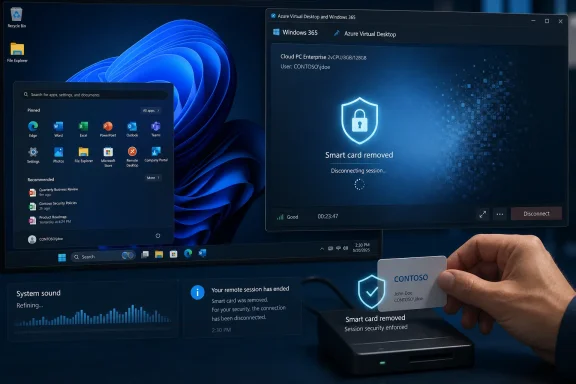
But the most important change is not a consumer desktop tweak. Administrators can now configure Azure Virtual Desktop and Windows 365 sessions using Microsoft Entra ID authentication, specifically RDS AAD Auth, to automatically disconnect when a redirected smart card is removed. In plain terms, if the credential that helped establish trust disappears, the remote Windows session can be forced to stop pretending nothing happened.
That is a narrow feature by consumer standards and a meaningful one by enterprise standards. Smart cards remain embedded in sectors where identity assurance, audit trails, and compliance controls matter more than convenience. Government, defense-adjacent organizations, healthcare, financial services, and highly regulated enterprises still care deeply about what happens when a physical credential leaves the reader.
The old desktop assumption was comparatively simple: the card is present, the user signs in, and the local machine can react when the card is removed. The modern Windows assumption is messier. The user may be sitting at one endpoint, authenticating through cloud identity, and working inside a remote desktop session hosted somewhere else entirely. Build 26220.8754 is Microsoft tightening that seam.
Smart card removal policy is a good example because it sounds obvious until you stretch it across a remote session. If an organization requires a smart card for access, the removal of that card should carry consequence. The exact consequence may vary — lock the machine, sign out the user, disconnect the session — but the security logic is clear: possession of the credential should remain part of the trust equation.
In a remote Windows session, however, the card is not necessarily local to the Windows environment doing the work. It may be redirected from the client into the remote session. The operating system, the remote desktop stack, the identity provider, and the session host all have to agree about what “removed” means and what should happen next. That is the kind of edge case that does not sell laptops but does determine whether a regulated deployment passes muster.
Microsoft’s new enforcement path for Entra-authenticated remote sessions suggests the company is still closing gaps between traditional Windows policy and cloud-delivered Windows reality. The feature is not merely about smart cards. It is about making sure that when Windows becomes a service endpoint rather than a box under the desk, the security model does not quietly degrade.
Administrators do not buy compliance with a keynote demo. They get it by proving that access controls behave consistently when users do inconvenient things. A user walks away. A card is removed. A session remains open on a thin client. A help desk technician launches File Explorer elevated. A cloud desktop session persists after the local endpoint state changes. These are the details auditors, red teams, and operations teams eventually care about.
The smart card removal change in Build 26220.8754 therefore lands as a small but pointed improvement. Microsoft is extending policy enforcement into the Entra-authenticated remote desktop world, where more organizations are placing real workloads. The phrase “remote session” no longer implies a niche administrative console; for some users, it is their primary Windows PC.
There is also a risk-management angle here. Automatically disconnecting a session is not the same as logging out and destroying state. It can preserve work while still reducing the chance that an unattended or improperly authenticated session remains usable. That distinction matters in environments where security teams and productivity teams spend their lives negotiating with each other.
File Explorer is not just a file manager anymore. It is a shell surface, a cloud storage front end, a SharePoint and OneDrive gateway, a sync-status viewer, and increasingly a place where Microsoft experiments with AI-adjacent and productivity actions. When it misbehaves, Windows does not merely feel unpolished; it feels structurally unreliable.
The administrator-mode detail matters because elevated workflows are often where Windows’ modern layers rub against its older ones. Admin context, user context, cloud account context, and sync-client context do not always align cleanly. A OneDrive shortcut failing under elevation is not catastrophic, but it is emblematic of a broader Windows 11 challenge: the operating system is now a stack of identity, shell, cloud, and legacy compatibility layers, and users expect them to act like one coherent product.
For sysadmins, these fixes are not glamorous. They are the difference between a predictable support script and another strange ticket. They also remind us that Windows 11’s cloud integration is only as good as its behavior under the messy privilege boundaries that power users and IT staff encounter every day.
The system tray has survived decades of Windows redesigns because it solves a stubborn problem: background state needs a visible home. Windows 11 has modernized the taskbar, simplified parts of it, and at times frustrated power users by removing older customization patterns. Yet the tray remains a practical control panel for the things users expect to monitor without opening a full app.
Reliability here is especially important for enterprise endpoints. Security agents, management tools, update notifiers, collaboration clients, and remote access software all compete for attention in or around the tray. When that region fails to load consistently, it becomes harder for users to tell what state their machine is in and harder for help desks to talk them through basic diagnostics.
This is where Windows polish becomes operational. The user may describe the problem as “my icons are missing,” but the administrator hears something larger: the shell is not presenting trusted status correctly. Microsoft’s fix may be small, but the target is a part of Windows that users read as a proxy for system health.
Still, sensory consistency is part of operating system polish. Dark mode began as a visual preference, but platforms increasingly treat it as an environment. The desktop changes contrast, app surfaces change tone, and Microsoft evidently believes sound should fit that context too. Whether users notice consciously is almost beside the point.
Windows 11 has always been caught between two design ambitions. It wants to be calmer, softer, and more modern than Windows 10, but it must also remain the practical workhorse that runs legacy apps, enterprise agents, remote desktops, and every odd utility people still depend on. Polished sounds in dark mode sit on the aesthetic side of that divide. Smart card enforcement sits on the enterprise side. The fact that both appear in the same build is Windows 11 in miniature.
The danger for Microsoft is that polish can feel frivolous when core reliability is under scrutiny. The opportunity is that small sensory refinements, when paired with real fixes, make Windows feel less like a collection of unfinished migrations. Build 26220.8754 at least gestures toward both.
This build also reinforces Microsoft’s current preference for incremental enablement over monolithic version drama. Windows 11 version numbers still matter for support, marketing, and deployment rings, but many changes now arrive as controlled rollouts, cumulative updates, or enablement packages. The operating system is less a single annual object than a moving train with different cars opening at different times.
For enthusiasts, that can be unsatisfying. There is no grand “new Windows” moment in a build like 26220.8754. For administrators, it is both useful and maddening. Useful, because smaller changes are easier to test and absorb. Maddening, because tracking which tenant, channel, policy, and build combination exposes which behavior can become its own job.
That is why the smart card change deserves attention now, even if it sits in preview. Enterprises that rely on Azure Virtual Desktop, Windows 365, smart cards, or Entra-authenticated Remote Desktop Services should treat this as a signal of where Microsoft is aligning policy enforcement. The right time to understand those changes is before they arrive in a production servicing channel.
This is a very Microsoft compromise. The company wants Windows to keep evolving quickly enough to support Copilot-era features, cloud PCs, security baselines, and new hardware. At the same time, it must avoid making every annual update feel like a disruptive migration project. Enablement packages let Microsoft stage much of the code in advance and turn on a version transition with less download and installation drama.
For users, the upside is obvious: smaller, faster updates are easier to tolerate. For IT departments, the appeal is also clear, provided Microsoft’s documentation and controls keep pace. A less disruptive feature update still needs testing, rollback planning, app validation, and policy review.
Build 26220.8754 fits neatly into that world. It is not trying to persuade anyone that Windows 11 is new again. It is trying to make the next version of Windows 11 feel more secure in cloud desktop scenarios and less flaky in everyday shell behavior. That may be less exciting than a redesigned Start menu, but it is closer to what mature operating systems actually need.
But for administrators running pilot rings, this is exactly the sort of update worth studying. It touches authentication behavior, remote session lifecycle, File Explorer elevation behavior, and taskbar reliability. None of those areas should be waved through blindly in a managed fleet, especially when virtual desktops and cloud PCs are part of the environment.
The smart card feature in particular should be tested against real workflows. Disconnecting a session when a redirected card is removed may satisfy a policy requirement, but organizations will still need to understand the user experience. What happens to unsaved work? How do line-of-business applications respond? What do users see when they reconnect? Does the behavior match existing local-session policy expectations?
That is the difference between a security feature and a deployable security control. Microsoft can provide the mechanism, but administrators still have to validate the outcome in the messy architecture of their own estate.
The release also shows Microsoft’s balancing act. The company must keep Windows comfortable for enthusiasts who care about File Explorer, the taskbar, and dark mode polish. It must satisfy enterprises that need policy enforcement to survive the shift from local PCs to cloud sessions. And it must do all of this through a servicing model that increasingly blurs the boundary between feature updates and routine maintenance.
The risk is fragmentation of attention. Users see a sound tweak and wonder why long-standing annoyances remain. Administrators see a useful policy improvement and wonder how quickly it will be documented, manageable, and predictable at scale. Microsoft sees one Windows platform trying to serve all of them.
In that sense, the build is not minor because it lacks a flashy feature. It is minor because the work of making Windows coherent now happens in minor places.
 Microsoft’s Quiet Beta Build Is Really an Identity Story
Build 26220.8754 arrives in the Windows Insider Beta Channel as part of the continuing Windows 11 version 25H2 preview track, delivered through the now-familiar enablement-package model. That means this is not a dramatic branch jump or a feature-wave announcement dressed up as a cumulative update. It is a maintenance-minded build with a small list of changes, and Microsoft is presenting it accordingly.But the most important change is not a consumer desktop tweak. Administrators can now configure Azure Virtual Desktop and Windows 365 sessions using Microsoft Entra ID authentication, specifically RDS AAD Auth, to automatically disconnect when a redirected smart card is removed. In plain terms, if the credential that helped establish trust disappears, the remote Windows session can be forced to stop pretending nothing happened.
That is a narrow feature by consumer standards and a meaningful one by enterprise standards. Smart cards remain embedded in sectors where identity assurance, audit trails, and compliance controls matter more than convenience. Government, defense-adjacent organizations, healthcare, financial services, and highly regulated enterprises still care deeply about what happens when a physical credential leaves the reader.
The old desktop assumption was comparatively simple: the card is present, the user signs in, and the local machine can react when the card is removed. The modern Windows assumption is messier. The user may be sitting at one endpoint, authenticating through cloud identity, and working inside a remote desktop session hosted somewhere else entirely. Build 26220.8754 is Microsoft tightening that seam.
The Smart Card Fix Exposes the Problem Cloud PCs Created
The rise of Azure Virtual Desktop and Windows 365 changed the shape of Windows security. Microsoft did not simply move desktops into the cloud; it moved decades of local-session assumptions into architectures where the “PC” is often a streamed environment tied to conditional access, Entra ID, device compliance, and remote protocol behavior. That creates new places for policy intent to get lost.Smart card removal policy is a good example because it sounds obvious until you stretch it across a remote session. If an organization requires a smart card for access, the removal of that card should carry consequence. The exact consequence may vary — lock the machine, sign out the user, disconnect the session — but the security logic is clear: possession of the credential should remain part of the trust equation.
In a remote Windows session, however, the card is not necessarily local to the Windows environment doing the work. It may be redirected from the client into the remote session. The operating system, the remote desktop stack, the identity provider, and the session host all have to agree about what “removed” means and what should happen next. That is the kind of edge case that does not sell laptops but does determine whether a regulated deployment passes muster.
Microsoft’s new enforcement path for Entra-authenticated remote sessions suggests the company is still closing gaps between traditional Windows policy and cloud-delivered Windows reality. The feature is not merely about smart cards. It is about making sure that when Windows becomes a service endpoint rather than a box under the desk, the security model does not quietly degrade.
Compliance Is Won in the Boring Places
There is a tendency in consumer coverage to treat smart cards as legacy technology, something belonging to badge clips, government offices, and organizations that never got the passwordless memo. That view misses the larger point. Smart cards are not fashionable, but they represent a security pattern Windows has to keep supporting: strong possession-based authentication backed by policy that can be audited.Administrators do not buy compliance with a keynote demo. They get it by proving that access controls behave consistently when users do inconvenient things. A user walks away. A card is removed. A session remains open on a thin client. A help desk technician launches File Explorer elevated. A cloud desktop session persists after the local endpoint state changes. These are the details auditors, red teams, and operations teams eventually care about.
The smart card removal change in Build 26220.8754 therefore lands as a small but pointed improvement. Microsoft is extending policy enforcement into the Entra-authenticated remote desktop world, where more organizations are placing real workloads. The phrase “remote session” no longer implies a niche administrative console; for some users, it is their primary Windows PC.
There is also a risk-management angle here. Automatically disconnecting a session is not the same as logging out and destroying state. It can preserve work while still reducing the chance that an unattended or improperly authenticated session remains usable. That distinction matters in environments where security teams and productivity teams spend their lives negotiating with each other.
File Explorer Still Carries the Weight of Windows Trust
The File Explorer fix in this build is more mundane but no less revealing. Microsoft says it fixed an issue where the OneDrive shortcut in File Explorer stopped working when File Explorer was run in administrator mode. That is the kind of bug that sounds trivial until it affects someone trying to do actual maintenance work on a real PC.File Explorer is not just a file manager anymore. It is a shell surface, a cloud storage front end, a SharePoint and OneDrive gateway, a sync-status viewer, and increasingly a place where Microsoft experiments with AI-adjacent and productivity actions. When it misbehaves, Windows does not merely feel unpolished; it feels structurally unreliable.
The administrator-mode detail matters because elevated workflows are often where Windows’ modern layers rub against its older ones. Admin context, user context, cloud account context, and sync-client context do not always align cleanly. A OneDrive shortcut failing under elevation is not catastrophic, but it is emblematic of a broader Windows 11 challenge: the operating system is now a stack of identity, shell, cloud, and legacy compatibility layers, and users expect them to act like one coherent product.
For sysadmins, these fixes are not glamorous. They are the difference between a predictable support script and another strange ticket. They also remind us that Windows 11’s cloud integration is only as good as its behavior under the messy privilege boundaries that power users and IT staff encounter every day.
The Taskbar Tray Remains a Small Surface With Outsized Consequences
Build 26220.8754 also improves the reliability of loading the system tray area on the taskbar. Microsoft’s wording is modest, but the tray is one of those tiny Windows surfaces whose failure can make the whole desktop feel broken. If icons do not appear, users may not know whether VPN, audio, battery, sync, security, or communication tools are running correctly.The system tray has survived decades of Windows redesigns because it solves a stubborn problem: background state needs a visible home. Windows 11 has modernized the taskbar, simplified parts of it, and at times frustrated power users by removing older customization patterns. Yet the tray remains a practical control panel for the things users expect to monitor without opening a full app.
Reliability here is especially important for enterprise endpoints. Security agents, management tools, update notifiers, collaboration clients, and remote access software all compete for attention in or around the tray. When that region fails to load consistently, it becomes harder for users to tell what state their machine is in and harder for help desks to talk them through basic diagnostics.
This is where Windows polish becomes operational. The user may describe the problem as “my icons are missing,” but the administrator hears something larger: the shell is not presenting trusted status correctly. Microsoft’s fix may be small, but the target is a part of Windows that users read as a proxy for system health.
Dark Mode Sounds Are a Tiny Signal of Microsoft’s Bigger Polish Campaign
The system sound change is the most consumer-facing part of the update, and also the easiest to mock. Microsoft says it has refined system sounds when Windows is running in dark mode. No, this is not the feature that will convince Windows 10 holdouts to finally upgrade. No, administrators are not going to halt a deployment strategy while they evaluate the emotional resonance of a notification chime.Still, sensory consistency is part of operating system polish. Dark mode began as a visual preference, but platforms increasingly treat it as an environment. The desktop changes contrast, app surfaces change tone, and Microsoft evidently believes sound should fit that context too. Whether users notice consciously is almost beside the point.
Windows 11 has always been caught between two design ambitions. It wants to be calmer, softer, and more modern than Windows 10, but it must also remain the practical workhorse that runs legacy apps, enterprise agents, remote desktops, and every odd utility people still depend on. Polished sounds in dark mode sit on the aesthetic side of that divide. Smart card enforcement sits on the enterprise side. The fact that both appear in the same build is Windows 11 in miniature.
The danger for Microsoft is that polish can feel frivolous when core reliability is under scrutiny. The opportunity is that small sensory refinements, when paired with real fixes, make Windows feel less like a collection of unfinished migrations. Build 26220.8754 at least gestures toward both.
Beta Channel No Longer Means What It Used To
The Beta Channel has become one of the more interesting parts of the Windows Insider Program because it often previews changes that are closer to production reality than the more experimental Dev or Canary channels. That does not mean every feature will ship exactly as tested, and Microsoft is careful to remind Insiders that preview features may change, roll out gradually, or disappear. But Beta builds increasingly show the contours of the next mainstream Windows servicing wave.This build also reinforces Microsoft’s current preference for incremental enablement over monolithic version drama. Windows 11 version numbers still matter for support, marketing, and deployment rings, but many changes now arrive as controlled rollouts, cumulative updates, or enablement packages. The operating system is less a single annual object than a moving train with different cars opening at different times.
For enthusiasts, that can be unsatisfying. There is no grand “new Windows” moment in a build like 26220.8754. For administrators, it is both useful and maddening. Useful, because smaller changes are easier to test and absorb. Maddening, because tracking which tenant, channel, policy, and build combination exposes which behavior can become its own job.
That is why the smart card change deserves attention now, even if it sits in preview. Enterprises that rely on Azure Virtual Desktop, Windows 365, smart cards, or Entra-authenticated Remote Desktop Services should treat this as a signal of where Microsoft is aligning policy enforcement. The right time to understand those changes is before they arrive in a production servicing channel.
Windows 11 25H2 Is Looking More Like a Servicing Strategy Than a Spectacle
The broader context is Windows 11 25H2, which appears to continue Microsoft’s recent pattern of treating major version updates as relatively lightweight transitions for devices already on recent Windows 11 releases. That does not mean nothing changes. It means the visible upgrade event may be less dramatic than the cumulative engineering underneath.This is a very Microsoft compromise. The company wants Windows to keep evolving quickly enough to support Copilot-era features, cloud PCs, security baselines, and new hardware. At the same time, it must avoid making every annual update feel like a disruptive migration project. Enablement packages let Microsoft stage much of the code in advance and turn on a version transition with less download and installation drama.
For users, the upside is obvious: smaller, faster updates are easier to tolerate. For IT departments, the appeal is also clear, provided Microsoft’s documentation and controls keep pace. A less disruptive feature update still needs testing, rollback planning, app validation, and policy review.
Build 26220.8754 fits neatly into that world. It is not trying to persuade anyone that Windows 11 is new again. It is trying to make the next version of Windows 11 feel more secure in cloud desktop scenarios and less flaky in everyday shell behavior. That may be less exciting than a redesigned Start menu, but it is closer to what mature operating systems actually need.
The Real Audience Is the Administrator With a Pilot Ring
The average home user does not need to rush toward this build. It is an Insider preview, not a general-availability update, and its most meaningful change targets a specific enterprise configuration. If you are not using smart cards, Azure Virtual Desktop, Windows 365, or Entra-authenticated remote sessions, the build’s security headline will be mostly academic.But for administrators running pilot rings, this is exactly the sort of update worth studying. It touches authentication behavior, remote session lifecycle, File Explorer elevation behavior, and taskbar reliability. None of those areas should be waved through blindly in a managed fleet, especially when virtual desktops and cloud PCs are part of the environment.
The smart card feature in particular should be tested against real workflows. Disconnecting a session when a redirected card is removed may satisfy a policy requirement, but organizations will still need to understand the user experience. What happens to unsaved work? How do line-of-business applications respond? What do users see when they reconnect? Does the behavior match existing local-session policy expectations?
That is the difference between a security feature and a deployable security control. Microsoft can provide the mechanism, but administrators still have to validate the outcome in the messy architecture of their own estate.
The Small Build That Says Where Windows Is Going
Build 26220.8754 is easy to summarize and harder to dismiss. It is a small Beta Channel update, but it lands at the intersection of three Windows priorities: cloud-delivered desktops, identity-centered security, and desktop reliability. That combination says more about modern Windows than another round of Start menu screenshots would.The release also shows Microsoft’s balancing act. The company must keep Windows comfortable for enthusiasts who care about File Explorer, the taskbar, and dark mode polish. It must satisfy enterprises that need policy enforcement to survive the shift from local PCs to cloud sessions. And it must do all of this through a servicing model that increasingly blurs the boundary between feature updates and routine maintenance.
The risk is fragmentation of attention. Users see a sound tweak and wonder why long-standing annoyances remain. Administrators see a useful policy improvement and wonder how quickly it will be documented, manageable, and predictable at scale. Microsoft sees one Windows platform trying to serve all of them.
In that sense, the build is not minor because it lacks a flashy feature. It is minor because the work of making Windows coherent now happens in minor places.
The Practical Read for WindowsForum Readers
For anyone tracking Windows 11 previews, Build 26220.8754 is a reminder that the Beta Channel is not just a playground for UI experiments. It is also where Microsoft rehearses the operational details that later determine whether Windows behaves properly in managed environments. This release is worth watching less for what it changes on a home desktop and more for what it reveals about Microsoft’s priorities.- Microsoft released Windows 11 Insider Preview Build 26220.8754 to the Beta Channel on June 26, 2026.
- The most important change lets administrators disconnect Entra-authenticated Azure Virtual Desktop and Windows 365 sessions when a redirected smart card is removed.
- The update fixes a File Explorer issue where the OneDrive shortcut could fail when File Explorer was running with administrator privileges.
- Microsoft says it improved reliability for loading the system tray area of the taskbar.
- The build also refines system sounds in dark mode, a small polish change rather than a major feature.
- Organizations using smart cards with cloud-hosted Windows sessions should test the new behavior before assuming it matches existing local-session policies.
References
- Primary source: Windows Report
Published: 2026-06-26T18:10:23.511171
Loading…
windowsreport.com - Official source: blogs.windows.com
Loading…
blogs.windows.com - Related coverage: elevenforum.com
Loading…
www.elevenforum.com - Official source: learn.microsoft.com
Loading…
learn.microsoft.com - Related coverage: windowscentral.com
Loading…
www.windowscentral.com - Related coverage: techrepublic.com
Loading…
www.techrepublic.com