
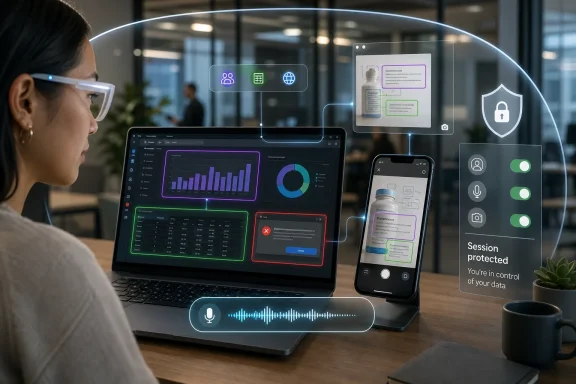
Microsoft began rolling out Vision in Microsoft 365 Copilot in June 2026 for worldwide standard multi-tenant customers, adding real-time analysis of shared desktop screens and mobile camera feeds across desktop, mobile, and web experiences. The feature sounds simple: show Copilot what you are looking at, then ask about it. But in Microsoft 365, where the “thing you are looking at” may be a spreadsheet, contract, Teams thread, dashboard, whiteboard, factory floor, or customer record, Vision is less a convenience feature than a new boundary line. Microsoft is moving Copilot from a text-and-file assistant into an always-near visual interpreter of work.
The original pitch for Microsoft 365 Copilot was that it could reason over work data: mail, meetings, chats, files, calendars, and the Microsoft Graph. Vision adds a more immediate input layer. Instead of asking users to upload a file, paste a screenshot, summarize a meeting, or explain the contents of an error dialog, Microsoft is letting users share the live visual context itself.
That changes the rhythm of Copilot. A text chatbot waits for a prompt; a document assistant waits for a file; a meeting assistant waits for a transcript. Vision waits for the user to point — at a desktop, an app window, a chart, a camera view, or whatever the phone is seeing — and then folds that visual evidence into a voice conversation.
This is not just “OCR, but branded.” The value proposition is that Copilot can combine visual input with work and web grounding. In other words, the assistant is not merely reading pixels; it is supposed to interpret what those pixels mean in the context of the user’s job, their organization’s information, and the conversation already underway.
That is why the mobile camera portion matters as much as desktop sharing. A camera turns Copilot into a field companion: a way to point at a whiteboard, product label, server rack, printed document, meeting room display, or equipment panel and ask, in plain speech, what matters. Microsoft’s enterprise AI story has been heavy on documents and meetings; Vision pulls it into the physical world.
That is powerful because the real world of work is messy. A user troubleshooting an issue might have a browser tab, a PowerShell window, an Excel export, a Teams chat, and a vendor PDF open at the same time. No single application owns the whole workflow. Vision’s promise is that the assistant can take in the composite view and help the user reason across it.
This is also where the feature becomes strategically important for Microsoft. Copilot has sometimes felt strongest inside the polished boundaries of Microsoft 365 apps and weaker at the edges, where people jump among line-of-business tools, browser portals, legacy software, and third-party dashboards. Desktop Vision gives Microsoft a way to participate in those edge workflows without waiting for every vendor to build a Copilot plug-in.
There is a quiet platform play here. If the assistant can understand the screen, then the lack of an API becomes less fatal. Microsoft can offer guidance across applications it does not control, because the visual surface is enough to understand at least part of the task.
That does not mean Vision will be equally reliable everywhere. Screens are ambiguous, layouts change, and visual inference can be brittle. But even a partially successful “screen as context” model is a meaningful shift for IT: the assistant is no longer limited to what the user explicitly types or what an administrator has connected through sanctioned data sources.
For routine work, that matters. A user looking at a dense spreadsheet may not know what prompt to write, but they can say, “What changed here?” or “Which number looks wrong?” A mobile worker can point a camera at an object and ask, “Does this match the instructions?” A help desk technician can share an error screen and ask for the likely cause without writing a diagnostic essay.
Microsoft has been pushing Copilot toward spoken interaction for some time, and Vision makes the case more obvious. Voice is not always superior to text, especially in open offices or regulated settings, but it is far more natural when the user is already doing something visual or physical. The interface becomes: look, speak, adjust, continue.
That is a different kind of productivity claim from “write this email faster.” It is closer to reducing friction during decision-making. Copilot is being positioned not simply as a generator of documents, but as an interpreter that helps users decide what they are seeing and what to do next.
Those assurances are important, but they do not make the governance problem disappear. In enterprise environments, “not used for training” is only one question. Administrators will also care about what data is visible during a session, what responses are logged, how transcripts are retained, whether sensitive content appears in conversation history, and how policy controls map onto existing compliance obligations.
The danger is not only malicious misuse. The more common risk is accidental oversharing. A user may share a desktop that includes a customer record, unreleased financial data, a privileged admin console, a private Teams message, or a browser tab with personal information. If Copilot is analyzing what is visible, the security boundary shifts from “what file did I upload?” to “what happened to be on screen?”
That is a much harder model to train users around. People understand attaching the wrong document. They are less accustomed to thinking of the screen itself as a data source.
Microsoft’s mitigation is that the user must initiate the session and choose what to share. That is the correct baseline. But IT departments will still need to decide whether that is enough for all roles, all devices, and all environments.
Still, users will make the comparison because both features touch the same nerve: the computer can now inspect what is on the screen. Microsoft can draw technical distinctions, and those distinctions matter, but the public trust problem is broader than architecture. Users want to know when the machine is looking, what it sees, where that data goes, and how easily the feature can be disabled.
For Microsoft 365 customers, the stakes are arguably higher than in the consumer PC market. The screen in a workplace may contain regulated data, trade secrets, patient information, legal material, source code, or employee records. Even if Vision behaves exactly as Microsoft says it does, enterprises still have to prove that behavior to auditors, risk committees, and skeptical employees.
This is the new tax on AI features that cross from text into perception. They may be genuinely useful, but they must be explained with unusual precision. A vague “your privacy is protected” will not satisfy organizations that have spent years building data loss prevention, retention, eDiscovery, insider risk, and conditional access programs.
Microsoft’s strongest argument is not that Vision is risk-free. It is that work already happens visually and informally, and that organizations may prefer a governed Microsoft 365 capability over unmanaged screenshots, phone photos, consumer AI apps, and ad hoc screen sharing into less controlled services.
Vision will require a more behavioral approach than a typical app toggle. An organization may be comfortable with Copilot analyzing a PowerPoint deck, but not an HR case management screen. It may allow mobile camera analysis for field service workers, but not for employees in secure facilities. It may permit desktop sharing for general productivity, but ban it on privileged access workstations.
Those decisions do not map cleanly to a single technical switch. They require role-based guidance and an understanding of where sensitive data appears in daily work. The uncomfortable truth for many organizations is that they do not have a complete inventory of that visual exposure.
The feature also raises support questions. If Copilot gives bad advice based on what it sees, who owns the outcome? If a user asks Copilot to interpret a chart and makes a business decision, is that treated like any other Copilot output, or does the live visual grounding create a stronger expectation of accuracy? Microsoft will position Copilot as an assistant, not an authority, but workplace behavior tends to blur that line.
The most mature deployments will not simply announce that Vision is available. They will define acceptable use cases, prohibited content categories, escalation paths, and expectations for human verification. That sounds bureaucratic, but it is the difference between an AI assistant and an unmanaged second set of eyes.
Low-vision users, neurodivergent workers, new employees, and people working in unfamiliar software all stand to benefit from an assistant that can explain what they are looking at without forcing them to translate the scene into a perfect prompt. The same is true for workers who are away from a desk, wearing gloves, moving between equipment, or juggling physical and digital tasks.
There is also a training angle. Instead of writing a static guide for every business process, an organization could imagine employees asking Copilot for help while looking at the actual interface. That does not replace documentation, but it changes how documentation is consumed. The help arrives in context, at the moment of confusion.
The best version of Vision is not the flashy demo in which Copilot identifies a chart. It is the mundane moment when someone avoids a support ticket, understands a warning, catches a mismatch, or completes a process without switching windows ten times.
This is why Microsoft keeps returning to the language of context. AI assistants are often weakest when the user must describe everything up front. Vision reduces that burden. It lets the environment carry part of the prompt.
Multimodal AI systems can misread charts, confuse labels, overlook small but important details, or infer intent from incomplete visual evidence. A desktop full of overlapping windows is not a clean dataset. A mobile camera feed may be shaky, poorly lit, or pointed at an object with ambiguous markings. Real-time analysis adds pressure to answer quickly, which is not always the same as answering carefully.
The issue is not that Copilot Vision will be uniquely unreliable. Humans misread screens too. The issue is that AI systems can combine partial perception with fluent explanation, producing responses that feel more certain than the evidence supports.
For business users, that means Vision should be treated as decision support rather than decision automation. It can help identify patterns, explain visible content, and suggest next steps. It should not become the final authority for compliance reviews, safety checks, legal interpretations, medical judgments, financial approvals, or privileged administrative actions without additional controls.
Microsoft’s refusal to let Vision directly click, type, or scroll on behalf of the user is an important boundary. It keeps the human in the action loop. But influence can be as consequential as control, especially when users are rushed.
For Microsoft, the advantage is distribution. Microsoft 365 already sits at the center of work for many organizations. Teams, Outlook, Office apps, SharePoint, OneDrive, Edge, Windows, and Entra ID create a platform where a multimodal assistant can be both convenient and governable. Competitors can build impressive assistants, but they often lack the same deep administrative footprint inside corporate environments.
That advantage cuts both ways. Because Microsoft is embedded in enterprise workflows, it receives more scrutiny. A consumer AI app that analyzes a photo can be treated as a novelty; a Microsoft 365 feature analyzing a shared screen in a regulated company becomes a risk-management item.
The rollout also suggests that Microsoft sees Copilot’s future less as a sidebar and more as an ambient layer across devices. Desktop, mobile, and web availability matters because work no longer lives in one endpoint. A user may start with a Teams conversation, inspect a dashboard on a laptop, walk into a conference room, and capture a whiteboard on a phone. Vision is designed for that continuity.
If Microsoft can make the experience reliable, it gives Copilot a more natural role in daily work. If it cannot, Vision risks becoming another impressive demo that administrators disable or users forget.
A good Vision experience should make the boundary visible. Users should always know that a session is active. They should be able to stop sharing instantly. They should be encouraged to share a window rather than an entire desktop when that is enough. They should receive clear warnings before exposing sensitive contexts. Administrators should be able to shape those defaults.
This is especially important on mobile. A phone camera can capture bystanders, badges, screens, documents, customer environments, and physical locations. In some workplaces, the camera is already restricted for good reasons. Adding AI interpretation to the camera feed raises the stakes further, even if the session is transient.
Microsoft has spent years telling enterprises to classify data, protect identities, and govern access. Vision tests whether those principles can survive when the input is not a file or a database row but a live view of the world.
The best governance posture will be layered. Technical controls should limit availability where necessary. User education should explain safe sharing practices. Compliance teams should understand logging and retention behavior. Managers should define approved scenarios. None of that is glamorous, but it is how a powerful feature becomes a trusted one.
This is exactly where Microsoft wants to be. The company’s productivity empire has always depended on owning the workflows around work, not merely the files. Copilot extends that ambition into interpretation. It aims to understand not just what users wrote, but what they are seeing, saying, and trying to accomplish.
For Windows enthusiasts, this is also part of a larger story about the PC’s changing role. The desktop is no longer merely a launchpad for applications. It is becoming a context surface for AI. The operating system, browser, productivity suite, and cloud identity stack are converging around the assistant.
That convergence will make some users more productive and others more uneasy. Both reactions are rational. The same capability that helps a user understand a confusing dashboard can also feel like a corporate AI has been invited into the most private layer of daily work.
The decisive factor will be agency. If users and admins feel in control, Vision could become one of Copilot’s more practical additions. If it arrives as another feature people discover only after it appears in the interface, Microsoft will have recreated the trust problem that has haunted its most aggressive AI launches.
 Microsoft Moves Copilot From the Document to the Room
The original pitch for Microsoft 365 Copilot was that it could reason over work data: mail, meetings, chats, files, calendars, and the Microsoft Graph. Vision adds a more immediate input layer. Instead of asking users to upload a file, paste a screenshot, summarize a meeting, or explain the contents of an error dialog, Microsoft is letting users share the live visual context itself.That changes the rhythm of Copilot. A text chatbot waits for a prompt; a document assistant waits for a file; a meeting assistant waits for a transcript. Vision waits for the user to point — at a desktop, an app window, a chart, a camera view, or whatever the phone is seeing — and then folds that visual evidence into a voice conversation.
This is not just “OCR, but branded.” The value proposition is that Copilot can combine visual input with work and web grounding. In other words, the assistant is not merely reading pixels; it is supposed to interpret what those pixels mean in the context of the user’s job, their organization’s information, and the conversation already underway.
That is why the mobile camera portion matters as much as desktop sharing. A camera turns Copilot into a field companion: a way to point at a whiteboard, product label, server rack, printed document, meeting room display, or equipment panel and ask, in plain speech, what matters. Microsoft’s enterprise AI story has been heavy on documents and meetings; Vision pulls it into the physical world.
The Desktop Is Becoming an API
For decades, the desktop has been the place where applications compete for attention. Microsoft’s newest AI layer treats it as something else: a substrate that can be inspected. When Copilot can see the screen, the screen becomes a kind of informal API, exposing the state of multiple applications without requiring formal integration into each one.That is powerful because the real world of work is messy. A user troubleshooting an issue might have a browser tab, a PowerShell window, an Excel export, a Teams chat, and a vendor PDF open at the same time. No single application owns the whole workflow. Vision’s promise is that the assistant can take in the composite view and help the user reason across it.
This is also where the feature becomes strategically important for Microsoft. Copilot has sometimes felt strongest inside the polished boundaries of Microsoft 365 apps and weaker at the edges, where people jump among line-of-business tools, browser portals, legacy software, and third-party dashboards. Desktop Vision gives Microsoft a way to participate in those edge workflows without waiting for every vendor to build a Copilot plug-in.
There is a quiet platform play here. If the assistant can understand the screen, then the lack of an API becomes less fatal. Microsoft can offer guidance across applications it does not control, because the visual surface is enough to understand at least part of the task.
That does not mean Vision will be equally reliable everywhere. Screens are ambiguous, layouts change, and visual inference can be brittle. But even a partially successful “screen as context” model is a meaningful shift for IT: the assistant is no longer limited to what the user explicitly types or what an administrator has connected through sanctioned data sources.
Voice Makes the Feature Feel Less Like Search and More Like Supervision
The real-time voice component is not cosmetic. Vision works because the user can ask questions in the moment while looking at the same thing as Copilot. That makes the interaction feel less like querying a database and more like talking to a colleague over your shoulder.For routine work, that matters. A user looking at a dense spreadsheet may not know what prompt to write, but they can say, “What changed here?” or “Which number looks wrong?” A mobile worker can point a camera at an object and ask, “Does this match the instructions?” A help desk technician can share an error screen and ask for the likely cause without writing a diagnostic essay.
Microsoft has been pushing Copilot toward spoken interaction for some time, and Vision makes the case more obvious. Voice is not always superior to text, especially in open offices or regulated settings, but it is far more natural when the user is already doing something visual or physical. The interface becomes: look, speak, adjust, continue.
That is a different kind of productivity claim from “write this email faster.” It is closer to reducing friction during decision-making. Copilot is being positioned not simply as a generator of documents, but as an interpreter that helps users decide what they are seeing and what to do next.
The Privacy Story Is Now the Product Story
Any assistant that can see a user’s screen or camera feed immediately enters sensitive territory. Microsoft knows this, which is why the company’s support language around Copilot Vision emphasizes user initiation, session boundaries, and the claim that images are not retained or used for model training. The company also says Vision is there to answer questions rather than directly control the PC.Those assurances are important, but they do not make the governance problem disappear. In enterprise environments, “not used for training” is only one question. Administrators will also care about what data is visible during a session, what responses are logged, how transcripts are retained, whether sensitive content appears in conversation history, and how policy controls map onto existing compliance obligations.
The danger is not only malicious misuse. The more common risk is accidental oversharing. A user may share a desktop that includes a customer record, unreleased financial data, a privileged admin console, a private Teams message, or a browser tab with personal information. If Copilot is analyzing what is visible, the security boundary shifts from “what file did I upload?” to “what happened to be on screen?”
That is a much harder model to train users around. People understand attaching the wrong document. They are less accustomed to thinking of the screen itself as a data source.
Microsoft’s mitigation is that the user must initiate the session and choose what to share. That is the correct baseline. But IT departments will still need to decide whether that is enough for all roles, all devices, and all environments.
Microsoft’s Old Screenshot Anxiety Has Not Gone Away
Vision inevitably invites comparison with Recall, Microsoft’s controversial Windows feature that captured snapshots of user activity on Copilot+ PCs before the company reworked its security and opt-in model. Vision and Recall are not the same thing. Recall is about creating a searchable timeline; Vision is about live, user-initiated analysis during an active session.Still, users will make the comparison because both features touch the same nerve: the computer can now inspect what is on the screen. Microsoft can draw technical distinctions, and those distinctions matter, but the public trust problem is broader than architecture. Users want to know when the machine is looking, what it sees, where that data goes, and how easily the feature can be disabled.
For Microsoft 365 customers, the stakes are arguably higher than in the consumer PC market. The screen in a workplace may contain regulated data, trade secrets, patient information, legal material, source code, or employee records. Even if Vision behaves exactly as Microsoft says it does, enterprises still have to prove that behavior to auditors, risk committees, and skeptical employees.
This is the new tax on AI features that cross from text into perception. They may be genuinely useful, but they must be explained with unusual precision. A vague “your privacy is protected” will not satisfy organizations that have spent years building data loss prevention, retention, eDiscovery, insider risk, and conditional access programs.
Microsoft’s strongest argument is not that Vision is risk-free. It is that work already happens visually and informally, and that organizations may prefer a governed Microsoft 365 capability over unmanaged screenshots, phone photos, consumer AI apps, and ad hoc screen sharing into less controlled services.
The Admin Burden Moves From Deployment to Behavior
For IT teams, rollout status is the easy part. The harder work is deciding how Vision should be used. Microsoft 365 features often arrive as service-side changes, and administrators then scramble to translate product capability into policy, training, and support guidance.Vision will require a more behavioral approach than a typical app toggle. An organization may be comfortable with Copilot analyzing a PowerPoint deck, but not an HR case management screen. It may allow mobile camera analysis for field service workers, but not for employees in secure facilities. It may permit desktop sharing for general productivity, but ban it on privileged access workstations.
Those decisions do not map cleanly to a single technical switch. They require role-based guidance and an understanding of where sensitive data appears in daily work. The uncomfortable truth for many organizations is that they do not have a complete inventory of that visual exposure.
The feature also raises support questions. If Copilot gives bad advice based on what it sees, who owns the outcome? If a user asks Copilot to interpret a chart and makes a business decision, is that treated like any other Copilot output, or does the live visual grounding create a stronger expectation of accuracy? Microsoft will position Copilot as an assistant, not an authority, but workplace behavior tends to blur that line.
The most mature deployments will not simply announce that Vision is available. They will define acceptable use cases, prohibited content categories, escalation paths, and expectations for human verification. That sounds bureaucratic, but it is the difference between an AI assistant and an unmanaged second set of eyes.
The Accessibility Upside Is Real
It would be a mistake to treat Vision only as a security story. For many users, visual Copilot could be genuinely empowering. A system that can describe, interpret, and discuss what is on screen or in front of a phone camera has obvious value for accessibility, training, and task support.Low-vision users, neurodivergent workers, new employees, and people working in unfamiliar software all stand to benefit from an assistant that can explain what they are looking at without forcing them to translate the scene into a perfect prompt. The same is true for workers who are away from a desk, wearing gloves, moving between equipment, or juggling physical and digital tasks.
There is also a training angle. Instead of writing a static guide for every business process, an organization could imagine employees asking Copilot for help while looking at the actual interface. That does not replace documentation, but it changes how documentation is consumed. The help arrives in context, at the moment of confusion.
The best version of Vision is not the flashy demo in which Copilot identifies a chart. It is the mundane moment when someone avoids a support ticket, understands a warning, catches a mismatch, or completes a process without switching windows ten times.
This is why Microsoft keeps returning to the language of context. AI assistants are often weakest when the user must describe everything up front. Vision reduces that burden. It lets the environment carry part of the prompt.
The Feature Also Exposes Copilot’s Trust Gap
The challenge is that visual context can make Copilot feel more authoritative than it is. If an assistant can see the same screen as the user and speak confidently about it, users may be less likely to question its interpretation. That is useful when the answer is right and dangerous when it is not.Multimodal AI systems can misread charts, confuse labels, overlook small but important details, or infer intent from incomplete visual evidence. A desktop full of overlapping windows is not a clean dataset. A mobile camera feed may be shaky, poorly lit, or pointed at an object with ambiguous markings. Real-time analysis adds pressure to answer quickly, which is not always the same as answering carefully.
The issue is not that Copilot Vision will be uniquely unreliable. Humans misread screens too. The issue is that AI systems can combine partial perception with fluent explanation, producing responses that feel more certain than the evidence supports.
For business users, that means Vision should be treated as decision support rather than decision automation. It can help identify patterns, explain visible content, and suggest next steps. It should not become the final authority for compliance reviews, safety checks, legal interpretations, medical judgments, financial approvals, or privileged administrative actions without additional controls.
Microsoft’s refusal to let Vision directly click, type, or scroll on behalf of the user is an important boundary. It keeps the human in the action loop. But influence can be as consequential as control, especially when users are rushed.
The Competitive Pressure Is Obvious
Microsoft is not adding visual understanding to Copilot in a vacuum. The AI market has been moving toward multimodal assistants that can see screens, understand images, speak naturally, and operate across devices. The direction is clear: the chat box is becoming only one interface among many.For Microsoft, the advantage is distribution. Microsoft 365 already sits at the center of work for many organizations. Teams, Outlook, Office apps, SharePoint, OneDrive, Edge, Windows, and Entra ID create a platform where a multimodal assistant can be both convenient and governable. Competitors can build impressive assistants, but they often lack the same deep administrative footprint inside corporate environments.
That advantage cuts both ways. Because Microsoft is embedded in enterprise workflows, it receives more scrutiny. A consumer AI app that analyzes a photo can be treated as a novelty; a Microsoft 365 feature analyzing a shared screen in a regulated company becomes a risk-management item.
The rollout also suggests that Microsoft sees Copilot’s future less as a sidebar and more as an ambient layer across devices. Desktop, mobile, and web availability matters because work no longer lives in one endpoint. A user may start with a Teams conversation, inspect a dashboard on a laptop, walk into a conference room, and capture a whiteboard on a phone. Vision is designed for that continuity.
If Microsoft can make the experience reliable, it gives Copilot a more natural role in daily work. If it cannot, Vision risks becoming another impressive demo that administrators disable or users forget.
The Real Product Is the Permission Model
The most important interface in Vision may not be the glasses icon, the voice session, or the camera toggle. It is the consent and sharing model. Microsoft’s design choices around when Copilot can see, what it can see, and how clearly the user understands the session will determine whether this feature feels empowering or invasive.A good Vision experience should make the boundary visible. Users should always know that a session is active. They should be able to stop sharing instantly. They should be encouraged to share a window rather than an entire desktop when that is enough. They should receive clear warnings before exposing sensitive contexts. Administrators should be able to shape those defaults.
This is especially important on mobile. A phone camera can capture bystanders, badges, screens, documents, customer environments, and physical locations. In some workplaces, the camera is already restricted for good reasons. Adding AI interpretation to the camera feed raises the stakes further, even if the session is transient.
Microsoft has spent years telling enterprises to classify data, protect identities, and govern access. Vision tests whether those principles can survive when the input is not a file or a database row but a live view of the world.
The best governance posture will be layered. Technical controls should limit availability where necessary. User education should explain safe sharing practices. Compliance teams should understand logging and retention behavior. Managers should define approved scenarios. None of that is glamorous, but it is how a powerful feature becomes a trusted one.
This Is Where Microsoft 365 Copilot Starts to Feel Like an Operating Layer
The deeper implication is that Microsoft 365 Copilot is becoming less of an app and more of an operating layer for work. It can read organizational data, join meetings, draft documents, search the web, respond by voice, and now interpret what the user shares visually. That combination begins to resemble a work-aware assistant that sits above individual applications.This is exactly where Microsoft wants to be. The company’s productivity empire has always depended on owning the workflows around work, not merely the files. Copilot extends that ambition into interpretation. It aims to understand not just what users wrote, but what they are seeing, saying, and trying to accomplish.
For Windows enthusiasts, this is also part of a larger story about the PC’s changing role. The desktop is no longer merely a launchpad for applications. It is becoming a context surface for AI. The operating system, browser, productivity suite, and cloud identity stack are converging around the assistant.
That convergence will make some users more productive and others more uneasy. Both reactions are rational. The same capability that helps a user understand a confusing dashboard can also feel like a corporate AI has been invited into the most private layer of daily work.
The decisive factor will be agency. If users and admins feel in control, Vision could become one of Copilot’s more practical additions. If it arrives as another feature people discover only after it appears in the interface, Microsoft will have recreated the trust problem that has haunted its most aggressive AI launches.
The Practical Read for WindowsForum Readers
Vision in Microsoft 365 Copilot is worth watching because it is not merely another roadmap checkbox. It is a test of whether Microsoft can make multimodal AI useful inside real enterprise workflows without triggering a governance backlash. For admins and power users, the feature deserves neither reflexive panic nor blind enthusiasm.- Microsoft is rolling out Vision in Microsoft 365 Copilot as a general availability feature for worldwide standard multi-tenant customers, with desktop screen and mobile camera analysis across desktop, mobile, and web.
- The feature is most valuable when users need help interpreting what they are actively seeing, such as charts, error messages, dashboards, physical objects, whiteboards, or app workflows.
- The privacy and compliance questions center on screen and camera exposure, session boundaries, logging, retention, user consent, and whether sensitive information may be visible during a session.
- Organizations should decide where Vision is appropriate before users normalize it, especially in regulated departments, secure facilities, privileged admin environments, and customer-facing scenarios.
- The feature’s usefulness will depend on clear human verification, because visual AI can misinterpret screens or camera feeds even when its spoken answer sounds confident.
- Microsoft’s larger bet is that Copilot becomes an ambient work layer that understands documents, meetings, voice, web context, and now shared visual reality.
References
- Primary source: Microsoft 365 Roadmap
Published: 2026-06-26T22:01:51.0909953Z
Loading…
www.microsoft.com - Official source: support.microsoft.com
Loading…
support.microsoft.com - Official source: learn.microsoft.com
Updated Windows and Microsoft 365 Copilot Chat experience | Microsoft Learn
Learn about changes to the Copilot in Windows experience for commercial environments and how to configure it for your organization.learn.microsoft.com - Official source: techcommunity.microsoft.com
Loading…
techcommunity.microsoft.com - Related coverage: techradar.com
Loading…
www.techradar.com - Related coverage: windowscentral.com
Loading…
www.windowscentral.com