
Microsoft has launched Microsoft 365 Roadmap item 559995 in June 2026, giving Global admins and Viva Insights admins the ability to enable additional organizational attributes as filters in Power BI reports for Viva and Microsoft 365 Copilot analytics. That sounds like a small reporting switch, but it is really a governance milestone. Microsoft is acknowledging that Copilot measurement cannot mature if every dashboard slices the workforce through the same handful of default dimensions. The question now moves from whether companies can see Copilot usage to whether they can see it responsibly, in the language their own businesses actually use.
The first generation of Copilot reporting was designed to answer a blunt executive question: are people using the expensive AI licenses we bought? That was a fair place to start. Adoption dashboards, usage summaries, and app-level engagement reports gave IT leaders a way to separate internal enthusiasm from actual activity.
But the next question was always harder. Which parts of the business are using Copilot well? Which roles are getting value? Which geographies, cost centers, business units, management layers, or job families are lagging — and why?
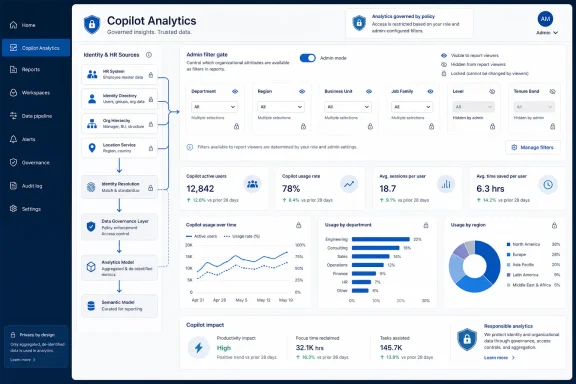
Roadmap ID 559995 matters because it gives admins more control over the filters available in Power BI reports connected to Viva Insights and Copilot analytics. Global admins and Insights admins can turn on reserved attributes and organization-specific custom attributes, making those fields available to users who already have access to the reports.
That distinction matters. Microsoft is not merely adding more columns to a table. It is giving organizations a way to map Copilot reporting onto the messy internal structures where budget decisions, training plans, compliance obligations, and productivity targets actually live.
This is where custom attributes become more than administrative decoration. An organization might want to filter Copilot usage by sales region, store type, product group, operating company, union status, acquisition cohort, frontline-versus-corporate designation, or internal transformation program. None of those dimensions are guaranteed to exist in Microsoft’s default reporting model, but many of them are exactly where the story is.
Reserved attributes also matter because Microsoft’s Viva Insights data model has long relied on organizational data to make analysis useful. Attributes such as organization, manager hierarchy, role, location, and other workforce descriptors shape how collaboration and productivity patterns are interpreted. With this update, more of that attribute richness can be exposed through Power BI filters rather than trapped behind a one-size-fits-most reporting experience.
The business impact is obvious. Instead of asking whether Copilot adoption is at 41 percent across the company, a CIO can ask whether adoption is concentrated in headquarters, whether field sales is using it differently than inside sales, or whether newly acquired teams are being left behind. That is the difference between a dashboard that reports activity and a dashboard that can inform an intervention.
Microsoft’s framing puts enablement in the hands of Global admins and Insights admins, which is the right administrative starting point. But the harder question is not who can flip the toggle. It is who decides whether a given attribute should ever become a reporting filter.
The risk is not necessarily that someone sees raw personal data. Viva Insights and Copilot analytics are generally designed around aggregation, privacy thresholds, and role-based access. The risk is that more granular filtering can make small groups easier to isolate, easier to compare, and easier to narrate badly.
A report that says “Copilot usage is low in Department A” may be legitimate. A report that lets managers slice by location, role, tenure band, and custom performance group until only a handful of employees are effectively identifiable is something else. The technical permission model can be intact while the analytical practice becomes reckless.
That is why this feature should be treated as an analytics governance change, not just a Viva Insights update. Organizations should decide which attributes are safe for broad filtering, which should be restricted to analysts, and which should stay out of Copilot reporting entirely.
A user who opens Copilot every day may be experimenting without saving much time. Another user may invoke it rarely but use it for high-value work such as summarizing regulatory material, drafting customer communications, or analyzing Excel-heavy business processes. Usage volume is evidence, not proof.
Power BI filtering does not solve that problem by itself, but it gives organizations a better instrument. The more precisely a company can segment usage, the easier it becomes to compare adoption against job design, training exposure, business process maturity, and executive sponsorship. Copilot analytics become more useful when they can be studied in relation to the organization’s operating model.
This is especially important because Copilot value is unlikely to spread evenly. Some departments have obvious use cases: communications, consulting, sales operations, finance analysis, legal review, software development, HR shared services. Others may need tailored enablement before usage makes sense. A single company-wide adoption number hides that unevenness.
The enhanced filtering update is Microsoft’s quiet admission that Copilot measurement has entered its second phase. The first phase was telemetry. The second phase is interpretation.
That is where Power BI matters. Viva Insights can package the data, but Power BI is where many organizations already build executive reporting, operational scorecards, and custom analytics. By improving the filterability of Power BI reports, Microsoft is strengthening the layer where Copilot adoption becomes a management practice rather than a product tour.
The choice to make this a web-based, generally available feature for standard multi-tenant cloud customers also tells us where Microsoft wants the baseline to move. This is not being positioned as a niche preview for a handful of bleeding-edge tenants. It is part of the mainstream Copilot analytics toolkit.
That mainstreaming is important for admins. Many IT departments have been asked to roll out Copilot before the organization has fully agreed on what success looks like. Better report filtering gives those teams a way to bring business leaders into the measurement process without rebuilding the analytics stack from scratch.
Still, the presence of a filter does not guarantee the presence of a strategy. A dashboard can become more customizable and still remain politically useless if leaders do not agree on what the segments mean, what actions follow from the data, and what level of comparison is appropriate.
In practical terms, this lets IT and insights teams curate the reporting vocabulary. They can decide that “business unit” and “job family” are useful filters, while “performance rating” and “reduction-in-force cohort” are not. They can expose region while suppressing site-level granularity in small offices. They can choose attributes that encourage responsible management questions rather than forensic employee hunting.
This is the right architecture for a product category that sits between HR analytics, IT telemetry, and productivity management. Copilot reporting is not purely technical. It touches behavior, workforce planning, change management, and trust.
There is also a political benefit. Business leaders often distrust central dashboards because the categories do not match how they run their teams. Letting organizations bring their own attributes into Power BI reports reduces that disconnect. The analytics can speak in the company’s dialect.
But this also increases the importance of data quality. Custom attributes are only useful if they are maintained, consistently populated, and understood. A stale HR field or inconsistently coded business unit can make a Copilot report look precise while quietly misleading everyone in the room.
That changes the stakes for reporting. Early adopters could tolerate fuzzy metrics because the project was exploratory. Broader deployments require a more disciplined view of utilization and impact. Finance teams want justification. CIOs want adoption plans. Business leaders want proof that their functions are not being measured by irrelevant averages.
Enhanced filtering helps because it supports the uncomfortable middle layer between enthusiasm and accounting. A company can discover that Copilot usage is high among headquarters knowledge workers but weak in regional teams. It can see whether a training campaign moved the needle in one function but not another. It can identify pockets of adoption that deserve closer qualitative study.
This is also where admins should resist the temptation to turn Copilot analytics into a surveillance scoreboard. The best use of segmentation is to improve enablement and understand business context. The worst use is to rank teams by usage volume and declare winners without knowing whether the activity produced better work.
Microsoft’s update makes deeper analysis possible. It does not make shallow analysis impossible.
Custom attributes generally originate from HR systems, identity directories, or organizational data imports. If those pipelines are messy, the reports inherit the mess. If business units are renamed without cleanup, if locations are inconsistently formatted, or if job families exist in three competing taxonomies, the filtering experience becomes another way to surface technical debt.
There is also a permissions question. Users who already have access to Power BI reports can use newly enabled filters, which means admins need to understand the report audience before exposing sensitive dimensions. The attribute enablement decision cannot be separated from workspace access, sharing settings, and downstream export behavior.
Power BI is powerful precisely because it travels well across an organization. That is also why governance has to be deliberate. Once a report becomes part of an executive rhythm, its assumptions tend to harden into management truth.
For IT pros, the practical move is to treat this release as a prompt for review. Which Copilot and Viva reports are in use? Who can view them? Which organizational attributes are clean enough to support decisions? Which attributes would create unnecessary privacy or employee-relations risk if exposed as filters?
That duality is central to Microsoft’s enterprise pitch. Consumer AI products can live on personal preference and viral adoption. Enterprise AI needs controls, telemetry, compliance posture, license assignment, and business-case reporting. Viva Insights and Power BI sit directly in that second category.
The enhanced filtering feature is not flashy, but it is strategically aligned with that enterprise reality. It helps Microsoft answer a common objection: “We cannot manage what we cannot measure in our own terms.” By allowing more organizational attributes to become report filters, Microsoft gives customers a path toward localized, business-specific Copilot analytics.
The danger is that customers may confuse measurement maturity with value maturity. More filters can produce more charts, more meetings, and more apparent insight without changing how work gets done. A better dashboard is only useful if it leads to better training, better process redesign, or better license targeting.
That is the line Microsoft and its customers now have to walk. Copilot analytics must become more detailed without becoming more performative.
That matters because Copilot adoption often depends on context. A finance analyst, account manager, project coordinator, and HR business partner may all benefit from Copilot, but not in the same workflows. If reporting can be filtered by the attributes that define those populations, the enablement team can stop treating the workforce as a single audience.
The same logic applies to license optimization. Companies do not want to yank licenses from people too quickly, because low usage may reflect poor onboarding rather than lack of need. But they also cannot ignore persistent non-use across expensive deployments. Better segmentation makes that conversation more honest.
It can also reveal where success is real enough to copy. If one business unit shows unusually strong usage after a local champion program, that pattern can be studied and adapted. If another group’s usage remains low despite training, the issue may be workflow fit rather than awareness.
This is the version of Copilot analytics worth taking seriously: not a scoreboard, but a feedback loop.
That timeline is notable. The launch comes after the first broad wave of Copilot experimentation and during the period when organizations are trying to normalize AI spending. The reporting layer is arriving not as an afterthought, but as part of Microsoft’s attempt to make Copilot governable at scale.
The feature’s apparent simplicity may help adoption. Admins do not need to invent a new analytics platform to benefit from it. They need to understand the attributes available to them, decide which ones belong in reports, and communicate how those filters should be used.
But the simplicity can also hide the organizational work. The best implementation will involve IT, HR analytics, privacy, legal, security, and business stakeholders. The worst implementation will be one admin enabling every interesting field because a dashboard owner asked for more slicers.
This is the old enterprise lesson in a new AI wrapper: flexibility is not the same thing as control.
 Microsoft Turns Copilot Measurement Into an Org-Data Problem
The first generation of Copilot reporting was designed to answer a blunt executive question: are people using the expensive AI licenses we bought? That was a fair place to start. Adoption dashboards, usage summaries, and app-level engagement reports gave IT leaders a way to separate internal enthusiasm from actual activity.But the next question was always harder. Which parts of the business are using Copilot well? Which roles are getting value? Which geographies, cost centers, business units, management layers, or job families are lagging — and why?
Roadmap ID 559995 matters because it gives admins more control over the filters available in Power BI reports connected to Viva Insights and Copilot analytics. Global admins and Insights admins can turn on reserved attributes and organization-specific custom attributes, making those fields available to users who already have access to the reports.
That distinction matters. Microsoft is not merely adding more columns to a table. It is giving organizations a way to map Copilot reporting onto the messy internal structures where budget decisions, training plans, compliance obligations, and productivity targets actually live.
Default Dashboards Were Never Going to Survive First Contact With the Business
Standardized analytics are useful until they hit a real company. A global manufacturer does not think about workforce productivity the same way a law firm does. A public-sector agency, a hospital network, and a software company may all use Microsoft 365, but their internal definitions of meaningful adoption are radically different.This is where custom attributes become more than administrative decoration. An organization might want to filter Copilot usage by sales region, store type, product group, operating company, union status, acquisition cohort, frontline-versus-corporate designation, or internal transformation program. None of those dimensions are guaranteed to exist in Microsoft’s default reporting model, but many of them are exactly where the story is.
Reserved attributes also matter because Microsoft’s Viva Insights data model has long relied on organizational data to make analysis useful. Attributes such as organization, manager hierarchy, role, location, and other workforce descriptors shape how collaboration and productivity patterns are interpreted. With this update, more of that attribute richness can be exposed through Power BI filters rather than trapped behind a one-size-fits-most reporting experience.
The business impact is obvious. Instead of asking whether Copilot adoption is at 41 percent across the company, a CIO can ask whether adoption is concentrated in headquarters, whether field sales is using it differently than inside sales, or whether newly acquired teams are being left behind. That is the difference between a dashboard that reports activity and a dashboard that can inform an intervention.
The New Filter Is Also a New Governance Surface
Every time Microsoft gives customers more analytical flexibility, it also creates a new place for governance to fail. Additional filters in Power BI reports may sound harmless, but organizational attributes can be sensitive. A custom field might encode compensation band, performance cohort, diversity-related grouping, labor category, or participation in a restructuring program.Microsoft’s framing puts enablement in the hands of Global admins and Insights admins, which is the right administrative starting point. But the harder question is not who can flip the toggle. It is who decides whether a given attribute should ever become a reporting filter.
The risk is not necessarily that someone sees raw personal data. Viva Insights and Copilot analytics are generally designed around aggregation, privacy thresholds, and role-based access. The risk is that more granular filtering can make small groups easier to isolate, easier to compare, and easier to narrate badly.
A report that says “Copilot usage is low in Department A” may be legitimate. A report that lets managers slice by location, role, tenure band, and custom performance group until only a handful of employees are effectively identifiable is something else. The technical permission model can be intact while the analytical practice becomes reckless.
That is why this feature should be treated as an analytics governance change, not just a Viva Insights update. Organizations should decide which attributes are safe for broad filtering, which should be restricted to analysts, and which should stay out of Copilot reporting entirely.
Copilot ROI Needs Better Segmentation, Not Better Slogans
Microsoft has spent the past few years selling Copilot as a productivity layer for Microsoft 365. Customers, in turn, have spent the same period trying to determine whether the licenses justify their cost. That calculation has never been as simple as counting prompts.A user who opens Copilot every day may be experimenting without saving much time. Another user may invoke it rarely but use it for high-value work such as summarizing regulatory material, drafting customer communications, or analyzing Excel-heavy business processes. Usage volume is evidence, not proof.
Power BI filtering does not solve that problem by itself, but it gives organizations a better instrument. The more precisely a company can segment usage, the easier it becomes to compare adoption against job design, training exposure, business process maturity, and executive sponsorship. Copilot analytics become more useful when they can be studied in relation to the organization’s operating model.
This is especially important because Copilot value is unlikely to spread evenly. Some departments have obvious use cases: communications, consulting, sales operations, finance analysis, legal review, software development, HR shared services. Others may need tailored enablement before usage makes sense. A single company-wide adoption number hides that unevenness.
The enhanced filtering update is Microsoft’s quiet admission that Copilot measurement has entered its second phase. The first phase was telemetry. The second phase is interpretation.
Power BI Remains the Serious Layer Beneath the Executive Storytelling
Microsoft’s Copilot story often lands in glossy demos: a meeting summarized, a document drafted, a spreadsheet explained, an email rewritten. But enterprise buyers eventually need something less theatrical and more durable. They need a reporting system that can survive budget review, audit scrutiny, and skeptical department heads.That is where Power BI matters. Viva Insights can package the data, but Power BI is where many organizations already build executive reporting, operational scorecards, and custom analytics. By improving the filterability of Power BI reports, Microsoft is strengthening the layer where Copilot adoption becomes a management practice rather than a product tour.
The choice to make this a web-based, generally available feature for standard multi-tenant cloud customers also tells us where Microsoft wants the baseline to move. This is not being positioned as a niche preview for a handful of bleeding-edge tenants. It is part of the mainstream Copilot analytics toolkit.
That mainstreaming is important for admins. Many IT departments have been asked to roll out Copilot before the organization has fully agreed on what success looks like. Better report filtering gives those teams a way to bring business leaders into the measurement process without rebuilding the analytics stack from scratch.
Still, the presence of a filter does not guarantee the presence of a strategy. A dashboard can become more customizable and still remain politically useless if leaders do not agree on what the segments mean, what actions follow from the data, and what level of comparison is appropriate.
The Admin Toggle Moves Power From Microsoft’s Model to the Customer’s Model
The most interesting part of the update is not that report users can apply new filters. It is that admins decide which additional attributes become available in the first place. That creates a gate between organizational data and analytical consumption.In practical terms, this lets IT and insights teams curate the reporting vocabulary. They can decide that “business unit” and “job family” are useful filters, while “performance rating” and “reduction-in-force cohort” are not. They can expose region while suppressing site-level granularity in small offices. They can choose attributes that encourage responsible management questions rather than forensic employee hunting.
This is the right architecture for a product category that sits between HR analytics, IT telemetry, and productivity management. Copilot reporting is not purely technical. It touches behavior, workforce planning, change management, and trust.
There is also a political benefit. Business leaders often distrust central dashboards because the categories do not match how they run their teams. Letting organizations bring their own attributes into Power BI reports reduces that disconnect. The analytics can speak in the company’s dialect.
But this also increases the importance of data quality. Custom attributes are only useful if they are maintained, consistently populated, and understood. A stale HR field or inconsistently coded business unit can make a Copilot report look precise while quietly misleading everyone in the room.
The Feature Arrives as Copilot Analytics Becomes a Budget Battlefield
By mid-2026, many organizations are no longer asking whether generative AI belongs somewhere in the productivity stack. They are asking how much of it to buy, who should get it, and what evidence should drive the next renewal. Copilot is not a novelty line item anymore. It is a recurring enterprise cost.That changes the stakes for reporting. Early adopters could tolerate fuzzy metrics because the project was exploratory. Broader deployments require a more disciplined view of utilization and impact. Finance teams want justification. CIOs want adoption plans. Business leaders want proof that their functions are not being measured by irrelevant averages.
Enhanced filtering helps because it supports the uncomfortable middle layer between enthusiasm and accounting. A company can discover that Copilot usage is high among headquarters knowledge workers but weak in regional teams. It can see whether a training campaign moved the needle in one function but not another. It can identify pockets of adoption that deserve closer qualitative study.
This is also where admins should resist the temptation to turn Copilot analytics into a surveillance scoreboard. The best use of segmentation is to improve enablement and understand business context. The worst use is to rank teams by usage volume and declare winners without knowing whether the activity produced better work.
Microsoft’s update makes deeper analysis possible. It does not make shallow analysis impossible.
WindowsForum Readers Should Watch the Identity and Data Plumbing
For sysadmins and Microsoft 365 administrators, the headline feature is only the visible part of the work. The actual readiness burden sits underneath: identity hygiene, organizational data preparation, role assignments, report permissions, Power BI governance, and internal policy.Custom attributes generally originate from HR systems, identity directories, or organizational data imports. If those pipelines are messy, the reports inherit the mess. If business units are renamed without cleanup, if locations are inconsistently formatted, or if job families exist in three competing taxonomies, the filtering experience becomes another way to surface technical debt.
There is also a permissions question. Users who already have access to Power BI reports can use newly enabled filters, which means admins need to understand the report audience before exposing sensitive dimensions. The attribute enablement decision cannot be separated from workspace access, sharing settings, and downstream export behavior.
Power BI is powerful precisely because it travels well across an organization. That is also why governance has to be deliberate. Once a report becomes part of an executive rhythm, its assumptions tend to harden into management truth.
For IT pros, the practical move is to treat this release as a prompt for review. Which Copilot and Viva reports are in use? Who can view them? Which organizational attributes are clean enough to support decisions? Which attributes would create unnecessary privacy or employee-relations risk if exposed as filters?
Microsoft Is Building the Measurement Layer for AI at Work
This update fits a broader pattern in Microsoft 365. Microsoft is not only embedding Copilot into Word, Excel, Outlook, Teams, and Power BI; it is also building the administrative and analytical scaffolding around those experiences. The company wants Copilot to be both a tool employees use and a platform leaders manage.That duality is central to Microsoft’s enterprise pitch. Consumer AI products can live on personal preference and viral adoption. Enterprise AI needs controls, telemetry, compliance posture, license assignment, and business-case reporting. Viva Insights and Power BI sit directly in that second category.
The enhanced filtering feature is not flashy, but it is strategically aligned with that enterprise reality. It helps Microsoft answer a common objection: “We cannot manage what we cannot measure in our own terms.” By allowing more organizational attributes to become report filters, Microsoft gives customers a path toward localized, business-specific Copilot analytics.
The danger is that customers may confuse measurement maturity with value maturity. More filters can produce more charts, more meetings, and more apparent insight without changing how work gets done. A better dashboard is only useful if it leads to better training, better process redesign, or better license targeting.
That is the line Microsoft and its customers now have to walk. Copilot analytics must become more detailed without becoming more performative.
The Real Win Is Less Dashboard Theater and More Targeted Intervention
The strongest case for this feature is not executive reporting. It is intervention design. If an organization can identify that Copilot adoption is weak in a specific role family or region, it can respond with tailored enablement rather than another generic training blast.That matters because Copilot adoption often depends on context. A finance analyst, account manager, project coordinator, and HR business partner may all benefit from Copilot, but not in the same workflows. If reporting can be filtered by the attributes that define those populations, the enablement team can stop treating the workforce as a single audience.
The same logic applies to license optimization. Companies do not want to yank licenses from people too quickly, because low usage may reflect poor onboarding rather than lack of need. But they also cannot ignore persistent non-use across expensive deployments. Better segmentation makes that conversation more honest.
It can also reveal where success is real enough to copy. If one business unit shows unusually strong usage after a local champion program, that pattern can be studied and adapted. If another group’s usage remains low despite training, the issue may be workflow fit rather than awareness.
This is the version of Copilot analytics worth taking seriously: not a scoreboard, but a feedback loop.
The June Launch Gives Admins a Small Switch With Large Consequences
Microsoft lists the feature as launched for General Availability in June 2026, covering Microsoft Viva and Microsoft 365 Copilot on the web for worldwide standard multi-tenant customers. The roadmap item was created on April 7, 2026, and updated on June 26, 2026, which places it squarely in Microsoft’s current push to harden Copilot’s enterprise management story.That timeline is notable. The launch comes after the first broad wave of Copilot experimentation and during the period when organizations are trying to normalize AI spending. The reporting layer is arriving not as an afterthought, but as part of Microsoft’s attempt to make Copilot governable at scale.
The feature’s apparent simplicity may help adoption. Admins do not need to invent a new analytics platform to benefit from it. They need to understand the attributes available to them, decide which ones belong in reports, and communicate how those filters should be used.
But the simplicity can also hide the organizational work. The best implementation will involve IT, HR analytics, privacy, legal, security, and business stakeholders. The worst implementation will be one admin enabling every interesting field because a dashboard owner asked for more slicers.
This is the old enterprise lesson in a new AI wrapper: flexibility is not the same thing as control.
The Filters That Will Decide Whether Copilot Analytics Grow Up
The concrete lesson from Roadmap ID 559995 is that Copilot reporting is moving closer to the business structures that decide whether AI adoption succeeds or stalls. Admins should treat the launch as a reason to tighten their data model and reporting rules before the next executive review cycle.- Organizations can now make additional reserved and custom organizational attributes available as filters in Viva and Copilot-related Power BI reports.
- The feature is generally available as of June 2026 for worldwide standard multi-tenant cloud customers using the web experience.
- Global admins and Viva Insights admins control which additional attributes are enabled, making the admin decision a governance checkpoint.
- Report users who already have access can apply the newly enabled filters, so report permissions and attribute sensitivity must be reviewed together.
- The biggest business value is not prettier dashboards but better segmentation for Copilot adoption, training, license planning, and workflow analysis.
- The biggest risk is enabling sensitive or low-quality attributes that make reports look precise while creating privacy, trust, or interpretation problems.
References
- Primary source: Microsoft 365 Roadmap
Published: 2026-06-26T22:01:51.0909953Z
Loading…
www.microsoft.com - Official source: learn.microsoft.com
Loading…
learn.microsoft.com - Related coverage: m365admin.handsontek.net
Microsoft Viva: Unlocking Deeper Copilot Insights with Enhanced Power BI Filtering - M365 Admin
Enable Global and Insights admins to turn on additional attributes as filters in Power BI reports, including reserved attributes and your organization’s custom attributes. Users who have access to Power BI reports can then use these newly enabled filters to tailor reports to their business...m365admin.handsontek.net - Official source: techcommunity.microsoft.com
What's new in Viva Insights | Microsoft Community Hub
We’re excited to announce a variety of new features and Power BI reports that have recently launched for Viva Insights. These new features empower customers... techcommunity.microsoft.com
- Official source: cdn-dynmedia-1.microsoft.com