
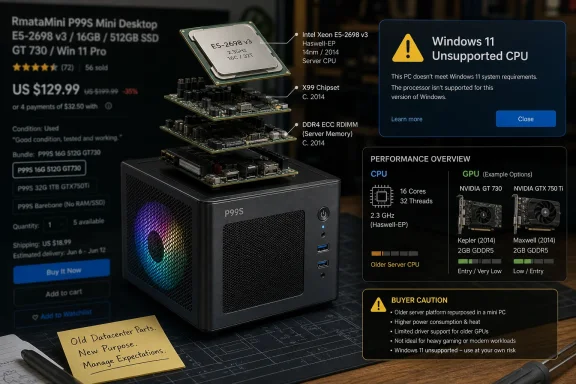
A newly listed RmataMini P99S mini desktop is being marketed in 2026 as a low-cost gaming PC starting around $239, pairing Intel’s 2014 Xeon E5-2698 v3 server processor with aging discrete Nvidia graphics inside a compact, stylized chassis. That combination is not impossible, and in a narrow sense it is not even fraudulent. But the pitch works because it turns yesterday’s datacenter surplus into today’s spec-sheet theater, where “16 cores,” “dedicated GPU,” and “gaming PC” do far more work than the silicon itself can.
The headline number is the Xeon E5-2698 v3, a 16-core, 32-thread Haswell-era server CPU launched in the third quarter of 2014. In its day, it belonged in serious rackmount machines, not RGB-adjacent mini desktops on marketplace listings. It has a 2.3GHz base clock, a 3.6GHz maximum turbo, 40MB of cache, quad-channel DDR4 support in proper platforms, and a 135W TDP that tells you almost everything about why this is an odd fit for a compact PC.
That does not make the chip useless. A 16-core Xeon can still chew through parallel tasks if the workload is forgiving, the cooling is competent, and the user does not care about idle power, platform age, or modern instruction-set advantages. The problem is that none of those caveats fit comfortably inside the phrase “mini gaming PC.”
The P99S appears to be part of a familiar gray-market hardware ecosystem: recycled or surplus Xeon processors, inexpensive X99-style motherboards, budget memory, commodity SSDs, and whatever older GPU can be made to fit the price point. This is not inherently bad. The used enterprise hardware scene has kept homelabs, student workstations, and budget render boxes alive for years.
But the difference between a clever salvage build and a questionable consumer PC is disclosure. A buyer who knows they are purchasing a repurposed Haswell server platform can make an informed decision. A buyer who sees “gaming,” “Xeon,” “16 cores,” and “dedicated graphics” may be led toward a very different expectation.
That is the trap. The E5-2698 v3 was designed for throughput in servers and workstations, not for high-refresh desktop gaming or modern efficiency. Its 16 cores were valuable when spread across virtual machines, render jobs, compile tasks, or database work. They are much less magical when paired with an old mobile GPU and asked to play current games.
The chip’s 135W TDP is also not a small detail. Many current mini PCs use mobile Ryzen or Intel Core processors with far lower power envelopes and much stronger integrated graphics than older office desktops could dream of. Those machines may have fewer cores, but they can deliver better day-to-day performance per watt, less fan noise, and more predictable driver support.
The Xeon’s age matters in another way: it belongs to a platform generation that predates many assumptions baked into today’s consumer PC experience. Sleep behavior, firmware polish, USB reliability, NVMe implementation, fan curves, TPM support, secure boot configuration, and BIOS update availability all become part of the real product. A cheap PC is not just a CPU plus a GPU; it is a platform you have to live with.
The GeForce GTS 450 is especially glaring. It dates back to the Fermi era and was a budget desktop card more than a decade ago. Calling a system with that GPU a gaming PC in 2026 is technically possible only if “gaming” includes older titles, esports at reduced settings, emulation, or very modest expectations.
The GTX 850M is a mobile GPU from another era of laptop gaming. It may be more power-conscious than the GTS 450, but it is still a dated part with limited relevance to modern games. The GTX 1650M is the most credible of the reported options, but even that is an entry-level Turing-era mobile GPU, not a magic wand for a 2014 server platform.
The broader issue is consistency. When a product family spans GPUs as old as the GTS 450 and as comparatively recent as the GTX 1650M, the model name stops telling buyers much about the experience they will receive. Two P99S units may look similar in photos while behaving like completely different machines under load.
That is where bargain listings become risky. A $239 configuration with one GPU is not the same value proposition as a pricier configuration with another. The name on the chassis may be constant, but the practical performance envelope can swing wildly.
To be fair, “gaming” does not mean one thing. A user playing older Steam titles, Minecraft, League of Legends, lightweight indie games, or retro emulators may have a perfectly acceptable experience on modest hardware. Someone expecting smooth performance in recent AAA games, modern DirectX 12 titles, ray tracing workloads, or high-refresh 1080p gaming will likely be disappointed.
The trouble is that marketplace language rarely makes that distinction clearly. It leans on recognizable nouns rather than practical outcomes. “Xeon” sounds professional, “16 cores” sounds powerful, and “dedicated GPU” sounds better than integrated graphics. The buyer is left to discover that the balance of the system matters more than any one term.
A good gaming PC is not merely a machine with a graphics card. It is a system with a CPU, GPU, memory configuration, storage, cooling, drivers, firmware, and power delivery that work together for a target experience. The P99S reads less like a designed gaming platform and more like a clever parts-bin assembly dressed for retail.
That distinction matters. Unsupported Windows 11 installations can create uncertainty around upgrades, feature updates, security expectations, driver validation, and troubleshooting. Enthusiasts may accept that bargain willingly. Small businesses, schools, and anyone buying a PC for a nontechnical family member should be more cautious.
The timing is awkward because Windows 10 support has already become a forcing function for old hardware. A cheap Windows 10 box in 2026 is not the same kind of bargain it would have been several years ago. If the system ships with Windows 10, the buyer inherits an end-of-support problem unless they plan to run Linux, pay for extended support where applicable, or accept an unsupported Windows 11 path.
This is where the P99S becomes less a product story and more a Windows ecosystem story. Microsoft’s hardware requirements pushed a large amount of otherwise functional hardware into a gray zone. Vendors can still package that hardware attractively, but the long-term OS story does not become cleaner just because the chassis is new.
That is the context in which the P99S looks peculiar. It is compact by desktop standards, with reported dimensions of roughly 201 × 201 × 142 mm, but it is not a tiny NUC-style slab. It is closer to a small cube built around a power-hungry old platform, a discrete GPU, and a 450W-class power supply in some listings.
That raises the obvious question: if the system is not as efficient as a modern mini PC, not as upgradeable as a conventional desktop, and not as reliable as a business workstation, what exactly is the form factor solving? The answer may simply be shelf appeal. It looks like a modern compact gaming box even if its internal logic belongs to a different era.
Cooling is the unresolved variable. A 135W Xeon can be managed, but it needs airflow and a heatsink suited to sustained loads. Pair that with a discrete GPU and a small enclosure, and the design has to be competent, not merely decorative. Without independent thermal testing, buyers should treat sustained performance claims cautiously.
Noise is another hidden cost. Cheap compact systems often meet their thermal obligations by moving air aggressively. A machine that looks tidy on a desk may still behave like a small server when rendering, compiling, or gaming. For some users, that is tolerable; for living-room or bedroom use, it may not be.
That buyer, however, is not shopping like a normal consumer. They know the difference between core count and core quality. They understand that an older Xeon may lack official Windows 11 support. They can tolerate higher power consumption, troubleshoot odd drivers, replace a fan, image a drive, flash a BIOS, and laugh when a marketplace listing calls a GTS 450 “Blackwell” or gestures toward DLSS in a way that makes no architectural sense.
For them, the P99S may be interesting precisely because it is weird. It is a prebuilt expression of the AliExpress-X99 phenomenon: take cheap retired server silicon, pair it with inexpensive boards and surplus parts, then sell performance-per-dollar to buyers willing to live with rough edges. That scene has always existed at the edge of the mainstream PC market.
The danger is when that edge product is packaged for people who do not know they are buying an edge product. A parent buying a child’s first gaming PC, a student seeking a reliable Windows 11 machine, or a small office trying to save money could easily mistake this for a conventional budget desktop. It is not.
But price is not the same as value. Electricity consumption over time, fan noise, storage quality, warranty service, replacement parts, OS support, and resale value all matter. A system that is cheap to buy can become expensive to tolerate if it is loud, hot, unstable, unsupported, or poorly matched to the buyer’s needs.
There is also the question of component provenance. Repurposed hardware is not automatically unreliable, but it does complicate expectations. A Xeon pulled from enterprise channels may have spent years in a server. A GPU may be old stock, recycled, or otherwise difficult to verify. The motherboard may be a cost-optimized X99 derivative with firmware support that depends more on the seller than on a recognizable OEM ecosystem.
For enthusiasts, that uncertainty can be part of the fun. For everyone else, it is risk masquerading as savings. The P99S is not too good to be true because the parts cannot exist at this price; it is too good to be simple.
The half-truth emerges from the arrangement. A 2014 server CPU is not equivalent to a modern 16-core desktop chip. A dedicated GPU from 2010 is not equivalent to a modern gaming card. A compact chassis does not guarantee mini-PC efficiency. Windows compatibility is not the same as official Windows support.
This is not unique to RmataMini. The broader marketplace is crowded with refurbished office PCs rebranded as gaming rigs, old workstations with RGB fans, and entry-level GPUs sold under language better suited to far newer hardware. The incentives reward searchable claims, not nuanced explanations.
That puts more burden on buyers than it should. A spec sheet should clarify a product; too often, it becomes a puzzle. The P99S asks buyers to decode processor generations, GPU suffixes, memory standards, platform chipsets, and Microsoft support policy before they can understand what is actually being sold.
For Windows 11 users, official CPU support is the first filter. If a system does not meet Microsoft’s supported processor requirements, that does not automatically make it e-waste, but it moves the machine into enthusiast territory. You should be comfortable owning the consequences.
For gamers, the GPU should be the first performance filter. A GTS 450 configuration should be treated as a retro or very-light-gaming machine. A GTX 850M configuration is still old and limited. A GTX 1650M configuration is the only one that begins to resemble a plausible budget gaming setup, and even then the word “budget” is doing heavy lifting.
For homelab users, the CPU may be the attraction. But even there, memory capacity, ECC behavior, network options, BIOS features, storage expandability, and idle power matter more than a glamorous product photo. A used workstation or small server from a major OEM may be uglier but easier to document and maintain.
A used business desktop with an 8th-gen or newer Core processor may offer official Windows 11 support, better idle power, mainstream drivers, and a cleaner upgrade path. A modern Ryzen mini PC may beat the P99S in everyday responsiveness while using far less electricity. A low-end custom desktop may cost more upfront but provide standard components, easier GPU upgrades, and fewer platform mysteries.
There are scenarios where the P99S still wins on raw thread count per dollar. If you need lots of cheap cores for a specific workload and already understand the compromises, it may be compelling. But as a general-purpose Windows PC, the value case is less obvious once support and longevity enter the calculation.
This is why the product feels both fascinating and misleading. It is a niche machine wearing mainstream clothes. The hardware enthusiast sees a cheap experiment; the average buyer may see a gaming bargain. Those are not the same thing.
But reuse becomes murky when the marketing outruns the machine. A product can be affordable, creative, and useful while still being a poor fit for the audience implied by its branding. The P99S appears to sit exactly there.
The most concrete reading is simple:
 The P99S Is a Bargain Only If You Ignore the Calendar
The headline number is the Xeon E5-2698 v3, a 16-core, 32-thread Haswell-era server CPU launched in the third quarter of 2014. In its day, it belonged in serious rackmount machines, not RGB-adjacent mini desktops on marketplace listings. It has a 2.3GHz base clock, a 3.6GHz maximum turbo, 40MB of cache, quad-channel DDR4 support in proper platforms, and a 135W TDP that tells you almost everything about why this is an odd fit for a compact PC.That does not make the chip useless. A 16-core Xeon can still chew through parallel tasks if the workload is forgiving, the cooling is competent, and the user does not care about idle power, platform age, or modern instruction-set advantages. The problem is that none of those caveats fit comfortably inside the phrase “mini gaming PC.”
The P99S appears to be part of a familiar gray-market hardware ecosystem: recycled or surplus Xeon processors, inexpensive X99-style motherboards, budget memory, commodity SSDs, and whatever older GPU can be made to fit the price point. This is not inherently bad. The used enterprise hardware scene has kept homelabs, student workstations, and budget render boxes alive for years.
But the difference between a clever salvage build and a questionable consumer PC is disclosure. A buyer who knows they are purchasing a repurposed Haswell server platform can make an informed decision. A buyer who sees “gaming,” “Xeon,” “16 cores,” and “dedicated graphics” may be led toward a very different expectation.
The 16-Core Sticker Hides a Single-Core Problem
Modern PC performance is not governed by core count alone. Windows responsiveness, game frame pacing, browser workloads, software launch times, and many creative applications still lean heavily on per-core speed, cache behavior, memory latency, platform firmware, and newer CPU features. A 2014 Xeon with many cores can look impressive in a listing and still feel ordinary beside a modern low-power desktop chip.That is the trap. The E5-2698 v3 was designed for throughput in servers and workstations, not for high-refresh desktop gaming or modern efficiency. Its 16 cores were valuable when spread across virtual machines, render jobs, compile tasks, or database work. They are much less magical when paired with an old mobile GPU and asked to play current games.
The chip’s 135W TDP is also not a small detail. Many current mini PCs use mobile Ryzen or Intel Core processors with far lower power envelopes and much stronger integrated graphics than older office desktops could dream of. Those machines may have fewer cores, but they can deliver better day-to-day performance per watt, less fan noise, and more predictable driver support.
The Xeon’s age matters in another way: it belongs to a platform generation that predates many assumptions baked into today’s consumer PC experience. Sleep behavior, firmware polish, USB reliability, NVMe implementation, fan curves, TPM support, secure boot configuration, and BIOS update availability all become part of the real product. A cheap PC is not just a CPU plus a GPU; it is a platform you have to live with.
The GPU Options Tell the Real Story
The P99S becomes more revealing when you look past the Xeon and examine the graphics configurations. Reported options include the GeForce GTS 450, GeForce GTX 850M, and GeForce GTX 1650M. That is a strange spread of hardware generations, performance classes, and intended markets.The GeForce GTS 450 is especially glaring. It dates back to the Fermi era and was a budget desktop card more than a decade ago. Calling a system with that GPU a gaming PC in 2026 is technically possible only if “gaming” includes older titles, esports at reduced settings, emulation, or very modest expectations.
The GTX 850M is a mobile GPU from another era of laptop gaming. It may be more power-conscious than the GTS 450, but it is still a dated part with limited relevance to modern games. The GTX 1650M is the most credible of the reported options, but even that is an entry-level Turing-era mobile GPU, not a magic wand for a 2014 server platform.
The broader issue is consistency. When a product family spans GPUs as old as the GTS 450 and as comparatively recent as the GTX 1650M, the model name stops telling buyers much about the experience they will receive. Two P99S units may look similar in photos while behaving like completely different machines under load.
That is where bargain listings become risky. A $239 configuration with one GPU is not the same value proposition as a pricier configuration with another. The name on the chassis may be constant, but the practical performance envelope can swing wildly.
“Gaming PC” Has Become the Cheapest Label in the Marketplace
The PC industry has stretched the term gaming so far that it now describes everything from liquid-cooled flagship towers to bargain desktops with illuminated fans. The P99S sits at the extreme end of that marketing drift. A front-mounted lit fan and a discrete GPU do not automatically make a machine fit for modern games.To be fair, “gaming” does not mean one thing. A user playing older Steam titles, Minecraft, League of Legends, lightweight indie games, or retro emulators may have a perfectly acceptable experience on modest hardware. Someone expecting smooth performance in recent AAA games, modern DirectX 12 titles, ray tracing workloads, or high-refresh 1080p gaming will likely be disappointed.
The trouble is that marketplace language rarely makes that distinction clearly. It leans on recognizable nouns rather than practical outcomes. “Xeon” sounds professional, “16 cores” sounds powerful, and “dedicated GPU” sounds better than integrated graphics. The buyer is left to discover that the balance of the system matters more than any one term.
A good gaming PC is not merely a machine with a graphics card. It is a system with a CPU, GPU, memory configuration, storage, cooling, drivers, firmware, and power delivery that work together for a target experience. The P99S reads less like a designed gaming platform and more like a clever parts-bin assembly dressed for retail.
Windows 11 Is the Line the Xeon Cannot Officially Cross
For WindowsForum readers, the operating system issue may be the most important part of the story. The Xeon E5-2698 v3 is not on Microsoft’s supported Windows 11 processor lists. That does not necessarily mean Windows 11 can never be installed on such a system, but it does mean the machine sits outside Microsoft’s official support boundary.That distinction matters. Unsupported Windows 11 installations can create uncertainty around upgrades, feature updates, security expectations, driver validation, and troubleshooting. Enthusiasts may accept that bargain willingly. Small businesses, schools, and anyone buying a PC for a nontechnical family member should be more cautious.
The timing is awkward because Windows 10 support has already become a forcing function for old hardware. A cheap Windows 10 box in 2026 is not the same kind of bargain it would have been several years ago. If the system ships with Windows 10, the buyer inherits an end-of-support problem unless they plan to run Linux, pay for extended support where applicable, or accept an unsupported Windows 11 path.
This is where the P99S becomes less a product story and more a Windows ecosystem story. Microsoft’s hardware requirements pushed a large amount of otherwise functional hardware into a gray zone. Vendors can still package that hardware attractively, but the long-term OS story does not become cleaner just because the chassis is new.
The Mini-PC Form Factor Makes the Old Server Silicon Even Stranger
The mini PC market has changed dramatically. Modern small desktops from mainstream and boutique vendors can be quiet, efficient, and surprisingly capable because mobile-class processors have become genuinely strong. AMD’s recent Ryzen mobile APUs and Intel’s newer mobile Core chips can handle office work, media, light gaming, and even some creative tasks without needing a discrete GPU at all.That is the context in which the P99S looks peculiar. It is compact by desktop standards, with reported dimensions of roughly 201 × 201 × 142 mm, but it is not a tiny NUC-style slab. It is closer to a small cube built around a power-hungry old platform, a discrete GPU, and a 450W-class power supply in some listings.
That raises the obvious question: if the system is not as efficient as a modern mini PC, not as upgradeable as a conventional desktop, and not as reliable as a business workstation, what exactly is the form factor solving? The answer may simply be shelf appeal. It looks like a modern compact gaming box even if its internal logic belongs to a different era.
Cooling is the unresolved variable. A 135W Xeon can be managed, but it needs airflow and a heatsink suited to sustained loads. Pair that with a discrete GPU and a small enclosure, and the design has to be competent, not merely decorative. Without independent thermal testing, buyers should treat sustained performance claims cautiously.
Noise is another hidden cost. Cheap compact systems often meet their thermal obligations by moving air aggressively. A machine that looks tidy on a desk may still behave like a small server when rendering, compiling, or gaming. For some users, that is tolerable; for living-room or bedroom use, it may not be.
The Best Use Case Is Not the One on the Box
The more charitable reading of the P99S is that it could be useful for the right buyer. A 16-core Xeon with 16GB of RAM and an SSD can still serve as a budget homelab node, a Linux experimentation box, a light virtualization host, a build server for modest projects, or a cheap workstation for heavily threaded workloads that do not demand modern acceleration.That buyer, however, is not shopping like a normal consumer. They know the difference between core count and core quality. They understand that an older Xeon may lack official Windows 11 support. They can tolerate higher power consumption, troubleshoot odd drivers, replace a fan, image a drive, flash a BIOS, and laugh when a marketplace listing calls a GTS 450 “Blackwell” or gestures toward DLSS in a way that makes no architectural sense.
For them, the P99S may be interesting precisely because it is weird. It is a prebuilt expression of the AliExpress-X99 phenomenon: take cheap retired server silicon, pair it with inexpensive boards and surplus parts, then sell performance-per-dollar to buyers willing to live with rough edges. That scene has always existed at the edge of the mainstream PC market.
The danger is when that edge product is packaged for people who do not know they are buying an edge product. A parent buying a child’s first gaming PC, a student seeking a reliable Windows 11 machine, or a small office trying to save money could easily mistake this for a conventional budget desktop. It is not.
The Price Is Real, but So Are the Externalities
The starting price is the hook because it makes the usual objections sound elitist. At around $239, a complete desktop with a 16-core Xeon, RAM, SSD, power supply, case, and dedicated GPU is undeniably attention-grabbing. Many individual modern CPUs cost more than that.But price is not the same as value. Electricity consumption over time, fan noise, storage quality, warranty service, replacement parts, OS support, and resale value all matter. A system that is cheap to buy can become expensive to tolerate if it is loud, hot, unstable, unsupported, or poorly matched to the buyer’s needs.
There is also the question of component provenance. Repurposed hardware is not automatically unreliable, but it does complicate expectations. A Xeon pulled from enterprise channels may have spent years in a server. A GPU may be old stock, recycled, or otherwise difficult to verify. The motherboard may be a cost-optimized X99 derivative with firmware support that depends more on the seller than on a recognizable OEM ecosystem.
For enthusiasts, that uncertainty can be part of the fun. For everyone else, it is risk masquerading as savings. The P99S is not too good to be true because the parts cannot exist at this price; it is too good to be simple.
Marketplace PCs Are Learning to Speak in Half-Truths
The P99S is a useful case study in how online PC listings compress complexity into keywords. The words are often individually defensible. The Xeon really does have 16 cores. The system really can include a dedicated GPU. The chassis really is compact compared with a tower. The price really is low.The half-truth emerges from the arrangement. A 2014 server CPU is not equivalent to a modern 16-core desktop chip. A dedicated GPU from 2010 is not equivalent to a modern gaming card. A compact chassis does not guarantee mini-PC efficiency. Windows compatibility is not the same as official Windows support.
This is not unique to RmataMini. The broader marketplace is crowded with refurbished office PCs rebranded as gaming rigs, old workstations with RGB fans, and entry-level GPUs sold under language better suited to far newer hardware. The incentives reward searchable claims, not nuanced explanations.
That puts more burden on buyers than it should. A spec sheet should clarify a product; too often, it becomes a puzzle. The P99S asks buyers to decode processor generations, GPU suffixes, memory standards, platform chipsets, and Microsoft support policy before they can understand what is actually being sold.
Windows Users Should Read the Listing Backwards
The safest way to evaluate a machine like this is to start from the future, not the price. Ask what operating system you intend to run for the next three to five years, what software you need, what games you expect to play, and how much noise and power draw you can tolerate. Only then should the $239 figure enter the conversation.For Windows 11 users, official CPU support is the first filter. If a system does not meet Microsoft’s supported processor requirements, that does not automatically make it e-waste, but it moves the machine into enthusiast territory. You should be comfortable owning the consequences.
For gamers, the GPU should be the first performance filter. A GTS 450 configuration should be treated as a retro or very-light-gaming machine. A GTX 850M configuration is still old and limited. A GTX 1650M configuration is the only one that begins to resemble a plausible budget gaming setup, and even then the word “budget” is doing heavy lifting.
For homelab users, the CPU may be the attraction. But even there, memory capacity, ECC behavior, network options, BIOS features, storage expandability, and idle power matter more than a glamorous product photo. A used workstation or small server from a major OEM may be uglier but easier to document and maintain.
The Real Competition Is Not Another Xeon Box
The P99S is not competing only with other bargain Xeon systems. It is competing with used office desktops, refurbished workstations, Steam Deck-style handhelds, modern mini PCs, entry-level laptops, and low-cost AM4 or LGA1700 desktop builds. That is a much tougher field than the listing suggests.A used business desktop with an 8th-gen or newer Core processor may offer official Windows 11 support, better idle power, mainstream drivers, and a cleaner upgrade path. A modern Ryzen mini PC may beat the P99S in everyday responsiveness while using far less electricity. A low-end custom desktop may cost more upfront but provide standard components, easier GPU upgrades, and fewer platform mysteries.
There are scenarios where the P99S still wins on raw thread count per dollar. If you need lots of cheap cores for a specific workload and already understand the compromises, it may be compelling. But as a general-purpose Windows PC, the value case is less obvious once support and longevity enter the calculation.
This is why the product feels both fascinating and misleading. It is a niche machine wearing mainstream clothes. The hardware enthusiast sees a cheap experiment; the average buyer may see a gaming bargain. Those are not the same thing.
The Bargain Works Only for Buyers Who Know the Trick
The P99S should not be dismissed merely because it uses old hardware. The PC community has always thrived on second lives: retired Xeons in home labs, corporate desktops turned into media servers, ancient GPUs repurposed for display output, and budget rigs assembled from whatever the market leaves behind. Reuse is often better than waste.But reuse becomes murky when the marketing outruns the machine. A product can be affordable, creative, and useful while still being a poor fit for the audience implied by its branding. The P99S appears to sit exactly there.
The most concrete reading is simple:
- The Xeon E5-2698 v3 offers many threads for little money, but it is a 2014 server processor with a 135W TDP and weak modern-platform credentials.
- The reported GPU options range from deeply obsolete to merely entry-level, so the exact configuration matters more than the P99S name.
- The system should not be treated as an officially supported Windows 11 PC, which changes its long-term value for ordinary users.
- The compact chassis may look modern, but thermals, noise, and power consumption remain open questions until independently tested.
- The best audience is an enthusiast or homelab buyer who wants cheap cores and accepts the maintenance burden.
- The worst audience is someone who wants a simple, modern, supported gaming PC and assumes “Xeon plus dedicated GPU” guarantees one.
References
- Primary source: Notebookcheck
Published: 2026-06-26T13:30:12.319391
Loading…
www.notebookcheck.net - Related coverage: intel.com
Loading…
www.intel.com - Related coverage: intel.co.jp
Loading…
www.intel.co.jp - Related coverage: intel.com.tw
Loading…
www.intel.com.tw - Related coverage: techradar.com
Loading…
www.techradar.com - Related coverage: intel.com.br
Loading…
www.intel.com.br
- Related coverage: cpu-monkey.com
Loading…
www.cpu-monkey.com - Related coverage: dmcpu.com
Loading…
www.dmcpu.com - Related coverage: cpu-compare.com
Loading…
cpu-compare.com - Related coverage: pcpartdb.com
Loading…
pcpartdb.com - Related coverage: technical.city
Loading…
technical.city - Related coverage: newegg.com
Loading…
www.newegg.com - Related coverage: pc-builder.io
Loading…
pc-builder.io - Related coverage: notebookcheck-cn.com
Loading…
www.notebookcheck-cn.com - Related coverage: mouser.com
Loading…
www.mouser.com