

Humpy Adepu’s roundup of favorite AI tools, published by Analytics Insight, names ChatGPT, Claude, Google Gemini, Microsoft Copilot, Perplexity AI, Midjourney, and GitHub Copilot as standouts for writing, research, productivity, image generation, and software development. The list is useful because it says the quiet part out loud: the AI market is no longer a single-chatbot race. The winning workflow is becoming a stack, not a subscription. For Windows users and IT pros, that shift matters because the real question is no longer “Which AI is best?” but “Which AI belongs closest to the work?”
The old consumer framing of artificial intelligence treated these services as interchangeable boxes: type a prompt, receive an answer, decide whether it sounds smart. That was a reasonable way to understand ChatGPT in late 2022 and early 2023, when the novelty was the interface itself. But the current AI market has become more specialized, more expensive, and more tightly tied to the software ecosystems people already use.
Adepu’s list captures that reality more accurately than many benchmark charts do. ChatGPT is praised as a general assistant. Claude is framed as the patient analyst. Gemini belongs inside Google’s productivity world. Microsoft Copilot belongs inside Microsoft 365. Perplexity is for sourced research. Midjourney is for image creation. GitHub Copilot is for code.
That segmentation is not accidental. It reflects the way AI tools are escaping the browser tab and turning into work surfaces. The model may still matter, but the surrounding product now matters just as much: where the assistant can read, where it can write, what permissions it has, and whether its output lands in a useful place.
For WindowsForum readers, this is the practical dividing line. An AI assistant that writes a polished paragraph is interesting. An AI assistant that can summarize a Teams meeting, turn it into a project plan, draft the follow-up email, and respect enterprise retention rules is operationally significant. The favorites list is a consumer-friendly snapshot of a much larger platform battle.
That matters because general-purpose tools win enormous mindshare before specialized tools even get a chance. ChatGPT is where many users learned prompt habits, discovered what hallucinations look like, and started treating AI as a conversational coworker rather than a search box. Even when rivals outperform it in specific domains, ChatGPT benefits from familiarity.
Adepu’s description is conventional but accurate: writing, brainstorming, coding, research, and daily productivity are exactly the jobs where ChatGPT remains comfortable. It is good enough across enough categories that it often becomes the first stop. That does not mean it is always the best stop.
The danger for ChatGPT is that “good at everything” can become “best at nothing” as other tools deepen their integration. Claude can feel better for long documents. Gemini has Google’s data gravity. Copilot has Microsoft 365. Perplexity has citations as a core behavior. GitHub Copilot lives where developers type code. ChatGPT’s challenge is to remain the front door even as the rooms behind it become more specialized.
Adepu highlights Claude’s ability to handle long documents, produce polished writing, and maintain context across extended conversations. Those are not minor conveniences. In many knowledge-work scenarios, the hard part is not generating text; it is preserving the shape of an argument across dozens of pages, competing constraints, and ambiguous source material.
This is why Claude has become a favorite among people who edit, analyze, summarize, and reason through complex documents. Its appeal is not merely that it can ingest large amounts of text. It is that it often behaves like a tool designed for deliberation rather than speed.
That distinction is valuable for IT teams too. Policies, incident reports, procurement documents, architecture reviews, and compliance narratives are not usually solved by a quick answer. They require an assistant that can keep track of nuance without flattening everything into executive-summary mush. Claude’s strength is that it tends to make the user feel less like a prompt jockey and more like an editor working with a patient analyst.
Adepu’s praise for Gemini’s integration with Google tools gets to the heart of the matter. For users whose professional and personal information already lives in Google’s cloud, Gemini can feel less like a separate service and more like a layer across the workspace. That is the same integration logic Microsoft is pursuing with Copilot, but with Google’s own center of gravity.
The strength of this approach is obvious. AI becomes more useful when it can operate near the documents, messages, and context that define a person’s workday. The weakness is just as obvious: it binds the usefulness of the AI to the trust users and administrators place in the platform.
That makes Gemini especially interesting in mixed environments. Many Windows users live in a Microsoft desktop world while also depending heavily on Google services. They may use Windows 11, Chrome, Gmail, Google Drive, and Microsoft Office in the same day. Gemini’s success will depend on how well it can become indispensable in that hybrid reality rather than merely impressive inside Google’s own demo loop.
Still, the strategic direction is clear. Microsoft wants Copilot to become the AI layer for work, especially in organizations already standardized on Microsoft 365. Word, Excel, PowerPoint, Outlook, Teams, SharePoint, OneDrive, and Entra ID give Microsoft a distribution advantage that no standalone chatbot can easily match.
Adepu’s description focuses on drafting emails, summarizing meetings, creating presentations, analyzing spreadsheets, and supporting enterprise productivity. That is precisely where Copilot is supposed to shine. The pitch is not that it will beat every rival in a blind model comparison. The pitch is that it will appear where the work already happens.
For administrators, that is both the appeal and the headache. Copilot’s usefulness depends on permissions, identity, data hygiene, labeling, governance, and user training. If SharePoint is a junk drawer, Copilot can become a faster way to search the junk drawer. If Teams has become a sprawling archive of half-decisions and duplicated files, AI summaries may amplify confusion rather than resolve it.
This is where Microsoft’s AI future becomes an IT operations story. Copilot adoption is not just a license purchase. It is a referendum on whether an organization’s information architecture is healthy enough for AI to safely reason over it.
Adepu calls Perplexity a preferred research assistant for quick, source-backed answers. That is the product’s core identity. It tries to make the chain of evidence visible, which gives it a different relationship with user trust than a chatbot that simply asserts an answer in a confident tone.
This does not make Perplexity infallible. Source-backed answers can still misread sources, overstate consensus, or cite material that is weaker than it looks. But the user experience encourages verification in a way that many general chatbots historically did not. It nudges the user toward an answer with a paper trail.
For IT professionals, that matters. When researching a Windows error, a Microsoft licensing change, a security advisory, or a new hardware compatibility issue, the answer is often less important than the provenance of the answer. A tool that treats citations as first-class objects can reduce the time between “I found a claim” and “I trust this enough to act.”
Adepu’s praise for detailed illustrations, concept art, marketing assets, and imaginative designs reflects why Midjourney still commands attention. It has become shorthand for a certain kind of AI visual polish. Even users who do not understand model architecture often recognize the aesthetic leap from crude image generation to genuinely usable concept work.
For businesses, this creates both opportunity and risk. Marketing teams can prototype campaigns faster. Independent creators can explore visual ideas without commissioning every early-stage mockup. Product teams can generate mood boards and interface concepts at a pace that would have been absurd a few years ago.
But the unresolved questions are significant. Copyright, training data, brand safety, likeness rights, disclosure, and creative labor all remain live issues. The more visually impressive these systems become, the less comfortable it is to treat them as harmless toys. Midjourney’s strength is that it makes the future of creative tooling feel immediate; its controversy is that it makes the future of creative labor feel negotiable.
Adepu describes GitHub Copilot as an experienced coding partner that supports multiple languages and integrates into popular editors. That description understates the deeper shift. Copilot changes the texture of programming by moving AI assistance from a separate consultation window into the act of writing code itself.
That does not eliminate the need for judgment. In fact, it increases the premium on judgment. Developers must still understand architecture, security, maintainability, dependency risk, and the difference between code that compiles and code that should exist. Copilot can produce plausible code quickly, which is useful only if someone competent is reviewing it.
For teams, the governance questions are familiar but urgent. What code can be sent to an AI service? How are suggestions audited? What happens when generated code resembles licensed material? How should junior developers learn fundamentals when autocomplete becomes unusually powerful? These are not reasons to avoid coding assistants, but they are reasons to deploy them with policy rather than vibes.
That fragmentation is not a temporary inconvenience. It is the market sorting itself around jobs rather than brands. Users are learning that the right assistant depends on the artifact they want at the end: an email, a policy memo, a cited briefing, a spreadsheet analysis, a slide deck, a logo concept, or a working function.
The subscription problem follows immediately. A power user can justify multiple tools. A company cannot casually buy every employee every AI subscription and hope the value appears. Procurement teams will increasingly ask which assistants are core infrastructure and which are optional tools for specific roles.
This will create tension between user preference and enterprise standardization. Employees may prefer Claude or ChatGPT for writing while the company pays for Microsoft 365 Copilot. Developers may want GitHub Copilot while security teams worry about code exposure. Researchers may prefer Perplexity while legal teams question source reliability. The AI stack is becoming personal before it becomes governable.
That creates a new version of desktop sprawl. Instead of too many tray utilities and browser extensions, users now have too many assistants with overlapping capabilities and different privacy models. The question is no longer whether AI will be available on the PC. It is whether the PC can remain coherent when every major software vendor wants to insert an assistant into the workflow.
Microsoft’s obvious ambition is to make Copilot the organizing layer. But Windows history suggests users rarely accept a single vendor’s preferred workflow without modification. They mix browsers, editors, cloud drives, terminals, note apps, and communication tools. AI will be no different.
The result is that Windows may become the most important proving ground for practical AI interoperability. Users will not care which model family produced the answer if the answer helps finish the task. Administrators, however, will care very much which service processed the data, where logs are stored, and whether the assistant respects enterprise controls.
That is why “favorite AI tools” is a more revealing category than it first appears. Favorites are not chosen only by benchmark scores. They are chosen by comfort, habit, workflow fit, perceived reliability, and the cost of being wrong.
If ChatGPT drafts a mediocre birthday toast, the stakes are low. If Copilot summarizes a meeting incorrectly and an executive acts on it, the stakes rise. If GitHub Copilot suggests insecure code that passes a superficial review, the stakes rise again. If an AI research assistant invents or misrepresents a source in a compliance context, the damage may not be obvious until much later.
The next phase of AI adoption will therefore be less about awe and more about calibration. Users need to know when to ask, when to verify, when to constrain, and when to avoid AI entirely. The best tool is not the one that sounds most confident. It is the one whose failure modes the user understands.
That means identity-aware access, audit logs, retention controls, data-loss prevention, administrative policy, model choice, clear licensing, and user education. It also means knowing when not to connect an AI assistant to a data source simply because the integration exists. The more capable these tools become, the more consequential bad configuration becomes.
This is especially true for Microsoft 365 Copilot. Its value rises with access to organizational context, but so does its sensitivity. Many companies will discover that preparing for Copilot is really preparing their information estate for scrutiny. Overshared files, stale permissions, abandoned Teams, and poorly labeled data become AI-era liabilities.
The same principle applies outside Microsoft’s stack. Google Workspace administrators face similar questions with Gemini. Developers face them with GitHub Copilot. Researchers face them with Perplexity. Creative teams face them with Midjourney. The AI tool may be new, but the underlying discipline is old: know your data, know your users, and know what happens when convenience outruns control.
The AI market is moving from novelty to infrastructure, and that transition will reward users who think in workflows rather than logos. The favorites named in Adepu’s roundup are less a final ranking than a snapshot of a new computing layer forming around documents, code, meetings, search, and images. For Windows users and IT teams, the opportunity is enormous, but so is the need for discipline: the future belongs not to the loudest chatbot, but to the assistant that can be trusted closest to the work.
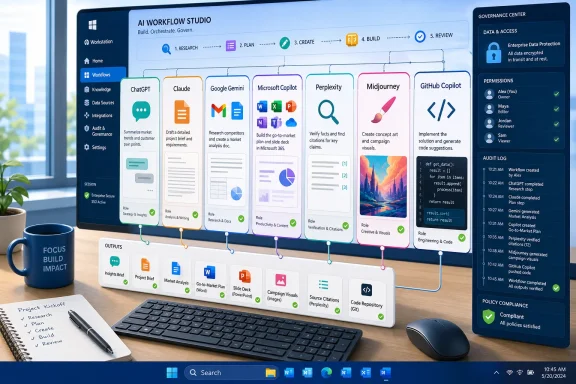 The Best AI Tool Is Now a Workflow Decision
The old consumer framing of artificial intelligence treated these services as interchangeable boxes: type a prompt, receive an answer, decide whether it sounds smart. That was a reasonable way to understand ChatGPT in late 2022 and early 2023, when the novelty was the interface itself. But the current AI market has become more specialized, more expensive, and more tightly tied to the software ecosystems people already use.Adepu’s list captures that reality more accurately than many benchmark charts do. ChatGPT is praised as a general assistant. Claude is framed as the patient analyst. Gemini belongs inside Google’s productivity world. Microsoft Copilot belongs inside Microsoft 365. Perplexity is for sourced research. Midjourney is for image creation. GitHub Copilot is for code.
That segmentation is not accidental. It reflects the way AI tools are escaping the browser tab and turning into work surfaces. The model may still matter, but the surrounding product now matters just as much: where the assistant can read, where it can write, what permissions it has, and whether its output lands in a useful place.
For WindowsForum readers, this is the practical dividing line. An AI assistant that writes a polished paragraph is interesting. An AI assistant that can summarize a Teams meeting, turn it into a project plan, draft the follow-up email, and respect enterprise retention rules is operationally significant. The favorites list is a consumer-friendly snapshot of a much larger platform battle.
ChatGPT Remains the Default Because Defaults Have Gravity
ChatGPT’s biggest advantage is not simply that it is capable. Its advantage is that it became the mental default for general-purpose AI. When people say they are “using AI,” they often mean they opened ChatGPT, pasted a mess of text into it, and asked for structure, explanation, or a first draft.That matters because general-purpose tools win enormous mindshare before specialized tools even get a chance. ChatGPT is where many users learned prompt habits, discovered what hallucinations look like, and started treating AI as a conversational coworker rather than a search box. Even when rivals outperform it in specific domains, ChatGPT benefits from familiarity.
Adepu’s description is conventional but accurate: writing, brainstorming, coding, research, and daily productivity are exactly the jobs where ChatGPT remains comfortable. It is good enough across enough categories that it often becomes the first stop. That does not mean it is always the best stop.
The danger for ChatGPT is that “good at everything” can become “best at nothing” as other tools deepen their integration. Claude can feel better for long documents. Gemini has Google’s data gravity. Copilot has Microsoft 365. Perplexity has citations as a core behavior. GitHub Copilot lives where developers type code. ChatGPT’s challenge is to remain the front door even as the rooms behind it become more specialized.
Claude Wins Trust by Slowing the Conversation Down
Claude’s reputation has been built around a different kind of confidence. It is less often described as flashy and more often described as careful. That distinction matters in professional settings, where the best answer is not always the most enthusiastic one.Adepu highlights Claude’s ability to handle long documents, produce polished writing, and maintain context across extended conversations. Those are not minor conveniences. In many knowledge-work scenarios, the hard part is not generating text; it is preserving the shape of an argument across dozens of pages, competing constraints, and ambiguous source material.
This is why Claude has become a favorite among people who edit, analyze, summarize, and reason through complex documents. Its appeal is not merely that it can ingest large amounts of text. It is that it often behaves like a tool designed for deliberation rather than speed.
That distinction is valuable for IT teams too. Policies, incident reports, procurement documents, architecture reviews, and compliance narratives are not usually solved by a quick answer. They require an assistant that can keep track of nuance without flattening everything into executive-summary mush. Claude’s strength is that it tends to make the user feel less like a prompt jockey and more like an editor working with a patient analyst.
Gemini’s Real Product Is Google’s Memory Palace
Google Gemini is often judged as a chatbot, but that undersells the real play. Gemini’s strategic value is not the blank prompt box. It is Google’s ecosystem: Gmail, Docs, Drive, Calendar, Search, Android, Chrome, and Workspace.Adepu’s praise for Gemini’s integration with Google tools gets to the heart of the matter. For users whose professional and personal information already lives in Google’s cloud, Gemini can feel less like a separate service and more like a layer across the workspace. That is the same integration logic Microsoft is pursuing with Copilot, but with Google’s own center of gravity.
The strength of this approach is obvious. AI becomes more useful when it can operate near the documents, messages, and context that define a person’s workday. The weakness is just as obvious: it binds the usefulness of the AI to the trust users and administrators place in the platform.
That makes Gemini especially interesting in mixed environments. Many Windows users live in a Microsoft desktop world while also depending heavily on Google services. They may use Windows 11, Chrome, Gmail, Google Drive, and Microsoft Office in the same day. Gemini’s success will depend on how well it can become indispensable in that hybrid reality rather than merely impressive inside Google’s own demo loop.
Microsoft Copilot Is Less a Chatbot Than a Distribution Strategy
Microsoft Copilot is the most misunderstood tool in Adepu’s list because the name now covers too many things. There is Copilot in Windows, Copilot on the web, Copilot in Edge, Copilot in Microsoft 365, Copilot Studio, Security Copilot, GitHub Copilot, and a growing family of agentic features across the Microsoft estate. The branding is unified; the user experience is not always so tidy.Still, the strategic direction is clear. Microsoft wants Copilot to become the AI layer for work, especially in organizations already standardized on Microsoft 365. Word, Excel, PowerPoint, Outlook, Teams, SharePoint, OneDrive, and Entra ID give Microsoft a distribution advantage that no standalone chatbot can easily match.
Adepu’s description focuses on drafting emails, summarizing meetings, creating presentations, analyzing spreadsheets, and supporting enterprise productivity. That is precisely where Copilot is supposed to shine. The pitch is not that it will beat every rival in a blind model comparison. The pitch is that it will appear where the work already happens.
For administrators, that is both the appeal and the headache. Copilot’s usefulness depends on permissions, identity, data hygiene, labeling, governance, and user training. If SharePoint is a junk drawer, Copilot can become a faster way to search the junk drawer. If Teams has become a sprawling archive of half-decisions and duplicated files, AI summaries may amplify confusion rather than resolve it.
This is where Microsoft’s AI future becomes an IT operations story. Copilot adoption is not just a license purchase. It is a referendum on whether an organization’s information architecture is healthy enough for AI to safely reason over it.
Perplexity Turns Search Anxiety Into a Product
Perplexity AI occupies a different psychological niche. It is not primarily loved because it writes the most elegant prose or sits inside the biggest productivity suite. It is loved because it responds to a very modern irritation: the feeling that researching anything now requires opening too many tabs and distrusting all of them.Adepu calls Perplexity a preferred research assistant for quick, source-backed answers. That is the product’s core identity. It tries to make the chain of evidence visible, which gives it a different relationship with user trust than a chatbot that simply asserts an answer in a confident tone.
This does not make Perplexity infallible. Source-backed answers can still misread sources, overstate consensus, or cite material that is weaker than it looks. But the user experience encourages verification in a way that many general chatbots historically did not. It nudges the user toward an answer with a paper trail.
For IT professionals, that matters. When researching a Windows error, a Microsoft licensing change, a security advisory, or a new hardware compatibility issue, the answer is often less important than the provenance of the answer. A tool that treats citations as first-class objects can reduce the time between “I found a claim” and “I trust this enough to act.”
Midjourney Shows Why Creative AI Is Its Own Category
Midjourney belongs on the list because image generation is not merely another checkbox in a productivity suite. It is a distinct creative workflow with its own culture, expectations, and quality bar. People use it not just to make images, but to explore visual direction.Adepu’s praise for detailed illustrations, concept art, marketing assets, and imaginative designs reflects why Midjourney still commands attention. It has become shorthand for a certain kind of AI visual polish. Even users who do not understand model architecture often recognize the aesthetic leap from crude image generation to genuinely usable concept work.
For businesses, this creates both opportunity and risk. Marketing teams can prototype campaigns faster. Independent creators can explore visual ideas without commissioning every early-stage mockup. Product teams can generate mood boards and interface concepts at a pace that would have been absurd a few years ago.
But the unresolved questions are significant. Copyright, training data, brand safety, likeness rights, disclosure, and creative labor all remain live issues. The more visually impressive these systems become, the less comfortable it is to treat them as harmless toys. Midjourney’s strength is that it makes the future of creative tooling feel immediate; its controversy is that it makes the future of creative labor feel negotiable.
GitHub Copilot Has the Clearest Return on Keystrokes
GitHub Copilot is the most practically measurable tool in the list. A writing assistant may make prose better, but “better” is subjective. A coding assistant that completes boilerplate, suggests tests, explains unfamiliar syntax, or accelerates refactoring produces a more visible productivity loop.Adepu describes GitHub Copilot as an experienced coding partner that supports multiple languages and integrates into popular editors. That description understates the deeper shift. Copilot changes the texture of programming by moving AI assistance from a separate consultation window into the act of writing code itself.
That does not eliminate the need for judgment. In fact, it increases the premium on judgment. Developers must still understand architecture, security, maintainability, dependency risk, and the difference between code that compiles and code that should exist. Copilot can produce plausible code quickly, which is useful only if someone competent is reviewing it.
For teams, the governance questions are familiar but urgent. What code can be sent to an AI service? How are suggestions audited? What happens when generated code resembles licensed material? How should junior developers learn fundamentals when autocomplete becomes unusually powerful? These are not reasons to avoid coding assistants, but they are reasons to deploy them with policy rather than vibes.
The Stack Is Beating the Super-App
The most important implication of Adepu’s roundup is that no single tool owns the whole workflow. ChatGPT may be the general assistant. Claude may be the long-form reasoning partner. Gemini may be the Google-native layer. Microsoft Copilot may be the enterprise productivity interface. Perplexity may be the research engine. Midjourney may be the visual studio. GitHub Copilot may be the developer companion.That fragmentation is not a temporary inconvenience. It is the market sorting itself around jobs rather than brands. Users are learning that the right assistant depends on the artifact they want at the end: an email, a policy memo, a cited briefing, a spreadsheet analysis, a slide deck, a logo concept, or a working function.
The subscription problem follows immediately. A power user can justify multiple tools. A company cannot casually buy every employee every AI subscription and hope the value appears. Procurement teams will increasingly ask which assistants are core infrastructure and which are optional tools for specific roles.
This will create tension between user preference and enterprise standardization. Employees may prefer Claude or ChatGPT for writing while the company pays for Microsoft 365 Copilot. Developers may want GitHub Copilot while security teams worry about code exposure. Researchers may prefer Perplexity while legal teams question source reliability. The AI stack is becoming personal before it becomes governable.
Windows Is Becoming the Place Where AI Stacks Collide
Windows users are in a peculiar position. The operating system is Microsoft’s home turf, but the AI workflows running on top of it are increasingly heterogeneous. A typical power user may have Copilot in Windows, ChatGPT in a browser tab, Claude as a writing partner, Gemini tied to Gmail, Perplexity for research, Midjourney in a creative workflow, and GitHub Copilot inside Visual Studio Code.That creates a new version of desktop sprawl. Instead of too many tray utilities and browser extensions, users now have too many assistants with overlapping capabilities and different privacy models. The question is no longer whether AI will be available on the PC. It is whether the PC can remain coherent when every major software vendor wants to insert an assistant into the workflow.
Microsoft’s obvious ambition is to make Copilot the organizing layer. But Windows history suggests users rarely accept a single vendor’s preferred workflow without modification. They mix browsers, editors, cloud drives, terminals, note apps, and communication tools. AI will be no different.
The result is that Windows may become the most important proving ground for practical AI interoperability. Users will not care which model family produced the answer if the answer helps finish the task. Administrators, however, will care very much which service processed the data, where logs are stored, and whether the assistant respects enterprise controls.
The Favorites List Is Really a Map of User Trust
Each tool in Adepu’s list asks for a different kind of trust. ChatGPT asks users to trust a generalist. Claude asks them to trust a reasoning partner with long documents. Gemini asks them to trust Google with contextual productivity. Microsoft Copilot asks organizations to trust their own Microsoft tenant. Perplexity asks users to trust a citation workflow. Midjourney asks creators to trust generative aesthetics. GitHub Copilot asks developers to trust suggestions that may land directly in production code.That is why “favorite AI tools” is a more revealing category than it first appears. Favorites are not chosen only by benchmark scores. They are chosen by comfort, habit, workflow fit, perceived reliability, and the cost of being wrong.
If ChatGPT drafts a mediocre birthday toast, the stakes are low. If Copilot summarizes a meeting incorrectly and an executive acts on it, the stakes rise. If GitHub Copilot suggests insecure code that passes a superficial review, the stakes rise again. If an AI research assistant invents or misrepresents a source in a compliance context, the damage may not be obvious until much later.
The next phase of AI adoption will therefore be less about awe and more about calibration. Users need to know when to ask, when to verify, when to constrain, and when to avoid AI entirely. The best tool is not the one that sounds most confident. It is the one whose failure modes the user understands.
The Next Upgrade Is Governance, Not Just Intelligence
The industry still markets AI improvements as model upgrades: faster, smarter, more multimodal, better at reasoning, better at code. Those gains matter. But for real organizations, the next practical upgrade is governance.That means identity-aware access, audit logs, retention controls, data-loss prevention, administrative policy, model choice, clear licensing, and user education. It also means knowing when not to connect an AI assistant to a data source simply because the integration exists. The more capable these tools become, the more consequential bad configuration becomes.
This is especially true for Microsoft 365 Copilot. Its value rises with access to organizational context, but so does its sensitivity. Many companies will discover that preparing for Copilot is really preparing their information estate for scrutiny. Overshared files, stale permissions, abandoned Teams, and poorly labeled data become AI-era liabilities.
The same principle applies outside Microsoft’s stack. Google Workspace administrators face similar questions with Gemini. Developers face them with GitHub Copilot. Researchers face them with Perplexity. Creative teams face them with Midjourney. The AI tool may be new, but the underlying discipline is old: know your data, know your users, and know what happens when convenience outruns control.
The Seven-Tool AI Stack Has Already Arrived
Adepu’s favorites list works because it mirrors how many experienced users now behave: they do not wait for one assistant to do everything. They route tasks to the tool that feels strongest for the job. That is not inefficiency. It is specialization.- ChatGPT remains the most flexible starting point for general writing, brainstorming, explanation, and everyday problem solving.
- Claude is strongest when the task involves long documents, careful editing, structured reasoning, or a need for a more measured conversational style.
- Gemini makes the most sense for users whose work already lives in Google’s apps and who want AI close to Gmail, Docs, Drive, and Search.
- Microsoft Copilot is most compelling inside Microsoft 365 environments, where identity, documents, meetings, mail, and enterprise controls are already connected.
- Perplexity is best understood as a research interface that reduces tab overload by pairing concise answers with visible source trails.
- Midjourney and GitHub Copilot show that creative and developer workflows are specialized enough to support their own AI leaders rather than being swallowed by general chatbots.
The AI market is moving from novelty to infrastructure, and that transition will reward users who think in workflows rather than logos. The favorites named in Adepu’s roundup are less a final ranking than a snapshot of a new computing layer forming around documents, code, meetings, search, and images. For Windows users and IT teams, the opportunity is enormous, but so is the need for discipline: the future belongs not to the loudest chatbot, but to the assistant that can be trusted closest to the work.
References
- Primary source: Analytics Insight
Published: 2026-06-26T09:50:24.917731
Loading…
www.analyticsinsight.net - Related coverage: techradar.com
ChatGPT’s workplace dominance is collapsing fast as Gemini and Claude rapidly steal attention from office professionals worldwide | TechRadar
Gemini and Claude are ChatGPT’s biggest challengerswww.techradar.com