
Organizations should not treat Microsoft’s incoming Intune Suite expansion as an automatic purchase event. The practical answer is: prepare a narrow pilot and an approval package now, then use Microsoft’s tenant-specific 30-day Message Center notice as the trigger for final rollout governance. Do not wait passively for CY26 Q3, but do not commit to broad licensing unless you can name the workflow the added Intune capability will improve, the team that will own it, and the criteria that will decide whether it moves beyond pilot.
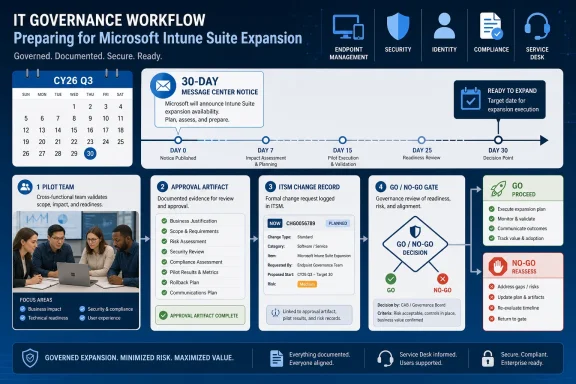
Microsoft has said the new capabilities begin rolling out in CY26 Q3 and that each tenant will receive 30 days’ notice in Message Center before availability. That is enough time to confirm a prepared decision. It is not enough time to discover the feature, assign ownership, resolve licensing, write support guidance, train help desk, and obtain security or compliance approval from scratch.
The immediate move is therefore concrete: assign a Message Center owner, create an approval artifact, define a pilot population, document go/no-go criteria, and decide which connected Microsoft 365 stakeholders must sign off before production use.
Microsoft’s latest Intune messaging is easy to misread as another roadmap update in the continuing Microsoft 365 cadence. It should be treated as more than that. When advanced endpoint-management capabilities become part of the Microsoft 365 service-change pipeline, the decision no longer belongs only to endpoint administrators. It also touches licensing, security operations, identity administration, compliance, service desk readiness, and change management.
That matters because “available in the tenant” is not the same thing as “licensed, approved, documented, supported, and safe to use.” A Message Center notice tells administrators that something is coming to their tenant. It does not, by itself, answer whether the organization should enable it, fund it, delegate it, or support it.
The most defensible posture for most Microsoft 365 customers is: prepare the pilot now, decide before rollout, and purchase only against a mapped use case. That avoids two common mistakes. One is buying because Microsoft has placed the capability into a larger suite story. The other is waiting so long that the feature becomes available before the organization has agreed who can use it and under what conditions.
For WindowsForum readers, the useful angle is not simply that Intune is being surfaced more prominently around Microsoft 365. WindowsForum’s own Microsoft 365 coverage has repeatedly shown the same pattern from the admin side: Microsoft updates often arrive as productivity or security improvements, but the real work for IT pros is deciding how those updates affect support, governance, and user communication. Earlier WindowsForum coverage of the Windows 10 Fall Creators Update highlighted Microsoft 365 security and management features as part of a broader operating-system and cloud-management story. More recent WindowsForum roundups of Microsoft 365 updates in February, April, and May 2025 likewise emphasized security, collaboration, accessibility, and productivity improvements as recurring operational themes rather than isolated feature drops.
That forum history gives this Intune Suite expansion a specific context: Windows admins are not just watching a feature list. They are watching another Microsoft 365 change that needs to be translated into tenant policy, support ownership, and rollout discipline.
A tenant owner should create a short approval artifact before the notice arrives. It does not need to be a long governance document, but it should be written down and reviewed. At minimum, it should include:
The pilot itself should be narrow. A reasonable first scope is a small group of IT-owned devices, a handful of technically capable users, and at least one service-desk representative who can observe the support impact. If the capability affects security or compliance workflows, include a security analyst or compliance reviewer in the pilot group. If it affects Windows 365 or cloud PC management, include a cloud PC administrator and a user whose daily work depends on that environment.
The pilot should not be a general Microsoft 365 redesign. It should test one defined workflow. Examples of acceptable pilot questions include:
“We will probably use it eventually” is not a business case. The licensing conversation should start with workloads, not SKUs. Endpoint teams should identify where today’s process is manual, fragile, duplicated, or dependent on tools that the organization is already trying to rationalize. Security teams should state what risk or response problem the capability is expected to address. Compliance teams should say whether the change creates new documentation or audit expectations. Procurement should confirm whether the cost model fits the users or devices that would actually benefit.
That distinction is the difference between buying a tool and buying a promise. The tool can be evaluated through a pilot. The promise usually sounds attractive but does not tell the help desk what to support on Monday morning.
WindowsForum’s recurring Microsoft 365 update coverage is useful here because it reflects the admin’s lived pattern: Microsoft announces a set of enhancements across productivity, security, collaboration, or accessibility; IT teams then have to decide which changes are relevant to their tenant and which are noise. The February 2025 WindowsForum roundup framed Microsoft 365 changes around productivity, security, and communication. The April 2025 coverage highlighted productivity and security enhancements in a cross-platform context. The May 2025 coverage emphasized collaboration, security, and accessibility. Those reports make the same point in different cycles: not every Microsoft 365 enhancement deserves the same rollout urgency, and the value depends on local use.
That is the right lens for Intune Suite. Do not ask, “Is Microsoft adding more?” Ask, “Which of these additions solves a problem we already own?”
A good pilot plan should include a small number of test users, a defined administrative group, a rollback path, and a written list of what will not be tested. The last item is underrated. Microsoft 365 rollouts tend to sprawl because each connected service suggests another possible integration. A device-management pilot can quickly become a debate about identity, data governance, security operations, and help-desk process. Those topics may matter, but they should be staged rather than allowed to expand the pilot without approval.
The supported ecosystem context matters, but it should be handled carefully. Windows 11, Windows 365, Entra, Purview, and Defender are relevant because they are part of the Microsoft 365 administrative and security environment in which many organizations operate. That does not mean every Intune change automatically alters all of those services. It means the pilot team should check whether the tested capability has dependencies, signals, policies, or operational handoffs involving those areas.
The pilot approval artifact should therefore include a stakeholder table:
This is not bureaucracy for its own sake. It is a way to stop the organization from discovering, halfway through rollout, that the wrong team owns the operational consequences.
But waiting should still be active. The wrong version of waiting is doing nothing until the Message Center notice arrives. The right version is building a decision package that can be approved or rejected quickly when Microsoft confirms tenant availability.
That package should include:
For smaller IT teams, the temptation will be to let Microsoft’s defaults or availability timing define the rollout. That may be workable for low-risk user-facing productivity changes. It is a poor habit for advanced endpoint and security workflows. Intune changes can affect devices, access-adjacent processes, support expectations, and security administration. Those areas need ownership before production use.
Message Center is also where many organizations discover how uneven their Microsoft 365 monitoring discipline really is. Some tenants have a formal process for reviewing notices, assigning owners, and tracking change impact. Others depend on a few administrators noticing the right post at the right time.
This rollout is a good reason to fix that gap. If advanced Intune capabilities are going to arrive through the Microsoft 365 service-change pipeline, Message Center needs to be treated as an operational input. The person who reads the notice should create or update a change record, attach the Microsoft notice, assign the endpoint owner, and notify the stakeholder group. The notice should also be logged with the expected availability date once Microsoft provides tenant-specific timing.
A practical operating model looks like this:
The right operational question is not, “How much will this change the entire Microsoft stack?” The right question is, “Which of our Microsoft 365 services does this pilot actually touch?”
For Windows 11, ask whether the capability changes device configuration, user experience, app delivery, support scripts, or compliance reporting.
For Windows 365, ask whether cloud PCs are in scope, whether the affected users rely on them for daily work, and whether cloud PC support teams need pilot training.
For Entra, ask whether the pilot uses groups, roles, access policies, or identity-driven assignment logic that requires review.
For Purview, ask whether any compliance documentation, data-governance review, or audit trail is required.
For Defender, ask whether the capability changes security operations, device signals, alert triage, or response procedures.
Those questions keep the review grounded. They acknowledge the connected Microsoft 365 context without overstating what Microsoft has publicly confirmed for every tenant.
That is why the pilot should include more than technically enthusiastic IT users. A better pilot group includes:
The pilot should also produce evidence. At the end, the owner should be able to answer:
A better approach is to rank use cases by operational value. If an advanced Intune capability can replace a fragile manual process, reduce avoidable tool overlap, or improve a security workflow that already has executive attention, it belongs near the top. If the value is mainly that the organization might use it someday, it belongs in the parking lot.
The approval artifact should include a simple use-case ranking table:
This table prevents the conversation from becoming a vague debate over whether the suite is “worth it.” It forces the organization to name the job.
Security teams often want stronger endpoint posture. Endpoint teams want guardrails that do not create avoidable user disruption. The right answer is not to let one team dominate the other. It is to define which decisions are security policy, which are endpoint operations, and which require joint approval.
A practical split might look like this:
This is how to keep the rollout disciplined. Include the teams that have a real stake. Do not expand the project by assumption.
That burden is familiar to WindowsForum readers. Forum coverage of Microsoft 365 updates across productivity, security, communication, accessibility, and collaboration routinely lands on the same practical issue: Microsoft ships the change, but tenant administrators absorb the operational interpretation. The WindowsForum angle is not simply “new Microsoft feature available.” It is “what does this mean for the people who have to run the tenant?”
That is why the Intune Suite decision should be documented in language non-admins can understand. Finance needs to know what may be purchased and why. Security needs to know what risk or workflow is being addressed. Help desk needs to know what users might notice. Executives need to know whether the organization is adopting a platform capability or merely testing a feature.
If those answers are missing, the tenant should not move beyond a controlled pilot. Not because the technology is necessarily flawed, but because the operating model is unfinished.
Admins should therefore prepare for uncertainty rather than demand precision Microsoft has not provided. The rollout start window is known. The tenant-specific date is not. The notice mechanism is known. Each organization’s readiness is its own responsibility.
The practical calendar is:
If the use case is real, funded, and already owned, prepare the purchase decision and pilot plan now. If the use case is plausible but unproven, prepare and run a narrow pilot when the tenant notice and availability allow it. If governance is immature, wait on broad purchase but do the planning immediately. What no organization should do is wait silently for Message Center to start the conversation.
That is the difference between a roadmap reaction and a rollout strategy. Roadmap reactions ask, “What did Microsoft announce?” Rollout strategies ask, “What will we allow into production, who owns it, what problem does it solve, and how will we know whether it worked?”
WindowsForum’s Microsoft 365 coverage has consistently been most useful when it translates Microsoft’s update cadence into admin consequences. This Intune Suite expansion should be read the same way. The headline is not just that Microsoft is adding capability. The admin question is whether the tenant is ready to govern that capability.
Use this matrix:
The long-term direction is clear enough for planning: Microsoft is continuing to make Intune part of the broader Microsoft 365 administrative experience. That may be useful for many organizations, especially those already standardized on Microsoft 365. But usefulness still has to be proven locally. The winners in this rollout will not be the tenants that click first. They will be the tenants that know, before the notice arrives, which capability they are testing, who owns it, and what evidence will justify production use.
Microsoft has said the new capabilities begin rolling out in CY26 Q3 and that each tenant will receive 30 days’ notice in Message Center before availability. That is enough time to confirm a prepared decision. It is not enough time to discover the feature, assign ownership, resolve licensing, write support guidance, train help desk, and obtain security or compliance approval from scratch.
The immediate move is therefore concrete: assign a Message Center owner, create an approval artifact, define a pilot population, document go/no-go criteria, and decide which connected Microsoft 365 stakeholders must sign off before production use.
 Microsoft Is Turning an Admin Feature Drop Into a Budget Decision
Microsoft’s latest Intune messaging is easy to misread as another roadmap update in the continuing Microsoft 365 cadence. It should be treated as more than that. When advanced endpoint-management capabilities become part of the Microsoft 365 service-change pipeline, the decision no longer belongs only to endpoint administrators. It also touches licensing, security operations, identity administration, compliance, service desk readiness, and change management.That matters because “available in the tenant” is not the same thing as “licensed, approved, documented, supported, and safe to use.” A Message Center notice tells administrators that something is coming to their tenant. It does not, by itself, answer whether the organization should enable it, fund it, delegate it, or support it.
The most defensible posture for most Microsoft 365 customers is: prepare the pilot now, decide before rollout, and purchase only against a mapped use case. That avoids two common mistakes. One is buying because Microsoft has placed the capability into a larger suite story. The other is waiting so long that the feature becomes available before the organization has agreed who can use it and under what conditions.
For WindowsForum readers, the useful angle is not simply that Intune is being surfaced more prominently around Microsoft 365. WindowsForum’s own Microsoft 365 coverage has repeatedly shown the same pattern from the admin side: Microsoft updates often arrive as productivity or security improvements, but the real work for IT pros is deciding how those updates affect support, governance, and user communication. Earlier WindowsForum coverage of the Windows 10 Fall Creators Update highlighted Microsoft 365 security and management features as part of a broader operating-system and cloud-management story. More recent WindowsForum roundups of Microsoft 365 updates in February, April, and May 2025 likewise emphasized security, collaboration, accessibility, and productivity improvements as recurring operational themes rather than isolated feature drops.
That forum history gives this Intune Suite expansion a specific context: Windows admins are not just watching a feature list. They are watching another Microsoft 365 change that needs to be translated into tenant policy, support ownership, and rollout discipline.
The Concrete Move Is to Build the Pilot Before the Message Center Clock Starts
The immediate action is straightforward: assign ownership, inventory licensing exposure, define a limited pilot population, and decide what “go” and “no-go” will mean before Microsoft’s tenant-specific notice appears. Microsoft’s 30-day notice should be used for final validation, not first discovery.A tenant owner should create a short approval artifact before the notice arrives. It does not need to be a long governance document, but it should be written down and reviewed. At minimum, it should include:
- The specific Intune Suite capability or capabilities being evaluated.
- The business or operational problem the pilot is meant to address.
- The pilot owner from endpoint management.
- The required reviewers from security, identity, compliance, service desk, and procurement.
- The pilot user and device scope.
- The licensing assumption being tested.
- The support process for pilot users.
- The rollback or stop condition.
- The decision criteria for expanding, pausing, or rejecting production rollout.
The pilot itself should be narrow. A reasonable first scope is a small group of IT-owned devices, a handful of technically capable users, and at least one service-desk representative who can observe the support impact. If the capability affects security or compliance workflows, include a security analyst or compliance reviewer in the pilot group. If it affects Windows 365 or cloud PC management, include a cloud PC administrator and a user whose daily work depends on that environment.
The pilot should not be a general Microsoft 365 redesign. It should test one defined workflow. Examples of acceptable pilot questions include:
- Does this capability reduce a known manual endpoint-management task?
- Does it improve an existing security or device-management workflow without creating unclear ownership?
- Can the service desk identify, explain, and triage user-facing effects?
- Can administrators document the change well enough for audit or internal review?
- Does the licensing model make sense for the population that would actually use it?
Prepare a Purchase Decision Only If the Use Case Already Has a Name
Some organizations should move faster than others. If endpoint, identity, and security teams have already identified a real need that maps cleanly to an advanced Intune capability, then preparing a purchase decision before tenant availability may be reasonable. The key word is “preparing.” The article’s recommendation is not to buy reflexively. It is to have the purchasing path ready if the pilot and governance review support it.“We will probably use it eventually” is not a business case. The licensing conversation should start with workloads, not SKUs. Endpoint teams should identify where today’s process is manual, fragile, duplicated, or dependent on tools that the organization is already trying to rationalize. Security teams should state what risk or response problem the capability is expected to address. Compliance teams should say whether the change creates new documentation or audit expectations. Procurement should confirm whether the cost model fits the users or devices that would actually benefit.
That distinction is the difference between buying a tool and buying a promise. The tool can be evaluated through a pilot. The promise usually sounds attractive but does not tell the help desk what to support on Monday morning.
WindowsForum’s recurring Microsoft 365 update coverage is useful here because it reflects the admin’s lived pattern: Microsoft announces a set of enhancements across productivity, security, collaboration, or accessibility; IT teams then have to decide which changes are relevant to their tenant and which are noise. The February 2025 WindowsForum roundup framed Microsoft 365 changes around productivity, security, and communication. The April 2025 coverage highlighted productivity and security enhancements in a cross-platform context. The May 2025 coverage emphasized collaboration, security, and accessibility. Those reports make the same point in different cycles: not every Microsoft 365 enhancement deserves the same rollout urgency, and the value depends on local use.
That is the right lens for Intune Suite. Do not ask, “Is Microsoft adding more?” Ask, “Which of these additions solves a problem we already own?”
Pilot Now If You Need Evidence More Than Enthusiasm
For most tenants, the strongest answer is pilot preparation rather than purchase deferral. Waiting for CY26 Q3 may feel conservative, but passive waiting can create an avoidable scramble. The 30-day Message Center notice is useful only if the organization already knows how it will evaluate the notice.A good pilot plan should include a small number of test users, a defined administrative group, a rollback path, and a written list of what will not be tested. The last item is underrated. Microsoft 365 rollouts tend to sprawl because each connected service suggests another possible integration. A device-management pilot can quickly become a debate about identity, data governance, security operations, and help-desk process. Those topics may matter, but they should be staged rather than allowed to expand the pilot without approval.
The supported ecosystem context matters, but it should be handled carefully. Windows 11, Windows 365, Entra, Purview, and Defender are relevant because they are part of the Microsoft 365 administrative and security environment in which many organizations operate. That does not mean every Intune change automatically alters all of those services. It means the pilot team should check whether the tested capability has dependencies, signals, policies, or operational handoffs involving those areas.
The pilot approval artifact should therefore include a stakeholder table:
| Area | Named reviewer | Review question |
|---|---|---|
| Endpoint management | Intune or endpoint lead | What policy, device group, or workflow is being tested? |
| Security operations | SOC or Defender owner | Does the pilot affect alerting, response, or device-risk handling? |
| Identity | Entra administrator | Does the pilot interact with access, groups, roles, or conditional controls? |
| Compliance or governance | Purview/compliance owner | Is documentation, retention, audit, or data-handling review required? |
| Service desk | Support lead | What user-visible behavior could generate tickets? |
| Procurement/licensing | Licensing owner | Who needs the entitlement and how will cost be allocated? |
| Change management | CAB or tenant change owner | What approval is required before production rollout? |
Wait on Broad Purchase If Governance Is the Real Blocker
There is a legitimate case for waiting on broad purchase. If the organization has unresolved Microsoft 365 licensing questions, weak change-management discipline, or a history of enabling new admin features without ownership, then purchasing early may simply convert uncertainty into spend.But waiting should still be active. The wrong version of waiting is doing nothing until the Message Center notice arrives. The right version is building a decision package that can be approved or rejected quickly when Microsoft confirms tenant availability.
That package should include:
- A named executive or IT leadership sponsor.
- The technical pilot owner.
- The affected admin roles.
- The intended pilot scope.
- The excluded scope.
- A licensing estimate or licensing question list.
- The help-desk intake path.
- The communications plan for pilot users.
- The security and compliance review requirements.
- The production expansion criteria.
- The reason the organization would say “no.”
For smaller IT teams, the temptation will be to let Microsoft’s defaults or availability timing define the rollout. That may be workable for low-risk user-facing productivity changes. It is a poor habit for advanced endpoint and security workflows. Intune changes can affect devices, access-adjacent processes, support expectations, and security administration. Those areas need ownership before production use.
The 30-Day Notice Is a Warning Label, Not a Comfort Blanket
Microsoft’s promise of a 30-day Message Center notice is useful, but it should not be mistaken for a complete enterprise-planning window. Thirty days is enough time to brief stakeholders, confirm pilot timing, and prepare communications if the plan already exists. It is not enough time to resolve a licensing dispute, design governance, train support staff, and negotiate production ownership from scratch.Message Center is also where many organizations discover how uneven their Microsoft 365 monitoring discipline really is. Some tenants have a formal process for reviewing notices, assigning owners, and tracking change impact. Others depend on a few administrators noticing the right post at the right time.
This rollout is a good reason to fix that gap. If advanced Intune capabilities are going to arrive through the Microsoft 365 service-change pipeline, Message Center needs to be treated as an operational input. The person who reads the notice should create or update a change record, attach the Microsoft notice, assign the endpoint owner, and notify the stakeholder group. The notice should also be logged with the expected availability date once Microsoft provides tenant-specific timing.
A practical operating model looks like this:
- Before the notice: create the pilot plan, stakeholder list, and approval artifact.
- When the notice appears: open a tracked change record and attach the Message Center details.
- Within five business days: confirm whether the planned pilot still matches the announced tenant timing and capability details.
- Before availability: approve, pause, or reject pilot activation.
- After availability: enable only for the approved pilot scope.
- After pilot completion: document the outcome and make a separate production decision.
The Supported Ecosystem Context Should Shape the Review, Not Inflate the Claims
The verified public framing connects this Intune Suite expansion to the broader Microsoft 365 environment, including Windows 11, Windows 365, Entra, Purview, and Defender. That is enough to justify a cross-functional review. It is not enough to assume a specific downstream effect in every tenant.The right operational question is not, “How much will this change the entire Microsoft stack?” The right question is, “Which of our Microsoft 365 services does this pilot actually touch?”
For Windows 11, ask whether the capability changes device configuration, user experience, app delivery, support scripts, or compliance reporting.
For Windows 365, ask whether cloud PCs are in scope, whether the affected users rely on them for daily work, and whether cloud PC support teams need pilot training.
For Entra, ask whether the pilot uses groups, roles, access policies, or identity-driven assignment logic that requires review.
For Purview, ask whether any compliance documentation, data-governance review, or audit trail is required.
For Defender, ask whether the capability changes security operations, device signals, alert triage, or response procedures.
Those questions keep the review grounded. They acknowledge the connected Microsoft 365 context without overstating what Microsoft has publicly confirmed for every tenant.
Windows Admins Should Expect the Pilot to Include Support and Security, Not Just IT Power Users
For Windows administrators, the shift is important because Windows 11 and Windows 365 are visible to users in ways that back-end admin decisions are not. Even if a capability is technically sound, the rollout can fail if the service desk cannot explain what changed or if security teams do not know how to interpret the resulting workflow.That is why the pilot should include more than technically enthusiastic IT users. A better pilot group includes:
- Two to five endpoint administrators who will configure and monitor the capability.
- A small number of IT users on Windows 11 devices.
- At least one Windows 365 or cloud PC user if that environment is in scope.
- One service-desk representative who can validate ticket language.
- One security reviewer if Defender or security operations are affected.
- One identity reviewer if Entra groups, roles, or access logic are involved.
- One compliance reviewer if Purview, audit, or governance questions are in scope.
The pilot should also produce evidence. At the end, the owner should be able to answer:
- What changed for administrators?
- What changed for users?
- What tickets or support questions appeared?
- What documentation was missing?
- What security or compliance review was required?
- What licensing assumption was confirmed or disproved?
- What would need to be true before production expansion?
The Licensing Trap Is Evaluating the Suite Before Defining the Job
The classic enterprise software trap is buying a suite because the bundled value looks obvious, then discovering that only one team is ready to use it. The inverse trap is refusing to buy because the full suite is not immediately justified, even though one or two capabilities could solve an expensive or painful operational problem. Both mistakes come from evaluating the bundle before evaluating the work.A better approach is to rank use cases by operational value. If an advanced Intune capability can replace a fragile manual process, reduce avoidable tool overlap, or improve a security workflow that already has executive attention, it belongs near the top. If the value is mainly that the organization might use it someday, it belongs in the parking lot.
The approval artifact should include a simple use-case ranking table:
| Use case | Current pain | Owner | Pilot fit | Licensing confidence | Decision |
|---|---|---|---|---|---|
| Named workflow 1 | Manual, risky, costly, or slow process | Team/person | High/medium/low | Known/unknown | Pilot, defer, or reject |
| Named workflow 2 | Specific operational issue | Team/person | High/medium/low | Known/unknown | Pilot, defer, or reject |
| Future possibility | No current owner | None | Low | Unknown | Parking lot |
Security Teams Get More Shared Accountability, Not a Blank Check
Because Defender and Purview are part of the relevant Microsoft 365 environment, security and compliance teams should not treat this as an endpoint-only change. They should review whether the pilot affects security workflows, compliance documentation, or administrative responsibility. That does not mean security owns every Intune decision. It means the boundaries should be written down.Security teams often want stronger endpoint posture. Endpoint teams want guardrails that do not create avoidable user disruption. The right answer is not to let one team dominate the other. It is to define which decisions are security policy, which are endpoint operations, and which require joint approval.
A practical split might look like this:
- Security policy decisions: risk tolerance, required posture, response expectations.
- Endpoint operations decisions: configuration method, assignment groups, testing, rollback.
- Joint decisions: production scope, exceptions, monitoring, support escalation, user impact.
This is how to keep the rollout disciplined. Include the teams that have a real stake. Do not expand the project by assumption.
The Admin Center Is Becoming a Business Process Trigger
One reason Microsoft 365 changes generate strong reactions among administrators is that they often arrive as interface or service changes but behave like business process changes. A new capability appears in an admin surface, a Message Center post announces timing, and the technical team is suddenly expected to know whether the organization has licensed, approved, documented, and trained for it.That burden is familiar to WindowsForum readers. Forum coverage of Microsoft 365 updates across productivity, security, communication, accessibility, and collaboration routinely lands on the same practical issue: Microsoft ships the change, but tenant administrators absorb the operational interpretation. The WindowsForum angle is not simply “new Microsoft feature available.” It is “what does this mean for the people who have to run the tenant?”
That is why the Intune Suite decision should be documented in language non-admins can understand. Finance needs to know what may be purchased and why. Security needs to know what risk or workflow is being addressed. Help desk needs to know what users might notice. Executives need to know whether the organization is adopting a platform capability or merely testing a feature.
If those answers are missing, the tenant should not move beyond a controlled pilot. Not because the technology is necessarily flawed, but because the operating model is unfinished.
The Practical Calendar Starts Before CY26 Q3
The calendar is the sharpest part of this story, but it should not be overstated. Microsoft has identified CY26 Q3 as the rollout start window and has said tenants will receive 30 days’ Message Center notice before availability. That does not establish a universal tenant date. It also does not prove that every tenant will receive the change at the same moment.Admins should therefore prepare for uncertainty rather than demand precision Microsoft has not provided. The rollout start window is known. The tenant-specific date is not. The notice mechanism is known. Each organization’s readiness is its own responsibility.
The practical calendar is:
- Now: assign Message Center monitoring ownership and create the pilot approval artifact.
- Before the tenant notice: identify the pilot group, required reviewers, licensing questions, and support plan.
- When the 30-day notice appears: open a tracked change record, confirm tenant-specific timing, and route the notice to the stakeholder group.
- During the notice window: approve, adjust, or pause the pilot based on the exact notice details.
- After availability: enable only for the approved pilot scope.
- After the pilot: document evidence and make a separate production decision.
The WindowsForum Verdict Is Conditional, Not Ambiguous
The answer to “buy now, pilot now, or wait for CY26 Q3?” is not a single universal instruction. Microsoft has not provided enough tenant-specific public detail to justify that. But the decision is not unknowable. It turns on whether the organization already has a named use case, a licensing owner, and a governance path.If the use case is real, funded, and already owned, prepare the purchase decision and pilot plan now. If the use case is plausible but unproven, prepare and run a narrow pilot when the tenant notice and availability allow it. If governance is immature, wait on broad purchase but do the planning immediately. What no organization should do is wait silently for Message Center to start the conversation.
That is the difference between a roadmap reaction and a rollout strategy. Roadmap reactions ask, “What did Microsoft announce?” Rollout strategies ask, “What will we allow into production, who owns it, what problem does it solve, and how will we know whether it worked?”
WindowsForum’s Microsoft 365 coverage has consistently been most useful when it translates Microsoft’s update cadence into admin consequences. This Intune Suite expansion should be read the same way. The headline is not just that Microsoft is adding capability. The admin question is whether the tenant is ready to govern that capability.
The Decision Matrix Before the Notice Arrives
Treat CY26 Q3 as a readiness deadline rather than a purchase deadline. The coming Message Center notice should confirm timing and tenant availability. It should not trigger panic.Use this matrix:
| Tenant condition | Recommended action |
|---|---|
| Named use case, clear owner, likely funding | Prepare purchase decision and pilot plan now; do not expand beyond approved scope without evidence. |
| Plausible value, unclear proof | Build a narrow pilot plan and use the 30-day notice to validate timing and scope. |
| Weak governance or unresolved licensing | Wait on broad purchase, but create the approval artifact and stakeholder path now. |
| No named use case | Do not buy broadly; track the capability and revisit when a real workflow need appears. |
| Message Center monitoring is informal | Assign a named owner and require a tracked change record for the notice. |
Frequently Asked Questions
Should organizations buy the expanded Intune Suite capabilities now?
Not automatically. Prepare the purchasing path only if there is a named use case, a licensing owner, and a clear operational problem the capability is expected to solve. If the organization cannot name the workflow, owner, pilot group, and success criteria, broad purchase should wait.Should admins wait for CY26 Q3 before doing anything?
No. Waiting on purchase can be reasonable, but waiting on planning is not. The organization should assign Message Center ownership, create a pilot approval artifact, identify stakeholders, and document decision criteria before the tenant-specific notice arrives.What should the 30-day Message Center notice be used for?
Use it to confirm tenant-specific timing, open or update a tracked change record, route the notice to the right owners, finalize pilot timing, and approve or pause activation. Do not rely on that 30-day window to build governance from scratch.Who should monitor Message Center for this rollout?
A named Microsoft 365 service owner, tenant change manager, or designated admin should monitor Message Center. That person should route relevant notices to endpoint management, security, identity, compliance, procurement, service desk, and change-management stakeholders. Monitoring should be tied to a ticket or change record so the notice is tracked.What should the pilot scope include?
Start small. Include IT-owned Windows 11 devices, a few technically capable users, the endpoint administrators who will operate the feature, and a service-desk representative. Add a Windows 365 user if cloud PCs are in scope. Add security, identity, or compliance reviewers only where the tested capability actually affects Defender, Entra, Purview, or related workflows.What should be documented before production rollout?
Document the tested capability, pilot population, admin roles, support process, licensing assumption, rollback path, user impact, security or compliance review, and go/no-go criteria. Also document what is out of scope for the first phase.What are good go/no-go criteria?
Good criteria include whether the capability solves the named workflow problem, whether licensing is understood, whether support impact is acceptable, whether security and compliance reviewers approve, whether rollback is practical, and whether administrators can operate the feature without unclear ownership.How should WindowsForum readers interpret this Intune Suite expansion?
As another Microsoft 365 change that needs tenant-level interpretation. WindowsForum’s prior Microsoft 365 coverage has repeatedly shown that Microsoft updates are not just feature announcements; they become support, governance, licensing, and communication tasks for admins. The right response is not hype or delay. It is controlled preparation.References
- Primary source: techcommunity.microsoft.com
Microsoft 365 adds advanced Microsoft Intune solutions at scale - Microsoft Intune Blog
Microsoft 365 extends advanced security and AI-powered endpoint management to more customers   techcommunity.microsoft.com
- Independent coverage: microsoft.com
Microsoft 365 Roadmap | Microsoft 365
The Microsoft 365 Roadmap lists updates that are currently planned for applicable subscribers. Check here for more information on the status of new features and updates.www.microsoft.com
- Primary source: WindowsForum
Microsoft 365 security and management features available in Windows 10 Fall Creators Update | Windows Forum
Last week, we shared the Windows 10 Fall Creators Update has begun rolling out to customers and we highlighted some of our favorite features for people who...windowsforum.com
