

Samsung’s Galaxy S26 Ultra is being singled out in a new BGR roundup as one of the best Android phones for bright sunlight, thanks to its 6.9-inch OLED display, 2,600-nit peak-brightness rating, and anti-glare coating that improves outdoor legibility. The interesting part is not that Samsung has built another expensive slab with a very bright panel. It is that the phone industry’s display race is moving away from raw brightness numbers and toward a more practical question: can you actually read the thing when the real world gets in the way?
That sounds obvious, but it is a shift worth taking seriously. For years, phone makers have treated display quality as a spec-sheet contest: higher refresh rates, higher peak brightness, higher resolutions, thinner bezels, and enough HDR branding to fill a Best Buy placard. Sunlight visibility cuts through that theater. It asks whether a device still works when you are walking across a parking lot, checking a boarding pass at noon, photographing a job site, or approving a login prompt outside an office building.
The Galaxy S26 Ultra’s headline figure, according to BGR’s summary, is 2,600 nits of peak brightness. That is a big number, and it matters. OLED panels have spent the past decade improving from beautiful-but-fragile indoor displays into everyday, all-weather computing surfaces, and high peak luminance is part of that transition.
But “peak brightness” has always been an slippery metric. It often describes what a small portion of the screen can hit under particular test conditions, not necessarily what the entire display can sustain while you are scrolling maps or typing a message in August heat. BGR’s more useful observation is that the S26 Ultra reportedly holds high brightness longer than some rivals, which is the part that matters after the first few seconds outside.
The more important feature may be the less glamorous one: the anti-glare coating. A phone does not merely compete with sunlight by blasting more light back at your eyes. It also competes by reducing reflections, improving contrast, and keeping black areas from turning into a mirror. Once a screen becomes bright enough, glare becomes the limiting factor.
That is why Samsung’s current Ultra strategy is more interesting than a normal annual spec bump. The company is trying to make the display perform better in the hostile conditions where a phone is most likely to be used one-handed, briefly, and under pressure. The best screen is not always the one that looks most vivid in a review studio. Sometimes it is the one that lets you read a two-factor code before it expires.
Phones are now confronting the same tradeoff. As flagships become cameras, wallets, identity devices, car keys, boarding passes, and emergency tools, outdoor readability is no longer a luxury. It is core functionality.
Samsung’s Ultra line has been particularly aggressive here. The company has leaned into anti-reflective glass on recent models, and the S26 Ultra appears to continue that philosophy while adding a privacy-display layer. That combination is ambitious because it asks one panel to solve two different problems: reduce environmental reflection and reduce off-angle visibility to other people.
Those goals can conflict. A display optimized for wide, easy viewing is not the same as one designed to hide content from the person sitting next to you. A display designed to scatter less ambient light may not behave identically when additional privacy layers or pixel structures are introduced. The result is a more complicated screen, not simply a brighter one.
That complication is why the BGR recommendation should be read as more than buying advice. It is a snapshot of where phone hardware is going: toward panels that are tuned for circumstances, not just specifications. The display is becoming adaptive in the same way cameras and processors already are.
Privacy Display is aimed at a real problem. People use phones in trains, airports, cafes, hospitals, offices, and classrooms. The more sensitive the content on phones becomes, the more useful it is to limit what someone can see from the side. Banking apps, work chats, health portals, authentication prompts, and password managers all benefit from fewer wandering eyes.
Yet privacy filters have always carried tradeoffs. Anyone who has used an aftermarket privacy screen protector knows the penalty: reduced brightness, narrower viewing angles, altered color, and sometimes eyestrain. Samsung’s integrated approach should be more elegant than a plastic film slapped on top of a premium OLED panel, but physics still gets a vote.
That is why the instruction to disable Privacy Display for maximum outdoor visibility matters. It turns a supposedly seamless flagship feature into a user decision. Do you want maximum readability, or do you want maximum privacy? In many situations the answer will be obvious, but the need to choose undercuts the idea that premium hardware simply solves everything at once.
For IT departments, that choice is not theoretical. A corporate phone used by a field technician, health worker, sales rep, or executive may need both outdoor readability and privacy. If one feature compromises the other, policy guidance and user education become part of the deployment plan.
The problem for Samsung is that raw flagship performance has become less exciting. Most premium phones are fast enough for messaging, browsing, navigation, media, authentication, and productivity apps. Even gaming and multitasking are no longer exclusive reasons to buy the most expensive model.
That makes display usability more strategically important. It is one of the few areas where a high-end device can still feel meaningfully better every day. A brighter, less reflective screen is not a benchmark victory; it is a repeated moment of relief.
There is also a subtle camera angle here. Outdoor visibility affects photography more than people admit. The best camera system in the world is harder to use if the viewfinder washes out in daylight. A screen that remains readable outdoors improves framing, exposure judgment, and the simple act of deciding whether the photo you just took is worth keeping.
That is where Samsung’s argument becomes strongest. The S26 Ultra is not merely selling a better panel for reading email. It is selling a better interface for everything the phone does.
Windows users know this from laptops and tablets. A notebook with excellent indoor color reproduction can become nearly useless outdoors. A tablet used for inventory, field service, education, or point-of-sale work may fail not because the software is bad but because the display cannot survive the environment.
That is why this Android roundup belongs in a broader conversation about client devices. The modern endpoint is not just a PC on a desk. It is a fleet of phones, tablets, convertibles, handheld scanners, and laptops, all expected to authenticate users, access cloud apps, handle sensitive data, and function wherever work happens.
For sysadmins, procurement teams, and security-minded users, outdoor readability is a deployment variable. If employees cannot reliably read prompts in the field, they may delay security approvals, disable protections, take screenshots, move data to personal devices, or fall back to paper. Bad screens create bad workflows, and bad workflows create risk.
The consumer phone market often discovers these problems first because it moves faster and sells in higher volume. Then enterprise hardware follows. Anti-glare, high-brightness, adaptive displays may start as flagship-phone marketing, but they are also previews of what users will expect from every mobile endpoint.
When every flagship is fast, every flagship has multiple cameras, and every flagship has a big OLED panel, the differences become experiential. Which device is easiest to use outside? Which one remains readable without torching the battery? Which one handles reflections instead of merely overpowering them? Which one lets you see your content without letting everyone else see it too?
This is where the Android ecosystem’s diversity matters. Some vendors chase extreme brightness ratings. Others emphasize eye comfort, PWM dimming, color accuracy, or gaming refresh rates. Samsung’s S26 Ultra appears to be staking out a position around anti-glare visibility and privacy, even if that pairing introduces compromises.
That makes buying advice more complicated than simply naming the brightest display. A phone can have a higher peak-brightness rating and still be worse outdoors if reflections are severe. Another can look less spectacular in a showroom but be more usable on a sidewalk. The best sunlight display is a system-level result, not a single number.
The market is gradually learning that lesson. Reviewers are testing sustained brightness, reflectance, viewing angles, dimming behavior, and real-world legibility. Consumers are learning to distrust a lone “nits” figure. That is healthy skepticism, and phone makers have earned it.
There are several variables that matter. Auto-brightness behavior can differ from manual brightness. Sustained luminance can drop as the panel heats up. Privacy features can change viewing-angle performance. Screen protectors can ruin anti-reflective benefits. Sunglasses, especially polarized lenses, can alter what the user sees.
That last point is easy to miss. Outdoor readability is not just about the phone. It is about the phone, the user, the angle of light, the content on screen, battery state, temperature, and accessories. A glossy third-party tempered-glass protector can undo part of what Samsung engineered into the device.
The same caution applies to pricing. A $1,300 phone with superior outdoor visibility may be a rational purchase for a power user, a creator, or a field worker. It is harder to justify if the feature rarely matters in daily use. Display excellence is valuable, but only when matched to real behavior.
This is where the Android flagship market becomes both impressive and absurd. The engineering is genuinely good. The prices are genuinely high. The buyer has to decide whether the difference between “readable” and “excellent outdoors” is worth hundreds of dollars.
A Windows laptop may still be the primary productivity machine, but the phone is often the primary identity device. It approves sign-ins, receives security prompts, stores credentials, opens documents, joins calls, scans QR codes, and bridges the gap between desk work and everywhere else. If the phone is unreadable outdoors, the user’s access layer becomes unreliable.
That matters for hybrid work and field work in particular. A technician using a Windows laptop in a vehicle may still depend on a phone for hotspot access, MFA approval, documentation photos, or Teams coordination. A bad display can slow down the entire workflow, even if the PC itself is fine.
It also matters for support. Help desks often troubleshoot “app problems” that are really device-context problems. The user says they cannot complete a login, read a code, approve a prompt, or scan an asset tag. The root cause may be glare, brightness throttling, screen damage, or a privacy setting the user forgot they enabled.
This is why hardware details that sound like consumer fluff can become operational details. A better display does not merely make Netflix look nicer. It can reduce friction in authentication, communication, navigation, and documentation.
That is why sunlight readability matters so much. In bright conditions, users do not patiently study their phones. They squint, tilt, shade the screen with a hand, crank brightness, move to shadow, or give up. Every extra gesture adds friction, and every friction point creates room for mistakes.
This matters most when the content is security-sensitive. A user approving a login prompt needs to see the app name, location, time, and context clearly. A user reading a warning needs to distinguish it from a routine notification. A user checking directions while walking should not have to fight reflections to avoid missing a turn.
The S26 Ultra’s anti-glare approach is therefore more than a premium-display flourish. It improves the odds that the phone can communicate clearly in messy conditions. That is a human-factors win, not just a hardware win.
But the Privacy Display feature complicates the trust equation. If privacy mode dims or changes the screen in ways that users do not understand, they may misread the display or assume something is wrong. Samsung needs the feature to feel predictable. A privacy system that users disable because it gets in the way is not much of a privacy system.
That distinction should shape how people read BGR’s recommendation. The S26 Ultra may be one of the strongest Android phones for sunlight visibility, but it is also one of the most expensive Android phones on the market. A buyer should know whether they are paying for a capability they will actually use.
There is also a durability and accessory question. If the anti-glare coating is central to the phone’s value, then covering it with the wrong screen protector is self-sabotage. Buyers who habitually install cheap glossy protectors may not experience the display Samsung intended.
For organizations, the procurement question is even sharper. A fleet buyer should not simply choose the brightest flagship. They should test devices under realistic field conditions, with the cases and protectors employees will actually use, running the apps employees actually need. That is the difference between buying a spec and buying a tool.
The S26 Ultra’s display may be excellent, but excellence is contextual. A screen built for sunlight is most valuable when sunlight is part of the job.
That sounds obvious, but it is a shift worth taking seriously. For years, phone makers have treated display quality as a spec-sheet contest: higher refresh rates, higher peak brightness, higher resolutions, thinner bezels, and enough HDR branding to fill a Best Buy placard. Sunlight visibility cuts through that theater. It asks whether a device still works when you are walking across a parking lot, checking a boarding pass at noon, photographing a job site, or approving a login prompt outside an office building.
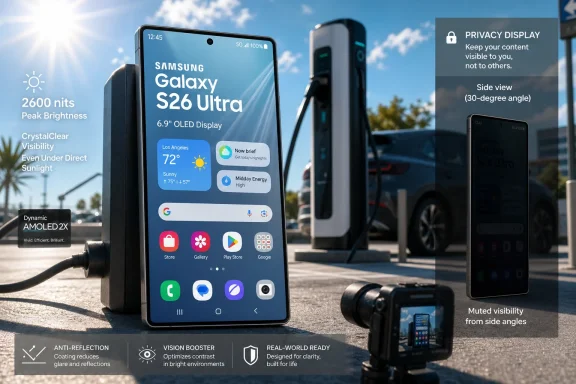 Samsung’s Brightness Claim Is Only Half the Story
The Galaxy S26 Ultra’s headline figure, according to BGR’s summary, is 2,600 nits of peak brightness. That is a big number, and it matters. OLED panels have spent the past decade improving from beautiful-but-fragile indoor displays into everyday, all-weather computing surfaces, and high peak luminance is part of that transition.But “peak brightness” has always been an slippery metric. It often describes what a small portion of the screen can hit under particular test conditions, not necessarily what the entire display can sustain while you are scrolling maps or typing a message in August heat. BGR’s more useful observation is that the S26 Ultra reportedly holds high brightness longer than some rivals, which is the part that matters after the first few seconds outside.
The more important feature may be the less glamorous one: the anti-glare coating. A phone does not merely compete with sunlight by blasting more light back at your eyes. It also competes by reducing reflections, improving contrast, and keeping black areas from turning into a mirror. Once a screen becomes bright enough, glare becomes the limiting factor.
That is why Samsung’s current Ultra strategy is more interesting than a normal annual spec bump. The company is trying to make the display perform better in the hostile conditions where a phone is most likely to be used one-handed, briefly, and under pressure. The best screen is not always the one that looks most vivid in a review studio. Sometimes it is the one that lets you read a two-factor code before it expires.
The Anti-Glare Race Has Become a Usability Race
Anti-reflective coatings are not new, but they are becoming central to the premium-phone pitch. Laptop buyers have understood this for years. A glossy display can look spectacular indoors and become maddening near a window; a matte or anti-reflective treatment can look less theatrical but make the machine more usable in more places.Phones are now confronting the same tradeoff. As flagships become cameras, wallets, identity devices, car keys, boarding passes, and emergency tools, outdoor readability is no longer a luxury. It is core functionality.
Samsung’s Ultra line has been particularly aggressive here. The company has leaned into anti-reflective glass on recent models, and the S26 Ultra appears to continue that philosophy while adding a privacy-display layer. That combination is ambitious because it asks one panel to solve two different problems: reduce environmental reflection and reduce off-angle visibility to other people.
Those goals can conflict. A display optimized for wide, easy viewing is not the same as one designed to hide content from the person sitting next to you. A display designed to scatter less ambient light may not behave identically when additional privacy layers or pixel structures are introduced. The result is a more complicated screen, not simply a brighter one.
That complication is why the BGR recommendation should be read as more than buying advice. It is a snapshot of where phone hardware is going: toward panels that are tuned for circumstances, not just specifications. The display is becoming adaptive in the same way cameras and processors already are.
Privacy Display Is the Feature That Makes the S26 Ultra More Complicated
BGR notes that Samsung’s Privacy Display feature has nothing to do with outdoor visibility and may need to be disabled for the best bright-light experience. That caveat is small, but it is revealing. It suggests that the S26 Ultra’s display story is not one clean victory lap but a balancing act.Privacy Display is aimed at a real problem. People use phones in trains, airports, cafes, hospitals, offices, and classrooms. The more sensitive the content on phones becomes, the more useful it is to limit what someone can see from the side. Banking apps, work chats, health portals, authentication prompts, and password managers all benefit from fewer wandering eyes.
Yet privacy filters have always carried tradeoffs. Anyone who has used an aftermarket privacy screen protector knows the penalty: reduced brightness, narrower viewing angles, altered color, and sometimes eyestrain. Samsung’s integrated approach should be more elegant than a plastic film slapped on top of a premium OLED panel, but physics still gets a vote.
That is why the instruction to disable Privacy Display for maximum outdoor visibility matters. It turns a supposedly seamless flagship feature into a user decision. Do you want maximum readability, or do you want maximum privacy? In many situations the answer will be obvious, but the need to choose undercuts the idea that premium hardware simply solves everything at once.
For IT departments, that choice is not theoretical. A corporate phone used by a field technician, health worker, sales rep, or executive may need both outdoor readability and privacy. If one feature compromises the other, policy guidance and user education become part of the deployment plan.
The Spec Sheet Still Serves the Old Flagship Ritual
Beyond the screen, the S26 Ultra reads like a familiar Samsung flagship: Qualcomm’s Snapdragon 8 Elite Gen 5 for Galaxy, up to 16GB of RAM, a 5,000mAh battery, 45W wired charging, and a quad-camera system. The base price cited by BGR is $1,300, with discounts often bringing it down by a couple hundred dollars. In other words, this is still a maximalist device for people willing to pay for the top shelf.The problem for Samsung is that raw flagship performance has become less exciting. Most premium phones are fast enough for messaging, browsing, navigation, media, authentication, and productivity apps. Even gaming and multitasking are no longer exclusive reasons to buy the most expensive model.
That makes display usability more strategically important. It is one of the few areas where a high-end device can still feel meaningfully better every day. A brighter, less reflective screen is not a benchmark victory; it is a repeated moment of relief.
There is also a subtle camera angle here. Outdoor visibility affects photography more than people admit. The best camera system in the world is harder to use if the viewfinder washes out in daylight. A screen that remains readable outdoors improves framing, exposure judgment, and the simple act of deciding whether the photo you just took is worth keeping.
That is where Samsung’s argument becomes strongest. The S26 Ultra is not merely selling a better panel for reading email. It is selling a better interface for everything the phone does.
Android’s Sunlight Problem Was Never Just About Android
It is tempting to frame this as an Android-versus-iPhone contest, especially because premium phone comparisons inevitably collapse into that binary. But sunlight readability is a broader mobile-computing issue. Every portable screen lives at the mercy of ambient light, heat, battery constraints, and human vision.Windows users know this from laptops and tablets. A notebook with excellent indoor color reproduction can become nearly useless outdoors. A tablet used for inventory, field service, education, or point-of-sale work may fail not because the software is bad but because the display cannot survive the environment.
That is why this Android roundup belongs in a broader conversation about client devices. The modern endpoint is not just a PC on a desk. It is a fleet of phones, tablets, convertibles, handheld scanners, and laptops, all expected to authenticate users, access cloud apps, handle sensitive data, and function wherever work happens.
For sysadmins, procurement teams, and security-minded users, outdoor readability is a deployment variable. If employees cannot reliably read prompts in the field, they may delay security approvals, disable protections, take screenshots, move data to personal devices, or fall back to paper. Bad screens create bad workflows, and bad workflows create risk.
The consumer phone market often discovers these problems first because it moves faster and sells in higher volume. Then enterprise hardware follows. Anti-glare, high-brightness, adaptive displays may start as flagship-phone marketing, but they are also previews of what users will expect from every mobile endpoint.
BGR’s Roundup Shows How the Phone Market Is Sorting Itself
The premise of BGR’s article is straightforward: some Android phone screens are better than others in bright sunlight. That seems like service journalism, and it is. But it also signals a maturation of the smartphone market.When every flagship is fast, every flagship has multiple cameras, and every flagship has a big OLED panel, the differences become experiential. Which device is easiest to use outside? Which one remains readable without torching the battery? Which one handles reflections instead of merely overpowering them? Which one lets you see your content without letting everyone else see it too?
This is where the Android ecosystem’s diversity matters. Some vendors chase extreme brightness ratings. Others emphasize eye comfort, PWM dimming, color accuracy, or gaming refresh rates. Samsung’s S26 Ultra appears to be staking out a position around anti-glare visibility and privacy, even if that pairing introduces compromises.
That makes buying advice more complicated than simply naming the brightest display. A phone can have a higher peak-brightness rating and still be worse outdoors if reflections are severe. Another can look less spectacular in a showroom but be more usable on a sidewalk. The best sunlight display is a system-level result, not a single number.
The market is gradually learning that lesson. Reviewers are testing sustained brightness, reflectance, viewing angles, dimming behavior, and real-world legibility. Consumers are learning to distrust a lone “nits” figure. That is healthy skepticism, and phone makers have earned it.
Where Enthusiasts Should Be Skeptical
Samsung deserves credit for pushing anti-glare technology into mainstream flagship conversation, but enthusiasts should keep their guard up. The phone industry has a habit of turning nuanced engineering improvements into oversimplified marketing claims. “Best in sunlight” is useful only if reviewers explain the conditions behind it.There are several variables that matter. Auto-brightness behavior can differ from manual brightness. Sustained luminance can drop as the panel heats up. Privacy features can change viewing-angle performance. Screen protectors can ruin anti-reflective benefits. Sunglasses, especially polarized lenses, can alter what the user sees.
That last point is easy to miss. Outdoor readability is not just about the phone. It is about the phone, the user, the angle of light, the content on screen, battery state, temperature, and accessories. A glossy third-party tempered-glass protector can undo part of what Samsung engineered into the device.
The same caution applies to pricing. A $1,300 phone with superior outdoor visibility may be a rational purchase for a power user, a creator, or a field worker. It is harder to justify if the feature rarely matters in daily use. Display excellence is valuable, but only when matched to real behavior.
This is where the Android flagship market becomes both impressive and absurd. The engineering is genuinely good. The prices are genuinely high. The buyer has to decide whether the difference between “readable” and “excellent outdoors” is worth hundreds of dollars.
The Windows Angle Is Endpoint Reality, Not Phone Tribalism
WindowsForum readers may reasonably ask why an Android display roundup matters here. The answer is that the boundary between PC and phone administration has been dissolving for years. Microsoft 365, Entra ID, Intune, Defender, Teams, Outlook, OneDrive, passkeys, and authenticator apps have made phones part of the Windows-adjacent workday.A Windows laptop may still be the primary productivity machine, but the phone is often the primary identity device. It approves sign-ins, receives security prompts, stores credentials, opens documents, joins calls, scans QR codes, and bridges the gap between desk work and everywhere else. If the phone is unreadable outdoors, the user’s access layer becomes unreliable.
That matters for hybrid work and field work in particular. A technician using a Windows laptop in a vehicle may still depend on a phone for hotspot access, MFA approval, documentation photos, or Teams coordination. A bad display can slow down the entire workflow, even if the PC itself is fine.
It also matters for support. Help desks often troubleshoot “app problems” that are really device-context problems. The user says they cannot complete a login, read a code, approve a prompt, or scan an asset tag. The root cause may be glare, brightness throttling, screen damage, or a privacy setting the user forgot they enabled.
This is why hardware details that sound like consumer fluff can become operational details. A better display does not merely make Netflix look nicer. It can reduce friction in authentication, communication, navigation, and documentation.
The Real Contest Is Trust at a Glance
The most underrated quality of a mobile display is not beauty. It is trust. Can you glance at the screen and immediately understand what it is telling you?That is why sunlight readability matters so much. In bright conditions, users do not patiently study their phones. They squint, tilt, shade the screen with a hand, crank brightness, move to shadow, or give up. Every extra gesture adds friction, and every friction point creates room for mistakes.
This matters most when the content is security-sensitive. A user approving a login prompt needs to see the app name, location, time, and context clearly. A user reading a warning needs to distinguish it from a routine notification. A user checking directions while walking should not have to fight reflections to avoid missing a turn.
The S26 Ultra’s anti-glare approach is therefore more than a premium-display flourish. It improves the odds that the phone can communicate clearly in messy conditions. That is a human-factors win, not just a hardware win.
But the Privacy Display feature complicates the trust equation. If privacy mode dims or changes the screen in ways that users do not understand, they may misread the display or assume something is wrong. Samsung needs the feature to feel predictable. A privacy system that users disable because it gets in the way is not much of a privacy system.
The Buying Decision Is Now About Context
The best reason to buy a phone like the Galaxy S26 Ultra is not that it tops a chart. It is that its strengths match the owner’s environment. Someone who spends much of the day outdoors, travels frequently, takes photos in daylight, or handles sensitive information in public will get more value from this display than someone who mostly uses a phone at home and in an office.That distinction should shape how people read BGR’s recommendation. The S26 Ultra may be one of the strongest Android phones for sunlight visibility, but it is also one of the most expensive Android phones on the market. A buyer should know whether they are paying for a capability they will actually use.
There is also a durability and accessory question. If the anti-glare coating is central to the phone’s value, then covering it with the wrong screen protector is self-sabotage. Buyers who habitually install cheap glossy protectors may not experience the display Samsung intended.
For organizations, the procurement question is even sharper. A fleet buyer should not simply choose the brightest flagship. They should test devices under realistic field conditions, with the cases and protectors employees will actually use, running the apps employees actually need. That is the difference between buying a spec and buying a tool.
The S26 Ultra’s display may be excellent, but excellence is contextual. A screen built for sunlight is most valuable when sunlight is part of the job.
The Practical Lesson Hidden in Samsung’s Shiny Panel
BGR’s roundup is ostensibly about five Android phones that look good in bright sunlight, but the Galaxy S26 Ultra entry captures the larger lesson: premium displays are becoming situational tools, not just visual showcases. That is the part worth remembering as phones, tablets, and PCs continue borrowing ideas from one another.- The Galaxy S26 Ultra’s outdoor advantage appears to come from the combination of high peak brightness and anti-glare treatment, not brightness alone.
- Privacy Display may be useful for sensitive work in public, but users may need to disable it when maximum outdoor visibility matters.
- Peak-brightness ratings should be treated as starting points, because sustained brightness and reflectance often determine real-world readability.
- Screen protectors, cases, sunglasses, heat, and auto-brightness behavior can all change how good a display feels outdoors.
- IT teams should test mobile devices in the environments where employees actually work, rather than relying only on manufacturer display claims.
- The broader endpoint lesson is that readability, privacy, and usability are now security and productivity issues, not just comfort features.
References
- Primary source: bgr.com
Published: Sat, 27 Jun 2026 14:47:00 GMT
5 Android Phone Screens That Look Great In Bright Sunlight
The Samsung Galaxy S26 Ultra, Google Pixel 10 series, and the OnePlus 15 have displays with high peak brightness numbers, so they are legible outdoors.www.bgr.com - Related coverage: nanoreview.net
Samsung Galaxy S26 Ultra: specs, benchmarks, and user reviews
Samsung Galaxy S26 Ultra – full specifications, battery, camera, display, and performance tests. User and expert reviews.nanoreview.net - Related coverage: digitalcameraworld.com
Samsung Galaxy S26 Ultra review: a 9/10 phone with an 8/10 camera | Digital Camera World
After six weeks with Samsung's Galaxy S26 Ultra, AirDrop support and the impressive Privacy Display help it stand out despite a mixed camera experiencewww.digitalcameraworld.com - Related coverage: tomsguide.com
Galaxy S26 Ultra lab tests show that it's dimmer than S25 Ultra — even with Privacy Display turned off | Tom's Guide
The Galaxy S26 Ultra has a one-of-a-kind Privacy Display that shields the screen from the sides, but our testing reveals it also impacts the overall brightness.www.tomsguide.com - Related coverage: 5.imimg.com
