
Microsoft’s week was defined by an uncomfortable contrast: Windows 11 marked five years since its June 24, 2021 unveiling, Windows 10 received another year of security breathing room, and Xbox hardware moved further away from its old mass-market price promise. The pattern is hard to miss. Microsoft is still trying to modernize its platforms, but it is also being forced to subsidize patience, tolerate old hardware, and ask customers to pay more for the future.
That is not a normal victory lap. It is a company discovering that the installed base, the supply chain, and the living room all have veto power.
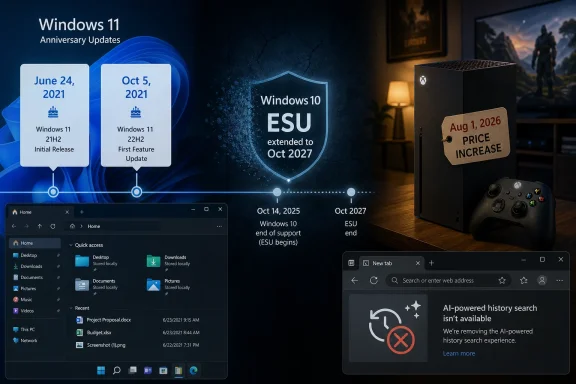
Windows 11’s fifth anniversary is really the anniversary of its announcement, not its general availability. Microsoft showed the operating system on June 24, 2021, then released it publicly on October 5, 2021. That distinction matters because Windows 11 has always lived in the gap between Microsoft’s pitch and users’ lived experience.
The pitch was clarity, calm, modernity, and a cleaner Windows. The lived experience was stricter hardware requirements, a rebuilt taskbar that initially lost features, a Start menu that felt less flexible, and a Search experience many users believed had become too entangled with the web. Windows 11 was not Windows Vista, but it inherited a Vista-like problem: the argument for upgrading was often less obvious than the friction of doing so.
Five years later, Microsoft is still filling in gaps that many users thought should never have existed. Recent preview work around taskbar settings, File Explorer behavior, accessibility controls, Windows Update options, and recovery features shows a company belatedly polishing the surfaces it once shipped as finished. The irony is that Windows 11 is improving precisely because Microsoft has stopped pretending its first version settled the argument.
The absence of Windows 12 also changes the meaning of this anniversary. For years, Windows watchers assumed Windows 11 would be a transitional release: a TPM-era reset, a new shell, a bridge to something more cloud-infused. Instead, Microsoft appears to be stretching Windows 11 into a longer-lived platform, closer to Windows 10’s decade-long role than the shorter rhythm some expected.
Windows 10 officially reached end of support in October 2025, but “end” has become a softer word than it used to be. The original consumer ESU offer already acknowledged that millions of PCs could not or would not move to Windows 11. A second year turns that acknowledgment into policy.
There are several ways to read the move, and none of them are flattering to the simplicity of Microsoft’s Windows 11 story. It suggests that Windows 10 remains too widely deployed to abandon cleanly. It suggests that Windows 11’s hardware floor is still politically and practically expensive. It also suggests that security reality has caught up with marketing: unsupported Windows machines do not vanish; they become risk.
For home users, another ESU year is relief. For IT departments, it is a planning extension. For Microsoft, it is an admission that the Windows ecosystem cannot be moved by calendar pressure alone.
The company can still insist that Windows 11 is the supported future. But the extension weakens the idea that October 2025 was a hard cliff. The new message is more conditional: upgrade if you can, enroll if you cannot, and please do not become part of the botnet statistics.
Microsoft had defensible reasons for drawing a harder line. Modern Windows security depends on hardware-backed protections, virtualization-based security, secure boot assumptions, and a platform Microsoft can reason about at scale. The problem is that the environmental, financial, and operational costs of that line did not disappear just because the security rationale was legitimate.
A small business with aging but stable machines does not experience Windows 11 as a security architecture. It experiences Windows 11 as a hardware refresh bill. A school district does not experience TPM requirements as a white paper. It experiences them as procurement pressure. A home user with a reliable 2018 PC does not experience unsupported hardware as a strategic platform shift. They experience it as Microsoft telling them their working computer has become a problem.
The ESU extension buys time, but it does not solve that tension. It merely postpones the collision between Microsoft’s desired baseline and the real-world life span of PCs. In that sense, Windows 10’s extra year is not a detour from the Windows 11 story. It is the story.
Point-in-time restore is especially interesting because it signals a broader shift in how Microsoft thinks about recovery. Classic System Restore has long been useful but limited, and many users have learned not to trust it as a complete escape hatch. A more capable rollback model, if Microsoft can make it reliable and understandable, could matter more than another Copilot button.
The Windows Update changes also matter because update trust is one of Windows’ oldest wounds. Users do not merely want updates to exist; they want to understand when updates arrive, what risk they carry, and how much control they have over timing. Every new control surface is Microsoft trying to repair a relationship damaged by years of surprise reboots, opaque failures, and cumulative-update anxiety.
The same is true of File Explorer performance work. Explorer is not glamorous, but it is the front door of desktop computing. If Explorer feels sluggish, Windows feels sluggish. If Explorer is unreliable, the entire operating system feels less trustworthy.
The interesting part is not any single build number. It is the way the Insider Program has become a rolling repair shop for Windows 11’s original compromises. The taskbar, in particular, has spent much of Windows 11’s life clawing back flexibility that Windows 10 users already had.
That dynamic is both encouraging and frustrating. It is encouraging because Microsoft is clearly listening to long-running complaints. It is frustrating because some of the fixes feel like restoration work rather than innovation. A redesigned settings page for the taskbar is welcome, but it also reminds users how much muscle memory was disrupted by the Windows 11 shell rewrite.
For enthusiasts, this is the normal churn of platform development. For businesses, it is another reason to treat Windows 11 as a moving target. The operating system is improving, but its cadence means administrators must constantly distinguish between features that are ready, features that are staged, and features that are merely being tested in public.
It did not help enough. For many users, the idea of AI rummaging through browsing history felt creepy before the technical details even entered the room. That reaction may not be perfectly fair, but it is politically real. Trust is not a checkbox Microsoft can enable through local inference.
This is the problem with the company’s recent AI habit. Microsoft often treats AI features as productivity conveniences whose value will become obvious once users try them. Users increasingly treat them as boundary tests: What is being analyzed? Where is it stored? Can I turn it off? Why is this in my browser?
Edge has already suffered from a perception that it is overstuffed. Adding AI to history search may have been technically clever, but it landed in a browser that many users believe has been too aggressive about sidebars, shopping features, prompts, and Microsoft account nudges. The discontinuation suggests Microsoft is learning, or at least measuring, that not every AI surface is worth defending.
PowerToys occupies a special place in the Windows ecosystem because it admits something the core OS often avoids saying out loud: power users need knobs. They need launchers, tiling helpers, file tools, remapping utilities, clipboard improvements, and workflow shortcuts that may never make sense as default Windows behavior. PowerToys is where Microsoft can serve those users without turning Windows Settings into an aircraft cockpit.
The proposed same-app window switcher is a good example. It is not a feature every casual user will care about, but developers, writers, admins, and anyone who lives with multiple windows in a single application may immediately understand the appeal. It is a small productivity affordance of the kind desktop operating systems used to accumulate naturally.
The bug-fix cadence also matters. PowerToys has become mature enough that regressions and memory leaks are not merely hobbyist annoyances; they affect real workflows. The project’s credibility comes from moving quickly when those problems appear.
That is not a routine adjustment. It changes the emotional contract of console gaming. Consoles traditionally become better deals over time: launch pricing gives way to bundles, revisions, discounts, and a larger software library. This generation has increasingly moved in the opposite direction.
A 512GB Xbox Series S becoming dramatically more expensive years into its life cycle is the sort of thing that would have sounded absurd in the Xbox 360 era. Yet here we are, with Microsoft pointing to storage and memory costs, broader supply-chain pressure, and affordability programs such as financing, pre-owned consoles, trade-ins, and certified refurbished units.
Those programs may soften the blow, but they also reveal the problem. When a platform holder starts talking like a car dealer, the console has lost some of its old simplicity. Buy-now-pay-later and refurbished pathways may help families get hardware, but they cannot fully disguise the fact that the entry price is moving away from casual adoption.
If the console becomes more expensive late in the generation, Microsoft has less reason to treat unit sales as the primary measure of success. That may align with the company’s services strategy, but it also risks weakening Xbox as a living-room brand. A console ecosystem still needs a healthy hardware base, even if the company says the ecosystem extends beyond the hardware.
There is also a competitive optics problem. If the Xbox Series S was once positioned as the affordable next-gen doorway, repeated price increases make that argument harder to sustain. The Series S has already carried compromises in storage, performance targets, and physical media. A higher price makes those compromises more visible.
The discontinuation of the 2TB Series X adds another signal. Microsoft is not merely raising prices; it is pruning the lineup. That suggests the company is managing margin, inventory, and component exposure more tightly than a platform holder would in a healthier hardware cycle.
Valve is not selling the Steam Machine as a traditional subsidized console. It is closer to a compact living-room PC running SteamOS, with access to the enormous Steam library and a more open PC-like identity. That distinction matters, but consumers will still compare it with consoles because it sits under the television and plays games.
At more than $1,000, the Steam Machine is not an impulse alternative to Xbox. It is a statement about where gaming hardware costs have gone. PC components, memory, storage, tariffs, logistics, and platform strategy all collide in a device that may appeal to enthusiasts while frightening off the mass market.
The comparison also clarifies Microsoft’s dilemma. Xbox is too expensive to feel like the old Xbox, but still not flexible enough to feel like a full PC. Steam Machine is expensive but can argue that it is a PC. Xbox is expensive and must argue that the console model still deserves a place.
Grand Theft Auto VI is likely to be one of the defining commercial events of this console generation. When a game at that scale normalizes a higher base price, publishers pay attention. Players may complain, but many will still buy it, and that is the signal the market remembers.
The combined picture is uncomfortable. Consoles cost more. Storage costs more. Premium editions cost more. Subscription hooks are everywhere. The old console bargain was simple: buy the box, buy the game, play for years. The new bargain is more fragmented and more expensive.
Microsoft is not solely responsible for that shift, but Xbox has to live inside it. If the company raises hardware prices while the biggest games push software pricing higher, Game Pass becomes more important as a value argument. It also becomes more scrutinized, because users will ask whether the subscription can really offset the rising cost of participation.
That is the central tension of modern Windows. Microsoft wants Windows to be a continuously improving service, but many users still want an operating system to feel settled. The more Microsoft ships features through staged rollouts and preview channels, the harder it becomes to say what Windows 11 is at any given moment.
There are benefits to that model. Accessibility improvements no longer need to wait years. File Explorer fixes can arrive outside a major OS launch. Security controls can evolve as threats change. Power users can test features early and influence direction.
But the cost is cognitive load. IT pros must track rings, channels, enablement packages, cumulative updates, and feature flags. Home users must interpret new Settings pages and changed defaults. Reviewers must ask whether a feature is broadly available or merely rolling out to a subset of machines.
That mixture says more than any keynote. Microsoft’s strategy is not collapsing, but it is being disciplined by reality. The installed base is older than the roadmap wants. The gaming market is more expensive than the console model prefers. AI features need trust, not just model placement. Windows 11 needs polish more than slogans.
That is not a normal victory lap. It is a company discovering that the installed base, the supply chain, and the living room all have veto power.
 Windows 11 Reaches Five Years Old, but the Anniversary Is Complicated
Windows 11’s fifth anniversary is really the anniversary of its announcement, not its general availability. Microsoft showed the operating system on June 24, 2021, then released it publicly on October 5, 2021. That distinction matters because Windows 11 has always lived in the gap between Microsoft’s pitch and users’ lived experience.The pitch was clarity, calm, modernity, and a cleaner Windows. The lived experience was stricter hardware requirements, a rebuilt taskbar that initially lost features, a Start menu that felt less flexible, and a Search experience many users believed had become too entangled with the web. Windows 11 was not Windows Vista, but it inherited a Vista-like problem: the argument for upgrading was often less obvious than the friction of doing so.
Five years later, Microsoft is still filling in gaps that many users thought should never have existed. Recent preview work around taskbar settings, File Explorer behavior, accessibility controls, Windows Update options, and recovery features shows a company belatedly polishing the surfaces it once shipped as finished. The irony is that Windows 11 is improving precisely because Microsoft has stopped pretending its first version settled the argument.
The absence of Windows 12 also changes the meaning of this anniversary. For years, Windows watchers assumed Windows 11 would be a transitional release: a TPM-era reset, a new shell, a bridge to something more cloud-infused. Instead, Microsoft appears to be stretching Windows 11 into a longer-lived platform, closer to Windows 10’s decade-long role than the shorter rhythm some expected.
Windows 10 Refuses to Leave the Building
The week’s more consequential Windows news was not nostalgic. Microsoft has reportedly extended the consumer Windows 10 Extended Security Updates program by another year, pushing the practical security runway into October 2027 for users who enroll. That is a major concession, even if Microsoft made it quietly.Windows 10 officially reached end of support in October 2025, but “end” has become a softer word than it used to be. The original consumer ESU offer already acknowledged that millions of PCs could not or would not move to Windows 11. A second year turns that acknowledgment into policy.
There are several ways to read the move, and none of them are flattering to the simplicity of Microsoft’s Windows 11 story. It suggests that Windows 10 remains too widely deployed to abandon cleanly. It suggests that Windows 11’s hardware floor is still politically and practically expensive. It also suggests that security reality has caught up with marketing: unsupported Windows machines do not vanish; they become risk.
For home users, another ESU year is relief. For IT departments, it is a planning extension. For Microsoft, it is an admission that the Windows ecosystem cannot be moved by calendar pressure alone.
The company can still insist that Windows 11 is the supported future. But the extension weakens the idea that October 2025 was a hard cliff. The new message is more conditional: upgrade if you can, enroll if you cannot, and please do not become part of the botnet statistics.
The Upgrade Problem Was Never Just Stubborn Users
It is tempting to frame Windows 10 holdouts as sentimental or lazy. That misses the more structural issue. A large number of perfectly functional PCs were excluded from Windows 11’s official upgrade path because of Microsoft’s security baseline requirements, especially around TPM 2.0 and supported processors.Microsoft had defensible reasons for drawing a harder line. Modern Windows security depends on hardware-backed protections, virtualization-based security, secure boot assumptions, and a platform Microsoft can reason about at scale. The problem is that the environmental, financial, and operational costs of that line did not disappear just because the security rationale was legitimate.
A small business with aging but stable machines does not experience Windows 11 as a security architecture. It experiences Windows 11 as a hardware refresh bill. A school district does not experience TPM requirements as a white paper. It experiences them as procurement pressure. A home user with a reliable 2018 PC does not experience unsupported hardware as a strategic platform shift. They experience it as Microsoft telling them their working computer has become a problem.
The ESU extension buys time, but it does not solve that tension. It merely postpones the collision between Microsoft’s desired baseline and the real-world life span of PCs. In that sense, Windows 10’s extra year is not a detour from the Windows 11 story. It is the story.
Windows 11’s New Features Show a Platform Becoming More Practical
The optional Windows 11 update highlighted this week, KB5095093, fits neatly into Microsoft’s recent pattern: less spectacle, more housekeeping. Point-in-time restore is the kind of feature that does not sell a keynote but can save an administrator’s afternoon. New Windows Update controls, quieter Widgets behavior, accessibility additions, File Explorer refinements, and performance improvements are not revolutionary, but they are exactly where Windows 11 has needed work.Point-in-time restore is especially interesting because it signals a broader shift in how Microsoft thinks about recovery. Classic System Restore has long been useful but limited, and many users have learned not to trust it as a complete escape hatch. A more capable rollback model, if Microsoft can make it reliable and understandable, could matter more than another Copilot button.
The Windows Update changes also matter because update trust is one of Windows’ oldest wounds. Users do not merely want updates to exist; they want to understand when updates arrive, what risk they carry, and how much control they have over timing. Every new control surface is Microsoft trying to repair a relationship damaged by years of surprise reboots, opaque failures, and cumulative-update anxiety.
The same is true of File Explorer performance work. Explorer is not glamorous, but it is the front door of desktop computing. If Explorer feels sluggish, Windows feels sluggish. If Explorer is unreliable, the entire operating system feels less trustworthy.
The Insider Channels Are Becoming Microsoft’s Repair Shop
This week’s Insider builds continued that theme. Canary and Dev builds brought accessibility features, Windows Update controls, audio improvements, redesigned taskbar settings, and File Explorer changes. Beta builds handled smaller fixes, including a OneDrive-related File Explorer issue and dark-mode system sound tweaks.The interesting part is not any single build number. It is the way the Insider Program has become a rolling repair shop for Windows 11’s original compromises. The taskbar, in particular, has spent much of Windows 11’s life clawing back flexibility that Windows 10 users already had.
That dynamic is both encouraging and frustrating. It is encouraging because Microsoft is clearly listening to long-running complaints. It is frustrating because some of the fixes feel like restoration work rather than innovation. A redesigned settings page for the taskbar is welcome, but it also reminds users how much muscle memory was disrupted by the Windows 11 shell rewrite.
For enthusiasts, this is the normal churn of platform development. For businesses, it is another reason to treat Windows 11 as a moving target. The operating system is improving, but its cadence means administrators must constantly distinguish between features that are ready, features that are staged, and features that are merely being tested in public.
Edge Loses an AI Feature That Never Earned Trust
Microsoft’s decision to discontinue AI-powered browsing history search in Edge is a small story with a large lesson. The feature’s premise was reasonable: let users search their browsing history in natural language without remembering exact page titles or keywords. Microsoft also emphasized on-device processing, which should have helped with privacy concerns.It did not help enough. For many users, the idea of AI rummaging through browsing history felt creepy before the technical details even entered the room. That reaction may not be perfectly fair, but it is politically real. Trust is not a checkbox Microsoft can enable through local inference.
This is the problem with the company’s recent AI habit. Microsoft often treats AI features as productivity conveniences whose value will become obvious once users try them. Users increasingly treat them as boundary tests: What is being analyzed? Where is it stored? Can I turn it off? Why is this in my browser?
Edge has already suffered from a perception that it is overstuffed. Adding AI to history search may have been technically clever, but it landed in a browser that many users believe has been too aggressive about sidebars, shopping features, prompts, and Microsoft account nudges. The discontinuation suggests Microsoft is learning, or at least measuring, that not every AI surface is worth defending.
PowerToys Remains the Windows Team’s Most Honest Product
PowerToys had a busy week too, with version 0.100.1 followed by another maintenance update addressing memory leaks in Command Palette Dock. Microsoft is also working on a module to make switching between windows within the same application easier, using an Alt + ` shortcut.PowerToys occupies a special place in the Windows ecosystem because it admits something the core OS often avoids saying out loud: power users need knobs. They need launchers, tiling helpers, file tools, remapping utilities, clipboard improvements, and workflow shortcuts that may never make sense as default Windows behavior. PowerToys is where Microsoft can serve those users without turning Windows Settings into an aircraft cockpit.
The proposed same-app window switcher is a good example. It is not a feature every casual user will care about, but developers, writers, admins, and anyone who lives with multiple windows in a single application may immediately understand the appeal. It is a small productivity affordance of the kind desktop operating systems used to accumulate naturally.
The bug-fix cadence also matters. PowerToys has become mature enough that regressions and memory leaks are not merely hobbyist annoyances; they affect real workflows. The project’s credibility comes from moving quickly when those problems appear.
Xbox Pricing Breaks the Console Contract
The Xbox news was the week’s sharpest reminder that the economics of consumer hardware have changed. Microsoft announced another Xbox Series X|S price increase effective August 1, 2026, with 512GB models rising by $100 and 1TB models by $150. The 2TB Xbox Series X is being discontinued.That is not a routine adjustment. It changes the emotional contract of console gaming. Consoles traditionally become better deals over time: launch pricing gives way to bundles, revisions, discounts, and a larger software library. This generation has increasingly moved in the opposite direction.
A 512GB Xbox Series S becoming dramatically more expensive years into its life cycle is the sort of thing that would have sounded absurd in the Xbox 360 era. Yet here we are, with Microsoft pointing to storage and memory costs, broader supply-chain pressure, and affordability programs such as financing, pre-owned consoles, trade-ins, and certified refurbished units.
Those programs may soften the blow, but they also reveal the problem. When a platform holder starts talking like a car dealer, the console has lost some of its old simplicity. Buy-now-pay-later and refurbished pathways may help families get hardware, but they cannot fully disguise the fact that the entry price is moving away from casual adoption.
Microsoft’s Gaming Strategy Is Becoming Less Console-Centered by Necessity
The Xbox price increase lands at an awkward moment because Microsoft has spent years arguing that Xbox is bigger than a box. Game Pass, cloud gaming, PC releases, cross-device play, and multiplatform publishing have all loosened the console’s central role. Higher hardware prices may accelerate that shift whether Microsoft wants them to or not.If the console becomes more expensive late in the generation, Microsoft has less reason to treat unit sales as the primary measure of success. That may align with the company’s services strategy, but it also risks weakening Xbox as a living-room brand. A console ecosystem still needs a healthy hardware base, even if the company says the ecosystem extends beyond the hardware.
There is also a competitive optics problem. If the Xbox Series S was once positioned as the affordable next-gen doorway, repeated price increases make that argument harder to sustain. The Series S has already carried compromises in storage, performance targets, and physical media. A higher price makes those compromises more visible.
The discontinuation of the 2TB Series X adds another signal. Microsoft is not merely raising prices; it is pruning the lineup. That suggests the company is managing margin, inventory, and component exposure more tightly than a platform holder would in a healthier hardware cycle.
Valve’s Steam Machine Makes the Living Room Look Expensive Everywhere
Valve’s newly priced Steam Machine puts Microsoft’s console problem in a broader context. The 512GB Steam Machine starts at $1,049, with higher-capacity and controller bundles climbing well above that. Shipments or purchase invitations begin around the end of June, depending on the reservation process.Valve is not selling the Steam Machine as a traditional subsidized console. It is closer to a compact living-room PC running SteamOS, with access to the enormous Steam library and a more open PC-like identity. That distinction matters, but consumers will still compare it with consoles because it sits under the television and plays games.
At more than $1,000, the Steam Machine is not an impulse alternative to Xbox. It is a statement about where gaming hardware costs have gone. PC components, memory, storage, tariffs, logistics, and platform strategy all collide in a device that may appeal to enthusiasts while frightening off the mass market.
The comparison also clarifies Microsoft’s dilemma. Xbox is too expensive to feel like the old Xbox, but still not flexible enough to feel like a full PC. Steam Machine is expensive but can argue that it is a PC. Xbox is expensive and must argue that the console model still deserves a place.
Grand Theft Auto VI Turns the Software Price Dial Too
Hardware was not the only gaming cost moving upward. Rockstar’s Grand Theft Auto VI pricing reportedly sets the base edition at $79.99 and the premium edition at $99.99, with preorder bonuses and GTA+ incentives layered on top. That price point will not surprise anyone watching the industry, but it still matters because GTA is not just another release.Grand Theft Auto VI is likely to be one of the defining commercial events of this console generation. When a game at that scale normalizes a higher base price, publishers pay attention. Players may complain, but many will still buy it, and that is the signal the market remembers.
The combined picture is uncomfortable. Consoles cost more. Storage costs more. Premium editions cost more. Subscription hooks are everywhere. The old console bargain was simple: buy the box, buy the game, play for years. The new bargain is more fragmented and more expensive.
Microsoft is not solely responsible for that shift, but Xbox has to live inside it. If the company raises hardware prices while the biggest games push software pricing higher, Game Pass becomes more important as a value argument. It also becomes more scrutinized, because users will ask whether the subscription can really offset the rising cost of participation.
The Week’s Smaller Updates Still Point to a Larger Microsoft
The rest of the week’s update stream shows Microsoft’s ecosystem functioning as a series of overlapping maintenance loops. Drivers, firmware, app updates, Edge changes, PowerToys releases, Insider builds, and optional Windows updates all move on their own clocks. For enthusiasts, that rhythm is familiar. For ordinary users, it can feel like the computer is never finished.That is the central tension of modern Windows. Microsoft wants Windows to be a continuously improving service, but many users still want an operating system to feel settled. The more Microsoft ships features through staged rollouts and preview channels, the harder it becomes to say what Windows 11 is at any given moment.
There are benefits to that model. Accessibility improvements no longer need to wait years. File Explorer fixes can arrive outside a major OS launch. Security controls can evolve as threats change. Power users can test features early and influence direction.
But the cost is cognitive load. IT pros must track rings, channels, enablement packages, cumulative updates, and feature flags. Home users must interpret new Settings pages and changed defaults. Reviewers must ask whether a feature is broadly available or merely rolling out to a subset of machines.
This Was the Week Microsoft Bought Time and Raised Prices
This week’s Microsoft news is best read not as a collection of unrelated updates, but as a snapshot of a company renegotiating its bargains with users. Windows 10 users get more time. Windows 11 users get more repairs and refinements. Xbox buyers get higher prices and financing options. Edge users get one fewer AI intrusion.That mixture says more than any keynote. Microsoft’s strategy is not collapsing, but it is being disciplined by reality. The installed base is older than the roadmap wants. The gaming market is more expensive than the console model prefers. AI features need trust, not just model placement. Windows 11 needs polish more than slogans.
The Fine Print Became the Main Story
The practical lessons from the week are unusually concrete, and they cut across both Windows and Xbox.- Windows 11’s five-year milestone is tied to its June 2021 announcement, while its public release anniversary arrives on October 5.
- Windows 10 users now appear to have a security-update path extending into October 2027 if they enroll in Microsoft’s ESU program.
- Windows 11’s optional update stream is becoming the place where Microsoft delivers the usability and recovery improvements the OS has needed for years.
- Edge’s retreat from AI-powered history search shows that local processing alone does not solve user distrust.
- Xbox console prices rising on August 1, 2026 makes Microsoft’s hardware value proposition harder to defend late in the generation.
- Valve’s $1,049 Steam Machine and GTA VI’s higher pricing suggest the entire gaming market is moving into a more expensive phase, not just Xbox.
References
- Primary source: Neowin
Published: 2026-06-27T10:10:09.684505
Microsoft Weekly: 5 years of Windows 11, more support for Windows 10, and expensive Xbox - Neowin
Catch up with this week's Microsoft stories in our latest recap. Windows 11 is five years old, Windows 10 gets more support, Xbox prices go up, and more. www.neowin.net
- Related coverage: tomshardware.com
Microsoft extends free Windows 10 security updates for a second year — program now ends on October 12, 2027 | Tom's Hardware
Just as the memory shortage pushes PC prices even higher.www.tomshardware.com - Related coverage: gamesradar.com
Xbox announces another console price hike, this time $100 more for the 512 GB and $150 for 1TB | GamesRadar+
The cheapest Xbox Series S now costs what the disc-equipped Xbox Series X cost at launch 6 years agowww.gamesradar.com - Related coverage: techradar.com
- Related coverage: pcgamer.com
Windows 10 gets yet another year of life as Microsoft extends security updates into 2027 | PC Gamer
Vive la Windows 10!www.pcgamer.com - Related coverage: gematsu.com
Xbox Series global price increase announced - Gematsu
Microsoft will increase the price of Xbox Series consoles worldwide for a third time starting August 1, following a global price increase back in May 2025 and a…www.gematsu.com
- Related coverage: pcworld.com
Microsoft offers extended security updates to more Windows versions | PCWorld
Microsoft is expanding its ESU program by adding extended support for additional Windows versions.www.pcworld.com - Related coverage: dotesports.com
Xbox raises prices by up to $150 amid memory cost crisis
Xbox console prices are increasing by up to $150 from August 1, 2026, as memory costs soar. The 2TB model is also being discontinued.dotesports.com - Related coverage: techspot.com
The third Xbox price hike in 15 months raises all models by at least $100 | TechSpot
Mere days after reports of mass layoffs at Microsoft-owned game development studios, things have gone from bad to worse for Xbox. In a few weeks, the company's...www.techspot.com - Related coverage: windowscentral.com
Microsoft quietly extends Windows 10's extra security updates program for free: Users can now stay on Windows 10 until October 2027 securely | Windows Central
Windows 10's ESU program has been quietly extended by an extra year, now ending on October 12, 2027 instead of October 2026.www.windowscentral.com - Related coverage: smartprix.com
Xbox Series S And Series X Prices Are Going Up By Up To $150 From August 1, 2026 - Smartprix
Hours after Apple announced the price hike for its products (except the iPhone), Microsoft did something similar. The company confirms that Xbox console prices will rise worldwide from August 1, 2026, something I wish Apple had done, as it would have given prospective buyers some time to get the... www.smartprix.com
- Related coverage: techcrunch.com
Xbox follows Apple with price increases | TechCrunch
The company says the increases are being driven by rising memory and console storage prices, with costs more than 2.5x higher than previous levels.techcrunch.com - Related coverage: en.softonic.com
- Related coverage: tomsguide.com
Microsoft extends Windows 10 support for another year: what you need to know | Tom's Guide
Windows 10 support was supposed to end for good this year, but Microsoft quietly extended it for at least one more.www.tomsguide.com - Related coverage: arstechnica.com
Microsoft adds another year to Windows 10 extended update program - Ars Technica
About a quarter of PCs are still running Microsoft's previous operating system.arstechnica.com - Related coverage: techrepublic.com
Xbox Console Prices Rise Again as Microsoft Cites Memory Costs - TechRepublic
Microsoft is raising Xbox console prices worldwide on August 1 as memory and storage costs climb, with the Xbox Series X reaching $800.www.techrepublic.com
- Related coverage: aha.org
</rdf:Alt> </dc:title> <dc:description> <rdf:Alt> <rdf:li xml:lang="x-default"/> </rdf:Alt> </dc:description> <dc:creator> <rdf:Seq> <rdf:li>Katheri
</rdf:Alt> </dc:description> <dc:creator> <rdf:Seq> <rdf:li>Katherine Higgins (SLALOM INC)www.aha.org
- Related coverage: windowslatest.com
Microsoft warns Windows 11 recovery feature uses up to 50GB of storage, but for a good cause
Windows 11 Point-in-time restore can use up to 50GB of storage, but the space isn't pre-reserved. Here's how it works and why it's worth it. www.windowslatest.com
- Official source: blogs.windows.com
Windows 11 available on October 5
Today, we are thrilled to announce Windows 11 will start to become available on October 5, 2021. On this day, the free upgrade to Windows 11 will begin rolling out to eligible Windows 10 PCs and PCs that come pre-loaded with Windows 11 will start toblogs.windows.com - Official source: news.microsoft.com
微軟宣布Windows 11 將於10月5日開始正式發佈 – 微軟新聞中心
 news.microsoft.com
- Related coverage: axios.com
Microsoft previews Windows 11
The new version of Windows is due out this holiday season.www.axios.com
- Related coverage: techxplore.com
