

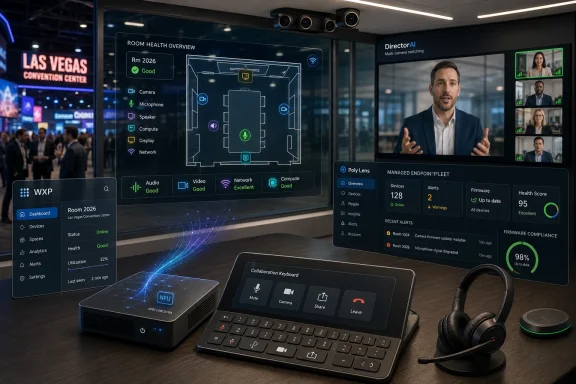
HP introduced a new AI-powered collaboration portfolio at InfoComm 2026 in Las Vegas on June 16, combining Poly room compute, VideoOS updates, Focus 6 headsets, a collaboration keyboard, and deeper Workforce Experience Platform management into a single enterprise meeting-room stack. The announcement is less about one clever headset or another Teams Rooms box than about HP’s attempt to own the connective tissue of hybrid work. For Windows admins, AV integrators, and procurement teams, the message is blunt: the meeting room is becoming another managed endpoint fleet. The risk is that “AI collaboration” becomes a prettier wrapper around the same old device sprawl unless HP can prove the platform layer actually reduces complexity.
The most important product in HP’s InfoComm announcement is not the most visible one. Headsets, keyboards, cameras, and room compute appliances are tangible, budgetable, and easy to demo on a trade-show floor. But HP’s strategic center of gravity is the HP Workforce Experience Platform, or WXP, now absorbing more of the collaboration estate through Poly Lens and WXP Collaboration, the product formerly known as Vyopta.
That matters because hybrid work has pushed meeting spaces into the same operational category as laptops, printers, phones, and security agents. A conference room that fails five minutes before a board meeting is no longer an AV inconvenience; it is a productivity outage. HP’s bet is that IT departments want collaboration rooms measured, mapped, updated, and remediated through the same kind of central management logic they already expect from endpoint platforms.
The pitch is neatly timed. Organizations spent the first phase of hybrid work buying whatever kept meetings alive: webcams, speakerphones, bars, carts, Teams Rooms devices, Zoom Rooms appliances, and a scattering of personal peripherals. The second phase is less glamorous. It is about inventory, telemetry, firmware drift, room utilization, user complaints, and the growing suspicion that nobody really knows which rooms work well until someone important has a bad call.
HP is trying to turn that mess into a platform story. The integration of Poly Lens and WXP Collaboration into WXP gives the company a way to talk about visibility across devices, spaces, compute, and print as one operational fabric. Whether customers experience that as simplification or as another management console with nicer branding will determine whether this announcement ages as a real shift or a trade-show bundle.
That is more interesting than it sounds. Traditional device management is usually list-first: serial numbers, firmware versions, assigned users, last check-in times, health status, and compliance posture. Meeting rooms, by contrast, are physical systems. A camera, a touch controller, a display, a Windows compute module, a microphone, a network drop, and a room booking panel all combine into one user experience, but they are often managed as separate objects.
A room visualizer acknowledges that the unit of failure is not always the device. It may be the room configuration, the cable path, the local network segment, the wrong controller, the wrong account state, or a mismatch between how the room was designed and how employees actually use it. If HP can make that visible without forcing admins to maintain yet another brittle model by hand, it could be useful in a very practical way.
The AI branding is doing plenty of marketing work here, but the operational idea is sound. IT teams do not need a chatbot that waxes lyrical about collaboration. They need a system that says the huddle room on floor six has recurring audio complaints, the same firmware baseline as the rooms that work, a different network switch, and a utilization pattern that justifies replacing the camera before the next quarterly meeting cycle.
The challenge is trust. Room analytics can improve support, planning, and budgeting, but they also sit close to sensitive workplace behavior. Occupancy, meeting frequency, room usage, and device telemetry can become organizational surveillance if governance is weak. HP is selling insight; enterprise buyers will need to define boundaries before insight becomes another quiet instrument panel for measuring workers.
The timing is important. Microsoft, Intel, AMD, Qualcomm, and PC OEMs have spent the last two years teaching buyers to associate AI PCs with neural processing units. Meeting rooms are a natural extension of that story because video conferencing is full of inference-heavy workloads: framing, speaker tracking, background processing, noise suppression, transcription assistance, and eventually more sophisticated meeting intelligence.
In practice, a Windows-based room compute box gives IT departments a familiar management and support model. Teams Rooms on Windows has different trade-offs than Android-based room systems, but many enterprises already understand the Windows lifecycle, security posture, and update implications. HP’s promise is that its new room compute can serve both Microsoft Teams Rooms and Zoom Rooms deployments while offering enough local AI headroom to remain viable for longer than a basic appliance.
The phrase “future-proof” should always raise an eyebrow. No vendor can guarantee how Microsoft, Zoom, Intel, or enterprise security requirements will evolve over the next five years. Still, choosing a room compute device with a modern NPU is a rational hedge if an organization expects meeting software to lean harder on local acceleration.
For admins, the more practical question is not whether the chip is impressive. It is whether the entire stack can be patched predictably, monitored centrally, enrolled cleanly, and recovered quickly when an update breaks something. AI hardware in a meeting room is only as valuable as the operational discipline wrapped around it.
But this dual-platform posture also reveals where HP sits in the hierarchy. Microsoft and Zoom own the meeting experience at the software layer. HP owns, or wants to own, the hardware estate and management plane around that experience. That can be a strong business if HP becomes the trusted infrastructure vendor beneath the collaboration apps, but it also means HP is dependent on certification timelines, platform policies, and feature roadmaps it does not fully control.
The certification details matter. HP says the Poly Studio 5 and 7 Room Compute devices are part of the certification story for Teams Rooms and Zoom Rooms, with availability through select resellers in July. HP’s own fine print indicates that certification status differs by model and platform, which is exactly the kind of detail enterprise buyers must verify before placing volume orders.
This is where the trade-show narrative meets procurement reality. A room device that is “for Teams Rooms” in a marketing sentence may still require careful checking against current certification lists, tenant requirements, room licensing, peripheral compatibility, and deployment guides. The wrong assumption can turn a promising standard into a support ticket factory.
For Windows admins, the lesson is familiar: buy the certified configuration, not the vibe. Collaboration rooms are too visible, too politically sensitive, and too dependent on vendor ecosystems to reward improvisation.
This is one of the few areas where “AI” maps cleanly to an obvious user problem. Bad room framing is exhausting. Remote employees lose context when they cannot tell who is speaking, whether someone is trying to interject, or what the energy in the room feels like. A multi-camera system that smoothly follows the conversation can make a hybrid meeting meaningfully better.
The hard part is subtlety. Overactive camera switching can be just as distracting as static framing, especially in rooms with side conversations, nervous movement, or participants who do not want a close-up every time they breathe near a microphone. The best collaboration AI will be almost invisible; the worst will feel like a low-budget television director trapped inside a soundbar.
HP’s VideoOS update also promises simplified setup for Microsoft Teams Rooms on Android through HP Touch Controller Direct Connect and a redesigned WebUI for administration. Those may be less flashy than multi-camera switching, but they are the details that decide whether a room system survives contact with real IT operations. A more natural meeting experience will not compensate for controller pairing rituals that fail during deployment.
The broader industry trend is clear. Meeting-room vendors are turning cameras, microphones, and compute into perception systems. They are not simply transmitting audio and video; they are interpreting the room. That creates better meetings when done well, but it also pushes administrators to understand how data is processed, where intelligence runs, and which settings are appropriate for different spaces.
Hybrid work did not eliminate the office. It made the office less predictable. Employees move from open areas to huddle rooms to home offices to airport lounges, often carrying the same headset through each context. A headset that can keep voice quality high without a dongle, survive a full day of calls, and avoid becoming e-waste when the ear cushions wear out is not a luxury for many knowledge workers. It is part of the basic toolchain.
The Microsoft Teams Open Office certification is especially relevant because it addresses one of the most persistent failures of modern offices: the open-plan environment that looks collaborative on a floor plan and sounds like a cafeteria on a call. Noise suppression has become a core productivity feature because office design often assumes a level of acoustic privacy that does not exist.
Replaceable batteries and ear cushions are a welcome nod toward longevity. Enterprise peripherals are frequently treated as disposable, especially when procurement cycles prioritize unit cost over lifecycle cost. If HP can make replacement parts easy to obtain and simple to install, that sustainability claim becomes more than a line in a press release.
Still, the headset category is crowded and mature. HP has to win on reliability, comfort, microphone quality, fleet manageability, and certification behavior rather than novelty. A premium headset that sounds great in a demo but creates Bluetooth weirdness across laptops, phones, and room systems will not survive long in a demanding enterprise fleet.
The significance is not the keyboard itself. It is HP’s belief that collaboration controls should be physical, standardized, and fleet-deployable. Anyone who has fumbled through a meeting interface to find mute, camera, share, or raise-hand controls understands the appeal. Software buttons move, hide, or change depending on app state; hardware keys can build muscle memory.
This is also a subtle admission that collaboration fatigue is not only about too many meetings. It is about micro-frictions repeated dozens of times a day. Joining, muting, unmuting, sharing, switching windows, finding the right camera, and recovering from accidental audio routing are small failures that accumulate into distrust of the tools.
For Windows users, the key question will be integration quality. Dedicated collaboration keys are only useful if they work consistently across Teams, Zoom, Google Meet, and local system states. Cross-platform support is a promise; real-world behavior will depend on drivers, firmware, app APIs, OS permissions, and how gracefully the keyboard handles conflicts.
At $59.99, HP is not asking enterprises to treat the keyboard as exotic hardware. It is asking them to imagine collaboration as a first-class input category, alongside typing, pointing, and function keys. That is a modest product with a surprisingly coherent thesis.
The InfoComm 2026 announcement shows the acquisition maturing from product adjacency into platform integration. Poly Lens is no longer just a tool for Poly devices; it is being pulled into WXP as part of a broader workplace management layer. The former Vyopta capability adds collaboration analytics that help HP speak to spaces and usage, not merely peripherals.
That is the right direction if HP wants to defend relevance in a world where PC refresh cycles are lengthening and AI PC hype is not enough to guarantee margin. The company can sell a more durable story if it owns the managed experience across the personal device, the desk, the meeting room, and the service layer. Hardware becomes the installed base; software becomes the relationship.
But platform plays are unforgiving. Customers will tolerate one more dashboard only if it replaces two others or solves a problem none of the existing tools can solve. HP must show that WXP can connect signals across collaboration and endpoint environments in ways that lead to faster fixes, better planning, and lower operational overhead.
The danger is familiar to anyone who has watched enterprise software absorb product lines after an acquisition. Integration can become a roadmap word rather than a lived experience. If admins still bounce between portals, licensing tiers, device-specific limitations, and inconsistent telemetry, the unified ecosystem will feel unified mostly in PowerPoint.
The useful AI is specific. Acoustic fencing that isolates a speaker’s voice is useful. Camera intelligence that improves remote presence is useful. Telemetry analysis that flags recurring room failures before users complain is useful. Local acceleration that reduces latency or protects sensitive meeting context may become very useful as collaboration features grow more demanding.
The overstretched AI is vague. “Transforming how work gets done” is a fine ambition, but it does not help an admin decide whether to upgrade ten rooms or two hundred. “Agentic ways of working” sounds strategic, but it risks skipping over the immediate job of keeping audio, video, calendars, identity, and firmware aligned.
The best reading of HP’s announcement is that AI is becoming embedded in collaboration infrastructure rather than appearing as one discrete product. That is probably where the market is going. Users will not ask whether the room has AI; they will ask whether remote colleagues can hear them, whether the camera frames the right person, whether the meeting starts on time, and whether IT can fix the room without dispatching someone across campus.
The worst reading is that vendors are using AI to blur the line between genuinely new capabilities and routine product refreshes. Enterprise buyers should reward the former and interrogate the latter.
The most immediate admin benefit is better visibility. If WXP can show which rooms are unhealthy, which devices are lagging, which peripherals are underused, and which spaces generate repeated tickets, IT can move from anecdote to evidence. That is valuable because collaboration problems are often political. Everyone has a story about the room that never works; fewer organizations have reliable data showing why.
The next benefit is standardization. HP clearly wants organizations to buy into an ecosystem where headsets, room compute, controllers, cameras, keyboards, analytics, and support models reinforce one another. Standardization can lower support costs and simplify training, especially across distributed offices.
The trade-off is lock-in. A coherent ecosystem can become a procurement funnel, and a management platform can make it harder to mix best-of-breed components from different vendors. Some enterprises will accept that trade for simplicity. Others, especially those with mature AV teams or complex spaces, will want more flexibility than a single-vendor stack comfortably allows.
Security teams will also ask harder questions as collaboration devices become more intelligent. What data is collected? How long is it retained? Is meeting content analyzed, or only device and room telemetry? Which features run locally, which call cloud services, and how are admin roles separated? These are not objections to HP’s strategy; they are the new baseline questions for AI-infused workplace infrastructure.
That is why HP’s availability timeline matters. The Poly Focus 6 Series is slated for July availability on HP.com, while the Poly Studio Room Compute devices are expected in July through select resellers. Poly VideoOS 5.1 is expected in the third quarter of 2026, and the HP Collaboration Keyboard is planned for September. Poly Lens integration into WXP is already underway, with more capabilities rolling out through 2026.
A staggered rollout is normal, but it complicates evaluation. The full ecosystem HP is describing will not arrive as one finished object. Enterprises will be testing pieces of it while the management integration continues to evolve. That means pilot programs should be designed around measurable outcomes rather than product enthusiasm.
The most useful pilots will compare room health, ticket volume, meeting start reliability, user satisfaction, and support time before and after deployment. They should include both standard rooms and problematic rooms, because easy rooms can make almost any vendor look good. They should also test mixed-platform reality, especially where Teams, Zoom, and Google services coexist.
For Windows-heavy environments, the Poly Studio Room Compute deserves particular scrutiny around update behavior, manageability, security baselines, and Teams Rooms lifecycle fit. The hardware may be modern, but meeting-room success usually depends on dull things done consistently. Dull things are where IT wins or loses.
The Focus 6 headset is the easiest procurement decision because it can be tested at the user level. Comfort, call quality, battery life, Bluetooth behavior, and certification performance reveal themselves quickly. If the headset performs well, it strengthens HP’s broader story; if it does not, no amount of platform language will save it.
The room compute decision is more strategic. At starting prices in the low thousands, the devices are not impulse purchases, but they are also not outlandish compared with the total cost of a properly equipped meeting room. The larger cost is operational: installation, standardization, support procedures, training, and long-term lifecycle management.
VideoOS 5.1 should be judged less by its feature list than by its behavior under pressure. Does multi-camera switching improve meetings without drawing attention to itself? Does the controller setup reduce deployment friction? Does the redesigned WebUI make daily administration faster? These are the questions that matter after the demo ends.
WXP integration is the slowest and most consequential piece. If HP can make WXP the place where collaboration spaces, PCs, printers, and workplace telemetry converge into actionable operations, it will have something enterprise IT actually needs. If it becomes another subscription layer that mostly aggregates dashboards, buyers will be right to hesitate.
A Teams Rooms deployment already pulls Windows into the physical meeting space. Add NPU-equipped room compute, AI camera logic, controller pairing, device telemetry, cloud management, endpoint security expectations, and lifecycle support, and the room becomes part of the Windows-adjacent estate whether organizations planned for that or not. The practical boundary between endpoint management and room management is fading.
That does not mean every sysadmin needs to become an AV engineer. It does mean organizations need clearer ownership models. When a meeting starts late because a room system update changed behavior, who owns the incident? When analytics show a room is underused because users distrust the equipment, who acts? When an AI framing feature makes participants uncomfortable, who sets policy?
HP’s ecosystem approach is partly an answer to that organizational confusion. By offering hardware, software, analytics, and management under one umbrella, HP is saying the room can be governed as a system. That is attractive, especially for distributed organizations without deep local AV support.
But governance cannot be outsourced entirely to a vendor platform. IT leaders still need standards, privacy rules, support processes, procurement discipline, and feedback loops with actual employees. The platform may reveal the problem; it will not automatically decide the right cultural or operational response.
The strongest part of HP’s announcement is the integration story around WXP, Poly Lens, and WXP Collaboration. If that layer works, the hardware portfolio becomes more than a catalog. The weakest part is the industry-wide temptation to let AI language stand in for proof of operational improvement.
WindowsForum readers should watch the certification details, update behavior, and management integration more closely than the launch slogans. Teams Rooms and Zoom Rooms compatibility is essential, but the lived experience will depend on how reliably HP’s stack handles the mundane realities of enterprise deployment. The smartest buyers will pilot the ecosystem as an operational system, not as a bundle of shiny devices.
HP also deserves credit for treating sustainability and serviceability as part of the collaboration story. Recycled plastics, replaceable headset components, and longer lifecycle positioning are not the headline, but they matter in large fleets. The next test is whether those claims translate into accessible parts, clear repair processes, and procurement models that reward keeping devices in service.
 HP Is Selling the Meeting Room as a Managed Endpoint
The most important product in HP’s InfoComm announcement is not the most visible one. Headsets, keyboards, cameras, and room compute appliances are tangible, budgetable, and easy to demo on a trade-show floor. But HP’s strategic center of gravity is the HP Workforce Experience Platform, or WXP, now absorbing more of the collaboration estate through Poly Lens and WXP Collaboration, the product formerly known as Vyopta.That matters because hybrid work has pushed meeting spaces into the same operational category as laptops, printers, phones, and security agents. A conference room that fails five minutes before a board meeting is no longer an AV inconvenience; it is a productivity outage. HP’s bet is that IT departments want collaboration rooms measured, mapped, updated, and remediated through the same kind of central management logic they already expect from endpoint platforms.
The pitch is neatly timed. Organizations spent the first phase of hybrid work buying whatever kept meetings alive: webcams, speakerphones, bars, carts, Teams Rooms devices, Zoom Rooms appliances, and a scattering of personal peripherals. The second phase is less glamorous. It is about inventory, telemetry, firmware drift, room utilization, user complaints, and the growing suspicion that nobody really knows which rooms work well until someone important has a bad call.
HP is trying to turn that mess into a platform story. The integration of Poly Lens and WXP Collaboration into WXP gives the company a way to talk about visibility across devices, spaces, compute, and print as one operational fabric. Whether customers experience that as simplification or as another management console with nicer branding will determine whether this announcement ages as a real shift or a trade-show bundle.
The “Single Pane of Glass” Finally Has a Floor Plan
HP’s most revealing phrase is not “AI-powered.” It is “interactive digital replica.” Poly Lens Room VisualizerAI is described as a way to give IT teams a visual model of collaboration spaces, turning device data into something closer to a map of the workplace.That is more interesting than it sounds. Traditional device management is usually list-first: serial numbers, firmware versions, assigned users, last check-in times, health status, and compliance posture. Meeting rooms, by contrast, are physical systems. A camera, a touch controller, a display, a Windows compute module, a microphone, a network drop, and a room booking panel all combine into one user experience, but they are often managed as separate objects.
A room visualizer acknowledges that the unit of failure is not always the device. It may be the room configuration, the cable path, the local network segment, the wrong controller, the wrong account state, or a mismatch between how the room was designed and how employees actually use it. If HP can make that visible without forcing admins to maintain yet another brittle model by hand, it could be useful in a very practical way.
The AI branding is doing plenty of marketing work here, but the operational idea is sound. IT teams do not need a chatbot that waxes lyrical about collaboration. They need a system that says the huddle room on floor six has recurring audio complaints, the same firmware baseline as the rooms that work, a different network switch, and a utilization pattern that justifies replacing the camera before the next quarterly meeting cycle.
The challenge is trust. Room analytics can improve support, planning, and budgeting, but they also sit close to sensitive workplace behavior. Occupancy, meeting frequency, room usage, and device telemetry can become organizational surveillance if governance is weak. HP is selling insight; enterprise buyers will need to define boundaries before insight becomes another quiet instrument panel for measuring workers.
Windows-Based Room Compute Is Back in the AI Spotlight
The HP Poly Studio Room Compute is the hardware announcement that will draw the most attention from WindowsForum readers because it places Windows-based collaboration compute at the center of HP’s room strategy. HP says the device is designed for Microsoft Teams Rooms and Zoom Rooms and is powered by third-generation Intel Core Ultra processors with integrated NPUs. That positions it for a future in which AI-assisted meeting features are expected to run locally, or at least partly locally, rather than entirely in the cloud.The timing is important. Microsoft, Intel, AMD, Qualcomm, and PC OEMs have spent the last two years teaching buyers to associate AI PCs with neural processing units. Meeting rooms are a natural extension of that story because video conferencing is full of inference-heavy workloads: framing, speaker tracking, background processing, noise suppression, transcription assistance, and eventually more sophisticated meeting intelligence.
In practice, a Windows-based room compute box gives IT departments a familiar management and support model. Teams Rooms on Windows has different trade-offs than Android-based room systems, but many enterprises already understand the Windows lifecycle, security posture, and update implications. HP’s promise is that its new room compute can serve both Microsoft Teams Rooms and Zoom Rooms deployments while offering enough local AI headroom to remain viable for longer than a basic appliance.
The phrase “future-proof” should always raise an eyebrow. No vendor can guarantee how Microsoft, Zoom, Intel, or enterprise security requirements will evolve over the next five years. Still, choosing a room compute device with a modern NPU is a rational hedge if an organization expects meeting software to lean harder on local acceleration.
For admins, the more practical question is not whether the chip is impressive. It is whether the entire stack can be patched predictably, monitored centrally, enrolled cleanly, and recovered quickly when an update breaks something. AI hardware in a meeting room is only as valuable as the operational discipline wrapped around it.
Microsoft Teams Rooms and Zoom Rooms Remain the Real Platforms
HP’s announcement carefully speaks to both Microsoft Teams Rooms and Zoom Rooms because most enterprises are not as monogamous as their official collaboration strategy suggests. A company may standardize on Teams for identity and calendaring while still maintaining Zoom for external meetings, executive workflows, webinars, or acquired business units. Room hardware that speaks both languages gives procurement some breathing room.But this dual-platform posture also reveals where HP sits in the hierarchy. Microsoft and Zoom own the meeting experience at the software layer. HP owns, or wants to own, the hardware estate and management plane around that experience. That can be a strong business if HP becomes the trusted infrastructure vendor beneath the collaboration apps, but it also means HP is dependent on certification timelines, platform policies, and feature roadmaps it does not fully control.
The certification details matter. HP says the Poly Studio 5 and 7 Room Compute devices are part of the certification story for Teams Rooms and Zoom Rooms, with availability through select resellers in July. HP’s own fine print indicates that certification status differs by model and platform, which is exactly the kind of detail enterprise buyers must verify before placing volume orders.
This is where the trade-show narrative meets procurement reality. A room device that is “for Teams Rooms” in a marketing sentence may still require careful checking against current certification lists, tenant requirements, room licensing, peripheral compatibility, and deployment guides. The wrong assumption can turn a promising standard into a support ticket factory.
For Windows admins, the lesson is familiar: buy the certified configuration, not the vibe. Collaboration rooms are too visible, too politically sensitive, and too dependent on vendor ecosystems to reward improvisation.
Multi-Camera AI Is the New Conference Room Arms Race
HP Poly VideoOS 5.1 brings DirectorAI multi-camera switching to the center of the room experience. The promise is straightforward: instead of leaving remote participants staring at a wide shot of a table, the system intelligently selects the best view of in-room speakers and participants. The goal is to make hybrid meetings feel less like surveillance footage and more like a directed conversation.This is one of the few areas where “AI” maps cleanly to an obvious user problem. Bad room framing is exhausting. Remote employees lose context when they cannot tell who is speaking, whether someone is trying to interject, or what the energy in the room feels like. A multi-camera system that smoothly follows the conversation can make a hybrid meeting meaningfully better.
The hard part is subtlety. Overactive camera switching can be just as distracting as static framing, especially in rooms with side conversations, nervous movement, or participants who do not want a close-up every time they breathe near a microphone. The best collaboration AI will be almost invisible; the worst will feel like a low-budget television director trapped inside a soundbar.
HP’s VideoOS update also promises simplified setup for Microsoft Teams Rooms on Android through HP Touch Controller Direct Connect and a redesigned WebUI for administration. Those may be less flashy than multi-camera switching, but they are the details that decide whether a room system survives contact with real IT operations. A more natural meeting experience will not compensate for controller pairing rituals that fail during deployment.
The broader industry trend is clear. Meeting-room vendors are turning cameras, microphones, and compute into perception systems. They are not simply transmitting audio and video; they are interpreting the room. That creates better meetings when done well, but it also pushes administrators to understand how data is processed, where intelligence runs, and which settings are appropriate for different spaces.
The Headset Still Carries the Hybrid Workday
The HP Poly Focus 6 Series Bluetooth headsets are the most personal part of the announcement, and perhaps the easiest to underestimate. HP is pitching hybrid active noise cancellation, Acoustic Fence 2.0, spatial audio, wireless charging, a foldable design option, replaceable batteries and ear cushions, and certifications across Google Meet, Google Voice, Microsoft Teams Open Office, and Zoom. That is a long feature list, but the underlying target is simple: the chaotic workday between rooms.Hybrid work did not eliminate the office. It made the office less predictable. Employees move from open areas to huddle rooms to home offices to airport lounges, often carrying the same headset through each context. A headset that can keep voice quality high without a dongle, survive a full day of calls, and avoid becoming e-waste when the ear cushions wear out is not a luxury for many knowledge workers. It is part of the basic toolchain.
The Microsoft Teams Open Office certification is especially relevant because it addresses one of the most persistent failures of modern offices: the open-plan environment that looks collaborative on a floor plan and sounds like a cafeteria on a call. Noise suppression has become a core productivity feature because office design often assumes a level of acoustic privacy that does not exist.
Replaceable batteries and ear cushions are a welcome nod toward longevity. Enterprise peripherals are frequently treated as disposable, especially when procurement cycles prioritize unit cost over lifecycle cost. If HP can make replacement parts easy to obtain and simple to install, that sustainability claim becomes more than a line in a press release.
Still, the headset category is crowded and mature. HP has to win on reliability, comfort, microphone quality, fleet manageability, and certification behavior rather than novelty. A premium headset that sounds great in a demo but creates Bluetooth weirdness across laptops, phones, and room systems will not survive long in a demanding enterprise fleet.
A Collaboration Keyboard Is Small, But the Signal Is Big
The HP Collaboration Keyboard sounds almost quaint next to AI room mapping and NPU-equipped room compute. It is a wireless keyboard with programmable collaboration controls, adjustable tilt, dedicated keys for microphone mute, camera control, and screen sharing, plus customizable shortcuts and cross-platform support. HP says it will arrive in September 2026 at a mainstream price.The significance is not the keyboard itself. It is HP’s belief that collaboration controls should be physical, standardized, and fleet-deployable. Anyone who has fumbled through a meeting interface to find mute, camera, share, or raise-hand controls understands the appeal. Software buttons move, hide, or change depending on app state; hardware keys can build muscle memory.
This is also a subtle admission that collaboration fatigue is not only about too many meetings. It is about micro-frictions repeated dozens of times a day. Joining, muting, unmuting, sharing, switching windows, finding the right camera, and recovering from accidental audio routing are small failures that accumulate into distrust of the tools.
For Windows users, the key question will be integration quality. Dedicated collaboration keys are only useful if they work consistently across Teams, Zoom, Google Meet, and local system states. Cross-platform support is a promise; real-world behavior will depend on drivers, firmware, app APIs, OS permissions, and how gracefully the keyboard handles conflicts.
At $59.99, HP is not asking enterprises to treat the keyboard as exotic hardware. It is asking them to imagine collaboration as a first-class input category, alongside typing, pointing, and function keys. That is a modest product with a surprisingly coherent thesis.
HP’s Poly Acquisition Is Turning Into a Platform Play
HP’s 2022 acquisition of Poly always made strategic sense on paper. The PC market was becoming less about the box on the desk and more about the experience around work: displays, docks, cameras, headsets, rooms, device management, subscriptions, and services. Poly gave HP a collaboration hardware portfolio and enterprise credibility in spaces where a laptop vendor alone would have looked incomplete.The InfoComm 2026 announcement shows the acquisition maturing from product adjacency into platform integration. Poly Lens is no longer just a tool for Poly devices; it is being pulled into WXP as part of a broader workplace management layer. The former Vyopta capability adds collaboration analytics that help HP speak to spaces and usage, not merely peripherals.
That is the right direction if HP wants to defend relevance in a world where PC refresh cycles are lengthening and AI PC hype is not enough to guarantee margin. The company can sell a more durable story if it owns the managed experience across the personal device, the desk, the meeting room, and the service layer. Hardware becomes the installed base; software becomes the relationship.
But platform plays are unforgiving. Customers will tolerate one more dashboard only if it replaces two others or solves a problem none of the existing tools can solve. HP must show that WXP can connect signals across collaboration and endpoint environments in ways that lead to faster fixes, better planning, and lower operational overhead.
The danger is familiar to anyone who has watched enterprise software absorb product lines after an acquisition. Integration can become a roadmap word rather than a lived experience. If admins still bounce between portals, licensing tiers, device-specific limitations, and inconsistent telemetry, the unified ecosystem will feel unified mostly in PowerPoint.
The AI Label Is Both Useful and Overstretched
HP is not alone in describing every layer of collaboration as AI-powered. The phrase now covers local inference on NPUs, noise cancellation, speaker tracking, camera switching, analytics, remediation suggestions, room visualization, and possibly future agentic workflows. Some of those uses are meaningful; others are ordinary automation wearing fashionable clothes.The useful AI is specific. Acoustic fencing that isolates a speaker’s voice is useful. Camera intelligence that improves remote presence is useful. Telemetry analysis that flags recurring room failures before users complain is useful. Local acceleration that reduces latency or protects sensitive meeting context may become very useful as collaboration features grow more demanding.
The overstretched AI is vague. “Transforming how work gets done” is a fine ambition, but it does not help an admin decide whether to upgrade ten rooms or two hundred. “Agentic ways of working” sounds strategic, but it risks skipping over the immediate job of keeping audio, video, calendars, identity, and firmware aligned.
The best reading of HP’s announcement is that AI is becoming embedded in collaboration infrastructure rather than appearing as one discrete product. That is probably where the market is going. Users will not ask whether the room has AI; they will ask whether remote colleagues can hear them, whether the camera frames the right person, whether the meeting starts on time, and whether IT can fix the room without dispatching someone across campus.
The worst reading is that vendors are using AI to blur the line between genuinely new capabilities and routine product refreshes. Enterprise buyers should reward the former and interrogate the latter.
The Admin Burden Moves From Deployment to Governance
HP’s collaboration ecosystem is aimed squarely at IT teams, but it also expands what IT must govern. A modern meeting room now touches identity, endpoint management, network quality, room scheduling, physical space planning, privacy policy, accessibility, security, firmware lifecycle, vendor contracts, and employee experience metrics. Adding AI-powered analytics does not remove that complexity. It concentrates it.The most immediate admin benefit is better visibility. If WXP can show which rooms are unhealthy, which devices are lagging, which peripherals are underused, and which spaces generate repeated tickets, IT can move from anecdote to evidence. That is valuable because collaboration problems are often political. Everyone has a story about the room that never works; fewer organizations have reliable data showing why.
The next benefit is standardization. HP clearly wants organizations to buy into an ecosystem where headsets, room compute, controllers, cameras, keyboards, analytics, and support models reinforce one another. Standardization can lower support costs and simplify training, especially across distributed offices.
The trade-off is lock-in. A coherent ecosystem can become a procurement funnel, and a management platform can make it harder to mix best-of-breed components from different vendors. Some enterprises will accept that trade for simplicity. Others, especially those with mature AV teams or complex spaces, will want more flexibility than a single-vendor stack comfortably allows.
Security teams will also ask harder questions as collaboration devices become more intelligent. What data is collected? How long is it retained? Is meeting content analyzed, or only device and room telemetry? Which features run locally, which call cloud services, and how are admin roles separated? These are not objections to HP’s strategy; they are the new baseline questions for AI-infused workplace infrastructure.
The Practical Test Comes After the Demo Room
InfoComm announcements tend to make collaboration technology look seamless because the environment is curated. Real offices are not curated. They have aging switches, inconsistent cabling, rooms that were repurposed after a reorg, firmware versions left behind by cautious admins, and employees who join meetings from whatever device they used last.That is why HP’s availability timeline matters. The Poly Focus 6 Series is slated for July availability on HP.com, while the Poly Studio Room Compute devices are expected in July through select resellers. Poly VideoOS 5.1 is expected in the third quarter of 2026, and the HP Collaboration Keyboard is planned for September. Poly Lens integration into WXP is already underway, with more capabilities rolling out through 2026.
A staggered rollout is normal, but it complicates evaluation. The full ecosystem HP is describing will not arrive as one finished object. Enterprises will be testing pieces of it while the management integration continues to evolve. That means pilot programs should be designed around measurable outcomes rather than product enthusiasm.
The most useful pilots will compare room health, ticket volume, meeting start reliability, user satisfaction, and support time before and after deployment. They should include both standard rooms and problematic rooms, because easy rooms can make almost any vendor look good. They should also test mixed-platform reality, especially where Teams, Zoom, and Google services coexist.
For Windows-heavy environments, the Poly Studio Room Compute deserves particular scrutiny around update behavior, manageability, security baselines, and Teams Rooms lifecycle fit. The hardware may be modern, but meeting-room success usually depends on dull things done consistently. Dull things are where IT wins or loses.
HP’s Calendar Gives Buyers a Sensible Pilot Window
The announcement’s pricing and availability create a natural evaluation sequence. Start with the personal peripherals if the organization already has a Poly or HP standard, then pilot room compute and VideoOS in a limited set of spaces, and only then decide whether WXP integration justifies broader consolidation. That is a more disciplined path than treating InfoComm as a shopping list.The Focus 6 headset is the easiest procurement decision because it can be tested at the user level. Comfort, call quality, battery life, Bluetooth behavior, and certification performance reveal themselves quickly. If the headset performs well, it strengthens HP’s broader story; if it does not, no amount of platform language will save it.
The room compute decision is more strategic. At starting prices in the low thousands, the devices are not impulse purchases, but they are also not outlandish compared with the total cost of a properly equipped meeting room. The larger cost is operational: installation, standardization, support procedures, training, and long-term lifecycle management.
VideoOS 5.1 should be judged less by its feature list than by its behavior under pressure. Does multi-camera switching improve meetings without drawing attention to itself? Does the controller setup reduce deployment friction? Does the redesigned WebUI make daily administration faster? These are the questions that matter after the demo ends.
WXP integration is the slowest and most consequential piece. If HP can make WXP the place where collaboration spaces, PCs, printers, and workplace telemetry converge into actionable operations, it will have something enterprise IT actually needs. If it becomes another subscription layer that mostly aggregates dashboards, buyers will be right to hesitate.
The Room Is Now Part of the Windows Estate
For years, Windows admins could treat conference rooms as adjacent territory. AV teams handled the room, desktop teams handled the PC, network teams handled connectivity, and collaboration teams handled Teams or Zoom. That separation is becoming harder to maintain.A Teams Rooms deployment already pulls Windows into the physical meeting space. Add NPU-equipped room compute, AI camera logic, controller pairing, device telemetry, cloud management, endpoint security expectations, and lifecycle support, and the room becomes part of the Windows-adjacent estate whether organizations planned for that or not. The practical boundary between endpoint management and room management is fading.
That does not mean every sysadmin needs to become an AV engineer. It does mean organizations need clearer ownership models. When a meeting starts late because a room system update changed behavior, who owns the incident? When analytics show a room is underused because users distrust the equipment, who acts? When an AI framing feature makes participants uncomfortable, who sets policy?
HP’s ecosystem approach is partly an answer to that organizational confusion. By offering hardware, software, analytics, and management under one umbrella, HP is saying the room can be governed as a system. That is attractive, especially for distributed organizations without deep local AV support.
But governance cannot be outsourced entirely to a vendor platform. IT leaders still need standards, privacy rules, support processes, procurement discipline, and feedback loops with actual employees. The platform may reveal the problem; it will not automatically decide the right cultural or operational response.
The HP Bet That WindowsForum Readers Should Watch
HP’s InfoComm 2026 portfolio is best understood as a bet that collaboration infrastructure will be managed less like a pile of peripherals and more like a workplace operating layer. That is a credible bet, and it aligns with where enterprise work is heading. But credibility is not the same as inevitability.The strongest part of HP’s announcement is the integration story around WXP, Poly Lens, and WXP Collaboration. If that layer works, the hardware portfolio becomes more than a catalog. The weakest part is the industry-wide temptation to let AI language stand in for proof of operational improvement.
WindowsForum readers should watch the certification details, update behavior, and management integration more closely than the launch slogans. Teams Rooms and Zoom Rooms compatibility is essential, but the lived experience will depend on how reliably HP’s stack handles the mundane realities of enterprise deployment. The smartest buyers will pilot the ecosystem as an operational system, not as a bundle of shiny devices.
HP also deserves credit for treating sustainability and serviceability as part of the collaboration story. Recycled plastics, replaceable headset components, and longer lifecycle positioning are not the headline, but they matter in large fleets. The next test is whether those claims translate into accessible parts, clear repair processes, and procurement models that reward keeping devices in service.
The Details That Will Decide Whether HP’s Ecosystem Sticks
HP’s announcement gives IT teams plenty to evaluate, but the decision should not be made on the broad promise of AI-powered collaboration. It should be made on the concrete ways the products reduce friction for users and reduce support burden for administrators.- HP’s real strategic move is the integration of Poly Lens and WXP Collaboration into WXP, not any single headset, keyboard, or room compute device.
- The HP Poly Studio Room Compute is notable because it brings modern Intel Core Ultra processors with integrated NPUs into Windows-based meeting-room deployments for Teams Rooms and Zoom Rooms.
- Poly VideoOS 5.1 will matter if its multi-camera DirectorAI behavior improves hybrid meetings without making the room feel overproduced or intrusive.
- The Focus 6 headset and Collaboration Keyboard show HP pushing collaboration controls into everyday personal hardware, where small reductions in friction can compound across the workday.
- Enterprises should verify certification status, licensing requirements, update paths, privacy controls, and WXP integration depth before standardizing on the stack.
- The best pilot programs will measure room reliability, ticket volume, meeting start times, user satisfaction, and administrative effort rather than relying on demo-room impressions.
References
- Primary source: مجلة أرقام
Published: 2026-06-28T07:57:10.580345
HP Debuts AI-Powered Unified Collaboration Ecosystem at InfoComm 2026
at InfoComm 2026, HP Inc. introduced AI-powered communication and collaboration solutions designed to transform how work gets done. As organizations operate across increasingly distributed environments, HP is advancing its collaboration ecosystem — powered by the HP Workforce Experience Platform...arqam.news - Related coverage: hp.com
HP Debuts AI-Powered Unified Collaboration Ecosystem at InfoComm 2026 | HP® Official Site
Today, at InfoComm 2026, HP Inc. introduced AI-powered communication and collaboration solutions designed to transform how work gets done.www.hp.com
- Related coverage: marketscreener.com
- Related coverage: tradingview.com
ZAWYA: HP debuts AI-powered unified collaboration ecosystem at InfoComm 2026 — TradingView News
Dubai, UAE - At InfoComm 2026, HP Inc. introduced AI-powered communication and collaboration solutions designed to transform how work gets done.As organizations operate across increasingly distributed environments, HP is advancing its collaboration ecosystem — powered by the HP Workforce Experience…www.tradingview.com
- Related coverage: windowsforum.com
HP Poly Expansion: AI Room Compute, VideoOS 5.1, and WXP Managed Collaboration | Windows Forum
HP announced at InfoComm 2026 in Las Vegas on June 16 that it is expanding its Poly collaboration portfolio with AI-assisted room compute devices, VideoOS...windowsforum.com