

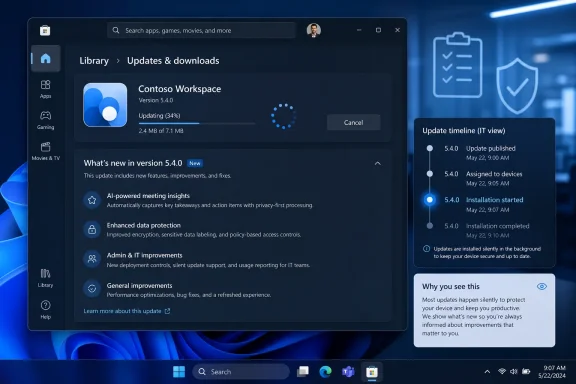
Microsoft’s Windows 11 Microsoft Store now surfaces developer-provided “What’s new” version notes for app updates in the Store’s download and product-page experience, a change first tested with Windows Insiders in August 2024 and now treated as part of the modern Store experience. It sounds minor because changelogs always sound minor. But on Windows, where app servicing has been split for years across Windows Update, Store packages, Win32 updaters, winget, OEM utilities, and enterprise tooling, a visible release note is not just decoration. It is a small admission that users and administrators need to know what changed before the next silent update rewrites their assumptions.
The Microsoft Store in Windows 11 was supposed to be the reset button. Microsoft pitched it in 2021 as a more open, more flexible storefront: not just UWP apps, not just packaged sandbox experiments, but a place where traditional Win32 software could live beside modern apps, games, and Microsoft’s own inbox components. That was the right strategic move, because the old Windows Store had become a symbol of Windows 8’s overreach and Windows 10’s half-hearted app platform.
The problem is that a store is not made trustworthy by inventory alone. It is made trustworthy by behavior. Users forgive an app marketplace for being boring; they do not forgive it for being opaque, slow, pushy, or mysteriously different from the software they thought they installed yesterday.
That is why the “What’s new” section matters more than its humble UI footprint suggests. The version note is the Store’s smallest unit of accountability. It tells the user that an app changed for a reason, that somebody shipped that change deliberately, and that the Store is more than a vending machine with automatic receipts.
For years, Windows users have been trained to distrust that premise. Store app changelogs were often stale, generic, or missing entirely. Many Microsoft apps would update with little more than “bug fixes and performance improvements,” if even that. Some release notes lingered across versions long after they stopped describing the app in front of the user.
The new Store experience does not magically fix that culture. Microsoft can add a better place for version notes, but it cannot force every developer to write meaningful ones. Still, surfacing those notes in the update flow changes the incentive. A changelog buried on a product page is optional trivia; a changelog shown while an update is pending becomes part of the transaction.
Windows 11’s Store is now involved in more than the apps users consciously install. Microsoft distributes and updates pieces of the Windows experience through app packages, Store-delivered components, language assets, media extensions, accessibility features, and inbox apps. Notepad, Paint, Photos, Terminal, Snipping Tool, Clock, Calculator, and other familiar pieces of Windows have spent the Windows 11 era becoming more modular, more frequently updated, and less tied to the once-a-year feature release.
That modularity is defensible. It lets Microsoft improve an app without waiting for an operating system milestone. It lets security fixes and compatibility changes move faster. It also lets Windows feel less frozen between annual releases, which matters in a world where browsers, mobile operating systems, and cloud apps change constantly.
But there is a cost. The more Windows moves through small app updates, the harder it becomes for users to understand what version of “Windows” they are actually running. Two PCs can both report Windows 11 version 24H2 or 25H2 and still have different Store app versions, different web-powered components, different AI features, and different inbox app behavior.
That is the new Windows servicing reality. Microsoft can say, correctly, that the operating system has a version number. Users can say, also correctly, that the experience in front of them changed yesterday and they were never told why. The Store’s version notes sit right at that fault line.
Those are good goals. The Store needed them. The Windows 11 redesign made the Store more visually coherent and dramatically more credible than its Windows 10 predecessor, but its app-management experience still lagged behind the expectations set by iOS, Android, macOS, Linux package managers, and even third-party Windows tooling.
The important bit is that Microsoft paired UI polish with information flow. Version notes for pending updates and active downloads create a moment of visibility at the exact point where users have historically had the least context. The update is happening now. The app is changing now. The Store can either tell you what is happening or pretend the only thing you need is a progress ring.
That distinction matters because Microsoft has spent the last decade normalizing invisible change. Windows Update became more automatic. Edge updates itself. Microsoft 365 apps update on their own channels. Store apps update in the background. WebView2 lets desktop apps inherit browser-engine changes without the user thinking of them as app updates at all.
In isolation, each system makes sense. In aggregate, they produce the modern Windows feeling that your PC is a managed endpoint even when you own it outright. The changelog is one of the few gestures that pushes in the opposite direction.
In a perfectly managed environment, admins would control those changes through deployment rings, policy, package governance, and testing. In the real world, Windows estates are messy. Some apps come from the Store. Some come from Intune. Some arrive through Microsoft 365. Some are vendor-managed. Some are user-installed because blocking everything creates more operational pain than it prevents.
That is where transparency becomes operationally useful. A release note is not a substitute for proper change management, but it is evidence. It gives support staff a timestamped explanation to compare with tickets, screenshots, and user reports. It also helps identify when a Store app update, rather than a Windows cumulative update, is the likely culprit.
Microsoft knows this problem exists because its own servicing model has made it unavoidable. The company has been moving toward a more orchestrated update story, including efforts to bring more app updates into Windows Update-style management paths. That direction makes sense for enterprise reliability. But it also risks making app updates even more abstract unless Microsoft keeps the human-readable layer intact.
The worst outcome would be a Windows ecosystem where updates become better coordinated but less intelligible. Admins do not just need updates to install. They need to know what they are approving, delaying, troubleshooting, or explaining.
Users can tell. “Bug fixes and performance improvements” has become the software equivalent of a shrug. It is sometimes true, often incomplete, and almost always useless. It tells the user that work happened, but not whether any of that work affects them.
There are legitimate reasons for vague notes. Security fixes may need careful phrasing. A/B-tested features may not be available to everyone. Backend changes may matter more than visible UI. Developers may ship hotfixes under pressure and document them later. Small teams may simply lack the process maturity to produce polished notes on every release.
Still, Windows developers have fewer excuses than they used to. If the Store is going to put “What’s new” text in front of users during updates, then the release note becomes part of the app experience. A bad note makes the app look careless. A good note makes even a small update feel intentional.
Microsoft should be judged by the same standard. Its inbox apps often set the tone for the rest of the Store, and too often that tone has been corporate minimalism masquerading as clarity. If Notepad, Paint, Photos, Phone Link, or the Microsoft Store itself changes in a way users will notice, Microsoft should say so plainly.
That openness is why Win32 matters. It is why line-of-business apps, niche utilities, hardware tools, game launchers, development environments, and ancient-but-critical enterprise software continue to run. Microsoft’s more open Store policies for Windows 11 acknowledged that reality rather than trying to wish it away.
But openness without coherence becomes sprawl. A user may update one app through the Store, another through a built-in updater, another through winget, another through a vendor portal, and another only when the IT department repackages it. Each path has different logging, rollback expectations, release notes, and administrative controls.
The Store’s changelog improvements are therefore useful but bounded. They improve the apps that pass through the Store’s update experience. They do not solve the broader fragmentation of Windows software maintenance. They do not make every Win32 updater transparent. They do not guarantee that the version installed from the Store behaves like the version downloaded from a vendor website.
That is why Microsoft’s long-term challenge is not merely to make the Store nicer. It is to make Windows app updates feel less like a scavenger hunt. The user should not need to know the packaging history of an app to understand whether it is current, what changed, and who controls the next update.
Microsoft’s marketing has encouraged this blur. Windows 11 is now presented less as a static operating system than as a rolling experience that gains features over time. That is not inherently wrong. The old model, where meaningful changes waited for a monolithic Windows release, looks slow next to cloud software and mobile platforms.
But a rolling Windows requires a better public record. If features arrive through the Store, the Store must explain them. If features arrive through Windows Update, Windows Update must explain them. If features arrive through server-side enablement, Microsoft needs to stop pretending that a blog post aimed at Insiders is sufficient disclosure for everyone else.
The danger is not that Microsoft updates Windows too often. The danger is that Windows becomes a product where users cannot tell whether a change came from the OS, the Store, Edge, Microsoft 365, Copilot, an OEM package, or an experiment flag. That confusion erodes trust even when the change itself is beneficial.
The “What’s new” section is one antidote to that confusion. It is not the whole cure, but it is an important habit. Software that changes in public should explain itself in public.
For consumers, the Store still competes with habits formed over decades. Windows users search the web for apps. They download installers. They rely on Steam, Adobe Creative Cloud, Epic Games Store, GitHub releases, vendor portals, browser prompts, and package managers. The Store is one option among many, not the default mental model.
Microsoft has made progress by allowing more app types and reducing some of the old platform dogma. The Store now feels less like a museum of compromised mobile-style Windows apps and more like a plausible software catalog. But plausibility is not loyalty. Users still need reasons to prefer it.
Transparent updates can be one of those reasons. If the Store consistently shows accurate version notes, handles updates cleanly, avoids dark-pattern promotion, and makes it easy to reinstall previously acquired apps, it becomes a safer default for ordinary users. Not exciting, perhaps, but safe. On Windows, safe is a feature.
The counterweight is Microsoft’s own promotional instinct. The Store has often been asked to serve too many masters: app discovery, gaming, subscriptions, Microsoft account engagement, entertainment, and corporate cross-selling. Every time it feels like an ad surface rather than a utility, Microsoft spends some of the trust it is trying to earn back.
That is especially important for Windows because the user base is so broad. A casual user may want reassurance that an update is harmless. A power user may want to know whether a workflow changed. A sysadmin may want to correlate a new app version with a support spike. A security-minded user may want to know whether a vulnerability was addressed.
A single note cannot satisfy all of those audiences perfectly, but it can respect them. It can say, in plain English, that the update includes a new import view, fixes a crash when opening large files, changes default sync behavior, or addresses a reliability issue. That is better than pretending the details do not matter.
The Microsoft Store’s decision to show version notes in the update path implicitly says they do matter. Now Microsoft and developers have to live up to that implication. Otherwise, the Store will have built a better window into the same empty room.
Windows users are tired of unexplained motion. They are tired of apps changing names, icons, layouts, defaults, sign-in prompts, privacy settings, AI surfaces, and notification behavior under the banner of continuous improvement. Some of those changes are good. Some are neutral. Some are self-serving. The problem is that they increasingly arrive with the same serene lack of explanation.
That fatigue is why tiny UI affordances become symbolic. A visible “What’s new” note says the user is not merely the endpoint of a deployment pipeline. It says there is still a relationship between the person using the machine and the people changing the software on it.
Microsoft does not always act as though it believes that. The company’s most criticized Windows 11 decisions have often involved taking liberties with defaults, recommendations, account prompts, Edge integration, Start menu promotion, or Copilot placement. In that context, the Store’s version-note work is welcome because it moves in the opposite direction: toward disclosure rather than persuasion.
But disclosure must become habit, not exception. If Microsoft wants Windows to be continuously updated, AI-augmented, cloud-connected, and modular, then it needs a much stronger norm around explaining change. The Store is one visible place to start.
For Windows enthusiasts and administrators, the Store’s “What’s new” work is a reminder that app servicing is now part of the Windows servicing story. Treat it accordingly.
 Microsoft Finally Rediscovers the Changelog
The Microsoft Store in Windows 11 was supposed to be the reset button. Microsoft pitched it in 2021 as a more open, more flexible storefront: not just UWP apps, not just packaged sandbox experiments, but a place where traditional Win32 software could live beside modern apps, games, and Microsoft’s own inbox components. That was the right strategic move, because the old Windows Store had become a symbol of Windows 8’s overreach and Windows 10’s half-hearted app platform.The problem is that a store is not made trustworthy by inventory alone. It is made trustworthy by behavior. Users forgive an app marketplace for being boring; they do not forgive it for being opaque, slow, pushy, or mysteriously different from the software they thought they installed yesterday.
That is why the “What’s new” section matters more than its humble UI footprint suggests. The version note is the Store’s smallest unit of accountability. It tells the user that an app changed for a reason, that somebody shipped that change deliberately, and that the Store is more than a vending machine with automatic receipts.
For years, Windows users have been trained to distrust that premise. Store app changelogs were often stale, generic, or missing entirely. Many Microsoft apps would update with little more than “bug fixes and performance improvements,” if even that. Some release notes lingered across versions long after they stopped describing the app in front of the user.
The new Store experience does not magically fix that culture. Microsoft can add a better place for version notes, but it cannot force every developer to write meaningful ones. Still, surfacing those notes in the update flow changes the incentive. A changelog buried on a product page is optional trivia; a changelog shown while an update is pending becomes part of the transaction.
The Store Became Infrastructure Before It Became Beloved
Windows enthusiasts tend to judge the Microsoft Store as a consumer app: a place to search, download, rate, and complain. Administrators increasingly have to judge it as infrastructure. That distinction explains why a feature as plain as “What’s new” can matter to one group more than another.Windows 11’s Store is now involved in more than the apps users consciously install. Microsoft distributes and updates pieces of the Windows experience through app packages, Store-delivered components, language assets, media extensions, accessibility features, and inbox apps. Notepad, Paint, Photos, Terminal, Snipping Tool, Clock, Calculator, and other familiar pieces of Windows have spent the Windows 11 era becoming more modular, more frequently updated, and less tied to the once-a-year feature release.
That modularity is defensible. It lets Microsoft improve an app without waiting for an operating system milestone. It lets security fixes and compatibility changes move faster. It also lets Windows feel less frozen between annual releases, which matters in a world where browsers, mobile operating systems, and cloud apps change constantly.
But there is a cost. The more Windows moves through small app updates, the harder it becomes for users to understand what version of “Windows” they are actually running. Two PCs can both report Windows 11 version 24H2 or 25H2 and still have different Store app versions, different web-powered components, different AI features, and different inbox app behavior.
That is the new Windows servicing reality. Microsoft can say, correctly, that the operating system has a version number. Users can say, also correctly, that the experience in front of them changed yesterday and they were never told why. The Store’s version notes sit right at that fault line.
A Better Store Page Does Not Solve the Trust Problem
The August 2024 Store update was not only about changelogs. Microsoft also tested a refreshed downloads and updates area, a revised library experience, and improved product pages. The company’s message was familiar: make the Store easier to browse, easier to manage, and more useful as the hub for Windows apps.Those are good goals. The Store needed them. The Windows 11 redesign made the Store more visually coherent and dramatically more credible than its Windows 10 predecessor, but its app-management experience still lagged behind the expectations set by iOS, Android, macOS, Linux package managers, and even third-party Windows tooling.
The important bit is that Microsoft paired UI polish with information flow. Version notes for pending updates and active downloads create a moment of visibility at the exact point where users have historically had the least context. The update is happening now. The app is changing now. The Store can either tell you what is happening or pretend the only thing you need is a progress ring.
That distinction matters because Microsoft has spent the last decade normalizing invisible change. Windows Update became more automatic. Edge updates itself. Microsoft 365 apps update on their own channels. Store apps update in the background. WebView2 lets desktop apps inherit browser-engine changes without the user thinking of them as app updates at all.
In isolation, each system makes sense. In aggregate, they produce the modern Windows feeling that your PC is a managed endpoint even when you own it outright. The changelog is one of the few gestures that pushes in the opposite direction.
The Enterprise Angle Is Less Cosmetic Than It Looks
For home users, a “What’s new” note may answer a simple question: why does this app look different? For IT departments, the same note can be a first clue in a support investigation. If Photos changes its import behavior, if Snipping Tool gains a new default, if Terminal adjusts a profile setting, the help desk wants to know whether a user broke something or Microsoft shipped something.In a perfectly managed environment, admins would control those changes through deployment rings, policy, package governance, and testing. In the real world, Windows estates are messy. Some apps come from the Store. Some come from Intune. Some arrive through Microsoft 365. Some are vendor-managed. Some are user-installed because blocking everything creates more operational pain than it prevents.
That is where transparency becomes operationally useful. A release note is not a substitute for proper change management, but it is evidence. It gives support staff a timestamped explanation to compare with tickets, screenshots, and user reports. It also helps identify when a Store app update, rather than a Windows cumulative update, is the likely culprit.
Microsoft knows this problem exists because its own servicing model has made it unavoidable. The company has been moving toward a more orchestrated update story, including efforts to bring more app updates into Windows Update-style management paths. That direction makes sense for enterprise reliability. But it also risks making app updates even more abstract unless Microsoft keeps the human-readable layer intact.
The worst outcome would be a Windows ecosystem where updates become better coordinated but less intelligible. Admins do not just need updates to install. They need to know what they are approving, delaying, troubleshooting, or explaining.
Developers Now Have Fewer Excuses
The Store can display version notes, but developers still have to write them. That is where the story gets uncomfortable. The software industry has spent years convincing itself that release notes are either marketing copy, legal cover, or a low-priority chore to be delegated to whoever touches the submission form last.Users can tell. “Bug fixes and performance improvements” has become the software equivalent of a shrug. It is sometimes true, often incomplete, and almost always useless. It tells the user that work happened, but not whether any of that work affects them.
There are legitimate reasons for vague notes. Security fixes may need careful phrasing. A/B-tested features may not be available to everyone. Backend changes may matter more than visible UI. Developers may ship hotfixes under pressure and document them later. Small teams may simply lack the process maturity to produce polished notes on every release.
Still, Windows developers have fewer excuses than they used to. If the Store is going to put “What’s new” text in front of users during updates, then the release note becomes part of the app experience. A bad note makes the app look careless. A good note makes even a small update feel intentional.
Microsoft should be judged by the same standard. Its inbox apps often set the tone for the rest of the Store, and too often that tone has been corporate minimalism masquerading as clarity. If Notepad, Paint, Photos, Phone Link, or the Microsoft Store itself changes in a way users will notice, Microsoft should say so plainly.
Windows’ App Model Is Still a Maze
The deeper issue is that the Microsoft Store is only one piece of Windows app management. That has always been the blessing and curse of the platform. Windows won because it let software arrive from anywhere. It still survives in professional environments because it does not force every workflow through a single app gatekeeper.That openness is why Win32 matters. It is why line-of-business apps, niche utilities, hardware tools, game launchers, development environments, and ancient-but-critical enterprise software continue to run. Microsoft’s more open Store policies for Windows 11 acknowledged that reality rather than trying to wish it away.
But openness without coherence becomes sprawl. A user may update one app through the Store, another through a built-in updater, another through winget, another through a vendor portal, and another only when the IT department repackages it. Each path has different logging, rollback expectations, release notes, and administrative controls.
The Store’s changelog improvements are therefore useful but bounded. They improve the apps that pass through the Store’s update experience. They do not solve the broader fragmentation of Windows software maintenance. They do not make every Win32 updater transparent. They do not guarantee that the version installed from the Store behaves like the version downloaded from a vendor website.
That is why Microsoft’s long-term challenge is not merely to make the Store nicer. It is to make Windows app updates feel less like a scavenger hunt. The user should not need to know the packaging history of an app to understand whether it is current, what changed, and who controls the next update.
The Store Is Becoming a Windows Feature Feed
The Microsoft Store also occupies a strange new role in Windows 11: it is not just a marketplace but a delivery mechanism for Windows features that Microsoft wants to evolve independently. This is why Store updates often feel bigger than ordinary app maintenance. When an inbox app gains AI editing, a new accessibility asset, a refreshed interface, or a changed default workflow, users experience that as Windows changing.Microsoft’s marketing has encouraged this blur. Windows 11 is now presented less as a static operating system than as a rolling experience that gains features over time. That is not inherently wrong. The old model, where meaningful changes waited for a monolithic Windows release, looks slow next to cloud software and mobile platforms.
But a rolling Windows requires a better public record. If features arrive through the Store, the Store must explain them. If features arrive through Windows Update, Windows Update must explain them. If features arrive through server-side enablement, Microsoft needs to stop pretending that a blog post aimed at Insiders is sufficient disclosure for everyone else.
The danger is not that Microsoft updates Windows too often. The danger is that Windows becomes a product where users cannot tell whether a change came from the OS, the Store, Edge, Microsoft 365, Copilot, an OEM package, or an experiment flag. That confusion erodes trust even when the change itself is beneficial.
The “What’s new” section is one antidote to that confusion. It is not the whole cure, but it is an important habit. Software that changes in public should explain itself in public.
The Consumer Store Still Has a Discovery Problem
It is worth separating the Store’s update improvements from its discovery problem. The Microsoft Store can be a better place to manage app updates while still being an uneven place to find software. Those are different failures, and Microsoft has historically tended to improve one while declaring victory over both.For consumers, the Store still competes with habits formed over decades. Windows users search the web for apps. They download installers. They rely on Steam, Adobe Creative Cloud, Epic Games Store, GitHub releases, vendor portals, browser prompts, and package managers. The Store is one option among many, not the default mental model.
Microsoft has made progress by allowing more app types and reducing some of the old platform dogma. The Store now feels less like a museum of compromised mobile-style Windows apps and more like a plausible software catalog. But plausibility is not loyalty. Users still need reasons to prefer it.
Transparent updates can be one of those reasons. If the Store consistently shows accurate version notes, handles updates cleanly, avoids dark-pattern promotion, and makes it easy to reinstall previously acquired apps, it becomes a safer default for ordinary users. Not exciting, perhaps, but safe. On Windows, safe is a feature.
The counterweight is Microsoft’s own promotional instinct. The Store has often been asked to serve too many masters: app discovery, gaming, subscriptions, Microsoft account engagement, entertainment, and corporate cross-selling. Every time it feels like an ad surface rather than a utility, Microsoft spends some of the trust it is trying to earn back.
The Changelog Is a Test of Respect
A useful changelog is not long. It is specific. It tells users what changed, what was fixed, and whether behavior they rely on might be different. It avoids pretending that every update is a feature launch, and it avoids hiding meaningful changes behind euphemism.That is especially important for Windows because the user base is so broad. A casual user may want reassurance that an update is harmless. A power user may want to know whether a workflow changed. A sysadmin may want to correlate a new app version with a support spike. A security-minded user may want to know whether a vulnerability was addressed.
A single note cannot satisfy all of those audiences perfectly, but it can respect them. It can say, in plain English, that the update includes a new import view, fixes a crash when opening large files, changes default sync behavior, or addresses a reliability issue. That is better than pretending the details do not matter.
The Microsoft Store’s decision to show version notes in the update path implicitly says they do matter. Now Microsoft and developers have to live up to that implication. Otherwise, the Store will have built a better window into the same empty room.
Microsoft’s Real Rival Is User Fatigue
The obvious comparison is Apple’s App Store or Google Play, where app updates, release notes, and automatic maintenance are familiar parts of the platform. But Microsoft’s real rival is not Cupertino or Mountain View. It is fatigue.Windows users are tired of unexplained motion. They are tired of apps changing names, icons, layouts, defaults, sign-in prompts, privacy settings, AI surfaces, and notification behavior under the banner of continuous improvement. Some of those changes are good. Some are neutral. Some are self-serving. The problem is that they increasingly arrive with the same serene lack of explanation.
That fatigue is why tiny UI affordances become symbolic. A visible “What’s new” note says the user is not merely the endpoint of a deployment pipeline. It says there is still a relationship between the person using the machine and the people changing the software on it.
Microsoft does not always act as though it believes that. The company’s most criticized Windows 11 decisions have often involved taking liberties with defaults, recommendations, account prompts, Edge integration, Start menu promotion, or Copilot placement. In that context, the Store’s version-note work is welcome because it moves in the opposite direction: toward disclosure rather than persuasion.
But disclosure must become habit, not exception. If Microsoft wants Windows to be continuously updated, AI-augmented, cloud-connected, and modular, then it needs a much stronger norm around explaining change. The Store is one visible place to start.
The Small Store Note That Carries a Bigger Windows Burden
The practical lesson is not that every Windows user should spend the afternoon reading Store release notes. Most will not, and that is fine. The point is that the information should be available at the moment it is useful, especially when an update is pending, active, or newly installed.For Windows enthusiasts and administrators, the Store’s “What’s new” work is a reminder that app servicing is now part of the Windows servicing story. Treat it accordingly.
- The Microsoft Store’s version notes are most useful when they appear during the update flow, not only on a buried product page.
- Developers now have a stronger obligation to write release notes that describe actual user-visible changes.
- Administrators should consider Store app versions when investigating Windows 11 behavior changes, especially for inbox apps.
- Microsoft’s modular Windows strategy makes update transparency more important, not less.
- The Store can improve trust only if it behaves like a utility first and a promotional surface second.
References
- Primary source: thurrott.com
Published: 2026-06-28T03:10:14.662727
Loading…
www.thurrott.com - Official source: support.microsoft.com
Loading…
support.microsoft.com - Related coverage: windowscentral.com
Loading…
www.windowscentral.com - Related coverage: howtogeek.com
Loading…
www.howtogeek.com - Related coverage: pcworld.com
Loading…
www.pcworld.com - Related coverage: fullcirclecomputing.com
What's New in Windows 11 Quick Reference
Handy What's New in Windows 11 with commonly used shortcuts, tips and tricks. Free for personal and professional training.www.fullcirclecomputing.com
- Related coverage: customguide.com
Loading…
www.customguide.com - Related coverage: deploymentresearch.com
Loading…
deploymentresearch.com - Official source: blogs.windows.com
Loading…
blogs.windows.com - Official source: learn.microsoft.com
Loading…
learn.microsoft.com - Related coverage: pureinfotech.com
Loading…
pureinfotech.com - Related coverage: its.ny.gov
Loading…
its.ny.gov