

In 2026, consumer AI adoption is clustering around a familiar cast of apps — ChatGPT, Gemini, Microsoft Copilot, Perplexity, Grok, Adobe Firefly, Canva, and Duolingo — as users fold generative tools into writing, search, office work, design, coding, and language learning. The list itself is not surprising. What is surprising is how quickly “AI app” has stopped meaning one thing. The market is no longer a novelty race to download a chatbot; it is becoming a distribution war over where daily work already happens.
The most revealing thing about the current AI app boom is that almost every major winner arrives with an existing habit attached. ChatGPT has the verb-like familiarity of the category pioneer. Gemini rides Google Search, Android, Gmail, Docs, and Chrome. Copilot sits inside Windows, Edge, Visual Studio Code, GitHub, Teams, Excel, Word, and PowerPoint.
That matters more than benchmark bragging rights. Users do not wake up wanting to compare model architectures; they want to finish an email, summarize a PDF, clean up a spreadsheet, generate an image, translate a sentence, debug a script, or ask a question without opening six tabs. The app that wins is often the one closest to the task.
For Windows users, this is the important shift. AI is no longer a destination app that sits beside the operating system. It is becoming an ambient layer across the productivity stack, browser, creative tools, and mobile devices that feed the desktop workflow.
The result is a market that looks crowded from the outside but increasingly segmented from within. ChatGPT may be the default generalist, Gemini the Google-native assistant, Copilot the enterprise and Windows-adjacent layer, Perplexity the answer engine, Firefly and Canva the creative accelerators, Grok the real-time personality play, and Duolingo the proof that AI’s most durable use cases may hide inside ordinary apps.
But the very breadth that made ChatGPT famous is also what makes the market harder to defend. Once users learn the basic interaction pattern — type a request, refine the answer, ask for a rewrite, upload a file — the magic becomes portable. A good enough assistant embedded in Gmail, Word, Notion, Slack, a browser, or a phone can chip away at ChatGPT’s standalone gravitational pull.
That does not mean ChatGPT is fading. It means the first era of consumer AI, in which one app could plausibly stand for the whole phenomenon, is ending. The next era is less about whether people use AI and more about whose AI is present at the moment of work.
OpenAI’s challenge is therefore not simply technical. It has to remain the place users deliberately choose, while Google, Microsoft, Apple, Meta, Adobe, and others try to make AI something users encounter by default. That distinction — chosen versus bundled — is where the market’s next fight will happen.
That does not guarantee trust. Google has spent years asking users to rely on Search as a gateway to the web, and generative answers complicate that relationship. When an AI answer is wrong, thinly sourced, or too confident, it can feel more consequential than a bad search result because it arrives as a finished assertion rather than a list of places to check.
Still, Gemini’s strategic position is obvious. If AI becomes the interface to information, Google cannot afford to let that interface live somewhere else. Search advertising, Android stickiness, Workspace subscriptions, Chrome usage, and cloud services all depend on Google remaining close to user intent.
For Windows users, Gemini is less an operating-system feature than a cross-platform gravitational field. It enters through Chrome, Gmail, Google Drive, Android phones, and the habits of students and workers who already keep one foot in Google’s ecosystem even when their primary PC runs Windows.
That gives Microsoft a different path to adoption. Copilot does not need to win every casual chatbot comparison if it can become the sanctioned assistant for Word documents, Excel models, Outlook threads, Teams meetings, SharePoint repositories, PowerPoint decks, and developer workflows. In enterprise IT, the “best” AI tool is often the one that fits the tenant, policy model, audit requirements, and procurement channel.
The Windows angle is more complicated. Microsoft has experimented aggressively with AI in Windows itself, from Copilot entry points to recall-style features and local AI capabilities on newer hardware. Some users see this as overdue modernization. Others see it as the latest round of cloud-first nudging inside an operating system they want to remain predictable, controllable, and private.
That tension is not going away. Microsoft’s opportunity is to make AI feel like a productivity feature rather than an advertising surface or telemetry funnel. Its risk is that users treat Copilot as another preinstalled prompt they have to disable before getting back to work.
This is why Perplexity has carved out a distinct identity. ChatGPT is a general assistant. Gemini is tied to Google’s information empire. Copilot is attached to Microsoft’s productivity stack. Perplexity presents itself as an answer engine, and that framing matters because it narrows the promise.
The narrowing is useful. Users who want quick research, source-backed summaries, comparison shopping, technical explanations, or news context are not always asking for a creative partner. They want a fast map of the terrain. Perplexity’s appeal is that it recognizes the difference.
But the model has its own fragility. If AI answer engines become the front door to the web, publishers will fight over attribution, traffic, licensing, and whether summaries substitute for reading. The tool that helps users escape bad search may also accelerate the economic crisis of the open web that made bad search feel so exhausting in the first place.
Its most distinctive appeal is real-time context. Users who live inside X want an assistant that can explain what people are reacting to now, summarize fast-moving discourse, and answer in a tone that feels less corporate than the polished voices of ChatGPT, Gemini, or Copilot. For some users, that is the point. For others, it is the warning label.
Grok’s future depends on whether it can become more than an identity product. Real-time data access is valuable, but enterprise users, educators, developers, and researchers still judge AI tools on reliability, controllability, safety, integrations, and output quality. Attitude can earn attention; dependable workflows earn retention.
That distinction matters in 2026 because the AI market is maturing. A chatbot can go viral by sounding different. It becomes infrastructure only when people trust it with boring, repeated, consequential work.
That is Adobe’s advantage. Photoshop, Illustrator, Express, Premiere, and the broader Creative Cloud ecosystem give Firefly a home inside the production process. The user is not necessarily “using an AI app” in the same way someone opens a chatbot. They are using a creative tool that now has generative functions woven into the canvas.
This distinction is important for licensing and trust. Creative professionals care about provenance, commercial safety, training data controversies, and whether generated assets can survive client review. Adobe has positioned Firefly around enterprise-friendly creative generation, which is exactly the kind of reassurance agencies and in-house teams need before letting AI into brand work.
The broader lesson is that creative AI adoption will not be measured only by standalone image apps. It will be measured by how deeply generative features disappear into the tools used to make thumbnails, ads, pitch decks, product mockups, newsletters, videos, and social campaigns.
That audience does not want more creative complexity. It wants less blank-page anxiety. AI features that generate layouts, rewrite copy, remove backgrounds, create images, resize designs, and turn rough ideas into polished templates fit naturally into Canva’s original promise: make design accessible to people who do not think of themselves as designers.
This is one of the most practical forms of AI adoption. It does not require users to understand model families or prompt engineering. It asks them what they are trying to make and then collapses the distance between intention and artifact.
For Windows users, Canva also reflects the browser-based future of productivity. Many lightweight creative tasks that once required installed desktop software now happen in web apps, synced accounts, and collaborative workspaces. AI accelerates that migration by making the web tool feel more capable without making the local PC feel more central.
Language learning is a natural fit for AI because it is repetitive, personal, and feedback-heavy. A human tutor is ideal but expensive and scarce. A static app is scalable but limited. AI lets Duolingo move closer to tutor-like interaction while retaining the gamified, mobile-first structure that made it popular.
This points to a broader truth about 2026 adoption. The most durable AI features may not announce themselves as AI at all. They may simply make old software feel more responsive, more personalized, and less brittle.
That has implications beyond education. Finance apps, health apps, note-taking tools, IDEs, customer-support platforms, and operating systems are all heading in the same direction. The AI interface may be conversational when conversation helps, but invisible when conversation gets in the way.
This is why AI adoption numbers often seem contradictory. One report may rank apps by mobile downloads, another by monthly active users, another by web traffic, another by enterprise seats, another by time spent, and another by subscription revenue. Each tells part of the story; none tells the whole story.
For a Windows audience, the most meaningful metric is often not download volume but workflow capture. Which assistant is allowed to see company files? Which one can summarize meetings? Which one lives in the browser? Which one can operate across local documents, cloud storage, email, and line-of-business apps? Which one is blocked by policy?
This is where Microsoft has an advantage that raw consumer charts can obscure. Copilot may not always dominate app-store excitement, but Microsoft’s presence in identity, endpoint management, productivity software, developer tools, and cloud infrastructure gives it leverage where IT decisions are made. Conversely, ChatGPT’s consumer strength gives OpenAI cultural momentum that enterprise vendors cannot easily manufacture.
That is why the current crop of apps feels less like a fad than a reorganization of software expectations. Users are learning that text can be reshaped instantly, images can be drafted from a sentence, meetings can become summaries, code can be explained line by line, and research can begin with a synthesized brief. Once learned, those expectations do not stay confined to one app.
The pressure then moves to every software vendor. A notes app without summarization starts to feel old. A design tool without generative fill feels incomplete. A browser without AI search feels behind. A productivity suite without document-aware assistance feels like it is charging for yesterday’s workflow.
This is good for users in the short term because competition forces rapid improvement. It is also risky because every vendor now has an incentive to sprinkle AI over interfaces whether or not the feature is needed, mature, or respectful of user control.
Newer Windows hardware with neural processing units gives Microsoft and PC makers a story about local AI. On-device processing promises lower latency, better privacy, offline capability, and reduced cloud costs. In practice, the value depends on whether users see meaningful features rather than marketing badges.
The local-versus-cloud split will matter more over time. Cloud models are powerful and frequently updated, but they raise concerns about data exposure, subscription dependency, and unpredictable policy changes. Local models may be more private and responsive, but they can be smaller, more limited, and unevenly supported across hardware.
Administrators will have to manage that complexity. AI features may touch documents, screenshots, recordings, browser histories, meeting transcripts, and code repositories. The security model of “install an app and assign permissions” becomes harder when the assistant is embedded across the operating system and productivity layer.
Consumer users often face this as a settings problem. Is chat history saved? Is data used for training? Can memory be disabled? Are uploads retained? What happens to voice clips? The answers vary by provider, plan, region, and enterprise policy.
For organizations, the issue is bigger than settings. They need data-loss prevention, audit logs, retention controls, legal holds, access boundaries, tenant isolation, and clarity about where prompts and outputs travel. AI turns ordinary productivity actions into potential data-processing events.
This is where the easy consumer narrative — “AI apps save time” — meets the harder administrative reality. Saving ten minutes on a summary is useful. Accidentally exposing privileged data, regulated information, or unreleased source code is expensive.
But the gains are uneven. AI helps most when the user can judge the output. A strong writer can spot a bland paragraph. A skilled developer can catch a broken function. A subject-matter expert can detect a hallucinated claim. A beginner may accept confident nonsense because it looks polished.
That creates a training problem. Organizations cannot simply roll out AI and assume productivity rises. They need norms around verification, disclosure, sensitive data, acceptable use, and when not to automate. The most productive AI users are not necessarily the most enthusiastic; they are the ones who know where the tool’s competence ends.
The same is true for students and consumers. AI can accelerate learning when used as a coach. It can weaken learning when used as a substitute for effort. The difference is not always visible in download statistics.
The deeper trend is that AI is becoming a feature layer across software categories. Chatbots are only the most visible expression. The same technology is moving into browsers, office suites, creative tools, learning apps, operating systems, customer-service platforms, and developer environments.
That shift will make the category harder to track. A user who opens ChatGPT is clearly using AI. A user who accepts a suggested rewrite in Word, generates a slide in Canva, asks Gemini inside Gmail, removes a background in Adobe Express, or practices a simulated conversation in Duolingo may not think about AI at all.
This is how technologies become normal. They stop being destinations and become expectations.
This is why the market can support several winners at once. ChatGPT can remain the general-purpose assistant while Gemini grows through Google’s ecosystem, Copilot advances through enterprise productivity, Perplexity serves research-heavy users, Firefly and Canva split creative workflows, Grok appeals to real-time information seekers, and Duolingo turns AI into personalized practice.
The danger is that vendors will confuse presence with usefulness. An AI button in every toolbar is not the same as a thoughtful workflow. Users will tolerate experimentation for a while, but they will eventually punish features that are intrusive, inaccurate, slow, expensive, or impossible to govern.
The next phase will reward restraint as much as ambition. The best AI apps will not merely answer more questions; they will know when to stay out of the way.
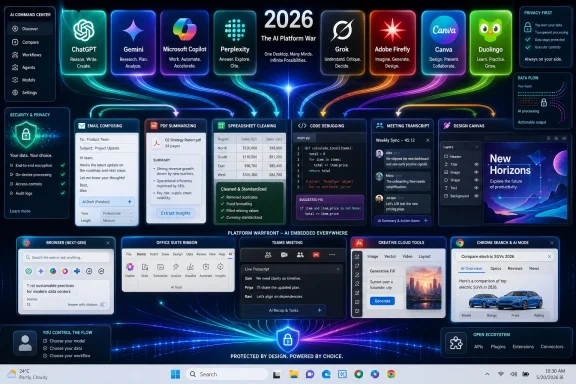 The AI App Boom Is Really a Platform War
The most revealing thing about the current AI app boom is that almost every major winner arrives with an existing habit attached. ChatGPT has the verb-like familiarity of the category pioneer. Gemini rides Google Search, Android, Gmail, Docs, and Chrome. Copilot sits inside Windows, Edge, Visual Studio Code, GitHub, Teams, Excel, Word, and PowerPoint.That matters more than benchmark bragging rights. Users do not wake up wanting to compare model architectures; they want to finish an email, summarize a PDF, clean up a spreadsheet, generate an image, translate a sentence, debug a script, or ask a question without opening six tabs. The app that wins is often the one closest to the task.
For Windows users, this is the important shift. AI is no longer a destination app that sits beside the operating system. It is becoming an ambient layer across the productivity stack, browser, creative tools, and mobile devices that feed the desktop workflow.
The result is a market that looks crowded from the outside but increasingly segmented from within. ChatGPT may be the default generalist, Gemini the Google-native assistant, Copilot the enterprise and Windows-adjacent layer, Perplexity the answer engine, Firefly and Canva the creative accelerators, Grok the real-time personality play, and Duolingo the proof that AI’s most durable use cases may hide inside ordinary apps.
ChatGPT Still Defines the Category, Even as the Category Escapes It
ChatGPT remains the app most people mean when they say they “use AI.” That is a powerful advantage, and OpenAI has spent the past few years turning a chatbot into something closer to a personal workbench: writing assistant, coding helper, document analyst, voice companion, tutor, and lightweight automation layer.But the very breadth that made ChatGPT famous is also what makes the market harder to defend. Once users learn the basic interaction pattern — type a request, refine the answer, ask for a rewrite, upload a file — the magic becomes portable. A good enough assistant embedded in Gmail, Word, Notion, Slack, a browser, or a phone can chip away at ChatGPT’s standalone gravitational pull.
That does not mean ChatGPT is fading. It means the first era of consumer AI, in which one app could plausibly stand for the whole phenomenon, is ending. The next era is less about whether people use AI and more about whose AI is present at the moment of work.
OpenAI’s challenge is therefore not simply technical. It has to remain the place users deliberately choose, while Google, Microsoft, Apple, Meta, Adobe, and others try to make AI something users encounter by default. That distinction — chosen versus bundled — is where the market’s next fight will happen.
Gemini’s Advantage Is That Google Does Not Need You to Download It
Google Gemini’s rise is a reminder that distribution is its own kind of intelligence. A standalone AI chatbot has to persuade users to form a new habit. Google can place Gemini near habits that already exist: search queries, Android gestures, email composition, document drafting, browser sessions, and cloud files.That does not guarantee trust. Google has spent years asking users to rely on Search as a gateway to the web, and generative answers complicate that relationship. When an AI answer is wrong, thinly sourced, or too confident, it can feel more consequential than a bad search result because it arrives as a finished assertion rather than a list of places to check.
Still, Gemini’s strategic position is obvious. If AI becomes the interface to information, Google cannot afford to let that interface live somewhere else. Search advertising, Android stickiness, Workspace subscriptions, Chrome usage, and cloud services all depend on Google remaining close to user intent.
For Windows users, Gemini is less an operating-system feature than a cross-platform gravitational field. It enters through Chrome, Gmail, Google Drive, Android phones, and the habits of students and workers who already keep one foot in Google’s ecosystem even when their primary PC runs Windows.
Copilot Is Microsoft’s Bet That AI Belongs Inside the Workday
Microsoft Copilot is the most important AI app for WindowsForum readers not because it is always the flashiest, but because it is the one most likely to be imposed by workplace infrastructure. A consumer can choose ChatGPT or Perplexity on a whim. A company rolling out Microsoft 365 Copilot is making an organizational decision about data, identity, compliance, licensing, and workflow.That gives Microsoft a different path to adoption. Copilot does not need to win every casual chatbot comparison if it can become the sanctioned assistant for Word documents, Excel models, Outlook threads, Teams meetings, SharePoint repositories, PowerPoint decks, and developer workflows. In enterprise IT, the “best” AI tool is often the one that fits the tenant, policy model, audit requirements, and procurement channel.
The Windows angle is more complicated. Microsoft has experimented aggressively with AI in Windows itself, from Copilot entry points to recall-style features and local AI capabilities on newer hardware. Some users see this as overdue modernization. Others see it as the latest round of cloud-first nudging inside an operating system they want to remain predictable, controllable, and private.
That tension is not going away. Microsoft’s opportunity is to make AI feel like a productivity feature rather than an advertising surface or telemetry funnel. Its risk is that users treat Copilot as another preinstalled prompt they have to disable before getting back to work.
Perplexity Turned Search Anxiety Into a Product
Perplexity’s popularity makes sense in a web where search results often feel crowded by ads, SEO sludge, affiliate pages, and autogenerated filler. Its pitch is simple: ask a question, get a synthesized answer, and see the sources that support it. That is not a replacement for research, but it is a compelling shortcut for the first pass.This is why Perplexity has carved out a distinct identity. ChatGPT is a general assistant. Gemini is tied to Google’s information empire. Copilot is attached to Microsoft’s productivity stack. Perplexity presents itself as an answer engine, and that framing matters because it narrows the promise.
The narrowing is useful. Users who want quick research, source-backed summaries, comparison shopping, technical explanations, or news context are not always asking for a creative partner. They want a fast map of the terrain. Perplexity’s appeal is that it recognizes the difference.
But the model has its own fragility. If AI answer engines become the front door to the web, publishers will fight over attribution, traffic, licensing, and whether summaries substitute for reading. The tool that helps users escape bad search may also accelerate the economic crisis of the open web that made bad search feel so exhausting in the first place.
Grok Is the Culture-War Chatbot With a Real-Time Hook
Grok occupies a stranger place in the AI app lineup. It is not merely an assistant; it is part product, part personality, part platform extension for X. That makes it unusually visible and unusually polarizing.Its most distinctive appeal is real-time context. Users who live inside X want an assistant that can explain what people are reacting to now, summarize fast-moving discourse, and answer in a tone that feels less corporate than the polished voices of ChatGPT, Gemini, or Copilot. For some users, that is the point. For others, it is the warning label.
Grok’s future depends on whether it can become more than an identity product. Real-time data access is valuable, but enterprise users, educators, developers, and researchers still judge AI tools on reliability, controllability, safety, integrations, and output quality. Attitude can earn attention; dependable workflows earn retention.
That distinction matters in 2026 because the AI market is maturing. A chatbot can go viral by sounding different. It becomes infrastructure only when people trust it with boring, repeated, consequential work.
Adobe Firefly Shows Why Creative AI Is Not Just About Prompts
Adobe Firefly is one of the clearest examples of AI being absorbed into a professional workflow rather than sold as a separate toy. Designers do not just want to generate an image from a prompt. They want to extend a background, remove an object, create variations, match a brand style, preserve layers, and keep working inside tools they already know.That is Adobe’s advantage. Photoshop, Illustrator, Express, Premiere, and the broader Creative Cloud ecosystem give Firefly a home inside the production process. The user is not necessarily “using an AI app” in the same way someone opens a chatbot. They are using a creative tool that now has generative functions woven into the canvas.
This distinction is important for licensing and trust. Creative professionals care about provenance, commercial safety, training data controversies, and whether generated assets can survive client review. Adobe has positioned Firefly around enterprise-friendly creative generation, which is exactly the kind of reassurance agencies and in-house teams need before letting AI into brand work.
The broader lesson is that creative AI adoption will not be measured only by standalone image apps. It will be measured by how deeply generative features disappear into the tools used to make thumbnails, ads, pitch decks, product mockups, newsletters, videos, and social campaigns.
Canva Is Winning the People Who Never Wanted Photoshop
Canva’s AI story is different from Adobe’s because Canva’s audience is different. It serves the office worker making a quick flyer, the teacher building a classroom handout, the small-business owner designing an Instagram post, the nonprofit making a donor deck, and the student assembling a presentation five hours before it is due.That audience does not want more creative complexity. It wants less blank-page anxiety. AI features that generate layouts, rewrite copy, remove backgrounds, create images, resize designs, and turn rough ideas into polished templates fit naturally into Canva’s original promise: make design accessible to people who do not think of themselves as designers.
This is one of the most practical forms of AI adoption. It does not require users to understand model families or prompt engineering. It asks them what they are trying to make and then collapses the distance between intention and artifact.
For Windows users, Canva also reflects the browser-based future of productivity. Many lightweight creative tasks that once required installed desktop software now happen in web apps, synced accounts, and collaborative workspaces. AI accelerates that migration by making the web tool feel more capable without making the local PC feel more central.
Duolingo Proves AI Can Win by Disappearing
Duolingo is the oddest entry in the list because many users do not primarily think of it as an AI app. That is exactly why it matters. AI is not always a chatbot window; sometimes it is the adaptive logic behind a lesson, the generated exercise that targets a weakness, the simulated conversation that lets a learner practice without embarrassment, or the personalized explanation that appears when a user gets stuck.Language learning is a natural fit for AI because it is repetitive, personal, and feedback-heavy. A human tutor is ideal but expensive and scarce. A static app is scalable but limited. AI lets Duolingo move closer to tutor-like interaction while retaining the gamified, mobile-first structure that made it popular.
This points to a broader truth about 2026 adoption. The most durable AI features may not announce themselves as AI at all. They may simply make old software feel more responsive, more personalized, and less brittle.
That has implications beyond education. Finance apps, health apps, note-taking tools, IDEs, customer-support platforms, and operating systems are all heading in the same direction. The AI interface may be conversational when conversation helps, but invisible when conversation gets in the way.
The Download Chart Does Not Tell the Whole Story
The phrase “everyone is downloading them” captures the mood, but downloads are a blunt instrument. A downloaded app may be opened once and abandoned. A bundled feature may have massive usage without a visible download. A workplace deployment may matter more economically than a consumer app-store surge.This is why AI adoption numbers often seem contradictory. One report may rank apps by mobile downloads, another by monthly active users, another by web traffic, another by enterprise seats, another by time spent, and another by subscription revenue. Each tells part of the story; none tells the whole story.
For a Windows audience, the most meaningful metric is often not download volume but workflow capture. Which assistant is allowed to see company files? Which one can summarize meetings? Which one lives in the browser? Which one can operate across local documents, cloud storage, email, and line-of-business apps? Which one is blocked by policy?
This is where Microsoft has an advantage that raw consumer charts can obscure. Copilot may not always dominate app-store excitement, but Microsoft’s presence in identity, endpoint management, productivity software, developer tools, and cloud infrastructure gives it leverage where IT decisions are made. Conversely, ChatGPT’s consumer strength gives OpenAI cultural momentum that enterprise vendors cannot easily manufacture.
AI Is Becoming the New Office Suite
The first office suites bundled word processing, spreadsheets, presentations, email, and calendars into a shared productivity grammar. The AI app market is beginning to create a similar grammar around prompting, summarizing, rewriting, generating, searching, coding, translating, transcribing, and automating.That is why the current crop of apps feels less like a fad than a reorganization of software expectations. Users are learning that text can be reshaped instantly, images can be drafted from a sentence, meetings can become summaries, code can be explained line by line, and research can begin with a synthesized brief. Once learned, those expectations do not stay confined to one app.
The pressure then moves to every software vendor. A notes app without summarization starts to feel old. A design tool without generative fill feels incomplete. A browser without AI search feels behind. A productivity suite without document-aware assistance feels like it is charging for yesterday’s workflow.
This is good for users in the short term because competition forces rapid improvement. It is also risky because every vendor now has an incentive to sprinkle AI over interfaces whether or not the feature is needed, mature, or respectful of user control.
The Windows Desktop Becomes the Battleground Again
For years, much of the consumer software story moved away from the Windows desktop and into phones, browsers, and cloud services. AI is pulling attention back toward the PC, but not in a nostalgic way. The question is not whether desktop apps return to dominance; it is whether the PC becomes the command center for AI-assisted work across local and cloud contexts.Newer Windows hardware with neural processing units gives Microsoft and PC makers a story about local AI. On-device processing promises lower latency, better privacy, offline capability, and reduced cloud costs. In practice, the value depends on whether users see meaningful features rather than marketing badges.
The local-versus-cloud split will matter more over time. Cloud models are powerful and frequently updated, but they raise concerns about data exposure, subscription dependency, and unpredictable policy changes. Local models may be more private and responsive, but they can be smaller, more limited, and unevenly supported across hardware.
Administrators will have to manage that complexity. AI features may touch documents, screenshots, recordings, browser histories, meeting transcripts, and code repositories. The security model of “install an app and assign permissions” becomes harder when the assistant is embedded across the operating system and productivity layer.
The Privacy Bargain Is Getting Harder to Read
Every AI app asks for a bargain: give me more context and I will be more useful. The problem is that context is often the sensitive part. Emails, calendars, files, messages, screenshots, voice recordings, documents, source code, and customer data are exactly what make an assistant powerful and exactly what make users nervous.Consumer users often face this as a settings problem. Is chat history saved? Is data used for training? Can memory be disabled? Are uploads retained? What happens to voice clips? The answers vary by provider, plan, region, and enterprise policy.
For organizations, the issue is bigger than settings. They need data-loss prevention, audit logs, retention controls, legal holds, access boundaries, tenant isolation, and clarity about where prompts and outputs travel. AI turns ordinary productivity actions into potential data-processing events.
This is where the easy consumer narrative — “AI apps save time” — meets the harder administrative reality. Saving ten minutes on a summary is useful. Accidentally exposing privileged data, regulated information, or unreleased source code is expensive.
The Productivity Gains Are Real, but Unevenly Distributed
It is no longer credible to argue that AI apps are only toys. Writers use them to draft and edit. Developers use them to explain APIs and generate boilerplate. Analysts use them to summarize reports. Students use them as tutors. Designers use them for variations. Support teams use them to triage responses.But the gains are uneven. AI helps most when the user can judge the output. A strong writer can spot a bland paragraph. A skilled developer can catch a broken function. A subject-matter expert can detect a hallucinated claim. A beginner may accept confident nonsense because it looks polished.
That creates a training problem. Organizations cannot simply roll out AI and assume productivity rises. They need norms around verification, disclosure, sensitive data, acceptable use, and when not to automate. The most productive AI users are not necessarily the most enthusiastic; they are the ones who know where the tool’s competence ends.
The same is true for students and consumers. AI can accelerate learning when used as a coach. It can weaken learning when used as a substitute for effort. The difference is not always visible in download statistics.
The App Store Is Only the Front Door
The article that sparked this discussion lists recognizable AI apps, and as a consumer snapshot it is broadly right. These are the names ordinary users encounter when they go looking for help with writing, research, design, productivity, coding, or learning. But the deeper trend is not that people are downloading eight famous apps.The deeper trend is that AI is becoming a feature layer across software categories. Chatbots are only the most visible expression. The same technology is moving into browsers, office suites, creative tools, learning apps, operating systems, customer-service platforms, and developer environments.
That shift will make the category harder to track. A user who opens ChatGPT is clearly using AI. A user who accepts a suggested rewrite in Word, generates a slide in Canva, asks Gemini inside Gmail, removes a background in Adobe Express, or practices a simulated conversation in Duolingo may not think about AI at all.
This is how technologies become normal. They stop being destinations and become expectations.
The Real Winners Will Own the Moment of Need
The 2026 AI app race is less about who has the cleverest chatbot and more about who owns the moment when a user needs help. That moment may happen in a blank document, a crowded inbox, a browser search, a spreadsheet, a classroom exercise, a design canvas, a code editor, or a social feed.This is why the market can support several winners at once. ChatGPT can remain the general-purpose assistant while Gemini grows through Google’s ecosystem, Copilot advances through enterprise productivity, Perplexity serves research-heavy users, Firefly and Canva split creative workflows, Grok appeals to real-time information seekers, and Duolingo turns AI into personalized practice.
The danger is that vendors will confuse presence with usefulness. An AI button in every toolbar is not the same as a thoughtful workflow. Users will tolerate experimentation for a while, but they will eventually punish features that are intrusive, inaccurate, slow, expensive, or impossible to govern.
The next phase will reward restraint as much as ambition. The best AI apps will not merely answer more questions; they will know when to stay out of the way.
The 2026 AI Download Craze Is a Map of Software’s Next Default
The practical lesson from this year’s AI app surge is that users should think less about brand loyalty and more about fit. The right tool depends on where the work lives, what data it needs, how much verification is possible, and whether the assistant improves a workflow rather than adding another inbox of machine-generated noise.- ChatGPT remains the broadest general-purpose AI assistant, but its dominance is being challenged by tools embedded closer to daily work.
- Gemini’s strength comes from Google’s ecosystem, where AI can appear inside search, mobile, browser, and productivity habits without demanding a separate workflow.
- Microsoft Copilot matters most in organizations because it connects AI adoption to identity, compliance, Microsoft 365, developer tools, and Windows administration.
- Perplexity has momentum because users want faster research with visible sourcing, especially as traditional search feels more cluttered.
- Adobe Firefly, Canva, and Duolingo show that some of the most successful AI adoption happens when the technology disappears into familiar creative and learning tasks.
- IT teams should treat AI apps as data-access surfaces, not harmless utilities, because prompts, files, transcripts, screenshots, and generated outputs can all carry risk.