

Google’s Android 17 rollout began in mid-June 2026 for Pixel devices, and one of its most consequential quieter additions is Rambler, a Gemini-powered Gboard dictation feature that lets users speak naturally while the keyboard edits, formats, and interprets instructions in context. It looks like a convenience feature, but it points to something larger than better voice typing. Google is trying to turn the keyboard from a text-entry utility into an AI command surface. That shift matters because the keyboard is where mobile computing still begins.
The headline Android 17 story is easy to tell in familiar terms: more Gemini, more ambient intelligence, more system-level assistance. That is the kind of framing Google wants, because it places Android inside the broader AI platform race rather than the narrower phone operating-system market. But Rambler is more interesting precisely because it does not announce itself as a grand reinvention.
It lives inside Gboard, the most ordinary place imaginable. The keyboard is not glamorous. It is infrastructure, a background tool users notice mostly when it fails. Yet on a phone, the keyboard is also the bottleneck through which search queries, messages, passwords, notes, commands, and half-formed thoughts pass dozens or hundreds of times per day.
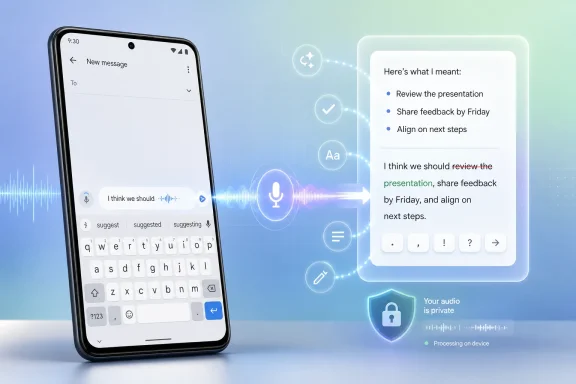
That makes Rambler strategically important. If the feature works as described, it does not merely transcribe words. It distinguishes between the words a user wants written and the instructions a user is giving about those words. “Add milk, eggs, and bread — actually remove bread — make that a bullet list” is no longer a messy dictation problem. It becomes an editing session conducted in natural speech.
The difference sounds subtle until you remember how bad conventional dictation can feel. Traditional speech-to-text systems are literal-minded clerks. They hear filler words, false starts, corrections, hesitations, and formatting instructions as text unless the user learns special command syntax. Rambler is Google’s attempt to make dictation behave less like a stenographer and more like an assistant.
We pause. We revise mid-sentence. We say “no, wait” and then continue. We use tone, rhythm, and context to separate a thought from an instruction. Human listeners understand this effortlessly, but software historically has not.
That is why most users treat dictation as a specialized tool rather than a default input mode. It is useful in the car, while cooking, or for a quick message when hands are occupied. But it often stops being useful the moment the user needs to compose anything that requires structure. The cost of correction eats the time saved by speaking.
Rambler attacks that friction directly. The reported ability to filter out “ums” and “ahs,” understand spoken edits, format text, add emojis, and handle code-switching between languages is not just a polish pass. It is an admission that speech input has been designed around an unrealistic model of how people talk.
Rambler benefits from being less theatrical. It does not need to open a chatbot panel or ask the user to start a special AI session. It simply makes a familiar interaction more forgiving. That is often where AI is most useful: not as a destination, but as a correction layer inside an existing workflow.
This is also where Google has an advantage over many AI-first startups. Gboard is already installed on enormous numbers of Android devices. Android already has permissions, input methods, language models, user dictionaries, voice recognition, and account-level personalization. If Google can make the default keyboard meaningfully smarter, it can distribute an AI writing interface at a scale that standalone dictation apps can only envy.
The catch is trust. A keyboard is not just another app. It sees sensitive material by design. The more intelligent it becomes, the more users will reasonably ask where speech is processed, what is retained, how personalization works, and how enterprise administrators can govern it.
That is a meaningful philosophical change. A passive operating system routes actions. An interpretive operating system decides what the user probably meant, cleans up the input, surfaces suggestions, and sometimes acts across app boundaries. Rambler is a small example, but it sits squarely inside that larger movement.
The keyboard is a logical place to start because it is app-agnostic. A smarter camera feature helps when taking photos. A smarter messaging feature helps inside one app. A smarter keyboard can affect nearly every text field on the device, from email drafts to grocery lists to social posts to workplace chat.
That universality is why Rambler may matter more than flashier Android 17 features. It is not confined to a showcase demo. If it becomes reliable, it changes the rhythm of everyday phone use. Users will not think, “I am using AI.” They will think, “I can finally dictate without babysitting the transcript.”
This is where the feature becomes more than a dictation upgrade. It is an interface bet on messy intent. Most user interfaces assume the user knows what they want before they begin. Real work often happens differently. People discover what they mean while composing.
On a desktop, that discovery process is supported by a large keyboard, cursor control, shortcuts, and visible document structure. On a phone, it is cramped and interruptive. Every correction requires tapping, selecting, dragging handles, fighting autocorrect, or switching input modes. Rambler’s promise is that the user can keep speaking through the mess.
That is especially relevant for accessibility. Better dictation is not just a convenience for people who dislike typing. It can be a primary interface for users with motor impairments, temporary injuries, visual fatigue, repetitive strain, or conditions that make small touch targets difficult. When voice tools become more tolerant of natural speech, they become less punishing for the users who depend on them most.
Legacy dictation systems often turn that into a failure mode. They mishear names, flatten accents, or force users to select a language mode before speaking. That design assumes language use is tidy and segmented. It is not.
If Rambler can handle mixed-language input with fewer manual switches, it could make Android feel more natural for a large portion of the world’s users. This is the kind of feature that matters more outside the Silicon Valley product-demo bubble, where bilingual and multilingual communication is routine rather than exceptional.
It also shows why Google keeps tying Android more deeply to its language-model work. Speech recognition alone can identify words. A context-aware model can infer that a phrase is a correction, that an item should be removed from a list, or that the user has switched languages without making a formal mode change. The operating system becomes better because the model understands the shape of human communication.
Users will want to know whether Rambler processing happens on-device, in the cloud, or through some hybrid approach. They will want to know whether audio snippets are stored, whether generated text is used for model improvement, and whether enterprise controls can disable or restrict the feature. Google’s answers will matter, especially for regulated industries.
For IT administrators, the concern is not merely theoretical. A keyboard can appear in corporate email, customer records, internal chat, ticketing systems, password fields, and proprietary documents. Even if sensitive fields are protected, the general risk model changes when an input method becomes more capable and more cloud-connected.
The practical enterprise response will likely be cautious. Consumer users may embrace Rambler if it saves time. Managed-device fleets may wait for documentation, policy controls, and evidence of predictable behavior. That is not anti-AI conservatism; it is normal risk management.
But the deeper competition is between input models. The smartphone era has been dominated by touch, taps, swipes, and cramped text entry. Voice has always been the obvious alternative, yet it never became the default because it was brittle, socially awkward, and poorly integrated into editing workflows.
AI gives voice input another chance. Not because everyone suddenly wants to dictate novels on the bus, but because phones are used in fragments. A message while walking. A note while making coffee. A list while searching the pantry. A reply while carrying a bag. These are moments where speaking would be faster if the cleanup burden disappeared.
Rambler is therefore competing against the thumb keyboard itself. That is a bigger prize than the dictation market. If Google can make speaking feel like composing rather than transcribing, it changes how users think about mobile input.
That creates a familiar Android tension. Google can announce a cohesive vision, but users experience it unevenly. Pixel owners may see the feature first. Samsung, OnePlus, Xiaomi, Motorola, and other device owners may receive pieces of the experience on different schedules, depending on app updates and system integration.
This is not merely a consumer annoyance. For developers and IT teams, uneven rollout makes support harder. A feature described as “Android 17” may actually depend on a particular Gboard version, server-side flag, language pack, Gemini availability, or device capability. The brand says platform feature; the deployment reality says moving target.
Still, placing Rambler in Gboard could help Google sidestep some of Android’s historical slowness. Updating a keyboard app is easier than waiting for every OEM to ship a full OS upgrade. If Google wants AI interface changes to spread quickly, apps and Play services remain its most powerful distribution channels.
Windows has plenty of places where AI can appear as a sidebar, chat box, or search panel. Those interfaces are visible and marketable, but they are not always where work happens. Work happens in text fields, command lines, document editors, email clients, terminals, browser bars, and configuration panes.
That is why a keyboard-level AI feature on Android is worth watching from Redmond. If AI becomes most useful at the point of input, then the operating-system vendor that controls the input layer has enormous leverage. On Windows, that could mean smarter dictation, richer IME behavior, context-aware clipboard actions, natural-language correction across apps, or voice-driven formatting that works wherever text can be entered.
The danger for Microsoft is that Copilot remains perceived as a destination rather than an invisible productivity layer. Google’s Rambler points in the opposite direction. It suggests the winning interface may be the one users barely notice because it simply makes a painful task less painful.
These questions matter because trust in input tools is fragile. A user can forgive a chatbot for a clumsy answer. A keyboard that mangles a message to a colleague, inserts the wrong emoji, or misunderstands a correction will be abandoned quickly. The closer software gets to the act of expression, the less tolerance users have for “mostly right.”
The upside is equally large. If Rambler gets the basics right, it could normalize a new kind of mobile composition. Users might dictate longer notes, structure lists by voice, draft messages with fewer edits, and move between languages without micromanaging settings. That would make Android feel less like a grid of apps and more like a responsive environment.
The broader Android 17 story is therefore not that Google added another AI feature. It is that Google is embedding AI into one of the oldest and most heavily used parts of the smartphone. The keyboard is becoming a mediator of intent, not just a panel of letters.
 Google Hides Its Most Ambitious Interface Change in the Keyboard
The headline Android 17 story is easy to tell in familiar terms: more Gemini, more ambient intelligence, more system-level assistance. That is the kind of framing Google wants, because it places Android inside the broader AI platform race rather than the narrower phone operating-system market. But Rambler is more interesting precisely because it does not announce itself as a grand reinvention.It lives inside Gboard, the most ordinary place imaginable. The keyboard is not glamorous. It is infrastructure, a background tool users notice mostly when it fails. Yet on a phone, the keyboard is also the bottleneck through which search queries, messages, passwords, notes, commands, and half-formed thoughts pass dozens or hundreds of times per day.
That makes Rambler strategically important. If the feature works as described, it does not merely transcribe words. It distinguishes between the words a user wants written and the instructions a user is giving about those words. “Add milk, eggs, and bread — actually remove bread — make that a bullet list” is no longer a messy dictation problem. It becomes an editing session conducted in natural speech.
The difference sounds subtle until you remember how bad conventional dictation can feel. Traditional speech-to-text systems are literal-minded clerks. They hear filler words, false starts, corrections, hesitations, and formatting instructions as text unless the user learns special command syntax. Rambler is Google’s attempt to make dictation behave less like a stenographer and more like an assistant.
Dictation Has Always Been Powerful, but Socially Awkward
Voice input on smartphones has suffered from two problems. The first is technical: transcription errors, punctuation failures, awkward formatting, and the constant need to manually clean up the result. The second is behavioral: people do not speak in finished prose.We pause. We revise mid-sentence. We say “no, wait” and then continue. We use tone, rhythm, and context to separate a thought from an instruction. Human listeners understand this effortlessly, but software historically has not.
That is why most users treat dictation as a specialized tool rather than a default input mode. It is useful in the car, while cooking, or for a quick message when hands are occupied. But it often stops being useful the moment the user needs to compose anything that requires structure. The cost of correction eats the time saved by speaking.
Rambler attacks that friction directly. The reported ability to filter out “ums” and “ahs,” understand spoken edits, format text, add emojis, and handle code-switching between languages is not just a polish pass. It is an admission that speech input has been designed around an unrealistic model of how people talk.
The AI Feature That Does Not Need to Say “AI” Every Five Seconds
Google has spent the past few years making Gemini more visible across its products. That visibility cuts both ways. For enthusiasts, it signals progress. For skeptical users and administrators, it can feel like another layer of branding placed between them and the task they were trying to complete.Rambler benefits from being less theatrical. It does not need to open a chatbot panel or ask the user to start a special AI session. It simply makes a familiar interaction more forgiving. That is often where AI is most useful: not as a destination, but as a correction layer inside an existing workflow.
This is also where Google has an advantage over many AI-first startups. Gboard is already installed on enormous numbers of Android devices. Android already has permissions, input methods, language models, user dictionaries, voice recognition, and account-level personalization. If Google can make the default keyboard meaningfully smarter, it can distribute an AI writing interface at a scale that standalone dictation apps can only envy.
The catch is trust. A keyboard is not just another app. It sees sensitive material by design. The more intelligent it becomes, the more users will reasonably ask where speech is processed, what is retained, how personalization works, and how enterprise administrators can govern it.
Android 17 Is Really About Making the System Less Passive
Android has always been more flexible than iOS, but flexibility is not the same as intelligence. For years, the operating system mostly waited for user input, then handed that input to apps. Android 17’s AI direction suggests Google wants the system layer to become more interpretive.That is a meaningful philosophical change. A passive operating system routes actions. An interpretive operating system decides what the user probably meant, cleans up the input, surfaces suggestions, and sometimes acts across app boundaries. Rambler is a small example, but it sits squarely inside that larger movement.
The keyboard is a logical place to start because it is app-agnostic. A smarter camera feature helps when taking photos. A smarter messaging feature helps inside one app. A smarter keyboard can affect nearly every text field on the device, from email drafts to grocery lists to social posts to workplace chat.
That universality is why Rambler may matter more than flashier Android 17 features. It is not confined to a showcase demo. If it becomes reliable, it changes the rhythm of everyday phone use. Users will not think, “I am using AI.” They will think, “I can finally dictate without babysitting the transcript.”
The Feature’s Name Is Silly; the Interface Problem Is Not
“Rambler” sounds like a joke someone forgot to replace before the keynote. But the name captures the core insight: users should not have to speak like robots to use voice input. They should be able to ramble, revise, and redirect without destroying the text.This is where the feature becomes more than a dictation upgrade. It is an interface bet on messy intent. Most user interfaces assume the user knows what they want before they begin. Real work often happens differently. People discover what they mean while composing.
On a desktop, that discovery process is supported by a large keyboard, cursor control, shortcuts, and visible document structure. On a phone, it is cramped and interruptive. Every correction requires tapping, selecting, dragging handles, fighting autocorrect, or switching input modes. Rambler’s promise is that the user can keep speaking through the mess.
That is especially relevant for accessibility. Better dictation is not just a convenience for people who dislike typing. It can be a primary interface for users with motor impairments, temporary injuries, visual fatigue, repetitive strain, or conditions that make small touch targets difficult. When voice tools become more tolerant of natural speech, they become less punishing for the users who depend on them most.
Code-Switching Is More Than a Demo Trick
The claim that Rambler is language agnostic, or at least capable of handling mixed-language speech, may be one of its most important details. Multilingual users routinely code-switch in real life. They borrow words, switch registers, use family language for one phrase and workplace language for another, and move between languages without announcing the transition.Legacy dictation systems often turn that into a failure mode. They mishear names, flatten accents, or force users to select a language mode before speaking. That design assumes language use is tidy and segmented. It is not.
If Rambler can handle mixed-language input with fewer manual switches, it could make Android feel more natural for a large portion of the world’s users. This is the kind of feature that matters more outside the Silicon Valley product-demo bubble, where bilingual and multilingual communication is routine rather than exceptional.
It also shows why Google keeps tying Android more deeply to its language-model work. Speech recognition alone can identify words. A context-aware model can infer that a phrase is a correction, that an item should be removed from a list, or that the user has switched languages without making a formal mode change. The operating system becomes better because the model understands the shape of human communication.
The Privacy Trade-Off Moves Closer to the User’s Mouth
The uncomfortable part is obvious: a feature that listens better can also feel more invasive. Dictation already involves sensitive data. AI-enhanced dictation raises the stakes because it may require richer context to work well.Users will want to know whether Rambler processing happens on-device, in the cloud, or through some hybrid approach. They will want to know whether audio snippets are stored, whether generated text is used for model improvement, and whether enterprise controls can disable or restrict the feature. Google’s answers will matter, especially for regulated industries.
For IT administrators, the concern is not merely theoretical. A keyboard can appear in corporate email, customer records, internal chat, ticketing systems, password fields, and proprietary documents. Even if sensitive fields are protected, the general risk model changes when an input method becomes more capable and more cloud-connected.
The practical enterprise response will likely be cautious. Consumer users may embrace Rambler if it saves time. Managed-device fleets may wait for documentation, policy controls, and evidence of predictable behavior. That is not anti-AI conservatism; it is normal risk management.
The Real Competition Is Not Another Keyboard
It is tempting to frame Rambler as a threat to dictation startups, and in one sense it is. If the default Android keyboard can transcribe, edit, format, and understand natural corrections well enough, many users will not seek a separate app. Distribution wins.But the deeper competition is between input models. The smartphone era has been dominated by touch, taps, swipes, and cramped text entry. Voice has always been the obvious alternative, yet it never became the default because it was brittle, socially awkward, and poorly integrated into editing workflows.
AI gives voice input another chance. Not because everyone suddenly wants to dictate novels on the bus, but because phones are used in fragments. A message while walking. A note while making coffee. A list while searching the pantry. A reply while carrying a bag. These are moments where speaking would be faster if the cleanup burden disappeared.
Rambler is therefore competing against the thumb keyboard itself. That is a bigger prize than the dictation market. If Google can make speaking feel like composing rather than transcribing, it changes how users think about mobile input.
Android’s Fragmentation Will Decide How Fast This Feels Real
As with many Android features, availability will be the messy part. Android 17 may be stable for Pixel devices, but Android is an ecosystem, not a single shipping product. Features tied to Gboard can sometimes move faster than OS-level upgrades, but hardware, region, language support, account settings, and staged rollouts can still complicate the picture.That creates a familiar Android tension. Google can announce a cohesive vision, but users experience it unevenly. Pixel owners may see the feature first. Samsung, OnePlus, Xiaomi, Motorola, and other device owners may receive pieces of the experience on different schedules, depending on app updates and system integration.
This is not merely a consumer annoyance. For developers and IT teams, uneven rollout makes support harder. A feature described as “Android 17” may actually depend on a particular Gboard version, server-side flag, language pack, Gemini availability, or device capability. The brand says platform feature; the deployment reality says moving target.
Still, placing Rambler in Gboard could help Google sidestep some of Android’s historical slowness. Updating a keyboard app is easier than waiting for every OEM to ship a full OS upgrade. If Google wants AI interface changes to spread quickly, apps and Play services remain its most powerful distribution channels.
Microsoft Should Be Watching the Keyboard, Not Just Gemini
For WindowsForum readers, the Android angle is only half the story. Microsoft has spent years trying to make Windows more assistant-driven, first with Cortana, then with cloud search integrations, and now with Copilot. The lesson from Rambler is that the most successful AI features may not look like assistants at all.Windows has plenty of places where AI can appear as a sidebar, chat box, or search panel. Those interfaces are visible and marketable, but they are not always where work happens. Work happens in text fields, command lines, document editors, email clients, terminals, browser bars, and configuration panes.
That is why a keyboard-level AI feature on Android is worth watching from Redmond. If AI becomes most useful at the point of input, then the operating-system vendor that controls the input layer has enormous leverage. On Windows, that could mean smarter dictation, richer IME behavior, context-aware clipboard actions, natural-language correction across apps, or voice-driven formatting that works wherever text can be entered.
The danger for Microsoft is that Copilot remains perceived as a destination rather than an invisible productivity layer. Google’s Rambler points in the opposite direction. It suggests the winning interface may be the one users barely notice because it simply makes a painful task less painful.
A Small Feature Carries a Large Platform Bet
Rambler’s success will depend on mundane details. Does it misinterpret commands as text? Does it delete the wrong thing? Does it behave consistently across apps? Does it support enough languages and accents? Does it work quickly enough that users do not revert to typing?These questions matter because trust in input tools is fragile. A user can forgive a chatbot for a clumsy answer. A keyboard that mangles a message to a colleague, inserts the wrong emoji, or misunderstands a correction will be abandoned quickly. The closer software gets to the act of expression, the less tolerance users have for “mostly right.”
The upside is equally large. If Rambler gets the basics right, it could normalize a new kind of mobile composition. Users might dictate longer notes, structure lists by voice, draft messages with fewer edits, and move between languages without micromanaging settings. That would make Android feel less like a grid of apps and more like a responsive environment.
The broader Android 17 story is therefore not that Google added another AI feature. It is that Google is embedding AI into one of the oldest and most heavily used parts of the smartphone. The keyboard is becoming a mediator of intent, not just a panel of letters.
The Rambler Details That Actually Matter
The most important thing about Rambler is not the branding, but the way it collapses transcription, editing, and formatting into one spoken flow. That makes it one of Android 17’s more practical tests of whether AI can improve daily computing without demanding a new habit from users.- Rambler is part of Gboard, even though it fits into Google’s wider Android 17 push toward more system-level intelligence.
- The feature is designed to understand natural speech, including corrections, formatting requests, filler words, and midstream changes.
- Its code-switching support could make it more useful for multilingual users than older dictation systems that expect one language at a time.
- Its enterprise future will depend on clear privacy documentation, administrative controls, and predictable behavior in managed environments.
- Its real competitive target is not just rival dictation apps, but the assumption that phone text entry must be thumb-first.
References
- Primary source: bgr.com
Published: Sun, 28 Jun 2026 09:17:00 GMT
5 Underrated Android 17 Features You Might Have Missed
Android 17's underrated features include bubbles for improved multitasking, better mobile gaming, easy reaction video recording, and Gboard's Rambler.www.bgr.com - Related coverage: androidcentral.com
Android 17 brings a surprisingly big upgrade for wireless earbuds | Android Central
Support for LHDC v5 is here!www.androidcentral.com - Related coverage: phonearena.com
Android 17 expected release date, supported devices and must-know features - PhoneArena
Everything you need to know about the upcoming Android 17 mobile operating system.www.phonearena.com - Related coverage: techcrunch.com
Android 17 launches with new multitasking tools as Google expands Gemini features | TechCrunch
Google has released Android 17 and Wear OS 7, introducing new multitasking features, parental controls, security tools, and smartwatch upgrades. The launch is also accompanied by a Pixel Drop that brings Google’s latest AI models to its devices.techcrunch.com - Related coverage: macrumors.com
Google Previews Android 17 With 'Gemini Intelligence' a Month Before Apple's iOS 27 Reveal
Google today previewed Android 17, the next version of Android that it is bringing to smartphones and other devices. Android 17 includes multiple new AI features, and it comes about a month ahead of when Apple plans to unveil iOS 27 with new AI capabilities. Google is now calling the AI features...www.macrumors.com - Related coverage: gadgets.beebom.com
Android 17: Features, Dessert Name and Release Timeline | Beebom Gadgets
Google has officially released Android 17, and with the stable build now out, here are all the features, codename and release timeline.gadgets.beebom.com
- Related coverage: androidauthority.com
Android 17: Official features, leaked features, codename, and everything else we know
Android 17 is here with its first stable release, confirming all the new features present in the platform update. Check out what's new!www.androidauthority.com - Related coverage: frandroid.com
Loading…
www.frandroid.com - Related coverage: 01net.com
Android 17 : date de sortie, nouveautés, smartphones compatibles… tout savoir sur la mise à jour disponible
Calendrier de sortie, bêta et nouvelles fonctionnalités : voici tout ce qu'il faut savoir sur la prochaine version de l'OS de Google. www.01net.com
- Related coverage: android-developers.googleblog.com
Android Developers Blog: Android 17 is here
News and insights on the Android platform, developer tools, and events.android-developers.googleblog.com
- Related coverage: cincodias.elpais.com
- Related coverage: techradar.com
Loading…
www.techradar.com - Related coverage: tomsguide.com
9 major Android upgrades just announced ahead of Google I/O, including Gemini Intelligence, 3D emojis and better iPhone compatibility | Tom's Guide
From Gemini Intelligence to new emojis, here are the most important Android updates Google announced ahead of I/O 2026.www.tomsguide.com - Related coverage: los40.com
Android 17 ya es oficial: la ambiciosa revolución que rompe las barreras con el iPhone | Dispositivos | LOS40
Google rediseña por completo las reglas de su sistema operativo. Analizamos las funciones más radicales, el inédito calendario de lanzamiento para este verano y los primeros móviles que se actualizarán.los40.com - Related coverage: ashgabattimes.com
Loading…
ashgabattimes.com