

Google’s Gemini integration with Android Auto can expose driving context, voice requests, message content, contacts, call actions, and location-linked activity unless users deliberately narrow Android Auto permissions and change Gemini Apps Activity settings on their Android phone. The practical answer is not to panic, but to treat the car as another Google-connected endpoint. The more interesting story is that “hands-free” computing has quietly become data-rich computing. Privacy in the dashboard is now less about whether the microphone exists and more about which software stack gets to remember what happened after it wakes up.
Android Auto has always been a compromise: Google gets a safer, simplified interface for the road, and users get navigation, music, calls, and messages without fumbling with a phone. But Gemini changes the bargain because it turns routine voice control into an AI-mediated interaction layer. Asking for directions, replying to a message, or summarizing a chat is no longer just a command; it can become part of a broader assistant activity trail.
That does not mean Gemini is constantly uploading everything said inside the cabin. Google’s assistant systems are designed to wait for activation, such as a wake phrase, steering wheel button, or on-screen trigger. But for privacy-minded drivers, the distinction between “always listening locally for a wake word” and “always recording everything” is important without being fully reassuring.
A car is an unusually intimate computing environment. It knows where you go, whom you call, what messages arrive while you are in motion, and sometimes who is sitting beside you. The dashboard may look like a convenience screen, but the data behind it can map habits more vividly than almost any other device.
The ZDNET piece gets the central warning right: Gemini in Android Auto is not just a feature upgrade. It is a new privacy surface.
Wake-word systems generally listen locally for a trigger before sending a request for processing. False activations can happen, and anyone who has had a smart speaker answer an unrelated conversation knows the problem is not theoretical. In a car, that false trigger can involve passengers, road noise, podcasts, children, or a half-heard phrase from the radio.
Turning off “Hey Google” detection in the car is therefore a sensible first move. It does not remove Gemini from Android Auto, but it changes the interaction from ambient readiness to deliberate invocation. The steering wheel button becomes the privacy boundary.
That boundary matters because the goal is not to make Android Auto useless. It is to reduce accidental collection. A driver who presses a button to dictate a message has made a clear trade; a driver whose assistant wakes up during a private conversation has not.
Google’s default posture favors functionality. That is not surprising. Android Auto is most useful when it can read messages, place calls, identify contacts, route navigation, and surface notifications. The same access that makes the system helpful also makes it sensitive.
Users should review Android Auto under Settings, then Apps, then Permissions. The exact menu wording varies by phone maker and Android version, but the principle is consistent: remove permissions that do not support features you actually use. If you never dictate texts from the car, Android Auto does not need message access. If you only use it for navigation and music, it does not need the same reach as a personal assistant.
This is where privacy advice often becomes unrealistic. Telling users to revoke everything is easy, but it breaks the product. A better approach is to decide which in-car actions are worth the data access and which ones are habits inherited from defaults.
But message summarization is also a clear example of AI moving from command execution into content interpretation. Reading a message aloud is one thing. Having an AI system process a thread, infer its meaning, and generate a compressed version is another.
If users want Android Auto to announce messages without Gemini summarizing them, they should look in Android Auto’s message settings and disable assistant-generated notification summaries where available. This keeps the traditional read-aloud flow while reducing the amount of conversational content routed through AI features.
The trade-off is obvious. You may hear more of the raw message. You may lose the neat digest. But you keep the system closer to a speaker and farther from an analyst.
That last point is the one many users miss. “AI activity” sounds abstract until it includes a dictated message, a navigation-related request, or a voice command made with passengers in the car. Human review does not mean a Google employee is casually reading every driver’s texts, but it does mean the data pipeline is broader than many people assume.
Turning off Gemini Apps Activity does not necessarily make Gemini stop functioning. Google has moved toward allowing some assistant-style actions even when activity saving is disabled. But users should understand the distinction: disabling activity retention is not the same as blocking every temporary processing step required to fulfill a command.
The most privacy-preserving option is to turn off activity saving and delete existing Gemini activity. A less strict option is to keep activity on but shorten auto-delete from the default window to a shorter retention period. The right answer depends on whether a user values assistant continuity more than minimizing long-term records.
The privacy concern is not that Google invented dashboard voice control in 2026. It is that the assistant is becoming more capable precisely because it is becoming more context-hungry. The more Gemini can do, the more it benefits from access to personal data.
This is the old platform bargain dressed in newer AI clothing. Users get magic when they grant access. Platforms get scale when users accept defaults. The point of privacy settings is to interrupt that bargain long enough for the user to decide what is actually worth it.
Android Auto makes the decision harder because the car is a safety environment. Voice control can be less distracting than touch control. Message summaries can be less disruptive than full readouts. A stricter privacy configuration may, in some cases, make the interface clunkier.
That is why the right standard is not “turn everything off.” The right standard is minimum useful access.
Companies that already manage Android devices should pay attention to Gemini’s role as the default assistant layer. Mobile device management policies can restrict assistant access, control app permissions, or shape which accounts and apps are available on managed devices. But many organizations still treat in-car interfaces as outside the endpoint perimeter.
That assumption is aging badly. If a phone projects corporate notifications onto a dashboard, and an AI assistant can summarize or act on some of those notifications, the dashboard is part of the workflow. It may not be owned by IT, but it participates in the data path.
The practical response is policy, not paranoia. Employees should know whether they are allowed to use AI assistants for work messages in cars. Administrators should consider whether sensitive apps can surface notifications through Android Auto. Legal and compliance teams should understand that voice assistants can create records outside the obvious messaging archive.
The car has become another place where consumer convenience collides with enterprise governance.
That fragmentation benefits no one except the default configuration. A user who wants to make a privacy-conscious choice must know which subsystem owns which part of the experience. Google’s product architecture may make sense internally, but from the driver’s seat it feels like four different doors to the same room.
This is a familiar pattern in modern platform privacy. Companies provide controls, but the controls mirror engineering boundaries rather than user concerns. A normal person does not think, “I want to adjust the retention policy for assistant-mediated activity generated during projected automotive sessions.” They think, “I don’t want my car conversations and messages saved.”
Google could make this simpler with a dedicated Android Auto privacy dashboard: microphone activation, message AI features, contact access, location sharing, and Gemini activity retention in one place. Until then, users have to assemble the privacy posture manually.
The important thing is to revisit these settings after major app updates. Gemini’s Android role is still changing, and Google has been steadily moving assistant functions into the Gemini experience. A setting that seemed irrelevant six months ago may matter after a rollout.
Drivers should also be realistic about account separation. If your personal Google account is signed into Gemini and your work messages flow through Android Auto notifications, the privacy boundary may be thinner than you think. The cleanest setup may involve limiting which apps can send notifications to Android Auto in the first place.
Privacy in Android Auto is no longer one toggle. It is a posture.
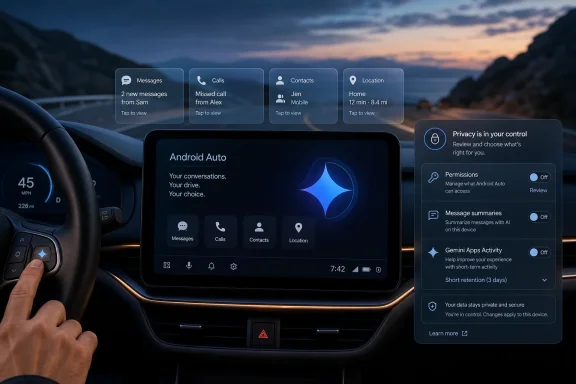 The Car Is No Longer a Dumb Screen for Your Phone
Android Auto has always been a compromise: Google gets a safer, simplified interface for the road, and users get navigation, music, calls, and messages without fumbling with a phone. But Gemini changes the bargain because it turns routine voice control into an AI-mediated interaction layer. Asking for directions, replying to a message, or summarizing a chat is no longer just a command; it can become part of a broader assistant activity trail.That does not mean Gemini is constantly uploading everything said inside the cabin. Google’s assistant systems are designed to wait for activation, such as a wake phrase, steering wheel button, or on-screen trigger. But for privacy-minded drivers, the distinction between “always listening locally for a wake word” and “always recording everything” is important without being fully reassuring.
A car is an unusually intimate computing environment. It knows where you go, whom you call, what messages arrive while you are in motion, and sometimes who is sitting beside you. The dashboard may look like a convenience screen, but the data behind it can map habits more vividly than almost any other device.
The ZDNET piece gets the central warning right: Gemini in Android Auto is not just a feature upgrade. It is a new privacy surface.
The Wake Word Is the Smallest Part of the Problem
The obvious anxiety is the microphone. Drivers hear “Hey Google” and picture an always-on audio feed traveling to the cloud. That fear is too blunt, but not baseless.Wake-word systems generally listen locally for a trigger before sending a request for processing. False activations can happen, and anyone who has had a smart speaker answer an unrelated conversation knows the problem is not theoretical. In a car, that false trigger can involve passengers, road noise, podcasts, children, or a half-heard phrase from the radio.
Turning off “Hey Google” detection in the car is therefore a sensible first move. It does not remove Gemini from Android Auto, but it changes the interaction from ambient readiness to deliberate invocation. The steering wheel button becomes the privacy boundary.
That boundary matters because the goal is not to make Android Auto useless. It is to reduce accidental collection. A driver who presses a button to dictate a message has made a clear trade; a driver whose assistant wakes up during a private conversation has not.
Android Auto Permissions Are the Real Control Plane
The more consequential settings live in Android’s app permissions. Android Auto acts as the bridge between the phone and the vehicle interface, which means its access to contacts, phone, SMS, microphone, calendar, location, and notifications determines what the in-car experience can do.Google’s default posture favors functionality. That is not surprising. Android Auto is most useful when it can read messages, place calls, identify contacts, route navigation, and surface notifications. The same access that makes the system helpful also makes it sensitive.
Users should review Android Auto under Settings, then Apps, then Permissions. The exact menu wording varies by phone maker and Android version, but the principle is consistent: remove permissions that do not support features you actually use. If you never dictate texts from the car, Android Auto does not need message access. If you only use it for navigation and music, it does not need the same reach as a personal assistant.
This is where privacy advice often becomes unrealistic. Telling users to revoke everything is easy, but it breaks the product. A better approach is to decide which in-car actions are worth the data access and which ones are habits inherited from defaults.
Message Summaries Are Convenience With a Cost
Gemini’s ability to summarize long messages and group chats sounds tailor-made for driving. Nobody wants a car to read a chaotic thread aloud for two minutes while merging onto the interstate. A summary can be safer and less distracting.But message summarization is also a clear example of AI moving from command execution into content interpretation. Reading a message aloud is one thing. Having an AI system process a thread, infer its meaning, and generate a compressed version is another.
If users want Android Auto to announce messages without Gemini summarizing them, they should look in Android Auto’s message settings and disable assistant-generated notification summaries where available. This keeps the traditional read-aloud flow while reducing the amount of conversational content routed through AI features.
The trade-off is obvious. You may hear more of the raw message. You may lose the neat digest. But you keep the system closer to a speaker and farther from an analyst.
Gemini Apps Activity Is the Setting That Deserves the Most Attention
The most important privacy switch is Gemini Apps Activity. This is where Google lets users review, delete, pause, or shorten retention for activity associated with Gemini. If the setting is on, activity may be used to improve Google services, including AI systems, and some data may be reviewed by humans or service providers under Google’s privacy processes.That last point is the one many users miss. “AI activity” sounds abstract until it includes a dictated message, a navigation-related request, or a voice command made with passengers in the car. Human review does not mean a Google employee is casually reading every driver’s texts, but it does mean the data pipeline is broader than many people assume.
Turning off Gemini Apps Activity does not necessarily make Gemini stop functioning. Google has moved toward allowing some assistant-style actions even when activity saving is disabled. But users should understand the distinction: disabling activity retention is not the same as blocking every temporary processing step required to fulfill a command.
The most privacy-preserving option is to turn off activity saving and delete existing Gemini activity. A less strict option is to keep activity on but shorten auto-delete from the default window to a shorter retention period. The right answer depends on whether a user values assistant continuity more than minimizing long-term records.
Google’s Framing Is Usability; The User’s Problem Is Exposure
Google will frame Gemini in Android Auto as a natural evolution. Assistant could send messages and start calls; Gemini can understand more context, handle more natural phrasing, summarize more intelligently, and eventually coordinate across apps with less friction. For many drivers, that will be genuinely useful.The privacy concern is not that Google invented dashboard voice control in 2026. It is that the assistant is becoming more capable precisely because it is becoming more context-hungry. The more Gemini can do, the more it benefits from access to personal data.
This is the old platform bargain dressed in newer AI clothing. Users get magic when they grant access. Platforms get scale when users accept defaults. The point of privacy settings is to interrupt that bargain long enough for the user to decide what is actually worth it.
Android Auto makes the decision harder because the car is a safety environment. Voice control can be less distracting than touch control. Message summaries can be less disruptive than full readouts. A stricter privacy configuration may, in some cases, make the interface clunkier.
That is why the right standard is not “turn everything off.” The right standard is minimum useful access.
Enterprise IT Should Treat the Dashboard as a Managed Endpoint
For businesses, this is not just a consumer privacy story. Android Auto lives in the same messy boundary zone as personal phones used for work, Bluetooth pairing in rental cars, and employees dictating messages while commuting. The assistant may sit in a privately owned vehicle, but the data can include work contacts, client names, internal messages, meeting details, and location-linked routines.Companies that already manage Android devices should pay attention to Gemini’s role as the default assistant layer. Mobile device management policies can restrict assistant access, control app permissions, or shape which accounts and apps are available on managed devices. But many organizations still treat in-car interfaces as outside the endpoint perimeter.
That assumption is aging badly. If a phone projects corporate notifications onto a dashboard, and an AI assistant can summarize or act on some of those notifications, the dashboard is part of the workflow. It may not be owned by IT, but it participates in the data path.
The practical response is policy, not paranoia. Employees should know whether they are allowed to use AI assistants for work messages in cars. Administrators should consider whether sensitive apps can surface notifications through Android Auto. Legal and compliance teams should understand that voice assistants can create records outside the obvious messaging archive.
The car has become another place where consumer convenience collides with enterprise governance.
The Settings Google Gives You Are Useful, But Fragmented
One frustration is that the controls are scattered. Wake-word detection sits in assistant settings. Android Auto permissions sit in Android app settings. Message summaries live inside Android Auto configuration. Gemini retention and review controls live under Gemini Apps Activity.That fragmentation benefits no one except the default configuration. A user who wants to make a privacy-conscious choice must know which subsystem owns which part of the experience. Google’s product architecture may make sense internally, but from the driver’s seat it feels like four different doors to the same room.
This is a familiar pattern in modern platform privacy. Companies provide controls, but the controls mirror engineering boundaries rather than user concerns. A normal person does not think, “I want to adjust the retention policy for assistant-mediated activity generated during projected automotive sessions.” They think, “I don’t want my car conversations and messages saved.”
Google could make this simpler with a dedicated Android Auto privacy dashboard: microphone activation, message AI features, contact access, location sharing, and Gemini activity retention in one place. Until then, users have to assemble the privacy posture manually.
The Sensible Gemini-in-the-Car Setup Is Deliberate, Not Default
The best configuration depends on how you use Android Auto, but a defensible privacy-first setup is not complicated. Disable passive wake-word activation if you do not need it. Keep only the Android Auto permissions that match your actual driving habits. Turn off AI message summaries if you are uncomfortable with Gemini processing message content. Review Gemini Apps Activity, shorten retention, or turn it off entirely.The important thing is to revisit these settings after major app updates. Gemini’s Android role is still changing, and Google has been steadily moving assistant functions into the Gemini experience. A setting that seemed irrelevant six months ago may matter after a rollout.
Drivers should also be realistic about account separation. If your personal Google account is signed into Gemini and your work messages flow through Android Auto notifications, the privacy boundary may be thinner than you think. The cleanest setup may involve limiting which apps can send notifications to Android Auto in the first place.
Privacy in Android Auto is no longer one toggle. It is a posture.
The Dashboard Privacy Checklist Google Should Have Shipped
The practical advice is short because the principle is simple: decide what Gemini may hear, what Android Auto may access, and how long Google may remember it.- Turn off “Hey Google” detection in the car if you want Gemini to respond only when you deliberately press a button or tap the interface.
- Review Android Auto app permissions and remove access to contacts, phone, messages, microphone, calendar, or location when those permissions do not support features you actually use.
- Disable Gemini-powered message summaries if you want incoming texts read aloud without having AI summarize longer conversations or group chats.
- Open Gemini Apps Activity and decide whether activity saving should be off, deleted, or retained for a shorter period than the default.
- Limit which apps can send notifications through Android Auto, especially if work messages, medical information, financial alerts, or private chats appear while driving.
- Recheck these settings after Android, Google app, Gemini, or Android Auto updates, because assistant behavior and defaults can change during rollouts.
References
- Primary source: ZDNET
Published: 2026-06-28T10:52:07.816581
Use Android Auto? How to limit what information Gemini learns about you
Google's AI offers a lot of convenience in your car, but you're offering up a lot of sensitive information.www.zdnet.com - Official source: support.google.com

Gemini Apps Privacy Hub - Gemini Apps Help
Last updated: May 19, 2026 Table of contents Gemini Apps Privacy Notice What data is collected
support.google.com
- Related coverage: techradar.com
- Related coverage: phonearena.com
Google warning: Do not divulge confidential info or personal data when using Gemini - PhoneArena
Google warns those having conversations with Gemini (formerly Bard) that humans review these interactions.www.phonearena.com - Related coverage: t3.com
"Google Assistant has become unusable" on Android Auto – but the future still looks bright | T3
The slow roll-out of Gemini on Android Auto has resulted in a downgraded experience... for nowwww.t3.com - Official source: 9to5google.com
Email: Gemini will work as your Android assistant if 'Activity' is off
Google has announced (via email) that Gemini app users can soon access smart assistant capabilities on Android without having Activity saved.9to5google.com
- Related coverage: gadgets360.com
- Related coverage: safety.google
Gemini Privacy & Safety Settings - Google Safety Center
Learn how Gemini puts you in control with easy-to-use activity controls, built-in fact checking, and safety protections for younger users.safety.google - Related coverage: androidcentral.com
How to use the Gemini app on Android | Android Central
Do you want to know how to use the Gemini app? See how easy it is to use the app with these beginner-friendly tips.www.androidcentral.com - Related coverage: androidsage.com
How To Change (Gemini AI) Assistant on your Android: In the wake of Privacy Nightmare
Google's Gemini AI now accesses your apps. Learn how to change your Android assistant and regain privacy control.www.androidsage.com - Related coverage: howtogeek.com
Google Will Let You Use Gemini Without Recording Your Activity
A rare privacy win from Google. www.howtogeek.com
- Related coverage: tomsguide.com
Google Gemini under fire for major privacy change — what you need to know | Tom's Guide
A new email sent to certain Gemini users has raised some privacy concerns, as well as a general lack of information about what this change will mean for users.www.tomsguide.com - Related coverage: gemini.google
What is Gemini and how it works
Learn about Gemini: its capabilities, how it works, and its limitations. Explore Google's approach to AI, from model training to safety guidelines and future developments.gemini.google