

The FBI warned in May 2026 that Kali365, a phishing-as-a-service platform first seen in April and distributed mainly through Telegram, is being used to hijack Microsoft 365 accounts by abusing Microsoft’s legitimate device-code sign-in flow. The important word there is not “phishing.” It is legitimate. Kali365 matters because it turns a real Microsoft authentication path into the delivery mechanism for account takeover, making the old advice about spotting fake login pages feel suddenly incomplete.
For Windows users, Microsoft 365 admins, and small-business owners, this is the uncomfortable next stage of identity attacks. The scam does not need your password in the way most people understand password theft. It needs you to approve a sign-in you did not start, and it relies on the fact that many users have been trained to trust anything that lands on a real Microsoft page.
Classic phishing asks the victim to type a password into a counterfeit page. The defender’s answer has long been a mix of password managers, multifactor authentication, domain awareness, and user skepticism. Kali365 is a reminder that attackers do not need to defeat every control; they only need to find a workflow where the victim can be made to participate in the wrong session.
Microsoft’s device-code flow was designed for constrained devices. Think of a smart TV, conference-room device, printer, or command-line tool that cannot comfortably display a full browser login experience. The device shows a short code, and the user enters that code on another device through Microsoft’s real verification page.
That is elegant when the device is yours. It is dangerous when the device belongs to an attacker.
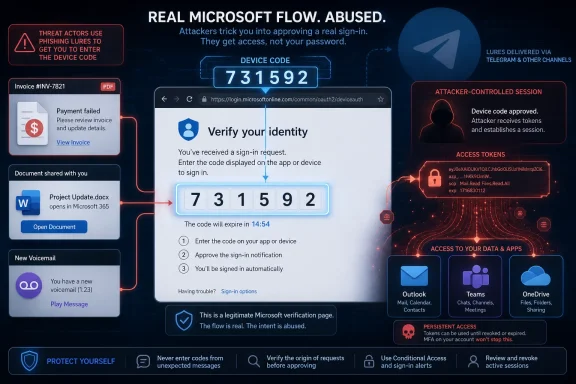
In the Kali365 scenario described by the FBI, the criminal starts the login process on their own system. The victim receives a lure, often dressed up as a document, voicemail, invoice, file share, or collaboration prompt. The message tells the victim to enter a device code on Microsoft’s verification page. If the victim complies and completes any required prompts, the attacker’s session receives the benefit.
That is why the scam feels slippery. The victim may not see a suspicious domain. The page may not look cloned. The password manager may not raise an alarm. The user may even pass MFA exactly as the tenant expects, only to authorize the wrong device.
OAuth access and refresh tokens are the real prize here. A password is a secret that unlocks a door. A token is closer to a badge that says the door has already been unlocked and the holder is allowed to keep moving. If an attacker captures the right token, they may be able to access Outlook, Teams, OneDrive, SharePoint, or other Microsoft 365 resources without repeating the password theft step.
That changes the psychology of the attack. Users are used to being warned against entering passwords into strange pages. They are less used to being warned that a perfectly real Microsoft page can be part of an attacker-controlled login sequence.
It also changes the administrative response. Resetting a password is not enough if active sessions, refresh tokens, OAuth grants, forwarding rules, or malicious inbox rules remain in place. The account must be treated as an active compromise, not merely as a near miss.
Kali365 is described as a phishing-as-a-service platform, which means attackers can subscribe to tooling rather than build it themselves. The FBI said the platform provides AI-generated phishing lures, automated campaign templates, victim tracking dashboards, and OAuth token capture capabilities. That combination matters because it packages social engineering, delivery, monitoring, and post-authentication theft into something less-skilled criminals can operate.
This is the same industrial logic that made ransomware explode. The best criminal platforms reduce expertise requirements, standardize the workflow, and let affiliates focus on targets. Phishing-as-a-service does for account takeover what ransomware-as-a-service did for extortion: it turns a technical intrusion pattern into a repeatable business process.
The Telegram distribution angle fits that model. Cybercrime marketplaces no longer need to look like shadowy standalone forums to matter. They can operate through familiar messaging ecosystems, where marketing, support, updates, and affiliate recruitment blur together.
For defenders, the consequence is depressing but clarifying. If Kali365 is easy to rent and easy to run, then the attack is not reserved for elite operators. It can show up in a small accounting firm, a local manufacturer, a school district, a regional law office, or a volunteer nonprofit that happens to rely on Microsoft 365.
But MFA is not magic. The Kali365 warning lands in a world where attackers increasingly try to route around MFA rather than break it cryptographically. They use adversary-in-the-middle kits, consent phishing, token theft, session hijacking, push fatigue, help-desk manipulation, and now renewed abuse of device-code flows.
The lesson is that MFA must be treated as one control inside a broader identity posture. If users can be tricked into authorizing attacker-controlled sessions, and if those sessions can persist through refresh tokens, then defenders need policies that govern authentication flows directly. That is where Microsoft Entra Conditional Access becomes more than an enterprise checkbox.
Microsoft’s own guidance now treats device-code flow as a high-risk authentication method that should be blocked wherever possible. That is a notable position because it acknowledges the tradeoff plainly: the feature is legitimate, but its legitimate use cases are narrow enough that many organizations can live without it.
Outlook gives attackers tone, timing, invoice patterns, vendor names, internal politics, and reply-chain credibility. Teams exposes informal trust networks and operational chatter. OneDrive and SharePoint reveal contracts, HR files, proposals, spreadsheets, credentials accidentally stored in documents, and customer data. Calendar access shows who is traveling, who is out sick, and when executives are in meetings.
That is why one account can become a beachhead. Attackers do not need to immediately exfiltrate everything to create damage. They can sit inside the mailbox, learn the organization’s habits, create forwarding rules, hide security alerts, and wait for a payment event. When the fake request eventually arrives, it may come from the real account, in the right style, at the right time, to the right person.
Small businesses are especially exposed because they often combine high-trust workflows with thin security staffing. A bookkeeper, office manager, owner, or partner may have broad access across email, files, billing, and customer communications. A single compromise can become business email compromise, data theft, payroll fraud, vendor fraud, and reputational damage in one incident.
Large enterprises at least tend to have logs, playbooks, identity teams, and security operations centers. Small firms often have Microsoft 365, a managed service provider, and a hope that MFA means the big holes are closed. Kali365 is the kind of threat that punishes that assumption.
Users need to understand one concrete rule: never enter a Microsoft device code unless they personally initiated the sign-in on a device they control and recognize. That rule is simple enough to teach and specific enough to stop this attack. If a device code arrives in an email, Teams message, text message, document prompt, voicemail notice, or unexpected file-sharing request, the default answer should be no.
This is where security awareness training often fails. It teaches suspicion as a vibe instead of a decision tree. Kali365 thrives because the surface looks familiar, urgent, and official. Training must therefore focus on the trigger, not the aesthetics.
A real Microsoft page is not proof that the surrounding workflow is legitimate. A code is not proof that someone needs access to a file. An MFA prompt is not proof that the right person started the session. The right question is narrower: Did I initiate this sign-in, on this device, for this purpose, right now?
If the answer is no, the user should stop.
The caution is that some environments really do use device-code flow. Teams Rooms devices, shared devices, digital signage, printers, developer tooling, command-line utilities, and legacy workflows may depend on it. Blocking first and asking questions later can create avoidable outages.
The better path is report-only mode, sign-in log review, exception design, enforcement, and recurring audit. Admins should identify where device-code flow appears, who uses it, what app or resource is involved, what location and device context appear in the logs, and whether the use case can move to a safer authentication method. Broad exception groups should be treated as technical debt, not as convenience.
Emergency access accounts deserve special handling. Break-glass accounts exist to prevent lockout during identity outages or misconfiguration. Excluding them from certain Conditional Access policies may be necessary, but those exclusions should be tightly monitored and reviewed. An emergency account that is easy to abuse is not a safety measure; it is a privileged back door.
Kali365 shows why that belief has limits. Device-code flow is a real feature with real use cases. Microsoft cannot simply erase every risky workflow without breaking some customers’ environments. The vendor can document, warn, recommend, and provide controls, but tenant owners still need to decide what risk they are willing to carry.
That is especially true in mixed environments where Microsoft 365 is only one layer. Identity touches endpoint management, mobile devices, SaaS integrations, help desks, conditional access, logging retention, email security, and incident response. Blocking device-code flow helps, but it does not eliminate token theft, OAuth abuse, malicious consent grants, or compromised endpoints.
Admins should also avoid the trap of treating this as a one-time Kali365 problem. Today’s kit has a name. Tomorrow’s may have a different brand, different dashboard, and different delivery channel. The durable issue is that attackers are targeting authentication flows and tokens because that is where modern cloud identity concentrates power.
The first response is session control. Sign the user out everywhere, revoke refresh tokens, review active sessions, and reset the password. Password reset alone is incomplete, but it is still part of the cleanup, especially if the account may have been exposed through other means.
The second response is mailbox and app inspection. Outlook rules should be reviewed for forwarding, hiding, deleting, moving, or marking messages as read. Attackers frequently create rules to suppress security alerts or divert financial correspondence. Delegates, forwarding settings, recovery email addresses, phone numbers, registered devices, and connected apps should be checked.
The third response is blast-radius analysis. Review recent sign-ins, locations, IP addresses, user agents, OAuth grants, OneDrive access, SharePoint file activity, Teams messages, sent mail, and any suspicious changes to MFA methods. If the account has financial authority or access to sensitive files, assume the incident is broader than a nuisance login.
Finally, notify the right people quickly. In a workplace, that means IT or the managed service provider. In a regulated business, it may mean legal, compliance, cyber insurance, and incident response partners. If money or personal data is involved, delay is expensive.
But for WindowsForum’s audience, the deeper story is administrative. This is not merely another scam for users to spot. It is a signal that identity teams need to inventory authentication flows with the same seriousness they already apply to legacy protocols, privileged roles, and risky sign-ins.
Device-code phishing is uncomfortable because it cuts across familiar security categories. It is not just email security, because the decisive step happens in Microsoft identity. It is not just identity security, because the lure often arrives through email or collaboration tools. It is not just user training, because the best mitigation may be a Conditional Access block. It is not just a Microsoft problem, because the same criminal economics will chase any cloud identity workflow that can be turned into a token dispenser.
That is the modern Windows ecosystem in miniature. The desktop still matters, but the account matters more. Outlook, Teams, OneDrive, Entra ID, mobile devices, browsers, and third-party apps are now one security surface. A scam that starts with a message can end with persistent access to a company’s operating memory.
Users should treat unexpected device-code prompts as hostile. Admins should audit and restrict device-code flow. Organizations should revoke sessions aggressively when a code is entered by mistake. Security teams should watch for suspicious sign-ins, inbox rules, OAuth grants, and unusual access to Microsoft 365 services.
Most of all, companies should stop treating MFA as the end of the identity conversation.
For Windows users, Microsoft 365 admins, and small-business owners, this is the uncomfortable next stage of identity attacks. The scam does not need your password in the way most people understand password theft. It needs you to approve a sign-in you did not start, and it relies on the fact that many users have been trained to trust anything that lands on a real Microsoft page.
 The Attack Works Because Nothing Looks Obviously Broken
Classic phishing asks the victim to type a password into a counterfeit page. The defender’s answer has long been a mix of password managers, multifactor authentication, domain awareness, and user skepticism. Kali365 is a reminder that attackers do not need to defeat every control; they only need to find a workflow where the victim can be made to participate in the wrong session.Microsoft’s device-code flow was designed for constrained devices. Think of a smart TV, conference-room device, printer, or command-line tool that cannot comfortably display a full browser login experience. The device shows a short code, and the user enters that code on another device through Microsoft’s real verification page.
That is elegant when the device is yours. It is dangerous when the device belongs to an attacker.
In the Kali365 scenario described by the FBI, the criminal starts the login process on their own system. The victim receives a lure, often dressed up as a document, voicemail, invoice, file share, or collaboration prompt. The message tells the victim to enter a device code on Microsoft’s verification page. If the victim complies and completes any required prompts, the attacker’s session receives the benefit.
That is why the scam feels slippery. The victim may not see a suspicious domain. The page may not look cloned. The password manager may not raise an alarm. The user may even pass MFA exactly as the tenant expects, only to authorize the wrong device.
Passwordless Did Not Kill Phishing; It Changed the Battlefield
The Fox News framing calls this a “passwordless scam,” and that label is useful if it does not become misleading. The point is not that passwordless authentication is bad. The point is that identity systems now depend on flows, tokens, device state, app consent, and session continuity—not simply on whether a password was typed into a box.OAuth access and refresh tokens are the real prize here. A password is a secret that unlocks a door. A token is closer to a badge that says the door has already been unlocked and the holder is allowed to keep moving. If an attacker captures the right token, they may be able to access Outlook, Teams, OneDrive, SharePoint, or other Microsoft 365 resources without repeating the password theft step.
That changes the psychology of the attack. Users are used to being warned against entering passwords into strange pages. They are less used to being warned that a perfectly real Microsoft page can be part of an attacker-controlled login sequence.
It also changes the administrative response. Resetting a password is not enough if active sessions, refresh tokens, OAuth grants, forwarding rules, or malicious inbox rules remain in place. The account must be treated as an active compromise, not merely as a near miss.
Kali365 Is a Product, Not Just a Campaign
The FBI’s warning is not only about one trick. It is about the commercialization of the trick.Kali365 is described as a phishing-as-a-service platform, which means attackers can subscribe to tooling rather than build it themselves. The FBI said the platform provides AI-generated phishing lures, automated campaign templates, victim tracking dashboards, and OAuth token capture capabilities. That combination matters because it packages social engineering, delivery, monitoring, and post-authentication theft into something less-skilled criminals can operate.
This is the same industrial logic that made ransomware explode. The best criminal platforms reduce expertise requirements, standardize the workflow, and let affiliates focus on targets. Phishing-as-a-service does for account takeover what ransomware-as-a-service did for extortion: it turns a technical intrusion pattern into a repeatable business process.
The Telegram distribution angle fits that model. Cybercrime marketplaces no longer need to look like shadowy standalone forums to matter. They can operate through familiar messaging ecosystems, where marketing, support, updates, and affiliate recruitment blur together.
For defenders, the consequence is depressing but clarifying. If Kali365 is easy to rent and easy to run, then the attack is not reserved for elite operators. It can show up in a small accounting firm, a local manufacturer, a school district, a regional law office, or a volunteer nonprofit that happens to rely on Microsoft 365.
MFA Still Matters, but It No Longer Deserves Blind Faith
The most dangerous reaction to this warning would be to conclude that MFA is useless. It is not. Multifactor authentication still blocks huge categories of password spraying, credential stuffing, reused-password attacks, and brute-force attempts. Turning it off because one flow can be abused would be like disabling seat belts because some crashes still cause injuries.But MFA is not magic. The Kali365 warning lands in a world where attackers increasingly try to route around MFA rather than break it cryptographically. They use adversary-in-the-middle kits, consent phishing, token theft, session hijacking, push fatigue, help-desk manipulation, and now renewed abuse of device-code flows.
The lesson is that MFA must be treated as one control inside a broader identity posture. If users can be tricked into authorizing attacker-controlled sessions, and if those sessions can persist through refresh tokens, then defenders need policies that govern authentication flows directly. That is where Microsoft Entra Conditional Access becomes more than an enterprise checkbox.
Microsoft’s own guidance now treats device-code flow as a high-risk authentication method that should be blocked wherever possible. That is a notable position because it acknowledges the tradeoff plainly: the feature is legitimate, but its legitimate use cases are narrow enough that many organizations can live without it.
The Real Target Is the Business Graph Inside Microsoft 365
A compromised Microsoft 365 account is not just an inbox. It is a map of business relationships.Outlook gives attackers tone, timing, invoice patterns, vendor names, internal politics, and reply-chain credibility. Teams exposes informal trust networks and operational chatter. OneDrive and SharePoint reveal contracts, HR files, proposals, spreadsheets, credentials accidentally stored in documents, and customer data. Calendar access shows who is traveling, who is out sick, and when executives are in meetings.
That is why one account can become a beachhead. Attackers do not need to immediately exfiltrate everything to create damage. They can sit inside the mailbox, learn the organization’s habits, create forwarding rules, hide security alerts, and wait for a payment event. When the fake request eventually arrives, it may come from the real account, in the right style, at the right time, to the right person.
Small businesses are especially exposed because they often combine high-trust workflows with thin security staffing. A bookkeeper, office manager, owner, or partner may have broad access across email, files, billing, and customer communications. A single compromise can become business email compromise, data theft, payroll fraud, vendor fraud, and reputational damage in one incident.
Large enterprises at least tend to have logs, playbooks, identity teams, and security operations centers. Small firms often have Microsoft 365, a managed service provider, and a hope that MFA means the big holes are closed. Kali365 is the kind of threat that punishes that assumption.
The User Training Has to Get More Specific
“Don’t click suspicious links” is now too blunt to carry the load. It is not wrong, but it is insufficient.Users need to understand one concrete rule: never enter a Microsoft device code unless they personally initiated the sign-in on a device they control and recognize. That rule is simple enough to teach and specific enough to stop this attack. If a device code arrives in an email, Teams message, text message, document prompt, voicemail notice, or unexpected file-sharing request, the default answer should be no.
This is where security awareness training often fails. It teaches suspicion as a vibe instead of a decision tree. Kali365 thrives because the surface looks familiar, urgent, and official. Training must therefore focus on the trigger, not the aesthetics.
A real Microsoft page is not proof that the surrounding workflow is legitimate. A code is not proof that someone needs access to a file. An MFA prompt is not proof that the right person started the session. The right question is narrower: Did I initiate this sign-in, on this device, for this purpose, right now?
If the answer is no, the user should stop.
Admins Have a Policy Lever, and They Should Use It Carefully
For Microsoft 365 administrators, the practical answer is to restrict device-code flow where possible. In Microsoft Entra Conditional Access, organizations can create policies targeting authentication flows and block device-code flow for users and cloud apps. Microsoft recommends getting as close as possible to a unilateral block, with exceptions only for documented and secured business needs.The caution is that some environments really do use device-code flow. Teams Rooms devices, shared devices, digital signage, printers, developer tooling, command-line utilities, and legacy workflows may depend on it. Blocking first and asking questions later can create avoidable outages.
The better path is report-only mode, sign-in log review, exception design, enforcement, and recurring audit. Admins should identify where device-code flow appears, who uses it, what app or resource is involved, what location and device context appear in the logs, and whether the use case can move to a safer authentication method. Broad exception groups should be treated as technical debt, not as convenience.
Emergency access accounts deserve special handling. Break-glass accounts exist to prevent lockout during identity outages or misconfiguration. Excluding them from certain Conditional Access policies may be necessary, but those exclusions should be tightly monitored and reviewed. An emergency account that is easy to abuse is not a safety measure; it is a privileged back door.
Microsoft’s Security Defaults Are Not a Substitute for Tenant Judgment
Microsoft has steadily pushed customers toward stronger defaults, mandatory MFA in more places, and managed Conditional Access policies. That trend is good. It also tempts organizations to believe the platform vendor can make all identity decisions on their behalf.Kali365 shows why that belief has limits. Device-code flow is a real feature with real use cases. Microsoft cannot simply erase every risky workflow without breaking some customers’ environments. The vendor can document, warn, recommend, and provide controls, but tenant owners still need to decide what risk they are willing to carry.
That is especially true in mixed environments where Microsoft 365 is only one layer. Identity touches endpoint management, mobile devices, SaaS integrations, help desks, conditional access, logging retention, email security, and incident response. Blocking device-code flow helps, but it does not eliminate token theft, OAuth abuse, malicious consent grants, or compromised endpoints.
Admins should also avoid the trap of treating this as a one-time Kali365 problem. Today’s kit has a name. Tomorrow’s may have a different brand, different dashboard, and different delivery channel. The durable issue is that attackers are targeting authentication flows and tokens because that is where modern cloud identity concentrates power.
Incident Response Starts After the Code Is Entered
If a user has already entered a device code from an unexpected message, the organization should assume the attacker may have obtained access. Waiting to see whether “anything happens” gives the intruder more time to establish persistence.The first response is session control. Sign the user out everywhere, revoke refresh tokens, review active sessions, and reset the password. Password reset alone is incomplete, but it is still part of the cleanup, especially if the account may have been exposed through other means.
The second response is mailbox and app inspection. Outlook rules should be reviewed for forwarding, hiding, deleting, moving, or marking messages as read. Attackers frequently create rules to suppress security alerts or divert financial correspondence. Delegates, forwarding settings, recovery email addresses, phone numbers, registered devices, and connected apps should be checked.
The third response is blast-radius analysis. Review recent sign-ins, locations, IP addresses, user agents, OAuth grants, OneDrive access, SharePoint file activity, Teams messages, sent mail, and any suspicious changes to MFA methods. If the account has financial authority or access to sensitive files, assume the incident is broader than a nuisance login.
Finally, notify the right people quickly. In a workplace, that means IT or the managed service provider. In a regulated business, it may mean legal, compliance, cyber insurance, and incident response partners. If money or personal data is involved, delay is expensive.
The Fox News Version Gets the Consumer Warning Right but Undersells the Admin Story
The Fox News/CyberGuy article is strongest where it gives ordinary users a simple behavioral warning: do not enter device codes you did not request. That is the message most people need, and it is concrete enough to survive outside a security training slide deck.But for WindowsForum’s audience, the deeper story is administrative. This is not merely another scam for users to spot. It is a signal that identity teams need to inventory authentication flows with the same seriousness they already apply to legacy protocols, privileged roles, and risky sign-ins.
Device-code phishing is uncomfortable because it cuts across familiar security categories. It is not just email security, because the decisive step happens in Microsoft identity. It is not just identity security, because the lure often arrives through email or collaboration tools. It is not just user training, because the best mitigation may be a Conditional Access block. It is not just a Microsoft problem, because the same criminal economics will chase any cloud identity workflow that can be turned into a token dispenser.
That is the modern Windows ecosystem in miniature. The desktop still matters, but the account matters more. Outlook, Teams, OneDrive, Entra ID, mobile devices, browsers, and third-party apps are now one security surface. A scam that starts with a message can end with persistent access to a company’s operating memory.
The Practical Lesson Is Smaller Than the Threat Sounds
The good news is that Kali365 does not require every user and admin to become an OAuth expert overnight. The defensive moves are not exotic. They are disciplined.Users should treat unexpected device-code prompts as hostile. Admins should audit and restrict device-code flow. Organizations should revoke sessions aggressively when a code is entered by mistake. Security teams should watch for suspicious sign-ins, inbox rules, OAuth grants, and unusual access to Microsoft 365 services.
Most of all, companies should stop treating MFA as the end of the identity conversation.
The Microsoft Code Box Has Become a Security Boundary
A few concrete actions matter more than another round of generic phishing posters:- Users should never enter a Microsoft device code unless they personally started the sign-in on a device they recognize.
- Microsoft 365 admins should review Entra sign-in logs for device-code flow usage before deciding which exceptions are truly necessary.
- Organizations that do not need device-code flow should block it with Conditional Access and keep emergency access accounts under separate review.
- Incident responders should revoke sessions and refresh tokens after a suspected device-code compromise, not merely reset the password.
- Security training should explicitly explain that a real Microsoft verification page can still be part of an attacker-controlled login attempt.
- Small businesses should treat a compromised Microsoft 365 account as a potential business email compromise incident, not just an isolated login problem.
References
- Primary source: Fox News
Published: Sun, 28 Jun 2026 13:53:49 GMT
Loading…
www.foxnews.com - Related coverage: livemint.com
Loading…
www.livemint.com - Related coverage: techrepublic.com
FBI Warns: ‘Kali365’ Phishing Service Targets Microsoft 365 Accounts
The FBI warned that Kali365 can hijack Microsoft 365 accounts by abusing device code authentication and capturing OAuth tokens.www.techrepublic.com
- Related coverage: techradar.com
FBI warns of Kali phishing scam hitting Microsoft OAuth tokens — warns 'Kali365 lowers the barrier of entry, providing less-technical attackers access to AI-generated phishing lures' | TechRadar
A new phishing kit is being offered on Telegramwww.techradar.com - Related coverage: theregister.com
FBI warns of Kali365 as device code phishing soars
MFA? No problem, says crimeware that tricks users into handing attackers the keys to M365www.theregister.com - Related coverage: thecybersignal.com
FBI Warns of Kali365 Phishing Kit Stealing Microsoft 365 Tokens
The FBI's IC3 warned of Kali365, a Telegram-sold phishing kit that runs device-code phishing to steal Microsoft 365 OAuth tokens after victims pass MFA. www.thecybersignal.com
- Related coverage: overe.io
Loading…
www.overe.io - Related coverage: malwarebytes.com
Kali365 phishing kit bypasses MFA and steals Microsoft logins | Malwarebytes
The FBI has warned that attackers are using a new phishing kit to gain long-term access to Microsoft Outlook, Teams, and OneDrive accounts.www.malwarebytes.com - Related coverage: brightnexus.com
FBI Warns of Kali365 Phishing Platform Targeting Microsoft 365 Accounts | Bright Nexus
SeverityHigh Detail The Federal Bureau of Investigation (FBI) has issued a warning regarding an emerging phishing-as-a-service (PhaaS) platform known as “Kali36www.brightnexus.com
- Related coverage: securityboulevard.com
Loading…
securityboulevard.com - Related coverage: purpleshieldsecurity.com
FBI Warns of Kali365 Phishing Kit Hijacking Microsoft 365
The FBI warns Kali365, a phishing-as-a-service kit, hijacks Microsoft 365 tokens and bypasses MFA. What it means for your business and how to respond. www.purpleshieldsecurity.com
- Related coverage: kiplinger.com
New Scam Targets Microsoft Users, FBI Warns. Here's How to Protect Yourself | Kiplinger
This phishing scam doesn't rely on a fake website. Instead, it tricks users into approving access themselves.www.kiplinger.com - Related coverage: itpro.com
FBI warns Microsoft 365 users about another phishing as a service attack – here's how to avoid it | IT Pro
Kali365 platform is serious enough to garner a warning from the FBIwww.itpro.com