

The FBI warned on May 21, 2026, that Kali365, a phishing-as-a-service platform first observed in April, is targeting Microsoft 365 users by abusing legitimate device-code sign-ins to capture OAuth tokens for Outlook, Teams, OneDrive, and other cloud services without stealing passwords. The uncomfortable lesson is not that multifactor authentication has suddenly become useless. It is that attackers have learned to route around the part of the login ceremony users were trained to distrust. The passwordless future is still safer than the password-soaked past, but Kali365 shows how fragile that future becomes when authorization is treated as a reflex.
Most phishing campaigns ask the victim to make an obvious mistake: type a password into a fake page, approve a strange push notification, download a malicious attachment, or ignore a browser warning. Kali365 is more subtle because it borrows a legitimate Microsoft workflow and moves the deception one step earlier. The victim may be sent to a real Microsoft verification page, not a counterfeit one.
That distinction matters. Security training has spent years teaching users to inspect domains, distrust misspellings, avoid odd-looking login pages, and lean on password managers as a sanity check. Device-code phishing does not necessarily need to defeat those habits. It can tell the user to visit Microsoft’s own page and enter a short code.
The trap is in who initiated the sign-in. In a normal device-code flow, a user might be trying to authorize a smart TV, a Teams room device, a printer-like appliance, a command-line tool, or another device that is awkward to type on. The device displays a code, the user signs in on a second screen, and Microsoft grants the original device access.
In the Kali365-style attack, the attacker starts that flow from their own infrastructure. The victim is then tricked into entering the attacker’s code. Once the code is approved, the attacker gets the benefit of the authorization event: tokens that can open the door to the victim’s Microsoft 365 environment.
This is why the phrase “passwordless scam” feels both sensational and technically useful. The attacker is not necessarily stealing a password. They are stealing the outcome of a successful authentication.
That is a different failure mode, and a more interesting one. In password phishing, the attacker captures a secret and then tries to replay it. In device-code phishing, the attacker asks the victim to complete a legitimate authorization step on the attacker’s behalf. The victim is not handing over a credential in the old sense; they are lending their trust to a session they do not understand.
OAuth tokens are the crucial prize. Access tokens can let an application act against cloud services for a period of time, while refresh tokens can help maintain access without repeatedly prompting the user. In a business environment, that can mean email, files, chats, calendars, contacts, and collaboration data all become reachable from a single compromised identity.
The phishing kit model makes that worse. Kali365 is described as a platform that lowers the barrier to entry for less technical attackers by bundling lures, templates, tracking dashboards, and token-capture capabilities. That is the same grim industrialization curve we have seen across ransomware, business email compromise, and credential theft: what begins as a technique becomes a product, and what becomes a product becomes a market.
The result is not merely a clever scam. It is an attack pattern that turns identity infrastructure into a distribution channel for criminal access.
Outlook gives attackers the ability to read negotiations, invoices, password-reset messages, travel plans, customer issues, and internal politics. Teams gives them conversations that sound like the company in its own voice. OneDrive and SharePoint give them files, spreadsheets, contracts, HR documents, engineering notes, and whatever else employees have dragged into the cloud because that is where work now lives.
This is why account takeover often becomes business email compromise. The attacker does not need to immediately detonate malware or encrypt files. They can wait, read, imitate, and insert themselves into ordinary business processes. A fake invoice sent from a real account is not a fake-looking message; it is a familiar sender making a plausible request.
Small businesses are especially exposed because they often sit in the worst part of the risk curve. They rely heavily on Microsoft 365, but they may not have a full-time security team, mature logging, conditional access expertise, or routine token-revocation procedures. Their users are trained enough to know that Microsoft login pages are normal, but not always trained enough to recognize a device-code flow they did not initiate.
That is the real operational danger. Kali365 does not need to defeat a Fortune 100 security program to be successful. It needs to fool a billing coordinator, an office manager, a contractor, or a busy executive long enough to approve a code.
Enterprise identity systems are full of these tradeoffs. The more usable a sign-in method becomes, the more attackers study where the user’s attention is weakest. Device-code flow asks the user to bridge two contexts: the device requesting access and the browser session approving it. Phishing thrives in that gap.
The legitimate Microsoft page can create a false sense of completion. Users may assume that if the page is real, the request is safe. But authenticity of the page is not authenticity of the intent. A real verification page can still be used to authorize a malicious session if the code came from an attacker.
This is the conceptual shift security teams need to teach. The old rule was “don’t enter your password on a fake site.” The new rule is “don’t approve an authentication event you did not personally start and understand.” That rule is harder to teach because it requires context, not just pattern matching.
The industry has spent years trying to remove passwords because humans are bad at managing secrets. Device-code phishing reminds us that humans can also be bad at interpreting consent screens, authorization prompts, and cross-device login rituals. Passwordless does not eliminate social engineering. It changes where the social engineering happens.
This is the cybercrime economy’s recurring pattern. Malware builders, ransomware affiliates, initial-access brokers, credential marketplaces, and phishing-kit vendors all specialize. Each layer makes the next compromise cheaper. A tool like Kali365 does not have to be novel forever; it only has to make a working technique repeatable.
The FBI’s warning also fits a broader rise in device-code phishing against Microsoft 365 environments. Security researchers and Microsoft itself have been documenting abuse of this flow, including campaigns that use legitimate services, document previews, and convincing prompts to direct victims into the authorization process. Kali365 is part of that larger trend rather than a bolt from the blue.
The addition of AI-generated phishing lures is predictable but still important. Generative text does not need to produce literary brilliance to be useful to criminals. It needs to generate plausible messages at scale, vary wording enough to dodge filters, and adapt to business contexts quickly. In account takeover, plausible is often enough.
This is where the “smart people can fall for it” caveat becomes more than a courtesy. A user who would never type a password into a suspicious clone site might still enter a code on a real Microsoft page after receiving a polished message about a file, voicemail, invoice, meeting recording, or shared document. The attack works because it is designed for the habits of people who think they are being careful.
The stronger defense is to restrict or block device-code flow where it is not needed. Microsoft Entra Conditional Access can be used to block specific authentication flows, including device-code flow, and Microsoft’s own documentation now treats device-code flow as a high-risk method that can be abused in phishing. For many organizations, the right default is not “allow unless suspicious.” It is “block unless justified.”
That does not mean administrators should flip a tenant-wide switch without preparation. Device-code flow may be used by Teams phones, meeting-room systems, shared devices, command-line tools, development workflows, or niche business processes. A hasty block can create outages that quickly turn into exceptions, and sloppy exceptions can become the new attack path.
The better sequence is audit, classify, restrict, then monitor. Find where device-code flow is actually used. Decide which use cases are legitimate. Create narrowly scoped exceptions for those devices, users, locations, or apps. Then watch sign-in logs for denied attempts and suspicious patterns.
Blocking authentication transfer policies is part of the same logic. If a workflow allows authentication to be transferred between devices in ways the business does not need, it increases the surface area for confusion. The modern identity perimeter is not a firewall boundary; it is a choreography of prompts, tokens, policies, and sessions. Attackers are learning the choreography.
Outlook is a favorite place to hide that persistence. Attackers may create forwarding rules, inbox rules that delete or archive warnings, filters that hide replies, or delegated access paths that survive the first wave of remediation. They may also use the account to send more phishing lures internally, where trust is higher and defenses can be weaker.
Teams and OneDrive deserve equal attention. A compromised account can expose shared files and private chats, but it can also give an attacker the social graph of the organization: who approves payments, who handles payroll, who resets accounts, who works with vendors, and who is likely to respond quickly. That reconnaissance is often more valuable than the first mailbox.
Administrators should also treat device-code phishing as a possible precursor to broader compromise. If an attacker accessed mail, did they retrieve password-reset messages? If they accessed files, did they find VPN instructions, API keys, finance documents, or customer lists? If they used Teams, did they contact other employees? The blast radius is rarely limited to the first token.
For personal users, the response is narrower but still urgent. Sign out of all sessions, change the password, review recovery methods, inspect recent activity, remove unfamiliar devices and apps, and check mailbox rules. If the account is used to recover other services, assume those services may be at risk too.
But the enterprise lesson is bigger than “be careful.” Attackers are exploiting a mismatch between how identity systems are designed and how users interpret them. Users see a code, a familiar brand, a legitimate page, and a task that appears connected to work. The identity platform sees a completed authorization. The attacker sees a token.
That gap cannot be closed by antivirus software alone, and it cannot be closed by telling employees to be smarter. Endpoint security may help with malicious links or payloads, and user training may reduce the number of successful lures, but the meaningful control is policy. If device-code flow is not required, it should not be broadly available.
There is also a licensing and maturity issue hiding under the surface. Some of Microsoft’s most useful identity protections depend on Entra capabilities, Conditional Access planning, and administrative knowledge that not every small organization has. The companies most likely to rely on default settings are often the ones least prepared to investigate a token-based compromise.
That is a recurring problem in cloud security. The platform may provide a control, the documentation may explain it, and the advisory may recommend it, but the operational burden still lands on the customer. Shared responsibility is accurate as a model. It is not always comforting as a lived experience.
The company’s challenge is to make dangerous flows harder to abuse without breaking legitimate device scenarios. That is not simple. Teams rooms, shared devices, developer tools, and command-line workflows exist because organizations need them. Security controls that ignore those workflows will be disabled, bypassed, or buried in exception lists.
Still, the direction of travel is clear. Device-code flow should become less ambient and more intentional. Users should see clearer context about what device or application they are authorizing. Administrators should have easier defaults for blocking high-risk flows. Logs should make device-code events obvious rather than something only mature security teams notice after an advisory.
There is a design lesson here for the broader industry, too. Any authentication method that separates “where the request starts” from “where the user approves it” creates room for deception. Push fatigue exploited the ambiguity of MFA prompts. Consent phishing exploited the ambiguity of application permissions. Device-code phishing exploits the ambiguity of cross-device authorization.
The future of identity security will be won or lost in these ambiguous moments. Not at the password field, but at the prompt that asks a busy human to decide whether a request is normal.
That does not mean every device code is malicious. It means device codes should be contextual. If you are setting up a Teams room, signing into an Xbox, authorizing a command-line session, or pairing a device you control, the workflow may be expected. If a code arrives in an unsolicited email about a voicemail, invoice, document, or account verification, it should be treated as hostile.
The most effective scams are often the ones that make the victim feel slightly behind. A document is expiring. A meeting recording is waiting. A shared file requires verification. A manager needs something reviewed. These lures work because Microsoft 365 is where real work already happens, and real work is full of interruptions.
That is why the instruction must be simple enough to survive a busy day: do not enter codes from messages. Go to the service directly. If a document is real, it will be available through the normal portal, the sender can confirm it through another channel, or IT can validate the request. If it is urgent enough to bypass procedure, it is urgent enough to verify.
For administrators, the parallel rule is just as simple: do not allow high-risk flows because they might someday be convenient. Convenience should be proven. Risk is already proven.
A compromised token can make a clean, fully patched Windows PC irrelevant. The attacker may never need to run code on the endpoint. They can access cloud mail and files from elsewhere, using legitimate APIs and sessions that look enough like normal activity to survive casual inspection. That is why cloud sign-in logs, conditional access policies, and token revocation now belong in the same mental toolbox as patching and endpoint detection.
For Windows enthusiasts, this is an uncomfortable shift. The operating system is still important, but the account has become the control plane. Your Microsoft identity ties together Windows sign-in, Office apps, OneDrive sync, Teams meetings, Outlook mail, Edge profiles, recovery flows, and sometimes even third-party services. Protecting the device while ignoring the identity is like locking the front door and leaving the building badge on the sidewalk.
For sysadmins, the message is more pointed. If your Microsoft 365 tenant has not been reviewed for device-code flow, authentication transfer, risky sign-ins, suspicious OAuth grants, and session revocation procedures, Kali365 is a reason to move that review from “someday” to this quarter. The attack is not theoretical, and the mitigation is not exotic.
The hardest part may be explaining to leadership why “we have MFA” is not the end of the conversation. MFA is a layer, not a guarantee. Identity security now requires understanding which flows are allowed, which prompts users see, which tokens persist, and which logs someone is actually watching.
One stolen Microsoft 365 session can become a fake payment request. It can become a confidential file leak. It can become internal phishing. It can become vendor fraud. It can become reputational damage when customers receive malicious mail from a real employee account. The path from device code to financial loss is shorter than it looks.
The attack also challenges incident reporting. A user may not realize they were phished because they never typed a password into a fake page. They may remember entering a code, but not see that as a security event. By the time suspicious mail rules, strange sent items, or unusual sign-ins are discovered, the attacker may already have moved laterally through trust relationships.
That is why organizations should make device-code reporting explicit. Employees should know that an unexpected code prompt is not merely “weird.” It is something to report immediately, even if they did not complete it. Security teams should collect the email, headers, timestamps, device information, IPs, and sign-in records while they are still fresh.
The FBI’s recommendation to report incidents through its cybercrime channel is not just bureaucratic housekeeping. Phishing-as-a-service platforms depend on scale, shared infrastructure, and reusable tradecraft. Reports help investigators and defenders map the ecosystem, even when an individual incident seems small.
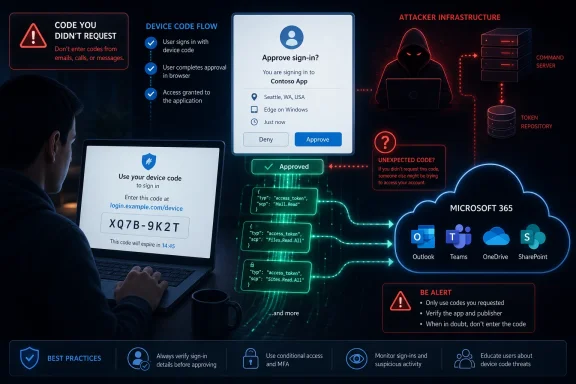 The Scam Works Because the Page Is Real
Most phishing campaigns ask the victim to make an obvious mistake: type a password into a fake page, approve a strange push notification, download a malicious attachment, or ignore a browser warning. Kali365 is more subtle because it borrows a legitimate Microsoft workflow and moves the deception one step earlier. The victim may be sent to a real Microsoft verification page, not a counterfeit one.That distinction matters. Security training has spent years teaching users to inspect domains, distrust misspellings, avoid odd-looking login pages, and lean on password managers as a sanity check. Device-code phishing does not necessarily need to defeat those habits. It can tell the user to visit Microsoft’s own page and enter a short code.
The trap is in who initiated the sign-in. In a normal device-code flow, a user might be trying to authorize a smart TV, a Teams room device, a printer-like appliance, a command-line tool, or another device that is awkward to type on. The device displays a code, the user signs in on a second screen, and Microsoft grants the original device access.
In the Kali365-style attack, the attacker starts that flow from their own infrastructure. The victim is then tricked into entering the attacker’s code. Once the code is approved, the attacker gets the benefit of the authorization event: tokens that can open the door to the victim’s Microsoft 365 environment.
This is why the phrase “passwordless scam” feels both sensational and technically useful. The attacker is not necessarily stealing a password. They are stealing the outcome of a successful authentication.
MFA Did Its Job, Then Handed the Keys to the Wrong Session
The first reaction to any “MFA bypass” headline should be skepticism. Multifactor authentication is not a magic spell; it is a set of controls that reduce the usefulness of stolen passwords and make many account-takeover attempts fail. Kali365 does not prove MFA is broken. It proves that MFA can be socially engineered when the user is persuaded to authorize the wrong thing.That is a different failure mode, and a more interesting one. In password phishing, the attacker captures a secret and then tries to replay it. In device-code phishing, the attacker asks the victim to complete a legitimate authorization step on the attacker’s behalf. The victim is not handing over a credential in the old sense; they are lending their trust to a session they do not understand.
OAuth tokens are the crucial prize. Access tokens can let an application act against cloud services for a period of time, while refresh tokens can help maintain access without repeatedly prompting the user. In a business environment, that can mean email, files, chats, calendars, contacts, and collaboration data all become reachable from a single compromised identity.
The phishing kit model makes that worse. Kali365 is described as a platform that lowers the barrier to entry for less technical attackers by bundling lures, templates, tracking dashboards, and token-capture capabilities. That is the same grim industrialization curve we have seen across ransomware, business email compromise, and credential theft: what begins as a technique becomes a product, and what becomes a product becomes a market.
The result is not merely a clever scam. It is an attack pattern that turns identity infrastructure into a distribution channel for criminal access.
Microsoft 365 Is the Perfect Target Because It Is the Modern Office
For consumers, a compromised Microsoft account can expose email, cloud storage, photos, subscriptions, and recovery paths for other services. For organizations, a compromised Microsoft 365 account is often much more valuable. It is a pass into the operating system of the business.Outlook gives attackers the ability to read negotiations, invoices, password-reset messages, travel plans, customer issues, and internal politics. Teams gives them conversations that sound like the company in its own voice. OneDrive and SharePoint give them files, spreadsheets, contracts, HR documents, engineering notes, and whatever else employees have dragged into the cloud because that is where work now lives.
This is why account takeover often becomes business email compromise. The attacker does not need to immediately detonate malware or encrypt files. They can wait, read, imitate, and insert themselves into ordinary business processes. A fake invoice sent from a real account is not a fake-looking message; it is a familiar sender making a plausible request.
Small businesses are especially exposed because they often sit in the worst part of the risk curve. They rely heavily on Microsoft 365, but they may not have a full-time security team, mature logging, conditional access expertise, or routine token-revocation procedures. Their users are trained enough to know that Microsoft login pages are normal, but not always trained enough to recognize a device-code flow they did not initiate.
That is the real operational danger. Kali365 does not need to defeat a Fortune 100 security program to be successful. It needs to fool a billing coordinator, an office manager, a contractor, or a busy executive long enough to approve a code.
The Device-Code Flow Was Built for Convenience, Not Suspicion
Device-code authentication exists for good reasons. Some devices cannot easily accept passwords or security keys. Some workflows need a user to authenticate elsewhere and grant access back to a constrained device. Anyone who has signed into a streaming app on a TV has seen the consumer version of this design.Enterprise identity systems are full of these tradeoffs. The more usable a sign-in method becomes, the more attackers study where the user’s attention is weakest. Device-code flow asks the user to bridge two contexts: the device requesting access and the browser session approving it. Phishing thrives in that gap.
The legitimate Microsoft page can create a false sense of completion. Users may assume that if the page is real, the request is safe. But authenticity of the page is not authenticity of the intent. A real verification page can still be used to authorize a malicious session if the code came from an attacker.
This is the conceptual shift security teams need to teach. The old rule was “don’t enter your password on a fake site.” The new rule is “don’t approve an authentication event you did not personally start and understand.” That rule is harder to teach because it requires context, not just pattern matching.
The industry has spent years trying to remove passwords because humans are bad at managing secrets. Device-code phishing reminds us that humans can also be bad at interpreting consent screens, authorization prompts, and cross-device login rituals. Passwordless does not eliminate social engineering. It changes where the social engineering happens.
The Phishing-as-a-Service Market Keeps Professionalizing the Grift
The most important part of the Kali365 warning may not be the specific kit. It is the service model. Phishing-as-a-service turns attacker infrastructure into a subscription business, complete with templates, automation, dashboards, and distribution channels. That means new operators can run campaigns without understanding every technical detail of OAuth, token handling, or Microsoft identity flows.This is the cybercrime economy’s recurring pattern. Malware builders, ransomware affiliates, initial-access brokers, credential marketplaces, and phishing-kit vendors all specialize. Each layer makes the next compromise cheaper. A tool like Kali365 does not have to be novel forever; it only has to make a working technique repeatable.
The FBI’s warning also fits a broader rise in device-code phishing against Microsoft 365 environments. Security researchers and Microsoft itself have been documenting abuse of this flow, including campaigns that use legitimate services, document previews, and convincing prompts to direct victims into the authorization process. Kali365 is part of that larger trend rather than a bolt from the blue.
The addition of AI-generated phishing lures is predictable but still important. Generative text does not need to produce literary brilliance to be useful to criminals. It needs to generate plausible messages at scale, vary wording enough to dodge filters, and adapt to business contexts quickly. In account takeover, plausible is often enough.
This is where the “smart people can fall for it” caveat becomes more than a courtesy. A user who would never type a password into a suspicious clone site might still enter a code on a real Microsoft page after receiving a polished message about a file, voicemail, invoice, meeting recording, or shared document. The attack works because it is designed for the habits of people who think they are being careful.
The Defensive Answer Is Boring, Administrative, and Necessary
There is a simple user-facing rule: never enter a Microsoft device code unless you initiated the sign-in from a device you are physically using or deliberately setting up. That rule should be printed in every Microsoft 365 security-awareness module this summer. But user education is not enough, and any organization that stops there is confusing advice with control.The stronger defense is to restrict or block device-code flow where it is not needed. Microsoft Entra Conditional Access can be used to block specific authentication flows, including device-code flow, and Microsoft’s own documentation now treats device-code flow as a high-risk method that can be abused in phishing. For many organizations, the right default is not “allow unless suspicious.” It is “block unless justified.”
That does not mean administrators should flip a tenant-wide switch without preparation. Device-code flow may be used by Teams phones, meeting-room systems, shared devices, command-line tools, development workflows, or niche business processes. A hasty block can create outages that quickly turn into exceptions, and sloppy exceptions can become the new attack path.
The better sequence is audit, classify, restrict, then monitor. Find where device-code flow is actually used. Decide which use cases are legitimate. Create narrowly scoped exceptions for those devices, users, locations, or apps. Then watch sign-in logs for denied attempts and suspicious patterns.
Blocking authentication transfer policies is part of the same logic. If a workflow allows authentication to be transferred between devices in ways the business does not need, it increases the surface area for confusion. The modern identity perimeter is not a firewall boundary; it is a choreography of prompts, tokens, policies, and sessions. Attackers are learning the choreography.
Token Theft Changes the Incident-Response Clock
If a user enters a code by mistake, changing the password is not enough. That is one of the most dangerous misunderstandings in token-based account compromise. A password reset may help, but the immediate objective is to revoke the attacker’s sessions, invalidate refresh tokens where possible, review consented applications, and inspect the account for persistence.Outlook is a favorite place to hide that persistence. Attackers may create forwarding rules, inbox rules that delete or archive warnings, filters that hide replies, or delegated access paths that survive the first wave of remediation. They may also use the account to send more phishing lures internally, where trust is higher and defenses can be weaker.
Teams and OneDrive deserve equal attention. A compromised account can expose shared files and private chats, but it can also give an attacker the social graph of the organization: who approves payments, who handles payroll, who resets accounts, who works with vendors, and who is likely to respond quickly. That reconnaissance is often more valuable than the first mailbox.
Administrators should also treat device-code phishing as a possible precursor to broader compromise. If an attacker accessed mail, did they retrieve password-reset messages? If they accessed files, did they find VPN instructions, API keys, finance documents, or customer lists? If they used Teams, did they contact other employees? The blast radius is rarely limited to the first token.
For personal users, the response is narrower but still urgent. Sign out of all sessions, change the password, review recovery methods, inspect recent activity, remove unfamiliar devices and apps, and check mailbox rules. If the account is used to recover other services, assume those services may be at risk too.
The Fox News Framing Gets the Fear Right but Not the Whole Lesson
The Fox News/CyberGuy write-up is useful because it translates a technical warning into plain consumer language: this can happen without password theft, it can involve a real Microsoft page, and unexpected device codes should be treated as alarms. That is the right public-safety message. People do not need to understand the OAuth device authorization grant to know that a code they did not request is dangerous.But the enterprise lesson is bigger than “be careful.” Attackers are exploiting a mismatch between how identity systems are designed and how users interpret them. Users see a code, a familiar brand, a legitimate page, and a task that appears connected to work. The identity platform sees a completed authorization. The attacker sees a token.
That gap cannot be closed by antivirus software alone, and it cannot be closed by telling employees to be smarter. Endpoint security may help with malicious links or payloads, and user training may reduce the number of successful lures, but the meaningful control is policy. If device-code flow is not required, it should not be broadly available.
There is also a licensing and maturity issue hiding under the surface. Some of Microsoft’s most useful identity protections depend on Entra capabilities, Conditional Access planning, and administrative knowledge that not every small organization has. The companies most likely to rely on default settings are often the ones least prepared to investigate a token-based compromise.
That is a recurring problem in cloud security. The platform may provide a control, the documentation may explain it, and the advisory may recommend it, but the operational burden still lands on the customer. Shared responsibility is accurate as a model. It is not always comforting as a lived experience.
Microsoft’s Security Story Now Depends on Reducing Ambiguity
Microsoft has been pushing users and organizations away from passwords for years, and broadly speaking, that push is correct. Passkeys, security keys, authenticator apps, conditional access, risk-based sign-ins, and phishing-resistant authentication are all improvements over reusable passwords. The problem is that attackers do not need to defeat the strongest form of authentication if weaker authorization paths remain open.The company’s challenge is to make dangerous flows harder to abuse without breaking legitimate device scenarios. That is not simple. Teams rooms, shared devices, developer tools, and command-line workflows exist because organizations need them. Security controls that ignore those workflows will be disabled, bypassed, or buried in exception lists.
Still, the direction of travel is clear. Device-code flow should become less ambient and more intentional. Users should see clearer context about what device or application they are authorizing. Administrators should have easier defaults for blocking high-risk flows. Logs should make device-code events obvious rather than something only mature security teams notice after an advisory.
There is a design lesson here for the broader industry, too. Any authentication method that separates “where the request starts” from “where the user approves it” creates room for deception. Push fatigue exploited the ambiguity of MFA prompts. Consent phishing exploited the ambiguity of application permissions. Device-code phishing exploits the ambiguity of cross-device authorization.
The future of identity security will be won or lost in these ambiguous moments. Not at the password field, but at the prompt that asks a busy human to decide whether a request is normal.
The Code Is the New Attachment
For years, security teams trained users not to open suspicious attachments. Then links became the main battlefield. Then QR codes moved the link off the screen and into the phone. Now the humble device code deserves a place in the same mental category: an object that can look harmless while carrying an attacker’s intent.That does not mean every device code is malicious. It means device codes should be contextual. If you are setting up a Teams room, signing into an Xbox, authorizing a command-line session, or pairing a device you control, the workflow may be expected. If a code arrives in an unsolicited email about a voicemail, invoice, document, or account verification, it should be treated as hostile.
The most effective scams are often the ones that make the victim feel slightly behind. A document is expiring. A meeting recording is waiting. A shared file requires verification. A manager needs something reviewed. These lures work because Microsoft 365 is where real work already happens, and real work is full of interruptions.
That is why the instruction must be simple enough to survive a busy day: do not enter codes from messages. Go to the service directly. If a document is real, it will be available through the normal portal, the sender can confirm it through another channel, or IT can validate the request. If it is urgent enough to bypass procedure, it is urgent enough to verify.
For administrators, the parallel rule is just as simple: do not allow high-risk flows because they might someday be convenient. Convenience should be proven. Risk is already proven.
The Practical WindowsForum Read Is That Identity Is Now the Endpoint
Windows users used to think about security in terms of the device in front of them. Was the PC patched? Was Defender running? Was the browser up to date? Did the attachment execute? Those questions still matter, but Microsoft 365 has moved the center of gravity from the local machine to the cloud identity.A compromised token can make a clean, fully patched Windows PC irrelevant. The attacker may never need to run code on the endpoint. They can access cloud mail and files from elsewhere, using legitimate APIs and sessions that look enough like normal activity to survive casual inspection. That is why cloud sign-in logs, conditional access policies, and token revocation now belong in the same mental toolbox as patching and endpoint detection.
For Windows enthusiasts, this is an uncomfortable shift. The operating system is still important, but the account has become the control plane. Your Microsoft identity ties together Windows sign-in, Office apps, OneDrive sync, Teams meetings, Outlook mail, Edge profiles, recovery flows, and sometimes even third-party services. Protecting the device while ignoring the identity is like locking the front door and leaving the building badge on the sidewalk.
For sysadmins, the message is more pointed. If your Microsoft 365 tenant has not been reviewed for device-code flow, authentication transfer, risky sign-ins, suspicious OAuth grants, and session revocation procedures, Kali365 is a reason to move that review from “someday” to this quarter. The attack is not theoretical, and the mitigation is not exotic.
The hardest part may be explaining to leadership why “we have MFA” is not the end of the conversation. MFA is a layer, not a guarantee. Identity security now requires understanding which flows are allowed, which prompts users see, which tokens persist, and which logs someone is actually watching.
Kali365 Turns a Help-Desk Detail Into a Boardroom Risk
The mechanics of device-code authentication can sound like help-desk trivia. Codes, prompts, tokens, flows, sessions, conditional access: it is the language of administrators, not executives. But the business impact is familiar to any board member who has watched a company get hit by fraud, data exposure, or operational disruption.One stolen Microsoft 365 session can become a fake payment request. It can become a confidential file leak. It can become internal phishing. It can become vendor fraud. It can become reputational damage when customers receive malicious mail from a real employee account. The path from device code to financial loss is shorter than it looks.
The attack also challenges incident reporting. A user may not realize they were phished because they never typed a password into a fake page. They may remember entering a code, but not see that as a security event. By the time suspicious mail rules, strange sent items, or unusual sign-ins are discovered, the attacker may already have moved laterally through trust relationships.
That is why organizations should make device-code reporting explicit. Employees should know that an unexpected code prompt is not merely “weird.” It is something to report immediately, even if they did not complete it. Security teams should collect the email, headers, timestamps, device information, IPs, and sign-in records while they are still fresh.
The FBI’s recommendation to report incidents through its cybercrime channel is not just bureaucratic housekeeping. Phishing-as-a-service platforms depend on scale, shared infrastructure, and reusable tradecraft. Reports help investigators and defenders map the ecosystem, even when an individual incident seems small.
The Microsoft Code You Did Not Ask For Is the Warning Siren
Kali365 is not the death of MFA, and it is not proof that passwordless authentication was a mistake. It is a reminder that identity security is now a contest over authorization, context, and user attention. The concrete lessons are narrow enough to act on and broad enough to matter.- Unexpected Microsoft device-code requests should be treated as suspicious, even when the verification page is genuinely Microsoft’s.
- Users should only enter a device code when they personally initiated the sign-in from a device or application they recognize.
- Organizations that do not need device-code flow should block it with Conditional Access after auditing legitimate usage.
- Password resets alone are not a complete response to token theft; sessions, refresh tokens, app access, and mailbox rules must be reviewed.
- Small businesses should treat Microsoft 365 account takeover as a fraud and data-risk scenario, not merely an IT inconvenience.
- Security training should move beyond fake-login-page spotting and teach employees to question unexpected authorization prompts.
References
- Primary source: Fox News
Published: Sun, 28 Jun 2026 13:53:49 GMT
FBI warns Microsoft 365 users about Kali365 scam that bypasses MFA | Fox News
Microsoft 365 accounts are being targeted by a phishing platform called Kali365 that can bypass MFA, the FBI warns. Here's how to protect your account.noticias.foxnews.com - Official source: learn.microsoft.com
Authentication flows as a condition in Conditional Access policy - Microsoft Entra ID | Microsoft Learn
Learn how authentication flows provide a seamless experience across all application and device typeslearn.microsoft.com - Related coverage: techrepublic.com
FBI Warns: ‘Kali365’ Phishing Service Targets Microsoft 365 Accounts
The FBI warned that Kali365 can hijack Microsoft 365 accounts by abusing device code authentication and capturing OAuth tokens.www.techrepublic.com
- Official source: microsoft.com
Inside an AI‑enabled device code phishing campaign | Microsoft Security Blog
A new wave of device code phishing shows how threat actors are scaling account compromise using AI and end‑to‑end automation. This campaign goes beyond traditional phishing by generating live authentication codes on demand, enabling higher success rates and sustained post‑compromise access.www.microsoft.com - Related coverage: thecybersignal.com
FBI Warns of Kali365 Phishing Kit Stealing Microsoft 365 Tokens
The FBI's IC3 warned of Kali365, a Telegram-sold phishing kit that runs device-code phishing to steal Microsoft 365 OAuth tokens after victims pass MFA. www.thecybersignal.com
- Related coverage: bvainc.com
New FBI Alert: Kali365 Phishing Kit Bypasses Microsoft 365 MFA - BVA Technology Services
The FBI’s Internet Crime Complaint Center (IC3) recently issued a Public Service Announcement (May 21, 2026) warning organizations about a rapidly emerging threat targeting Microsoft 365 environments: Kali365, a Phishing-as-a-Service (PhaaS) platform designed to bypass traditional security...www.bvainc.com
- Related coverage: safebrowz.com
FBI Kali365 Warning 2026: Why OAuth Device-Code Phishing Slips Past MFA | SafeBrowz
The FBI's May 2026 PSA260521 advisory on Kali365 phishing-as-a-service is a watershed moment for Microsoft 365 security. SafeBrowz unpacks the OAuth device-code flow abuse, why MFA does not stop it, and how our 3-layer detection engine catches the landing pages.safebrowz.com - Related coverage: purpleshieldsecurity.com
FBI Warns of Kali365 Phishing Kit Hijacking Microsoft 365
The FBI warns Kali365, a phishing-as-a-service kit, hijacks Microsoft 365 tokens and bypasses MFA. What it means for your business and how to respond. www.purpleshieldsecurity.com
- Related coverage: dualmedia.com
Kali365 Warning: Why Microsoft 365 MFA May Not Be Enough
Kali365 targets Microsoft 365 tokens, not just passwords. Learn the FBI warning, affected Teams, Outlook, OneDrive risks, and fixes.www.dualmedia.com - Related coverage: techradar.com
FBI warns of Kali phishing scam hitting Microsoft OAuth tokens — warns 'Kali365 lowers the barrier of entry, providing less-technical attackers access to AI-generated phishing lures' | TechRadar
A new phishing kit is being offered on Telegramwww.techradar.com - Related coverage: kiplinger.com
New Scam Targets Microsoft Users, FBI Warns. Here's How to Protect Yourself | Kiplinger
This phishing scam doesn't rely on a fake website. Instead, it tricks users into approving access themselves.www.kiplinger.com - Related coverage: itpro.com
FBI warns Microsoft 365 users about another phishing as a service attack – here's how to avoid it | IT Pro
Kali365 platform is serious enough to garner a warning from the FBIwww.itpro.com