

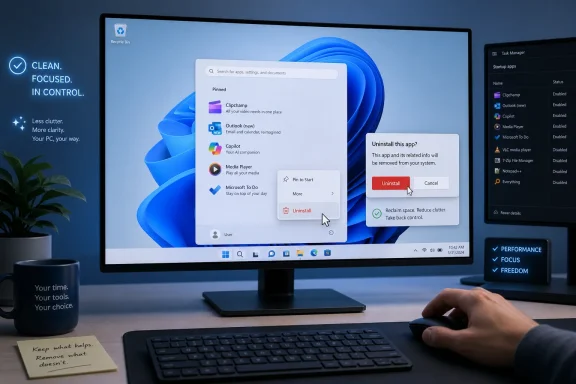
On new Windows 11 PCs, many users still begin setup by uninstalling bundled Microsoft apps such as Clipchamp, the new Outlook, Copilot, Media Player, and Microsoft To Do, because these defaults often serve Microsoft’s ecosystem strategy more clearly than the owner’s immediate needs. That ritual says something unflattering about the modern Windows out-of-box experience. The problem is not that every bundled app is bad; it is that Windows increasingly treats the first boot as a distribution channel. A premium PC can feel less like a clean workstation than a negotiation over whose workflow gets to be the default.
There was a time when preinstalled Windows software was mostly judged by a simple standard: does it help the user do something basic before they install anything else? Notepad, Paint, Calculator, File Explorer, and even the old Windows Media Player fit that model. They were humble utilities, not strategic funnels.
The modern Windows app drawer is different. It is filled with software that often overlaps with better third-party tools, cloud services, subscriptions, or Microsoft account hooks. The result is not catastrophic, but it is irritating in a way that compounds because users encounter it immediately, before the machine has earned any trust.
That is why the first cleanup pass on a new Windows PC has become a kind of ownership ceremony. Removing Clipchamp, Outlook, Copilot, Media Player, and Microsoft To Do is not just about saving storage or decluttering Start. It is a small act of reclaiming the machine from defaults that were chosen for business reasons as much as user reasons.
The irony is that Microsoft knows how to build excellent first-party utilities. PowerToys, Windows Terminal, Defender, and parts of the Settings app show a company that can still make genuinely useful Windows software. The annoyance comes from the contrast: the apps users often want are optional downloads, while the apps Microsoft wants promoted are already waiting on the taskbar or in Start.
But its presence as a default Windows app reveals the central problem with Microsoft’s bundling strategy. Video editing is not a universal computing need in the way browsing files, opening images, or playing media are. Preinstalling a lightweight video editor on every PC makes sense only if Windows is being treated as a showcase for Microsoft’s broader services portfolio.
Clipchamp also carries the awkwardness of many modern Microsoft consumer apps: it feels less like a native part of Windows than a web service wearing a Windows badge. Microsoft acquired Clipchamp in 2021, and the app has since become the company’s default answer to basic video editing on Windows 11. Yet for users who remember the older video editor inside Photos, Clipchamp can feel like a more complicated replacement for a simpler tool.
That older Photos-based editor was not a professional application, but it had virtues that matter in default software. It felt local. It was easy to understand. It did not announce itself as a growth surface for a separate product identity. It was the sort of modest built-in feature that made Windows feel complete without making the user feel marketed to.
The moment someone actually cares about video editing, Clipchamp’s position weakens further. DaVinci Resolve exists for users who want power, color tools, and a path toward serious editing. OpenShot and other free editors exist for people who want a simpler open-source route. Even browser-based creation tools outside Microsoft’s world compete for the same casual audience.
That leaves Clipchamp in an uncomfortable middle. It is too specialized to justify being on every machine, too limited for ambitious editors, and too connected to Microsoft’s cloud-era design instincts to satisfy people who want a plain local tool. It is precisely the kind of app that should be easy to discover, not impossible to avoid.
For Microsoft, the consolidation makes strategic sense. Outlook is one of the company’s strongest brands, and unifying consumer mail, work mail, calendar, Microsoft 365 integration, and account identity under that name is cleaner on a slide deck than maintaining separate Windows Mail and classic Outlook paths forever. Engineering teams also prefer fewer clients to support.
But users do not experience product-line simplification as a virtue if the replacement feels worse. The old Mail and Calendar apps were limited, but they were also lightweight and direct. They did not need to be the center of a Microsoft 365 universe to be useful. For many people, that was the point.
The new Outlook has improved over time, and Microsoft continues to add missing features. Still, its reputation problem is real. Users object to its web-app feel, its performance profile, its differences from classic Outlook, and, for free accounts, the presence of advertising. Email is already a noisy, stressful part of computing; an email client that makes sponsored messages feel like part of the inbox commits a special kind of interface sin.
This is why Outlook is often among the first removals on a new personal PC. Not because everyone has a superior local mail client ready to go, but because the default no longer feels neutral. It feels like a Microsoft account front door, an ad surface for free users, and a migration vehicle for a broader services strategy.
That distinction matters. A good default earns inertia. A bad default spends it.
For many users, that distinction is academic. They see another icon, another assistant, another web-connected feature asking for attention before proving its value. If they already prefer ChatGPT, Claude, Gemini, or no assistant at all, Copilot’s privileged placement feels presumptuous.
The technical packaging does not help. Copilot on Windows has shifted forms more than once, and recent versions have leaned heavily on web technologies rather than feeling like a deep native Windows component. That may be perfectly rational engineering; web-based interfaces are easier to update quickly, keep consistent across devices, and connect to cloud services. But users tend to judge by feel, not architecture diagrams.
The result is a mismatch between Microsoft’s ambition and the user’s first impression. Microsoft talks about agents, context, productivity, and reducing friction. The user sees a pinned app they did not ask for, powered by services they may not trust, competing with tools they may already prefer.
There is also a privacy and governance dimension, especially for businesses. Even when Copilot features are controllable, documented, and increasingly manageable through enterprise policy, administrators are rightly wary of assistants that sit near files, mail, browser history, and workplace data. The issue is not simply whether Copilot is safe in a narrow technical sense. It is whether its presence changes user behavior faster than policy, training, and compliance teams can adapt.
On a personal machine, uninstalling Copilot may be a preference. In an organization, suppressing or managing it can be a risk-control decision. In both cases, the instinct is the same: AI should be adopted intentionally, not smuggled into the workflow by default placement.
And yet many experienced Windows users still remove it or ignore it immediately because VLC exists. That is not really Microsoft’s fault. VLC has spent years earning trust by playing almost anything, staying free, remaining open source, and accumulating practical features that go far beyond basic playback.
This is where default-app logic runs into decades of user habit. Microsoft can ship a reasonable media player, but it cannot easily erase the muscle memory of people who install VLC on every PC they touch. For those users, Media Player is not objectionable. It is redundant.
Redundancy is not harmless at scale. Every extra app in Start, every duplicate file association prompt, and every “open with” decision adds small amounts of noise. Windows has always been powerful partly because it lets users replace pieces of the experience. But when the default set grows too broad, the operating system starts to look less like a foundation and more like a pile.
The best argument for Media Player is that a fresh PC should be able to open common media files immediately. That is fair. The best argument against it is that Microsoft’s built-in app does not need to occupy the emotional space of a recommended app when a large share of the enthusiast and IT audience has already standardized elsewhere.
Media Player is not a villain. It is a reminder that even decent defaults can become clutter when they do not match real-world practice.
The problem is the assumption embedded in its default presence. A task manager is intensely personal software. Some people want a bare checklist. Some want kanban boards. Some want natural-language scheduling, project templates, tags, or deep calendar integration. Some want no task app at all because their reminders live in a notebook, a calendar, or their phone.
To Do makes the most sense when the rest of Microsoft’s ecosystem is already the center of gravity. Its tasks can surface through Outlook, and its value rises when Microsoft services are already handling your mail, calendar, and account identity. Outside that context, it is just another reminder app with a Microsoft sign-in prompt standing between the user and a grocery list.
That is why alternatives such as Todoist, TickTick, Google Tasks, Apple Reminders, Notion, Obsidian plugins, and plain text files continue to survive. They reflect different philosophies of remembering. Microsoft To Do reflects Microsoft’s.
There is nothing wrong with Microsoft offering it. There is something wearying about every new Windows installation assuming that the user’s future productivity system should begin there. As with Clipchamp, the issue is not availability. It is presumption.
But the aggregate effect is what matters. A Windows PC does not feel bloated because one small app is present. It feels bloated because the default installation is full of software that many users did not choose, will not use, and must mentally sort before the machine feels like theirs.
Some of these apps are genuinely useful in specific circumstances. Quick Assist can be invaluable for remote help. Sticky Notes has fans. Camera is necessary for testing webcams and scanning QR codes in some workflows. Feedback Hub is a channel for bug reports that Microsoft does, at least sometimes, use.
The trouble is that Windows does a poor job of distinguishing between universal utilities, optional conveniences, promotional surfaces, and ecosystem hooks. They all arrive in the same psychological bundle: stuff Microsoft put here. Enthusiasts then respond with the same blunt instrument: remove it.
This dynamic also explains why the word bloatware remains so durable even when storage is cheap and modern PCs are powerful. Bloat is not only about disk space or RAM. It is about attention, defaults, trust, and the sense that the operating system is making assumptions about the user before the user has made any choices.
But Microsoft should not mistake tolerance for satisfaction. Enthusiasts will spend 20 minutes uninstalling unwanted apps because they know how. IT departments will build images, policies, provisioning packages, and management scripts because they have to. Ordinary users may simply live with the clutter, click the wrong thing, or gradually conclude that their expensive PC feels strangely messy.
That last outcome is the dangerous one. The first hour with a new machine sets the emotional tone. A clean setup says: this device is yours. A cluttered one says: this device is shared between you, the OEM, Microsoft, and whoever paid for placement in the experience.
PC makers deserve some blame too. Trial antivirus packages, vendor utilities, update agents, support assistants, game launchers, cloud storage promos, and accessory control panels can make a new system feel compromised before Windows itself even enters the dock. But Microsoft owns the baseline, and the baseline matters.
If Windows is to remain the default productivity platform for another decade, Microsoft needs to get more disciplined about what belongs in the box. The answer is not necessarily a bare-bones Windows for everyone. The answer is a clearer distinction between core tools and recommended downloads, with the user given more meaningful control during setup.
That does not make every app malicious, worthless, or incompetent. It makes them contested defaults. A default is powerful precisely because it reaches people who have not made a decision yet, and that power should be used sparingly.
The strongest case for preinstalled software is accessibility. A new PC should be useful before the user downloads anything. It should open files, browse the web, manage photos, play media, handle basic notes, and help recover from problems. But that mission gets diluted when “useful out of the box” becomes “strategically aligned with Microsoft’s cloud, AI, and subscription goals.”
This is where Microsoft’s consumer Windows strategy keeps colliding with its enterprise instincts. Enterprises want manageability, predictability, and policy control. Enthusiasts want agency and cleanliness. Casual users want simplicity. Microsoft wants engagement across its services. Those goals can coexist, but not when every new device feels like it has already been enrolled in a marketing plan.
For Microsoft, the lesson is harder. The company needs to trust that good apps can win without being preloaded everywhere. If Clipchamp, Copilot, Outlook, and To Do are compelling, Windows can recommend them contextually, explain their value, and let users opt in. That would create fewer resentful first impressions than pinning, bundling, and replacing until users reach for uninstall.
The cleanest Windows setup is not the one with nothing installed. It is the one where the installed apps match the user’s intent. That is the standard Microsoft should be chasing.
 Microsoft Has Turned First Boot Into a Product Pitch
There was a time when preinstalled Windows software was mostly judged by a simple standard: does it help the user do something basic before they install anything else? Notepad, Paint, Calculator, File Explorer, and even the old Windows Media Player fit that model. They were humble utilities, not strategic funnels.The modern Windows app drawer is different. It is filled with software that often overlaps with better third-party tools, cloud services, subscriptions, or Microsoft account hooks. The result is not catastrophic, but it is irritating in a way that compounds because users encounter it immediately, before the machine has earned any trust.
That is why the first cleanup pass on a new Windows PC has become a kind of ownership ceremony. Removing Clipchamp, Outlook, Copilot, Media Player, and Microsoft To Do is not just about saving storage or decluttering Start. It is a small act of reclaiming the machine from defaults that were chosen for business reasons as much as user reasons.
The irony is that Microsoft knows how to build excellent first-party utilities. PowerToys, Windows Terminal, Defender, and parts of the Settings app show a company that can still make genuinely useful Windows software. The annoyance comes from the contrast: the apps users often want are optional downloads, while the apps Microsoft wants promoted are already waiting on the taskbar or in Start.
Clipchamp Is the Clearest Case of an App That Solves the Wrong Problem
Clipchamp is not useless in the literal sense. It can trim clips, add text, assemble quick social videos, and export simple projects without forcing a beginner into a professional editing suite. For students, casual creators, and office workers making a quick internal clip, that is not nothing.But its presence as a default Windows app reveals the central problem with Microsoft’s bundling strategy. Video editing is not a universal computing need in the way browsing files, opening images, or playing media are. Preinstalling a lightweight video editor on every PC makes sense only if Windows is being treated as a showcase for Microsoft’s broader services portfolio.
Clipchamp also carries the awkwardness of many modern Microsoft consumer apps: it feels less like a native part of Windows than a web service wearing a Windows badge. Microsoft acquired Clipchamp in 2021, and the app has since become the company’s default answer to basic video editing on Windows 11. Yet for users who remember the older video editor inside Photos, Clipchamp can feel like a more complicated replacement for a simpler tool.
That older Photos-based editor was not a professional application, but it had virtues that matter in default software. It felt local. It was easy to understand. It did not announce itself as a growth surface for a separate product identity. It was the sort of modest built-in feature that made Windows feel complete without making the user feel marketed to.
The moment someone actually cares about video editing, Clipchamp’s position weakens further. DaVinci Resolve exists for users who want power, color tools, and a path toward serious editing. OpenShot and other free editors exist for people who want a simpler open-source route. Even browser-based creation tools outside Microsoft’s world compete for the same casual audience.
That leaves Clipchamp in an uncomfortable middle. It is too specialized to justify being on every machine, too limited for ambitious editors, and too connected to Microsoft’s cloud-era design instincts to satisfy people who want a plain local tool. It is precisely the kind of app that should be easy to discover, not impossible to avoid.
Outlook Shows How a Default Can Become a Downgrade
The new Outlook for Windows is a more consequential case because email and calendars are not niche tasks. A basic mail client is one of those things an operating system can reasonably include. The controversy is that Microsoft did not merely ship a new option; it replaced the old Windows Mail and Calendar experience with an app many users still regard as slower, heavier, and more web-shaped than the thing it displaced.For Microsoft, the consolidation makes strategic sense. Outlook is one of the company’s strongest brands, and unifying consumer mail, work mail, calendar, Microsoft 365 integration, and account identity under that name is cleaner on a slide deck than maintaining separate Windows Mail and classic Outlook paths forever. Engineering teams also prefer fewer clients to support.
But users do not experience product-line simplification as a virtue if the replacement feels worse. The old Mail and Calendar apps were limited, but they were also lightweight and direct. They did not need to be the center of a Microsoft 365 universe to be useful. For many people, that was the point.
The new Outlook has improved over time, and Microsoft continues to add missing features. Still, its reputation problem is real. Users object to its web-app feel, its performance profile, its differences from classic Outlook, and, for free accounts, the presence of advertising. Email is already a noisy, stressful part of computing; an email client that makes sponsored messages feel like part of the inbox commits a special kind of interface sin.
This is why Outlook is often among the first removals on a new personal PC. Not because everyone has a superior local mail client ready to go, but because the default no longer feels neutral. It feels like a Microsoft account front door, an ad surface for free users, and a migration vehicle for a broader services strategy.
That distinction matters. A good default earns inertia. A bad default spends it.
Copilot Is Not Just an App, It Is Microsoft’s Preferred Future
Copilot is the most politically charged item in the cleanup list because it represents Microsoft’s current operating-system thesis. The company wants AI to be a primary interface layer across Windows, Microsoft 365, Edge, Teams, and enterprise management. From Redmond’s perspective, putting Copilot near the center of Windows is not bloat; it is the next platform transition.For many users, that distinction is academic. They see another icon, another assistant, another web-connected feature asking for attention before proving its value. If they already prefer ChatGPT, Claude, Gemini, or no assistant at all, Copilot’s privileged placement feels presumptuous.
The technical packaging does not help. Copilot on Windows has shifted forms more than once, and recent versions have leaned heavily on web technologies rather than feeling like a deep native Windows component. That may be perfectly rational engineering; web-based interfaces are easier to update quickly, keep consistent across devices, and connect to cloud services. But users tend to judge by feel, not architecture diagrams.
The result is a mismatch between Microsoft’s ambition and the user’s first impression. Microsoft talks about agents, context, productivity, and reducing friction. The user sees a pinned app they did not ask for, powered by services they may not trust, competing with tools they may already prefer.
There is also a privacy and governance dimension, especially for businesses. Even when Copilot features are controllable, documented, and increasingly manageable through enterprise policy, administrators are rightly wary of assistants that sit near files, mail, browser history, and workplace data. The issue is not simply whether Copilot is safe in a narrow technical sense. It is whether its presence changes user behavior faster than policy, training, and compliance teams can adapt.
On a personal machine, uninstalling Copilot may be a preference. In an organization, suppressing or managing it can be a risk-control decision. In both cases, the instinct is the same: AI should be adopted intentionally, not smuggled into the workflow by default placement.
Media Player Loses Because “Good Enough” Is Not Enough
Media Player is the least offensive app on the list, which makes it useful as a contrast. It is clean, understandable, and competent for everyday playback. Unlike Outlook or Copilot, it does not feel like the visible edge of a massive strategic campaign.And yet many experienced Windows users still remove it or ignore it immediately because VLC exists. That is not really Microsoft’s fault. VLC has spent years earning trust by playing almost anything, staying free, remaining open source, and accumulating practical features that go far beyond basic playback.
This is where default-app logic runs into decades of user habit. Microsoft can ship a reasonable media player, but it cannot easily erase the muscle memory of people who install VLC on every PC they touch. For those users, Media Player is not objectionable. It is redundant.
Redundancy is not harmless at scale. Every extra app in Start, every duplicate file association prompt, and every “open with” decision adds small amounts of noise. Windows has always been powerful partly because it lets users replace pieces of the experience. But when the default set grows too broad, the operating system starts to look less like a foundation and more like a pile.
The best argument for Media Player is that a fresh PC should be able to open common media files immediately. That is fair. The best argument against it is that Microsoft’s built-in app does not need to occupy the emotional space of a recommended app when a large share of the enthusiast and IT audience has already standardized elsewhere.
Media Player is not a villain. It is a reminder that even decent defaults can become clutter when they do not match real-world practice.
Microsoft To Do Is Useful Mostly If You Already Live in Microsoft’s House
Microsoft To Do is another app that is defensible in isolation. It syncs tasks, connects with Outlook, works across devices, and fits neatly into Microsoft’s productivity stack. For a Microsoft 365 user who already manages work through Outlook, Teams, and Exchange-backed services, To Do can be a tidy part of the day.The problem is the assumption embedded in its default presence. A task manager is intensely personal software. Some people want a bare checklist. Some want kanban boards. Some want natural-language scheduling, project templates, tags, or deep calendar integration. Some want no task app at all because their reminders live in a notebook, a calendar, or their phone.
To Do makes the most sense when the rest of Microsoft’s ecosystem is already the center of gravity. Its tasks can surface through Outlook, and its value rises when Microsoft services are already handling your mail, calendar, and account identity. Outside that context, it is just another reminder app with a Microsoft sign-in prompt standing between the user and a grocery list.
That is why alternatives such as Todoist, TickTick, Google Tasks, Apple Reminders, Notion, Obsidian plugins, and plain text files continue to survive. They reflect different philosophies of remembering. Microsoft To Do reflects Microsoft’s.
There is nothing wrong with Microsoft offering it. There is something wearying about every new Windows installation assuming that the user’s future productivity system should begin there. As with Clipchamp, the issue is not availability. It is presumption.
The Smaller Apps Reveal the Same Pattern in Miniature
Once users start trimming, the obvious targets multiply. Feedback Hub, Weather, Movies & TV, Sound Recorder, Sticky Notes, Quick Assist, Solitaire, Camera, and other bundled pieces all have plausible reasons to exist. Each can be defended in a meeting. Each has a user somewhere.But the aggregate effect is what matters. A Windows PC does not feel bloated because one small app is present. It feels bloated because the default installation is full of software that many users did not choose, will not use, and must mentally sort before the machine feels like theirs.
Some of these apps are genuinely useful in specific circumstances. Quick Assist can be invaluable for remote help. Sticky Notes has fans. Camera is necessary for testing webcams and scanning QR codes in some workflows. Feedback Hub is a channel for bug reports that Microsoft does, at least sometimes, use.
The trouble is that Windows does a poor job of distinguishing between universal utilities, optional conveniences, promotional surfaces, and ecosystem hooks. They all arrive in the same psychological bundle: stuff Microsoft put here. Enthusiasts then respond with the same blunt instrument: remove it.
This dynamic also explains why the word bloatware remains so durable even when storage is cheap and modern PCs are powerful. Bloat is not only about disk space or RAM. It is about attention, defaults, trust, and the sense that the operating system is making assumptions about the user before the user has made any choices.
The Real Competition Is Not Linux or macOS, It Is the User’s Patience
Windows remains the dominant desktop platform not because every default is beloved, but because its ecosystem is vast, compatible, and flexible. That flexibility is why users can remove Microsoft apps, install replacements, change defaults, run old software, script deployments, and bend the machine to their habits. The cleanup ritual is possible because Windows is still open enough to permit it.But Microsoft should not mistake tolerance for satisfaction. Enthusiasts will spend 20 minutes uninstalling unwanted apps because they know how. IT departments will build images, policies, provisioning packages, and management scripts because they have to. Ordinary users may simply live with the clutter, click the wrong thing, or gradually conclude that their expensive PC feels strangely messy.
That last outcome is the dangerous one. The first hour with a new machine sets the emotional tone. A clean setup says: this device is yours. A cluttered one says: this device is shared between you, the OEM, Microsoft, and whoever paid for placement in the experience.
PC makers deserve some blame too. Trial antivirus packages, vendor utilities, update agents, support assistants, game launchers, cloud storage promos, and accessory control panels can make a new system feel compromised before Windows itself even enters the dock. But Microsoft owns the baseline, and the baseline matters.
If Windows is to remain the default productivity platform for another decade, Microsoft needs to get more disciplined about what belongs in the box. The answer is not necessarily a bare-bones Windows for everyone. The answer is a clearer distinction between core tools and recommended downloads, with the user given more meaningful control during setup.
The Cleanup Ritual Says More About Windows Than the Apps Themselves
The five-app purge is not really about five apps. It is about the widening gap between what Microsoft considers strategically important and what users consider immediately useful. Clipchamp promotes Microsoft’s creator story. Outlook advances account and productivity consolidation. Copilot plants the AI flag. To Do reinforces Microsoft 365 habits. Media Player preserves a basic built-in role that many users have already outsourced to VLC.That does not make every app malicious, worthless, or incompetent. It makes them contested defaults. A default is powerful precisely because it reaches people who have not made a decision yet, and that power should be used sparingly.
The strongest case for preinstalled software is accessibility. A new PC should be useful before the user downloads anything. It should open files, browse the web, manage photos, play media, handle basic notes, and help recover from problems. But that mission gets diluted when “useful out of the box” becomes “strategically aligned with Microsoft’s cloud, AI, and subscription goals.”
This is where Microsoft’s consumer Windows strategy keeps colliding with its enterprise instincts. Enterprises want manageability, predictability, and policy control. Enthusiasts want agency and cleanliness. Casual users want simplicity. Microsoft wants engagement across its services. Those goals can coexist, but not when every new device feels like it has already been enrolled in a marketing plan.
A New PC Should Ask Before It Assumes
The practical lesson for users is simple: the app list deserves a first-day audit. Removing unwanted defaults is not paranoia, and it is not performative minimalism. It is basic system hygiene, especially on machines that will be used for work, school, development, gaming, or anything where distractions and duplicate defaults get in the way.For Microsoft, the lesson is harder. The company needs to trust that good apps can win without being preloaded everywhere. If Clipchamp, Copilot, Outlook, and To Do are compelling, Windows can recommend them contextually, explain their value, and let users opt in. That would create fewer resentful first impressions than pinning, bundling, and replacing until users reach for uninstall.
The cleanest Windows setup is not the one with nothing installed. It is the one where the installed apps match the user’s intent. That is the standard Microsoft should be chasing.
The Five Uninstalls That Define the Modern Windows Mood
The pattern is now familiar enough to be more than a personal preference. A new Windows PC arrives, the user opens Start, and the first customization step is subtraction rather than personalization. That is not a great signal for an operating system that wants to feel modern, helpful, and user-centered.- Clipchamp is useful for quick edits, but it is too specialized and too web-service-like to feel essential on every Windows PC.
- The new Outlook solves Microsoft’s consolidation problem more convincingly than it solves every user’s mail problem.
- Copilot should be an intentional AI choice, not a default presence that users remove to reclaim focus.
- Media Player is acceptable built-in software, but VLC remains the entrenched default for many experienced Windows users.
- Microsoft To Do works best inside the Microsoft 365 ecosystem, which makes it feel unnecessary for users who organize their lives elsewhere.
- The broader bundle of small Windows apps matters because clutter is cumulative, even when each individual app can be defended.
References
- Primary source: MakeUseOf
Published: 2026-06-28T16:01:10.705766
Loading…
www.makeuseof.com - Official source: microsoft.com
Loading…
www.microsoft.com - Related coverage: windowslatest.com
Loading…
www.windowslatest.com - Official source: support.microsoft.com
Loading…
support.microsoft.com - Related coverage: windowscentral.com
Microsoft fixes bug preventing classic Outlook launch — but still recommends the new Outlook for Windows as a workaround, despite it not being prime-time ready | Windows Central
The software giant recently indicated that it had fixed an annoying bug preventing users from launching the classic Outlook email client.www.windowscentral.com - Official source: learn.microsoft.com
Updated Windows and Microsoft 365 Copilot Chat experience | Microsoft Learn
Learn about changes to the Copilot in Windows experience for commercial environments and how to configure it for your organization.learn.microsoft.com
- Related coverage: techradar.com
Microsoft introduces 'Ask Copilot' box to Windows 11's taskbar – but only if you want AI there | TechRadar
Copilot replaces the traditional search box, if you opt inwww.techradar.com - Related coverage: pureinfotech.com
Loading…
pureinfotech.com - Related coverage: hungerford.tech