

Google Drive’s Projects feature lets eligible Google Workspace and Google AI subscribers create task-specific workspaces inside Drive, attach relevant files or folders, and use Gemini to query that narrower source set alongside Workspace context such as Gmail and Calendar instead of searching an entire account. The pitch sounds modest, almost like a folder with better branding. In practice, it points to the real productivity fight now unfolding across cloud software: not who stores the most data, but who can keep the right context from collapsing into digital noise.
For years, Google Drive has been the place many of us put everything because we did not know where else to put it. Contracts, drafts, screenshots, tax PDFs, research notes, invoices, slide decks, meeting recordings, and half-finished spreadsheets all accumulated under the comforting fiction that search would save us later. Drive’s original bargain was simple: stop worrying about where things live, because Google will find them.
That bargain has aged badly in the AI era. The more capable assistants become, the more obvious it is that “search everything” is not always intelligence. Sometimes it is the opposite. A model that has to infer which of 10,000 documents matters to the task at hand is not being empowered; it is being handed a messy attic and asked to produce a client-ready brief by lunch.
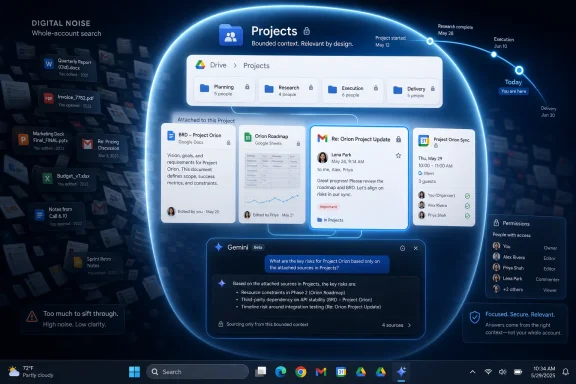
Projects in Google Drive is interesting because it admits this without quite saying so. It gives Gemini a bounded workspace: these files, this task, this conversation, this purpose. That boundary is the feature. The productivity gain is not magic summarization, but the removal of irrelevant possibility.
That matters for Windows users and IT pros because this is the shape enterprise AI is taking everywhere. Microsoft is pushing Copilot deeper into OneDrive, SharePoint, Outlook, Teams, and Windows. Google is doing the same across Drive, Gmail, Calendar, Docs, Sheets, and Chat. The winners will not simply be the assistants with the largest context windows; they will be the systems that understand when less context is the more useful context.
A folder can tell you that several documents belong to “Asha Jewels” or “Q3 audit” or “Windows migration plan.” It cannot tell the assistant that you are currently rewriting product descriptions, reconciling meeting promises against the website copy, or trying to build a spreadsheet of necklace SKUs from scattered source material. The folder is a storage container. The project is a working frame.
That distinction is why the Android Police account of using Projects lands so clearly. The author’s Drive was already organized enough to find things, but the problem was context switching: notes in one document, product information in another, email details elsewhere, meetings in Calendar, and the user stuck stitching the story together manually. Projects reduced the friction by letting Gemini operate inside a defined bundle.
The result is not just faster retrieval. It is a different workflow. Instead of opening tabs, copying snippets, and re-explaining the assignment to an AI assistant, the user can return to a workspace where the source material and previous framing are already aligned. That persistence is what makes Projects feel less like a search enhancement and more like the beginning of an AI-native file system.
Knowledge work does not suffer only because information is hard to access. It suffers because information is fragmented across tasks, time, people, and tools. A proposal may depend on a PDF in Drive, a pricing note in Gmail, a deadline in Calendar, a decision in Chat, and a spreadsheet that nobody remembers naming properly. The user’s labor is often not writing or analysis; it is reconstructing context.
Projects aims directly at that reconstruction cost. By letting users attach relevant files and return to the same Gemini conversation around a specific task, it changes Drive from a passive repository into a context manager. The assistant is no longer just answering, “What does this document say?” It is answering, “What do these materials mean for this thing I am trying to finish?”
That is a subtle but important shift. It also explains why the feature feels more consequential than another “summarize this PDF” button. Summaries are useful, but they are episodic. A project workspace is durable. It remembers the perimeter of the work.
For businesses, that perimeter is where governance and usefulness collide. A model that can see too little is frustrating. A model that can see too much is risky. Projects is one answer to that tension: give the assistant a smaller, user-selected source set, then let the broader Workspace integrations fill in supporting details when needed.
Drive is where the files are. Gmail is where the commitments are. Calendar is where the timeline is. Docs and Sheets are where the work becomes visible. Chat is where decisions may have been made in passing. Google’s productivity story is no longer about each app becoming smarter in isolation; it is about the assistant acting as connective tissue between them.
That is why the article’s Gmail and Calendar examples matter. Pulling a quote from an email without leaving the project sounds small until you remember how much time knowledge workers spend hunting for “the message where they said that thing.” Asking whether a project-related meeting is coming up next week sounds mundane until you consider how often timelines live outside the file system entirely.
This is also where Google Drive Projects differs from simply uploading a pile of files to a chatbot. The files are not detached artifacts. They remain part of a live workspace, governed by Drive permissions and surrounded by Google’s collaboration stack. A shared project can, in theory, become a common working surface for people who otherwise would be asking each other to resend links, confirm versions, or paste snippets into chat.
The strategic direction is clear. Google wants Drive to become the place where users do not merely store work, but assemble the evidence base for work. That turns Gemini from an accessory into a workflow layer. If it works reliably, the user spends less time navigating Google Workspace and more time asking the project itself what needs to happen next.
When a user asks Gemini about a specific client website, they do not necessarily want it to consider every vaguely similar document in Drive. They want the meeting notes, the product copy, the draft pages, and perhaps the relevant emails. A bounded project tells the assistant what not to consider, and that may be just as important as the material it includes.
This is a familiar lesson for anyone who has built retrieval systems, managed SharePoint libraries, or tried to make enterprise search tolerable. Relevance is not just about finding matching words. It is about knowing the working domain. A search result that is technically related but operationally irrelevant is still noise.
Projects provides a user-controlled relevance layer. It lets the person closest to the task define the corpus before Gemini starts reasoning over it. That turns the user from a prompt engineer into an editor of context.
The difference can feel immediate. Ask a broad assistant to “get all the descriptions for necklaces” and it may need clarification, or worse, it may confidently blend unrelated material. Ask inside a project containing the correct product files, and the instruction becomes operationally precise. The assistant can produce a table, a database-like list, or a Sheet-ready export because the ambiguity has already been reduced.
Projects in Drive sits in the middle of those categories. It is not as overtly research-oriented as NotebookLM, which has become known for source notebooks, summaries, and audio-style outputs. It is not a full project management system, either. It is closer to an AI workbench embedded inside the file storage layer most Google users already understand.
That placement is its strength. Users do not have to decide to adopt a new knowledge tool; they can create a project where the files already are. There is no elaborate taxonomy to design, no new database to populate, and no separate workspace app to justify to a manager. The feature’s best argument is that it reduces setup cost.
Microsoft will see the same pressure. Windows users who live in File Explorer, OneDrive, Teams, and Outlook do not want a chatbot that occasionally knows about their documents. They want task-specific context that follows the work without exposing the entire tenant every time someone asks a question. The future of AI productivity is not one giant assistant staring at everything. It is many bounded contexts, assembled quickly, shared carefully, and dissolved when the task is done.
That is why Drive Projects is worth watching even for people who do not use Google Workspace as their primary suite. It is a product signal. The file manager, the search box, the email client, and the AI chat panel are converging into something new: a workspace whose main unit is not the file, but the task.
Permissions in cloud storage are already difficult to reason about. Shared drives, inherited folder access, external collaborators, copied files, stale links, and departed employees can make the real access graph messier than the admin console suggests. Adding an AI layer does not necessarily create new permissions, but it can make existing permissions more powerful by making information easier to extract, summarize, and combine.
That is the part IT departments will care about. A user who can open a file could always read it, but an assistant that can synthesize 40 files in seconds changes the practical risk. The difference between access and usable extraction matters. AI compresses the effort required to turn permission into insight.
Projects may actually help here by encouraging scoped workspaces instead of broad, account-wide queries. But that depends on user behavior, admin controls, logging, and organizational discipline. If employees casually add entire shared folders to projects because it is convenient, the boundary becomes less meaningful. If teams create narrowly tailored projects with clean source sets, the model’s usefulness and the governance story both improve.
For WindowsForum’s sysadmin audience, the lesson is not “block this” or “embrace this.” It is to treat project-based AI workspaces as a new collaboration surface. They need the same scrutiny once reserved for shared folders and Teams channels: who owns them, who can see them, what sources they include, and what happens when the project ends.
This is the broader challenge for AI in productivity suites. Reading, summarizing, and extracting are useful, but the next step is doing. If Gemini can find the meeting, why can it not schedule the follow-up? If it can gather product descriptions, why can it not confidently create the final Sheet with validation rules and ownership metadata? If it can pull a quote from Gmail, why can it not draft the reply, attach the relevant Drive source, and queue it for approval?
Some of those limitations are product maturity issues. Others are trust and safety issues. Creating events, sending emails, changing files, or updating shared artifacts carries more risk than answering a question. The assistant needs confirmation flows, audit trails, rollback options, and clear provenance.
This is where Google has to be careful. If Projects remains mostly an analysis space, it will be useful but bounded. If it becomes an action space, it becomes far more powerful and far more governable only if the controls mature alongside it. Enterprise customers will not accept a black-box assistant making changes across Gmail, Calendar, Drive, and Sheets without predictable policy hooks.
The best version of Projects is not an omnipotent agent. It is a constrained operator: deeply aware of the project, transparent about its sources, cautious about actions, and explicit when it crosses from suggesting to changing. That is harder to build than a chat box, but it is the difference between novelty and infrastructure.
Projects does not ask users to memorize paths or maintain perfect folder hygiene. It asks them to assemble a meaningful source set. That is a more human version of organization. The user is not saying, “This document belongs under Clients > Retail > Jewelry > Web > Copy > Final.” The user is saying, “These are the materials for the Asha Jewels site redesign.”
That is closer to how work actually happens. Projects are temporary, overlapping, and purpose-driven. A single document may matter to multiple efforts. A spreadsheet may serve finance one week and marketing the next. A file tree struggles with that reality unless duplicated, linked, tagged, or endlessly reorganized.
AI workspaces can make that mess more manageable because they do not need to replace storage hierarchy. They can sit above it. A project can include files from different folders, emails from different threads, and events from different calendars without physically moving the underlying material. The workspace becomes a lens.
This is also why the feature feels more important than its current interface may suggest. The long-term play is not a better folder. It is a new abstraction layer over work. In that layer, the user defines intent, the system gathers context, and the assistant helps produce the next artifact.
The Google approach differs in texture, but not in direction. Both companies are trying to make the assistant useful by embedding it where the work already lives. Neither wants users to copy files into a separate AI app, paste prompts manually, and then move results back into the productivity suite. That workflow is too fragile for mainstream adoption.
The battleground, then, is not only model quality. It is integration quality. Can the assistant find the right source? Can it explain where an answer came from? Can it respect permissions? Can it keep project contexts separate? Can it move from answer to artifact without making users nervous?
Windows professionals should pay attention because these questions will define the next round of endpoint and collaboration management. AI features will arrive not as standalone applications but as capabilities embedded inside storage, mail, calendars, browsers, and operating systems. The controls will have to be just as embedded.
That means admins will need to understand not only whether Gemini or Copilot is enabled, but how users are grouping sources, sharing AI workspaces, exporting generated data, and preserving records. The AI assistant is becoming another participant in the collaboration fabric. Treating it like a fancy search box will underestimate both its usefulness and its risk.
A client project often consists of fragments. A research assignment may begin in PDFs, move through notes, pick up email confirmations, and end as a spreadsheet or article. A website build may involve copy docs, product catalogs, images, pricing notes, call transcripts, and scattered stakeholder feedback. The work is the connective tissue between those pieces.
Projects makes that connective tissue more explicit. It lets the user declare, “This is the boundary of the task,” and then lets Gemini operate inside that declaration. The result can feel like speed, but the deeper benefit is continuity.
Continuity is hard to market because it is not flashy. It does not demo as dramatically as a generated slide deck or an AI voice summary. But continuity is what determines whether people keep using productivity features after the novelty wears off. If a tool lets a user return tomorrow and pick up the same task without rebuilding the mental map, it has earned a place in the workflow.
That is the promise here. Not that Gemini will always be right, or that Projects will replace careful reading, or that Drive has suddenly become a full project management platform. The promise is that Google has started to align cloud storage with the way knowledge work actually accumulates.
In the old workflow, the user becomes the integration layer. They open one file to check copy, another to verify product details, another to confirm a design theme, and Gmail to find a quote or decision. Every tab switch has a cognitive cost. Every manual search risks missing the one detail that matters.
In the Projects workflow, Gemini can be asked to extract necklace descriptions, identify design themes across collections, or find supporting information from email. The assistant is not merely answering trivia about stored files. It is helping transform scattered source material into a structured work product.
That is the kind of task where AI can be genuinely useful without pretending to be creative magic. It can gather, compare, list, summarize, and format. It can turn loosely connected documents into a Sheet-ready database. It can reduce the boring coordination work that sits between raw material and finished deliverable.
The risk, of course, is that users may overtrust the output. If Gemini misses a file, misreads a description, or silently omits an item, the generated database may look more complete than it is. Source-grounded AI is still AI. Projects narrows the context, but it does not eliminate the need for verification.
For Google, the challenge is to keep the feature simple without making it shallow. Users need an easy way to create a project, attach sources, ask questions, and share the workspace. Power users and admins will need more: source visibility, export controls, project lifecycle management, auditability, and perhaps templates for recurring work.
There is also a discoverability problem. If Projects lives too quietly inside Drive, many users who would benefit from it may never change their habits. Folders are deeply ingrained. Search is muscle memory. Google will need to show users that a project is not another place to file things, but a temporary frame for getting work done.
That framing is critical. The danger is that users treat Projects as yet another organizational layer to maintain forever. The value is higher if projects can be created quickly, used intensely, shared when useful, and archived when done. The feature should reduce digital bureaucracy, not add a new form of it.
If Google gets that balance right, Drive becomes something more than cloud storage with AI bolted on. It becomes a workspace where context has a shape.
 Google Finally Notices That Search Is Not the Same as Context
For years, Google Drive has been the place many of us put everything because we did not know where else to put it. Contracts, drafts, screenshots, tax PDFs, research notes, invoices, slide decks, meeting recordings, and half-finished spreadsheets all accumulated under the comforting fiction that search would save us later. Drive’s original bargain was simple: stop worrying about where things live, because Google will find them.That bargain has aged badly in the AI era. The more capable assistants become, the more obvious it is that “search everything” is not always intelligence. Sometimes it is the opposite. A model that has to infer which of 10,000 documents matters to the task at hand is not being empowered; it is being handed a messy attic and asked to produce a client-ready brief by lunch.
Projects in Google Drive is interesting because it admits this without quite saying so. It gives Gemini a bounded workspace: these files, this task, this conversation, this purpose. That boundary is the feature. The productivity gain is not magic summarization, but the removal of irrelevant possibility.
That matters for Windows users and IT pros because this is the shape enterprise AI is taking everywhere. Microsoft is pushing Copilot deeper into OneDrive, SharePoint, Outlook, Teams, and Windows. Google is doing the same across Drive, Gmail, Calendar, Docs, Sheets, and Chat. The winners will not simply be the assistants with the largest context windows; they will be the systems that understand when less context is the more useful context.
The Folder Was Never Enough
The obvious response to Projects is that Drive already had folders. Anyone who has managed a shared drive, a client directory, or a departmental document library knows the limits of that answer. Folders organize files, but they do not automatically organize intent.A folder can tell you that several documents belong to “Asha Jewels” or “Q3 audit” or “Windows migration plan.” It cannot tell the assistant that you are currently rewriting product descriptions, reconciling meeting promises against the website copy, or trying to build a spreadsheet of necklace SKUs from scattered source material. The folder is a storage container. The project is a working frame.
That distinction is why the Android Police account of using Projects lands so clearly. The author’s Drive was already organized enough to find things, but the problem was context switching: notes in one document, product information in another, email details elsewhere, meetings in Calendar, and the user stuck stitching the story together manually. Projects reduced the friction by letting Gemini operate inside a defined bundle.
The result is not just faster retrieval. It is a different workflow. Instead of opening tabs, copying snippets, and re-explaining the assignment to an AI assistant, the user can return to a workspace where the source material and previous framing are already aligned. That persistence is what makes Projects feel less like a search enhancement and more like the beginning of an AI-native file system.
Gemini’s Real Job Is Becoming the Context Manager
The original fantasy of cloud storage was that files would be available everywhere. The current fantasy of AI productivity is that the assistant will understand everything. Neither promise is wrong, exactly, but both are incomplete.Knowledge work does not suffer only because information is hard to access. It suffers because information is fragmented across tasks, time, people, and tools. A proposal may depend on a PDF in Drive, a pricing note in Gmail, a deadline in Calendar, a decision in Chat, and a spreadsheet that nobody remembers naming properly. The user’s labor is often not writing or analysis; it is reconstructing context.
Projects aims directly at that reconstruction cost. By letting users attach relevant files and return to the same Gemini conversation around a specific task, it changes Drive from a passive repository into a context manager. The assistant is no longer just answering, “What does this document say?” It is answering, “What do these materials mean for this thing I am trying to finish?”
That is a subtle but important shift. It also explains why the feature feels more consequential than another “summarize this PDF” button. Summaries are useful, but they are episodic. A project workspace is durable. It remembers the perimeter of the work.
For businesses, that perimeter is where governance and usefulness collide. A model that can see too little is frustrating. A model that can see too much is risky. Projects is one answer to that tension: give the assistant a smaller, user-selected source set, then let the broader Workspace integrations fill in supporting details when needed.
Google’s Advantage Is the Mess It Already Owns
Google has an obvious advantage here, and it is not simply Gemini. It is the fact that for millions of users, Google already owns the mess.Drive is where the files are. Gmail is where the commitments are. Calendar is where the timeline is. Docs and Sheets are where the work becomes visible. Chat is where decisions may have been made in passing. Google’s productivity story is no longer about each app becoming smarter in isolation; it is about the assistant acting as connective tissue between them.
That is why the article’s Gmail and Calendar examples matter. Pulling a quote from an email without leaving the project sounds small until you remember how much time knowledge workers spend hunting for “the message where they said that thing.” Asking whether a project-related meeting is coming up next week sounds mundane until you consider how often timelines live outside the file system entirely.
This is also where Google Drive Projects differs from simply uploading a pile of files to a chatbot. The files are not detached artifacts. They remain part of a live workspace, governed by Drive permissions and surrounded by Google’s collaboration stack. A shared project can, in theory, become a common working surface for people who otherwise would be asking each other to resend links, confirm versions, or paste snippets into chat.
The strategic direction is clear. Google wants Drive to become the place where users do not merely store work, but assemble the evidence base for work. That turns Gemini from an accessory into a workflow layer. If it works reliably, the user spends less time navigating Google Workspace and more time asking the project itself what needs to happen next.
The Productivity Boost Comes From Saying No to the Rest of Drive
The most underrated part of Projects is constraint. Modern AI marketing tends to celebrate breadth: more tokens, more connectors, more integrations, more data. But productivity often comes from narrowing the field.When a user asks Gemini about a specific client website, they do not necessarily want it to consider every vaguely similar document in Drive. They want the meeting notes, the product copy, the draft pages, and perhaps the relevant emails. A bounded project tells the assistant what not to consider, and that may be just as important as the material it includes.
This is a familiar lesson for anyone who has built retrieval systems, managed SharePoint libraries, or tried to make enterprise search tolerable. Relevance is not just about finding matching words. It is about knowing the working domain. A search result that is technically related but operationally irrelevant is still noise.
Projects provides a user-controlled relevance layer. It lets the person closest to the task define the corpus before Gemini starts reasoning over it. That turns the user from a prompt engineer into an editor of context.
The difference can feel immediate. Ask a broad assistant to “get all the descriptions for necklaces” and it may need clarification, or worse, it may confidently blend unrelated material. Ask inside a project containing the correct product files, and the instruction becomes operationally precise. The assistant can produce a table, a database-like list, or a Sheet-ready export because the ambiguity has already been reduced.
This Is Where NotebookLM, Copilot, and Drive Start to Collide
Google is not the only company circling this problem. Microsoft’s Copilot ecosystem is built around the idea that work context lives across Microsoft 365, Windows, Teams, Outlook, OneDrive, and SharePoint. NotebookLM, also from Google, has popularized source-grounded research notebooks. ChatGPT and other assistants have their own project-style spaces for grouping files and conversations.Projects in Drive sits in the middle of those categories. It is not as overtly research-oriented as NotebookLM, which has become known for source notebooks, summaries, and audio-style outputs. It is not a full project management system, either. It is closer to an AI workbench embedded inside the file storage layer most Google users already understand.
That placement is its strength. Users do not have to decide to adopt a new knowledge tool; they can create a project where the files already are. There is no elaborate taxonomy to design, no new database to populate, and no separate workspace app to justify to a manager. The feature’s best argument is that it reduces setup cost.
Microsoft will see the same pressure. Windows users who live in File Explorer, OneDrive, Teams, and Outlook do not want a chatbot that occasionally knows about their documents. They want task-specific context that follows the work without exposing the entire tenant every time someone asks a question. The future of AI productivity is not one giant assistant staring at everything. It is many bounded contexts, assembled quickly, shared carefully, and dissolved when the task is done.
That is why Drive Projects is worth watching even for people who do not use Google Workspace as their primary suite. It is a product signal. The file manager, the search box, the email client, and the AI chat panel are converging into something new: a workspace whose main unit is not the file, but the task.
The Security Story Is Reassuring, but Not the Whole Story
Google says Projects respects Drive’s underlying security and compliance controls, meaning access to project content depends on access to the underlying files. That is the right baseline. It is also only the beginning of the governance conversation.Permissions in cloud storage are already difficult to reason about. Shared drives, inherited folder access, external collaborators, copied files, stale links, and departed employees can make the real access graph messier than the admin console suggests. Adding an AI layer does not necessarily create new permissions, but it can make existing permissions more powerful by making information easier to extract, summarize, and combine.
That is the part IT departments will care about. A user who can open a file could always read it, but an assistant that can synthesize 40 files in seconds changes the practical risk. The difference between access and usable extraction matters. AI compresses the effort required to turn permission into insight.
Projects may actually help here by encouraging scoped workspaces instead of broad, account-wide queries. But that depends on user behavior, admin controls, logging, and organizational discipline. If employees casually add entire shared folders to projects because it is convenient, the boundary becomes less meaningful. If teams create narrowly tailored projects with clean source sets, the model’s usefulness and the governance story both improve.
For WindowsForum’s sysadmin audience, the lesson is not “block this” or “embrace this.” It is to treat project-based AI workspaces as a new collaboration surface. They need the same scrutiny once reserved for shared folders and Teams channels: who owns them, who can see them, what sources they include, and what happens when the project ends.
The Weak Spots Reveal the Product’s Immaturity
The Android Police piece notes an important limitation: Gemini can look for project-related Calendar information, but it cannot create a new event from a text prompt in that flow. That is the kind of gap users notice immediately, because it interrupts the illusion that the workspace is becoming an action layer.This is the broader challenge for AI in productivity suites. Reading, summarizing, and extracting are useful, but the next step is doing. If Gemini can find the meeting, why can it not schedule the follow-up? If it can gather product descriptions, why can it not confidently create the final Sheet with validation rules and ownership metadata? If it can pull a quote from Gmail, why can it not draft the reply, attach the relevant Drive source, and queue it for approval?
Some of those limitations are product maturity issues. Others are trust and safety issues. Creating events, sending emails, changing files, or updating shared artifacts carries more risk than answering a question. The assistant needs confirmation flows, audit trails, rollback options, and clear provenance.
This is where Google has to be careful. If Projects remains mostly an analysis space, it will be useful but bounded. If it becomes an action space, it becomes far more powerful and far more governable only if the controls mature alongside it. Enterprise customers will not accept a black-box assistant making changes across Gmail, Calendar, Drive, and Sheets without predictable policy hooks.
The best version of Projects is not an omnipotent agent. It is a constrained operator: deeply aware of the project, transparent about its sources, cautious about actions, and explicit when it crosses from suggesting to changing. That is harder to build than a chat box, but it is the difference between novelty and infrastructure.
The File System Is Becoming a Prompt Surface
There is a historical irony in all of this. The computer industry has spent decades trying to hide the file system from ordinary users. Search, recents lists, cloud sync, app-specific libraries, and mobile sharing sheets all chipped away at the idea that people should manually navigate directories. AI now appears to be bringing the file system back, but in transformed form.Projects does not ask users to memorize paths or maintain perfect folder hygiene. It asks them to assemble a meaningful source set. That is a more human version of organization. The user is not saying, “This document belongs under Clients > Retail > Jewelry > Web > Copy > Final.” The user is saying, “These are the materials for the Asha Jewels site redesign.”
That is closer to how work actually happens. Projects are temporary, overlapping, and purpose-driven. A single document may matter to multiple efforts. A spreadsheet may serve finance one week and marketing the next. A file tree struggles with that reality unless duplicated, linked, tagged, or endlessly reorganized.
AI workspaces can make that mess more manageable because they do not need to replace storage hierarchy. They can sit above it. A project can include files from different folders, emails from different threads, and events from different calendars without physically moving the underlying material. The workspace becomes a lens.
This is also why the feature feels more important than its current interface may suggest. The long-term play is not a better folder. It is a new abstraction layer over work. In that layer, the user defines intent, the system gathers context, and the assistant helps produce the next artifact.
Windows Users Should Recognize the Pattern
Even though this is a Google Drive story, Windows users have seen this movie begin elsewhere. Microsoft has been turning Windows 11, Edge, OneDrive, and Microsoft 365 into surfaces for Copilot. File Explorer is no longer just a browser for local and cloud files; it is increasingly part of a broader productivity graph. Outlook is not just mail; it is context for meetings, tasks, commitments, and organizational memory.The Google approach differs in texture, but not in direction. Both companies are trying to make the assistant useful by embedding it where the work already lives. Neither wants users to copy files into a separate AI app, paste prompts manually, and then move results back into the productivity suite. That workflow is too fragile for mainstream adoption.
The battleground, then, is not only model quality. It is integration quality. Can the assistant find the right source? Can it explain where an answer came from? Can it respect permissions? Can it keep project contexts separate? Can it move from answer to artifact without making users nervous?
Windows professionals should pay attention because these questions will define the next round of endpoint and collaboration management. AI features will arrive not as standalone applications but as capabilities embedded inside storage, mail, calendars, browsers, and operating systems. The controls will have to be just as embedded.
That means admins will need to understand not only whether Gemini or Copilot is enabled, but how users are grouping sources, sharing AI workspaces, exporting generated data, and preserving records. The AI assistant is becoming another participant in the collaboration fabric. Treating it like a fancy search box will underestimate both its usefulness and its risk.
The Productivity Claim Is Plausible Because the Pain Is Real
The Android Police author’s conclusion that Projects turned Drive from a “storage locker” into a productivity tool is persuasive because it describes a pain most cloud users already know. The pain is not that documents are unavailable. It is that the relationship between documents is not visible when you need it.A client project often consists of fragments. A research assignment may begin in PDFs, move through notes, pick up email confirmations, and end as a spreadsheet or article. A website build may involve copy docs, product catalogs, images, pricing notes, call transcripts, and scattered stakeholder feedback. The work is the connective tissue between those pieces.
Projects makes that connective tissue more explicit. It lets the user declare, “This is the boundary of the task,” and then lets Gemini operate inside that declaration. The result can feel like speed, but the deeper benefit is continuity.
Continuity is hard to market because it is not flashy. It does not demo as dramatically as a generated slide deck or an AI voice summary. But continuity is what determines whether people keep using productivity features after the novelty wears off. If a tool lets a user return tomorrow and pick up the same task without rebuilding the mental map, it has earned a place in the workflow.
That is the promise here. Not that Gemini will always be right, or that Projects will replace careful reading, or that Drive has suddenly become a full project management platform. The promise is that Google has started to align cloud storage with the way knowledge work actually accumulates.
The Asha Jewels Lesson Is Bigger Than One Drive Account
The concrete example from the source article matters because it avoids the usual AI abstraction. A complex e-commerce website is exactly the kind of work that punishes bad context management. Product descriptions, collection themes, design notes, meeting decisions, and client requests rarely live in one pristine document.In the old workflow, the user becomes the integration layer. They open one file to check copy, another to verify product details, another to confirm a design theme, and Gmail to find a quote or decision. Every tab switch has a cognitive cost. Every manual search risks missing the one detail that matters.
In the Projects workflow, Gemini can be asked to extract necklace descriptions, identify design themes across collections, or find supporting information from email. The assistant is not merely answering trivia about stored files. It is helping transform scattered source material into a structured work product.
That is the kind of task where AI can be genuinely useful without pretending to be creative magic. It can gather, compare, list, summarize, and format. It can turn loosely connected documents into a Sheet-ready database. It can reduce the boring coordination work that sits between raw material and finished deliverable.
The risk, of course, is that users may overtrust the output. If Gemini misses a file, misreads a description, or silently omits an item, the generated database may look more complete than it is. Source-grounded AI is still AI. Projects narrows the context, but it does not eliminate the need for verification.
The Best AI Workspace Will Be Boring in the Right Ways
The most successful version of Projects will not feel like science fiction. It will feel like fewer tabs, fewer repeated explanations, fewer “where did we put that?” messages, and fewer moments spent rebuilding a task from memory. That is boring in the way good infrastructure is boring.For Google, the challenge is to keep the feature simple without making it shallow. Users need an easy way to create a project, attach sources, ask questions, and share the workspace. Power users and admins will need more: source visibility, export controls, project lifecycle management, auditability, and perhaps templates for recurring work.
There is also a discoverability problem. If Projects lives too quietly inside Drive, many users who would benefit from it may never change their habits. Folders are deeply ingrained. Search is muscle memory. Google will need to show users that a project is not another place to file things, but a temporary frame for getting work done.
That framing is critical. The danger is that users treat Projects as yet another organizational layer to maintain forever. The value is higher if projects can be created quickly, used intensely, shared when useful, and archived when done. The feature should reduce digital bureaucracy, not add a new form of it.
If Google gets that balance right, Drive becomes something more than cloud storage with AI bolted on. It becomes a workspace where context has a shape.
The Productivity Win Is Real, but the Assignment Has Changed
The useful lesson from Google Drive Projects is not that everyone should immediately reorganize their Drive around AI. It is that AI productivity depends on deliberately shaped context, and the tools are finally starting to reflect that.- Projects works best when the user attaches a focused set of files and folders rather than dumping an entire Drive hierarchy into the workspace.
- Gemini’s value increases when it can operate across task-specific Drive sources while selectively drawing on Gmail, Calendar, Chat, and the web.
- The feature is most compelling for research-heavy, client-heavy, or documentation-heavy work where source material is scattered but related.
- Shared projects could become a useful collaboration layer, but organizations should treat them as governed workspaces rather than casual chat sessions.
- The current limitations around taking actions, such as creating Calendar events from prompts, show that Projects is still closer to an analysis workspace than a full agentic project system.
- The biggest practical benefit is continuity: users can return to a task without rebuilding the context from scratch.
References
- Primary source: Android Police
Published: 2026-06-28T15:50:12.372092
I started using Projects in Google Drive; it instantly boosted my productivity
Google Drive finally feels smarter www.androidpolice.com
- Official source: support.google.com

Share your Gemini sources using Drive projects - Google Drive Help
Important: To use Gemini in Drive, you must have an eligible Google Workspace or Google AI plan. Learn more about Gemini features and plans. Note:
support.google.com
- Official source: workspace.google.com
Gemini in Google Drive | Google Workspace
Learn how to leverage AI in Google Drive to find and summarise documents, synthesise information from multiple files and explore relevant topics. workspace.google.com
- Related coverage: blog.google
Google shares Gemini updates to Docs, Sheets, Slides and Drive
These new Gemini features are coming to Google Docs, Sheets, Slides and Drive to help you get more done.blog.google - Related coverage: workspace.google.co.jp
Gemini in Google ドライブ | Google Workspace
Google ドライブで AI を活用して、ドキュメントの検索と要約、複数のファイルの情報の統合、関連トピックの調査を行う方法をご紹介します。
workspace.google.co.jp
- Related coverage: jetstream.blog
Gemini in Google Drive: Introducing the New “Projects” Feature – Jetstream
"Projects" has begun rolling out as a new feature for "Gemini in Google Drive." This feature allows users to create AI chatbots specialized for specific "Projects" by storing source files, folders, and Gemini conversation history in one place. Currently, creation...jetstream.blog
- Related coverage: workspaceupdates.googleblog.com
Google Workspace Updates: Ask Gemini in Drive now generally available
workspaceupdates.googleblog.com
- Related coverage: gadgets360.com
- Related coverage: ab-arts.be
Google Drive Projects: Gemini orchestrates your folders · AB-Arts
Google Drive Projects bundles folders, mail and tasks into one Gemini-powered workspace. Our Google AI Studio & Cloud masterclass covers it.www.ab-arts.be - Related coverage: cobry.ai
Ask Gemini in Drive | Google Workspace AI | Cobry
Engage in high-context, multi-turn conversations with Gemini to explore and understand content across Drive, Workspace apps, and the web. Check...cobry.ai - Related coverage: androidcentral.com
Gemini can now give you the TL;DR of your Google Drive folders | Android Central
When you don't have to go through every file, ask Gemini to do it.www.androidcentral.com - Related coverage: techradar.com
Watch out - Gemini will now remember all your work chats, and display them right in Google Workspace | TechRadar
Gemini is finally bringing conversation history to Workspace chatswww.techradar.com - Related coverage: tomsguide.com
Google Drive just got AI Overviews — and I tested Gemini’s new ‘Help me create’ to see if it lives up to the hype | Tom's Guide
Google just added powerful Gemini AI features to Docs, Sheets, Slides and Drive — here’s how the new tools can turn a blank page into a finished project.www.tomsguide.com - Related coverage: itpro.com
Google Workspace just got a huge Gemini update: Here’s what to expect with new AI features in Docs, Slides, Sheets, and Drive | IT Pro
Google has unveiled a raft of updates to Google Workspace, adding even more Gemini AI features to Docs, Sheets, Slides and Drive.www.itpro.com - Related coverage: cincodias.elpais.com
Loading…
cincodias.elpais.com - Official source: services.google.com
- Related coverage: wisdominterface.com
google workspace ai powered collab for organizations of all sizes
PDF documentwww.wisdominterface.com
- Related coverage: content.shi.com