

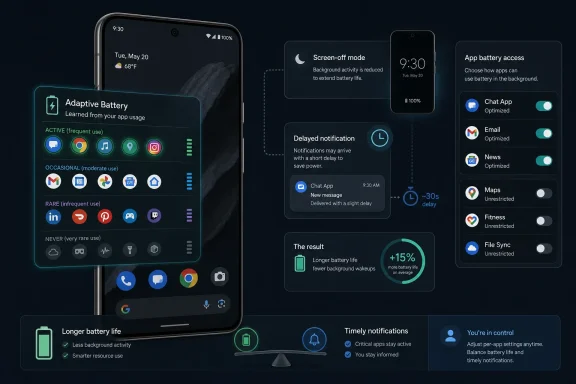
Google Pixel phones use Adaptive Battery, a default Android feature introduced with Android 9 in 2018, to learn which apps a person uses most often and limit background activity for apps the system predicts are less important. The feature is not a magic battery switch so much as a quiet bargain: Android saves power by becoming more opinionated about what deserves to run when the screen is off. For most Pixel owners, that bargain is worth accepting. For power users, commuters, sysadmins, and anyone who depends on timely alerts from a rarely opened app, it is also worth understanding where the bargain can go wrong.
The most revealing thing about Adaptive Battery is that Google does not present it like a flashy Pixel exclusive. There is no camera-style launch event moment, no branded wallpaper, no Gemini-infused promise that your phone has become sentient. It sits in Settings, usually already enabled, doing the kind of housekeeping that modern operating systems increasingly do without asking.
That invisibility is part of the appeal. Smartphone battery life has become a competition of milliamps, modem efficiency, display refresh rates, thermal envelopes, and software restraint. Users do not want a lecture on wake locks and job schedulers before dinner; they want the phone to make it through the day without turning into a pocket warmer.
Adaptive Battery’s premise is simple: apps you use constantly should get more freedom, while apps you rarely open should be treated with suspicion. On Pixel phones, Google says the battery system continuously learns from recent usage and can take a few weeks to optimize fully after setup, a factory reset, or sometimes a major software update. That caveat matters, because the feature is not merely enforcing a static rule. It is building a model of you.
The result is a more personal, and occasionally more brittle, kind of power management. A phone that knows you open Spotify every morning, Messages all day, and a parking app twice a month can make better decisions than a phone that treats all background activity as equal. But the same system can also misunderstand the app you rarely open precisely because it is doing its job silently in the background.
That shift produced Android’s App Standby Buckets, a ranking system that sorts apps into categories such as active, working set, frequent, rare, and never. The more likely Android thinks you are to use an app soon, the more freedom it tends to receive. The less likely it thinks you are to use it, the more the system can defer work, restrict network access, delay background jobs, or otherwise reduce its ability to wake the device.
This was a sensible answer to a real problem. Android’s openness has always been one of its strengths, but it also gave apps ample room to behave like tiny, needy tenants inside the phone. A social app wants sync cycles, a shopping app wants location nudges, a travel app wants notifications, a fitness app wants sensors, and a media app wants playback continuity. Individually, each request can sound reasonable. Collectively, they are why a phone with 35 percent battery at lunch can become a dead slab by dinner.
Pixel phones became a particularly visible test bed for this philosophy because they are Google’s own Android reference devices. When Google changes how Android thinks about background behavior, Pixel users often experience the cleanest version of that decision. There are fewer manufacturer overlays to blame, and fewer vendor-specific battery daemons muddying the water.
That does not mean Pixel battery behavior is always transparent. In some ways, stock Android’s restraint can feel more confusing because it is so polite about it. Your phone does not announce that an app has been downgraded in importance. It simply gets a little quieter, a little slower to refresh, or a little less eager to deliver the thing you expected on time.
That distinction matters because users tend to think of battery settings as personal preferences. Dim the screen. Turn off always-on display. Disable 5G. Use Battery Saver. Those are direct, visible trade-offs. Adaptive Battery is different: it makes many small decisions over time, based on behavior you may not realize you are teaching it.
If you stop opening an app, Android may decide the app matters less. If you only use an app irregularly, the system may not infer that it is critical. If you rely on an app’s notifications but almost never launch it, the phone sees a sparse interaction pattern and may classify it accordingly. The machine-learning story sounds elegant until you remember that importance and frequency are not the same thing.
That is the core tension in Adaptive Battery. The feature is excellent at identifying neglect. It is less naturally suited to recognizing latent importance. An airline app may be irrelevant for 49 weeks of the year and absolutely vital for six hours. A two-factor authentication app may be opened rarely, but it is not optional when you need it. A medical alert, home security, work chat, or fleet-management app can be important precisely because it should work without constant user attention.
Google’s defense is that users can override app-level behavior. That is true, and it is important. Pixel owners can open an individual app’s battery settings and choose whether background usage is optimized or unrestricted, depending on the Android version and settings layout. But a manual override is useful only if the user knows the automated policy exists in the first place.
The individual app controls sit elsewhere, under the app’s settings. A user can go to Settings, open Apps, select a specific app, and inspect App battery usage. Depending on the Android version, the interface may expose “Allow background usage” and then options such as Optimized and Unrestricted. Google has also redesigned this area over time, notably in Android 14-era Pixel builds, which means advice written for one Pixel generation or quarterly platform release may not match the exact labels on another.
That inconsistency is not merely cosmetic. Battery controls are the sort of setting users visit only when something has gone wrong. If the app is missing notifications, failing to sync, or taking too long to wake up, the user is already irritated. A moved toggle or renamed setting can turn a solvable issue into folklore.
The practical rule is more stable than the UI. If an app must be allowed to work in the background with minimal interference, set it to Unrestricted. If it is a normal app and you do not have a specific complaint, leave it Optimized. If the goal is maximum battery preservation and you accept delayed behavior, restrict background usage where the interface allows it.
Spotify is a useful example because it sits at the boundary between convenience and power use. If you use it every commute, Android should generally learn that it matters. But if the app feels sluggish, stops behaving properly in the background, or fails to resume as expected, putting it on Unrestricted can remove some of Android’s pressure. The trade-off is equally direct: more freedom for the app can mean more battery consumed by the app.
A user who checks the same messaging apps daily, streams music during the same rough windows, opens banking once a week, and ignores a pile of promotional apps for months is exactly the person Adaptive Battery understands. The system can prioritize the usual suspects and turn the rest into lower-energy citizens. For people who install too many apps and rarely prune them, this can make a meaningful difference.
The feature is less ideal for people whose phone behavior is fragmented across devices. If you read Gmail mostly on a laptop, answer Teams on a work machine, manage calendars on a tablet, and only occasionally open those apps on your Pixel, Android’s local view of your behavior may be incomplete. The Pixel can only learn from what happens on the Pixel.
That is where the “smart” label becomes a little slippery. Adaptive Battery is not judging your life; it is judging device-local interaction patterns. It may know that you rarely open an app. It may not know that the app is rarely opened because it quietly performs a mission-critical function.
This is also why a new phone can feel erratic. Google warns that optimization can take time after setup or a reset, and users often report that battery life settles after the first stretch of ownership. During that period, the phone is installing, indexing, syncing, updating, and learning. The user sees battery drain; the system sees calibration.
Delayed notifications are not a side effect in the trivial sense. They are one of the mechanisms by which power is saved. A phone that lets every app wake instantly, sync freely, and pull network data whenever it pleases is a phone that sacrifices standby endurance for immediacy. A phone that batches, defers, and limits those requests will last longer, but occasionally feel less alive.
For mainstream apps, the trade-off is often invisible because Android and app developers have spent years building around push messaging systems, foreground services, and platform rules. A well-behaved messaging app should not need to burn CPU in the background all day just to alert you. But not every app is well-behaved, not every notification path is equal, and not every developer has the scale or discipline of a major platform vendor.
This is where Pixel owners can misdiagnose the problem. If a notification arrives late, the culprit might be Adaptive Battery. It might also be the app’s own server, network conditions, Do Not Disturb, notification channels, data saver settings, VPN behavior, background data restrictions, or a vendor bug. Battery optimization is a tempting villain because it is both plausible and poorly understood.
That complexity does not absolve Google. A good battery system should be aggressive enough to matter and legible enough to troubleshoot. Android has improved, but it still asks ordinary users to reason through overlapping controls that even enthusiasts sometimes confuse: Adaptive Battery, Battery Saver, app battery usage, background data, unrestricted data, notification permissions, and OEM-specific management layers on non-Pixel devices.
That is generally healthy. Mobile operating systems should force developers to justify background work. If an app needs to upload logs, refresh content, reconcile state, or check a server, it should use the platform’s scheduled work APIs and tolerate deferral. If it needs real-time behavior, it should have a user-visible reason.
The difficulty is that users judge apps by outcomes, not by platform policy. If a podcast download does not finish, the podcast app gets blamed. If a health tracker misses sync, the tracker gets blamed. If a smart-home alert is late, the smart-home app gets blamed. The operating system’s invisible hand shapes the user experience, but the app often takes the reputation hit.
Google Play policy has also historically discouraged apps from casually asking users to exempt them from power management unless the app’s core function genuinely requires it. That is the right policy direction, because otherwise every app would declare itself essential and the battery system would collapse into a permissions arms race. But it leaves a gray zone for apps that are not always essential, yet become essential in specific contexts.
The better apps handle this with careful onboarding and contextual prompts. They do not demand Unrestricted mode on first launch. They explain the trade-off only when the user enables a feature that truly needs it, such as continuous tracking, real-time alerts, persistent connectivity, or background media behavior. The worst apps simply tell users to disable optimization because the developer has not adapted to modern Android.
That instinct is understandable and often counterproductive. Adaptive Battery exists because unmanaged background behavior really does cost power. Turning it off globally because one app misbehaves is like disabling the firewall because one program needs a port opened.
The better approach is surgical. Leave Adaptive Battery on. Leave most apps Optimized. Identify the small number of apps where delayed background work has a real cost, and adjust those apps individually. A music app, wearable companion, password manager, security camera app, diabetes monitor, work messenger, or travel app may deserve special treatment. A coupon app from a store you visited once does not.
Users should also remember that “Unrestricted” is not a badge of importance. It is a battery permission with consequences. If too many apps are given unrestricted background behavior, the phone loses the very advantage Adaptive Battery was meant to provide. The point is not to create a VIP list for every app you like. It is to exempt the apps whose background behavior must be reliable.
The same logic applies after software updates. It is normal for phones to drain more while updating, optimizing, and rebuilding indexes. Immediately tearing apart settings after a major update can make the diagnosis harder. If battery life is poor for a day, patience may be the right fix. If it remains poor after several days, then the app battery screen becomes evidence.
For Google, this is a product communication problem as much as an engineering problem. Pixel phones increasingly sell themselves on intelligence: call screening, spam defense, photo processing, voice transcription, contextual suggestions, and now broader AI integration. Adaptive Battery is part of that same lineage, but it is less glamorous because its success is measured in things that do not happen.
The phone does not get hot. The idle drain is lower. The rarely used app does not wake the modem at 3 a.m. The user makes it to bedtime with 18 percent instead of 7. These are wins, but they are quiet wins.
When the system fails, the failure is louder. A missed alert is concrete. A delayed message is annoying. A navigation app that does not behave properly at the wrong moment can feel like betrayal. Battery saved in the abstract rarely compensates emotionally for reliability lost in the specific.
That is why Adaptive Battery needs both automation and clear escape hatches. The default should protect users from app sprawl. The overrides should protect users from the default.
For WindowsForum readers, especially those who manage fleets, support relatives, test Android builds, or carry a Pixel as a secondary device, the nuance matters. The people most likely to notice Adaptive Battery’s edge cases are also the people most likely to understand why the feature exists. Background freedom is expensive. Background reliability is sometimes worth the price.
The cleanest way to think about it is operational: what would break if this app were delayed? If the answer is “nothing important,” let Android optimize it. If the answer is “my work alert, my ride, my authentication, my health data, or my home security,” consider making an exception.
That framing is better than the usual battery folklore because it starts with consequences. It also keeps the phone from becoming a manually curated museum of app privileges. Most users do not need to micromanage Android. They need to know when the machine’s assumptions do not match their own.
 Google’s Best Battery Feature Is the One Most Users Never Touch
The most revealing thing about Adaptive Battery is that Google does not present it like a flashy Pixel exclusive. There is no camera-style launch event moment, no branded wallpaper, no Gemini-infused promise that your phone has become sentient. It sits in Settings, usually already enabled, doing the kind of housekeeping that modern operating systems increasingly do without asking.That invisibility is part of the appeal. Smartphone battery life has become a competition of milliamps, modem efficiency, display refresh rates, thermal envelopes, and software restraint. Users do not want a lecture on wake locks and job schedulers before dinner; they want the phone to make it through the day without turning into a pocket warmer.
Adaptive Battery’s premise is simple: apps you use constantly should get more freedom, while apps you rarely open should be treated with suspicion. On Pixel phones, Google says the battery system continuously learns from recent usage and can take a few weeks to optimize fully after setup, a factory reset, or sometimes a major software update. That caveat matters, because the feature is not merely enforcing a static rule. It is building a model of you.
The result is a more personal, and occasionally more brittle, kind of power management. A phone that knows you open Spotify every morning, Messages all day, and a parking app twice a month can make better decisions than a phone that treats all background activity as equal. But the same system can also misunderstand the app you rarely open precisely because it is doing its job silently in the background.
Android Pie Turned Battery Life Into a Prediction Problem
Adaptive Battery arrived with Android 9 Pie, when Google began pushing Android’s power management beyond blunt restrictions and toward prediction. The underlying idea was not that every app should be punished for background activity. It was that the operating system should distinguish between likely-useful background work and likely-wasteful background work.That shift produced Android’s App Standby Buckets, a ranking system that sorts apps into categories such as active, working set, frequent, rare, and never. The more likely Android thinks you are to use an app soon, the more freedom it tends to receive. The less likely it thinks you are to use it, the more the system can defer work, restrict network access, delay background jobs, or otherwise reduce its ability to wake the device.
This was a sensible answer to a real problem. Android’s openness has always been one of its strengths, but it also gave apps ample room to behave like tiny, needy tenants inside the phone. A social app wants sync cycles, a shopping app wants location nudges, a travel app wants notifications, a fitness app wants sensors, and a media app wants playback continuity. Individually, each request can sound reasonable. Collectively, they are why a phone with 35 percent battery at lunch can become a dead slab by dinner.
Pixel phones became a particularly visible test bed for this philosophy because they are Google’s own Android reference devices. When Google changes how Android thinks about background behavior, Pixel users often experience the cleanest version of that decision. There are fewer manufacturer overlays to blame, and fewer vendor-specific battery daemons muddying the water.
That does not mean Pixel battery behavior is always transparent. In some ways, stock Android’s restraint can feel more confusing because it is so polite about it. Your phone does not announce that an app has been downgraded in importance. It simply gets a little quieter, a little slower to refresh, or a little less eager to deliver the thing you expected on time.
The Hidden Feature Is Really a Hidden Policy
Calling Adaptive Battery a “hidden smart feature” is technically fair, but it understates what is happening. This is not a little bonus setting tucked behind a menu. It is a policy engine that decides how much background privilege an app deserves.That distinction matters because users tend to think of battery settings as personal preferences. Dim the screen. Turn off always-on display. Disable 5G. Use Battery Saver. Those are direct, visible trade-offs. Adaptive Battery is different: it makes many small decisions over time, based on behavior you may not realize you are teaching it.
If you stop opening an app, Android may decide the app matters less. If you only use an app irregularly, the system may not infer that it is critical. If you rely on an app’s notifications but almost never launch it, the phone sees a sparse interaction pattern and may classify it accordingly. The machine-learning story sounds elegant until you remember that importance and frequency are not the same thing.
That is the core tension in Adaptive Battery. The feature is excellent at identifying neglect. It is less naturally suited to recognizing latent importance. An airline app may be irrelevant for 49 weeks of the year and absolutely vital for six hours. A two-factor authentication app may be opened rarely, but it is not optional when you need it. A medical alert, home security, work chat, or fleet-management app can be important precisely because it should work without constant user attention.
Google’s defense is that users can override app-level behavior. That is true, and it is important. Pixel owners can open an individual app’s battery settings and choose whether background usage is optimized or unrestricted, depending on the Android version and settings layout. But a manual override is useful only if the user knows the automated policy exists in the first place.
The Pixel Settings Trail Is Short, but the Meaning Is Not
On recent Pixel builds, Adaptive Battery lives under Settings, then Battery, then Battery Saver, then Adaptive Battery. If it is off, users can turn on “Use Adaptive Battery.” Google says the setting is enabled by default, which is exactly how it should be for a feature that benefits most people most of the time.The individual app controls sit elsewhere, under the app’s settings. A user can go to Settings, open Apps, select a specific app, and inspect App battery usage. Depending on the Android version, the interface may expose “Allow background usage” and then options such as Optimized and Unrestricted. Google has also redesigned this area over time, notably in Android 14-era Pixel builds, which means advice written for one Pixel generation or quarterly platform release may not match the exact labels on another.
That inconsistency is not merely cosmetic. Battery controls are the sort of setting users visit only when something has gone wrong. If the app is missing notifications, failing to sync, or taking too long to wake up, the user is already irritated. A moved toggle or renamed setting can turn a solvable issue into folklore.
The practical rule is more stable than the UI. If an app must be allowed to work in the background with minimal interference, set it to Unrestricted. If it is a normal app and you do not have a specific complaint, leave it Optimized. If the goal is maximum battery preservation and you accept delayed behavior, restrict background usage where the interface allows it.
Spotify is a useful example because it sits at the boundary between convenience and power use. If you use it every commute, Android should generally learn that it matters. But if the app feels sluggish, stops behaving properly in the background, or fails to resume as expected, putting it on Unrestricted can remove some of Android’s pressure. The trade-off is equally direct: more freedom for the app can mean more battery consumed by the app.
The System Works Best When Your Habits Are Boring
Adaptive Battery rewards routine. That is not an insult; it is the entire design. The more predictable your app habits are, the more useful the feature becomes.A user who checks the same messaging apps daily, streams music during the same rough windows, opens banking once a week, and ignores a pile of promotional apps for months is exactly the person Adaptive Battery understands. The system can prioritize the usual suspects and turn the rest into lower-energy citizens. For people who install too many apps and rarely prune them, this can make a meaningful difference.
The feature is less ideal for people whose phone behavior is fragmented across devices. If you read Gmail mostly on a laptop, answer Teams on a work machine, manage calendars on a tablet, and only occasionally open those apps on your Pixel, Android’s local view of your behavior may be incomplete. The Pixel can only learn from what happens on the Pixel.
That is where the “smart” label becomes a little slippery. Adaptive Battery is not judging your life; it is judging device-local interaction patterns. It may know that you rarely open an app. It may not know that the app is rarely opened because it quietly performs a mission-critical function.
This is also why a new phone can feel erratic. Google warns that optimization can take time after setup or a reset, and users often report that battery life settles after the first stretch of ownership. During that period, the phone is installing, indexing, syncing, updating, and learning. The user sees battery drain; the system sees calibration.
Delayed Notifications Are the Price of Aggressive Efficiency
The most important warning Google gives about Adaptive Battery is also the most revealing: to extend battery life, it may reduce performance and delay notifications. That sentence should be printed on the inside of every smartphone box.Delayed notifications are not a side effect in the trivial sense. They are one of the mechanisms by which power is saved. A phone that lets every app wake instantly, sync freely, and pull network data whenever it pleases is a phone that sacrifices standby endurance for immediacy. A phone that batches, defers, and limits those requests will last longer, but occasionally feel less alive.
For mainstream apps, the trade-off is often invisible because Android and app developers have spent years building around push messaging systems, foreground services, and platform rules. A well-behaved messaging app should not need to burn CPU in the background all day just to alert you. But not every app is well-behaved, not every notification path is equal, and not every developer has the scale or discipline of a major platform vendor.
This is where Pixel owners can misdiagnose the problem. If a notification arrives late, the culprit might be Adaptive Battery. It might also be the app’s own server, network conditions, Do Not Disturb, notification channels, data saver settings, VPN behavior, background data restrictions, or a vendor bug. Battery optimization is a tempting villain because it is both plausible and poorly understood.
That complexity does not absolve Google. A good battery system should be aggressive enough to matter and legible enough to troubleshoot. Android has improved, but it still asks ordinary users to reason through overlapping controls that even enthusiasts sometimes confuse: Adaptive Battery, Battery Saver, app battery usage, background data, unrestricted data, notification permissions, and OEM-specific management layers on non-Pixel devices.
Developers Live Under the Same Battery Regime as Users
For Android developers, Adaptive Battery is not just a user feature. It is a constraint of the platform. Apps cannot assume that background work will happen exactly when requested, and they have not been able to assume that for years.That is generally healthy. Mobile operating systems should force developers to justify background work. If an app needs to upload logs, refresh content, reconcile state, or check a server, it should use the platform’s scheduled work APIs and tolerate deferral. If it needs real-time behavior, it should have a user-visible reason.
The difficulty is that users judge apps by outcomes, not by platform policy. If a podcast download does not finish, the podcast app gets blamed. If a health tracker misses sync, the tracker gets blamed. If a smart-home alert is late, the smart-home app gets blamed. The operating system’s invisible hand shapes the user experience, but the app often takes the reputation hit.
Google Play policy has also historically discouraged apps from casually asking users to exempt them from power management unless the app’s core function genuinely requires it. That is the right policy direction, because otherwise every app would declare itself essential and the battery system would collapse into a permissions arms race. But it leaves a gray zone for apps that are not always essential, yet become essential in specific contexts.
The better apps handle this with careful onboarding and contextual prompts. They do not demand Unrestricted mode on first launch. They explain the trade-off only when the user enables a feature that truly needs it, such as continuous tracking, real-time alerts, persistent connectivity, or background media behavior. The worst apps simply tell users to disable optimization because the developer has not adapted to modern Android.
Pixel Owners Should Resist the Urge to Disable Everything
There is a certain kind of enthusiast advice that treats every automated setting as an enemy. Turn off Adaptive Battery. Disable adaptive connectivity. Kill animations. Restrict every app. Unrestrict every app. The advice varies, but the mood is the same: if the phone is making decisions, take the decisions away.That instinct is understandable and often counterproductive. Adaptive Battery exists because unmanaged background behavior really does cost power. Turning it off globally because one app misbehaves is like disabling the firewall because one program needs a port opened.
The better approach is surgical. Leave Adaptive Battery on. Leave most apps Optimized. Identify the small number of apps where delayed background work has a real cost, and adjust those apps individually. A music app, wearable companion, password manager, security camera app, diabetes monitor, work messenger, or travel app may deserve special treatment. A coupon app from a store you visited once does not.
Users should also remember that “Unrestricted” is not a badge of importance. It is a battery permission with consequences. If too many apps are given unrestricted background behavior, the phone loses the very advantage Adaptive Battery was meant to provide. The point is not to create a VIP list for every app you like. It is to exempt the apps whose background behavior must be reliable.
The same logic applies after software updates. It is normal for phones to drain more while updating, optimizing, and rebuilding indexes. Immediately tearing apart settings after a major update can make the diagnosis harder. If battery life is poor for a day, patience may be the right fix. If it remains poor after several days, then the app battery screen becomes evidence.
Google’s Battery Story Is Really About Trust
Adaptive Battery asks users to trust the operating system. That trust is fragile because the evidence is indirect. You do not see the battery life you would have lost. You only see the notification that arrived late, the app that refreshed slowly, or the percentage drop that seemed suspicious.For Google, this is a product communication problem as much as an engineering problem. Pixel phones increasingly sell themselves on intelligence: call screening, spam defense, photo processing, voice transcription, contextual suggestions, and now broader AI integration. Adaptive Battery is part of that same lineage, but it is less glamorous because its success is measured in things that do not happen.
The phone does not get hot. The idle drain is lower. The rarely used app does not wake the modem at 3 a.m. The user makes it to bedtime with 18 percent instead of 7. These are wins, but they are quiet wins.
When the system fails, the failure is louder. A missed alert is concrete. A delayed message is annoying. A navigation app that does not behave properly at the wrong moment can feel like betrayal. Battery saved in the abstract rarely compensates emotionally for reliability lost in the specific.
That is why Adaptive Battery needs both automation and clear escape hatches. The default should protect users from app sprawl. The overrides should protect users from the default.
The Real Pixel Battery Lesson Is Selective Trust
The practical lesson from Google’s hidden battery feature is not that every Pixel owner should go hunting through Settings. It is that the default is mostly right, but not sacred. Adaptive Battery is a useful baseline, not a moral commandment.For WindowsForum readers, especially those who manage fleets, support relatives, test Android builds, or carry a Pixel as a secondary device, the nuance matters. The people most likely to notice Adaptive Battery’s edge cases are also the people most likely to understand why the feature exists. Background freedom is expensive. Background reliability is sometimes worth the price.
The cleanest way to think about it is operational: what would break if this app were delayed? If the answer is “nothing important,” let Android optimize it. If the answer is “my work alert, my ride, my authentication, my health data, or my home security,” consider making an exception.
That framing is better than the usual battery folklore because it starts with consequences. It also keeps the phone from becoming a manually curated museum of app privileges. Most users do not need to micromanage Android. They need to know when the machine’s assumptions do not match their own.
The Few Pixel Battery Rules Worth Remembering
Adaptive Battery is one of those features that becomes easier to trust once its limits are visible. The setting is not a miracle cure for bad battery life, and it will not fix a weak signal, a degraded battery, a runaway app, or a buggy update. But it is one of the more sensible defaults in Android, precisely because it assumes most installed apps do not deserve equal access to the background.- Adaptive Battery should usually stay enabled because it is designed to reduce unnecessary background activity from apps you use less often.
- App-level battery settings are the right place to fix specific problems, rather than disabling Pixel’s battery intelligence globally.
- Unrestricted mode should be reserved for apps whose background behavior is genuinely important, because it can increase battery drain.
- Delayed notifications can be a real side effect of aggressive optimization, especially for apps the phone sees as rarely used.
- Battery life after setup, factory reset, or a major update can take time to settle because the phone is learning, syncing, and optimizing.
- The best test is practical reliability: if an app must alert, sync, track, or play in the background without delay, it may deserve an exception.
References
- Primary source: aol.com
Published: 2026-06-28T12:50:12.367600
Loading…
www.aol.com - Official source: support.google.com
Loading…
support.google.com - Official source: 9to5google.com
Loading…
9to5google.com - Related coverage: androidauthority.com
Loading…
www.androidauthority.com - Related coverage: androidcentral.com
Loading…
www.androidcentral.com - Related coverage: salestrail.io
Loading…
www.salestrail.io