

Microsoft released Windows 11 Insider Experimental Preview Build 26300.8758 on June 26, 2026, adding a dedicated Taskbar Size setting, smoother taskbar-size transitions, File Explorer reliability fixes, and dark-mode sound refinements for testers in the 26H2 preview track. The build is small by feature-count standards, but it lands in the middle of a much larger Windows 11 correction. Microsoft is not merely adding another Settings toggle; it is continuing to unwind some of the design rigidity that made Windows 11 feel less like a desktop operating system and more like a carefully supervised product demo. For Windows users and administrators, that shift matters because it suggests the company has finally accepted that everyday ergonomics are not “legacy clutter” — they are the operating system.
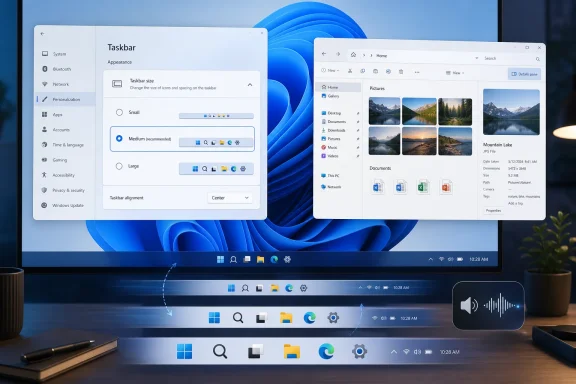
The headline change in Build 26300.8758 is a new, dedicated Taskbar Size setting. That may sound like the sort of release-note minutia only an Insider could love, but the taskbar is not a decorative strip of pixels. It is the main control surface for Windows, the thing users touch hundreds of times a day without thinking about it.
Windows 11’s original sin was not that it looked different from Windows 10. Microsoft has changed the Windows shell many times. The problem was that Windows 11 removed familiar degrees of freedom and then asked users to treat the loss as modernization. The taskbar was pinned to the bottom, the layout was simplified, context-menu behavior changed, and long-standing affordances were either missing or buried behind future promises.
Build 26300.8758 is part of a broader retreat from that philosophy. Earlier 26H2 Experimental builds brought back alternate taskbar positions and introduced smaller taskbar buttons for users who want more screen space. This latest build does not invent that smaller taskbar behavior from scratch; it makes the control easier to find and understand. That is the quiet but important distinction.
A feature hidden in a nested behavior menu is often a feature in name only. A feature surfaced with its own clear setting becomes part of the product’s mainstream vocabulary. Microsoft’s decision to promote taskbar sizing into a dedicated control is an admission that customization is not just for tweakers. It is a baseline expectation for a desktop OS that runs on everything from 11-inch tablets to multi-monitor workstations.
That is why these Insider builds have attracted attention out of proportion to their technical scope. A smaller taskbar saves a modest amount of vertical space. A movable taskbar restores a layout preference. A smoother animation between taskbar sizes improves polish. None of these changes will sell a new PC. Together, though, they signal that Microsoft is again treating the shell as a workspace rather than a brand canvas.
There is also a practical hardware story here. Windows 11 runs on ultrabooks, gaming handhelds, tablets, desktops, virtual machines, and remote desktops. A single taskbar size and position is a poor fit for that range. A compact taskbar can make sense on a small laptop display, while a vertical taskbar can make sense on an ultrawide monitor where horizontal space is abundant and vertical space is precious.
Microsoft spent much of the Windows 11 era pushing consistency. Users spent much of the same period asking for control. Build 26300.8758 suggests the company is trying to reconcile those demands by keeping the modern shell while restoring some of the configurability that made older versions of Windows feel adaptable.
But preview builds also reveal intent. The recent 26H2 Experimental sequence is unusually coherent: taskbar position, smaller taskbar buttons, Start menu personalization, search relevance improvements, quieter Widgets behavior, and shell reliability fixes all point in the same direction. Microsoft is trying to make Windows 11 feel less imposed and more adjustable.
That is not the same as returning to Windows 10. The company is not simply restoring every old behavior. Alternate taskbar positions in the new shell are still constrained by modern flyouts, animation rules, touch assumptions, and incomplete support for some scenarios. Auto-hide and tablet-optimized behavior have been described as areas still in progress or unsupported in certain alternate layouts. This is not nostalgia with a coat of paint; it is a retrofit.
The distinction will frustrate some users. The people who want the Windows 10 taskbar back exactly as it was will probably find these changes insufficient. But from a product-strategy perspective, Microsoft is more likely to keep rebuilding modern equivalents than to resurrect old code paths wholesale. The interesting question is whether those modern equivalents become good enough before users stop caring.
The File Explorer fixes are similarly unglamorous but useful. Microsoft says the build improves thumbnail preview reliability for cloud files in the Details pane, reorganizes that pane so properties are easier to review, fixes a OneDrive shortcut issue when File Explorer is run as administrator, and corrects a deletion-confirmation dialog that could show an internal Recycle Bin file name instead of the original name. None of that changes the Windows roadmap. All of it makes daily file management feel less brittle.
The dark-mode sound refinement is the strangest-sounding item, but it fits the same theme. Windows 11 has increasingly treated light and dark modes as whole-system experiences, not just color swaps. If system sounds are being adjusted to better match dark mode, Microsoft is polishing the sensory edges of the OS. Whether users notice consciously is beside the point; the best shell work often disappears into a sense that the machine is less abrasive.
The virtualization fix from the preceding build, 26300.8697, also deserves mention because it speaks to the risk profile of these flights. Microsoft had addressed bugchecks involving HYPERVISOR_ERROR and KMODE_EXCEPTION_NOT_HANDLED in scenarios involving restarts, virtual machine operations, or some gaming applications. That is a reminder that Experimental channel builds are not for production PCs, even when the changes sound like harmless UI improvements.
This matters because the Windows 11 Start menu has always been the operating system’s most obvious compromise between user intent and Microsoft intent. Users open Start to launch apps, search, and resume work. Microsoft has often treated it as a surface for recommendations, account presence, cloud integration, and ecosystem nudges. The tension is not new, but Windows 11 made it more visible.
Giving users more control over the Start layout does not eliminate that tension. It does, however, reduce the sense that the OS is fighting its owner for space. A Start menu that can be made smaller, cleaned up, or tuned to show specific sections is a Start menu that admits different people use Windows differently.
The reliability improvement in Build 26300.8697 — newly installed or removed apps showing correctly without requiring sign-out or restart — is especially telling. Customization gets attention, but reliability earns trust. If the Start menu cannot accurately reflect the apps on the machine, no amount of visual redesign matters.
For years, operating systems and apps have competed for attention in the language of helpfulness. A badge is helpful. A feed is helpful. A suggestion is helpful. A search result from the web is helpful. At some point, the cumulative effect stops being assistance and starts being environmental noise.
Windows is particularly vulnerable to that problem because it is both a consumer platform and a work tool. A user gaming on a handheld, an analyst in Excel, a developer in Visual Studio, and an administrator inside a remote session all need the shell to stay out of the way. The more Windows behaves like an engagement surface, the less it behaves like infrastructure.
The recent changes suggest Microsoft understands that the desktop’s credibility depends on restraint. A badge that matches the Windows accent color instead of screaming red is not a revolution. A Widgets experience that is quieter by default will not dominate a keynote. But these are the kinds of decisions that make an OS feel less needy.
The Experimental builds for 26H2 are delivered on top of Windows 11 version 25H2 with an enablement-package model that increments the build number. Microsoft is also using controlled feature rollout mechanisms, meaning two machines on ostensibly similar builds may not expose the same UI at the same time. That makes Insider testing more realistic from Microsoft’s perspective but more complicated for administrators trying to document behavior.
The practical consequence is that organizations should not treat every Insider screenshot as a deployment plan. A dedicated Taskbar Size setting appearing in Experimental is meaningful, but it does not define final policy exposure, management controls, or release timing. Enterprises will need to wait for clearer signals in Beta, Release Preview, policy documentation, and eventually stable cumulative updates.
Still, the direction is worth tracking now. If Microsoft continues to restore user-facing shell controls, administrators may need to revisit default desktop configurations, training material, and support assumptions. The return of familiar affordances can reduce friction, but it can also create new variability in managed environments where consistency is intentional.
Power users complained first, as they always do. But the discomfort was broader than the usual enthusiast grumbling. When a taskbar cannot be moved, resized meaningfully, or made to behave like users expect, the issue hits anyone whose workflow diverges from Microsoft’s default. That includes IT workers, developers, accessibility-sensitive users, and people with unusual monitor setups.
The company’s current course correction is therefore not a capitulation in the theatrical sense. It is product management catching up to lived reality. Windows succeeds because it can be made to fit messy environments. The more Microsoft narrows that adaptability, the more it weakens the central reason Windows remains hard to displace.
There is an irony here. The return of taskbar customization may be framed as a win for enthusiasts, but it is also a win for Microsoft’s own platform durability. The company does not need every user to love Windows 11. It needs Windows 11 to be tolerable, flexible, predictable, and familiar enough that users do not organize their workflows around avoiding it.
A better taskbar setting may matter more to many users than another AI entry point. A File Explorer dialog showing the correct deleted file name may save more confusion than a new cloud-connected assistant. A Start menu that updates reliably after app installs may improve trust more than an animated recommendation card. These are not anti-AI arguments. They are arguments for sequencing.
An operating system that gets the basics wrong has less permission to be ambitious. Microsoft’s challenge is that Windows must be both a stable workbench and a showcase for new platform bets. When those goals conflict, users tend to defend the workbench. Build 26300.8758 is evidence that Microsoft is at least spending engineering attention on the workbench again.
That balance will become more important as 26H2 takes shape. If Microsoft pairs AI integration with renewed shell flexibility, Windows 11 can feel like it is evolving without ignoring its installed base. If the company treats customization as a temporary concession while pushing more promotional surfaces into the shell, the same backlash will return.
That does not mean Windows 11 is suddenly becoming the version of Windows every critic wanted in 2021. Some limitations remain, and some restored features are not exact matches for their predecessors. The Experimental channel also carries the usual uncertainty: features can be delayed, changed, or dropped before reaching general availability.
But the direction is unmistakable. Microsoft is spending preview-build capital on the things users touch constantly. That is a healthier sign than a flashy feature drop that ignores everyday friction. Operating systems age well when they become less annoying, not merely when they become more capable.
For WindowsForum readers, the advice is simple: watch these builds, but do not chase them on machines you depend on. The 26H2 work is interesting precisely because it affects foundational shell behavior. That also makes it risky until the code moves through more stable channels.
 Microsoft Is Relearning the Value of the Boring Toggle
The headline change in Build 26300.8758 is a new, dedicated Taskbar Size setting. That may sound like the sort of release-note minutia only an Insider could love, but the taskbar is not a decorative strip of pixels. It is the main control surface for Windows, the thing users touch hundreds of times a day without thinking about it.Windows 11’s original sin was not that it looked different from Windows 10. Microsoft has changed the Windows shell many times. The problem was that Windows 11 removed familiar degrees of freedom and then asked users to treat the loss as modernization. The taskbar was pinned to the bottom, the layout was simplified, context-menu behavior changed, and long-standing affordances were either missing or buried behind future promises.
Build 26300.8758 is part of a broader retreat from that philosophy. Earlier 26H2 Experimental builds brought back alternate taskbar positions and introduced smaller taskbar buttons for users who want more screen space. This latest build does not invent that smaller taskbar behavior from scratch; it makes the control easier to find and understand. That is the quiet but important distinction.
A feature hidden in a nested behavior menu is often a feature in name only. A feature surfaced with its own clear setting becomes part of the product’s mainstream vocabulary. Microsoft’s decision to promote taskbar sizing into a dedicated control is an admission that customization is not just for tweakers. It is a baseline expectation for a desktop OS that runs on everything from 11-inch tablets to multi-monitor workstations.
The Taskbar Was Never Just a Bar
The Windows taskbar carries an unusual amount of emotional weight because it is both utility and identity. It tells users what is running, where they are, what needs attention, how to switch contexts, and whether the machine is behaving normally. When Microsoft changed it aggressively in Windows 11, it was not merely moving furniture. It was altering muscle memory.That is why these Insider builds have attracted attention out of proportion to their technical scope. A smaller taskbar saves a modest amount of vertical space. A movable taskbar restores a layout preference. A smoother animation between taskbar sizes improves polish. None of these changes will sell a new PC. Together, though, they signal that Microsoft is again treating the shell as a workspace rather than a brand canvas.
There is also a practical hardware story here. Windows 11 runs on ultrabooks, gaming handhelds, tablets, desktops, virtual machines, and remote desktops. A single taskbar size and position is a poor fit for that range. A compact taskbar can make sense on a small laptop display, while a vertical taskbar can make sense on an ultrawide monitor where horizontal space is abundant and vertical space is precious.
Microsoft spent much of the Windows 11 era pushing consistency. Users spent much of the same period asking for control. Build 26300.8758 suggests the company is trying to reconcile those demands by keeping the modern shell while restoring some of the configurability that made older versions of Windows feel adaptable.
Insider Builds Are Where Microsoft Negotiates With Its Own Past
The Experimental channel is not a promise factory. Microsoft explicitly treats these builds as a place to test concepts, stage controlled rollouts, and gather feedback before deciding what survives. Features can change, disappear, or arrive later in a very different form. That caveat matters, especially when discussing 26H2 functionality that mainstream users do not yet have.But preview builds also reveal intent. The recent 26H2 Experimental sequence is unusually coherent: taskbar position, smaller taskbar buttons, Start menu personalization, search relevance improvements, quieter Widgets behavior, and shell reliability fixes all point in the same direction. Microsoft is trying to make Windows 11 feel less imposed and more adjustable.
That is not the same as returning to Windows 10. The company is not simply restoring every old behavior. Alternate taskbar positions in the new shell are still constrained by modern flyouts, animation rules, touch assumptions, and incomplete support for some scenarios. Auto-hide and tablet-optimized behavior have been described as areas still in progress or unsupported in certain alternate layouts. This is not nostalgia with a coat of paint; it is a retrofit.
The distinction will frustrate some users. The people who want the Windows 10 taskbar back exactly as it was will probably find these changes insufficient. But from a product-strategy perspective, Microsoft is more likely to keep rebuilding modern equivalents than to resurrect old code paths wholesale. The interesting question is whether those modern equivalents become good enough before users stop caring.
The Latest Build Is More Polish Than Fireworks
Build 26300.8758 is not a landmark build in isolation. Beyond the dedicated Taskbar Size setting, Microsoft says it has refined transitions between taskbar sizes. That kind of change is easy to dismiss until it is missing. Shell animation jank, clipped system tray icons, or awkward resize behavior can make a feature feel experimental long after the code technically works.The File Explorer fixes are similarly unglamorous but useful. Microsoft says the build improves thumbnail preview reliability for cloud files in the Details pane, reorganizes that pane so properties are easier to review, fixes a OneDrive shortcut issue when File Explorer is run as administrator, and corrects a deletion-confirmation dialog that could show an internal Recycle Bin file name instead of the original name. None of that changes the Windows roadmap. All of it makes daily file management feel less brittle.
The dark-mode sound refinement is the strangest-sounding item, but it fits the same theme. Windows 11 has increasingly treated light and dark modes as whole-system experiences, not just color swaps. If system sounds are being adjusted to better match dark mode, Microsoft is polishing the sensory edges of the OS. Whether users notice consciously is beside the point; the best shell work often disappears into a sense that the machine is less abrasive.
The virtualization fix from the preceding build, 26300.8697, also deserves mention because it speaks to the risk profile of these flights. Microsoft had addressed bugchecks involving HYPERVISOR_ERROR and KMODE_EXCEPTION_NOT_HANDLED in scenarios involving restarts, virtual machine operations, or some gaming applications. That is a reminder that Experimental channel builds are not for production PCs, even when the changes sound like harmless UI improvements.
Start Menu Changes Reveal the Same Course Correction
The taskbar changes make the best headline, but the Start menu is moving along the same axis. Recent Experimental builds have introduced Start menu personalization options, including section-level controls, sizing choices, and privacy-oriented options such as hiding the user name and profile picture. Microsoft also renamed and reorganized some Start-related experiences to make the menu less prescriptive.This matters because the Windows 11 Start menu has always been the operating system’s most obvious compromise between user intent and Microsoft intent. Users open Start to launch apps, search, and resume work. Microsoft has often treated it as a surface for recommendations, account presence, cloud integration, and ecosystem nudges. The tension is not new, but Windows 11 made it more visible.
Giving users more control over the Start layout does not eliminate that tension. It does, however, reduce the sense that the OS is fighting its owner for space. A Start menu that can be made smaller, cleaned up, or tuned to show specific sections is a Start menu that admits different people use Windows differently.
The reliability improvement in Build 26300.8697 — newly installed or removed apps showing correctly without requiring sign-out or restart — is especially telling. Customization gets attention, but reliability earns trust. If the Start menu cannot accurately reflect the apps on the machine, no amount of visual redesign matters.
The Real Shift Is From “Engagement” to Restraint
One of the most interesting threads across recent Windows 11 builds is not more personalization, but less interruption. Microsoft has been testing quieter Widgets defaults, less alarming taskbar badging, and search behavior that better prioritizes local apps and files over web suggestions when those local results are stronger matches. These are subtle moves, but they challenge a decade of software design incentives.For years, operating systems and apps have competed for attention in the language of helpfulness. A badge is helpful. A feed is helpful. A suggestion is helpful. A search result from the web is helpful. At some point, the cumulative effect stops being assistance and starts being environmental noise.
Windows is particularly vulnerable to that problem because it is both a consumer platform and a work tool. A user gaming on a handheld, an analyst in Excel, a developer in Visual Studio, and an administrator inside a remote session all need the shell to stay out of the way. The more Windows behaves like an engagement surface, the less it behaves like infrastructure.
The recent changes suggest Microsoft understands that the desktop’s credibility depends on restraint. A badge that matches the Windows accent color instead of screaming red is not a revolution. A Widgets experience that is quieter by default will not dominate a keynote. But these are the kinds of decisions that make an OS feel less needy.
Administrators Should Watch the Cadence, Not Just the Features
For IT pros, the immediate temptation is to ask when these taskbar and Start menu changes will reach stable Windows 11 releases. That is the wrong first question. The better question is how Microsoft is staging shell change in the 25H2 and 26H2 era, because the answer affects testing, support scripts, user training, and help-desk expectations.The Experimental builds for 26H2 are delivered on top of Windows 11 version 25H2 with an enablement-package model that increments the build number. Microsoft is also using controlled feature rollout mechanisms, meaning two machines on ostensibly similar builds may not expose the same UI at the same time. That makes Insider testing more realistic from Microsoft’s perspective but more complicated for administrators trying to document behavior.
The practical consequence is that organizations should not treat every Insider screenshot as a deployment plan. A dedicated Taskbar Size setting appearing in Experimental is meaningful, but it does not define final policy exposure, management controls, or release timing. Enterprises will need to wait for clearer signals in Beta, Release Preview, policy documentation, and eventually stable cumulative updates.
Still, the direction is worth tracking now. If Microsoft continues to restore user-facing shell controls, administrators may need to revisit default desktop configurations, training material, and support assumptions. The return of familiar affordances can reduce friction, but it can also create new variability in managed environments where consistency is intentional.
The Windows 11 Backlash Finally Became Product Input
The most charitable reading of Windows 11’s early shell decisions is that Microsoft wanted to simplify the desktop for a new generation of hardware and users. The less charitable reading is that the company confused visual cleanliness with usability. Either way, the feedback loop has been long and noisy enough that Microsoft can no longer pretend the missing controls were edge cases.Power users complained first, as they always do. But the discomfort was broader than the usual enthusiast grumbling. When a taskbar cannot be moved, resized meaningfully, or made to behave like users expect, the issue hits anyone whose workflow diverges from Microsoft’s default. That includes IT workers, developers, accessibility-sensitive users, and people with unusual monitor setups.
The company’s current course correction is therefore not a capitulation in the theatrical sense. It is product management catching up to lived reality. Windows succeeds because it can be made to fit messy environments. The more Microsoft narrows that adaptability, the more it weakens the central reason Windows remains hard to displace.
There is an irony here. The return of taskbar customization may be framed as a win for enthusiasts, but it is also a win for Microsoft’s own platform durability. The company does not need every user to love Windows 11. It needs Windows 11 to be tolerable, flexible, predictable, and familiar enough that users do not organize their workflows around avoiding it.
AI Is Not the Only Windows Story Worth Following
Microsoft’s public Windows narrative over the last few years has leaned heavily on AI PCs, Copilot, neural processing units, Recall, and other forward-looking features. Those may matter, especially as hardware refresh cycles and enterprise procurement eventually catch up. But the recent Insider builds are a useful reminder that the Windows experience is still won or lost in mundane places.A better taskbar setting may matter more to many users than another AI entry point. A File Explorer dialog showing the correct deleted file name may save more confusion than a new cloud-connected assistant. A Start menu that updates reliably after app installs may improve trust more than an animated recommendation card. These are not anti-AI arguments. They are arguments for sequencing.
An operating system that gets the basics wrong has less permission to be ambitious. Microsoft’s challenge is that Windows must be both a stable workbench and a showcase for new platform bets. When those goals conflict, users tend to defend the workbench. Build 26300.8758 is evidence that Microsoft is at least spending engineering attention on the workbench again.
That balance will become more important as 26H2 takes shape. If Microsoft pairs AI integration with renewed shell flexibility, Windows 11 can feel like it is evolving without ignoring its installed base. If the company treats customization as a temporary concession while pushing more promotional surfaces into the shell, the same backlash will return.
The 26H2 Preview Track Is Becoming a Repair Manual
Seen one by one, the recent builds are incremental. Seen together, they read like a repair manual for Windows 11’s most persistent complaints. The taskbar is becoming more flexible. The Start menu is becoming more personal. Search is being tuned toward relevance. Widgets are being quieted. File Explorer is receiving reliability work. Even system sounds are being refined.That does not mean Windows 11 is suddenly becoming the version of Windows every critic wanted in 2021. Some limitations remain, and some restored features are not exact matches for their predecessors. The Experimental channel also carries the usual uncertainty: features can be delayed, changed, or dropped before reaching general availability.
But the direction is unmistakable. Microsoft is spending preview-build capital on the things users touch constantly. That is a healthier sign than a flashy feature drop that ignores everyday friction. Operating systems age well when they become less annoying, not merely when they become more capable.
For WindowsForum readers, the advice is simple: watch these builds, but do not chase them on machines you depend on. The 26H2 work is interesting precisely because it affects foundational shell behavior. That also makes it risky until the code moves through more stable channels.
The Small Setting That Says the Quiet Part Out Loud
The most concrete lessons from Build 26300.8758 are not hard to find, but they are easy to underestimate. Microsoft is changing the Windows 11 shell in ways that acknowledge user choice as a product requirement, not a nostalgic indulgence.- Build 26300.8758 adds a dedicated Taskbar Size setting for Windows 11 Insiders in the Experimental channel testing 26H2-era features.
- The taskbar work builds on earlier preview changes that introduced alternate taskbar positions and smaller taskbar buttons.
- File Explorer receives practical reliability fixes around cloud thumbnails, the Details pane, OneDrive shortcuts, and deletion confirmation text.
- The changes are still preview-only, controlled by Insider rollout mechanisms, and should not be treated as guaranteed stable-release behavior.
- The broader pattern across recent builds suggests Microsoft is trying to make Windows 11 quieter, more customizable, and less hostile to established workflows.
References
- Primary source: HotHardware
Published: Sun, 28 Jun 2026 16:31:00 GMT
Loading…
hothardware.com - Related coverage: windowscentral.com
Windows 11 is finally rethinking the Start menu and Taskbar, and it might win back people who gave up on it | Windows Central
Microsoft rebalances Windows 11, adding more flexibility to the Taskbar and Start menu.www.windowscentral.com - Related coverage: windowslatest.com
I tested Windows 11 June 2026 Updates: Here's everything new, improved, and fixed
Windows 11 June 2026 Patch Tuesday update brings Low Latency Profile, Shared Audio, Multi-App Camera, NPU tracking, and Secure Boot updates. www.windowslatest.com
- Official source: learn.microsoft.com
Windows 11 Insider Beta Preview Build 26220.8680 - Windows Insider Program | Microsoft Learn
Release notes for Windows 11 Insider Beta Preview Build 26220.8680learn.microsoft.com - Related coverage: alternativeto.net
More than 5 years after launch, Windows 11 is finally bringing back the movable Taskbar | AlternativeTo
Windows 11 is finally bringing back the movable Taskbar years after launch, allowing users to move it to any screen edge. There are also new updates to the Start menu design and Search improvementsalternativeto.net