

Thermal cameras, once associated with military gear and industrial maintenance, are now available as standalone tools, phone dongles, and rugged smartphones, giving home users and IT-adjacent tinkerers an affordable way to detect heat loss, electrical faults, leaks, pests, and failing electronics before visible damage appears. The important shift is not merely price. It is that infrared imaging has moved from specialist inspection work into the same practical category as a multimeter, laser level, or cable tester. For WindowsForum readers, the lesson is blunt: some of the most expensive problems in a home, workshop, server closet, or electronics bench announce themselves first as temperature anomalies.
The consumer pitch for thermal cameras often sounds like gadget theater. Point a camera at the wall and suddenly invisible colors bloom across the screen: hot pipes, cold drafts, warm pets, overloaded chargers, and a ghostly handprint left behind on a table. It is easy to treat that as a party trick.
But the practical value lies in timing. A failing connection, a damp patch, or a poorly insulated corner is much cheaper to deal with when it is only a temperature difference. Once it becomes a scorched outlet, mold bloom, blown board, or ruined ceiling, the tool you wish you had bought for a few hundred dollars starts to look cheap.
Adrian Kingsley-Hughes’ ZDNET piece makes the case from the kind of experience that matters: repeated use, not a lab demo. His examples are mundane in the best possible way. A thermal camera helped trace a faulty water-heater connection after a previous round of paid diagnosis and replacement parts reportedly failed to fix the real issue.
That is the point. Thermal imaging does not replace expertise, and it certainly does not make electrical work safe for the untrained. But it can collapse the search space. Instead of guessing where the problem might be, you can often see where the system is behaving differently from everything around it.
Standalone units are the most tool-like. They are made to be grabbed, powered on, aimed, and used without waiting for a phone app to behave. For tradespeople, facilities staff, and serious home repair types, that matters because the tool is not borrowing a phone battery, a port, or an operating system update cycle.
Phone dongles are the compromise that makes the category interesting for everyone else. They are small, relatively easy to carry, and useful for people who already document everything from their phone. Their weakness is also their strength: because they depend on a smartphone, they inherit the fragility, compatibility quirks, and app dependency of the phone ecosystem.
Then there are rugged Android phones with thermal cameras built in. This is the most cyberpunk version of the idea, and also the most niche. It makes sense for someone who already wants a bulky field phone, but it is unlikely to tempt anyone attached to an iPhone or a mainstream flagship Android device.
That variety is why thermal imaging has escaped the contractor-only aisle. A buyer no longer has to decide between a professional-grade instrument and nothing. The entry point can be a relatively inexpensive module, while higher-end users still have reasons to pay for better resolution, ruggedness, accuracy, and ergonomics.
In building work, the clue might be heat escaping around a window, a cold patch where insulation is missing, or moisture cooling part of a ceiling after rain. In electrical work, it might be a breaker, switch, cable bend, or terminal running warmer than comparable parts under similar load. In electronics repair, it might be a component that heats faster than the rest of the board.
The trick is comparison. A warm device is not necessarily a bad device. A warm charger, cable, transformer, voltage regulator, or CPU heatsink may be doing exactly what it was designed to do. The meaningful signal is often asymmetry: one terminal hotter than its neighbor, one breaker hotter than others carrying similar loads, or one chip cooking itself while the rest of the board stays quiet.
That is why Kingsley-Hughes’ advice to point the camera at everything is more serious than it sounds. Familiarity builds a baseline. Once you know what normal looks like, abnormal stops hiding in plain sight.
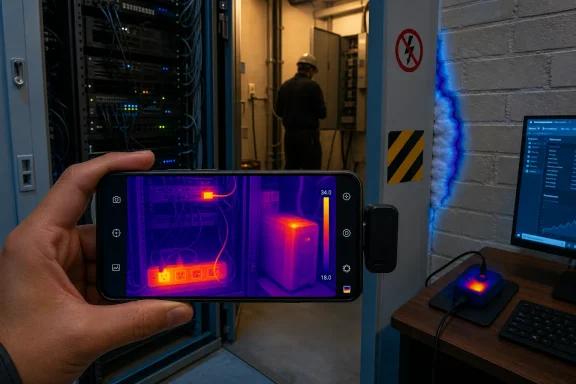
Thermal cameras are at their best when they make caution easier. They can tell you that a wall switch, extension lead, UPS, power strip, laptop charger, or server closet deserves attention before the smell of hot plastic joins the conversation. They can also help you decide when a problem is outside the DIY lane and needs a qualified electrician, plumber, or building inspector.
For IT pros, that framing should feel familiar. A thermal image is like an event log, SMART warning, or performance graph. It is a signal source, not a verdict. You still need context, judgment, and sometimes a professional with the right test equipment.
The safety angle is especially important because consumer-grade tools can make serious problems feel approachable. A $150 camera can reveal a hot electrical connection, but it does not make the repair harmless. The value is in spotting the anomaly early, documenting it, and escalating intelligently.
A thermal camera will not replace onboard temperature sensors, fan curves, or telemetry from tools like HWiNFO. It can, however, show what software cannot: the hot brick behind the desk, the power strip buried under carpet, the NAS enclosure with a blocked intake, the mini PC cooking in a cabinet, or the laptop charger that runs hotter than its twin.
In small offices and home labs, the most interesting thermal problems are often environmental. A rack may be fine in winter and marginal in summer. A closet may look tidy and perform terribly because warm exhaust air has nowhere to go. A UPS may be sitting in the worst possible thermal location, aging its batteries faster than anyone realizes.
Thermal imaging is also useful at the bench. A shorted component on a circuit board often reveals itself by heating rapidly. A failing voltage regulator may stand out. A cable, connector, or solder joint under load may show the kind of localized heat that explains intermittent behavior.
This is where the tool becomes less of a home-inspection novelty and more of an IT maintenance instrument. The same visual instinct that helps someone spot a missing patch of insulation can help a technician notice that one PoE injector, wall wart, docking station, or USB-C hub is behaving differently from the rest.
For many household and electronics tasks, relative temperature is more important than laboratory accuracy. You do not always need to know whether a component is exactly 83.4°C. You may only need to know that one component is far hotter than the identical one beside it, or that one corner of a room is dramatically colder than the rest.
Resolution matters more than newcomers expect. A low-resolution camera can miss small hot spots or smear them across neighboring pixels. This is especially relevant when inspecting circuit boards, connectors, or tightly packed electrical hardware. A camera that is fine for finding a cold window frame may be frustrating when hunting for a tiny failing component.
Refresh rate matters too. Some thermal cameras feel laggy, which is tolerable for walls and pipes but irritating when scanning electronics or moving around a cramped utility space. The better the workflow, the more likely the tool gets used when it matters.
The right buying question is therefore not “Which thermal camera is best?” It is “What kind of anomaly do I need to see?” A homeowner chasing drafts, a PC hobbyist checking power adapters, and a facilities technician inspecting panels are not really shopping for the same instrument.
This is the concept of emissivity, a word that sounds more academic than it feels in practice. Some surfaces emit thermal radiation in a way that is easy for a camera to interpret. Others behave more like mirrors in the infrared spectrum, which means the camera may be showing you a reflection of a nearby warm object rather than the true temperature of the target.
That matters in electrical work, where shiny terminals, bare copper, and metal enclosures are common. It also matters around windows, appliances, plumbing, and electronics. A thermal camera can make a reflection look like a hot spot, or make a genuinely hot low-emissivity surface appear less alarming than it is.
Experienced users work around this with technique. They compare similar materials, change viewing angles, understand the limitations of glass and reflective metal, and sometimes use high-emissivity reference materials where appropriate and safe. Casual users should at least remember the basic rule: the camera is excellent at showing patterns, but not every color patch is a literal temperature truth.
This is another reason practice matters. When you scan your own house, desk, workshop, and PC gear repeatedly, you start to understand which surfaces lie and which surfaces tell a useful story.
Moisture behind a wall does not politely announce itself at the start. Insulation gaps do not send notifications. Loose electrical connections may spend a long time being merely warmer than they should be before they become dangerous. A failing component on a board may be obvious in infrared before it fails catastrophically.
That makes thermal imaging a rare consumer technology that is both fun and financially rational. It gives the user an earlier warning layer. Even if it only prevents one needless service call, one avoidable repair, or one destroyed device, the economics can become very favorable.
There is also a documentation benefit. A thermal image can make a problem easier to explain to a landlord, contractor, electrician, facilities manager, or warranty department. “This outlet feels warm” is vague. A thermal image showing one device or connection running unusually hot compared with its surroundings is harder to wave away.
The camera still does not prove everything. It does not identify every hidden leak, certify an electrical system, or replace destructive inspection where needed. But it changes the conversation from suspicion to evidence.
That habit is especially useful for PCs and home infrastructure. A power adapter that is warm after hours of use may be normal. A power adapter that is dramatically hotter than an identical unit doing the same job is more interesting. A network switch that runs warm may be expected. A switch with one corner much hotter near its power input deserves closer attention.
The same principle applies around the house. A cold window edge in winter may be normal; one window that looks much worse than the others may indicate a failed seal or insulation problem. A damp patch after rain is more meaningful if you know the area was dry before. A breaker panel image is more useful when compared against similar circuits under similar loads.
Thermal imaging rewards curiosity, but it punishes overconfidence. The user who slowly builds a visual library of normal conditions will get more from a modest camera than the user who buys a premium unit and treats every bright color as an emergency.
Standalone cameras win on immediacy. They are less fiddly, often tougher, and better suited to repeated inspection work. If you expect to use thermal imaging around job sites, panels, mechanical equipment, or frequent maintenance tasks, the dedicated device has a strong argument.
Phone dongles win on convenience and documentation. They are easy to carry and make sharing images simple. The downside is that they depend on app quality, connector compatibility, and the practical annoyance of attaching hardware to a phone at the moment you need it.
Rugged thermal phones are the lifestyle choice. They make sense when the phone itself is part of the work environment. For mainstream users, though, the compromises are obvious: bulk, limited flagship appeal, and the absence of built-in thermal imaging from the iPhone and most premium Android handsets.
The market’s good news is that no single form factor has to win. The category now has enough maturity that users can match the device to the job rather than pretending everyone needs an inspector-grade unit.
 The New Superpower Is Not Seeing Heat, but Seeing Risk Earlier
The consumer pitch for thermal cameras often sounds like gadget theater. Point a camera at the wall and suddenly invisible colors bloom across the screen: hot pipes, cold drafts, warm pets, overloaded chargers, and a ghostly handprint left behind on a table. It is easy to treat that as a party trick.But the practical value lies in timing. A failing connection, a damp patch, or a poorly insulated corner is much cheaper to deal with when it is only a temperature difference. Once it becomes a scorched outlet, mold bloom, blown board, or ruined ceiling, the tool you wish you had bought for a few hundred dollars starts to look cheap.
Adrian Kingsley-Hughes’ ZDNET piece makes the case from the kind of experience that matters: repeated use, not a lab demo. His examples are mundane in the best possible way. A thermal camera helped trace a faulty water-heater connection after a previous round of paid diagnosis and replacement parts reportedly failed to fix the real issue.
That is the point. Thermal imaging does not replace expertise, and it certainly does not make electrical work safe for the untrained. But it can collapse the search space. Instead of guessing where the problem might be, you can often see where the system is behaving differently from everything around it.
A Tool That Used to Belong to Inspectors Now Belongs in the Drawer
The biggest change in thermal cameras is not that the physics became new. It is that the form factor stopped being exotic. The category now splits into three practical lanes: standalone thermal imagers, smartphone-attached modules, and rugged phones with built-in thermal sensors.Standalone units are the most tool-like. They are made to be grabbed, powered on, aimed, and used without waiting for a phone app to behave. For tradespeople, facilities staff, and serious home repair types, that matters because the tool is not borrowing a phone battery, a port, or an operating system update cycle.
Phone dongles are the compromise that makes the category interesting for everyone else. They are small, relatively easy to carry, and useful for people who already document everything from their phone. Their weakness is also their strength: because they depend on a smartphone, they inherit the fragility, compatibility quirks, and app dependency of the phone ecosystem.
Then there are rugged Android phones with thermal cameras built in. This is the most cyberpunk version of the idea, and also the most niche. It makes sense for someone who already wants a bulky field phone, but it is unlikely to tempt anyone attached to an iPhone or a mainstream flagship Android device.
That variety is why thermal imaging has escaped the contractor-only aisle. A buyer no longer has to decide between a professional-grade instrument and nothing. The entry point can be a relatively inexpensive module, while higher-end users still have reasons to pay for better resolution, ruggedness, accuracy, and ergonomics.
The Camera Does Not Diagnose the Problem; It Reveals Where to Look
A thermal camera is best understood as a pattern detector. It shows surface temperature differences, not root causes. That distinction matters because a colorful image can seduce people into thinking they are seeing the truth, when they are really seeing a clue.In building work, the clue might be heat escaping around a window, a cold patch where insulation is missing, or moisture cooling part of a ceiling after rain. In electrical work, it might be a breaker, switch, cable bend, or terminal running warmer than comparable parts under similar load. In electronics repair, it might be a component that heats faster than the rest of the board.
The trick is comparison. A warm device is not necessarily a bad device. A warm charger, cable, transformer, voltage regulator, or CPU heatsink may be doing exactly what it was designed to do. The meaningful signal is often asymmetry: one terminal hotter than its neighbor, one breaker hotter than others carrying similar loads, or one chip cooking itself while the rest of the board stays quiet.
That is why Kingsley-Hughes’ advice to point the camera at everything is more serious than it sounds. Familiarity builds a baseline. Once you know what normal looks like, abnormal stops hiding in plain sight.
Heat Is a Symptom, Not a Permission Slip
There is a danger in any democratized diagnostic tool: people mistake detection for authorization. Seeing a hot switch box does not mean you should open it without isolating power. Seeing a suspicious breaker does not mean you should poke around inside a live panel. Seeing a hot battery pack does not mean you should keep charging it “just to check.”Thermal cameras are at their best when they make caution easier. They can tell you that a wall switch, extension lead, UPS, power strip, laptop charger, or server closet deserves attention before the smell of hot plastic joins the conversation. They can also help you decide when a problem is outside the DIY lane and needs a qualified electrician, plumber, or building inspector.
For IT pros, that framing should feel familiar. A thermal image is like an event log, SMART warning, or performance graph. It is a signal source, not a verdict. You still need context, judgment, and sometimes a professional with the right test equipment.
The safety angle is especially important because consumer-grade tools can make serious problems feel approachable. A $150 camera can reveal a hot electrical connection, but it does not make the repair harmless. The value is in spotting the anomaly early, documenting it, and escalating intelligently.
The WindowsForum Angle Is Power, Batteries, and Small Rooms Full of Heat
For a community full of PC builders, home-lab operators, and sysadmins, thermal cameras have an obvious second life beyond home maintenance. Computers are machines for turning electrical power into heat, and a surprising number of reliability problems are thermal problems wearing different clothes.A thermal camera will not replace onboard temperature sensors, fan curves, or telemetry from tools like HWiNFO. It can, however, show what software cannot: the hot brick behind the desk, the power strip buried under carpet, the NAS enclosure with a blocked intake, the mini PC cooking in a cabinet, or the laptop charger that runs hotter than its twin.
In small offices and home labs, the most interesting thermal problems are often environmental. A rack may be fine in winter and marginal in summer. A closet may look tidy and perform terribly because warm exhaust air has nowhere to go. A UPS may be sitting in the worst possible thermal location, aging its batteries faster than anyone realizes.
Thermal imaging is also useful at the bench. A shorted component on a circuit board often reveals itself by heating rapidly. A failing voltage regulator may stand out. A cable, connector, or solder joint under load may show the kind of localized heat that explains intermittent behavior.
This is where the tool becomes less of a home-inspection novelty and more of an IT maintenance instrument. The same visual instinct that helps someone spot a missing patch of insulation can help a technician notice that one PoE injector, wall wart, docking station, or USB-C hub is behaving differently from the rest.
Cheap Cameras Are Good Enough Until They Aren’t
The arrival of inexpensive thermal cameras is the reason this discussion matters, but price cuts come with tradeoffs. Lower-cost devices usually have lower sensor resolution, slower refresh rates, narrower calibration options, and less confidence at the edges of their measurement range. That does not make them useless; it defines what they are good for.For many household and electronics tasks, relative temperature is more important than laboratory accuracy. You do not always need to know whether a component is exactly 83.4°C. You may only need to know that one component is far hotter than the identical one beside it, or that one corner of a room is dramatically colder than the rest.
Resolution matters more than newcomers expect. A low-resolution camera can miss small hot spots or smear them across neighboring pixels. This is especially relevant when inspecting circuit boards, connectors, or tightly packed electrical hardware. A camera that is fine for finding a cold window frame may be frustrating when hunting for a tiny failing component.
Refresh rate matters too. Some thermal cameras feel laggy, which is tolerable for walls and pipes but irritating when scanning electronics or moving around a cramped utility space. The better the workflow, the more likely the tool gets used when it matters.
The right buying question is therefore not “Which thermal camera is best?” It is “What kind of anomaly do I need to see?” A homeowner chasing drafts, a PC hobbyist checking power adapters, and a facilities technician inspecting panels are not really shopping for the same instrument.
The Most Misleading Surface in the Room May Be the Shiniest One
Thermal cameras read infrared radiation, and the image they show depends heavily on the surface being observed. That is where many casual users get fooled. Shiny metal, glass, polished surfaces, and reflective materials can report misleading temperatures because they reflect infrared energy from their surroundings.This is the concept of emissivity, a word that sounds more academic than it feels in practice. Some surfaces emit thermal radiation in a way that is easy for a camera to interpret. Others behave more like mirrors in the infrared spectrum, which means the camera may be showing you a reflection of a nearby warm object rather than the true temperature of the target.
That matters in electrical work, where shiny terminals, bare copper, and metal enclosures are common. It also matters around windows, appliances, plumbing, and electronics. A thermal camera can make a reflection look like a hot spot, or make a genuinely hot low-emissivity surface appear less alarming than it is.
Experienced users work around this with technique. They compare similar materials, change viewing angles, understand the limitations of glass and reflective metal, and sometimes use high-emissivity reference materials where appropriate and safe. Casual users should at least remember the basic rule: the camera is excellent at showing patterns, but not every color patch is a literal temperature truth.
This is another reason practice matters. When you scan your own house, desk, workshop, and PC gear repeatedly, you start to understand which surfaces lie and which surfaces tell a useful story.
The Real Competition Is Not Another Camera, but Waiting Too Long
The strongest argument for owning a thermal camera is not gadget enthusiasm. It is cost avoidance. The problems thermal cameras are good at spotting tend to become expensive when ignored.Moisture behind a wall does not politely announce itself at the start. Insulation gaps do not send notifications. Loose electrical connections may spend a long time being merely warmer than they should be before they become dangerous. A failing component on a board may be obvious in infrared before it fails catastrophically.
That makes thermal imaging a rare consumer technology that is both fun and financially rational. It gives the user an earlier warning layer. Even if it only prevents one needless service call, one avoidable repair, or one destroyed device, the economics can become very favorable.
There is also a documentation benefit. A thermal image can make a problem easier to explain to a landlord, contractor, electrician, facilities manager, or warranty department. “This outlet feels warm” is vague. A thermal image showing one device or connection running unusually hot compared with its surroundings is harder to wave away.
The camera still does not prove everything. It does not identify every hidden leak, certify an electrical system, or replace destructive inspection where needed. But it changes the conversation from suspicion to evidence.
A Small Amount of Training Beats a Bigger Sensor
The best early upgrade for a new thermal-camera owner is not necessarily a more expensive camera. It is disciplined use. Scan known-good objects. Compare similar loads. Check equipment when it is idle, then again under load. Take images over time, not just once.That habit is especially useful for PCs and home infrastructure. A power adapter that is warm after hours of use may be normal. A power adapter that is dramatically hotter than an identical unit doing the same job is more interesting. A network switch that runs warm may be expected. A switch with one corner much hotter near its power input deserves closer attention.
The same principle applies around the house. A cold window edge in winter may be normal; one window that looks much worse than the others may indicate a failed seal or insulation problem. A damp patch after rain is more meaningful if you know the area was dry before. A breaker panel image is more useful when compared against similar circuits under similar loads.
Thermal imaging rewards curiosity, but it punishes overconfidence. The user who slowly builds a visual library of normal conditions will get more from a modest camera than the user who buys a premium unit and treats every bright color as an emergency.
The Practical Buyer’s Choice Is About Friction
The best thermal camera is the one you will actually use. That sounds like consumer-review boilerplate, but with this category it is decisive. A standalone tool buried in a toolbox may be optically superior and still less useful than a phone dongle that lives in a laptop bag.Standalone cameras win on immediacy. They are less fiddly, often tougher, and better suited to repeated inspection work. If you expect to use thermal imaging around job sites, panels, mechanical equipment, or frequent maintenance tasks, the dedicated device has a strong argument.
Phone dongles win on convenience and documentation. They are easy to carry and make sharing images simple. The downside is that they depend on app quality, connector compatibility, and the practical annoyance of attaching hardware to a phone at the moment you need it.
Rugged thermal phones are the lifestyle choice. They make sense when the phone itself is part of the work environment. For mainstream users, though, the compromises are obvious: bulk, limited flagship appeal, and the absence of built-in thermal imaging from the iPhone and most premium Android handsets.
The market’s good news is that no single form factor has to win. The category now has enough maturity that users can match the device to the job rather than pretending everyone needs an inspector-grade unit.
The Colors Are Pretty, but the Boring Findings Pay the Bills
The most concrete lesson from years of consumer thermal-camera testing is that the boring discoveries are the valuable ones. The tool earns its keep not by producing cinematic Predator vision, but by pointing at a mundane fault before it becomes an invoice.- Thermal cameras are now affordable enough that homeowners, PC builders, and small-office admins can justify owning one for occasional diagnostics.
- Standalone units are best for frequent inspection work, while phone dongles are often the most practical entry point for casual users.
- The most useful readings are usually comparative, because one abnormal hot or cold spot among similar objects is more meaningful than a single dramatic color.
- Reflective surfaces, shiny metals, glass, and poor viewing angles can mislead the camera, so thermal images should be treated as evidence rather than proof.
- Electrical anomalies deserve caution, because seeing a hot connection does not make working on it safe.
- The tool becomes more valuable with practice, since knowing what normal looks like is what makes abnormal stand out.
References
- Primary source: ZDNET
Published: 2026-06-28T12:52:09.443546
Loading…
www.zdnet.com - Related coverage: fluke.com
Loading…
www.fluke.com - Related coverage: inspectandtest.net
Loading…
inspectandtest.net - Related coverage: nachi.org
Loading…
www.nachi.org - Related coverage: flir.com
Loading…
www.flir.com - Related coverage: blog.isa.org
Loading…
blog.isa.org