

Enterprises still running Microsoft Application Virtualization Hosting 5.0 for Windows Desktops should treat Microsoft’s current lifecycle date of April 14, 2026, as the support cliff, retire AVH/App-V wherever possible, and move modern desktop-delivery candidates toward Azure Virtual Desktop with MSIX app attach. The practical decision is not “What replaces App-V?” in the abstract. It is which applications can be remediated into a modern delivery model quickly, and which ones must be isolated, documented, and carried for a short, uncomfortable grace period.
The mistake many organizations will make is to treat the end of AVH 5.0 support as a packaging-team ticket. That understates the risk. App-V and AVH sit at the intersection of application compatibility, desktop strategy, security operations, image management, user experience, and procurement history.
Microsoft’s own direction is no longer subtle. The App-V 5 documentation points customers toward Azure Virtual Desktop with MSIX app attach, which makes the intended landing zone clear enough even if the migration path is messy. Microsoft is not asking enterprises to find a like-for-like replacement for every App-V deployment; it is nudging them toward a different desktop-delivery model.
That matters because App-V estates are rarely clean. They tend to contain the apps nobody wanted to touch: line-of-business clients with brittle dependencies, old middleware, plug-ins chained to specific Office or browser behavior, and departmental tools whose original owners have moved on. The technology may be reaching its end of support, but the business processes behind those packages are often very much alive.
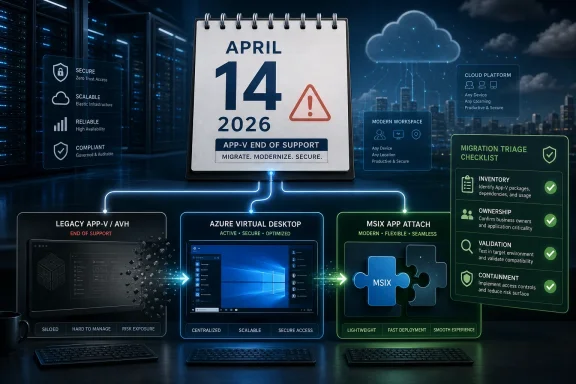
So the enterprise decision should begin with triage. Keep legacy App-V or AVH alive only where there is a documented business dependency and a defined exit date. Move applications to Azure Virtual Desktop plus MSIX app attach where the goal is modern, centrally managed desktop delivery rather than simply preserving yesterday’s packaging model.
That discrepancy should not be waved away as trivia. In lifecycle planning, a three-month misunderstanding is the difference between a controlled migration and a fire drill. If your internal roadmap says July 14, 2026, the first corrective action is to validate the date against Microsoft’s current lifecycle entry and update your risk register to April 14, 2026 unless your licensing or account team provides a specific written exception.
The lifecycle consequence is stark. Once support ends, Microsoft says there are no new security updates, non-security updates, or assisted support options. That does not mean every App-V package stops launching the next morning, but it does mean the platform becomes a formally unsupported dependency in your desktop estate.
That is the distinction executives need to hear. This is not an outage date. It is the date after which any continued use becomes a risk acceptance decision rather than a supported operating model.
For migration planning, the distinction matters less than the dependency chain. If your desktop environment relies on App-V packages, AVH components, MDOP-era tooling, or related operational processes, you need to evaluate the whole service, not just the client installed on a machine. The weakest unsupported link becomes the audit finding.
That is why a narrow “replace AVH” project can fail. An organization may remove one component while leaving behind sequencing assumptions, publishing methods, support scripts, undocumented package owners, and help-desk runbooks that still depend on the old App-V world. The platform may be a Microsoft lifecycle item, but the migration is an enterprise architecture cleanup.
A better framing is to classify each app by its future state. Some applications should become standard installed apps in a managed image or Intune-style deployment. Some belong in Azure Virtual Desktop with MSIX app attach. Some should be replaced by SaaS or a newer vendor-supported client. A small residue may need temporary containment because the cost or risk of immediate remediation is too high.
The census should capture more than package names. Admins need to know who uses the application, what business process it supports, whether the vendor still supports it, whether source media or installation documentation exists, whether the app requires drivers or services, and whether it stores user or machine state in unusual places. These are the details that determine whether MSIX app attach is a sensible target or a detour.
A useful classification model is simple. Applications that can be repackaged and validated quickly should move first. Applications with known incompatibilities should enter remediation. Applications tied to obsolete dependencies should be isolated and scheduled for replacement. Applications that nobody can justify should be retired.
This is where enterprises should resist perfectionism. The goal is not to solve twenty years of application debt in one heroic migration. The goal is to expose the debt early enough that the organization can decide what to pay down, what to contain, and what to stop carrying.
But “strategic path” is not the same thing as “drop-in replacement.” MSIX packaging has different assumptions from App-V. Some legacy applications that behaved acceptably inside App-V may need work before they behave well as MSIX packages or in an app attach scenario. The hard cases are usually not the clean desktop utilities; they are the apps with services, drivers, shell extensions, plug-ins, licensing hooks, odd registry behavior, or deep dependencies on old runtime components.
That is why the right question is not “Can MSIX app attach replace App-V?” The better question is “Which applications in our estate can be moved to this model without turning every logon into a support incident?” The answer will vary by estate, and it will not emerge from a lifecycle notice.
For WindowsForum readers already following the broader Windows 10 and Windows 11 transition, this App-V deadline fits the same pattern. Virtualization can buy time during a desktop migration, as discussed in WindowsForum’s related coverage of bridging Windows 10 end of support with enterprise virtualization and virtual Windows 11 desktops. But buying time is not the same as avoiding the decision.
In the first ring, choose applications with clear owners, predictable behavior, and low support blast radius. The objective is to prove the packaging workflow, storage design, assignment model, user experience, and rollback process. A successful first ring should produce templates and runbooks, not just a few migrated apps.
The second ring should involve applications that matter more to daily work but are still technically manageable. Here the focus shifts to performance, logon behavior, profile interaction, update cadence, and help-desk readiness. If users experience the migration as slower logons or missing shortcuts, the project will lose credibility quickly.
The final ring is where the real enterprise history lives. These are the applications that depend on old components, vendor abandonment, departmental exceptions, or business workflows nobody has fully documented. They need deeper remediation, replacement planning, or temporary containment with a named executive owner.
Containment might mean keeping a limited legacy environment available to a small user population while replacement work proceeds. It might mean isolating access through virtual desktops rather than allowing unsupported components to sprawl across physical endpoints. It might mean freezing changes except for emergency business continuity actions.
What containment must not mean is “we forgot about it.” After support ends, unsupported AVH/App-V dependencies should be visible in risk reporting. They should have business owners, not just technical custodians. They should have target exit dates and a clear statement of what Microsoft support will no longer provide.
This is where security teams and desktop teams often talk past each other. Security wants unsupported software gone. Desktop engineering wants business continuity. The decision framework bridges that gap by making each exception explicit, time-bound, and tied to a real business process.
If an enterprise is already evaluating Azure Virtual Desktop to bridge Windows 10-to-Windows 11 transition issues, application delivery should be part of the same design conversation. AVD without application rationalization can simply recreate old desktop complexity in a newer hosting model. Conversely, application rationalization without a desktop strategy can strand teams in a packaging project that does not solve user access.
WindowsForum has already covered the pressure around Microsoft 365 support on Windows 10 and the use of virtual Windows 11 desktops as a migration bridge. AVH and App-V belong in that same calendar-driven risk cluster. Each deadline narrows the space for “we’ll deal with it later.”
The organizations that handle this well will combine three workstreams: endpoint modernization, virtual desktop architecture, and application remediation. The organizations that handle it poorly will treat each deadline as a separate ticket and discover too late that the same legacy app blocks all three.
For every candidate application, the validation plan should include launch behavior, file associations, printing, plug-ins, authentication, profile persistence, update behavior, and interaction with other applications. If the app is used only once a month for a finance close, the test must include that scenario. If it talks to a local scanner, add the scanner. If it exports to Excel, test the export.
This is especially important when moving from App-V assumptions to MSIX app attach or another modern delivery method. The packaging layer is only one part of the user experience. Profiles, storage, identity, session-host configuration, certificates, permissions, and application dependencies all shape the outcome.
The best test group is not the most technical one. It is the group that knows the business process well enough to notice subtle breakage. A power user who can say “the app opened, but the reconciliation step failed” is more valuable than a technician who only confirms the executable launched.
Next comes ownership. Every package needs an application owner, a technical owner, and a business disposition. If the owner cannot explain why the application still exists, retirement should be on the table. If the owner says the application is critical, they must help fund and validate the migration path.
Then comes target-state mapping. Apps that fit modern packaging and virtual delivery should move toward Azure Virtual Desktop with MSIX app attach where that aligns with the desktop strategy. Apps better served by normal installation should be moved into standard endpoint or image management. Apps that are obsolete should be replaced or retired. Apps that cannot move yet should be contained.
Finally comes evidence. Auditors, risk committees, and support teams need proof that the enterprise understood the support cliff and acted deliberately. Keep records of package disposition, test outcomes, known issues, business approvals, and retirement dates. Unsupported technology is much easier to defend when it is bounded and actively managed.
That is why generic deprecation coverage is not enough. It is useful to know that Microsoft Application Virtualization 5.0, Application Virtualization Hosting 5.0 for Windows Desktops, and Application Virtualization Hosting 5.1 for Windows Desktops share the same 2026 support horizon. It is more useful to know what decision you are going to make on Monday morning.
The decision should be biased toward modernization. If the business goal is modern desktop delivery, Azure Virtual Desktop plus MSIX app attach is the strategic Microsoft-aligned path. If the business goal is merely to keep a fragile legacy application alive, admit that and contain it rather than pretending it is part of the future platform.
This distinction protects budgets as well as systems. Modernization projects fail when every exception is granted equal status. A dying legacy dependency should not receive the same architectural investment as a widely used application that can be moved to a supported delivery model.
The riskiest organizations are not the ones with the largest App-V estates. They are the ones that do not know how large the estate is. Unknown packages, orphaned owners, and undocumented workflows turn a support deadline into an archaeological dig.
There is also a sequencing problem. If you are simultaneously changing desktop operating systems, moving users into AVD, adjusting Microsoft 365 support posture, and modernizing application packaging, every delay compounds. A blocked application can delay a Windows migration; a delayed Windows migration can keep old app-delivery assumptions alive; an unsupported app-delivery platform can become the reason nobody wants to touch the desktop estate.
The answer is to start with the applications, not the platform slide deck. Once the app estate is classified, the desktop architecture has something real to respond to.
 Microsoft’s App-V Exit Is a Portfolio Problem, Not a Packaging Problem
The mistake many organizations will make is to treat the end of AVH 5.0 support as a packaging-team ticket. That understates the risk. App-V and AVH sit at the intersection of application compatibility, desktop strategy, security operations, image management, user experience, and procurement history.Microsoft’s own direction is no longer subtle. The App-V 5 documentation points customers toward Azure Virtual Desktop with MSIX app attach, which makes the intended landing zone clear enough even if the migration path is messy. Microsoft is not asking enterprises to find a like-for-like replacement for every App-V deployment; it is nudging them toward a different desktop-delivery model.
That matters because App-V estates are rarely clean. They tend to contain the apps nobody wanted to touch: line-of-business clients with brittle dependencies, old middleware, plug-ins chained to specific Office or browser behavior, and departmental tools whose original owners have moved on. The technology may be reaching its end of support, but the business processes behind those packages are often very much alive.
So the enterprise decision should begin with triage. Keep legacy App-V or AVH alive only where there is a documented business dependency and a defined exit date. Move applications to Azure Virtual Desktop plus MSIX app attach where the goal is modern, centrally managed desktop delivery rather than simply preserving yesterday’s packaging model.
The Date Confusion Is Itself a Risk Signal
The news hook many admins are encountering is “end of support on July 14, 2026” for Microsoft Application Virtualization Hosting 5.0 for Windows Desktops. The verified Microsoft lifecycle material, however, places Microsoft Application Virtualization Hosting 5.0 for Windows Desktops, Microsoft Application Virtualization 5.0, and Microsoft Application Virtualization Hosting 5.1 for Windows Desktops on the same April 14, 2026 support-cliff date.That discrepancy should not be waved away as trivia. In lifecycle planning, a three-month misunderstanding is the difference between a controlled migration and a fire drill. If your internal roadmap says July 14, 2026, the first corrective action is to validate the date against Microsoft’s current lifecycle entry and update your risk register to April 14, 2026 unless your licensing or account team provides a specific written exception.
The lifecycle consequence is stark. Once support ends, Microsoft says there are no new security updates, non-security updates, or assisted support options. That does not mean every App-V package stops launching the next morning, but it does mean the platform becomes a formally unsupported dependency in your desktop estate.
That is the distinction executives need to hear. This is not an outage date. It is the date after which any continued use becomes a risk acceptance decision rather than a supported operating model.
AVH 5.0 and App-V 5.0 Are Not the Same Conversation
The acronym soup encourages sloppy planning. App-V 5.0 is the application virtualization technology many admins know from packaging and delivering virtualized Windows applications. AVH 5.0 for Windows Desktops sits in the related hosting lane, and Microsoft’s lifecycle list groups it with related App-V and MDOP components reaching the same end-of-support horizon.For migration planning, the distinction matters less than the dependency chain. If your desktop environment relies on App-V packages, AVH components, MDOP-era tooling, or related operational processes, you need to evaluate the whole service, not just the client installed on a machine. The weakest unsupported link becomes the audit finding.
That is why a narrow “replace AVH” project can fail. An organization may remove one component while leaving behind sequencing assumptions, publishing methods, support scripts, undocumented package owners, and help-desk runbooks that still depend on the old App-V world. The platform may be a Microsoft lifecycle item, but the migration is an enterprise architecture cleanup.
A better framing is to classify each app by its future state. Some applications should become standard installed apps in a managed image or Intune-style deployment. Some belong in Azure Virtual Desktop with MSIX app attach. Some should be replaced by SaaS or a newer vendor-supported client. A small residue may need temporary containment because the cost or risk of immediate remediation is too high.
The First Step Is an Application Census With Consequences
The concrete work begins with inventory, not tooling. Every App-V or AVH-dependent workload should be identified, assigned an owner, mapped to users, and classified by business criticality. If an application has no owner, that is not a reason to ignore it; it is evidence that the application is already a governance problem.The census should capture more than package names. Admins need to know who uses the application, what business process it supports, whether the vendor still supports it, whether source media or installation documentation exists, whether the app requires drivers or services, and whether it stores user or machine state in unusual places. These are the details that determine whether MSIX app attach is a sensible target or a detour.
A useful classification model is simple. Applications that can be repackaged and validated quickly should move first. Applications with known incompatibilities should enter remediation. Applications tied to obsolete dependencies should be isolated and scheduled for replacement. Applications that nobody can justify should be retired.
This is where enterprises should resist perfectionism. The goal is not to solve twenty years of application debt in one heroic migration. The goal is to expose the debt early enough that the organization can decide what to pay down, what to contain, and what to stop carrying.
Azure Virtual Desktop Plus MSIX App Attach Is the Strategic Path, Not a Magic Converter
Microsoft’s preferred direction is Azure Virtual Desktop with MSIX app attach, and the logic is easy to understand. App attach allows applications to be dynamically attached to user sessions rather than baked into every session-host image. For organizations already moving toward virtual desktops, that can reduce image sprawl and make application assignment more flexible.But “strategic path” is not the same thing as “drop-in replacement.” MSIX packaging has different assumptions from App-V. Some legacy applications that behaved acceptably inside App-V may need work before they behave well as MSIX packages or in an app attach scenario. The hard cases are usually not the clean desktop utilities; they are the apps with services, drivers, shell extensions, plug-ins, licensing hooks, odd registry behavior, or deep dependencies on old runtime components.
That is why the right question is not “Can MSIX app attach replace App-V?” The better question is “Which applications in our estate can be moved to this model without turning every logon into a support incident?” The answer will vary by estate, and it will not emerge from a lifecycle notice.
For WindowsForum readers already following the broader Windows 10 and Windows 11 transition, this App-V deadline fits the same pattern. Virtualization can buy time during a desktop migration, as discussed in WindowsForum’s related coverage of bridging Windows 10 end of support with enterprise virtualization and virtual Windows 11 desktops. But buying time is not the same as avoiding the decision.
The Migration Plan Should Start With Rings, Not a Big Bang
The safest migration plan uses rings. Start with low-risk applications used by friendly pilot groups, move to broader productivity tools, then tackle business-critical and compatibility-sensitive applications. Leave the genuinely ugly dependencies for a documented containment track rather than letting them poison the whole program.In the first ring, choose applications with clear owners, predictable behavior, and low support blast radius. The objective is to prove the packaging workflow, storage design, assignment model, user experience, and rollback process. A successful first ring should produce templates and runbooks, not just a few migrated apps.
The second ring should involve applications that matter more to daily work but are still technically manageable. Here the focus shifts to performance, logon behavior, profile interaction, update cadence, and help-desk readiness. If users experience the migration as slower logons or missing shortcuts, the project will lose credibility quickly.
The final ring is where the real enterprise history lives. These are the applications that depend on old components, vendor abandonment, departmental exceptions, or business workflows nobody has fully documented. They need deeper remediation, replacement planning, or temporary containment with a named executive owner.
Containment Is Acceptable Only When It Is Explicit
There will be applications that cannot be moved quickly. Pretending otherwise leads to bad architecture. The mature response is to define a temporary containment strategy with a retirement date, compensating controls, and a support boundary everyone understands.Containment might mean keeping a limited legacy environment available to a small user population while replacement work proceeds. It might mean isolating access through virtual desktops rather than allowing unsupported components to sprawl across physical endpoints. It might mean freezing changes except for emergency business continuity actions.
What containment must not mean is “we forgot about it.” After support ends, unsupported AVH/App-V dependencies should be visible in risk reporting. They should have business owners, not just technical custodians. They should have target exit dates and a clear statement of what Microsoft support will no longer provide.
This is where security teams and desktop teams often talk past each other. Security wants unsupported software gone. Desktop engineering wants business continuity. The decision framework bridges that gap by making each exception explicit, time-bound, and tied to a real business process.
The Windows 10 Clock Makes This More Urgent
The App-V/AVH support cliff does not arrive in isolation. Many organizations are already juggling Windows 10 end-of-support planning, Windows 11 hardware readiness, Microsoft 365 app support changes on Windows 10, and broader cloud desktop decisions. That convergence is why the App-V deadline deserves attention now rather than in the final quarter before support ends.If an enterprise is already evaluating Azure Virtual Desktop to bridge Windows 10-to-Windows 11 transition issues, application delivery should be part of the same design conversation. AVD without application rationalization can simply recreate old desktop complexity in a newer hosting model. Conversely, application rationalization without a desktop strategy can strand teams in a packaging project that does not solve user access.
WindowsForum has already covered the pressure around Microsoft 365 support on Windows 10 and the use of virtual Windows 11 desktops as a migration bridge. AVH and App-V belong in that same calendar-driven risk cluster. Each deadline narrows the space for “we’ll deal with it later.”
The organizations that handle this well will combine three workstreams: endpoint modernization, virtual desktop architecture, and application remediation. The organizations that handle it poorly will treat each deadline as a separate ticket and discover too late that the same legacy app blocks all three.
The Real Compatibility Test Is the User’s Workday
A lab launch is not a migration success. An application can install, attach, and open while still failing the business process it exists to support. Admins need validation scripts that reflect real user workflows, not just technical startup checks.For every candidate application, the validation plan should include launch behavior, file associations, printing, plug-ins, authentication, profile persistence, update behavior, and interaction with other applications. If the app is used only once a month for a finance close, the test must include that scenario. If it talks to a local scanner, add the scanner. If it exports to Excel, test the export.
This is especially important when moving from App-V assumptions to MSIX app attach or another modern delivery method. The packaging layer is only one part of the user experience. Profiles, storage, identity, session-host configuration, certificates, permissions, and application dependencies all shape the outcome.
The best test group is not the most technical one. It is the group that knows the business process well enough to notice subtle breakage. A power user who can say “the app opened, but the reconciliation step failed” is more valuable than a technician who only confirms the executable launched.
Admins Need a Runbook Before They Need a Tool Demo
A practical enterprise runbook should begin with discovery. Identify App-V and AVH dependencies, export the package list where possible, reconcile it with endpoint and virtual desktop inventories, and compare it with software metering or sign-in data. The purpose is to separate real dependencies from historical clutter.Next comes ownership. Every package needs an application owner, a technical owner, and a business disposition. If the owner cannot explain why the application still exists, retirement should be on the table. If the owner says the application is critical, they must help fund and validate the migration path.
Then comes target-state mapping. Apps that fit modern packaging and virtual delivery should move toward Azure Virtual Desktop with MSIX app attach where that aligns with the desktop strategy. Apps better served by normal installation should be moved into standard endpoint or image management. Apps that are obsolete should be replaced or retired. Apps that cannot move yet should be contained.
Finally comes evidence. Auditors, risk committees, and support teams need proof that the enterprise understood the support cliff and acted deliberately. Keep records of package disposition, test outcomes, known issues, business approvals, and retirement dates. Unsupported technology is much easier to defend when it is bounded and actively managed.
Microsoft’s Lifecycle Notice Tells You the Deadline, Not the Design
Lifecycle pages are blunt instruments. They are good at telling you when support ends, but they do not know how tangled your packaging estate is. They do not know which apps are revenue-critical, which are political artifacts, and which can be retired with one difficult meeting.That is why generic deprecation coverage is not enough. It is useful to know that Microsoft Application Virtualization 5.0, Application Virtualization Hosting 5.0 for Windows Desktops, and Application Virtualization Hosting 5.1 for Windows Desktops share the same 2026 support horizon. It is more useful to know what decision you are going to make on Monday morning.
The decision should be biased toward modernization. If the business goal is modern desktop delivery, Azure Virtual Desktop plus MSIX app attach is the strategic Microsoft-aligned path. If the business goal is merely to keep a fragile legacy application alive, admit that and contain it rather than pretending it is part of the future platform.
This distinction protects budgets as well as systems. Modernization projects fail when every exception is granted equal status. A dying legacy dependency should not receive the same architectural investment as a widely used application that can be moved to a supported delivery model.
The April 2026 Cliff Leaves Less Time Than It Appears
April 14, 2026 sounds distant until you count the actual enterprise steps. Discovery takes time. Ownership fights take time. Packaging takes time. Pilot groups take time. Vendor escalations take time. Change freezes, budget cycles, and business calendars take even more.The riskiest organizations are not the ones with the largest App-V estates. They are the ones that do not know how large the estate is. Unknown packages, orphaned owners, and undocumented workflows turn a support deadline into an archaeological dig.
There is also a sequencing problem. If you are simultaneously changing desktop operating systems, moving users into AVD, adjusting Microsoft 365 support posture, and modernizing application packaging, every delay compounds. A blocked application can delay a Windows migration; a delayed Windows migration can keep old app-delivery assumptions alive; an unsupported app-delivery platform can become the reason nobody wants to touch the desktop estate.
The answer is to start with the applications, not the platform slide deck. Once the app estate is classified, the desktop architecture has something real to respond to.
The Decision Matrix Should Be Ruthless About Legacy Gravity
By now, enterprises should have enough information to make the first cut. The goal is not to lovingly preserve App-V behavior under a new name. The goal is to decide which applications deserve modernization, which deserve replacement, and which deserve a short, tightly governed stay of execution.- Applications that can be repackaged and validated quickly should move first, because early wins create the runbooks and confidence needed for harder migrations.
- Applications that align with a virtual desktop strategy should be evaluated for Azure Virtual Desktop with MSIX app attach rather than rebuilt around legacy App-V assumptions.
- Applications with unclear ownership should be escalated as business-risk items, because no-owner software becomes no-one’s migration until it becomes everyone’s outage.
- Applications that cannot be remediated before the support cliff should be isolated, documented, and given an explicit retirement or replacement date.
- Environments still assuming a July 14, 2026 deadline should re-check the Microsoft lifecycle position and plan against the currently verified April 14, 2026 date.
- After support ends, continued AVH/App-V use should be treated as a formal risk acceptance, not as routine desktop operations.