

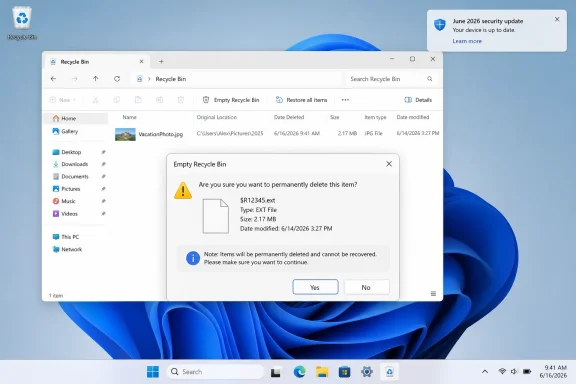
Microsoft confirmed in June 2026 that recent Windows security updates can make the Recycle Bin’s permanent-delete confirmation dialog show internal
This is not the kind of defect that brings a fleet to its knees. It does not appear to be encrypting files, wiping folders, or breaking boot paths. Microsoft’s own description frames it narrowly: the issue appears in the confirmation dialog when permanently deleting a single item from the Recycle Bin after installing the June 2026 security update.
But that is exactly why it has attracted attention. The Recycle Bin is not an obscure subsystem reserved for administrators and forensic analysts. It is one of the oldest trust surfaces in Windows, the place where the operating system tells normal users, in plain language, what is still recoverable and what is about to be gone.
The bug replaces that plain language with the kind of internal identifier Windows uses under the hood. A file that looked ordinary in Explorer can appear in the confirmation box as a cryptic dollar-sign-prefixed name, often resembling
That gap between technical severity and user perception is the story. Microsoft can accurately say the data is safe while still having shipped a regression that weakens confidence in a core desktop workflow.
That hidden machinery is normal. The mistake is letting the machinery become the message.
In normal use, the Recycle Bin list still shows the original file name. If the user restores the item, it returns with the original name. The problem appears at the decisive moment: the confirmation prompt for permanent deletion. That is the one dialog where Windows should be maximally clear, because the action it is asking the user to confirm is irreversible through ordinary means.
A cosmetic bug in a settings pane is annoying. A cosmetic bug in a destructive-action prompt is different. The user interface is part of the safety mechanism, and the safety mechanism depends on recognition.
This is why “display-only” should not be confused with “impact-free.” If a user sees a strange internal identifier when emptying or deleting from the Recycle Bin, the rational response is hesitation. If they hesitate, the workflow has failed. If they stop hesitating and simply click through because Windows dialogs are often noisy, the workflow has failed in the other direction.
For home users, the practical advice is equally narrow. Check the Recycle Bin list before permanently deleting anything. If the visible list shows the expected file, the misleading name in the confirmation dialog does not appear to mean Windows is targeting some unrelated object. If in doubt, cancel and restore the file first.
But Microsoft’s reassurance lands in a Windows ecosystem already conditioned to watch Patch Tuesday with one eye open. Recent update cycles have trained users and administrators to distinguish between official known issues, user-reported problems, and the ambiguous middle ground where something is clearly happening but not yet acknowledged. A Recycle Bin naming bug may be minor on its own, but it arrives as another exhibit in the larger trial over Windows update quality.
That is the reputational problem. Microsoft does not need every regression to be catastrophic for users to become more skeptical of routine updates. It only needs enough everyday annoyances to make “install the latest cumulative update” feel less like maintenance and more like a roll of the dice.
That breadth matters because it suggests this is not a niche driver conflict or a one-off hardware quirk. It is a shell-level regression that crossed release boundaries. When something this basic appears across supported Windows client and server lines, it raises uncomfortable questions about shared code paths, test coverage, and how much confidence Microsoft has in the everyday desktop scenarios that sit between enterprise security priorities and consumer polish.
The June timing also carries symbolic weight. Windows 10 is deep into its final support era for mainstream consumers, Windows 11 is carrying the burden of Microsoft’s modern desktop strategy, and IT teams are already juggling security baselines, hardware readiness, AI-era feature churn, and compatibility testing. A bug in the Recycle Bin is not the largest item on that list. It is, however, the kind of visible papercut that executives hear about because nontechnical users can describe it in one sentence.
That is the worst kind of minor bug for an operating system vendor: easy to understand, easy to screenshot, and hard to explain away without sounding dismissive.
There are good reasons for that model. A workaround may involve configuration, servicing steps, or shell behavior that Microsoft does not want millions of home users attempting without context. Enterprise support can also tailor guidance to managed environments where rollback, testing rings, and deployment controls exist.
Still, the optics are not ideal. The bug affects home users in a very visible way, but the near-term remedy is effectively gated behind business support. That reinforces a long-running perception that Windows consumers are both the broadest test surface and the least empowered class of affected users once a regression ships.
For administrators, the workaround question is more practical. If the bug is merely confusing and not destructive, rolling back a security update is probably the wrong tradeoff for most environments. A misleading Recycle Bin prompt is irritating; removing June security fixes could be much worse. The sane response is communication, not panic: warn help desks, update internal known-issue pages, and tell users what they are seeing before they flood support with suspected malware reports.
When that information is wrong, incomplete, or incomprehensible, the bargain breaks down. Users either distrust the system or learn to ignore it. Both outcomes are bad.
The Recycle Bin confirmation dialog is especially sensitive because deletion is one of the few operations ordinary users intuitively understand as dangerous. The whole point of the Recycle Bin is to soften that danger by adding a recoverable staging area. The final deletion prompt is the handrail at the edge of the cliff.
Replacing the recognizable file name with an internal token removes that handrail. The cliff may not have moved, but the sign now points in a language the user never agreed to learn.
This is also why the bug resonates with longtime Windows users. The Recycle Bin is legacy interface in the best sense: boring, stable, and broadly understood. When Microsoft breaks something that has felt settled for decades, the reaction is not proportional to the code change. It is proportional to the cultural memory of Windows as a system where old things keep working because too much depends on them.
But the bargain has always required trust. Microsoft asks users and organizations to accept large cumulative updates because the alternative is a fragmented, underpatched Windows population. In return, users expect the update process not to disturb basic workflows without good reason.
Every confirmed regression chips away at that bargain, even when the regression is small. A broken Recycle Bin prompt will not dominate a risk register beside privilege escalation vulnerabilities or boot failures. Yet it becomes part of the lived experience of Windows servicing: install an update, discover something weird, search the web, wait for Microsoft to acknowledge it, then wait again for the fix.
For IT departments, this reinforces the case for rings, deferrals, and staged deployment. The goal is not to avoid updates indefinitely. It is to prevent every workstation from becoming a first-wave tester on the same morning.
For home users, the options are thinner. Windows Update is designed to keep them current, and broadly speaking that is the right security posture. But when visible regressions keep appearing, even nontechnical users learn folk practices: delay updates, avoid rebooting, or distrust prompts. Those habits can become more dangerous than the bug that inspired them.
The better conclusion is more nuanced. Users should install security updates, but Microsoft should not hide behind the importance of security updates to minimize quality regressions in everyday interface paths. Security and reliability are not competing luxuries. They are both parts of operating-system trust.
Administrators should resist dramatic responses unless they have evidence of a broader problem in their environment. A rollback may make sense for a specific fleet if the update triggers business-critical failures, but a cosmetic Recycle Bin prompt bug by itself is a weak reason to unwind a security baseline. The more proportionate response is to document the behavior, educate support staff, and monitor Microsoft’s release health updates for the promised fix.
Home users should treat the bug as confusing rather than dangerous. If the Recycle Bin list shows the correct file name, the odd confirmation text is the known issue. Users who are uncertain should cancel, restore the file, and verify it before deleting again.
That advice is boring. In this case, boring is good.
Both readings contain some truth. Yes, the bug is minor compared with data loss or boot failure. No, that does not make it meaningless.
Software quality is partly statistical and partly emotional. Microsoft can measure crash rates, rollback rates, support cases, and telemetry signals. Users measure whether the machine in front of them behaves like it did yesterday. When the answer is no, the official severity rating only goes so far.
This is especially true for Windows because it serves everyone from gamers and grandparents to hospitals, factories, schools, developers, and government agencies. A regression in a niche enterprise feature may affect fewer people but carry enormous operational risk. A regression in the Recycle Bin may carry little operational risk but affect the shared mental model of the OS.
Microsoft has spent years telling users that Windows is a continuously serviced platform. The cost of that model is that quality is judged continuously, too.
$Rxxxxx-style file names instead of the original names on Windows 11, Windows 10, and supported Windows Server releases. The files themselves are not being renamed in the user’s view, corrupted, or restored incorrectly. That distinction matters, but it does not make the bug trivial. The Recycle Bin is one of those pieces of Windows plumbing that users only notice when it violates a basic expectation: tell me what I am about to destroy.
 The Smallest Windows Bug Is Sometimes the Loudest One
This is not the kind of defect that brings a fleet to its knees. It does not appear to be encrypting files, wiping folders, or breaking boot paths. Microsoft’s own description frames it narrowly: the issue appears in the confirmation dialog when permanently deleting a single item from the Recycle Bin after installing the June 2026 security update.But that is exactly why it has attracted attention. The Recycle Bin is not an obscure subsystem reserved for administrators and forensic analysts. It is one of the oldest trust surfaces in Windows, the place where the operating system tells normal users, in plain language, what is still recoverable and what is about to be gone.
The bug replaces that plain language with the kind of internal identifier Windows uses under the hood. A file that looked ordinary in Explorer can appear in the confirmation box as a cryptic dollar-sign-prefixed name, often resembling
$Rxxxxx.ext. To a power user, that may look like a storage implementation detail leaking through the interface. To everyone else, it looks like malware, corruption, or a different file being deleted.That gap between technical severity and user perception is the story. Microsoft can accurately say the data is safe while still having shipped a regression that weakens confidence in a core desktop workflow.
Windows Is Leaking Its Plumbing Into the Living Room
The Recycle Bin has always been more complicated than its friendly desktop icon suggests. When Windows moves an item there, it does not simply leave the file sitting around under its original name in a magical trash folder. The system tracks deleted items using metadata and internal names so that it can avoid collisions, preserve original paths, and restore files correctly.That hidden machinery is normal. The mistake is letting the machinery become the message.
In normal use, the Recycle Bin list still shows the original file name. If the user restores the item, it returns with the original name. The problem appears at the decisive moment: the confirmation prompt for permanent deletion. That is the one dialog where Windows should be maximally clear, because the action it is asking the user to confirm is irreversible through ordinary means.
A cosmetic bug in a settings pane is annoying. A cosmetic bug in a destructive-action prompt is different. The user interface is part of the safety mechanism, and the safety mechanism depends on recognition.
This is why “display-only” should not be confused with “impact-free.” If a user sees a strange internal identifier when emptying or deleting from the Recycle Bin, the rational response is hesitation. If they hesitate, the workflow has failed. If they stop hesitating and simply click through because Windows dialogs are often noisy, the workflow has failed in the other direction.
Microsoft’s Reassurance Is Correct, but Incomplete
Microsoft’s position is straightforward: the Recycle Bin itself still displays the correct name, restoring the item restores it properly, and the internal name appears only in the confirmation dialog. On the narrow question of data integrity, that is reassuring. Users should not assume their files have been damaged simply because the prompt looks wrong.For home users, the practical advice is equally narrow. Check the Recycle Bin list before permanently deleting anything. If the visible list shows the expected file, the misleading name in the confirmation dialog does not appear to mean Windows is targeting some unrelated object. If in doubt, cancel and restore the file first.
But Microsoft’s reassurance lands in a Windows ecosystem already conditioned to watch Patch Tuesday with one eye open. Recent update cycles have trained users and administrators to distinguish between official known issues, user-reported problems, and the ambiguous middle ground where something is clearly happening but not yet acknowledged. A Recycle Bin naming bug may be minor on its own, but it arrives as another exhibit in the larger trial over Windows update quality.
That is the reputational problem. Microsoft does not need every regression to be catastrophic for users to become more skeptical of routine updates. It only needs enough everyday annoyances to make “install the latest cumulative update” feel less like maintenance and more like a roll of the dice.
The Timing Makes a Minor Regression Feel Bigger
The bug is associated with the June 2026 Windows security updates, including the Patch Tuesday releases that landed on June 9. Microsoft’s release health material identifies the issue as confirmed and ties it to the June security update for affected builds. Reports also indicate that it spans a broad range of supported Windows versions, including current Windows 11 releases, Windows 10 22H2, long-term servicing editions, and multiple Windows Server versions.That breadth matters because it suggests this is not a niche driver conflict or a one-off hardware quirk. It is a shell-level regression that crossed release boundaries. When something this basic appears across supported Windows client and server lines, it raises uncomfortable questions about shared code paths, test coverage, and how much confidence Microsoft has in the everyday desktop scenarios that sit between enterprise security priorities and consumer polish.
The June timing also carries symbolic weight. Windows 10 is deep into its final support era for mainstream consumers, Windows 11 is carrying the burden of Microsoft’s modern desktop strategy, and IT teams are already juggling security baselines, hardware readiness, AI-era feature churn, and compatibility testing. A bug in the Recycle Bin is not the largest item on that list. It is, however, the kind of visible papercut that executives hear about because nontechnical users can describe it in one sentence.
That is the worst kind of minor bug for an operating system vendor: easy to understand, easy to screenshot, and hard to explain away without sounding dismissive.
The Enterprise Workaround Tells Its Own Story
Microsoft says business customers can contact support for a temporary workaround, while a permanent fix is planned for a future Windows update. That split is familiar. Enterprises with support channels may get mitigation guidance before the public sees a broadly documented fix, while consumers are told to wait.There are good reasons for that model. A workaround may involve configuration, servicing steps, or shell behavior that Microsoft does not want millions of home users attempting without context. Enterprise support can also tailor guidance to managed environments where rollback, testing rings, and deployment controls exist.
Still, the optics are not ideal. The bug affects home users in a very visible way, but the near-term remedy is effectively gated behind business support. That reinforces a long-running perception that Windows consumers are both the broadest test surface and the least empowered class of affected users once a regression ships.
For administrators, the workaround question is more practical. If the bug is merely confusing and not destructive, rolling back a security update is probably the wrong tradeoff for most environments. A misleading Recycle Bin prompt is irritating; removing June security fixes could be much worse. The sane response is communication, not panic: warn help desks, update internal known-issue pages, and tell users what they are seeing before they flood support with suspected malware reports.
The Recycle Bin Is a Trust Interface, Not Just a Folder
Windows has several moments where the operating system asks users to confirm intent. User Account Control prompts, SmartScreen warnings, BitLocker recovery screens, delete dialogs, and permission elevation boxes all rely on the same bargain: the system will interrupt the user only when the information is worth their attention.When that information is wrong, incomplete, or incomprehensible, the bargain breaks down. Users either distrust the system or learn to ignore it. Both outcomes are bad.
The Recycle Bin confirmation dialog is especially sensitive because deletion is one of the few operations ordinary users intuitively understand as dangerous. The whole point of the Recycle Bin is to soften that danger by adding a recoverable staging area. The final deletion prompt is the handrail at the edge of the cliff.
Replacing the recognizable file name with an internal token removes that handrail. The cliff may not have moved, but the sign now points in a language the user never agreed to learn.
This is also why the bug resonates with longtime Windows users. The Recycle Bin is legacy interface in the best sense: boring, stable, and broadly understood. When Microsoft breaks something that has felt settled for decades, the reaction is not proportional to the code change. It is proportional to the cultural memory of Windows as a system where old things keep working because too much depends on them.
Patch Tuesday’s Bargain Keeps Getting Harder to Sell
Patch Tuesday exists because predictable servicing is better than chaos. Enterprises need a cadence. Security teams need known windows for testing and deployment. Users need vulnerabilities fixed before attackers industrialize them.But the bargain has always required trust. Microsoft asks users and organizations to accept large cumulative updates because the alternative is a fragmented, underpatched Windows population. In return, users expect the update process not to disturb basic workflows without good reason.
Every confirmed regression chips away at that bargain, even when the regression is small. A broken Recycle Bin prompt will not dominate a risk register beside privilege escalation vulnerabilities or boot failures. Yet it becomes part of the lived experience of Windows servicing: install an update, discover something weird, search the web, wait for Microsoft to acknowledge it, then wait again for the fix.
For IT departments, this reinforces the case for rings, deferrals, and staged deployment. The goal is not to avoid updates indefinitely. It is to prevent every workstation from becoming a first-wave tester on the same morning.
For home users, the options are thinner. Windows Update is designed to keep them current, and broadly speaking that is the right security posture. But when visible regressions keep appearing, even nontechnical users learn folk practices: delay updates, avoid rebooting, or distrust prompts. Those habits can become more dangerous than the bug that inspired them.
This Is Not a Reason to Skip Security Updates
There is an understandable temptation to treat every update regression as evidence that the safest Windows machine is the one left untouched. That is wrong. The June updates include security fixes, and the known Recycle Bin issue does not appear to justify leaving systems exposed.The better conclusion is more nuanced. Users should install security updates, but Microsoft should not hide behind the importance of security updates to minimize quality regressions in everyday interface paths. Security and reliability are not competing luxuries. They are both parts of operating-system trust.
Administrators should resist dramatic responses unless they have evidence of a broader problem in their environment. A rollback may make sense for a specific fleet if the update triggers business-critical failures, but a cosmetic Recycle Bin prompt bug by itself is a weak reason to unwind a security baseline. The more proportionate response is to document the behavior, educate support staff, and monitor Microsoft’s release health updates for the promised fix.
Home users should treat the bug as confusing rather than dangerous. If the Recycle Bin list shows the correct file name, the odd confirmation text is the known issue. Users who are uncertain should cancel, restore the file, and verify it before deleting again.
That advice is boring. In this case, boring is good.
Microsoft’s Quality Problem Is a Perception Problem, Too
The most damaging Windows bugs are not always the ones with the highest technical severity. They are the ones that confirm what users already suspect. For critics, the Recycle Bin issue becomes another example of Microsoft shipping visible regressions in core areas. For defenders, it is a minor UI defect being inflated by the internet’s appetite for Windows schadenfreude.Both readings contain some truth. Yes, the bug is minor compared with data loss or boot failure. No, that does not make it meaningless.
Software quality is partly statistical and partly emotional. Microsoft can measure crash rates, rollback rates, support cases, and telemetry signals. Users measure whether the machine in front of them behaves like it did yesterday. When the answer is no, the official severity rating only goes so far.
This is especially true for Windows because it serves everyone from gamers and grandparents to hospitals, factories, schools, developers, and government agencies. A regression in a niche enterprise feature may affect fewer people but carry enormous operational risk. A regression in the Recycle Bin may carry little operational risk but affect the shared mental model of the OS.
Microsoft has spent years telling users that Windows is a continuously serviced platform. The cost of that model is that quality is judged continuously, too.
The Trash Can Bug Leaves Administrators With a Familiar Playbook
The practical lessons here are less dramatic than the screenshots. The bug is visible, confirmed, and annoying, but it is not currently a data-integrity emergency. That puts it into the category of update regressions that IT teams should manage through communication and deployment discipline rather than emergency rollback.- Users should verify the file name in the Recycle Bin list before permanently deleting a single item if the confirmation dialog shows a cryptic internal name.
- Administrators should brief help desks that
$Rxxxxx-style names in the delete confirmation dialog are a known Windows issue after the June 2026 security updates. - Organizations should avoid rolling back security updates solely because of this bug unless they identify additional business-impacting failures in their own environment.
- Business customers that need mitigation before the public fix should use Microsoft support channels rather than relying on unofficial registry edits or cleanup scripts.
- Everyone should watch for a future cumulative update that resolves the dialog behavior, because Microsoft has said a permanent fix is in development.
References
- Primary source: Research Snipers
Published: 2026-06-29T07:02:17.172958
Trash error: Microsoft confirms new Windows bug – Research Snipers
A faulty update for Windows 11 and Windows 10 is currently causing confusion when emptying...researchsnipers.com - Related coverage: windowslatest.com
Microsoft confirms Windows 11 update breaks Recycle Bin delete prompts, but your files are still safe
Microsoft has confirmed a new bug in Windows 11's June 2026 update where Recycle Bin prompts show misleading internal file names. www.windowslatest.com
- Related coverage: windowscentral.com
Microsoft confirms Recycle Bin glitch affecting all supported Windows versions — yes, even the trash needs debugging | Windows Central
Recycle Bin bug makes deleting files a bit confusing.www.windowscentral.com - Related coverage: techtimes.com
Windows 11 June Update KB5094126 Confirms Recycle Bin Regression: BitLocker Lockout Risk Lingers
Windows 11 June 2026 update KB5094126 has now received its first official bug acknowledgment — the Recycle Bin dialog — but enterprise IT teams face a more dangerous unconfirmed problem:www.techtimes.com - Related coverage: techspot.com
This month's Windows 11 update broke the Recycle Bin, OneDrive, and possibly your PC's stability | TechSpot
According to Microsoft, users who have installed the KB5095051 update might encounter a strange Recycle Bin bug that replaces the names of deleted files with internal Recycle...www.techspot.com - Related coverage: techrepublic.com
Microsoft Confirms Windows Recycle Bin Bug Affects All Supported Versions
Microsoft confirmed a Windows June update bug that shows internal Recycle Bin file names during permanent deletion, with a fix planned.www.techrepublic.com
- Official source: learn.microsoft.com
Windows 11 Recycle Bin still showing internal filenames after Update KB5095093. Possible fix? - Microsoft Q&A
Hello. I became aware of the Recycle Bin filename issue that was introduced in the Windows update June 9, 2026—KB5094126, as I experienced it myself. I decided to wait until the next update came around to fix it, which has since been released: June 23,…learn.microsoft.com - Related coverage: cybernews.com
Microsoft breaks the Recycle Bin. Yes, again. | Cybernews
Microsoft confirms Windows 10 and 11 Recycle Bin bug after Patch Tuesday update, with fix in development cybernews.com
- Related coverage: pureinfotech.com
Windows 11 Recycle Bin bug breaks delete prompts after June 2026 update – fix is in the works. - Pureinfotech
June 2026 update KB5094126 triggers a Recycle Bin bug where delete confirmation shows system filenames instead of original file names. pureinfotech.com
- Related coverage: windowsreport.com
Microsoft Confirms New Windows Recycle Bin Bug After June Patch Tuesday Update
Microsoft is investigating a Recycle Bin issue affecting supported Windows versions after users installed the June 2026 security updates. windowsreport.com
- Related coverage: ctrlaltnod.com
Windows Recycle Bin Filename Bug Confirmed in KB5094126 | Microsoft
Microsoft confirms KB5094126 introduces a Recycle Bin bug showing system identifiers instead of filenames in delete dialogs. No data loss, fix under investigation.www.ctrlaltnod.com - Related coverage: techradar.com
Microsoft acknowledges a Windows 11 bug affecting the Recycle Bin, and 'fed up' users think AI coding is to blame | TechRadar
File name confusionwww.techradar.com