

Microsoft released its June 2026 Intune update wave for cloud-managed endpoints, adding general availability for Enterprise Application Management auto-updates, new Endpoint Privilege Management scenarios, a Vulnerability Remediation Agent, and a modernized Apple automated device enrollment experience across iOS, iPadOS, and macOS. The common thread is not convenience; it is Microsoft trying to turn Intune from a policy console into a continuous endpoint operations layer. For Windows administrators, the message is blunt: patching apps, granting temporary privilege, and enrolling devices are no longer separate chores. They are becoming parts of the same security pipeline.
For years, Intune’s pitch was that cloud management could replace the sprawl of imaging tools, Group Policy workarounds, software deployment scripts, mobile device management consoles, and help desk privilege exceptions. That promise was always directionally true, but uneven in practice. Windows admins could standardize device policy in Intune, but they still had to manage third-party app updates, local admin exceptions, and enrollment edge cases with a patchwork of vendor tools and tribal knowledge.
The June update matters because it attacks those seams. Enterprise Application Management auto-updates target one of the least glamorous but most consequential parts of endpoint security: keeping common business apps current after deployment. Endpoint Privilege Management improvements address the awkward gap between least privilege and practical support. Apple enrollment changes acknowledge that modern endpoint fleets are rarely Windows-only, even inside Windows-first organizations.
This is Microsoft’s broader endpoint strategy in miniature. The company is not merely adding features to Intune; it is trying to collapse adjacent markets into Intune. App patching, privilege elevation, vulnerability prioritization, remote help, certificate management, and device analytics increasingly look less like separate products and more like service modules around a shared identity-and-policy core.
That shift has an obvious upside for IT teams drowning in consoles. It also has a cost: the more Intune becomes the place where everything is decided, the more any weakness in its licensing, reporting, timing, or reliability becomes an operational risk.
The new EAM auto-updates feature moves that recurring burden closer to the platform. When enabled for supported Enterprise App Catalog apps, Intune can detect that a newer catalog version is available and update targeted devices automatically. In plain English, Microsoft is trying to make supported third-party app patching behave more like a managed service than a packaging project.
That is a meaningful change for administrators who have spent years maintaining Win32 app packages, supersedence chains, detection rules, remediation scripts, and update groups. Every one of those moving parts is an opportunity for drift. A package may be deployed to the right collection but use an obsolete installer. A detection rule may pass even though the vulnerable component remains. A pilot group may get the update while frontline devices wait until the next maintenance window that never quite arrives.
Auto-updates do not make those risks disappear, but they change where the work sits. Instead of asking each IT shop to discover every vendor release, rebuild every package, and schedule every rollout, Microsoft is positioning the Enterprise App Catalog as the upstream source of update truth. The administrative job becomes deciding which apps are eligible, which devices are targeted, and how much trust to place in Microsoft’s validation pipeline.
That trust question is the real story. Automatic application updates are only as useful as the catalog’s freshness, packaging quality, compatibility handling, and rollback story. Microsoft says app updates go through validation, and the company has been setting expectations around update availability timelines. But enterprises will still want to know how quickly critical fixes appear, how update failures surface, and what happens when a vendor release breaks a line-of-business workflow.
The safest reading is that EAM auto-updates are a major operational improvement for mainstream apps, not a universal escape hatch from app lifecycle management. The boring apps that every business runs are exactly where automation can save time and reduce exposure. The strange apps that keep a warehouse scanner, medical workstation, manufacturing line, or finance workflow alive will still demand testing, rings, and human skepticism.
For security teams, the value of EAM auto-updates is the reduction of routine lag. If a browser-adjacent utility, collaboration app, archive tool, or remote support client gets a normal maintenance update, admins should not need to rediscover the problem in a scanner, build a package, and then wait for deployment telemetry to settle. The platform should narrow that gap automatically.
But the highest-pressure cases will still require judgment. A zero-day in an app used across thousands of devices may demand emergency action before Microsoft’s catalog workflow catches up. A vendor may release a patched build that fixes the vulnerability but introduces another problem. A regulated environment may need evidence that a specific vulnerable build was removed from a specific device population by a specific date.
That is where the new Vulnerability Remediation Agent becomes important. Microsoft is connecting Defender Vulnerability Management signals with Intune’s remediation experience, giving admins recommendations, impact summaries, affected systems, and suggested fixes inside the Intune admin center. In theory, this reduces the swivel-chair workflow between vulnerability dashboards and device management actions.
The best version of this model is powerful. Defender sees exposure, Intune knows the managed device state, EAM knows the available app versions, and policy can push remediation without waiting for a human to stitch the context together. That is the endpoint equivalent of moving from “findings” to “fixes.”
The danger is that prioritization can become opaque. Security teams will want to know why a recommendation is ranked as critical, whether business-critical devices are treated differently, and how Intune handles conflicts between remediation urgency and change management rules. Automation is useful only when admins can explain it afterward to auditors, incident responders, and application owners.
The June updates extend EPM in two practical directions. First, file elevation requests can now be approved for non-primary users on a device. Second, system-level network configuration support allows administrators to create rules-based policies that let standard users make specific network changes without becoming local administrators.
The non-primary user change sounds small until you remember how devices are used outside tidy architecture diagrams. Shared workstations, loaner laptops, lab machines, kiosk-like environments, frontline devices, and support scenarios often involve someone other than the device’s “primary” assigned user. If privilege elevation workflows assume a one-user-per-device world, they break down precisely where organizations need flexibility.
Network configuration is even more revealing. A user who cannot connect to the correct network may not be able to reach the help desk tooling that would solve the problem. A field employee may need to adjust network settings in a hotel, branch office, vehicle, lab, or customer site. Historically, the options were ugly: grant local admin, walk the user through a temporary elevation process, or escalate to support.
Rules-based preauthorization gives IT a cleaner path. Administrators can define the network changes that are acceptable and allow standard users to perform them without opening the broader local-admin door. That is least privilege not as a slogan, but as a workflow design principle.
This also signals Microsoft’s confidence that privilege management cannot be limited to executable elevation. Real-world admin rights are not only about running installers. They govern system settings, drivers, network stack behavior, security tools, and recovery actions. If EPM is going to replace ad hoc local admin exceptions, it has to move into those system-level tasks.
The Intune EPM model tries to make least privilege more livable by converting blanket rights into policy-mediated moments. A user does not need to be an administrator all the time to perform one approved action. A help desk analyst does not need to remote into every machine to bless a known file or setting. A device does not need to be broadly exposed just because one workflow requires elevated access.
The hard part is policy design. If rules are too narrow, users drown the help desk in approval requests. If rules are too broad, EPM becomes local admin rights with better branding. If approvals are slow, users find workarounds. If reporting is weak, security cannot prove the control is working.
Microsoft’s direction is sound, but organizations should resist the temptation to treat EPM as a switch. The better approach is to start with the recurring pain points that currently drive local admin exceptions. Network configuration, trusted vendor tools, device support utilities, and tightly scoped operational tasks are good candidates. “Anything the user asks for” is not.
There is also a cultural issue. Endpoint administrators and security teams need to agree on what counts as acceptable elevation. The help desk may want speed; security may want control; business units may want their legacy tools to keep working. EPM succeeds when those groups translate risk decisions into reusable policies instead of one-off approvals.
That matters because enrollment is the first security moment in a device’s life. If a Mac or iPad reaches the user before required apps, compliance policies, certificates, network settings, and restrictions are in place, the organization starts from a position of drift. The device may become productive quickly, but not necessarily safely.
Enrollment time grouping is a practical fix for a familiar timing problem. A device can be enrolled, but the policies and apps that make it usable may arrive later. Users then begin work in a half-configured state, and IT has to troubleshoot whether a problem is caused by policy delay, app installation lag, authentication failure, or user impatience.
By applying group-targeted assignments during setup, Intune can make Apple onboarding feel more deterministic. That is especially useful for organizations issuing devices directly to employees, shipping hardware to remote workers, or trying to standardize onboarding without desk-side IT. The closer a device gets to “secure and ready” before the user reaches the desktop, the fewer tickets follow.
The modernization also reflects Apple’s own management evolution. Apple has been moving toward more declarative management models, where devices can maintain and report state more efficiently. Microsoft’s Intune changes sit inside that broader platform shift. The result is not simply a nicer enrollment wizard; it is a gradual replacement of older mobile-device-management assumptions with more state-aware controls.
For WindowsForum readers, the Apple angle is still relevant. Many Windows-first shops now manage executive Macs, developer Macs, shared iPads, warehouse iPhones, or BYOD mobile devices alongside Windows PCs. Intune’s credibility increasingly depends on how well it handles that heterogeneity. A unified endpoint platform that only excels on Windows is not unified enough.
Admins need to understand what Intune is doing automatically, what it is merely recommending, and what still requires manual action. If an app is auto-updating, the portal should make the current version, target population, rollout state, failure rate, and supersedence behavior obvious. If a vulnerability recommendation appears, the portal should explain the affected devices and the proposed remediation without forcing a scavenger hunt across Defender, Entra, and Intune blades.
The same is true for EPM. A privilege approval system is only trustworthy if the people operating it can see who requested elevation, what was elevated, why it was allowed, how often it happens, and whether the rule still makes sense. Otherwise, least privilege becomes invisible complexity.
Microsoft has improved Intune reporting over time, but enterprise administrators have long memories. They remember delayed device check-ins, ambiguous deployment states, and portal experiences where “pending” could mean almost anything. As Intune takes on more automated remediation, Microsoft has to make reporting feel less like a compliance afterthought and more like an operational instrument panel.
This is where third-party tools will not disappear overnight. Many organizations use specialist app patching, endpoint analytics, privilege management, or vulnerability remediation products because they trust the reporting, timing, or workflow more than the platform-native equivalent. Microsoft does not need to be perfect to win share, but it does need to be predictable.
If an organization already owns Intune and begins receiving more Suite-adjacent capabilities through its Microsoft agreement, the case for buying separate tools becomes harder. A third-party product may still be deeper, faster, or more mature, but it now has to justify itself against a Microsoft feature that is already integrated with identity, device compliance, Defender signals, and the admin center.
That does not mean Microsoft automatically wins. Procurement gravity is powerful, but so is operational trust. If EAM’s catalog lacks critical apps, if auto-updates lag, if EPM workflows annoy users, or if Apple enrollment changes introduce migration pain, administrators will continue to defend specialist tools. The “included” feature is not free if it costs engineering time, help desk credibility, or security confidence.
Still, the direction is unmistakable. Microsoft is using licensing, integration, and platform adjacency to make Intune the default endpoint operations layer for organizations already invested in Microsoft 365. For many IT leaders, the question will shift from “Which tool is best?” to “Is Intune now good enough to retire another product?”
That is a dangerous question for vendors in the endpoint management market. It is also dangerous for customers if asked too casually. Consolidation can reduce complexity, but it can also reduce leverage and create single-platform dependency. A thinner tool stack is not automatically a safer one.
EAM auto-updates need app ownership. Someone has to decide whether a catalog app can update automatically or requires staged rollout. EPM needs privilege governance. Someone has to decide which elevation rules are safe and how approvals are reviewed. Enrollment modernization needs deployment discipline. Someone has to test the new Apple flow before it lands in the hands of executives, developers, or frontline workers.
That is the quiet truth behind most endpoint automation. Automation helps mature processes scale; it does not magically create mature processes. If an organization does not know where an app is installed, who owns it, or what breaks when it updates, auto-updates can expose that ignorance quickly. If local admin rights are granted informally today, EPM may reveal just how many business workflows depend on excessive privilege.
The Vulnerability Remediation Agent may also force uncomfortable prioritization conversations. Security teams love ranked lists until remediation touches uptime, user productivity, or application compatibility. Intune can recommend fixes, but it cannot settle every dispute between risk reduction and operational continuity.
That is why pilots matter. The right first move is not a tenant-wide automation spree. It is to choose representative apps, device groups, and user scenarios, then watch the telemetry closely. The goal is to learn where Microsoft’s defaults are trustworthy and where the organization needs additional guardrails.
The new model fits the realities of 2026. Devices are remote, hybrid, shared, personal, corporate, Windows, macOS, iOS, Android, and increasingly used by workflows touched by AI agents and automated services. Attackers do not care whether a vulnerable app fell between packaging cycles. Auditors do not care that a user needed local admin rights “just this once.” Employees do not care which console failed to deliver a policy before setup finished.
Microsoft’s answer is to make Intune the fabric underneath those moments. It wants app currency, privilege control, vulnerability remediation, and enrollment readiness to feel like expressions of the same policy system. That is ambitious, and it is probably necessary.
But ambition does not remove the need for operational skepticism. Admins should ask what happens when updates fail, when catalog versions lag, when privilege rules are abused, when enrollment timing differs by platform, and when automated recommendations conflict with business reality. The more Intune automates, the more important it becomes to understand its failure modes.
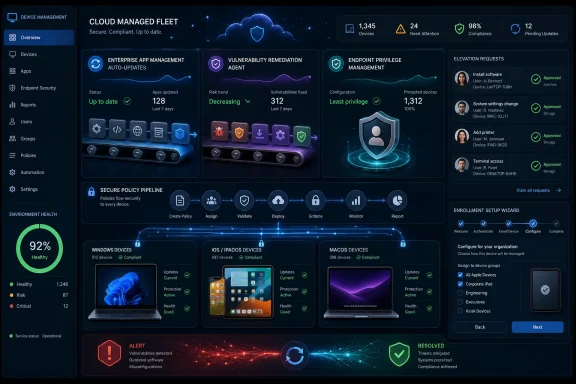 Microsoft Is Moving Intune From Management Console to Control Plane
For years, Intune’s pitch was that cloud management could replace the sprawl of imaging tools, Group Policy workarounds, software deployment scripts, mobile device management consoles, and help desk privilege exceptions. That promise was always directionally true, but uneven in practice. Windows admins could standardize device policy in Intune, but they still had to manage third-party app updates, local admin exceptions, and enrollment edge cases with a patchwork of vendor tools and tribal knowledge.The June update matters because it attacks those seams. Enterprise Application Management auto-updates target one of the least glamorous but most consequential parts of endpoint security: keeping common business apps current after deployment. Endpoint Privilege Management improvements address the awkward gap between least privilege and practical support. Apple enrollment changes acknowledge that modern endpoint fleets are rarely Windows-only, even inside Windows-first organizations.
This is Microsoft’s broader endpoint strategy in miniature. The company is not merely adding features to Intune; it is trying to collapse adjacent markets into Intune. App patching, privilege elevation, vulnerability prioritization, remote help, certificate management, and device analytics increasingly look less like separate products and more like service modules around a shared identity-and-policy core.
That shift has an obvious upside for IT teams drowning in consoles. It also has a cost: the more Intune becomes the place where everything is decided, the more any weakness in its licensing, reporting, timing, or reliability becomes an operational risk.
Auto-Updates Turn Enterprise App Management Into a Security Commitment
Enterprise Application Management has always sounded like the feature Intune should have had from the beginning. Most organizations do not struggle because they cannot install an app once. They struggle because the app has to be repackaged, tested, targeted, deployed, superseded, and reported on again and again, often under pressure from a CVE, an audit finding, or an impatient executive whose PDF tool has stopped working.The new EAM auto-updates feature moves that recurring burden closer to the platform. When enabled for supported Enterprise App Catalog apps, Intune can detect that a newer catalog version is available and update targeted devices automatically. In plain English, Microsoft is trying to make supported third-party app patching behave more like a managed service than a packaging project.
That is a meaningful change for administrators who have spent years maintaining Win32 app packages, supersedence chains, detection rules, remediation scripts, and update groups. Every one of those moving parts is an opportunity for drift. A package may be deployed to the right collection but use an obsolete installer. A detection rule may pass even though the vulnerable component remains. A pilot group may get the update while frontline devices wait until the next maintenance window that never quite arrives.
Auto-updates do not make those risks disappear, but they change where the work sits. Instead of asking each IT shop to discover every vendor release, rebuild every package, and schedule every rollout, Microsoft is positioning the Enterprise App Catalog as the upstream source of update truth. The administrative job becomes deciding which apps are eligible, which devices are targeted, and how much trust to place in Microsoft’s validation pipeline.
That trust question is the real story. Automatic application updates are only as useful as the catalog’s freshness, packaging quality, compatibility handling, and rollback story. Microsoft says app updates go through validation, and the company has been setting expectations around update availability timelines. But enterprises will still want to know how quickly critical fixes appear, how update failures surface, and what happens when a vendor release breaks a line-of-business workflow.
The safest reading is that EAM auto-updates are a major operational improvement for mainstream apps, not a universal escape hatch from app lifecycle management. The boring apps that every business runs are exactly where automation can save time and reduce exposure. The strange apps that keep a warehouse scanner, medical workstation, manufacturing line, or finance workflow alive will still demand testing, rings, and human skepticism.
The Patch Window Is Shrinking, Not Disappearing
Microsoft’s own framing is careful: auto-updates can reduce vulnerability exposure, but new threats can still appear between update cycles. That caveat deserves more attention than the product demo usually gives it. The modern endpoint risk is not merely that an app is out of date; it is that attackers move quickly once a widely deployed application becomes a known target.For security teams, the value of EAM auto-updates is the reduction of routine lag. If a browser-adjacent utility, collaboration app, archive tool, or remote support client gets a normal maintenance update, admins should not need to rediscover the problem in a scanner, build a package, and then wait for deployment telemetry to settle. The platform should narrow that gap automatically.
But the highest-pressure cases will still require judgment. A zero-day in an app used across thousands of devices may demand emergency action before Microsoft’s catalog workflow catches up. A vendor may release a patched build that fixes the vulnerability but introduces another problem. A regulated environment may need evidence that a specific vulnerable build was removed from a specific device population by a specific date.
That is where the new Vulnerability Remediation Agent becomes important. Microsoft is connecting Defender Vulnerability Management signals with Intune’s remediation experience, giving admins recommendations, impact summaries, affected systems, and suggested fixes inside the Intune admin center. In theory, this reduces the swivel-chair workflow between vulnerability dashboards and device management actions.
The best version of this model is powerful. Defender sees exposure, Intune knows the managed device state, EAM knows the available app versions, and policy can push remediation without waiting for a human to stitch the context together. That is the endpoint equivalent of moving from “findings” to “fixes.”
The danger is that prioritization can become opaque. Security teams will want to know why a recommendation is ranked as critical, whether business-critical devices are treated differently, and how Intune handles conflicts between remediation urgency and change management rules. Automation is useful only when admins can explain it afterward to auditors, incident responders, and application owners.
Endpoint Privilege Management Gets Closer to How Work Actually Happens
Endpoint Privilege Management exists because the old local-admin compromise stopped making sense. Giving users permanent administrative rights makes support easier in the short term and security worse in every other respect. Removing admin rights improves posture but generates tickets for basic tasks: installing a driver, changing a setting, running a trusted tool, or fixing a network problem on a device that is currently unreachable.The June updates extend EPM in two practical directions. First, file elevation requests can now be approved for non-primary users on a device. Second, system-level network configuration support allows administrators to create rules-based policies that let standard users make specific network changes without becoming local administrators.
The non-primary user change sounds small until you remember how devices are used outside tidy architecture diagrams. Shared workstations, loaner laptops, lab machines, kiosk-like environments, frontline devices, and support scenarios often involve someone other than the device’s “primary” assigned user. If privilege elevation workflows assume a one-user-per-device world, they break down precisely where organizations need flexibility.
Network configuration is even more revealing. A user who cannot connect to the correct network may not be able to reach the help desk tooling that would solve the problem. A field employee may need to adjust network settings in a hotel, branch office, vehicle, lab, or customer site. Historically, the options were ugly: grant local admin, walk the user through a temporary elevation process, or escalate to support.
Rules-based preauthorization gives IT a cleaner path. Administrators can define the network changes that are acceptable and allow standard users to perform them without opening the broader local-admin door. That is least privilege not as a slogan, but as a workflow design principle.
This also signals Microsoft’s confidence that privilege management cannot be limited to executable elevation. Real-world admin rights are not only about running installers. They govern system settings, drivers, network stack behavior, security tools, and recovery actions. If EPM is going to replace ad hoc local admin exceptions, it has to move into those system-level tasks.
Least Privilege Is Becoming a User Experience Problem
Security teams often describe least privilege as a control. Users experience it as friction. That mismatch is why so many organizations have struggled to remove local admin rights from Windows endpoints despite knowing the risk.The Intune EPM model tries to make least privilege more livable by converting blanket rights into policy-mediated moments. A user does not need to be an administrator all the time to perform one approved action. A help desk analyst does not need to remote into every machine to bless a known file or setting. A device does not need to be broadly exposed just because one workflow requires elevated access.
The hard part is policy design. If rules are too narrow, users drown the help desk in approval requests. If rules are too broad, EPM becomes local admin rights with better branding. If approvals are slow, users find workarounds. If reporting is weak, security cannot prove the control is working.
Microsoft’s direction is sound, but organizations should resist the temptation to treat EPM as a switch. The better approach is to start with the recurring pain points that currently drive local admin exceptions. Network configuration, trusted vendor tools, device support utilities, and tightly scoped operational tasks are good candidates. “Anything the user asks for” is not.
There is also a cultural issue. Endpoint administrators and security teams need to agree on what counts as acceptable elevation. The help desk may want speed; security may want control; business units may want their legacy tools to keep working. EPM succeeds when those groups translate risk decisions into reusable policies instead of one-off approvals.
Apple Enrollment Modernization Shows Intune Is No Longer Windows-Only in Practice
The Apple automated device enrollment improvements are not the flashiest part of the June wave, but they may be among the most important for mixed fleets. Microsoft says the enrollment experience for iOS, iPadOS, and macOS is moving to a redesigned system with cleaner policy structure, streamlined authentication, fewer outdated options, and more detailed controls. In addition, enrollment time grouping now extends to those Apple platforms, allowing assigned apps and policies to apply immediately during setup.That matters because enrollment is the first security moment in a device’s life. If a Mac or iPad reaches the user before required apps, compliance policies, certificates, network settings, and restrictions are in place, the organization starts from a position of drift. The device may become productive quickly, but not necessarily safely.
Enrollment time grouping is a practical fix for a familiar timing problem. A device can be enrolled, but the policies and apps that make it usable may arrive later. Users then begin work in a half-configured state, and IT has to troubleshoot whether a problem is caused by policy delay, app installation lag, authentication failure, or user impatience.
By applying group-targeted assignments during setup, Intune can make Apple onboarding feel more deterministic. That is especially useful for organizations issuing devices directly to employees, shipping hardware to remote workers, or trying to standardize onboarding without desk-side IT. The closer a device gets to “secure and ready” before the user reaches the desktop, the fewer tickets follow.
The modernization also reflects Apple’s own management evolution. Apple has been moving toward more declarative management models, where devices can maintain and report state more efficiently. Microsoft’s Intune changes sit inside that broader platform shift. The result is not simply a nicer enrollment wizard; it is a gradual replacement of older mobile-device-management assumptions with more state-aware controls.
For WindowsForum readers, the Apple angle is still relevant. Many Windows-first shops now manage executive Macs, developer Macs, shared iPads, warehouse iPhones, or BYOD mobile devices alongside Windows PCs. Intune’s credibility increasingly depends on how well it handles that heterogeneity. A unified endpoint platform that only excels on Windows is not unified enough.
The Admin Center Becomes the Battleground for Trust
Microsoft’s strategy puts more operational decisions inside the Intune admin center. App updates, vulnerability recommendations, privilege policies, and enrollment behavior are increasingly presented as connected workflows. That is convenient, but it also raises the stakes for the console’s clarity.Admins need to understand what Intune is doing automatically, what it is merely recommending, and what still requires manual action. If an app is auto-updating, the portal should make the current version, target population, rollout state, failure rate, and supersedence behavior obvious. If a vulnerability recommendation appears, the portal should explain the affected devices and the proposed remediation without forcing a scavenger hunt across Defender, Entra, and Intune blades.
The same is true for EPM. A privilege approval system is only trustworthy if the people operating it can see who requested elevation, what was elevated, why it was allowed, how often it happens, and whether the rule still makes sense. Otherwise, least privilege becomes invisible complexity.
Microsoft has improved Intune reporting over time, but enterprise administrators have long memories. They remember delayed device check-ins, ambiguous deployment states, and portal experiences where “pending” could mean almost anything. As Intune takes on more automated remediation, Microsoft has to make reporting feel less like a compliance afterthought and more like an operational instrument panel.
This is where third-party tools will not disappear overnight. Many organizations use specialist app patching, endpoint analytics, privilege management, or vulnerability remediation products because they trust the reporting, timing, or workflow more than the platform-native equivalent. Microsoft does not need to be perfect to win share, but it does need to be predictable.
Licensing Turns Product Strategy Into Procurement Strategy
The June Intune update also lands in the shadow of Microsoft’s broader Intune Suite packaging. Microsoft has been moving more advanced endpoint capabilities into mainstream enterprise licensing tiers, including expanded access around Microsoft 365 E3 and E5 scenarios. That changes the competitive math.If an organization already owns Intune and begins receiving more Suite-adjacent capabilities through its Microsoft agreement, the case for buying separate tools becomes harder. A third-party product may still be deeper, faster, or more mature, but it now has to justify itself against a Microsoft feature that is already integrated with identity, device compliance, Defender signals, and the admin center.
That does not mean Microsoft automatically wins. Procurement gravity is powerful, but so is operational trust. If EAM’s catalog lacks critical apps, if auto-updates lag, if EPM workflows annoy users, or if Apple enrollment changes introduce migration pain, administrators will continue to defend specialist tools. The “included” feature is not free if it costs engineering time, help desk credibility, or security confidence.
Still, the direction is unmistakable. Microsoft is using licensing, integration, and platform adjacency to make Intune the default endpoint operations layer for organizations already invested in Microsoft 365. For many IT leaders, the question will shift from “Which tool is best?” to “Is Intune now good enough to retire another product?”
That is a dangerous question for vendors in the endpoint management market. It is also dangerous for customers if asked too casually. Consolidation can reduce complexity, but it can also reduce leverage and create single-platform dependency. A thinner tool stack is not automatically a safer one.
The June Release Rewards Shops That Already Know Their Estate
The organizations that benefit most from these Intune enhancements will not be the ones that simply toggle everything on. They will be the ones that already know which apps matter, which users need exceptions, which devices are shared, which Apple enrollment flows are in production, and which vulnerabilities create actual business risk.EAM auto-updates need app ownership. Someone has to decide whether a catalog app can update automatically or requires staged rollout. EPM needs privilege governance. Someone has to decide which elevation rules are safe and how approvals are reviewed. Enrollment modernization needs deployment discipline. Someone has to test the new Apple flow before it lands in the hands of executives, developers, or frontline workers.
That is the quiet truth behind most endpoint automation. Automation helps mature processes scale; it does not magically create mature processes. If an organization does not know where an app is installed, who owns it, or what breaks when it updates, auto-updates can expose that ignorance quickly. If local admin rights are granted informally today, EPM may reveal just how many business workflows depend on excessive privilege.
The Vulnerability Remediation Agent may also force uncomfortable prioritization conversations. Security teams love ranked lists until remediation touches uptime, user productivity, or application compatibility. Intune can recommend fixes, but it cannot settle every dispute between risk reduction and operational continuity.
That is why pilots matter. The right first move is not a tenant-wide automation spree. It is to choose representative apps, device groups, and user scenarios, then watch the telemetry closely. The goal is to learn where Microsoft’s defaults are trustworthy and where the organization needs additional guardrails.
Microsoft’s Endpoint Bet Is Becoming Clearer
Microsoft’s June Intune wave is best understood as a platform bet: the endpoint should be continuously enrolled, continuously assessed, continuously updated, and continuously governed by policy. That is a very different model from the old endpoint lifecycle of image, deploy, patch monthly, and intervene when something breaks.The new model fits the realities of 2026. Devices are remote, hybrid, shared, personal, corporate, Windows, macOS, iOS, Android, and increasingly used by workflows touched by AI agents and automated services. Attackers do not care whether a vulnerable app fell between packaging cycles. Auditors do not care that a user needed local admin rights “just this once.” Employees do not care which console failed to deliver a policy before setup finished.
Microsoft’s answer is to make Intune the fabric underneath those moments. It wants app currency, privilege control, vulnerability remediation, and enrollment readiness to feel like expressions of the same policy system. That is ambitious, and it is probably necessary.
But ambition does not remove the need for operational skepticism. Admins should ask what happens when updates fail, when catalog versions lag, when privilege rules are abused, when enrollment timing differs by platform, and when automated recommendations conflict with business reality. The more Intune automates, the more important it becomes to understand its failure modes.
The Practical Reading for Windows Admins
The June update is not a reason to rebuild endpoint management overnight. It is a reason to reassess which manual processes still exist only because Intune was not good enough last year. Some of those assumptions may now be stale.- Organizations using Enterprise Application Management should identify which supported catalog apps are safe candidates for auto-updates and which still require staged validation.
- Security teams should evaluate the Vulnerability Remediation Agent as a bridge between Defender findings and Intune action, not as a replacement for risk review.
- Endpoint Privilege Management policies should begin with repeatable support scenarios such as trusted tools and controlled network configuration, rather than broad elevation rights.
- Apple automated device enrollment changes should be tested in pilot groups before replacing existing production enrollment flows.
- Administrators should treat reporting and rollback evidence as first-class requirements before expanding automation across large device populations.
- Licensing changes may make Intune-native capabilities financially attractive, but operational fit should decide whether third-party tools are retired.
References
- Primary source: Petri IT Knowledgebase
Published: 2026-06-29T13:48:36.634513
Microsoft Intune Adds Auto App Updates and Enhanced Privilege Controls
Microsoft Intune adds app auto-updates, expanded privilege controls, and improved device enrollment to simplify endpoint management. petri.com
- Official source: learn.microsoft.com
What's new in Microsoft Intune - Microsoft Intune | Microsoft Learn
Find out what's new in Microsoft Intune.learn.microsoft.com - Official source: techcommunity.microsoft.com
- Official source: microsoft.com
Microsoft Intune Enterprise Application Management | Microsoft Security
Deploy and manage apps proactively, simply, and securely while reducing time and effort for IT administrators with Enterprise Application Management.www.microsoft.com
- Related coverage: bighatgroup.com
Intune Enforces HTTPS for Win32 Apps, Apple ADE Entra Grouping Goes GA, Android BYOD Moves to AMAPI — June 19, 2026 | Big Hat Group Inc.
Three important Intune updates from the Week of June 15: HTTPS enforcement for Win32 app content delivery via Connected Cache, enrollment time grouping GA for Apple ADE, and Android personally owned work profile moving to AMAPI with web enrollment.www.bighatgroup.com - Related coverage: samexpert.com
Intune Suite Joins Microsoft 365 E5 in 2026 | SAMexpert Blog
SAMexpert on the Intune Suite bundle: Microsoft adds it free to 365 E5 and a partial set to E3 from summer 2026. Review add-ons before you pay twice.samexpert.com
- Related coverage: cloudinfra.net
Intune New Features And Release Updates
This post is about listing Intune new features and release updates. Microsoft regularly adds new features to the Intune service, presented incloudinfra.net - Official source: info.microsoft.com
- Official source: cdn-dynmedia-1.microsoft.com
Slide 1: Enhancing Device Management with Microsoft Intune Suite
PDF documentcdn-dynmedia-1.microsoft.com
- Related coverage: jornada365.cloud
- Related coverage: techriver.com
- Official source: download.microsoft.com