

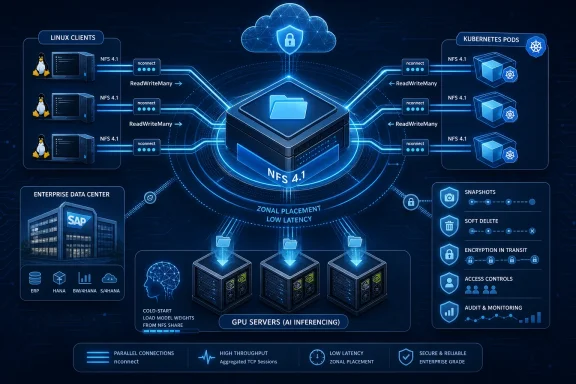
Microsoft on June 29 published an Azure Files pitch for Linux workloads, positioning NFS-backed managed file shares as a common storage layer for AI inferencing, Azure Kubernetes Service, enterprise application modernization, and partner-built cloud platforms running in Azure. The announcement is not a single blockbuster feature so much as a coordinated argument: the boring file share is being recast as a performance-sensitive cloud primitive. That matters because many of the systems now being modernized are not stateless web apps; they are Linux applications, model-serving fleets, SAP estates, CI/CD systems, and data pipelines that still expect shared files to behave like shared files. Microsoft’s bet is that Azure Files can make that old assumption feel native in a cloud that increasingly revolves around GPUs, containers, and managed platforms.
For years, cloud architecture diagrams treated file shares as the thing you escaped. Object storage was cheaper and more scalable, databases owned state, and containers encouraged developers to think of local files as disposable. If a workload still needed NFS, the implication was often that it had not yet been fully modernized.
Microsoft’s latest Azure Files messaging pushes back on that assumption. The company is arguing that shared file storage is not a legacy tax but a connective layer for Linux workloads that are becoming more distributed, more expensive to run, and more sensitive to startup time. The old file server may be gone, but the need for shared POSIX-style access has not gone with it.
That is especially true for organizations trying to modernize without rewriting everything. A Linux estate does not become cloud-native because an architect draws a Kubernetes logo around it. Applications still expect case sensitivity, Unix-style permissions, NFS semantics, and predictable paths. Azure Files is being presented as the compromise: keep the access model, outsource the infrastructure.
The timing is telling. Microsoft is not merely selling Azure Files as a storage service for lift-and-shift projects. It is tying the service to AI inferencing, Kubernetes, SAP modernization, migration tooling, partner ecosystems, and GitHub-centric developer workflows. In other words, Azure Files is being positioned as part of the modern Azure stack, not as a retirement home for old shares.
That reframing is the most interesting part of the blog. The features matter, but the strategic claim matters more: Microsoft sees Linux file storage as one of the pressure points where cloud modernization either accelerates or stalls.
That becomes expensive fast. GPUs are among the highest-cost resources in an inference architecture, and an idle GPU waiting for model files is not merely inefficient. It is a cloud bill with nothing useful happening on the other side of it.
The old approaches were workable when models and deployments were smaller. Teams could bake model weights into container images, but that creates huge images and slower image pulls. They could have each replica download its own copy, but that duplicates data and turns scale-out events into a storage stampede. Neither pattern is elegant when an inference fleet needs to react quickly to demand.
Azure Files offers a more conventional answer: put the weights once on a shared file share and let replicas mount that share as they start. Microsoft says this can keep images lean, reduce duplication, and bring new replicas online in seconds for small and mid-sized models. That last qualifier matters. The company is not claiming magic for every frontier-scale model, but it is identifying a real operational pain point for the many inference systems that live below the headline-grabbing top end.
The Linux NFS nconnect mount option is a key part of the performance story. By allowing multiple parallel TCP connections from a client to the same file share, nconnect can improve throughput under the right workload pattern. It is not a substitute for architecture, cache design, or benchmark discipline, but it gives Linux teams a familiar knob to turn when a single connection becomes the bottleneck.
Zonal placement sharpens the argument further. If the file share can live in the same availability zone as the GPU virtual machines reading from it, round-trip latency can be reduced for read-heavy startup paths. In AI infrastructure, locality is not an aesthetic preference. It is often the difference between expensive resources doing useful work and expensive resources waiting for the storage layer to catch up.
By letting customers size IOPS and throughput independently, provisioned v2 gives Microsoft a cleaner answer to the question every infrastructure team eventually asks: how do we pay for the performance characteristic we actually need? That matters in GPU-backed environments, where a storage bottleneck can waste much more money than the storage itself costs.
It also matters for cloud-native environments that grow unevenly. A multi-tenant platform might accumulate many shares, each with different usage patterns. Some need capacity. Some need bursty throughput. Some need predictable baseline performance for a narrow set of hot files. A more granular provisioning model gives operators room to tune without turning every storage decision into an overprovisioning exercise.
There is still a trade-off. Granularity creates flexibility, but it also creates responsibility. Teams will need to monitor utilization, understand throughput ceilings, and right-size shares over time. Microsoft’s pitch that percentage-based metrics can help with that is sensible, but metrics only help teams that actually build operational feedback loops around them.
That is the recurring theme in this announcement. Azure Files can remove the burden of running file infrastructure, but it does not remove the burden of understanding file workloads. The service can make the plumbing managed; it cannot make every workload self-explanatory.
Azure Files integrates with Azure Kubernetes Service through the Azure Files CSI driver, enabling dynamic provisioning through StorageClasses, expandable persistent volumes, and ReadWriteMany access across multiple pods. That combination is important because ReadWriteMany remains one of the dividing lines between simple container storage and the messier reality of shared application state.
Azure Disks are appropriate for many single-writer scenarios, but shared file access is a different problem. Content repositories, shared configuration stores, CI/CD artifact directories, and application data used by multiple replicas often need file semantics rather than block semantics. Azure Files gives AKS users a Microsoft-managed option for that class of workload.
The new file share experience also raises the scaling ceiling Microsoft wants platform teams to notice. Support for up to 10,000 file shares per subscription per region is not a consumer-friendly bullet point, but it is meaningful for multi-tenant platforms, high-density environments, and internal developer platforms that create storage resources programmatically. If every project, namespace, tenant, or environment wants its own isolated share, the old limits become architectural constraints.
Microsoft also says provisioning is about 2.5 times faster, with larger gains in batch deployments. That matters because infrastructure provisioning time becomes visible when it sits in the path of application deployment. A storage service that is technically adequate but slow to provision can become the hidden drag on platform velocity.
The interesting part is that Azure Files is being sold here not merely as storage for applications, but as storage for platforms. In a Kubernetes world, the buyer is often not an application owner asking for a share. It is a platform team trying to offer safe, repeatable storage primitives to hundreds of application teams without becoming a ticket queue.
The impressive number is not only traffic. Microsoft says deployments that once took an hour now run in three to 10 minutes, while the move to managed Azure services reduced operational workload by about one full-time engineer. That is the kind of result platform teams care about because it combines performance, deployment speed, and staffing pressure.
Of course, a customer story is still a customer story. It does not prove that Azure Files is the best answer for every Kubernetes storage pattern, nor does it replace benchmarking. But it illustrates the type of workload Microsoft wants to claim: not a toy demo, not a single legacy share, but a real platform where managed storage reduces the number of moving parts a small team has to operate.
The lesson is not that every Redis deployment should be backed in the same way. The lesson is that cloud-native does not mean stateless, and managed shared storage can be an enabler rather than a compromise when the operational model is right.
That is not a moral failing. It is how a large share of enterprise software was built, especially in SAP-adjacent, manufacturing, healthcare, finance, and line-of-business environments. For these systems, modernization often means changing where the workload runs and how it is operated, not rewriting the application’s storage model from scratch.
Azure Files NFS is positioned as a bridge for exactly that. By supporting NFS 4.1 and POSIX-style behaviors, Microsoft gives organizations a way to move Linux file workloads into Azure while preserving the access patterns applications already expect. For systems that depend on case sensitivity, Unix-style permissions, and conventional NFS mounts, that can make the difference between a migration project and a rewrite program.
The inclusion of SAP in Microsoft’s examples is deliberate. SAP landscapes are not casually refactored. They involve performance expectations, vendor support boundaries, operational procedures, and business processes that cannot simply be redesigned because a cloud platform prefers a different storage abstraction. If Azure Files can satisfy the shared storage requirements of more of those environments, Microsoft gets a stronger modernization story for one of the most valuable enterprise workload categories.
Migration tooling is part of that pitch. Microsoft points to Azure Storage Mover and Azure Migrate support for NFS as ways to assess, plan, and move Linux-based file workloads into Azure. It also acknowledges third-party migration paths from on-premises NAS through partners such as Komprise. That pluralism is important because enterprise file estates are rarely neat.
The strongest migration story is not “click here and everything is modern.” It is assessment, movement, validation, cutover, and then gradual operational improvement. Microsoft’s language suggests it understands that, at least in this pitch. The file estate is not an app package; it is often a historical record of how the business actually runs.
Snapshots and soft delete help protect against accidental deletion and certain operational mistakes. They are not a complete backup strategy by themselves, and administrators should resist treating them as one. But as part of a layered recovery model, they reduce the blast radius of human error and application misbehavior.
Encryption in transit for NFS is another practical requirement. Historically, NFS environments often relied heavily on trusted networks. In cloud deployments, where segmentation, private endpoints, hybrid connectivity, and compliance expectations all intersect, the ability to protect data moving between clients and shares becomes part of the service’s enterprise credentials.
The networking piece is equally important. Many organizations do not move Linux workloads to Azure in a clean break from on-premises infrastructure. They run hybrid for years, sometimes permanently. VPN and ExpressRoute connectivity give Azure Files a role in that hybrid operating model, especially when migration waves, disaster recovery plans, and application dependencies do not line up neatly.
Microsoft also highlights more granular governance in the new file share experience, including share-level cost tracking, network configuration, and role-based access control. That is exactly where shared storage can become dangerous if handled poorly. The more teams and applications rely on a common storage platform, the more important isolation, accounting, and access boundaries become.
Those are strong numbers, and they point to a broader reality: storage modernization rarely acts alone. The improvement likely reflects a combination of cloud architecture, compute, network placement, storage behavior, and operational redesign. But Azure Files is being positioned as one of the managed components that made the re-architecture viable.
For IT pros, the lesson is not to assume the same percentage gains will appear in every SAP environment. The lesson is that shared file storage is part of the performance envelope. If it is slow, distant, undersized, or operationally fragile, the rest of the stack suffers. If it is managed, zonally aware, and sized appropriately, it can stop being the bottleneck.
The Medline example also underscores why Microsoft is careful to talk about less disruption. Enterprises do not modernize mission-critical systems because a storage service is fashionable. They modernize when the new platform preserves enough of the old system’s expectations while improving performance, resiliency, manageability, or cost. Azure Files is being pitched as that preservation layer.
For Microsoft, that is leverage. Every partner that can treat Azure Files as a standard SMB or NFS target makes Azure more hospitable to existing enterprise software. Every ISV that can build on Azure Files without asking customers to run their own file servers reduces friction in Microsoft’s cloud marketplace.
The REST API support for NFS shares adds another layer. Standard protocols are useful for applications and operating systems, while APIs are useful for automation, management, data protection, and platform integration. A service that supports both can serve traditional workloads and cloud control planes at the same time.
That duality is central to modern infrastructure. The data plane may look familiar to a Linux application mounting NFS, but the management plane must be programmable, policy-aware, observable, and integrated with Azure identity and governance. Azure Files needs to satisfy both worlds if it wants to be more than a managed NAS replacement.
Partner scenarios such as business continuity and disaster recovery, data movement, database backups, and application enablement are not accidental add-ons. They are how storage services become sticky. Once backup workflows, migration tools, SAP and Oracle operational patterns, and SaaS platforms depend on a storage primitive, that primitive becomes part of the customer’s cloud operating model.
Azure Files’ strongest argument is manageability with familiar access. It is not trying to be the highest-performance answer for every extreme file workload, nor should customers assume it is. But for a large middle of Linux workloads that need NFS semantics, managed operations, Azure integration, and reasonable scaling, Microsoft wants it to be the default starting point.
That default matters. Cloud platforms win not only by offering exotic high-end services, but by making ordinary infrastructure decisions boring. If an AKS team, SAP migration team, or AI platform team can select Azure Files without launching a storage engineering project, Microsoft has removed friction from Azure adoption.
The risk is that “single managed file platform” can become too broad a phrase. AI model serving, Kubernetes RWX volumes, SAP shared storage, partner backup targets, and developer workflow caches have different performance and failure characteristics. The same service may support all of them, but not with the same configuration, cost model, or operational assumptions.
That is where administrators and architects need to stay skeptical. Azure Files can be a unifying platform, but unification is not the same as uniformity. The careful work is still in workload characterization, region and zone planning, throughput sizing, access control design, backup strategy, and testing under realistic failure and scale conditions.
There is also a familiar pattern here for anyone who has managed Windows file services. Shared storage starts as a convenience and becomes infrastructure. Permissions sprawl, backup assumptions, latency complaints, migration plans, and departmental ownership all arrive eventually. The cloud changes the control plane, but it does not eliminate the human and architectural problems around shared data.
Azure Files gives Microsoft a way to bring those familiar file-service concerns into Azure’s managed model. For SMB workloads, that story has long been intuitive to Windows administrators. The Linux NFS emphasis extends the same managed-service logic to teams that have historically depended on NAS appliances, self-managed NFS servers, or specialized storage platforms.
That matters in hybrid shops because consistency has value. If Azure Files can serve both SMB and NFS scenarios under a common governance and billing umbrella, infrastructure teams can reduce the number of platforms they must secure, monitor, and explain. That does not mean every workload should be forced onto Azure Files, but it does make the service more relevant to enterprise standardization conversations.
The more interesting Windows angle is AI and Kubernetes. Many organizations adopting AI services are not doing so in greenfield Linux-only startups. They are established Microsoft customers extending existing environments. A managed NFS share that helps model-serving replicas start faster may sound like a Linux detail, but the budget impact lands in the same IT organization that manages Windows endpoints, identity, security, and Azure subscriptions.
The AI inference example is a good case in point. Storing model weights once on a shared file share can reduce image bloat and duplication, but it also makes the share part of the startup critical path. If many replicas start simultaneously, the storage layer must be sized and tested for that pattern. A shared bottleneck is still a bottleneck, even when it is managed.
Kubernetes introduces similar subtleties. ReadWriteMany access is powerful, but multiple pods writing to shared storage can create application-level consistency issues if the software was not designed for it. Storage can provide file semantics; it cannot fix every concurrency assumption in an application.
Enterprise migration has its own traps. POSIX-style compatibility and NFS access reduce refactoring pressure, but they do not automatically solve path dependencies, performance expectations, legacy scripts, UID and GID mapping practices, or operational runbooks built around a specific on-premises NAS. A successful migration still requires discovery and testing, which is why Azure Migrate, Storage Mover, and partner tooling matter.
The right way to read Microsoft’s announcement is therefore neither cynicism nor blind acceptance. Azure Files is becoming more capable and more central to Azure’s Linux story. But the customers who benefit most will be the ones who treat it as a managed infrastructure component that still deserves engineering discipline.
 Microsoft Wants the File Share Back in the Center of the Cloud
For years, cloud architecture diagrams treated file shares as the thing you escaped. Object storage was cheaper and more scalable, databases owned state, and containers encouraged developers to think of local files as disposable. If a workload still needed NFS, the implication was often that it had not yet been fully modernized.Microsoft’s latest Azure Files messaging pushes back on that assumption. The company is arguing that shared file storage is not a legacy tax but a connective layer for Linux workloads that are becoming more distributed, more expensive to run, and more sensitive to startup time. The old file server may be gone, but the need for shared POSIX-style access has not gone with it.
That is especially true for organizations trying to modernize without rewriting everything. A Linux estate does not become cloud-native because an architect draws a Kubernetes logo around it. Applications still expect case sensitivity, Unix-style permissions, NFS semantics, and predictable paths. Azure Files is being presented as the compromise: keep the access model, outsource the infrastructure.
The timing is telling. Microsoft is not merely selling Azure Files as a storage service for lift-and-shift projects. It is tying the service to AI inferencing, Kubernetes, SAP modernization, migration tooling, partner ecosystems, and GitHub-centric developer workflows. In other words, Azure Files is being positioned as part of the modern Azure stack, not as a retirement home for old shares.
That reframing is the most interesting part of the blog. The features matter, but the strategic claim matters more: Microsoft sees Linux file storage as one of the pressure points where cloud modernization either accelerates or stalls.
AI Has Turned Storage Latency Into GPU Waste
The most persuasive part of Microsoft’s case is AI inferencing, because the economics are brutally simple. Before a model can answer a request, the serving instance has to load model weights from storage. When those weights are tens or hundreds of gigabytes, storage is no longer a background detail; it is part of the cold-start path.That becomes expensive fast. GPUs are among the highest-cost resources in an inference architecture, and an idle GPU waiting for model files is not merely inefficient. It is a cloud bill with nothing useful happening on the other side of it.
The old approaches were workable when models and deployments were smaller. Teams could bake model weights into container images, but that creates huge images and slower image pulls. They could have each replica download its own copy, but that duplicates data and turns scale-out events into a storage stampede. Neither pattern is elegant when an inference fleet needs to react quickly to demand.
Azure Files offers a more conventional answer: put the weights once on a shared file share and let replicas mount that share as they start. Microsoft says this can keep images lean, reduce duplication, and bring new replicas online in seconds for small and mid-sized models. That last qualifier matters. The company is not claiming magic for every frontier-scale model, but it is identifying a real operational pain point for the many inference systems that live below the headline-grabbing top end.
The Linux NFS nconnect mount option is a key part of the performance story. By allowing multiple parallel TCP connections from a client to the same file share, nconnect can improve throughput under the right workload pattern. It is not a substitute for architecture, cache design, or benchmark discipline, but it gives Linux teams a familiar knob to turn when a single connection becomes the bottleneck.
Zonal placement sharpens the argument further. If the file share can live in the same availability zone as the GPU virtual machines reading from it, round-trip latency can be reduced for read-heavy startup paths. In AI infrastructure, locality is not an aesthetic preference. It is often the difference between expensive resources doing useful work and expensive resources waiting for the storage layer to catch up.
Provisioned v2 Is Microsoft’s Answer to the “One Size Fits Nobody” Problem
The provisioned v2 billing model is a quieter but important piece of the story. Traditional storage pricing tends to bundle capacity and performance in ways that can feel mismatched for modern workloads. AI inferencing, CI systems, and shared artifact stores may need more throughput or IOPS without requiring a proportional increase in capacity.By letting customers size IOPS and throughput independently, provisioned v2 gives Microsoft a cleaner answer to the question every infrastructure team eventually asks: how do we pay for the performance characteristic we actually need? That matters in GPU-backed environments, where a storage bottleneck can waste much more money than the storage itself costs.
It also matters for cloud-native environments that grow unevenly. A multi-tenant platform might accumulate many shares, each with different usage patterns. Some need capacity. Some need bursty throughput. Some need predictable baseline performance for a narrow set of hot files. A more granular provisioning model gives operators room to tune without turning every storage decision into an overprovisioning exercise.
There is still a trade-off. Granularity creates flexibility, but it also creates responsibility. Teams will need to monitor utilization, understand throughput ceilings, and right-size shares over time. Microsoft’s pitch that percentage-based metrics can help with that is sensible, but metrics only help teams that actually build operational feedback loops around them.
That is the recurring theme in this announcement. Azure Files can remove the burden of running file infrastructure, but it does not remove the burden of understanding file workloads. The service can make the plumbing managed; it cannot make every workload self-explanatory.
Kubernetes Still Needs a Place to Put Shared State
The Kubernetes section of Microsoft’s blog is less flashy than the AI section, but for many WindowsForum readers working in mixed Windows and Linux shops, it may be more immediately relevant. Kubernetes did not eliminate state. It just made state more explicit, more policy-driven, and more dependent on storage integrations that behave predictably under orchestration.Azure Files integrates with Azure Kubernetes Service through the Azure Files CSI driver, enabling dynamic provisioning through StorageClasses, expandable persistent volumes, and ReadWriteMany access across multiple pods. That combination is important because ReadWriteMany remains one of the dividing lines between simple container storage and the messier reality of shared application state.
Azure Disks are appropriate for many single-writer scenarios, but shared file access is a different problem. Content repositories, shared configuration stores, CI/CD artifact directories, and application data used by multiple replicas often need file semantics rather than block semantics. Azure Files gives AKS users a Microsoft-managed option for that class of workload.
The new file share experience also raises the scaling ceiling Microsoft wants platform teams to notice. Support for up to 10,000 file shares per subscription per region is not a consumer-friendly bullet point, but it is meaningful for multi-tenant platforms, high-density environments, and internal developer platforms that create storage resources programmatically. If every project, namespace, tenant, or environment wants its own isolated share, the old limits become architectural constraints.
Microsoft also says provisioning is about 2.5 times faster, with larger gains in batch deployments. That matters because infrastructure provisioning time becomes visible when it sits in the path of application deployment. A storage service that is technically adequate but slow to provision can become the hidden drag on platform velocity.
The interesting part is that Azure Files is being sold here not merely as storage for applications, but as storage for platforms. In a Kubernetes world, the buyer is often not an application owner asking for a share. It is a platform team trying to offer safe, repeatable storage primitives to hundreds of application teams without becoming a ticket queue.
Zooniverse Shows the Pitch at Human Scale
Microsoft’s Zooniverse example gives the cloud-native argument a useful anchor. Zooniverse, described by Microsoft as the world’s largest platform for people-powered research, moved from AWS to a fully managed AKS environment and uses self-hosted Redis instances backed by Azure Files for caching and persisted data storage. The platform reportedly supports roughly 100 active projects and 10,000 to 15,000 daily users, with traffic spikes reaching tens of thousands of API calls per minute.The impressive number is not only traffic. Microsoft says deployments that once took an hour now run in three to 10 minutes, while the move to managed Azure services reduced operational workload by about one full-time engineer. That is the kind of result platform teams care about because it combines performance, deployment speed, and staffing pressure.
Of course, a customer story is still a customer story. It does not prove that Azure Files is the best answer for every Kubernetes storage pattern, nor does it replace benchmarking. But it illustrates the type of workload Microsoft wants to claim: not a toy demo, not a single legacy share, but a real platform where managed storage reduces the number of moving parts a small team has to operate.
The lesson is not that every Redis deployment should be backed in the same way. The lesson is that cloud-native does not mean stateless, and managed shared storage can be an enabler rather than a compromise when the operational model is right.
Enterprise Linux Modernization Is Mostly About Avoiding the Rewrite
The enterprise modernization section is where Microsoft’s argument becomes most pragmatic. Many Linux applications were not designed for cloud object stores, event streams, or twelve-factor manifestos. They were designed around files, directories, permissions, locks, and long-running operational assumptions.That is not a moral failing. It is how a large share of enterprise software was built, especially in SAP-adjacent, manufacturing, healthcare, finance, and line-of-business environments. For these systems, modernization often means changing where the workload runs and how it is operated, not rewriting the application’s storage model from scratch.
Azure Files NFS is positioned as a bridge for exactly that. By supporting NFS 4.1 and POSIX-style behaviors, Microsoft gives organizations a way to move Linux file workloads into Azure while preserving the access patterns applications already expect. For systems that depend on case sensitivity, Unix-style permissions, and conventional NFS mounts, that can make the difference between a migration project and a rewrite program.
The inclusion of SAP in Microsoft’s examples is deliberate. SAP landscapes are not casually refactored. They involve performance expectations, vendor support boundaries, operational procedures, and business processes that cannot simply be redesigned because a cloud platform prefers a different storage abstraction. If Azure Files can satisfy the shared storage requirements of more of those environments, Microsoft gets a stronger modernization story for one of the most valuable enterprise workload categories.
Migration tooling is part of that pitch. Microsoft points to Azure Storage Mover and Azure Migrate support for NFS as ways to assess, plan, and move Linux-based file workloads into Azure. It also acknowledges third-party migration paths from on-premises NAS through partners such as Komprise. That pluralism is important because enterprise file estates are rarely neat.
The strongest migration story is not “click here and everything is modern.” It is assessment, movement, validation, cutover, and then gradual operational improvement. Microsoft’s language suggests it understands that, at least in this pitch. The file estate is not an app package; it is often a historical record of how the business actually runs.
Business Continuity Is the Part Nobody Wants to Rediscover During an Outage
Once Linux workloads are in Azure, the storage conversation shifts from migration to resilience and security. Microsoft emphasizes snapshots, soft delete, encryption in transit for NFS, and networking options such as VPN and ExpressRoute. These are not glamorous features, but they are the features that determine whether a managed file service is credible for production.Snapshots and soft delete help protect against accidental deletion and certain operational mistakes. They are not a complete backup strategy by themselves, and administrators should resist treating them as one. But as part of a layered recovery model, they reduce the blast radius of human error and application misbehavior.
Encryption in transit for NFS is another practical requirement. Historically, NFS environments often relied heavily on trusted networks. In cloud deployments, where segmentation, private endpoints, hybrid connectivity, and compliance expectations all intersect, the ability to protect data moving between clients and shares becomes part of the service’s enterprise credentials.
The networking piece is equally important. Many organizations do not move Linux workloads to Azure in a clean break from on-premises infrastructure. They run hybrid for years, sometimes permanently. VPN and ExpressRoute connectivity give Azure Files a role in that hybrid operating model, especially when migration waves, disaster recovery plans, and application dependencies do not line up neatly.
Microsoft also highlights more granular governance in the new file share experience, including share-level cost tracking, network configuration, and role-based access control. That is exactly where shared storage can become dangerous if handled poorly. The more teams and applications rely on a common storage platform, the more important isolation, accounting, and access boundaries become.
Medline Is the Enterprise Case Study Microsoft Needed
Medline’s SAP migration is the enterprise proof point Microsoft uses to show that Azure Files is not limited to developer conveniences. As part of a move from an on-premises SAP ECC on HANA environment to Azure, Medline built a cloud-native SAP solution using fully managed Azure Files shares for zonally resilient shared storage. Microsoft says the re-architecture improved transaction times for key SAP workloads by more than 80 percent, cut response times for essential transactions by nearly 60 percent, and accelerated IDoc processing by more than 50 percent.Those are strong numbers, and they point to a broader reality: storage modernization rarely acts alone. The improvement likely reflects a combination of cloud architecture, compute, network placement, storage behavior, and operational redesign. But Azure Files is being positioned as one of the managed components that made the re-architecture viable.
For IT pros, the lesson is not to assume the same percentage gains will appear in every SAP environment. The lesson is that shared file storage is part of the performance envelope. If it is slow, distant, undersized, or operationally fragile, the rest of the stack suffers. If it is managed, zonally aware, and sized appropriately, it can stop being the bottleneck.
The Medline example also underscores why Microsoft is careful to talk about less disruption. Enterprises do not modernize mission-critical systems because a storage service is fashionable. They modernize when the new platform preserves enough of the old system’s expectations while improving performance, resiliency, manageability, or cost. Azure Files is being pitched as that preservation layer.
Partners Care Because Protocols Are the Platform
The partner and ISV section may sound like ecosystem boilerplate, but it is strategically important. Azure Files exposes SMB 3.x and NFS 4.1 endpoints rather than forcing every application through a proprietary storage interface. That protocol choice is what makes the service usable by existing tools, backup products, migration platforms, SaaS systems, and applications that were never written with Azure-specific APIs in mind.For Microsoft, that is leverage. Every partner that can treat Azure Files as a standard SMB or NFS target makes Azure more hospitable to existing enterprise software. Every ISV that can build on Azure Files without asking customers to run their own file servers reduces friction in Microsoft’s cloud marketplace.
The REST API support for NFS shares adds another layer. Standard protocols are useful for applications and operating systems, while APIs are useful for automation, management, data protection, and platform integration. A service that supports both can serve traditional workloads and cloud control planes at the same time.
That duality is central to modern infrastructure. The data plane may look familiar to a Linux application mounting NFS, but the management plane must be programmable, policy-aware, observable, and integrated with Azure identity and governance. Azure Files needs to satisfy both worlds if it wants to be more than a managed NAS replacement.
Partner scenarios such as business continuity and disaster recovery, data movement, database backups, and application enablement are not accidental add-ons. They are how storage services become sticky. Once backup workflows, migration tools, SAP and Oracle operational patterns, and SaaS platforms depend on a storage primitive, that primitive becomes part of the customer’s cloud operating model.
The Real Competition Is Not Just Another File Service
It would be too narrow to view Azure Files NFS only against other managed file services. In real architecture decisions, it competes with Azure NetApp Files, self-managed NFS servers, object storage plus application changes, distributed file systems, database-native storage, and sometimes doing nothing at all. Each option carries a different mix of performance, cost, operational burden, compatibility, and vendor lock-in.Azure Files’ strongest argument is manageability with familiar access. It is not trying to be the highest-performance answer for every extreme file workload, nor should customers assume it is. But for a large middle of Linux workloads that need NFS semantics, managed operations, Azure integration, and reasonable scaling, Microsoft wants it to be the default starting point.
That default matters. Cloud platforms win not only by offering exotic high-end services, but by making ordinary infrastructure decisions boring. If an AKS team, SAP migration team, or AI platform team can select Azure Files without launching a storage engineering project, Microsoft has removed friction from Azure adoption.
The risk is that “single managed file platform” can become too broad a phrase. AI model serving, Kubernetes RWX volumes, SAP shared storage, partner backup targets, and developer workflow caches have different performance and failure characteristics. The same service may support all of them, but not with the same configuration, cost model, or operational assumptions.
That is where administrators and architects need to stay skeptical. Azure Files can be a unifying platform, but unification is not the same as uniformity. The careful work is still in workload characterization, region and zone planning, throughput sizing, access control design, backup strategy, and testing under realistic failure and scale conditions.
Windows Shops Should Read This as a Linux Story With Familiar Lessons
Although the blog is explicitly about Linux workloads, WindowsForum readers should not treat it as someone else’s news. Many Microsoft-centric environments now run mixed estates: Windows Server applications, Linux web tiers, AKS clusters, SAP systems, DevOps tooling, GitHub workflows, and AI services all operating under the same Azure governance umbrella. The storage decisions for Linux workloads increasingly affect the whole enterprise platform.There is also a familiar pattern here for anyone who has managed Windows file services. Shared storage starts as a convenience and becomes infrastructure. Permissions sprawl, backup assumptions, latency complaints, migration plans, and departmental ownership all arrive eventually. The cloud changes the control plane, but it does not eliminate the human and architectural problems around shared data.
Azure Files gives Microsoft a way to bring those familiar file-service concerns into Azure’s managed model. For SMB workloads, that story has long been intuitive to Windows administrators. The Linux NFS emphasis extends the same managed-service logic to teams that have historically depended on NAS appliances, self-managed NFS servers, or specialized storage platforms.
That matters in hybrid shops because consistency has value. If Azure Files can serve both SMB and NFS scenarios under a common governance and billing umbrella, infrastructure teams can reduce the number of platforms they must secure, monitor, and explain. That does not mean every workload should be forced onto Azure Files, but it does make the service more relevant to enterprise standardization conversations.
The more interesting Windows angle is AI and Kubernetes. Many organizations adopting AI services are not doing so in greenfield Linux-only startups. They are established Microsoft customers extending existing environments. A managed NFS share that helps model-serving replicas start faster may sound like a Linux detail, but the budget impact lands in the same IT organization that manages Windows endpoints, identity, security, and Azure subscriptions.
The Catch Is That Managed Does Not Mean Effortless
Microsoft’s blog is optimistic by design, but IT pros should read between the lines. Azure Files can remove the work of maintaining file servers, patching NAS appliances, or building custom NFS clusters. It does not remove the need to design for latency, throughput, availability zones, access boundaries, backup, restore testing, or application behavior under contention.The AI inference example is a good case in point. Storing model weights once on a shared file share can reduce image bloat and duplication, but it also makes the share part of the startup critical path. If many replicas start simultaneously, the storage layer must be sized and tested for that pattern. A shared bottleneck is still a bottleneck, even when it is managed.
Kubernetes introduces similar subtleties. ReadWriteMany access is powerful, but multiple pods writing to shared storage can create application-level consistency issues if the software was not designed for it. Storage can provide file semantics; it cannot fix every concurrency assumption in an application.
Enterprise migration has its own traps. POSIX-style compatibility and NFS access reduce refactoring pressure, but they do not automatically solve path dependencies, performance expectations, legacy scripts, UID and GID mapping practices, or operational runbooks built around a specific on-premises NAS. A successful migration still requires discovery and testing, which is why Azure Migrate, Storage Mover, and partner tooling matter.
The right way to read Microsoft’s announcement is therefore neither cynicism nor blind acceptance. Azure Files is becoming more capable and more central to Azure’s Linux story. But the customers who benefit most will be the ones who treat it as a managed infrastructure component that still deserves engineering discipline.
The Managed NFS Pitch Comes Down to Five Practical Bets
Microsoft’s Azure Files update is best understood as a set of practical bets about where Linux workloads are going in Azure. The company is betting that AI, Kubernetes, enterprise modernization, and partner platforms all need shared file storage that feels familiar to applications but behaves like a cloud service to operators.- Azure Files NFS is being positioned as a common managed file layer for Linux workloads rather than a niche migration target for old applications.
- AI inferencing is the strongest performance argument because model-weight loading can directly affect cold starts, GPU utilization, and cost per inference.
- AKS integration through the Azure Files CSI driver makes ReadWriteMany storage a first-class option for container platforms that need shared state, artifacts, or persistent file access.
- Enterprise modernization remains the most pragmatic use case because many SAP and line-of-business systems need NFS and POSIX-style behavior more than they need a full rewrite.
- The new file share experience, provisioned v2 model, zonal placement, snapshots, soft delete, and NFS encryption in transit are the supporting pieces that make the service more credible for production.
- Architects should still benchmark and design carefully because a managed file share can remove operational toil without eliminating workload-specific bottlenecks.
References
- Primary source: Microsoft Azure
Published: 2026-06-29T15:30:12.872113
Loading…
azure.microsoft.com - Official source: learn.microsoft.com
Loading…
learn.microsoft.com - Related coverage: azureglossary.com
Loading…
azureglossary.com - Official source: opensource.microsoft.com
From open source to agentic systems: Microsoft at Open Source Summit North America 2026 | Microsoft Open Source Blog
Discover how Azure Linux 4.0 and Azure Container Linux deliver a secure, scalable Linux foundation for cloud native apps, containers, and AI workloads.opensource.microsoft.com - Related coverage: azure-heros.com
Loading…
www.azure-heros.com - Related coverage: docs.netapp.com
Loading…
docs.netapp.com
- Official source: download.microsoft.com
- Related coverage: docs.cloudera.com
Loading…
docs.cloudera.com