

Windows 11 has been demonstrated on an early-2000s ASRock ConRoe865PE motherboard using DDR1 memory, AGP graphics, and an Intel Core 2 Quad Q6600, after enthusiast driver work allowed an ATI Radeon HD 4650 AGP card to operate with acceleration. The stunt is not a roadmap for sane desktop deployment. It is, however, a revealing stress test of the boundary between what Windows 11 requires, what Microsoft supports, and what the operating system can still be persuaded to do.
The lesson is not that everyone should raid the parts bin and bring back AGP. The lesson is that Windows remains more historically elastic than its marketing suggests, while modern Windows policy has become less about raw bootability and more about a managed security baseline. A DDR1 Windows 11 PC is absurd, but it is an absurdity with a point.
The machine at the center of the demonstration is a museum piece with one very useful loophole. ASRock’s ConRoe865PE was one of those odd transitional boards that let users keep old DDR memory and AGP graphics while moving to newer LGA775 processors. Pairing that board with a Core 2 Quad Q6600 gives the platform far more CPU headroom than a normal Pentium 4-era system would have had, even though the surrounding chipset, memory, and graphics bus belong to a different age.
That matters because the story is easy to misunderstand. Windows 11 is not suddenly comfortable on any beige-box relic from 2003. The Q6600 is a 64-bit quad-core processor from the Core era, not a NetBurst fossil gasping under a composited desktop. The motherboard is old, but unusually accommodating.
The graphics side is where the project becomes more than a boot-screen flex. The ATI Radeon HD 4650 AGP is late enough to have useful video capabilities, but old enough that Windows 11 was never a realistic target. Getting AGP 8X support, 3D acceleration, and H.264 hardware decoding working required modified driver installation rather than a clean trip through Windows Update.
That is why this is impressive. Booting an operating system on unsupported hardware is one kind of hack. Making the machine usable enough to run browsers, decode video, and launch older 3D games is another. The difference is the difference between a screenshot and a system.
Microsoft’s argument was not entirely cynical. TPM-backed identity, measured boot, virtualization-based security, and modern driver models are easier to assume when the supported device fleet starts at a higher floor. Enterprise IT departments know the pain of supporting every possible configuration, especially when some of those configurations are decades out of step with today’s threat model.
But the DDR1 demonstration highlights the awkwardness in the public messaging. Users often hear “Windows 11 cannot run on that PC” when the more precise statement is “Microsoft does not want that PC in the supported Windows 11 population.” Those are very different claims.
The first is a technical impossibility. The second is a product and support decision. Microsoft’s own Windows 11 IoT Enterprise LTSC requirements make that distinction harder to ignore, because that channel provides more flexibility for specialized devices, including optional TPM and Secure Boot requirements and support for BIOS configurations under the right edition and scenario.
That world is different from the consumer PC world. A point-of-sale terminal, manufacturing controller, or specialized workstation may not need the same user-facing experience as a laptop sold at Best Buy. It may need long servicing, predictable behavior, and the ability to run on hardware that was selected for lifecycle reasons rather than consumer fashion.
Microsoft’s optional minimum requirements for Windows IoT Enterprise LTSC acknowledge that flexibility. They do not turn every old PC into a recommended Windows 11 machine. They say, in effect, that device makers can make narrower, validated choices when they own the whole configuration and the purpose of the device.
That is a crucial distinction for WindowsForum readers. IoT LTSC is not supposed to be a secret enthusiast edition for reviving every unsupported desktop. It is a licensing and servicing channel aimed at managed devices. The fact that it can help explain why Windows 11 runs on legacy BIOS hardware does not mean Microsoft has blessed your 20-year-old gaming rig as a daily driver.
The Radeon HD 4650 AGP sits in a strange historical pocket. It is newer than the platform around it, and it carries enough media and shader capability to be useful. But its AGP bridge and driver stack belong to an era when AMD and ATI were supporting hardware combinations that modern Windows no longer expects to encounter.
According to the reports around the demonstration, the working path involved old 64-bit Windows 7-era drivers or Windows 10 AGP driver packages with custom INF work. That is not a trivial matter of clicking “Update driver.” It is the kind of compatibility wrangling that depends on knowing which parts of the driver model are strict, which parts can be nudged, and which hardware IDs need to be persuaded to match.
The result is more than cosmetic. Hardware decoding means video playback is less punishing on the CPU. 3D acceleration means old games and benchmarks can run as actual accelerated workloads rather than software-rendered curiosities. That is why “it runs Crysis” still lands as a punchline after all these years: the system is not merely alive, it is doing period-appropriate PC things on a modern OS shell.
But performance is not the same as platform fitness. DDR1 bandwidth, old SATA modes, limited memory capacity, aging capacitors, missing firmware features, and ancient peripheral controllers all impose costs. A machine like this can be made stable in one user’s hands while remaining a bad bet for anyone who needs predictable updates, recoverability, or security posture.
That tension is familiar to anyone who has supported Windows in the real world. A machine can pass the “does it boot?” test and fail the “would I put a user on it?” test. It can run the operating system and still be a liability.
This is where enthusiasts and administrators often talk past each other. Enthusiasts see artificial limits and rightly enjoy breaking them. Administrators see unsupported combinations and start calculating incident response, backup strategy, driver provenance, and the next Patch Tuesday.
The DDR1 build is a reminder that this compatibility culture still exists inside Windows. The operating system can accommodate legacy ACPI, old driver models, and hardware arrangements that look irrational by 2026 standards. Microsoft has spent decades avoiding clean breaks, and that institutional memory is still visible.
Yet the modern Windows story is increasingly conditional. Compatibility is tolerated until it conflicts with security posture, update reliability, telemetry assumptions, or support economics. Windows 11 did not erase the past, but it did make the past negotiate for entry.
That negotiation is not always transparent to users. One edition says no. Another edition says maybe. A tool bypasses a check. A driver installs with an INF edit. The platform still bends, but it no longer promises to bend for everyone.
A DDR1 motherboard has none of the platform assumptions modern Windows security features prefer. There is no TPM 2.0 root of trust. There is no native Secure Boot chain. Firmware update practices from that era were primitive by current standards. Option ROMs, legacy boot paths, and old driver stacks widen the area where trust becomes difficult to measure.
For a hobby project, that may be acceptable. For a family member’s banking PC, a business endpoint, or a domain-joined workstation, it is not a cute quirk. It is operational risk.
The uncomfortable truth is that Microsoft can be right about the security benefits of modern hardware while enthusiasts are also right that Windows 11 can run on much older machines. Those facts do not cancel each other. They describe different priorities.
Against that backdrop, a DDR1 Windows 11 machine becomes more than a novelty. It becomes an argument in metal and silicon: if this absurd board can be made to run the OS, why is a far newer seventh-generation Core laptop excluded? Microsoft has technical answers, but the optics remain difficult.
The answer, again, is that Microsoft is not defining Windows 11 by the weakest device that can be coerced into booting it. It is defining Windows 11 by the baseline it wants to support, secure, and service. That is rational from Redmond’s perspective, but it is emotionally unsatisfying for users staring at functioning PCs with years of practical life left.
This is where the enthusiast scene performs a useful public service. It tests the claims. It finds the seams. It reminds vendors that “unsupported” should not be laundered into “impossible.”
Driver provenance becomes a serious issue. Modified packages may solve one problem while introducing another. Old GPU drivers may lack security fixes for vulnerabilities discovered long after the vendor stopped caring. Legacy firmware may never have been designed for the kinds of threat models now assumed in enterprise environments.
There is also the serviceability problem. Feature updates, cumulative updates, driver replacement, recovery environments, and backup tooling can all behave differently on unsupported hardware. A setup that works today may become fragile after a monthly update. The user who built it can probably recover; a help desk cannot scale that intuition.
For labs, retrocomputing channels, and compatibility research, this is fascinating. For production, it is a warning label.
That is why these demonstrations keep attracting attention. They reveal that a PC is not only a list of components. It is a stack of permissions, signatures, boot paths, APIs, and vendor decisions. Change one layer, and hardware written off as dead can suddenly perform one more trick.
The same dynamic explains why some old systems age gracefully and others collapse quickly. A machine with a usable 64-bit CPU, enough RAM, and a driver path has options. A machine trapped behind missing instruction sets, unsigned drivers, or unsupported firmware has fewer. Obsolescence is rarely one clean line.
This also complicates the environmental conversation. Extending hardware life is good when it avoids waste without creating security or energy costs that outweigh the benefit. But keeping every old PC alive as a general-purpose internet endpoint is not automatically responsible. Longevity has to be paired with role, risk, and maintenance.
Windows is still the operating system of improbable compatibility. Windows is also now the operating system of enforced baselines. Microsoft wants the credibility of both, but the two instincts collide whenever an old machine proves more capable than the support matrix admits.
That collision will keep happening. The PC installed base is too varied, the enthusiast community is too persistent, and Windows itself is too historically layered for clean marketing lines to survive contact with real hardware.
The lesson is not that everyone should raid the parts bin and bring back AGP. The lesson is that Windows remains more historically elastic than its marketing suggests, while modern Windows policy has become less about raw bootability and more about a managed security baseline. A DDR1 Windows 11 PC is absurd, but it is an absurdity with a point.
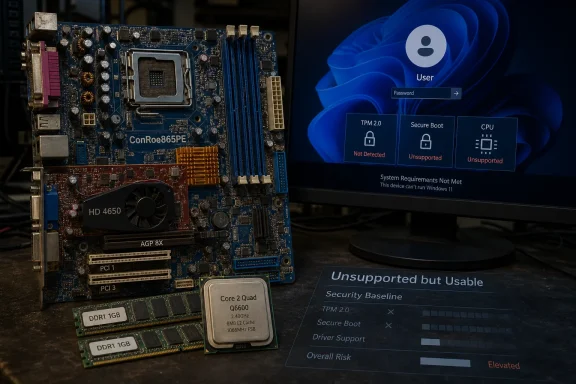 The Franken-PC Exposes a Gap Between Capability and Policy
The machine at the center of the demonstration is a museum piece with one very useful loophole. ASRock’s ConRoe865PE was one of those odd transitional boards that let users keep old DDR memory and AGP graphics while moving to newer LGA775 processors. Pairing that board with a Core 2 Quad Q6600 gives the platform far more CPU headroom than a normal Pentium 4-era system would have had, even though the surrounding chipset, memory, and graphics bus belong to a different age.That matters because the story is easy to misunderstand. Windows 11 is not suddenly comfortable on any beige-box relic from 2003. The Q6600 is a 64-bit quad-core processor from the Core era, not a NetBurst fossil gasping under a composited desktop. The motherboard is old, but unusually accommodating.
The graphics side is where the project becomes more than a boot-screen flex. The ATI Radeon HD 4650 AGP is late enough to have useful video capabilities, but old enough that Windows 11 was never a realistic target. Getting AGP 8X support, 3D acceleration, and H.264 hardware decoding working required modified driver installation rather than a clean trip through Windows Update.
That is why this is impressive. Booting an operating system on unsupported hardware is one kind of hack. Making the machine usable enough to run browsers, decode video, and launch older 3D games is another. The difference is the difference between a screenshot and a system.
Microsoft’s Hardware Line Was Always a Security Argument
When Microsoft launched Windows 11, the controversial part was never whether the NT kernel could execute on older PCs. It could, and enthusiasts proved that quickly. The controversy was that Microsoft tied the Windows 11 identity to a hardware security baseline: TPM 2.0, Secure Boot, modern CPUs, UEFI, and graphics support expectations that cut off a large amount of still-working hardware.Microsoft’s argument was not entirely cynical. TPM-backed identity, measured boot, virtualization-based security, and modern driver models are easier to assume when the supported device fleet starts at a higher floor. Enterprise IT departments know the pain of supporting every possible configuration, especially when some of those configurations are decades out of step with today’s threat model.
But the DDR1 demonstration highlights the awkwardness in the public messaging. Users often hear “Windows 11 cannot run on that PC” when the more precise statement is “Microsoft does not want that PC in the supported Windows 11 population.” Those are very different claims.
The first is a technical impossibility. The second is a product and support decision. Microsoft’s own Windows 11 IoT Enterprise LTSC requirements make that distinction harder to ignore, because that channel provides more flexibility for specialized devices, including optional TPM and Secure Boot requirements and support for BIOS configurations under the right edition and scenario.
IoT LTSC Is the Escape Hatch That Was Never Meant for Hobbyists
The reference to Windows 11 IoT is not a trivia point. It is the hinge of the whole story. Windows 11 IoT Enterprise LTSC 2024 is designed for embedded, industrial, kiosk, medical, retail, and appliance-like systems where the owner controls the workload and validates the hardware stack.That world is different from the consumer PC world. A point-of-sale terminal, manufacturing controller, or specialized workstation may not need the same user-facing experience as a laptop sold at Best Buy. It may need long servicing, predictable behavior, and the ability to run on hardware that was selected for lifecycle reasons rather than consumer fashion.
Microsoft’s optional minimum requirements for Windows IoT Enterprise LTSC acknowledge that flexibility. They do not turn every old PC into a recommended Windows 11 machine. They say, in effect, that device makers can make narrower, validated choices when they own the whole configuration and the purpose of the device.
That is a crucial distinction for WindowsForum readers. IoT LTSC is not supposed to be a secret enthusiast edition for reviving every unsupported desktop. It is a licensing and servicing channel aimed at managed devices. The fact that it can help explain why Windows 11 runs on legacy BIOS hardware does not mean Microsoft has blessed your 20-year-old gaming rig as a daily driver.
The AGP Driver Work Is the Real Hack
The operating system boot is the headline, but the graphics driver is the engineering story. AGP was already fading when Windows 7 arrived. By the time Windows 11 entered the scene, the PC graphics world had long since moved through PCI Express generations, WDDM revisions, and driver-signing expectations that AGP hardware was never designed to meet.The Radeon HD 4650 AGP sits in a strange historical pocket. It is newer than the platform around it, and it carries enough media and shader capability to be useful. But its AGP bridge and driver stack belong to an era when AMD and ATI were supporting hardware combinations that modern Windows no longer expects to encounter.
According to the reports around the demonstration, the working path involved old 64-bit Windows 7-era drivers or Windows 10 AGP driver packages with custom INF work. That is not a trivial matter of clicking “Update driver.” It is the kind of compatibility wrangling that depends on knowing which parts of the driver model are strict, which parts can be nudged, and which hardware IDs need to be persuaded to match.
The result is more than cosmetic. Hardware decoding means video playback is less punishing on the CPU. 3D acceleration means old games and benchmarks can run as actual accelerated workloads rather than software-rendered curiosities. That is why “it runs Crysis” still lands as a punchline after all these years: the system is not merely alive, it is doing period-appropriate PC things on a modern OS shell.
Old Hardware Can Be Fast Enough and Still Be the Wrong Hardware
The Core 2 Quad Q6600 deserves its cult reputation. In 2007, it was a landmark enthusiast chip: four cores, reasonable clocks, and a long afterlife in overclocked systems. Even today, a Q6600 can feel less ridiculous than its age suggests when running lightweight workloads.But performance is not the same as platform fitness. DDR1 bandwidth, old SATA modes, limited memory capacity, aging capacitors, missing firmware features, and ancient peripheral controllers all impose costs. A machine like this can be made stable in one user’s hands while remaining a bad bet for anyone who needs predictable updates, recoverability, or security posture.
That tension is familiar to anyone who has supported Windows in the real world. A machine can pass the “does it boot?” test and fail the “would I put a user on it?” test. It can run the operating system and still be a liability.
This is where enthusiasts and administrators often talk past each other. Enthusiasts see artificial limits and rightly enjoy breaking them. Administrators see unsupported combinations and start calculating incident response, backup strategy, driver provenance, and the next Patch Tuesday.
The Windows Compatibility Miracle Is Becoming More Conditional
One reason Windows became Windows is that it carried the past better than its rivals. Old applications, old peripherals, oddball boards, questionable drivers, and obscure enterprise dependencies all survived longer than they had any right to survive. Backward compatibility was not a side feature; it was part of the platform’s political economy.The DDR1 build is a reminder that this compatibility culture still exists inside Windows. The operating system can accommodate legacy ACPI, old driver models, and hardware arrangements that look irrational by 2026 standards. Microsoft has spent decades avoiding clean breaks, and that institutional memory is still visible.
Yet the modern Windows story is increasingly conditional. Compatibility is tolerated until it conflicts with security posture, update reliability, telemetry assumptions, or support economics. Windows 11 did not erase the past, but it did make the past negotiate for entry.
That negotiation is not always transparent to users. One edition says no. Another edition says maybe. A tool bypasses a check. A driver installs with an INF edit. The platform still bends, but it no longer promises to bend for everyone.
The Security Trade-Off Is Not Imaginary
It is tempting to treat Microsoft’s Windows 11 requirements as pure gatekeeping. There is some truth in that criticism, especially when capable PCs were excluded while low-end supported systems sometimes delivered unimpressive real-world performance. But dismissing the security argument entirely would be lazy.A DDR1 motherboard has none of the platform assumptions modern Windows security features prefer. There is no TPM 2.0 root of trust. There is no native Secure Boot chain. Firmware update practices from that era were primitive by current standards. Option ROMs, legacy boot paths, and old driver stacks widen the area where trust becomes difficult to measure.
For a hobby project, that may be acceptable. For a family member’s banking PC, a business endpoint, or a domain-joined workstation, it is not a cute quirk. It is operational risk.
The uncomfortable truth is that Microsoft can be right about the security benefits of modern hardware while enthusiasts are also right that Windows 11 can run on much older machines. Those facts do not cancel each other. They describe different priorities.
The Coming Windows 10 Deadline Gives the Stunt Political Weight
This demonstration lands with extra force because Windows 10’s mainstream support story is nearing its final chapter. Millions of machines that still feel usable are on the wrong side of the Windows 11 support line. Some will move to paid extended security options, some will shift to Linux, some will be replaced, and some will drift into unsupported use because that is what always happens at scale.Against that backdrop, a DDR1 Windows 11 machine becomes more than a novelty. It becomes an argument in metal and silicon: if this absurd board can be made to run the OS, why is a far newer seventh-generation Core laptop excluded? Microsoft has technical answers, but the optics remain difficult.
The answer, again, is that Microsoft is not defining Windows 11 by the weakest device that can be coerced into booting it. It is defining Windows 11 by the baseline it wants to support, secure, and service. That is rational from Redmond’s perspective, but it is emotionally unsatisfying for users staring at functioning PCs with years of practical life left.
This is where the enthusiast scene performs a useful public service. It tests the claims. It finds the seams. It reminds vendors that “unsupported” should not be laundered into “impossible.”
For IT Pros, the Lesson Is Validation, Not Nostalgia
No administrator should look at this project and decide to loosen endpoint standards. If anything, the lesson goes the other way. The more exotic the stack, the more responsibility shifts from Microsoft to the person choosing to run it.Driver provenance becomes a serious issue. Modified packages may solve one problem while introducing another. Old GPU drivers may lack security fixes for vulnerabilities discovered long after the vendor stopped caring. Legacy firmware may never have been designed for the kinds of threat models now assumed in enterprise environments.
There is also the serviceability problem. Feature updates, cumulative updates, driver replacement, recovery environments, and backup tooling can all behave differently on unsupported hardware. A setup that works today may become fragile after a monthly update. The user who built it can probably recover; a help desk cannot scale that intuition.
For labs, retrocomputing channels, and compatibility research, this is fascinating. For production, it is a warning label.
The Best Hardware Stories Are Really Software Stories
The charm of the DDR1 Windows 11 build is that it feels like a hardware resurrection. In reality, it is a software boundary story. The motherboard, CPU, and GPU are fixed artifacts. What changed was the set of assumptions around installation, firmware, drivers, and support policy.That is why these demonstrations keep attracting attention. They reveal that a PC is not only a list of components. It is a stack of permissions, signatures, boot paths, APIs, and vendor decisions. Change one layer, and hardware written off as dead can suddenly perform one more trick.
The same dynamic explains why some old systems age gracefully and others collapse quickly. A machine with a usable 64-bit CPU, enough RAM, and a driver path has options. A machine trapped behind missing instruction sets, unsigned drivers, or unsupported firmware has fewer. Obsolescence is rarely one clean line.
This also complicates the environmental conversation. Extending hardware life is good when it avoids waste without creating security or energy costs that outweigh the benefit. But keeping every old PC alive as a general-purpose internet endpoint is not automatically responsible. Longevity has to be paired with role, risk, and maintenance.
The DDR1 Demo Turns Windows 11 Into a Mirror
The most concrete read of the demonstration is simple: a determined user made Windows 11 work on a DDR1-era AGP platform with a Core 2 Quad and modified Radeon drivers. The broader read is more interesting. This project reflects the unresolved contradictions of the Windows ecosystem in 2026.Windows is still the operating system of improbable compatibility. Windows is also now the operating system of enforced baselines. Microsoft wants the credibility of both, but the two instincts collide whenever an old machine proves more capable than the support matrix admits.
That collision will keep happening. The PC installed base is too varied, the enthusiast community is too persistent, and Windows itself is too historically layered for clean marketing lines to survive contact with real hardware.
- Windows 11 running on this DDR1 and AGP system proves technical possibility, not practical supportability.
- The ASRock ConRoe865PE is an unusually flexible transitional motherboard, which makes the feat less universal than the headline suggests.
- The Core 2 Quad Q6600 gives the system enough CPU capability to avoid being a pure Pentium 4-era stunt.
- The Radeon HD 4650 AGP driver work is central because accelerated graphics and video decoding turn a boot demo into a usable experiment.
- Windows 11 IoT Enterprise LTSC explains part of the legacy BIOS story, but it does not make old consumer PCs officially supported Windows 11 desktops.
- The project strengthens the case for clearer language around unsupported hardware, because “not supported” and “cannot run” are not the same claim.
References
- Primary source: KitGuru
Published: Mon, 29 Jun 2026 17:44:12 GMT
Loading…
www.kitguru.net - Related coverage: tomshardware.com
RAM crisis provokes enthusiast to try Windows 11 on DDR1-era hardware — other key vintage components included the Core 2 Q6600 and ATI Radeon HD 4650 AGP | Tom's Hardware
'The best part,' says our hacky hero. 'It's completely stable.'www.tomshardware.com - Related coverage: pausehardware.com
Loading…
pausehardware.com - Official source: learn.microsoft.com
Loading…
learn.microsoft.com - Official source: microsoft.com
Loading…
www.microsoft.com - Related coverage: deskmodder.de
Windows 11 24H2 IoT Enterprise und IoT Enterprise LTSC Hardwareanforderungen sind sehr gering - Deskmodder.de
Während für die Consumer sich die Hardwarevoraussetzungen bei der Windows 11 24H2 gegenüber den Vorgängerversionen nicht geändert hat, außer dass ganz alte CPUs ohne SSE4.2 rausgeflogen sind, ist es bei der Windows 11 24H2 IoT Enterprise und IoT Enterprise LTSC…www.deskmodder.de
- Related coverage: forums.tomshardware.com
Loading…
forums.tomshardware.com - Related coverage: videocardz.com
Loading…
videocardz.com - Related coverage: itc.ua
Loading…
itc.ua - Related coverage: hackaday.com
Using Windows 11 On An LGA 775 PC With AGP Videocard | Hackaday
Although the thought of installing a modern operating system like Windows 11 on something as archaic as a Core 2 Quad Q6600 Intel CPU may seem ridiculous, it being the flagship CPU of the time mean…hackaday.com
- Related coverage: windowsarea.de
Microsoft reduziert Systemanforderungen für Windows 11 24H2 LTSC: TPM für IoT nun optional
Microsoft hat damit erstmals die Anforderungen für Windows 11 reduziert. Die Anforderungen sind im Grunde dieselben wie bei Windows 7.windowsarea.de