

Microsoft added roadmap ID 566701 on June 29, 2026, saying Edit with Copilot in PowerPoint for Microsoft 365 Copilot Premium users is in development for GCC High on desktop and web, with general availability targeted for September 2026. That sounds like a small roadmap entry until you remember where it is landing. In government clouds, every Copilot feature is a referendum on whether Microsoft can make generative AI useful without asking regulated customers to loosen their grip on data, identity, auditability, and trust.
PowerPoint is not where most people expect enterprise AI strategy to reveal itself. The app is the butt of corporate jokes, the graveyard of quarterly updates, and the place where strategy becomes rectangles. But for government agencies, defense contractors, and regulated suppliers, PowerPoint is also where proposals, program reviews, acquisition plans, threat briefings, and executive decisions are packaged for circulation.
That is why Copilot’s arrival as an editing assistant inside PowerPoint for GCC High matters. Microsoft is not merely adding a chat box to another Office app. It is trying to normalize natural-language document manipulation in one of the most sensitive Microsoft 365 environments short of DoD.
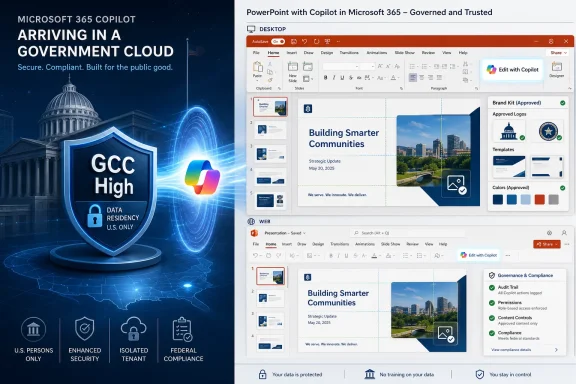
The roadmap entry says users will be able to start or refine presentations by asking Copilot to generate slides, update content, improve layouts, polish design, and preserve formatting, structure, and branding. It also says Copilot can connect to a brand kit, apply templates, insert approved imagery, and check brand compliance. For ordinary commercial tenants, that is productivity software catching up with the obvious. For GCC High, it is the slow collision of generative AI with procurement culture, controlled information, and institutional caution.
The key phrase is not “create slides.” It is inside your deck. Microsoft’s long game is not a separate AI workspace where users copy and paste output into Office. It is an AI layer embedded where work already happens, with enough access to context, file structure, and organizational signals to do more than autocomplete sentences.
Microsoft’s own government cloud positioning rests on isolation, U.S. data residency, compliance alignment, and a different operational model from standard multi-tenant commercial Microsoft 365. GCC High is designed for organizations handling sensitive government workloads and controlled unclassified information, including parts of the defense industrial base. That means feature gaps are not merely engineering backlog. They are the cost of making cloud software acceptable to customers whose compliance posture is contractual, not aspirational.
This roadmap item lands in that gap. Microsoft already lists Copilot in Office apps differently across commercial and government environments, and its documentation has made clear that some Copilot capabilities appear in sovereign or government clouds on a different schedule. The September 2026 target should therefore be read less as a routine ship date and more as a signal that Microsoft believes the PowerPoint editing workflow can now fit the GCC High boundary.
There is an uncomfortable truth here for both Microsoft and its customers. The more useful Copilot becomes, the more it wants access to the same information that makes regulated administrators nervous. A slide assistant that can preserve branding, reshape layouts, and update content has to understand the document, its visual system, and often the surrounding organizational context. The government-cloud promise is that this can happen without turning sensitive work into training fodder or leaking prompts into the wrong infrastructure.
That is where Edit with Copilot in PowerPoint could find its real footing. The value is not that it writes a presentation from nothing. The value is that it may reduce the hours spent turning semi-finished institutional material into something that can survive a review meeting.
For government and contractor users, this is especially relevant because many decks are not creative exercises. They are recurring forms of bureaucratic communication. The same capabilities that sound mundane in a marketing demo — update content, improve layouts, preserve branding — become more consequential when an organization must produce briefing material at high volume while maintaining legal, contractual, and visual standards.
Brand compliance also has a different flavor in this world. In the commercial market, a brand kit may mean logos, fonts, color palettes, and approved photography. In government-adjacent organizations, it can also mean avoiding the wrong seal, the wrong partner mark, the wrong distribution marking style, or the wrong visual treatment of sensitive program information. Copilot will not replace review chains, but if it can reduce obvious formatting and template drift, it could become part of the production line rather than a novelty.
The risk is that users hear “Copilot can edit your deck” and assume it understands institutional intent. It does not. It can manipulate content according to prompts and available context, but it cannot know whether a slide should exist, whether a statement is politically safe, or whether the latest version of a program metric is authoritative. That distinction will matter more in GCC High than in a sales deck for a regional conference.
For GCC High customers, licensing is rarely the only barrier. They also have to deal with tenant readiness, data governance, sensitivity labels, content lifecycle management, audit expectations, and user training. A premium feature that edits PowerPoint decks may look simple on a roadmap, but deploying it responsibly means deciding who gets it, what content it can touch, and how the organization will monitor usage.
This is where Microsoft’s bundling creates a familiar tension. The company wants customers to view Copilot as a horizontal productivity layer across Microsoft 365. IT departments tend to experience it as a series of vertical exceptions. Word has one behavior, Excel another, Outlook another, Teams another, and government clouds introduce their own differences.
PowerPoint may be one of the easier apps to justify because the output is visible. A bad AI-generated paragraph in a memo can hide in prose. A bad slide often looks bad immediately. That makes adoption more approachable, but it also creates a false sense of safety. A polished slide can still contain the wrong claim, the wrong classification marking, or the wrong implication.
Microsoft’s challenge is to persuade administrators that premium Copilot is not just a licensing upsell but an operationally manageable capability. GCC High customers will not adopt it at scale because a roadmap entry says it is generally available. They will adopt it when they can map it to existing controls and explain its behavior to security, legal, compliance, records, and mission owners.
But in regulated environments, brand control is often a proxy for information control. Approved templates can encode disclaimers, footers, handling instructions, accessibility patterns, and organizational hierarchy. Approved images can prevent users from grabbing random web assets or outdated diagrams. Brand compliance can become a soft guardrail against uncontrolled presentation sprawl.
Microsoft is positioning Copilot as a tool that does not merely generate content but respects the container. That is important because much of Office work is not blank-page creation. It is controlled variation inside established formats. If Copilot cannot respect those formats, it becomes another source of cleanup work.
The open question is how deep that respect goes. Preserving a theme is easier than understanding why a given template is used for one audience and not another. Checking whether a slide uses approved colors is easier than knowing whether a photograph is approved for a public briefing versus an internal program review. AI can help enforce surface-level consistency, but governance lives in the edge cases.
That does not make the feature unimportant. It makes it more interesting. The first generation of enterprise AI tried to prove it could write. The next generation has to prove it can behave inside an organization’s rules without requiring every user to become a prompt engineer, records manager, and compliance analyst at once.
In commercial settings, that may mean a bad strategy deck. In government settings, it can mean a misleading program update, a procurement artifact that overstates readiness, or a briefing that strips important uncertainty from technical risk. The tool’s productivity value is inseparable from the judgment of the person using it.
Microsoft knows this, which is why its public messaging around Copilot repeatedly emphasizes user control, inherited permissions, and enterprise data protection. But there is a difference between permission-aware output and decision-quality output. Copilot can be allowed to see a document and still produce a weak interpretation of it.
That is why the editing use case may be more realistic than the “create a whole deck for me” fantasy. Asking Copilot to improve layout, rephrase a slide, align content with a template, or make a deck more concise is bounded. Asking it to generate a complete argument for a sensitive audience is a different level of risk.
The best administrators will not treat Copilot in PowerPoint as a magic author. They will treat it as an eager junior staffer with access controls: useful for drafting, formatting, summarizing, and rearranging, but not qualified to decide what the organization should say.
That is a hard sell because generative AI arrives with cultural baggage. Users see consumer chatbots that hallucinate. Security teams see data exposure. Records managers see uncontrolled derivation. Legal teams see discoverability questions. Executives see productivity promises and ask why the organization is not already using it everywhere.
PowerPoint sits in the middle of those pressures. It is common enough to matter, structured enough for automation, and risky enough to require policy. That makes it a useful test case for whether Microsoft can turn Copilot from a demo into a managed enterprise surface.
The September 2026 target also gives agencies and contractors time to prepare. Waiting until general availability to think about policy would be a mistake. The organizations that get value from this feature will be the ones that already know where their templates live, which libraries contain approved assets, how sensitivity labels are used, and which groups should receive premium Copilot capabilities first.
There is a lesson here from every previous Office transformation. Features do not become safe because they are familiar. They become safe because organizations build repeatable practices around them. Copilot in PowerPoint will be no different.
That caveat matters more in government clouds because the release path is inherently more constrained. Desktop and web support sounds broad, but users will still need the right app versions, service configuration, tenant eligibility, and license assignment. Administrators should read “General Availability” as the beginning of operational readiness, not the end of it.
There is also the question of parity. Commercial Microsoft 365 customers often receive AI capabilities first, and government customers then receive a subset or delayed version shaped by compliance boundaries. If Edit with Copilot in PowerPoint arrives in GCC High in September 2026, the next question will be whether it behaves identically to the commercial version or carries government-specific limitations.
Those differences are not necessarily bad. In fact, they may be the point. A government-cloud implementation that disables or constrains certain connected experiences may be more acceptable than a feature-perfect port that raises unresolved data concerns. The measure of success is not whether GCC High gets every shiny capability at the same moment as commercial tenants. It is whether the feature is useful within the rules that made GCC High necessary.
Microsoft will still have to communicate those boundaries clearly. Nothing corrodes trust faster than an AI feature that appears in the ribbon but behaves differently depending on a licensing footnote, tenant setting, or unsupported scenario buried in documentation.
Administrators should start with content hygiene. Copilot’s usefulness depends on the quality of the material it can access, and its risk depends on the sensitivity of that material. If an organization’s SharePoint libraries are a graveyard of outdated templates, duplicate decks, obsolete logos, and unlabeled sensitive content, AI will not fix that mess. It may simply make the mess easier to reuse.
The second priority is entitlement strategy. Giving Copilot Premium to everyone who asks for it may satisfy executives in the short term, but GCC High environments need a more deliberate rollout. Communications teams, proposal groups, training departments, and program management offices may be logical pilots because they live in PowerPoint and can produce measurable before-and-after workflows.
The third priority is user guidance. Most Copilot failures are not dramatic security incidents; they are ordinary misuses. Users ask vague prompts, accept weak summaries, fail to verify facts, or assume a polished result is an approved result. Training should be grounded in real deck workflows, not generic AI enthusiasm.
Finally, administrators need to involve records and compliance teams early. AI-edited documents raise practical questions about authorship, retention, version history, and review. PowerPoint decks are often informal until they suddenly become evidence of a decision. That transition is exactly where governance needs to be boring, clear, and already in place.
The feature will not eliminate presentation work, and it will not absolve users of judgment. But it could change the economics of deck maintenance in organizations where PowerPoint is still the lingua franca of planning, briefing, and approval.
 Microsoft Moves the AI Slide Factory Into the High-Side Tenant
PowerPoint is not where most people expect enterprise AI strategy to reveal itself. The app is the butt of corporate jokes, the graveyard of quarterly updates, and the place where strategy becomes rectangles. But for government agencies, defense contractors, and regulated suppliers, PowerPoint is also where proposals, program reviews, acquisition plans, threat briefings, and executive decisions are packaged for circulation.That is why Copilot’s arrival as an editing assistant inside PowerPoint for GCC High matters. Microsoft is not merely adding a chat box to another Office app. It is trying to normalize natural-language document manipulation in one of the most sensitive Microsoft 365 environments short of DoD.
The roadmap entry says users will be able to start or refine presentations by asking Copilot to generate slides, update content, improve layouts, polish design, and preserve formatting, structure, and branding. It also says Copilot can connect to a brand kit, apply templates, insert approved imagery, and check brand compliance. For ordinary commercial tenants, that is productivity software catching up with the obvious. For GCC High, it is the slow collision of generative AI with procurement culture, controlled information, and institutional caution.
The key phrase is not “create slides.” It is inside your deck. Microsoft’s long game is not a separate AI workspace where users copy and paste output into Office. It is an AI layer embedded where work already happens, with enough access to context, file structure, and organizational signals to do more than autocomplete sentences.
Government Clouds Get Copilot Later Because Later Is the Product
The instinctive complaint from commercial Microsoft 365 users is that government tenants are always behind. That is true in the narrow sense and misleading in the important one. GCC High customers are not buying the fastest feature train; they are buying a version of Microsoft 365 where the train moves through different tunnels.Microsoft’s own government cloud positioning rests on isolation, U.S. data residency, compliance alignment, and a different operational model from standard multi-tenant commercial Microsoft 365. GCC High is designed for organizations handling sensitive government workloads and controlled unclassified information, including parts of the defense industrial base. That means feature gaps are not merely engineering backlog. They are the cost of making cloud software acceptable to customers whose compliance posture is contractual, not aspirational.
This roadmap item lands in that gap. Microsoft already lists Copilot in Office apps differently across commercial and government environments, and its documentation has made clear that some Copilot capabilities appear in sovereign or government clouds on a different schedule. The September 2026 target should therefore be read less as a routine ship date and more as a signal that Microsoft believes the PowerPoint editing workflow can now fit the GCC High boundary.
There is an uncomfortable truth here for both Microsoft and its customers. The more useful Copilot becomes, the more it wants access to the same information that makes regulated administrators nervous. A slide assistant that can preserve branding, reshape layouts, and update content has to understand the document, its visual system, and often the surrounding organizational context. The government-cloud promise is that this can happen without turning sensitive work into training fodder or leaking prompts into the wrong infrastructure.
The Roadmap Entry Is Small, but the Workflow Is Not
Most AI features are announced as if users spend their days asking grand questions. In reality, knowledge workers spend an enormous amount of time repairing artifacts: a slide that no longer matches the template, a deck whose structure changed after three executives edited it, a table that needs to be translated into a narrative, a visual hierarchy that collapsed when someone inserted a screenshot.That is where Edit with Copilot in PowerPoint could find its real footing. The value is not that it writes a presentation from nothing. The value is that it may reduce the hours spent turning semi-finished institutional material into something that can survive a review meeting.
For government and contractor users, this is especially relevant because many decks are not creative exercises. They are recurring forms of bureaucratic communication. The same capabilities that sound mundane in a marketing demo — update content, improve layouts, preserve branding — become more consequential when an organization must produce briefing material at high volume while maintaining legal, contractual, and visual standards.
Brand compliance also has a different flavor in this world. In the commercial market, a brand kit may mean logos, fonts, color palettes, and approved photography. In government-adjacent organizations, it can also mean avoiding the wrong seal, the wrong partner mark, the wrong distribution marking style, or the wrong visual treatment of sensitive program information. Copilot will not replace review chains, but if it can reduce obvious formatting and template drift, it could become part of the production line rather than a novelty.
The risk is that users hear “Copilot can edit your deck” and assume it understands institutional intent. It does not. It can manipulate content according to prompts and available context, but it cannot know whether a slide should exist, whether a statement is politically safe, or whether the latest version of a program metric is authoritative. That distinction will matter more in GCC High than in a sales deck for a regional conference.
Premium Licensing Turns AI Into a Planning Problem
The roadmap item says the feature is available to Microsoft 365 Copilot Premium users. That matters because Microsoft’s AI strategy has increasingly separated ambient chat from full, in-app Copilot experiences. The practical effect for administrators is that Copilot is not one thing they either have or do not have. It is a portfolio of entitlements, app surfaces, cloud constraints, and feature-availability tables.For GCC High customers, licensing is rarely the only barrier. They also have to deal with tenant readiness, data governance, sensitivity labels, content lifecycle management, audit expectations, and user training. A premium feature that edits PowerPoint decks may look simple on a roadmap, but deploying it responsibly means deciding who gets it, what content it can touch, and how the organization will monitor usage.
This is where Microsoft’s bundling creates a familiar tension. The company wants customers to view Copilot as a horizontal productivity layer across Microsoft 365. IT departments tend to experience it as a series of vertical exceptions. Word has one behavior, Excel another, Outlook another, Teams another, and government clouds introduce their own differences.
PowerPoint may be one of the easier apps to justify because the output is visible. A bad AI-generated paragraph in a memo can hide in prose. A bad slide often looks bad immediately. That makes adoption more approachable, but it also creates a false sense of safety. A polished slide can still contain the wrong claim, the wrong classification marking, or the wrong implication.
Microsoft’s challenge is to persuade administrators that premium Copilot is not just a licensing upsell but an operationally manageable capability. GCC High customers will not adopt it at scale because a roadmap entry says it is generally available. They will adopt it when they can map it to existing controls and explain its behavior to security, legal, compliance, records, and mission owners.
The Branding Feature Is Really a Governance Feature
The brand-kit language in the roadmap description deserves more attention than it will probably get. On the surface, it sounds like design automation. Copilot can use branded templates, insert approved images, and check for brand compliance. That is the sort of feature marketing teams love because it promises fewer ugly decks.But in regulated environments, brand control is often a proxy for information control. Approved templates can encode disclaimers, footers, handling instructions, accessibility patterns, and organizational hierarchy. Approved images can prevent users from grabbing random web assets or outdated diagrams. Brand compliance can become a soft guardrail against uncontrolled presentation sprawl.
Microsoft is positioning Copilot as a tool that does not merely generate content but respects the container. That is important because much of Office work is not blank-page creation. It is controlled variation inside established formats. If Copilot cannot respect those formats, it becomes another source of cleanup work.
The open question is how deep that respect goes. Preserving a theme is easier than understanding why a given template is used for one audience and not another. Checking whether a slide uses approved colors is easier than knowing whether a photograph is approved for a public briefing versus an internal program review. AI can help enforce surface-level consistency, but governance lives in the edge cases.
That does not make the feature unimportant. It makes it more interesting. The first generation of enterprise AI tried to prove it could write. The next generation has to prove it can behave inside an organization’s rules without requiring every user to become a prompt engineer, records manager, and compliance analyst at once.
PowerPoint Is Where Copilot’s Confidence Problem Becomes Visible
Generative AI still has a confidence problem, and PowerPoint is a uniquely dangerous place for it. Slides compress complexity. They turn ambiguity into bullets, tradeoffs into arrows, and caveats into speaker notes nobody reads. If Copilot helps users do that faster, it can accelerate clarity — or accelerate oversimplification.In commercial settings, that may mean a bad strategy deck. In government settings, it can mean a misleading program update, a procurement artifact that overstates readiness, or a briefing that strips important uncertainty from technical risk. The tool’s productivity value is inseparable from the judgment of the person using it.
Microsoft knows this, which is why its public messaging around Copilot repeatedly emphasizes user control, inherited permissions, and enterprise data protection. But there is a difference between permission-aware output and decision-quality output. Copilot can be allowed to see a document and still produce a weak interpretation of it.
That is why the editing use case may be more realistic than the “create a whole deck for me” fantasy. Asking Copilot to improve layout, rephrase a slide, align content with a template, or make a deck more concise is bounded. Asking it to generate a complete argument for a sensitive audience is a different level of risk.
The best administrators will not treat Copilot in PowerPoint as a magic author. They will treat it as an eager junior staffer with access controls: useful for drafting, formatting, summarizing, and rearranging, but not qualified to decide what the organization should say.
GCC High Customers Will Test the Boundary Between Convenience and Control
The real audience for this roadmap entry is not the person who hates making slides. It is the tenant administrator who has spent years saying no to convenience features because the risk model was wrong. GCC High customers are often willing to trade novelty for assurance, and Microsoft’s task is to make AI feel less like novelty and more like governed infrastructure.That is a hard sell because generative AI arrives with cultural baggage. Users see consumer chatbots that hallucinate. Security teams see data exposure. Records managers see uncontrolled derivation. Legal teams see discoverability questions. Executives see productivity promises and ask why the organization is not already using it everywhere.
PowerPoint sits in the middle of those pressures. It is common enough to matter, structured enough for automation, and risky enough to require policy. That makes it a useful test case for whether Microsoft can turn Copilot from a demo into a managed enterprise surface.
The September 2026 target also gives agencies and contractors time to prepare. Waiting until general availability to think about policy would be a mistake. The organizations that get value from this feature will be the ones that already know where their templates live, which libraries contain approved assets, how sensitivity labels are used, and which groups should receive premium Copilot capabilities first.
There is a lesson here from every previous Office transformation. Features do not become safe because they are familiar. They become safe because organizations build repeatable practices around them. Copilot in PowerPoint will be no different.
The September Date Is a Promise With an Asterisk
Microsoft 365 roadmap dates are useful, but they are not contracts. A September 2026 general availability target tells customers what Microsoft is aiming for, not what every tenant will see on the first day of the month. Rollouts can shift, cloud instances can lag, and feature behavior can vary by client, license, or administrative setting.That caveat matters more in government clouds because the release path is inherently more constrained. Desktop and web support sounds broad, but users will still need the right app versions, service configuration, tenant eligibility, and license assignment. Administrators should read “General Availability” as the beginning of operational readiness, not the end of it.
There is also the question of parity. Commercial Microsoft 365 customers often receive AI capabilities first, and government customers then receive a subset or delayed version shaped by compliance boundaries. If Edit with Copilot in PowerPoint arrives in GCC High in September 2026, the next question will be whether it behaves identically to the commercial version or carries government-specific limitations.
Those differences are not necessarily bad. In fact, they may be the point. A government-cloud implementation that disables or constrains certain connected experiences may be more acceptable than a feature-perfect port that raises unresolved data concerns. The measure of success is not whether GCC High gets every shiny capability at the same moment as commercial tenants. It is whether the feature is useful within the rules that made GCC High necessary.
Microsoft will still have to communicate those boundaries clearly. Nothing corrodes trust faster than an AI feature that appears in the ribbon but behaves differently depending on a licensing footnote, tenant setting, or unsupported scenario buried in documentation.
The Admin Work Starts Before the Button Appears
For WindowsForum’s IT pro audience, the practical story is not “Copilot can make slides.” It is “another Microsoft 365 AI surface is moving into a regulated cloud, and you should decide what that means before users discover it.” The difference between those two framings is the difference between deployment and drift.Administrators should start with content hygiene. Copilot’s usefulness depends on the quality of the material it can access, and its risk depends on the sensitivity of that material. If an organization’s SharePoint libraries are a graveyard of outdated templates, duplicate decks, obsolete logos, and unlabeled sensitive content, AI will not fix that mess. It may simply make the mess easier to reuse.
The second priority is entitlement strategy. Giving Copilot Premium to everyone who asks for it may satisfy executives in the short term, but GCC High environments need a more deliberate rollout. Communications teams, proposal groups, training departments, and program management offices may be logical pilots because they live in PowerPoint and can produce measurable before-and-after workflows.
The third priority is user guidance. Most Copilot failures are not dramatic security incidents; they are ordinary misuses. Users ask vague prompts, accept weak summaries, fail to verify facts, or assume a polished result is an approved result. Training should be grounded in real deck workflows, not generic AI enthusiasm.
Finally, administrators need to involve records and compliance teams early. AI-edited documents raise practical questions about authorship, retention, version history, and review. PowerPoint decks are often informal until they suddenly become evidence of a decision. That transition is exactly where governance needs to be boring, clear, and already in place.
The Deck Is Becoming a Governed AI Workspace
The most concrete reading of roadmap ID 566701 is simple: Microsoft plans to bring Edit with Copilot in PowerPoint to GCC High for Copilot Premium users on desktop and web in September 2026. The more important reading is that Microsoft is continuing to push Copilot deeper into the Office authoring surface, including in environments where every integration has to justify itself.The feature will not eliminate presentation work, and it will not absolve users of judgment. But it could change the economics of deck maintenance in organizations where PowerPoint is still the lingua franca of planning, briefing, and approval.
- Microsoft is targeting September 2026 general availability for Edit with Copilot in PowerPoint in GCC High, according to the newly added roadmap entry.
- The feature is scoped to Microsoft 365 Copilot Premium users and is listed for both desktop and web PowerPoint.
- The most useful near-term workflows are likely to be editing, layout cleanup, brand alignment, and controlled reuse rather than fully autonomous presentation creation.
- GCC High administrators should treat the rollout as a governance project involving licensing, templates, sensitivity labels, approved assets, and user training.
- The feature’s success will depend on how well Copilot respects organizational context without encouraging users to confuse polished slides with verified decisions.
References
- Primary source: Microsoft 365 Roadmap
Published: 2026-06-29T23:02:39.0286478Z
Loading…
www.microsoft.com - Official source: learn.microsoft.com
Understand Microsoft U.S. government cloud environments for Microsoft 365 and Microsoft 365 Copilot | Microsoft Learn
Get an overview of how Microsoft government clouds evolved, why different government cloud environments exist, when to use each environment, and how Microsoft 365 and Microsoft 365 Copilot differ across government cloud subscriptions.learn.microsoft.com - Official source: adoption.microsoft.com
Loading…
adoption.microsoft.com - Official source: enablement.microsoft.com
Loading…
enablement.microsoft.com - Related coverage: azurefeeds.com
Loading…
azurefeeds.com - Related coverage: windowscentral.com
Microsoft 365 is paywalling most of Copilot in its Office apps | Windows Central
Commercial customers will soon need a Microsoft 365 Copilot license to use Copilot Chat in Word, Excel, PowerPoint, and OneNote.www.windowscentral.com
- Official source: cdn-dynmedia-1.microsoft.com
- Official source: news.microsoft.com
- Official source: techcommunity.microsoft.com