

Microsoft has placed Planner custom templates, Roadmap ID 512431, in development for General Availability in July 2026 across desktop, Mac, and web for worldwide standard Microsoft 365 tenants, with the roadmap item created on November 18, 2025 and updated on June 29, 2026. That sounds like a small productivity feature, but it lands in a part of Microsoft 365 where small frictions become organizational habits. The promise is simple: let teams build reusable, organization-specific plan layouts instead of reinventing the same buckets, tasks, labels, and process scaffolding every time work begins. The risk is just as familiar: Microsoft may be turning Planner into another governed workspace system before it has fully earned administrators’ trust as one.
Planner has always been good at the fast start. A user opens a board, creates buckets, adds tasks, assigns owners, and gets a team moving without the overhead of a formal project management rollout. That simplicity is why Planner became one of Microsoft 365’s quiet workhorses: it was not Project, not Azure DevOps, not a ticketing platform, and not another database pretending to be a board.
But fast starts become messy when the same work repeats. Every onboarding plan, campaign launch, policy review, office move, audit response, software release checklist, or monthly close process begins with somebody copying an old plan, cleaning out stale tasks, fixing owners, deleting outdated dates, and hoping they did not inherit last quarter’s mistakes. In theory, duplication is a workaround. In practice, it is how process drift becomes normalized.
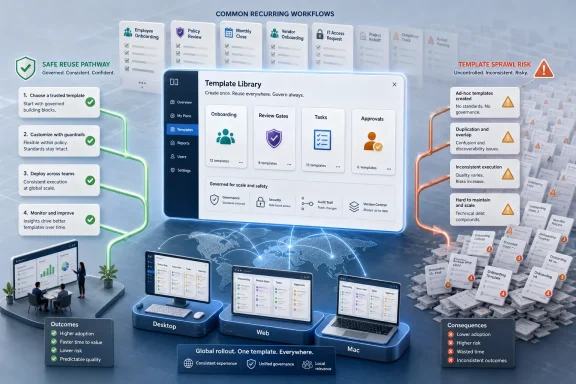
Custom templates are Microsoft’s admission that “copy plan” was never a strategy. A reusable template is not just a convenience feature; it is a way of turning tribal knowledge into an approved starting point. It says the organization has a preferred way to run this type of work, and Planner should help users begin from that pattern rather than from a blank board.
That matters because Planner sits in the middle of Microsoft 365’s collaboration sprawl. Teams, SharePoint, Outlook, To Do, Loop, Copilot, and Graph all touch the same messy reality: work is coordinated by people who do not think of themselves as project managers. If Microsoft wants Planner to be the everyday work-management layer for that audience, reusable templates are not optional. They are table stakes.
A well-designed Planner template can encode task categories, sequencing assumptions, review gates, and standard deliverables. It can help a security team ensure that access reviews always include evidence collection. It can help HR ensure that onboarding always includes device provisioning, account setup, compliance training, and manager check-ins. It can help marketing teams avoid launching campaigns without legal review or analytics tracking.
That is why this feature should interest administrators more than the roadmap wording suggests. Microsoft describes custom templates as reusable, pre-designed layouts tailored to organizational needs, offering consistency while allowing customization. The important phrase is not “saving time.” It is “tailored to your organization’s needs.”
Once templates become organization-specific, Planner is no longer just a lightweight task board. It becomes a distribution mechanism for operational standards. That is useful, but it also raises the question Microsoft has not answered in the roadmap blurb: who gets to create, publish, modify, retire, and audit these templates?
If custom templates are merely personal or team-level conveniences, they will reduce friction but may increase variation. If they are tenant-level or admin-managed assets, they become a serious governance feature. The value of the release depends heavily on which side Microsoft chooses — or whether it gives organizations enough control to choose for themselves.
That consolidation makes strategic sense, but it also creates tension. Users want Planner to remain simple. Administrators want it to be governable. Project managers want richer scheduling and dependencies. Executives want reporting. Microsoft wants it to become another surface where Copilot can reason about work.
Custom templates fit neatly into that larger strategy because they make Planner more repeatable without necessarily making the first-run experience feel heavier. The trick is that templates can hide complexity behind a clean starting point. A user does not need to understand the full process model if the right buckets, tasks, labels, and views are already waiting.
That is also why the feature could be more consequential than it looks. Templates are a bridge between “Planner as a board” and “Planner as a managed work system.” They let Microsoft move upmarket without forcing every user into the full weight of professional project management.
For WindowsForum’s audience, that distinction matters. Many IT shops live in the gap between ad hoc collaboration and formal service management. They are too busy for another platform rollout, too regulated to rely on random boards, and too budget-conscious to license every user for premium project tooling. Planner templates could become the compromise: enough structure to standardize repeatable work, without demanding that every process become a Project plan.
What it does not tell us is almost as important. The roadmap entry does not clarify whether custom templates apply to basic plans, premium plans, or both. It does not spell out whether mobile support follows later. It does not describe administrative controls, template storage, permissions, migration behavior, Graph availability, or whether templates can be shared across teams and Microsoft 365 Groups.
Those omissions are normal for Microsoft 365 Roadmap entries, which are directional rather than contractual. But they are not trivial for IT planning. A feature that saves a department ten minutes per plan is nice. A feature that lets central IT publish approved operational templates across the tenant is something else entirely.
Microsoft also has a habit of using General Availability as a rolling milestone rather than a single moment. July 2026 should be read as the target month when rollout begins or reaches the intended GA channel, not as a guarantee that every eligible tenant will see the switch on July 1. Administrators should expect the usual cadence: roadmap visibility, Message Center posts if tenant action is needed, documentation updates, and staggered availability.
The more prudent interpretation is that organizations should begin deciding what they would template before the button appears. Waiting until launch day will produce the predictable outcome: every department creates its own “official” onboarding board, naming conventions diverge, and the cleanup begins six months later.
Some of those should copy cleanly. Buckets, labels, task titles, checklist structures, and standard descriptions are obvious candidates. They are the skeleton of a repeatable process, and they are exactly the kind of content users hate recreating manually.
Other elements are dangerous if copied naively. Assignments may point to employees who leave the company or people who should not be default owners in every future instance. Due dates become stale unless Microsoft supports relative scheduling. Attachments can expose old files or duplicate content into the wrong context. Comments and history should almost certainly not carry forward into a new instance.
The gold-standard implementation would let template authors define reusable structure separately from live work. It would support relative offsets, placeholder roles, optional tasks, and perhaps template metadata that explains when to use a given layout. A weaker implementation would simply package up a plan clone and call it a template.
That difference will determine whether the feature becomes a clean enterprise tool or just a prettier version of “copy from last time.” Microsoft has learned this lesson elsewhere in Microsoft 365. Templates work best when they separate the reusable pattern from the accidental leftovers of a real workspace.
That risk is not hypothetical. Teams templates, SharePoint site designs, List templates, Power Automate flows, Loop workspaces, and third-party project boards all orbit the same problem: organizations want reusable ways to begin work, but reusable artifacts need ownership. Without lifecycle management, yesterday’s best practice becomes tomorrow’s misleading default.
Planner custom templates will need naming conventions, owners, review dates, and a retirement process. The templates themselves may become business-critical documentation. If a compliance process changes but the Planner template does not, the organization has effectively shipped outdated instructions to every team that relies on it.
This is where administrators should resist the temptation to treat the feature as “just Planner.” If templates can be shared broadly, they deserve the same governance thinking applied to Microsoft 365 Groups and SharePoint sites. If they are restricted to individual users or teams, the governance burden shifts toward education and support: make clear which templates are endorsed and which are local conveniences.
The administrative sweet spot would be a tiered model. Central IT or process owners could publish approved organizational templates, while teams could keep private templates for local workflows. That would match how real organizations work: not every checklist needs corporate approval, but some absolutely do.
If every product launch plan uses the same buckets and standard tasks, Copilot has a better chance of summarizing progress, identifying blockers, comparing similar projects, and generating status updates. If every plan is a unique snowflake, AI becomes another layer of guesswork over already messy collaboration data.
This is the under-discussed value of templates in the AI era. They are not just a productivity shortcut for humans. They are a way of making organizational work more legible to machines.
But that legibility cuts both ways. A template can also amplify sensitive process details. A security incident response template, for example, may reveal escalation steps, internal roles, evidence-handling procedures, or assumptions about tooling. An HR investigation template may encode confidential workflows. A finance close template may disclose approval dependencies and control points.
Organizations that are already thinking about Copilot data boundaries should treat Planner templates as part of the same conversation. If templates become broadly discoverable, they may expose more than intended. If template-created plans inherit permissions carelessly, they may place sensitive tasks in the wrong collaboration context.
The governance question is therefore not only “who can create a template?” It is also “who can see templates, who can instantiate them, and what permissions are applied when they do?” In Microsoft 365, the starting point often determines the security posture. Templates make the starting point repeatable, which means any mistake becomes repeatable too.
That distribution advantage is enormous. An organization may prefer a best-of-breed workflow tool, but it must still justify licensing, integration, governance, security review, and user adoption. Planner can win by being good enough, close enough, and included enough.
Custom templates strengthen that “good enough” case. They make Planner more viable for teams that previously found it too manual for recurring work. They reduce the gap between Planner and more mature work-management products without requiring Microsoft to transform every user into a project-management professional.
The danger for Microsoft is that “good enough” has limits. If templates lack role placeholders, admin controls, relative dates, import/export, reporting hooks, or API support, serious teams will continue to treat Planner as a lightweight board rather than a workflow platform. If Microsoft wants Planner to compete as the Microsoft 365 work hub, templates need to be more than cosmetic.
For Windows users and IT pros, the practical question is not whether Planner will replace every specialized tool. It will not. The question is whether Microsoft can make Planner the default place where ordinary business processes begin — and whether that default becomes helpful structure or another layer of tenant clutter.
Start by identifying the work that is both common and inconsistent. New employee onboarding, customer implementation, recurring audits, monthly reporting, incident triage, procurement reviews, software release readiness, event planning, and departmental intake are strong candidates. These are processes where a blank board wastes time and an old copied board carries risk.
Then identify which processes deserve official templates. Not every recurring activity should become a tenant-wide artifact. Some workflows are local, experimental, or too fast-changing to standardize. Others are so important that letting every team improvise is irresponsible.
The next step is to design templates as starting points, not cages. A good Planner template should standardize the parts of work that should not vary while leaving room for the specifics of each case. The goal is consistency without bureaucracy.
Finally, organizations should decide who owns template maintenance. A stale template is worse than no template because it gives outdated practice the appearance of approval. If Microsoft does not provide built-in lifecycle metadata, teams should create their own review calendar and naming conventions.
Microsoft has been steadily pushing Planner from a lightweight task board toward a broader work-management layer for Microsoft 365, and custom templates are one of the clearest signs yet that the company understands the missing middle between ad hoc collaboration and formal project management. If the July 2026 rollout delivers real governance, sensible reuse, and enough flexibility for different departments, Planner could become much more useful without becoming much more complicated. If it arrives as little more than plan copying with a new label, users will still welcome it — but administrators will inherit yet another place where Microsoft 365 turns convenience into cleanup.
 Microsoft Is Finally Treating Repeatable Work as a First-Class Problem
Planner has always been good at the fast start. A user opens a board, creates buckets, adds tasks, assigns owners, and gets a team moving without the overhead of a formal project management rollout. That simplicity is why Planner became one of Microsoft 365’s quiet workhorses: it was not Project, not Azure DevOps, not a ticketing platform, and not another database pretending to be a board.But fast starts become messy when the same work repeats. Every onboarding plan, campaign launch, policy review, office move, audit response, software release checklist, or monthly close process begins with somebody copying an old plan, cleaning out stale tasks, fixing owners, deleting outdated dates, and hoping they did not inherit last quarter’s mistakes. In theory, duplication is a workaround. In practice, it is how process drift becomes normalized.
Custom templates are Microsoft’s admission that “copy plan” was never a strategy. A reusable template is not just a convenience feature; it is a way of turning tribal knowledge into an approved starting point. It says the organization has a preferred way to run this type of work, and Planner should help users begin from that pattern rather than from a blank board.
That matters because Planner sits in the middle of Microsoft 365’s collaboration sprawl. Teams, SharePoint, Outlook, To Do, Loop, Copilot, and Graph all touch the same messy reality: work is coordinated by people who do not think of themselves as project managers. If Microsoft wants Planner to be the everyday work-management layer for that audience, reusable templates are not optional. They are table stakes.
The Template Is the Governance Layer in Disguise
The word template sounds harmless. It suggests formatting, layout, maybe a starter checklist. But in enterprise software, templates are one of the most powerful forms of governance because they shape user behavior before policy ever has to intervene.A well-designed Planner template can encode task categories, sequencing assumptions, review gates, and standard deliverables. It can help a security team ensure that access reviews always include evidence collection. It can help HR ensure that onboarding always includes device provisioning, account setup, compliance training, and manager check-ins. It can help marketing teams avoid launching campaigns without legal review or analytics tracking.
That is why this feature should interest administrators more than the roadmap wording suggests. Microsoft describes custom templates as reusable, pre-designed layouts tailored to organizational needs, offering consistency while allowing customization. The important phrase is not “saving time.” It is “tailored to your organization’s needs.”
Once templates become organization-specific, Planner is no longer just a lightweight task board. It becomes a distribution mechanism for operational standards. That is useful, but it also raises the question Microsoft has not answered in the roadmap blurb: who gets to create, publish, modify, retire, and audit these templates?
If custom templates are merely personal or team-level conveniences, they will reduce friction but may increase variation. If they are tenant-level or admin-managed assets, they become a serious governance feature. The value of the release depends heavily on which side Microsoft chooses — or whether it gives organizations enough control to choose for themselves.
Planner’s Identity Crisis Is Becoming a Product Strategy
Planner has spent the past few years absorbing expectations from several older Microsoft product categories. It inherits the lightweight collaboration DNA of original Planner, the personal task visibility of To Do, the structured project-management ambitions of Project for the web, and the AI-era positioning of Microsoft 365 Copilot. Microsoft’s own administrator documentation describes the new Planner as a unified work management experience that brings those worlds together.That consolidation makes strategic sense, but it also creates tension. Users want Planner to remain simple. Administrators want it to be governable. Project managers want richer scheduling and dependencies. Executives want reporting. Microsoft wants it to become another surface where Copilot can reason about work.
Custom templates fit neatly into that larger strategy because they make Planner more repeatable without necessarily making the first-run experience feel heavier. The trick is that templates can hide complexity behind a clean starting point. A user does not need to understand the full process model if the right buckets, tasks, labels, and views are already waiting.
That is also why the feature could be more consequential than it looks. Templates are a bridge between “Planner as a board” and “Planner as a managed work system.” They let Microsoft move upmarket without forcing every user into the full weight of professional project management.
For WindowsForum’s audience, that distinction matters. Many IT shops live in the gap between ad hoc collaboration and formal service management. They are too busy for another platform rollout, too regulated to rely on random boards, and too budget-conscious to license every user for premium project tooling. Planner templates could become the compromise: enough structure to standardize repeatable work, without demanding that every process become a Project plan.
The July 2026 Date Is Less Important Than the Rollout Boundaries
The roadmap currently points to General Availability in July 2026 for worldwide standard multi-tenant customers on desktop, Mac, and web. That tells us the feature is intended for mainstream commercial Microsoft 365 tenants, not just a preview program or a niche government cloud release. It also tells us Microsoft sees templates as part of the core Planner experience across major client surfaces.What it does not tell us is almost as important. The roadmap entry does not clarify whether custom templates apply to basic plans, premium plans, or both. It does not spell out whether mobile support follows later. It does not describe administrative controls, template storage, permissions, migration behavior, Graph availability, or whether templates can be shared across teams and Microsoft 365 Groups.
Those omissions are normal for Microsoft 365 Roadmap entries, which are directional rather than contractual. But they are not trivial for IT planning. A feature that saves a department ten minutes per plan is nice. A feature that lets central IT publish approved operational templates across the tenant is something else entirely.
Microsoft also has a habit of using General Availability as a rolling milestone rather than a single moment. July 2026 should be read as the target month when rollout begins or reaches the intended GA channel, not as a guarantee that every eligible tenant will see the switch on July 1. Administrators should expect the usual cadence: roadmap visibility, Message Center posts if tenant action is needed, documentation updates, and staggered availability.
The more prudent interpretation is that organizations should begin deciding what they would template before the button appears. Waiting until launch day will produce the predictable outcome: every department creates its own “official” onboarding board, naming conventions diverge, and the cleanup begins six months later.
The Feature Will Be Judged by What It Copies — and What It Refuses to Copy
The most important technical question is deceptively simple: what is inside a Planner custom template? A plan is not just a board layout. It can include buckets, tasks, labels, checklists, attachments, assignments, dates, priorities, notes, comments, views, and connections to Microsoft 365 Groups and files.Some of those should copy cleanly. Buckets, labels, task titles, checklist structures, and standard descriptions are obvious candidates. They are the skeleton of a repeatable process, and they are exactly the kind of content users hate recreating manually.
Other elements are dangerous if copied naively. Assignments may point to employees who leave the company or people who should not be default owners in every future instance. Due dates become stale unless Microsoft supports relative scheduling. Attachments can expose old files or duplicate content into the wrong context. Comments and history should almost certainly not carry forward into a new instance.
The gold-standard implementation would let template authors define reusable structure separately from live work. It would support relative offsets, placeholder roles, optional tasks, and perhaps template metadata that explains when to use a given layout. A weaker implementation would simply package up a plan clone and call it a template.
That difference will determine whether the feature becomes a clean enterprise tool or just a prettier version of “copy from last time.” Microsoft has learned this lesson elsewhere in Microsoft 365. Templates work best when they separate the reusable pattern from the accidental leftovers of a real workspace.
IT Departments Should Prepare for Template Sprawl Before Users Discover It
Every Microsoft 365 admin knows the pattern. A feature arrives to reduce duplication, users love it, and then the organization discovers that duplication has merely moved up a layer. Instead of too many plans, there are too many templates.That risk is not hypothetical. Teams templates, SharePoint site designs, List templates, Power Automate flows, Loop workspaces, and third-party project boards all orbit the same problem: organizations want reusable ways to begin work, but reusable artifacts need ownership. Without lifecycle management, yesterday’s best practice becomes tomorrow’s misleading default.
Planner custom templates will need naming conventions, owners, review dates, and a retirement process. The templates themselves may become business-critical documentation. If a compliance process changes but the Planner template does not, the organization has effectively shipped outdated instructions to every team that relies on it.
This is where administrators should resist the temptation to treat the feature as “just Planner.” If templates can be shared broadly, they deserve the same governance thinking applied to Microsoft 365 Groups and SharePoint sites. If they are restricted to individual users or teams, the governance burden shifts toward education and support: make clear which templates are endorsed and which are local conveniences.
The administrative sweet spot would be a tiered model. Central IT or process owners could publish approved organizational templates, while teams could keep private templates for local workflows. That would match how real organizations work: not every checklist needs corporate approval, but some absolutely do.
Copilot Makes Templates More Valuable and More Sensitive
Planner custom templates arrive in a Microsoft 365 environment increasingly shaped by Copilot. That is not incidental. AI assistants are only as useful as the work structures they can reason over, and templates create predictable structures.If every product launch plan uses the same buckets and standard tasks, Copilot has a better chance of summarizing progress, identifying blockers, comparing similar projects, and generating status updates. If every plan is a unique snowflake, AI becomes another layer of guesswork over already messy collaboration data.
This is the under-discussed value of templates in the AI era. They are not just a productivity shortcut for humans. They are a way of making organizational work more legible to machines.
But that legibility cuts both ways. A template can also amplify sensitive process details. A security incident response template, for example, may reveal escalation steps, internal roles, evidence-handling procedures, or assumptions about tooling. An HR investigation template may encode confidential workflows. A finance close template may disclose approval dependencies and control points.
Organizations that are already thinking about Copilot data boundaries should treat Planner templates as part of the same conversation. If templates become broadly discoverable, they may expose more than intended. If template-created plans inherit permissions carelessly, they may place sensitive tasks in the wrong collaboration context.
The governance question is therefore not only “who can create a template?” It is also “who can see templates, who can instantiate them, and what permissions are applied when they do?” In Microsoft 365, the starting point often determines the security posture. Templates make the starting point repeatable, which means any mistake becomes repeatable too.
Microsoft’s Bigger Bet Is That Work Management Belongs Inside Microsoft 365
Planner custom templates also say something about Microsoft’s competitive posture. The market for work management is crowded with tools that have long treated templates as a core feature: Asana, Trello, Monday.com, Jira, ClickUp, Smartsheet, and others all understand that repeatable workflows are central to adoption. Microsoft’s advantage is not that Planner is always the most sophisticated tool. It is that Planner is already inside the tenant where identity, files, meetings, email, and Teams conversations live.That distribution advantage is enormous. An organization may prefer a best-of-breed workflow tool, but it must still justify licensing, integration, governance, security review, and user adoption. Planner can win by being good enough, close enough, and included enough.
Custom templates strengthen that “good enough” case. They make Planner more viable for teams that previously found it too manual for recurring work. They reduce the gap between Planner and more mature work-management products without requiring Microsoft to transform every user into a project-management professional.
The danger for Microsoft is that “good enough” has limits. If templates lack role placeholders, admin controls, relative dates, import/export, reporting hooks, or API support, serious teams will continue to treat Planner as a lightweight board rather than a workflow platform. If Microsoft wants Planner to compete as the Microsoft 365 work hub, templates need to be more than cosmetic.
For Windows users and IT pros, the practical question is not whether Planner will replace every specialized tool. It will not. The question is whether Microsoft can make Planner the default place where ordinary business processes begin — and whether that default becomes helpful structure or another layer of tenant clutter.
The Best Template Strategy Starts Before the Feature Ships
Organizations that use Planner heavily should not wait for July 2026 to begin planning for templates. The right preparation is not technical deployment. It is process inventory.Start by identifying the work that is both common and inconsistent. New employee onboarding, customer implementation, recurring audits, monthly reporting, incident triage, procurement reviews, software release readiness, event planning, and departmental intake are strong candidates. These are processes where a blank board wastes time and an old copied board carries risk.
Then identify which processes deserve official templates. Not every recurring activity should become a tenant-wide artifact. Some workflows are local, experimental, or too fast-changing to standardize. Others are so important that letting every team improvise is irresponsible.
The next step is to design templates as starting points, not cages. A good Planner template should standardize the parts of work that should not vary while leaving room for the specifics of each case. The goal is consistency without bureaucracy.
Finally, organizations should decide who owns template maintenance. A stale template is worse than no template because it gives outdated practice the appearance of approval. If Microsoft does not provide built-in lifecycle metadata, teams should create their own review calendar and naming conventions.
The July Planner Drop Rewards Tenants That Already Know Their Work
The practical message for administrators is that Planner custom templates are not just a feature to announce to users. They are a feature to prepare for carefully, because the first templates people see may become the patterns they use for years.- Organizations should identify recurring Planner-based workflows now, before users create competing templates after rollout.
- Administrators should watch for Microsoft’s clarification on licensing, admin controls, permissions, and whether templates apply to basic plans, premium plans, or both.
- Template authors should avoid baking in stale assignments, absolute due dates, obsolete attachments, or process assumptions that cannot survive reuse.
- Security and compliance teams should treat broadly shared templates as operational artifacts that may reveal sensitive workflow details.
- The best early templates will likely be boring, repeatable processes where consistency matters more than creativity.
Microsoft has been steadily pushing Planner from a lightweight task board toward a broader work-management layer for Microsoft 365, and custom templates are one of the clearest signs yet that the company understands the missing middle between ad hoc collaboration and formal project management. If the July 2026 rollout delivers real governance, sensible reuse, and enough flexibility for different departments, Planner could become much more useful without becoming much more complicated. If it arrives as little more than plan copying with a new label, users will still welcome it — but administrators will inherit yet another place where Microsoft 365 turns convenience into cleanup.