

Windows users looking for a one-click cleanup utility have a new option in Fluent Cleaner, a free open-source Windows 10 and Windows 11 tool highlighted by ZDNET that removes temporary files, browser caches, logs, leftover application debris, and selected Registry traces without a traditional installer. The bigger story is not that another cleaner exists. It is that Windows’ built-in maintenance story still leaves enough friction, uncertainty, and cruft for a third-party utility to feel newly relevant. Fluent Cleaner succeeds if it stays boring, transparent, and conservative — three qualities the Windows cleanup category has repeatedly lost.
There is something faintly absurd about needing a separate utility to persuade a modern operating system to clean up after itself. Windows has Storage Sense, Disk Cleanup, temporary-file controls in Settings, browser cache tools, app uninstallers, and enterprise policy knobs. Yet the lived experience for many users is still a slow accretion of caches, logs, abandoned folders, installers, update remnants, and vendor-added clutter.
That gap is where Fluent Cleaner is trying to live. It presents itself as a modern, WinUI-style cleanup utility for Windows 10 and Windows 11, with categories for browsers, Microsoft Store apps, Windows components, multimedia tools, games, utilities, and common third-party applications. The pitch is simple: analyze first, show what would be removed, and let the user clean selectively or in one sweep.
ZDNET’s walkthrough frames the tool as a cleaner, more restrained alternative to the old CCleaner model. That comparison matters because CCleaner is not merely a product name in this space; it is the genre’s cautionary tale. A utility that began as a focused way to remove temporary files gradually became synonymous, fairly or not, with upsells, background components, and a sense that the cleaner itself had become one more thing to clean around.
Fluent Cleaner’s developer appears to understand that history. The public positioning emphasizes no bundled toolbars, no partner apps, no telemetry, and no traditional installation footprint. That is the right set of promises for a Windows utility in 2026, because users have been trained to distrust anything that claims to “optimize” a PC.
That distinction matters because Windows junk is not one thing. Browser caches are usually expendable. Installer leftovers are often expendable. Log files may be expendable, until the user is troubleshooting a failure. Registry entries may be harmless clutter, or they may be application-specific breadcrumbs whose absence changes behavior in ways that are hard to trace.
ZDNET’s strongest practical advice is the least glamorous: do not just smash the “Run Cleaner” button. Review the categories, inspect the results, and clean narrower areas first if you are uncertain. That is not timidity; it is the correct mindset for any tool with permission to delete files and Registry traces.
The tool’s category-by-category approach is therefore more than a convenience. It gives users a way to separate low-risk cleanup from higher-ambiguity cleanup. Clearing a browser cache is not the same act as removing old application data. Deleting temporary files is not the same act as deleting every trace a ruleset marks as leftover.
The problem is not absence. It is fragmentation and trust. Some controls live in Settings. Some remain in legacy dialogs. Some are automated only under certain conditions. Some are cautious to the point of leaving behind material that technically qualifies as junk but falls outside Microsoft’s comfort zone.
That caution is defensible. Microsoft has to support hundreds of millions of machines, countless application configurations, and business environments where “temporary” can still mean operationally important. A third-party utility can take a more aggressive stance because the user opted into it and because the blast radius is narrower.
But the existence of Fluent Cleaner is also an indictment of Windows’ housekeeping experience. If an operating system can advertise AI integration, cloud sync, widgets, Copilot hooks, and a modern Settings app, users are entitled to wonder why reclaiming disk space still feels like spelunking through multiple eras of interface design.
That is a meaningful improvement over opaque freeware utilities that ask for administrator privileges and then disappear into background services, startup tasks, or “health monitoring” agents. A portable executable with public code is simply a more accountable artifact than a black-box optimizer with a glossy landing page.
Still, open source does not prevent bad rules, accidental overreach, stale definitions, or user error. A cleanup database can be too broad. A detection rule can match the wrong path. A user can remove something that looked disposable but mattered to an application’s workflow.
The healthier way to read Fluent Cleaner’s open-source status is as a reason to consider it, not a reason to suspend judgment. In the Windows maintenance world, that is already progress. The safest utility is not the one with the loudest promises; it is the one that makes its actions inspectable before and after execution.
That history is why Fluent Cleaner has to be judged by restraint. Removing unambiguous application leftovers is one thing. Presenting Registry cleaning as a performance cure-all would be another. The line between maintenance and snake oil has always been thin in this category.
ZDNET’s coverage wisely avoids suggesting that Registry cleanup will transform a PC. The more plausible benefits are reclaimed disk space, less clutter, and perhaps modest improvements where bloated caches or temporary files are genuinely causing slowdowns. Most modern performance problems, however, come from startup apps, insufficient memory, slow storage, failing hardware, aggressive background processes, browser overload, or security software conflicts.
That does not make cleanup pointless. It just means users should calibrate expectations. Fluent Cleaner may help a neglected system breathe, especially on small SSDs or older Windows 10-era laptops. It is unlikely to turn a fundamentally underpowered machine into a new one.
Used properly, this could be a good interface idea. Many users do not know the difference between a browser shader cache, a crash dump, a thumbnail database, an application log, and a temporary installer directory. Plain-English explanations can make the review step less intimidating and reduce the temptation to treat every detected item as equal.
But AI should not become the authority that grants deletion permission. Cleanup decisions need deterministic rules, conservative defaults, and clear provenance. An AI-generated explanation can be a guide, but it should not replace documentation, user review, or backups.
There is also a trust wrinkle. A utility that advertises no telemetry becomes more complicated when a user voluntarily connects an external AI service. Fluent Cleaner appears to make that optional, which is the right design. The feature should remain an assistant at the edge of the product, not the center of the cleanup workflow.
That model is especially attractive for enthusiasts and support technicians. If you are cleaning a family member’s laptop, testing a utility on a spare machine, or triaging a low-storage PC, you may not want to install a permanent maintenance suite. You want a tool that performs a job and then gets out of the way.
Enterprise administrators will see it differently. A portable executable that can delete files and touch Registry entries is not something to casually introduce across a managed fleet. It needs packaging discipline, allow-listing decisions, logging expectations, and a clear answer to what support owns when an app behaves differently after cleanup.
That split is typical of Windows power tools. The same portability that makes Fluent Cleaner appealing to enthusiasts may make it awkward for regulated environments. In a home or lab, portability means convenience. In an enterprise, it can look like unmanaged change.
Microsoft has good reasons to avoid aggressive cleanup. It cannot assume every cache is worthless. It cannot delete every leftover file just because it looks abandoned. It cannot optimize for enthusiasts at the expense of supportability.
But Microsoft also has a tendency to solve user-visible friction by adding more surfaces rather than sharpening the existing ones. Windows 11 has Settings pages, legacy Control Panel remnants, hidden tools, command-line utilities, policy-driven features, and half-modernized workflows. Cleanup is one of the places where that layering becomes painfully visible.
Fluent Cleaner’s advantage is focus. It does not have to be the canonical Windows storage management framework. It only has to make a common maintenance job feel understandable. That is often where small utilities beat platform vendors: not by doing everything, but by making one neglected workflow feel finished.
Fluent Cleaner appears to resist that trap by offering inspection, per-category analysis, and item-level actions. But the big button still exists, and users will press it. That is why defaults matter enormously.
A good cleanup tool should be conservative on first run, transparent about what it skipped, and explicit about what may require closing applications. It should treat browser caches, temp directories, and logs differently from user-created files, application profiles, and Registry traces. It should never imply that deleting more is always better.
The restore point advice in ZDNET’s walkthrough is also worth taking seriously. Before running a broad cleanup, create a restore point or make sure a reliable backup exists. That may feel excessive for temporary files, but it is entirely reasonable when a tool is operating across categories and touching application state.
Some of that is useful. Some of it is unavoidable. Some of it is plainly commercial. But the cumulative effect is a sense that a Windows PC is never entirely clean, even when it is new.
That cultural frustration creates a market for debloaters, privacy scripts, cleanup utilities, startup managers, and “make Windows sane again” projects. Many are risky. Some are thoughtful. A few become essential tools for enthusiasts who want Microsoft’s ecosystem without every default Microsoft chooses.
Fluent Cleaner is positioned on the safer side of that spectrum because it focuses on junk files and cleanup rather than wholesale operating-system surgery. It is not trying to rip out half of Windows, remove core services, or disable security components. That narrower ambition is a strength.
Browser caches, temporary folders, app logs, and obvious leftovers are reasonable first candidates. Registry-related findings deserve more caution. Anything tied to an application you actively use should be reviewed with extra care, especially if the app stores recent projects, plug-in metadata, authentication state, or local indexes.
Close applications before scanning if you want cleaner results. Expect some files to be skipped because they are in use. Rebooting after a broad cleanup is not a bad idea, if only to confirm that your core apps still behave normally.
Most importantly, do not confuse cleanup with maintenance as a whole. If your PC is slow, also check startup apps, browser extensions, storage health, memory pressure, malware, Windows Update status, thermal throttling, and driver problems. Junk files can be part of the story, but they are rarely the entire plot.
The best version of this project is the boring version. It should keep its scope narrow, its rules readable, its defaults cautious, and its network behavior optional and explicit. The worst version would chase the same path as so many utilities before it: driver updates, VPN offers, “health scores,” scheduled nagging, subscription tiers, and vague optimization claims.
Windows does need better cleanup UX. But Windows users need trustworthy tools even more. Fluent Cleaner has a chance precisely because it appears to understand that trust is not won by promising to speed up everything. It is won by showing the user what will be deleted, then deleting only what the user agreed to remove.
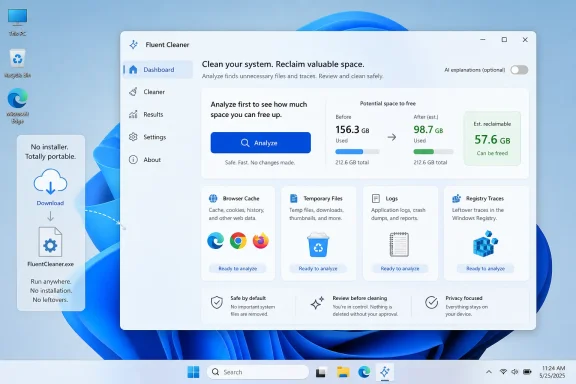 Fluent Cleaner Arrives Because Windows Still Makes Tidiness Feel Like Work
There is something faintly absurd about needing a separate utility to persuade a modern operating system to clean up after itself. Windows has Storage Sense, Disk Cleanup, temporary-file controls in Settings, browser cache tools, app uninstallers, and enterprise policy knobs. Yet the lived experience for many users is still a slow accretion of caches, logs, abandoned folders, installers, update remnants, and vendor-added clutter.That gap is where Fluent Cleaner is trying to live. It presents itself as a modern, WinUI-style cleanup utility for Windows 10 and Windows 11, with categories for browsers, Microsoft Store apps, Windows components, multimedia tools, games, utilities, and common third-party applications. The pitch is simple: analyze first, show what would be removed, and let the user clean selectively or in one sweep.
ZDNET’s walkthrough frames the tool as a cleaner, more restrained alternative to the old CCleaner model. That comparison matters because CCleaner is not merely a product name in this space; it is the genre’s cautionary tale. A utility that began as a focused way to remove temporary files gradually became synonymous, fairly or not, with upsells, background components, and a sense that the cleaner itself had become one more thing to clean around.
Fluent Cleaner’s developer appears to understand that history. The public positioning emphasizes no bundled toolbars, no partner apps, no telemetry, and no traditional installation footprint. That is the right set of promises for a Windows utility in 2026, because users have been trained to distrust anything that claims to “optimize” a PC.
The Best Cleaner Is the One That Explains Itself Before It Deletes
The crucial design choice in Fluent Cleaner is not the one-click button. It is the analysis view that comes before it. A cleanup tool that merely says it has found “junk” is asking for blind trust; a tool that shows the specific files, categories, sizes, and entries it intends to remove is at least inviting scrutiny.That distinction matters because Windows junk is not one thing. Browser caches are usually expendable. Installer leftovers are often expendable. Log files may be expendable, until the user is troubleshooting a failure. Registry entries may be harmless clutter, or they may be application-specific breadcrumbs whose absence changes behavior in ways that are hard to trace.
ZDNET’s strongest practical advice is the least glamorous: do not just smash the “Run Cleaner” button. Review the categories, inspect the results, and clean narrower areas first if you are uncertain. That is not timidity; it is the correct mindset for any tool with permission to delete files and Registry traces.
The tool’s category-by-category approach is therefore more than a convenience. It gives users a way to separate low-risk cleanup from higher-ambiguity cleanup. Clearing a browser cache is not the same act as removing old application data. Deleting temporary files is not the same act as deleting every trace a ruleset marks as leftover.
Microsoft Already Has the Plumbing, but Not Always the Confidence Layer
Windows is not helpless here. Storage Sense can automatically remove temporary files, clear Recycle Bin contents after a configured period, and manage cloud-backed files such as OneDrive content. Disk Cleanup still exists, even as Microsoft has pushed more routine maintenance into the Settings app. Windows 11 also exposes cleanup recommendations that can surface large files, unused apps, and temporary content.The problem is not absence. It is fragmentation and trust. Some controls live in Settings. Some remain in legacy dialogs. Some are automated only under certain conditions. Some are cautious to the point of leaving behind material that technically qualifies as junk but falls outside Microsoft’s comfort zone.
That caution is defensible. Microsoft has to support hundreds of millions of machines, countless application configurations, and business environments where “temporary” can still mean operationally important. A third-party utility can take a more aggressive stance because the user opted into it and because the blast radius is narrower.
But the existence of Fluent Cleaner is also an indictment of Windows’ housekeeping experience. If an operating system can advertise AI integration, cloud sync, widgets, Copilot hooks, and a modern Settings app, users are entitled to wonder why reclaiming disk space still feels like spelunking through multiple eras of interface design.
Open Source Is a Trust Signal, Not a Force Field
Fluent Cleaner’s open-source nature is one of its most important advantages, but it should not be confused with automatic safety. Source availability means technically capable users can inspect what the program does, how it defines cleanup targets, and whether its promises about telemetry and bundling are reflected in the code. It also means the project can be forked, audited, and criticized in public.That is a meaningful improvement over opaque freeware utilities that ask for administrator privileges and then disappear into background services, startup tasks, or “health monitoring” agents. A portable executable with public code is simply a more accountable artifact than a black-box optimizer with a glossy landing page.
Still, open source does not prevent bad rules, accidental overreach, stale definitions, or user error. A cleanup database can be too broad. A detection rule can match the wrong path. A user can remove something that looked disposable but mattered to an application’s workflow.
The healthier way to read Fluent Cleaner’s open-source status is as a reason to consider it, not a reason to suspend judgment. In the Windows maintenance world, that is already progress. The safest utility is not the one with the loudest promises; it is the one that makes its actions inspectable before and after execution.
The Registry Cleaner Ghost Still Haunts the Room
Any Windows cleanup tool that mentions Registry entries inherits decades of baggage. Registry cleaners were once sold as magical performance boosters, promising faster boot times and smoother operation by removing orphaned keys. In practice, many delivered negligible benefits and occasional breakage.That history is why Fluent Cleaner has to be judged by restraint. Removing unambiguous application leftovers is one thing. Presenting Registry cleaning as a performance cure-all would be another. The line between maintenance and snake oil has always been thin in this category.
ZDNET’s coverage wisely avoids suggesting that Registry cleanup will transform a PC. The more plausible benefits are reclaimed disk space, less clutter, and perhaps modest improvements where bloated caches or temporary files are genuinely causing slowdowns. Most modern performance problems, however, come from startup apps, insufficient memory, slow storage, failing hardware, aggressive background processes, browser overload, or security software conflicts.
That does not make cleanup pointless. It just means users should calibrate expectations. Fluent Cleaner may help a neglected system breathe, especially on small SSDs or older Windows 10-era laptops. It is unlikely to turn a fundamentally underpowered machine into a new one.
The AI Explanation Feature Is Useful Only If It Stays Subordinate
One of Fluent Cleaner’s more contemporary flourishes is an optional AI explanation feature. According to ZDNET’s walkthrough, users can add a Groq API key and ask the tool to explain what a selected cleanup item is, what it does, and what the consequences of removing it may be. That is a very 2026 feature: potentially helpful, slightly uncanny, and dependent on whether the explanation is accurate enough for the decision being made.Used properly, this could be a good interface idea. Many users do not know the difference between a browser shader cache, a crash dump, a thumbnail database, an application log, and a temporary installer directory. Plain-English explanations can make the review step less intimidating and reduce the temptation to treat every detected item as equal.
But AI should not become the authority that grants deletion permission. Cleanup decisions need deterministic rules, conservative defaults, and clear provenance. An AI-generated explanation can be a guide, but it should not replace documentation, user review, or backups.
There is also a trust wrinkle. A utility that advertises no telemetry becomes more complicated when a user voluntarily connects an external AI service. Fluent Cleaner appears to make that optional, which is the right design. The feature should remain an assistant at the edge of the product, not the center of the cleanup workflow.
Portable Utilities Fit the Moment Better Than Installed Optimizers
The fact that Fluent Cleaner can run without a conventional installation is not just a technical footnote. It changes the relationship between user and utility. A portable cleanup tool can be downloaded, extracted, run, inspected, and removed without leaving behind the kind of persistent footprint that made many users skeptical of optimizer apps in the first place.That model is especially attractive for enthusiasts and support technicians. If you are cleaning a family member’s laptop, testing a utility on a spare machine, or triaging a low-storage PC, you may not want to install a permanent maintenance suite. You want a tool that performs a job and then gets out of the way.
Enterprise administrators will see it differently. A portable executable that can delete files and touch Registry entries is not something to casually introduce across a managed fleet. It needs packaging discipline, allow-listing decisions, logging expectations, and a clear answer to what support owns when an app behaves differently after cleanup.
That split is typical of Windows power tools. The same portability that makes Fluent Cleaner appealing to enthusiasts may make it awkward for regulated environments. In a home or lab, portability means convenience. In an enterprise, it can look like unmanaged change.
The Real Competition Is Not CCleaner, but Windows Itself
The easiest headline is “Fluent Cleaner versus CCleaner.” The more interesting fight is Fluent Cleaner versus Microsoft’s own maintenance layer. If Windows’ built-in cleanup tools were coherent, discoverable, and sufficiently comprehensive, Fluent Cleaner would be a niche convenience rather than a newsworthy utility.Microsoft has good reasons to avoid aggressive cleanup. It cannot assume every cache is worthless. It cannot delete every leftover file just because it looks abandoned. It cannot optimize for enthusiasts at the expense of supportability.
But Microsoft also has a tendency to solve user-visible friction by adding more surfaces rather than sharpening the existing ones. Windows 11 has Settings pages, legacy Control Panel remnants, hidden tools, command-line utilities, policy-driven features, and half-modernized workflows. Cleanup is one of the places where that layering becomes painfully visible.
Fluent Cleaner’s advantage is focus. It does not have to be the canonical Windows storage management framework. It only has to make a common maintenance job feel understandable. That is often where small utilities beat platform vendors: not by doing everything, but by making one neglected workflow feel finished.
One-Click Cleanup Is a Temptation, Not a Strategy
The phrase “one click” is powerful because it promises relief from judgment. Too many files? Click once. PC feels slow? Click once. Windows feels grimy? Click once. The danger is that the very systems most in need of cleanup are often the ones where users understand the least about what can safely go.Fluent Cleaner appears to resist that trap by offering inspection, per-category analysis, and item-level actions. But the big button still exists, and users will press it. That is why defaults matter enormously.
A good cleanup tool should be conservative on first run, transparent about what it skipped, and explicit about what may require closing applications. It should treat browser caches, temp directories, and logs differently from user-created files, application profiles, and Registry traces. It should never imply that deleting more is always better.
The restore point advice in ZDNET’s walkthrough is also worth taking seriously. Before running a broad cleanup, create a restore point or make sure a reliable backup exists. That may feel excessive for temporary files, but it is entirely reasonable when a tool is operating across categories and touching application state.
Windows Bloat Is Now a Cultural Problem as Much as a Storage Problem
The enthusiasm around utilities like Fluent Cleaner reflects something deeper than disk space. Windows users increasingly experience the operating system as a place where competing interests pile up: Microsoft services, OEM preload deals, browser prompts, game launchers, cloud sync agents, AI features, Teams variants, widgets, update caches, telemetry settings, and app leftovers.Some of that is useful. Some of it is unavoidable. Some of it is plainly commercial. But the cumulative effect is a sense that a Windows PC is never entirely clean, even when it is new.
That cultural frustration creates a market for debloaters, privacy scripts, cleanup utilities, startup managers, and “make Windows sane again” projects. Many are risky. Some are thoughtful. A few become essential tools for enthusiasts who want Microsoft’s ecosystem without every default Microsoft chooses.
Fluent Cleaner is positioned on the safer side of that spectrum because it focuses on junk files and cleanup rather than wholesale operating-system surgery. It is not trying to rip out half of Windows, remove core services, or disable security components. That narrower ambition is a strength.
The Smart User Treats Fluent Cleaner Like a Scalpel
The practical advice is straightforward: use Fluent Cleaner as a scalpel, not a leaf blower. Download it from the project’s official release channel, run an analysis, inspect the categories, and begin with low-risk targets. Do not treat every detected entry as an obligation.Browser caches, temporary folders, app logs, and obvious leftovers are reasonable first candidates. Registry-related findings deserve more caution. Anything tied to an application you actively use should be reviewed with extra care, especially if the app stores recent projects, plug-in metadata, authentication state, or local indexes.
Close applications before scanning if you want cleaner results. Expect some files to be skipped because they are in use. Rebooting after a broad cleanup is not a bad idea, if only to confirm that your core apps still behave normally.
Most importantly, do not confuse cleanup with maintenance as a whole. If your PC is slow, also check startup apps, browser extensions, storage health, memory pressure, malware, Windows Update status, thermal throttling, and driver problems. Junk files can be part of the story, but they are rarely the entire plot.
Fluent Cleaner’s Promise Lives or Dies in Its Restraint
For now, Fluent Cleaner looks like the kind of utility Windows enthusiasts want to root for: free, open source, portable, modern-looking, and apparently allergic to the upsell culture that damaged trust in older cleanup suites. That does not make it mandatory, and it does not make it risk-free. It makes it interesting.The best version of this project is the boring version. It should keep its scope narrow, its rules readable, its defaults cautious, and its network behavior optional and explicit. The worst version would chase the same path as so many utilities before it: driver updates, VPN offers, “health scores,” scheduled nagging, subscription tiers, and vague optimization claims.
Windows does need better cleanup UX. But Windows users need trustworthy tools even more. Fluent Cleaner has a chance precisely because it appears to understand that trust is not won by promising to speed up everything. It is won by showing the user what will be deleted, then deleting only what the user agreed to remove.
The Sensible Path Through the Junk Drawer
Fluent Cleaner is not a miracle cure, but it is a useful reminder that Windows maintenance still benefits from independent tools when those tools are transparent and restrained.- Fluent Cleaner is best understood as a focused junk-file and cache cleaner, not a universal performance optimizer.
- Users should review scan results before running a broad cleanup, especially when Registry entries or application-specific data appear.
- Windows’ built-in Storage Sense and cleanup recommendations remain the safest starting point for routine maintenance.
- The portable, open-source model makes Fluent Cleaner more trustworthy than many traditional freeware optimizers, but it does not eliminate the need for backups and judgment.
- The optional AI explanation feature may help users understand cleanup targets, but it should not be treated as the final authority on whether something is safe to delete.
- The tool’s long-term credibility depends on avoiding the bloat, telemetry, bundled offers, and overpromising that turned cleanup utilities into objects of suspicion.
References
- Primary source: ZDNET
Published: Tue, 30 Jun 2026 09:10:00 GMT
Loading…
www.zdnet.com - Related coverage: techno360.in
Loading…
techno360.in - Related coverage: windowscentral.com
Why Windows 11 users are switching to Fluent Cleaner, the sleek CCleaner alternative that actually feels native | Windows Central
Fluent Cleaner feels like the PC maintenance utility Windows users have been missing for years.www.windowscentral.com - Related coverage: practical-tips.com
Loading…
www.practical-tips.com - Related coverage: windowsforum.com
Loading…
windowsforum.com - Official source: github.com
Loading…
github.com
- Related coverage: unikoshardware.com
Loading…
unikoshardware.com - Official source: support.microsoft.com
Loading…
support.microsoft.com - Official source: learn.microsoft.com
Configure Storage Sense in Windows | Microsoft Learn
Learn how to configure Storage Sense, a Windows feature that helps manage disk space by automatically cleaning up temporary files and unused content.learn.microsoft.com - Official source: microsoft.com
Loading…
www.microsoft.com - Related coverage: techtarget.com
Loading…
www.techtarget.com - Related coverage: tomshardware.com
How to Save Space on Windows 11 | Tom's Hardware
Storage is more affordable than ever, but that doesn’t mean it should go to waste. These are some of the best ways to save space on Windows 11.www.tomshardware.com - Official source: techcommunity.microsoft.com
Loading…
techcommunity.microsoft.com