

Windows 11 version 23H2, released on October 31, 2023, changed notifications less by reinventing the alert system than by nudging users to silence apps whose pop-ups they consistently ignore. That small behavioral prompt captures a larger Microsoft bet: Windows does not need more ways to notify us; it needs more ways to admit that most notifications are noise. The feature is minor in code, but revealing in strategy. It shows Microsoft trying to make Windows feel calmer without surrendering the app-centric, cloud-connected model that created the problem in the first place.
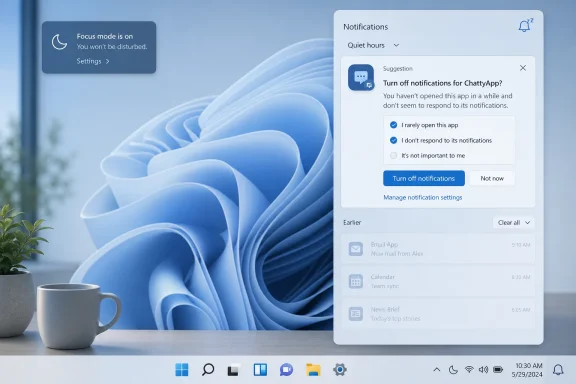
The prompt highlighted in Paul Thurrott’s Windows 11 Field Guide coverage is easy to dismiss as a convenience tweak. Windows notices when an app keeps raising notifications that the user never opens, and it suggests turning those notifications off. It is the kind of feature that rarely earns keynote time, but it sits at the intersection of productivity, telemetry, consent, and the uneasy bargain every modern operating system makes with its users.
For Windows enthusiasts and administrators, the question is not whether a suggestion to disable ignored notifications is useful. It usually is. The question is why Windows needs to intervene at all, and why a desktop operating system once defined by user control now spends so much energy managing the consequences of its own attention economy.
Windows notifications were supposed to be a civilized replacement for chaos. Instead of every app inventing its own toast, balloon, badge, tray icon, blinking taskbar button, or modal nag, the operating system would provide a common channel. Notifications would be visible, dismissible, searchable, and governed by a single control surface.
That was the theory. In practice, the notification center became another inbox, and Windows inherited the same disease that afflicted phones years earlier: every app discovered that a notification was not merely a status message, but a retention mechanism. Email apps, chat clients, game launchers, browser sites, cloud storage tools, security utilities, OEM helpers, and Microsoft’s own services all found reasons to speak.
The 23H2-era suggestion to disable ignored notifications is Microsoft acknowledging that the burden has shifted too far onto the user. It is not enough to provide a settings page with toggles. If the average person must audit every app’s alert behavior manually, the platform has already lost.
The interesting part is that Microsoft did not simply make notifications quieter by default. It chose a recommendation model. Windows watches behavior, draws a conclusion, and asks whether the user wants to act. That is a characteristically modern Microsoft compromise: not quite automation, not quite manual control, but a guided nudge based on observed use.
The modern Windows notification stream is more social, more commercial, and more cloud-dependent. It carries Teams messages, Outlook alerts, OneDrive sync status, Edge site notifications, Xbox activity, Microsoft Store app notices, delivery updates, calendar reminders, and assorted third-party demands for attention. Some are useful. Many are technically legitimate. Collectively, they are exhausting.
This matters because Windows is not a phone. A phone can be an always-on companion where interruption is part of the product design. A PC is still, for many people, the machine where work gets done, code gets written, invoices get processed, games get played full-screen, and remote meetings happen under pressure. A badly timed notification on a desktop can be more than annoying; it can expose private information on a shared screen, break concentration during a task, or create the impression that the user is not in command of the machine.
Microsoft knows this, which is why Windows 11 has accumulated a hierarchy of quieting mechanisms: notification settings, Do Not Disturb, Focus sessions, priority notifications, taskbar badge controls, and app-specific permissions. The problem is that a hierarchy of controls can itself become a maintenance burden. Users do not want a cockpit for distraction management. They want the PC to stop pestering them.
The notification suggestion fits that pattern. It was not a redesign of Windows 11’s alerting model. It was a small refinement that landed inside a broader release full of similarly incremental changes. Copilot drew the headlines, File Explorer received attention, passkeys and sharing improvements mattered to certain users, and enterprise administrators got the usual mix of policy implications and deployment choices.
But minor features can reveal major priorities. In 23H2, Microsoft was not merely shipping a desktop OS. It was continuing the transition toward Windows as a managed experience: a system that observes behavior, recommends actions, surfaces cloud services, and treats user attention as something to optimize. The notification prompt is one of the least controversial examples of that philosophy, which is precisely why it is worth examining.
When the system suggests disabling notifications from an app you never interact with, it is probably right. Yet the same mechanism depends on Windows deciding that your non-response is meaningful. Maybe you ignored those notifications because they were useless. Maybe you saw them, absorbed the information, and did not need to click. Maybe they appeared during meetings. Maybe the app is a security tool where a low click rate does not imply low importance.
That ambiguity is the hard part. A notification is not like a file you never open or an app you never launch. Sometimes its value is precisely that it delivers information without requiring interaction. Microsoft’s suggestion model is helpful, but it must be conservative, because ignored does not always mean unwanted.
But Windows runs in contexts where non-interaction is not indifference. A backup app that reports successful completion may be useful even if no one clicks it. A security agent warning that a scan completed may reassure a user without requiring action. A calendar reminder may prompt someone to leave their desk, not open the calendar app. A delivery notification may be read and dismissed because the job is done.
This is where Microsoft’s implementation philosophy matters. If Windows merely suggests a change, the risk is manageable. If Windows becomes more aggressive over time, administrators and power users will rightly worry. The distance between “Would you like to turn these off?” and “We turned these off for you” is the distance between assistance and interference.
The same issue applies to enterprise environments. An IT department may want certain notifications visible even if users rarely click them. Compliance notices, device health alerts, VPN prompts, and endpoint protection messages are not engagement bait. They are part of an operational signal chain. Consumer-style optimization can become dangerous when applied to business-critical messaging.
That does not mean Microsoft should avoid behavioral recommendations. It means the operating system must treat notification suppression as a user-facing choice, not a hidden cleanliness routine. The more Windows tries to be smart, the more transparent it must become about what it is measuring and what it is changing.
That is unfortunate, because the 23H2 notification suggestion is the kind of suggestion an operating system should make. It is contextual, reversible, and aligned with the user’s likely interest. It reduces interruption rather than creating it. It helps clean up a mess created by third-party and first-party apps alike.
The problem is that Windows does not live feature by feature in the user’s mind. It lives as an accumulation of experiences. If the OS nags you to back up folders to OneDrive, pushes account benefits in Start, recommends Edge defaults, advertises Game Pass, and then offers to silence an annoying app, the last prompt inherits resentment from the earlier ones.
Microsoft’s challenge is therefore not only technical. It is editorial. The company needs to decide what Windows is allowed to say, when it is allowed to say it, and whose interests the message serves. A notification about reducing notifications is defensible. A notification about reducing notifications next to a stream of service promotions is harder to take at face value.
This is why many Windows power users reach for debloating scripts, registry edits, Group Policy, and third-party utilities. They are not always rejecting the individual feature in front of them. They are rejecting the pattern. They want Windows to behave less like a funnel and more like an operating system.
For a new user, this may be fine. For a long-time Windows user, it can feel like the furniture keeps moving. The system tray, taskbar corner, notification center, calendar flyout, and Settings app all participate in a choreography that is more elegant than Windows 10 in some places and less discoverable in others.
The 23H2 suggestion feature works because it bypasses some of that complexity. Instead of asking the user to know where the relevant toggle lives, Windows brings the decision to the moment of annoyance. That is good interface design. It is also an admission that the settings model has failed for ordinary people.
Administrators see the other side of the compromise. Centralized notification controls are useful only if they can be governed predictably. If Microsoft keeps adding new surfaces for suggestions, badges, account notices, and app prompts, IT teams must track not only policies but user experience drift. A quiet desktop image in January can become a noisier one after cumulative updates, app updates, or service-side changes.
That is the hidden cost of Windows as a living product. The OS improves more continuously than it used to. It also changes in ways that are harder to freeze, document, and explain to users who just want their machines to behave consistently.
There is nothing wrong with Focus. In fact, it is one of Windows 11’s more sensible quality-of-life ideas. The issue is that it frames calm as a mode rather than a default. To get the quiet machine many users want, they must invoke a special state.
That makes sense for certain workflows. A writer, developer, student, or presenter may want a temporary bubble of silence. But many people want the inverse model: quiet by default, interruption by exception. Phones have moved in that direction with increasingly sophisticated focus profiles. Windows has the pieces, but the desktop culture around them remains less mature.
The ignored-notification suggestion is a bridge between those worlds. It does not ask the user to enter Focus. It slowly trims noisy senders from the everyday environment. Over time, that may be more effective than a single big Do Not Disturb button, because it addresses the sources of noise rather than merely muting the channel.
Still, trimming is not the same as reform. If apps continue to treat notifications as growth tools, Windows will remain the janitor. Microsoft can sweep up after the mess, but it also controls the platform rules that determine how much mess apps are allowed to make.
Microsoft Edge, Google Chrome, and other Chromium-based browsers have improved permission prompts over time, but the damage was done. The web trained users to swat away requests reflexively. Worse, some users accepted them without understanding that a website could now place messages into the operating system’s notification stream.
From Windows’ perspective, a browser-delivered site notification may look like part of the same alert ecosystem as a native app. From the user’s perspective, it can feel like the PC has been compromised by junk. That perception matters. When the desktop starts surfacing messages from sites the user barely remembers visiting, trust in the notification center erodes.
The 23H2 suggestion model can help here, too. If a web app or site-backed notification source keeps getting ignored, Windows or the browser can prompt the user to silence it. But the better answer is stricter permission design before the noise begins. Reducing unwanted notifications after the fact is useful; preventing casual subscription in the first place is better.
This is where Microsoft has competing incentives. Edge benefits from deeper integration with Windows notifications. Progressive web apps benefit from feeling native. Microsoft 365 web experiences benefit when alerts cross the boundary between browser and OS. The more Windows becomes a canvas for web-connected experiences, the more important notification discipline becomes.
In enterprise environments, consistency is a feature. Admins want to know which prompts appear, which can be suppressed, which are governed by policy, and which arrive through app updates or cloud configuration. Windows 11’s consumer and commercial personalities sometimes sit uneasily on the same codebase, and notifications are one of the places where that tension becomes visible.
The 23H2 notification suggestion is not, by itself, an enterprise threat. It is a user-experience refinement. But it belongs to a family of features that can complicate support if not clearly documented and controllable. If Windows recommends that a user silence an app, admins need confidence that important enterprise agents are not casually swept into the same bucket as shopping apps and game launchers.
There is also a training issue. Many organizations teach users to pay attention to security prompts, update restart notifications, VPN status, and compliance messages. At the same time, users are surrounded by low-value alerts from collaboration tools and browsers. The operating system cannot solve that cultural problem alone, but it can either improve or degrade the signal-to-noise ratio.
For admins, the practical stance is simple: treat notification policy as part of endpoint experience management, not cosmetic personalization. Decide which apps are allowed to interrupt, which should quietly log to notification center, and which should be blocked. Then test how those decisions behave across Windows feature updates, app revisions, and user-driven changes.
That hindsight matters because it shows how quickly “new in Windows” becomes “part of the baseline.” A notification cleanup prompt from 23H2 is no longer a marquee feature. It is one small expectation in a world where users increasingly assume the OS should be smart enough to reduce friction.
The risk for Microsoft is that each smart feature raises expectations for the next one. If Windows can notice ignored notifications, why can it not identify apps that abuse startup registration? If it can recommend Focus, why can it not distinguish a meeting from casual screen time more reliably? If it can promote cloud backup, why can it not explain more clearly what data is local, synced, or subject to organizational control?
That is the bargain of ambient intelligence. Once the OS starts making contextual recommendations, users judge it not only on whether the feature works, but on whether the system’s priorities match their own. Helpful suggestions build trust. Self-serving suggestions spend it.
Windows 11 has done both. The notification prompt belongs in the helpful column. But it exists in an operating system whose broader suggestion economy remains contested.
The less generous reading is that Microsoft is treating symptoms. Notifications are noisy because too many apps are allowed to behave as if access to attention is a default privilege. Windows can recommend disabling ignored senders, but the underlying permission model still depends heavily on user cleanup after apps have already crossed the line.
Both readings can be true. Mature operating systems improve through small repairs, not only grand redesigns. But small repairs should move toward a coherent philosophy. If Windows is going to be calmer, then calm needs to become a first-class design goal across the shell, Start menu, Edge integration, Microsoft account surfaces, widgets, Copilot, and app notifications.
The best version of this future is not a silent Windows. Silence is not the goal. A desktop that never interrupts would be just as broken in the other direction. The goal is proportionality: the right message, from the right sender, at the right time, with obvious controls and no hidden agenda.
That is harder than it sounds. Every app believes its own notifications are important. Every service team can justify one more reminder. Every engagement metric rewards reactivation. The operating system is the only layer with enough authority to say no.
For enthusiasts, this means auditing notification settings after major updates and new app installs. For admins, it means including notification behavior in deployment baselines and user-experience testing. For Microsoft, it means recognizing that a calmer Windows is not a nice-to-have flourish, but a competitive feature.
The concrete implications are straightforward:
The prompt highlighted in Paul Thurrott’s Windows 11 Field Guide coverage is easy to dismiss as a convenience tweak. Windows notices when an app keeps raising notifications that the user never opens, and it suggests turning those notifications off. It is the kind of feature that rarely earns keynote time, but it sits at the intersection of productivity, telemetry, consent, and the uneasy bargain every modern operating system makes with its users.
For Windows enthusiasts and administrators, the question is not whether a suggestion to disable ignored notifications is useful. It usually is. The question is why Windows needs to intervene at all, and why a desktop operating system once defined by user control now spends so much energy managing the consequences of its own attention economy.
 Microsoft’s Quiet Fix Says the Loud Part Softly
Windows notifications were supposed to be a civilized replacement for chaos. Instead of every app inventing its own toast, balloon, badge, tray icon, blinking taskbar button, or modal nag, the operating system would provide a common channel. Notifications would be visible, dismissible, searchable, and governed by a single control surface.That was the theory. In practice, the notification center became another inbox, and Windows inherited the same disease that afflicted phones years earlier: every app discovered that a notification was not merely a status message, but a retention mechanism. Email apps, chat clients, game launchers, browser sites, cloud storage tools, security utilities, OEM helpers, and Microsoft’s own services all found reasons to speak.
The 23H2-era suggestion to disable ignored notifications is Microsoft acknowledging that the burden has shifted too far onto the user. It is not enough to provide a settings page with toggles. If the average person must audit every app’s alert behavior manually, the platform has already lost.
The interesting part is that Microsoft did not simply make notifications quieter by default. It chose a recommendation model. Windows watches behavior, draws a conclusion, and asks whether the user wants to act. That is a characteristically modern Microsoft compromise: not quite automation, not quite manual control, but a guided nudge based on observed use.
The Desktop Has Become an Attention Broker
The PC used to be noisy in a different way. Old Windows systems interrupted users with driver balloons, update prompts, antivirus warnings, and application dialogs that behaved as if every event were urgent. But those interruptions were mostly local and mechanical. A printer was out of ink. A network cable was unplugged. A program crashed.The modern Windows notification stream is more social, more commercial, and more cloud-dependent. It carries Teams messages, Outlook alerts, OneDrive sync status, Edge site notifications, Xbox activity, Microsoft Store app notices, delivery updates, calendar reminders, and assorted third-party demands for attention. Some are useful. Many are technically legitimate. Collectively, they are exhausting.
This matters because Windows is not a phone. A phone can be an always-on companion where interruption is part of the product design. A PC is still, for many people, the machine where work gets done, code gets written, invoices get processed, games get played full-screen, and remote meetings happen under pressure. A badly timed notification on a desktop can be more than annoying; it can expose private information on a shared screen, break concentration during a task, or create the impression that the user is not in command of the machine.
Microsoft knows this, which is why Windows 11 has accumulated a hierarchy of quieting mechanisms: notification settings, Do Not Disturb, Focus sessions, priority notifications, taskbar badge controls, and app-specific permissions. The problem is that a hierarchy of controls can itself become a maintenance burden. Users do not want a cockpit for distraction management. They want the PC to stop pestering them.
23H2 Was a Switch, Not a Clean Break
Windows 11 version 23H2 was always a strange feature update. For many devices already on 22H2, it arrived through an enablement package, turning on features that had largely been staged through earlier cumulative updates. That made 23H2 less of a dramatic upgrade than a servicing milestone: the point at which Microsoft could reset the support clock, align features under a new version label, and tell IT departments where the train was headed.The notification suggestion fits that pattern. It was not a redesign of Windows 11’s alerting model. It was a small refinement that landed inside a broader release full of similarly incremental changes. Copilot drew the headlines, File Explorer received attention, passkeys and sharing improvements mattered to certain users, and enterprise administrators got the usual mix of policy implications and deployment choices.
But minor features can reveal major priorities. In 23H2, Microsoft was not merely shipping a desktop OS. It was continuing the transition toward Windows as a managed experience: a system that observes behavior, recommends actions, surfaces cloud services, and treats user attention as something to optimize. The notification prompt is one of the least controversial examples of that philosophy, which is precisely why it is worth examining.
When the system suggests disabling notifications from an app you never interact with, it is probably right. Yet the same mechanism depends on Windows deciding that your non-response is meaningful. Maybe you ignored those notifications because they were useless. Maybe you saw them, absorbed the information, and did not need to click. Maybe they appeared during meetings. Maybe the app is a security tool where a low click rate does not imply low importance.
That ambiguity is the hard part. A notification is not like a file you never open or an app you never launch. Sometimes its value is precisely that it delivers information without requiring interaction. Microsoft’s suggestion model is helpful, but it must be conservative, because ignored does not always mean unwanted.
The Best Notification Is Sometimes the One You Never Click
Click-through behavior is a seductive metric because it is easy to measure. If a notification appears fifty times and the user never opens it, a product team can infer that it is noise. In consumer software, that inference often holds. Promotional alerts, low-value social updates, and redundant status messages deserve the axe.But Windows runs in contexts where non-interaction is not indifference. A backup app that reports successful completion may be useful even if no one clicks it. A security agent warning that a scan completed may reassure a user without requiring action. A calendar reminder may prompt someone to leave their desk, not open the calendar app. A delivery notification may be read and dismissed because the job is done.
This is where Microsoft’s implementation philosophy matters. If Windows merely suggests a change, the risk is manageable. If Windows becomes more aggressive over time, administrators and power users will rightly worry. The distance between “Would you like to turn these off?” and “We turned these off for you” is the distance between assistance and interference.
The same issue applies to enterprise environments. An IT department may want certain notifications visible even if users rarely click them. Compliance notices, device health alerts, VPN prompts, and endpoint protection messages are not engagement bait. They are part of an operational signal chain. Consumer-style optimization can become dangerous when applied to business-critical messaging.
That does not mean Microsoft should avoid behavioral recommendations. It means the operating system must treat notification suppression as a user-facing choice, not a hidden cleanliness routine. The more Windows tries to be smart, the more transparent it must become about what it is measuring and what it is changing.
Windows 11 Still Has a Trust Problem Around Suggestions
The word “suggestion” carries baggage in Windows 11. Microsoft has used suggestions for helpful things, but also for promotions, account nudges, Microsoft 365 upsells, OneDrive reminders, Edge prompts, and Start menu content that many users experience as advertising. Even when a suggestion is genuinely useful, it arrives in a user interface that has trained people to be suspicious.That is unfortunate, because the 23H2 notification suggestion is the kind of suggestion an operating system should make. It is contextual, reversible, and aligned with the user’s likely interest. It reduces interruption rather than creating it. It helps clean up a mess created by third-party and first-party apps alike.
The problem is that Windows does not live feature by feature in the user’s mind. It lives as an accumulation of experiences. If the OS nags you to back up folders to OneDrive, pushes account benefits in Start, recommends Edge defaults, advertises Game Pass, and then offers to silence an annoying app, the last prompt inherits resentment from the earlier ones.
Microsoft’s challenge is therefore not only technical. It is editorial. The company needs to decide what Windows is allowed to say, when it is allowed to say it, and whose interests the message serves. A notification about reducing notifications is defensible. A notification about reducing notifications next to a stream of service promotions is harder to take at face value.
This is why many Windows power users reach for debloating scripts, registry edits, Group Policy, and third-party utilities. They are not always rejecting the individual feature in front of them. They are rejecting the pattern. They want Windows to behave less like a funnel and more like an operating system.
The Notification Center Is a Compromise That Never Fully Satisfied Anyone
Windows 11’s notification center is cleaner than the older Action Center model, but it also reflects Microsoft’s tendency to rearrange complexity rather than eliminate it. Notifications live behind the clock and bell area. Calendar integration has changed over time. Quick Settings moved elsewhere. Focus controls exist, but their naming and behavior have evolved from the Windows 10-era Focus Assist concept into Do Not Disturb and Focus sessions.For a new user, this may be fine. For a long-time Windows user, it can feel like the furniture keeps moving. The system tray, taskbar corner, notification center, calendar flyout, and Settings app all participate in a choreography that is more elegant than Windows 10 in some places and less discoverable in others.
The 23H2 suggestion feature works because it bypasses some of that complexity. Instead of asking the user to know where the relevant toggle lives, Windows brings the decision to the moment of annoyance. That is good interface design. It is also an admission that the settings model has failed for ordinary people.
Administrators see the other side of the compromise. Centralized notification controls are useful only if they can be governed predictably. If Microsoft keeps adding new surfaces for suggestions, badges, account notices, and app prompts, IT teams must track not only policies but user experience drift. A quiet desktop image in January can become a noisier one after cumulative updates, app updates, or service-side changes.
That is the hidden cost of Windows as a living product. The OS improves more continuously than it used to. It also changes in ways that are harder to freeze, document, and explain to users who just want their machines to behave consistently.
Focus Is Microsoft’s Admission That Settings Are Not Enough
Focus sessions and Do Not Disturb are Microsoft’s more explicit answer to notification overload. Start a focus session, and Windows can silence notifications, hide taskbar badges, suppress flashing app icons, and provide a timer. This is not merely a productivity feature; it is a behavioral patch over an operating environment that otherwise permits constant interruption.There is nothing wrong with Focus. In fact, it is one of Windows 11’s more sensible quality-of-life ideas. The issue is that it frames calm as a mode rather than a default. To get the quiet machine many users want, they must invoke a special state.
That makes sense for certain workflows. A writer, developer, student, or presenter may want a temporary bubble of silence. But many people want the inverse model: quiet by default, interruption by exception. Phones have moved in that direction with increasingly sophisticated focus profiles. Windows has the pieces, but the desktop culture around them remains less mature.
The ignored-notification suggestion is a bridge between those worlds. It does not ask the user to enter Focus. It slowly trims noisy senders from the everyday environment. Over time, that may be more effective than a single big Do Not Disturb button, because it addresses the sources of noise rather than merely muting the channel.
Still, trimming is not the same as reform. If apps continue to treat notifications as growth tools, Windows will remain the janitor. Microsoft can sweep up after the mess, but it also controls the platform rules that determine how much mess apps are allowed to make.
The Browser Made the Problem Worse
No discussion of Windows notifications is complete without browser notifications. Once websites gained the ability to request notification permission, the desktop inherited a mobile-style permission fatigue problem without the same cultural guardrails. Users visiting a news site, store, forum, or web app could be asked to allow notifications before they had any reason to trust the site.Microsoft Edge, Google Chrome, and other Chromium-based browsers have improved permission prompts over time, but the damage was done. The web trained users to swat away requests reflexively. Worse, some users accepted them without understanding that a website could now place messages into the operating system’s notification stream.
From Windows’ perspective, a browser-delivered site notification may look like part of the same alert ecosystem as a native app. From the user’s perspective, it can feel like the PC has been compromised by junk. That perception matters. When the desktop starts surfacing messages from sites the user barely remembers visiting, trust in the notification center erodes.
The 23H2 suggestion model can help here, too. If a web app or site-backed notification source keeps getting ignored, Windows or the browser can prompt the user to silence it. But the better answer is stricter permission design before the noise begins. Reducing unwanted notifications after the fact is useful; preventing casual subscription in the first place is better.
This is where Microsoft has competing incentives. Edge benefits from deeper integration with Windows notifications. Progressive web apps benefit from feeling native. Microsoft 365 web experiences benefit when alerts cross the boundary between browser and OS. The more Windows becomes a canvas for web-connected experiences, the more important notification discipline becomes.
For IT, the Risk Is Not Noise but Variability
Home users experience notification overload as annoyance. IT departments experience it as variability. A user who misses a security prompt because they turned off an app’s notifications may create a support incident. A user who receives too many low-value alerts may ignore the one that matters. A user who sees unexpected Microsoft account or consumer-service prompts on a managed machine may file a ticket asking whether something changed.In enterprise environments, consistency is a feature. Admins want to know which prompts appear, which can be suppressed, which are governed by policy, and which arrive through app updates or cloud configuration. Windows 11’s consumer and commercial personalities sometimes sit uneasily on the same codebase, and notifications are one of the places where that tension becomes visible.
The 23H2 notification suggestion is not, by itself, an enterprise threat. It is a user-experience refinement. But it belongs to a family of features that can complicate support if not clearly documented and controllable. If Windows recommends that a user silence an app, admins need confidence that important enterprise agents are not casually swept into the same bucket as shopping apps and game launchers.
There is also a training issue. Many organizations teach users to pay attention to security prompts, update restart notifications, VPN status, and compliance messages. At the same time, users are surrounded by low-value alerts from collaboration tools and browsers. The operating system cannot solve that cultural problem alone, but it can either improve or degrade the signal-to-noise ratio.
For admins, the practical stance is simple: treat notification policy as part of endpoint experience management, not cosmetic personalization. Decide which apps are allowed to interrupt, which should quietly log to notification center, and which should be blocked. Then test how those decisions behave across Windows feature updates, app revisions, and user-driven changes.
The 23H2 Timing Now Looks Like a Snapshot From a Faster Windows Era
Looking back from mid-2026, Windows 11 version 23H2 already feels transitional. Home and Pro editions have passed their support window, while Enterprise and Education editions continue on the longer servicing timeline. Newer Windows 11 releases have moved the platform forward, and Microsoft’s AI strategy has become more central to the Windows story than the relatively modest 23H2 update suggested at launch.That hindsight matters because it shows how quickly “new in Windows” becomes “part of the baseline.” A notification cleanup prompt from 23H2 is no longer a marquee feature. It is one small expectation in a world where users increasingly assume the OS should be smart enough to reduce friction.
The risk for Microsoft is that each smart feature raises expectations for the next one. If Windows can notice ignored notifications, why can it not identify apps that abuse startup registration? If it can recommend Focus, why can it not distinguish a meeting from casual screen time more reliably? If it can promote cloud backup, why can it not explain more clearly what data is local, synced, or subject to organizational control?
That is the bargain of ambient intelligence. Once the OS starts making contextual recommendations, users judge it not only on whether the feature works, but on whether the system’s priorities match their own. Helpful suggestions build trust. Self-serving suggestions spend it.
Windows 11 has done both. The notification prompt belongs in the helpful column. But it exists in an operating system whose broader suggestion economy remains contested.
The Small Toggle Carries a Bigger Lesson
The most generous reading of the 23H2 notification change is that Microsoft is learning restraint. Rather than forcing a new notification model on everyone, it identified a common annoyance and offered a targeted escape hatch. That is the kind of incremental polish Windows 11 needs more of.The less generous reading is that Microsoft is treating symptoms. Notifications are noisy because too many apps are allowed to behave as if access to attention is a default privilege. Windows can recommend disabling ignored senders, but the underlying permission model still depends heavily on user cleanup after apps have already crossed the line.
Both readings can be true. Mature operating systems improve through small repairs, not only grand redesigns. But small repairs should move toward a coherent philosophy. If Windows is going to be calmer, then calm needs to become a first-class design goal across the shell, Start menu, Edge integration, Microsoft account surfaces, widgets, Copilot, and app notifications.
The best version of this future is not a silent Windows. Silence is not the goal. A desktop that never interrupts would be just as broken in the other direction. The goal is proportionality: the right message, from the right sender, at the right time, with obvious controls and no hidden agenda.
That is harder than it sounds. Every app believes its own notifications are important. Every service team can justify one more reminder. Every engagement metric rewards reactivation. The operating system is the only layer with enough authority to say no.
A Windows PC Should Feel Less Like a Doorbell
The practical lesson from the 23H2 notification prompt is not that everyone should disable every alert. It is that Windows users and administrators should treat attention as a finite resource, just like battery life, bandwidth, and storage. A PC that constantly asks for attention is not more capable; it is less trustworthy.For enthusiasts, this means auditing notification settings after major updates and new app installs. For admins, it means including notification behavior in deployment baselines and user-experience testing. For Microsoft, it means recognizing that a calmer Windows is not a nice-to-have flourish, but a competitive feature.
The concrete implications are straightforward:
- Windows 11 version 23H2’s notification suggestion is useful because it targets apps whose alerts users consistently ignore instead of asking users to manually hunt through settings.
- The feature should be treated as a recommendation, not an automation mandate, because some valuable notifications are read but never clicked.
- Administrators should review which enterprise apps must retain notification privileges before users are encouraged to silence noisy senders.
- Microsoft’s broader use of suggestions in Windows affects how users perceive even genuinely helpful prompts.
- The long-term fix for notification fatigue is stricter attention discipline across Windows, browsers, Microsoft services, and third-party apps.
References
- Primary source: thurrott.com
Published: Tue, 30 Jun 2026 10:49:06 GMT
Loading…
www.thurrott.com - Related coverage: windowslatest.com
Loading…
www.windowslatest.com - Related coverage: windowscentral.com
Loading…
www.windowscentral.com - Official source: support.microsoft.com
Loading…
support.microsoft.com - Official source: microsoft.com
Loading…
www.microsoft.com - Official source: learn.microsoft.com
Notifications don't show in the action or notification center - Windows Client | Microsoft Learn
Provides basic guidelines to resolve the issue in which notifications don't show in the action or notification center by checking if the Quiet Hours (also known as focus assist) option is enabled.learn.microsoft.com