

Microsoft put context-based redirections for Windows 365 into public preview in June 2026, giving Enterprise and Flex dedicated Cloud PC administrators a way to control clipboard, drive, printer, and USB redirection according to Entra Conditional Access signals. The change is narrow in feature scope but broad in security meaning. It moves one of the messiest parts of hosted Windows — the boundary between the Cloud PC and the endpoint in front of the user — out of static policy and into conditional trust.
That matters because Windows 365 has always sold a tidy idea: keep the corporate desktop in Microsoft’s cloud and let people reach it from almost anywhere. But the practical risk has never been only where the desktop runs. It has been what happens when data crosses back into the unmanaged laptop, home printer, removable drive, or mobile browser that happens to be attached to the session.
The old way to think about redirection was brutally simple. An administrator decided whether a Cloud PC session could use the local clipboard, local storage, local printers, or attached USB devices, and that decision generally applied as a fixed posture. The organization either trusted the path between the remote Windows environment and the local machine, or it did not.
Context-based redirections change that model by asking a more useful question: trusted under what conditions? A compliant corporate laptop on a known network is not the same risk as an unmanaged personal tablet on airport Wi-Fi. A finance user working from a managed Windows device is not in the same posture as the same user connecting from a family Mac with unknown local storage and consumer sync clients.
Microsoft’s implementation leans on Microsoft Entra Conditional Access authentication context, which is an important architectural detail rather than a branding flourish. It means the redirection decision is not merely a Windows 365 setting buried in a device configuration profile. It becomes part of the same policy fabric many enterprises already use to evaluate identity, device compliance, group membership, and network conditions before granting access to Microsoft cloud resources.
The result is not a magical data-loss-prevention system. It does not inspect every copied string, classify every file, or understand the business intent behind a print job. But it does give administrators a sharper lever: allow or restrict common escape routes from the Cloud PC depending on the trust level of the session at that moment.
That is the real story. Microsoft is not just adding a few more toggles to Windows 365. It is trying to make the Cloud PC boundary behave less like a locked door and more like a security checkpoint.
The same is true of local drive redirection. When enabled, it can make a Cloud PC feel less isolated and more like a natural extension of the endpoint. A user can pull a file from local storage into a remote session, or move content the other way, without thinking much about the trust boundary being crossed.
Printers and USB devices complicate the picture further. Printing from a Cloud PC to a local printer may be entirely ordinary in a branch office, but reckless on a personal device in a shared living space. USB redirection can support legitimate peripherals and workflows, but it also widens the attack and exfiltration surface in ways security teams have spent years trying to constrain.
These are not edge cases. They are the ordinary frictions of hybrid work. Microsoft’s context-based redirections are aimed directly at this daily compromise between user productivity and data containment.
What makes the feature notable is that it treats these redirections as conditional privileges rather than permanent session traits. A user may be allowed to copy and paste when the endpoint is compliant, blocked from drive redirection when using an unmanaged device, and permitted to print only when the session meets a higher trust bar. That is a more realistic model of work than pretending every endpoint is equally safe or equally dangerous.
A Cloud PC can be patched, policy-managed, monitored, and protected by enterprise tooling. The personal machine connecting to it may be none of those things. It may have consumer backup software, browser extensions, a shared family profile, an unencrypted local disk, or a printer sitting in a public area. Virtualizing the desktop reduces some risks, but it does not erase the local endpoint.
Context-based redirection controls are Microsoft’s admission that the endpoint still matters. The company is not saying, “Your data is safe because it lives in Windows 365.” It is saying, more plausibly, “Your data is safer if the Cloud PC limits how much it can interact with an endpoint that does not meet your conditions.”
That distinction matters for administrators who have spent the last several years trying to reconcile Zero Trust rhetoric with real workforce behavior. Zero Trust is often reduced to identity checks and multifactor prompts, but the deeper premise is continuous evaluation. Trust should be scoped, conditional, and revocable.
This feature applies that idea to an unglamorous but important layer of the stack. It asks whether the session should be allowed to use local resources after the user has already authenticated. That is a subtler question than “Can this person sign in?” and, in many breach and leakage scenarios, a more consequential one.
The Cloud PC becomes not only a hosted desktop, but a policy enforcement point between corporate data and the messy world of local hardware.
That is a meaningful shift. Once a user is inside a Windows 365 session, the old assumption was that the session’s redirection settings determined the available local-resource behavior. Now, the relevant Conditional Access outcome can be mapped to particular redirection categories.
In practical terms, admins create an Entra authentication context, create a Conditional Access policy that issues that context when the right conditions are satisfied, and then configure Windows 365 Remote Connection Experience policy so selected redirections require that authentication context. If the conditions are met, the redirection path can be available. If they are not, it can be restricted.
This is not necessarily simple, and Microsoft should resist pretending otherwise. Authentication contexts are powerful, but they are another abstraction for already busy identity and endpoint teams to understand. The feature also depends on administrators correctly modeling user groups, device compliance, network locations, and redirection requirements without creating policy contradictions.
Still, the design has a logic enterprise IT will appreciate. It avoids creating a separate island of Windows 365-specific conditional logic and instead reuses Entra’s policy machinery. That makes the feature more likely to fit into existing governance processes, change reviews, and audit conversations.
The cost is complexity. The benefit is that the decision about whether a user can move data between Cloud PC and local device no longer has to be detached from the organization’s wider trust model.
That rule is sensible from a security standpoint. If one policy says a redirection is blocked, a newer conditional mechanism should not accidentally punch through it. But it also means pilots may produce confusing results in real environments where Intune settings, Group Policy, host pool configuration, RDP properties, security baselines, and legacy hardening templates already overlap.
This is where the preview status matters. Microsoft has said it is developing Resultant Set of Policy support to help users and administrators determine which redirection settings were applied to a connection and which policy source produced the value. That kind of visibility is not a luxury. It is essential if context-based redirections are going to be more than a lab demo.
Anyone who has troubleshot Windows policy precedence knows the shape of the problem. A setting can be correct in one portal, overridden in another, and made inscrutable by a third baseline someone deployed two years ago. Redirection policy is particularly vulnerable to this because it lives at the intersection of remote desktop behavior, endpoint management, security hardening, and user experience.
For now, administrators should treat the preview as a controlled pilot, not a switch to flip across the estate. A dedicated test group of Cloud PCs, carefully chosen user cohorts, and explicit before-and-after validation will matter more than the marketing phrase “adaptive data protection.”
The feature’s promise is dynamic control. Its early risk is dynamic confusion.
Clipboard control is the most visible day-to-day experience. It can be the difference between a Cloud PC that feels fluid and one that feels punitive. But it is also a classic leakage path, especially for small but sensitive data such as customer identifiers, financial values, source snippets, support notes, and authentication material.
Drive and storage redirection is higher volume and often higher consequence. Once local fixed, removable, or network storage is visible inside a remote session, the user experience becomes convenient in ways that security teams may not be able to observe fully. Context-aware gating gives admins a way to say that this convenience is acceptable only from endpoints that meet a stronger management and compliance posture.
Printer redirection is easy to underestimate because printing sounds old-fashioned until a regulated workflow depends on it. Local printing can be operationally necessary in healthcare, legal, logistics, public sector, and branch environments. It can also be an uncontrolled export of information to paper, PDF printers, or devices in spaces the organization does not govern.
USB redirection sits in the highest-friction category. It can enable specialized devices and real workflows, but it is also where admins tend to become rightly conservative. By placing USB redirection behind Conditional Access authentication context, Microsoft gives organizations a path between blanket denial and careless availability.
The larger point is that Windows 365 is becoming more granular about how the remote desktop touches the local world. Microsoft is not trying to make every endpoint equal. It is trying to make the Cloud PC less naive about the endpoint it is being accessed from.
A Windows laptop enrolled in Intune can expose a rich set of device compliance signals. A browser session from a personal machine may offer much less confidence. A mobile device may be managed through a different channel, have different local resource capabilities, and present a different practical risk. Treating those sessions identically would defeat the point of context-aware redirection.
This is where organizations will need to be honest about their workforce patterns. If most Cloud PC access happens from managed Windows endpoints, context-based redirections can become a refinement of an already mature endpoint strategy. If access frequently comes from contractors, personal Macs, mobile devices, or browser sessions, the policies will need to be more conservative and more carefully communicated.
There is also a user-experience challenge. From an end user’s perspective, copy-paste that works on Monday and fails on Tuesday may feel broken unless the organization explains why. The same is true when a local printer appears in one session but not another, or a USB device works from a compliant machine but not from an unmanaged one.
Security teams tend to think in conditions. Users tend to think in outcomes. A successful rollout has to translate one into the other without burying the help desk in “Windows 365 is broken” tickets.
That means policy clarity is not optional. If redirection behavior changes based on posture, the organization needs a support model that can tell users what changed, why it changed, and what they can do to regain access if appropriate.
Even so, the direction is significant now. Windows 365 is no longer just a way to stream a managed Windows desktop from Microsoft’s cloud. It is increasingly a place where identity, endpoint compliance, application access, remote desktop transport, and data movement policy converge.
That convergence is strategically useful for Microsoft. The more Windows 365 relies on Entra, Intune, the Windows App, and Azure Virtual Desktop plumbing, the more it rewards customers already deep in Microsoft’s management and identity ecosystem. Context-based redirections are therefore both a security feature and an ecosystem feature.
That does not make them bad. It does mean the feature will be most compelling for organizations that already run Microsoft’s stack as their control plane. If your compliance state, user grouping, Conditional Access policies, and Cloud PC configuration are already clean, this is a natural extension. If those foundations are messy, the feature may expose that mess rather than solve it.
Admins should also avoid overstating what redirection control can do. It can reduce data movement through specific remote-session channels. It cannot stop a user from photographing a screen, retyping information, using an approved SaaS export function, or finding another sanctioned path that leads to the same data exposure. Like most practical security controls, it narrows risk rather than abolishing it.
That is still valuable. In security architecture, narrowing risk in common workflows is often the difference between a defensible system and a wishful one.
A fixed block on clipboard redirection may protect data, but it can also make legitimate work painful. A fixed allowance may keep users happy, but it assumes every session is safe enough. Context-based redirections allow a middle ground: permit local integration when the session deserves it, and withhold it when the circumstances do not.
That is proportional trust, and it is closer to how enterprise risk actually works. A managed endpoint on a trusted network with a compliant security posture can receive more capability. An unmanaged endpoint in a lower-confidence context can still reach the Cloud PC, but with fewer ways to extract or intermingle data.
This approach is especially relevant for contractors, temporary staff, frontline workers, merger-and-acquisition scenarios, and disaster recovery access. In each case, the organization may need to provide Windows access quickly without fully trusting the local device. Cloud PCs help with that, but redirection controls decide how porous the boundary becomes.
The best security features are often the ones that let administrators stop making absurd choices. Context-based redirections do not eliminate the hard trade-offs in BYOD and virtual desktop access, but they make those trade-offs more precise.
For Windows 365, that precision is a competitive necessity. If Cloud PCs are going to become mainstream endpoints rather than niche virtual desktops, they must offer more than central hosting. They must offer intelligent boundaries.
A sensible pilot should begin with a small population, a dedicated Cloud PC group, and one or two redirection scenarios that are easy to validate. Clipboard behavior is the obvious first candidate because users notice it immediately and support teams can test it quickly. Drive and USB redirection should be handled more carefully because the consequences of getting them wrong are broader.
The other lesson is that Conditional Access design now reaches into user experience in a more visible way. A policy that once determined sign-in friction may now determine whether a user can print, paste, or access local storage. That increases the importance of documentation, help-desk readiness, and change control.
Administrators should also revisit old assumptions about “disabled by default” and legacy redirection baselines. Microsoft has already been tightening Cloud PC defaults around clipboard, drive, USB, and printer redirection for newly provisioned or reprovisioned environments. Context-based redirections fit into that trajectory: default caution, with conditional exceptions where trust allows.
The organizations that benefit most will be those that treat the feature as part of a data access architecture, not as a convenience setting.
That matters because Windows 365 has always sold a tidy idea: keep the corporate desktop in Microsoft’s cloud and let people reach it from almost anywhere. But the practical risk has never been only where the desktop runs. It has been what happens when data crosses back into the unmanaged laptop, home printer, removable drive, or mobile browser that happens to be attached to the session.
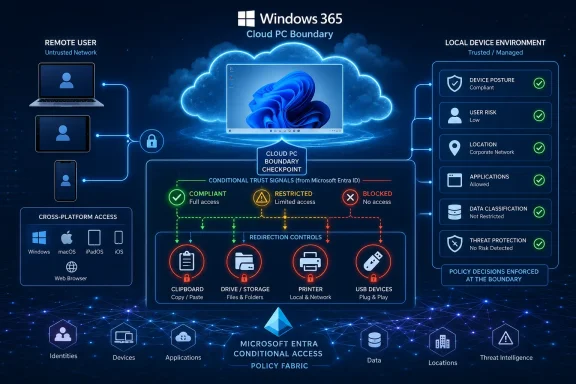 Microsoft Moves the Data Boundary From the Device to the Session
The old way to think about redirection was brutally simple. An administrator decided whether a Cloud PC session could use the local clipboard, local storage, local printers, or attached USB devices, and that decision generally applied as a fixed posture. The organization either trusted the path between the remote Windows environment and the local machine, or it did not.Context-based redirections change that model by asking a more useful question: trusted under what conditions? A compliant corporate laptop on a known network is not the same risk as an unmanaged personal tablet on airport Wi-Fi. A finance user working from a managed Windows device is not in the same posture as the same user connecting from a family Mac with unknown local storage and consumer sync clients.
Microsoft’s implementation leans on Microsoft Entra Conditional Access authentication context, which is an important architectural detail rather than a branding flourish. It means the redirection decision is not merely a Windows 365 setting buried in a device configuration profile. It becomes part of the same policy fabric many enterprises already use to evaluate identity, device compliance, group membership, and network conditions before granting access to Microsoft cloud resources.
The result is not a magical data-loss-prevention system. It does not inspect every copied string, classify every file, or understand the business intent behind a print job. But it does give administrators a sharper lever: allow or restrict common escape routes from the Cloud PC depending on the trust level of the session at that moment.
That is the real story. Microsoft is not just adding a few more toggles to Windows 365. It is trying to make the Cloud PC boundary behave less like a locked door and more like a security checkpoint.
The Clipboard Was Always a Security Policy in Disguise
Clipboard redirection is one of those features users notice only when it is missing. Copying a password, a ticket number, a Teams message, a spreadsheet cell, or a paragraph from a browser tab feels like muscle memory. In remote desktop environments, that convenience is also one of the easiest ways to move data out of a controlled system.The same is true of local drive redirection. When enabled, it can make a Cloud PC feel less isolated and more like a natural extension of the endpoint. A user can pull a file from local storage into a remote session, or move content the other way, without thinking much about the trust boundary being crossed.
Printers and USB devices complicate the picture further. Printing from a Cloud PC to a local printer may be entirely ordinary in a branch office, but reckless on a personal device in a shared living space. USB redirection can support legitimate peripherals and workflows, but it also widens the attack and exfiltration surface in ways security teams have spent years trying to constrain.
These are not edge cases. They are the ordinary frictions of hybrid work. Microsoft’s context-based redirections are aimed directly at this daily compromise between user productivity and data containment.
What makes the feature notable is that it treats these redirections as conditional privileges rather than permanent session traits. A user may be allowed to copy and paste when the endpoint is compliant, blocked from drive redirection when using an unmanaged device, and permitted to print only when the session meets a higher trust bar. That is a more realistic model of work than pretending every endpoint is equally safe or equally dangerous.
BYOD Finally Gets a More Honest Control Plane
Microsoft frames the feature as part of a broader secure bring-your-own-device strategy, and that is the right place to locate it. BYOD has always been sold with an appealing bargain: employees can use familiar hardware while the company keeps sensitive work in managed apps, virtual desktops, or cloud-hosted environments. The problem is that the bargain breaks down at the seams.A Cloud PC can be patched, policy-managed, monitored, and protected by enterprise tooling. The personal machine connecting to it may be none of those things. It may have consumer backup software, browser extensions, a shared family profile, an unencrypted local disk, or a printer sitting in a public area. Virtualizing the desktop reduces some risks, but it does not erase the local endpoint.
Context-based redirection controls are Microsoft’s admission that the endpoint still matters. The company is not saying, “Your data is safe because it lives in Windows 365.” It is saying, more plausibly, “Your data is safer if the Cloud PC limits how much it can interact with an endpoint that does not meet your conditions.”
That distinction matters for administrators who have spent the last several years trying to reconcile Zero Trust rhetoric with real workforce behavior. Zero Trust is often reduced to identity checks and multifactor prompts, but the deeper premise is continuous evaluation. Trust should be scoped, conditional, and revocable.
This feature applies that idea to an unglamorous but important layer of the stack. It asks whether the session should be allowed to use local resources after the user has already authenticated. That is a subtler question than “Can this person sign in?” and, in many breach and leakage scenarios, a more consequential one.
The Cloud PC becomes not only a hosted desktop, but a policy enforcement point between corporate data and the messy world of local hardware.
Conditional Access Becomes More Than a Front Door
For years, Conditional Access has been most visible at the entrance to services. It decides whether a user can sign in, whether MFA is required, whether a device must be compliant, whether a location is trusted, or whether risk signals should block access. Context-based redirections extend that mental model deeper into the session.That is a meaningful shift. Once a user is inside a Windows 365 session, the old assumption was that the session’s redirection settings determined the available local-resource behavior. Now, the relevant Conditional Access outcome can be mapped to particular redirection categories.
In practical terms, admins create an Entra authentication context, create a Conditional Access policy that issues that context when the right conditions are satisfied, and then configure Windows 365 Remote Connection Experience policy so selected redirections require that authentication context. If the conditions are met, the redirection path can be available. If they are not, it can be restricted.
This is not necessarily simple, and Microsoft should resist pretending otherwise. Authentication contexts are powerful, but they are another abstraction for already busy identity and endpoint teams to understand. The feature also depends on administrators correctly modeling user groups, device compliance, network locations, and redirection requirements without creating policy contradictions.
Still, the design has a logic enterprise IT will appreciate. It avoids creating a separate island of Windows 365-specific conditional logic and instead reuses Entra’s policy machinery. That makes the feature more likely to fit into existing governance processes, change reviews, and audit conversations.
The cost is complexity. The benefit is that the decision about whether a user can move data between Cloud PC and local device no longer has to be detached from the organization’s wider trust model.
The Most Restrictive Policy Still Wins, and That Will Trip Up Pilots
The public preview comes with an operational caveat that deserves more attention than it will probably get: existing policies that disable redirections can prevent context-based controls from behaving as expected. Microsoft’s guidance is to set the redirections being tested to “Not Configured” or “Enabled” where appropriate, because the most restrictive policy applies.That rule is sensible from a security standpoint. If one policy says a redirection is blocked, a newer conditional mechanism should not accidentally punch through it. But it also means pilots may produce confusing results in real environments where Intune settings, Group Policy, host pool configuration, RDP properties, security baselines, and legacy hardening templates already overlap.
This is where the preview status matters. Microsoft has said it is developing Resultant Set of Policy support to help users and administrators determine which redirection settings were applied to a connection and which policy source produced the value. That kind of visibility is not a luxury. It is essential if context-based redirections are going to be more than a lab demo.
Anyone who has troubleshot Windows policy precedence knows the shape of the problem. A setting can be correct in one portal, overridden in another, and made inscrutable by a third baseline someone deployed two years ago. Redirection policy is particularly vulnerable to this because it lives at the intersection of remote desktop behavior, endpoint management, security hardening, and user experience.
For now, administrators should treat the preview as a controlled pilot, not a switch to flip across the estate. A dedicated test group of Cloud PCs, carefully chosen user cohorts, and explicit before-and-after validation will matter more than the marketing phrase “adaptive data protection.”
The feature’s promise is dynamic control. Its early risk is dynamic confusion.
The Supported Scenarios Reveal Microsoft’s Real Priorities
Microsoft’s first supported redirection categories are the obvious ones: clipboard, drives and storage, printers, and USB. That list is unsurprising, but it is revealing. These are the routes by which remote work becomes locally useful — and by which controlled data becomes locally exposed.Clipboard control is the most visible day-to-day experience. It can be the difference between a Cloud PC that feels fluid and one that feels punitive. But it is also a classic leakage path, especially for small but sensitive data such as customer identifiers, financial values, source snippets, support notes, and authentication material.
Drive and storage redirection is higher volume and often higher consequence. Once local fixed, removable, or network storage is visible inside a remote session, the user experience becomes convenient in ways that security teams may not be able to observe fully. Context-aware gating gives admins a way to say that this convenience is acceptable only from endpoints that meet a stronger management and compliance posture.
Printer redirection is easy to underestimate because printing sounds old-fashioned until a regulated workflow depends on it. Local printing can be operationally necessary in healthcare, legal, logistics, public sector, and branch environments. It can also be an uncontrolled export of information to paper, PDF printers, or devices in spaces the organization does not govern.
USB redirection sits in the highest-friction category. It can enable specialized devices and real workflows, but it is also where admins tend to become rightly conservative. By placing USB redirection behind Conditional Access authentication context, Microsoft gives organizations a path between blanket denial and careless availability.
The larger point is that Windows 365 is becoming more granular about how the remote desktop touches the local world. Microsoft is not trying to make every endpoint equal. It is trying to make the Cloud PC less naive about the endpoint it is being accessed from.
Cross-Platform Support Makes the Policy Problem Bigger
Microsoft says context-based redirections will be supported through the Windows App on Windows, macOS, web, Android, and iOS/iPadOS, with dedicated sessions. That cross-platform reach is important because Windows 365’s value proposition depends on users being able to reach their Cloud PC from many types of devices. It also makes policy design harder.A Windows laptop enrolled in Intune can expose a rich set of device compliance signals. A browser session from a personal machine may offer much less confidence. A mobile device may be managed through a different channel, have different local resource capabilities, and present a different practical risk. Treating those sessions identically would defeat the point of context-aware redirection.
This is where organizations will need to be honest about their workforce patterns. If most Cloud PC access happens from managed Windows endpoints, context-based redirections can become a refinement of an already mature endpoint strategy. If access frequently comes from contractors, personal Macs, mobile devices, or browser sessions, the policies will need to be more conservative and more carefully communicated.
There is also a user-experience challenge. From an end user’s perspective, copy-paste that works on Monday and fails on Tuesday may feel broken unless the organization explains why. The same is true when a local printer appears in one session but not another, or a USB device works from a compliant machine but not from an unmanaged one.
Security teams tend to think in conditions. Users tend to think in outcomes. A successful rollout has to translate one into the other without burying the help desk in “Windows 365 is broken” tickets.
That means policy clarity is not optional. If redirection behavior changes based on posture, the organization needs a support model that can tell users what changed, why it changed, and what they can do to regain access if appropriate.
This Is a Preview Feature With Production-Sized Implications
The public preview label should temper expectations. Preview features can change, documentation can lag implementation, and management portals can expose rough edges. For regulated organizations, preview status alone may be enough to keep the feature out of broad production use until general availability.Even so, the direction is significant now. Windows 365 is no longer just a way to stream a managed Windows desktop from Microsoft’s cloud. It is increasingly a place where identity, endpoint compliance, application access, remote desktop transport, and data movement policy converge.
That convergence is strategically useful for Microsoft. The more Windows 365 relies on Entra, Intune, the Windows App, and Azure Virtual Desktop plumbing, the more it rewards customers already deep in Microsoft’s management and identity ecosystem. Context-based redirections are therefore both a security feature and an ecosystem feature.
That does not make them bad. It does mean the feature will be most compelling for organizations that already run Microsoft’s stack as their control plane. If your compliance state, user grouping, Conditional Access policies, and Cloud PC configuration are already clean, this is a natural extension. If those foundations are messy, the feature may expose that mess rather than solve it.
Admins should also avoid overstating what redirection control can do. It can reduce data movement through specific remote-session channels. It cannot stop a user from photographing a screen, retyping information, using an approved SaaS export function, or finding another sanctioned path that leads to the same data exposure. Like most practical security controls, it narrows risk rather than abolishing it.
That is still valuable. In security architecture, narrowing risk in common workflows is often the difference between a defensible system and a wishful one.
The Win Is Not Lockdown, It Is Proportional Trust
The temptation with features like this is to read them as another step toward locking down everything. That is not quite right. The better interpretation is that Microsoft is giving administrators a way to stop choosing between productivity and containment as if they were binary opposites.A fixed block on clipboard redirection may protect data, but it can also make legitimate work painful. A fixed allowance may keep users happy, but it assumes every session is safe enough. Context-based redirections allow a middle ground: permit local integration when the session deserves it, and withhold it when the circumstances do not.
That is proportional trust, and it is closer to how enterprise risk actually works. A managed endpoint on a trusted network with a compliant security posture can receive more capability. An unmanaged endpoint in a lower-confidence context can still reach the Cloud PC, but with fewer ways to extract or intermingle data.
This approach is especially relevant for contractors, temporary staff, frontline workers, merger-and-acquisition scenarios, and disaster recovery access. In each case, the organization may need to provide Windows access quickly without fully trusting the local device. Cloud PCs help with that, but redirection controls decide how porous the boundary becomes.
The best security features are often the ones that let administrators stop making absurd choices. Context-based redirections do not eliminate the hard trade-offs in BYOD and virtual desktop access, but they make those trade-offs more precise.
For Windows 365, that precision is a competitive necessity. If Cloud PCs are going to become mainstream endpoints rather than niche virtual desktops, they must offer more than central hosting. They must offer intelligent boundaries.
The Preview Gives Admins a New Lever, Not a Free Pass
The immediate practical lesson is that Windows 365 shops should start mapping their redirection requirements to trust levels. That work is not glamorous, but it is the difference between a useful deployment and a policy tangle. The feature is only as good as the organization’s understanding of when local integration is genuinely needed.A sensible pilot should begin with a small population, a dedicated Cloud PC group, and one or two redirection scenarios that are easy to validate. Clipboard behavior is the obvious first candidate because users notice it immediately and support teams can test it quickly. Drive and USB redirection should be handled more carefully because the consequences of getting them wrong are broader.
The other lesson is that Conditional Access design now reaches into user experience in a more visible way. A policy that once determined sign-in friction may now determine whether a user can print, paste, or access local storage. That increases the importance of documentation, help-desk readiness, and change control.
Administrators should also revisit old assumptions about “disabled by default” and legacy redirection baselines. Microsoft has already been tightening Cloud PC defaults around clipboard, drive, USB, and printer redirection for newly provisioned or reprovisioned environments. Context-based redirections fit into that trajectory: default caution, with conditional exceptions where trust allows.
The organizations that benefit most will be those that treat the feature as part of a data access architecture, not as a convenience setting.
The Cloud PC Boundary Just Became Negotiable
This preview points to a more mature Windows 365 model, but it also gives admins a few concrete things to do now.- Organizations should inventory where clipboard, drive, printer, and USB redirection are currently allowed, blocked, or governed by overlapping policy sources.
- Pilot deployments should use dedicated Cloud PC groups so existing hardening baselines do not obscure whether context-based redirections are actually working.
- Conditional Access authentication contexts should be named and documented clearly, because they will become part of troubleshooting user-visible session behavior.
- Help desks should be prepared to explain that redirection behavior may differ by device compliance, user group, network location, or session conditions.
- Security teams should treat this as a reduction in common data-movement risk, not as a complete substitute for classification, DLP, auditing, or user training.
References
- Primary source: Petri IT Knowledgebase
Published: 2026-06-30T13:12:15.318720
Windows 365 Adds Context-Based Redirections for Secure Data Access
The context-based redirections feature for Windows 365 allows admins to manage clipboard/USB/file access based on user and device context. petri.com
- Official source: techcommunity.microsoft.com
- Official source: learn.microsoft.com
コンテキスト ベースのリダイレクト (プレビュー) | Microsoft Learn
コンテキスト ベースのリダイレクトは、認証コンテキストに基づいてクリップボード、ドライブ、プリンター、USB リダイレクトの詳細なアクセス ポリシーを実装する機能です。learn.microsoft.com - Official source: microsoft.com
Microsoft Entra Conditional Access | Microsoft Security
Explore Microsoft and Azure Conditional Access policies and features in Microsoft Entra ID, including key factors such as device, location, and risk level.www.microsoft.com
- Related coverage: bighatgroup.com
Windows 365 Context-Based Redirections, GPU Options, 32 vCPU, and Dev-Ready Images — June 2026 Update | Big Hat Group Inc.
Microsoft announces context-based redirections, GPU Flex shared support, GPU Select SKU, 32 vCPU Cloud PCs, and a dev-ready Windows 11 image — the biggest Cloud PC release yet.www.bighatgroup.com - Related coverage: inthecloud247.com
Configure Windows 365 context-based redirections | Peter Klapwijk - In The Cloud 24-7
Configure Windows 365 context-based redirectionsinthecloud247.com
- Related coverage: windowsforum.com
Windows 365 & AVD Context-Based Redirection: Secure Clipboard, USB, Printers | Windows Forum
Microsoft has put context-based redirections for Windows App into public preview for Windows 365 and Azure Virtual Desktop in June 2026, letting...windowsforum.com