

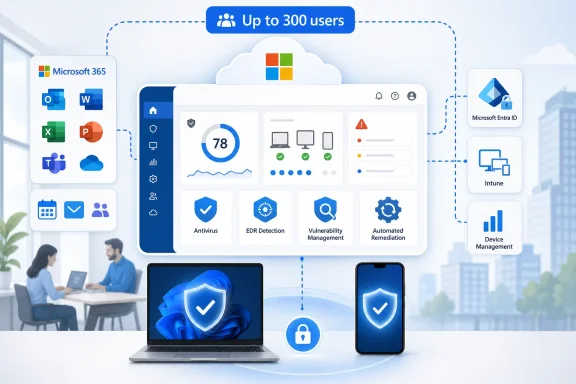
Microsoft Defender for Business is Microsoft’s small-business endpoint security product for organizations of up to 300 users, sold through Microsoft 365 Business Premium and as a standalone subscription, and it packages antivirus, vulnerability management, endpoint detection and response, and automated remediation into a cloud console. The product is not new in 2026, but its importance has sharpened as small firms face enterprise-style attacks without enterprise security staff. Microsoft’s bet is simple: if the company already owns the productivity, identity, email, and device-management layer, endpoint security becomes less a separate purchase than a default setting. That is good news for many small businesses — and a warning to every rival trying to sell security as a standalone island.
The most important thing about Defender for Business is not that it detects malware. Windows has had built-in security for years, and every credible endpoint vendor can tell a plausible story about ransomware, phishing payloads, suspicious scripts, and behavioral detection. The difference is that Microsoft is placing those controls inside the same commercial bundle that already runs the calendar, inbox, documents, Teams chats, identities, and increasingly the devices of small firms.
That changes the buying conversation. A 40-person accounting practice does not usually want to evaluate endpoint telemetry pipelines. It wants to know whether the laptops are protected, whether someone will be alerted when an employee opens the wrong attachment, and whether a consultant can explain the dashboard without turning the weekly staff meeting into a security seminar.
Defender for Business meets that market where it lives. It is aimed at companies large enough to be vulnerable and regulated, but not large enough to run a security operations center. The “up to 300 users” ceiling matters because it maps to Microsoft 365 Business plans, not to some abstract definition of small and midsize business.
For Microsoft, this is not philanthropy. Defender for Business is a security product, a retention tool, a channel product, and an investor story all at once. It gives Microsoft 365 Business Premium a sharper edge against cheaper productivity bundles, while giving managed service providers a Microsoft-native option to standardize across clients.
That quietness is not accidental. Microsoft has learned that small-business security succeeds when it avoids asking non-specialists to make specialist decisions. The product borrows from Microsoft Defender for Endpoint, but it is packaged with simplified setup, recommended baselines, and enough automation to reduce the number of choices an office manager or part-time IT consultant must make on day one.
The console’s central promise is prioritization. Small firms do not need another list of 700 theoretical weaknesses. They need to know which devices are exposed, which software is missing patches, which configuration choices are risky, and which alerts deserve attention before payroll, invoicing, or customer systems are interrupted.
That is where Microsoft’s integration story becomes practical rather than merely strategic. A device registered through Microsoft 365 and managed with Intune can be placed under policy more cleanly than a laptop protected by a third-party agent, a separate management console, and a reseller portal nobody has logged into since renewal season.
That matters because the threat model has changed. Ransomware crews and credential thieves do not behave like the noisy viruses of the Windows XP era. They abuse legitimate tools, steal tokens, run scripts, move laterally, disable protections, and wait for the best moment to apply pressure.
Endpoint detection and response, or EDR, is Microsoft’s answer to that behavioral problem. Instead of merely asking whether a file matches a known malicious signature, EDR asks whether a chain of activity looks suspicious: PowerShell launched from an unexpected process, a credential dump attempt, a sudden encryption pattern, or a device communicating with infrastructure associated with attacks.
For a large enterprise, those alerts feed teams of analysts. For a small firm, they must feed automation and readable recommendations. Defender for Business tries to compress that enterprise security loop into something a generalist can operate — not perfectly, but more realistically than asking every small business to build a miniature SOC.
At roughly the familiar U.S. list-price level of $22 per user per month on annual commitment, Business Premium bundles the productivity suite with identity protections, device management, email security, and Defender for Business. The standalone Defender for Business price has historically been around $3 per user per month, which makes it look inexpensive in isolation but more strategically useful as part of the bundle.
The economics are not subtle. Microsoft can argue that a firm already paying for Microsoft 365 should avoid the sprawl of another endpoint vendor, another agent, another billing relationship, and another admin portal. For a small company, that reduction in operational overhead may be as persuasive as the feature checklist.
This is also why competitors should worry. CrowdStrike, Sophos, SentinelOne, Bitdefender, ESET, and others may beat Microsoft in particular capabilities, managed offerings, analyst workflows, or cross-platform depth. But Microsoft does not need to win every bake-off to win many renewals. It needs to be good enough, already included, and easier to administer than the alternative.
A company can start with Business Premium, standardize on Microsoft’s security defaults, and grow into more advanced Defender for Endpoint plans, Microsoft 365 E3 or E5, or additional security and compliance products. The migration path is part of the pitch. Security maturity becomes a ladder, and Microsoft owns most of the rungs.
For administrators, that has advantages. Skills learned in Defender for Business are not wasted if the organization later moves into the enterprise Defender stack. Concepts such as attack surface reduction, device onboarding, vulnerability recommendations, and automated investigation carry forward.
But the boundary also creates pressure points. A firm approaching 300 users may discover that licensing, compliance, and security architecture become more complicated just as the business is becoming more dependent on Microsoft’s tooling. The same integration that lowers friction at 80 users can become a form of gravity at 280.
For those providers, Defender for Business offers a standard platform across many clients. That is powerful. An MSP supporting dozens of firms does not want every customer using a different endpoint console, policy model, renewal calendar, and exception process.
Microsoft’s channel machinery gives Defender for Business an advantage here. Cloud Solution Provider partners can sell, deploy, and manage Microsoft 365 plans as part of a broader service relationship. Defender for Business slips naturally into that motion because it is adjacent to the tenant settings MSPs already touch.
The risk is that some small businesses will treat “included” as “implemented.” Defender for Business is easier than enterprise EDR, but it is not magic. Devices must be onboarded, policies must be tuned, alerts must be reviewed, exclusions must be controlled, and someone must be accountable when a recommendation is inconvenient.
That is especially valuable in hybrid work. A small firm may have employees on Windows laptops, a few Macs, phones with business email, shared files in OneDrive or SharePoint, and Teams as the default collaboration layer. A security product that understands this environment through Microsoft 365 has context a standalone endpoint product may need extra integration work to obtain.
But integration cuts both ways. Microsoft’s security ecosystem is sprawling, and product names remain a maze: Defender for Business, Defender for Endpoint, Defender for Office 365, Defender for Cloud Apps, Defender Vulnerability Management, Microsoft Sentinel, Security Copilot, and more. Small-business buyers can easily confuse what they have with what they think they have.
There is also a concentration problem. Standardizing on Microsoft can reduce operational complexity, but it can also increase dependency on one vendor’s licensing decisions, portal changes, service health, and security assumptions. For some organizations, especially those with compliance obligations or high risk tolerance concerns, a best-of-breed security stack may still be worth the additional management burden.
What these organizations lack is not exposure but capacity. They cannot dedicate staff to threat hunting, log engineering, malware reverse engineering, and after-hours triage. A usable SMB security product must therefore hide complexity without hiding consequences.
Defender for Business is built around that compromise. Its vulnerability management features prioritize missing patches and misconfigurations, while its EDR capabilities aim to detect suspicious activity and automate parts of the response. That does not make the customer immune to compromise. It makes the defensive baseline more realistic.
The best version of this product is not a toy version of enterprise security. It is a translation layer. It turns enterprise-grade signals into actions that a smaller organization can actually take: update this app, isolate that device, investigate this alert, tighten that policy.
But Defender for Business itself is not a stock-moving product in isolation. Microsoft is too large for a $3-per-user endpoint SKU to matter by itself on any given trading day. The significance is cumulative: each bundled security feature makes Microsoft 365 stickier, each sticky tenant improves renewal durability, and each maturing customer creates a path toward higher-value licensing.
That is the Microsoft story in miniature. The company does not need every product to be a breakout category winner. It needs the portfolio to reinforce itself. Defender for Business reinforces Microsoft 365 Business Premium, which reinforces Entra ID, Intune, Exchange Online, SharePoint, Teams, and the broader security stack.
For shareholders, the product is best understood as evidence of Microsoft’s distribution advantage. The company can bring enterprise-style capabilities downmarket because it already has the billing relationship, admin portal, partner channel, and installed base. That is a structural advantage, not a quarterly surprise.
That case can still be made. Specialist vendors may offer stronger managed detection and response services, more mature cross-platform operations, richer threat hunting, faster incident workflows, or better reporting for certain industries. Some MSPs prefer vendor diversity precisely because they do not want a Microsoft-only monoculture.
The problem is that many small firms do not evaluate security like large enterprises. They buy through trusted consultants, renew what is already working, and avoid disruptive tooling changes unless pain forces the issue. If Defender for Business is already present inside Business Premium, the default question becomes: why are we paying separately for endpoint protection?
Microsoft’s burden, then, is reliability. If the product generates noisy alerts, confusing recommendations, licensing ambiguity, or deployment friction, customers and MSPs will look elsewhere. The SMB market forgives fewer operational surprises than vendors sometimes assume because small teams have less slack to absorb them.
That expansion explains why endpoint security alone is never the whole answer. A compromised mailbox, weak administrator password, unmanaged phone, or poorly configured file-sharing link can create just as much damage as malware on a laptop. Microsoft’s advantage is that it can connect endpoint security to identity, email, and device management inside the same subscription family.
Still, customers should not mistake product breadth for configuration maturity. Multi-factor authentication, least-privilege administration, device compliance, patch discipline, backup strategy, and user training remain essential. Defender for Business helps with one major slice of the problem, but it does not absolve a company from basic operational hygiene.
The better framing is that Defender for Business gives small firms a stronger endpoint floor. It raises the default from passive antivirus to a more active posture: detect, prioritize, investigate, remediate. That floor is valuable, but it is still a floor.
A manufacturer with old equipment-control software may need exceptions that a consulting firm would never allow. A medical practice may care more about compliance documentation and device encryption. A construction firm may have ruggedized laptops, intermittent connectivity, and field workers who treat security prompts as obstacles to getting paid.
This is where deployment quality matters more than marketing. A rushed Defender for Business rollout can produce a false sense of security if devices are missing, policies are incomplete, or nobody monitors alerts. A thoughtful rollout can materially improve resilience without overwhelming users.
The product’s approachable console is therefore only half the story. The other half is governance: who owns the alerts, who approves exceptions, who checks device coverage, who reviews vulnerability recommendations, and who confirms that backups and incident response plans exist before an attack.
Defender for Business is part of a broader correction. The industry is finally packaging serious controls in ways smaller organizations can buy and operate. That does not mean the controls are perfect, or that Microsoft is the only credible vendor. It means the baseline is rising.
The most concrete shift is that EDR and vulnerability management are no longer exotic terms reserved for Fortune 500 security teams. They are becoming expected features in mainstream small-business subscriptions. That is a healthy development, even if it also strengthens Microsoft’s grip on the commercial desktop.
The uncomfortable truth is that many small firms are already Microsoft shops by default. Defender for Business turns that fact into a security architecture. Whether that is empowering or constraining depends on how deliberately the organization uses it.
 Microsoft Is Turning Small-Business Security Into a Bundle Fight
The most important thing about Defender for Business is not that it detects malware. Windows has had built-in security for years, and every credible endpoint vendor can tell a plausible story about ransomware, phishing payloads, suspicious scripts, and behavioral detection. The difference is that Microsoft is placing those controls inside the same commercial bundle that already runs the calendar, inbox, documents, Teams chats, identities, and increasingly the devices of small firms.That changes the buying conversation. A 40-person accounting practice does not usually want to evaluate endpoint telemetry pipelines. It wants to know whether the laptops are protected, whether someone will be alerted when an employee opens the wrong attachment, and whether a consultant can explain the dashboard without turning the weekly staff meeting into a security seminar.
Defender for Business meets that market where it lives. It is aimed at companies large enough to be vulnerable and regulated, but not large enough to run a security operations center. The “up to 300 users” ceiling matters because it maps to Microsoft 365 Business plans, not to some abstract definition of small and midsize business.
For Microsoft, this is not philanthropy. Defender for Business is a security product, a retention tool, a channel product, and an investor story all at once. It gives Microsoft 365 Business Premium a sharper edge against cheaper productivity bundles, while giving managed service providers a Microsoft-native option to standardize across clients.
The Quiet Console Is the Product Strategy
The typical Defender for Business experience is deliberately undramatic. An administrator sees a portal with devices, alerts, recommendations, vulnerabilities, security scores, and policy settings. Employees see little unless something goes wrong, usually through Windows Security notifications, scan prompts, or the friction of a blocked action.That quietness is not accidental. Microsoft has learned that small-business security succeeds when it avoids asking non-specialists to make specialist decisions. The product borrows from Microsoft Defender for Endpoint, but it is packaged with simplified setup, recommended baselines, and enough automation to reduce the number of choices an office manager or part-time IT consultant must make on day one.
The console’s central promise is prioritization. Small firms do not need another list of 700 theoretical weaknesses. They need to know which devices are exposed, which software is missing patches, which configuration choices are risky, and which alerts deserve attention before payroll, invoicing, or customer systems are interrupted.
That is where Microsoft’s integration story becomes practical rather than merely strategic. A device registered through Microsoft 365 and managed with Intune can be placed under policy more cleanly than a laptop protected by a third-party agent, a separate management console, and a reseller portal nobody has logged into since renewal season.
Antivirus Was the Floor, Not the Pitch
For years, small-business endpoint security was sold as antivirus with nicer dashboards. Defender for Business belongs to a later era, where the endpoint tool is expected to watch behavior, investigate suspicious activity, and feed broader security decisions. Its advertised capabilities include next-generation antivirus, endpoint detection and response, attack surface reduction, automated investigation and remediation, and core vulnerability management.That matters because the threat model has changed. Ransomware crews and credential thieves do not behave like the noisy viruses of the Windows XP era. They abuse legitimate tools, steal tokens, run scripts, move laterally, disable protections, and wait for the best moment to apply pressure.
Endpoint detection and response, or EDR, is Microsoft’s answer to that behavioral problem. Instead of merely asking whether a file matches a known malicious signature, EDR asks whether a chain of activity looks suspicious: PowerShell launched from an unexpected process, a credential dump attempt, a sudden encryption pattern, or a device communicating with infrastructure associated with attacks.
For a large enterprise, those alerts feed teams of analysts. For a small firm, they must feed automation and readable recommendations. Defender for Business tries to compress that enterprise security loop into something a generalist can operate — not perfectly, but more realistically than asking every small business to build a miniature SOC.
Microsoft 365 Business Premium Becomes the Real Security SKU
The standalone Defender for Business subscription is important, but Microsoft 365 Business Premium is the center of gravity. Business Premium has become Microsoft’s answer to the question many small firms eventually ask: what do we need beyond email and Office apps to operate safely in a hybrid-work world?At roughly the familiar U.S. list-price level of $22 per user per month on annual commitment, Business Premium bundles the productivity suite with identity protections, device management, email security, and Defender for Business. The standalone Defender for Business price has historically been around $3 per user per month, which makes it look inexpensive in isolation but more strategically useful as part of the bundle.
The economics are not subtle. Microsoft can argue that a firm already paying for Microsoft 365 should avoid the sprawl of another endpoint vendor, another agent, another billing relationship, and another admin portal. For a small company, that reduction in operational overhead may be as persuasive as the feature checklist.
This is also why competitors should worry. CrowdStrike, Sophos, SentinelOne, Bitdefender, ESET, and others may beat Microsoft in particular capabilities, managed offerings, analyst workflows, or cross-platform depth. But Microsoft does not need to win every bake-off to win many renewals. It needs to be good enough, already included, and easier to administer than the alternative.
The 300-User Ceiling Is a Product Boundary and a Sales Funnel
Defender for Business is built for organizations with up to 300 users, a limit that neatly matches Microsoft’s small-business licensing structure. That cap looks like a restriction, but it is also a segmentation device. Microsoft knows exactly where the small-business product ends and where enterprise licensing conversations begin.A company can start with Business Premium, standardize on Microsoft’s security defaults, and grow into more advanced Defender for Endpoint plans, Microsoft 365 E3 or E5, or additional security and compliance products. The migration path is part of the pitch. Security maturity becomes a ladder, and Microsoft owns most of the rungs.
For administrators, that has advantages. Skills learned in Defender for Business are not wasted if the organization later moves into the enterprise Defender stack. Concepts such as attack surface reduction, device onboarding, vulnerability recommendations, and automated investigation carry forward.
But the boundary also creates pressure points. A firm approaching 300 users may discover that licensing, compliance, and security architecture become more complicated just as the business is becoming more dependent on Microsoft’s tooling. The same integration that lowers friction at 80 users can become a form of gravity at 280.
The Managed Service Provider Is the Hidden Buyer
Microsoft’s small-business security story often sounds as if the buyer is a founder, office manager, or internal IT generalist. In practice, the decisive audience is frequently the managed service provider. MSPs are the ones onboarding tenants, applying baselines, cleaning up identity settings, interpreting alerts, and explaining why a client’s line-of-business app triggered a security warning.For those providers, Defender for Business offers a standard platform across many clients. That is powerful. An MSP supporting dozens of firms does not want every customer using a different endpoint console, policy model, renewal calendar, and exception process.
Microsoft’s channel machinery gives Defender for Business an advantage here. Cloud Solution Provider partners can sell, deploy, and manage Microsoft 365 plans as part of a broader service relationship. Defender for Business slips naturally into that motion because it is adjacent to the tenant settings MSPs already touch.
The risk is that some small businesses will treat “included” as “implemented.” Defender for Business is easier than enterprise EDR, but it is not magic. Devices must be onboarded, policies must be tuned, alerts must be reviewed, exclusions must be controlled, and someone must be accountable when a recommendation is inconvenient.
Integration Is Microsoft’s Sharpest Weapon — and Its Sharpest Liability
The strongest argument for Defender for Business is integration. Microsoft controls the operating system, the productivity suite, the identity layer, the device-management framework, and a vast security telemetry network. When those pieces work together, security becomes less fragmented.That is especially valuable in hybrid work. A small firm may have employees on Windows laptops, a few Macs, phones with business email, shared files in OneDrive or SharePoint, and Teams as the default collaboration layer. A security product that understands this environment through Microsoft 365 has context a standalone endpoint product may need extra integration work to obtain.
But integration cuts both ways. Microsoft’s security ecosystem is sprawling, and product names remain a maze: Defender for Business, Defender for Endpoint, Defender for Office 365, Defender for Cloud Apps, Defender Vulnerability Management, Microsoft Sentinel, Security Copilot, and more. Small-business buyers can easily confuse what they have with what they think they have.
There is also a concentration problem. Standardizing on Microsoft can reduce operational complexity, but it can also increase dependency on one vendor’s licensing decisions, portal changes, service health, and security assumptions. For some organizations, especially those with compliance obligations or high risk tolerance concerns, a best-of-breed security stack may still be worth the additional management burden.
Small Firms Need Fewer Dashboards, Not Fewer Controls
The small-business security market is often misdescribed as a place where buyers need less security. They do not. A law office, dental group, manufacturer, architectural firm, or regional nonprofit may hold sensitive data, handle payments, depend on scheduling systems, and operate with little tolerance for downtime.What these organizations lack is not exposure but capacity. They cannot dedicate staff to threat hunting, log engineering, malware reverse engineering, and after-hours triage. A usable SMB security product must therefore hide complexity without hiding consequences.
Defender for Business is built around that compromise. Its vulnerability management features prioritize missing patches and misconfigurations, while its EDR capabilities aim to detect suspicious activity and automate parts of the response. That does not make the customer immune to compromise. It makes the defensive baseline more realistic.
The best version of this product is not a toy version of enterprise security. It is a translation layer. It turns enterprise-grade signals into actions that a smaller organization can actually take: update this app, isolate that device, investigate this alert, tighten that policy.
The Investor Story Is Real, but Easy to Overstate
The source material frames Defender for Business partly through Microsoft stock, and that is not unreasonable. Microsoft’s security business has grown into a major revenue pillar, and recurring cloud security subscriptions fit the model investors like: durable, expandable, and attached to existing enterprise relationships.But Defender for Business itself is not a stock-moving product in isolation. Microsoft is too large for a $3-per-user endpoint SKU to matter by itself on any given trading day. The significance is cumulative: each bundled security feature makes Microsoft 365 stickier, each sticky tenant improves renewal durability, and each maturing customer creates a path toward higher-value licensing.
That is the Microsoft story in miniature. The company does not need every product to be a breakout category winner. It needs the portfolio to reinforce itself. Defender for Business reinforces Microsoft 365 Business Premium, which reinforces Entra ID, Intune, Exchange Online, SharePoint, Teams, and the broader security stack.
For shareholders, the product is best understood as evidence of Microsoft’s distribution advantage. The company can bring enterprise-style capabilities downmarket because it already has the billing relationship, admin portal, partner channel, and installed base. That is a structural advantage, not a quarterly surprise.
The Competitive Question Is Whether “Good Enough” Keeps Getting Better
Security vendors dislike the phrase “good enough” because it sounds like compromise. In the SMB market, however, good enough plus integrated plus affordable plus managed is often the winning formula. The challenge for Microsoft’s rivals is to prove that their additional capability is worth additional complexity.That case can still be made. Specialist vendors may offer stronger managed detection and response services, more mature cross-platform operations, richer threat hunting, faster incident workflows, or better reporting for certain industries. Some MSPs prefer vendor diversity precisely because they do not want a Microsoft-only monoculture.
The problem is that many small firms do not evaluate security like large enterprises. They buy through trusted consultants, renew what is already working, and avoid disruptive tooling changes unless pain forces the issue. If Defender for Business is already present inside Business Premium, the default question becomes: why are we paying separately for endpoint protection?
Microsoft’s burden, then, is reliability. If the product generates noisy alerts, confusing recommendations, licensing ambiguity, or deployment friction, customers and MSPs will look elsewhere. The SMB market forgives fewer operational surprises than vendors sometimes assume because small teams have less slack to absorb them.
Windows Remains the Center, but the Perimeter Has Moved
Defender for Business supports Windows, macOS, Android, and iOS devices, which reflects the reality of modern small-company computing. Windows is still the anchor in many offices, but the business perimeter now includes personal phones, contractor laptops, remote employees, cloud apps, and browser sessions from places no one intended to manage ten years ago.That expansion explains why endpoint security alone is never the whole answer. A compromised mailbox, weak administrator password, unmanaged phone, or poorly configured file-sharing link can create just as much damage as malware on a laptop. Microsoft’s advantage is that it can connect endpoint security to identity, email, and device management inside the same subscription family.
Still, customers should not mistake product breadth for configuration maturity. Multi-factor authentication, least-privilege administration, device compliance, patch discipline, backup strategy, and user training remain essential. Defender for Business helps with one major slice of the problem, but it does not absolve a company from basic operational hygiene.
The better framing is that Defender for Business gives small firms a stronger endpoint floor. It raises the default from passive antivirus to a more active posture: detect, prioritize, investigate, remediate. That floor is valuable, but it is still a floor.
The Catch Is That Simplicity Requires Trust
Every simplified security product asks the customer to trust the vendor’s defaults. Defender for Business is no different. Microsoft’s recommended policies and automated responses may be appropriate for many small businesses, but not every business process tolerates the same level of enforcement.A manufacturer with old equipment-control software may need exceptions that a consulting firm would never allow. A medical practice may care more about compliance documentation and device encryption. A construction firm may have ruggedized laptops, intermittent connectivity, and field workers who treat security prompts as obstacles to getting paid.
This is where deployment quality matters more than marketing. A rushed Defender for Business rollout can produce a false sense of security if devices are missing, policies are incomplete, or nobody monitors alerts. A thoughtful rollout can materially improve resilience without overwhelming users.
The product’s approachable console is therefore only half the story. The other half is governance: who owns the alerts, who approves exceptions, who checks device coverage, who reviews vulnerability recommendations, and who confirms that backups and incident response plans exist before an attack.
The New Small-Business Baseline Is Finally Becoming Plausible
For years, security advice for small firms sounded like enterprise advice shrunk in the wash. Buy better endpoint protection. Patch faster. Use MFA. Train users. Segment networks. Monitor logs. Test backups. The recommendations were correct, but the operating model was often fantasy.Defender for Business is part of a broader correction. The industry is finally packaging serious controls in ways smaller organizations can buy and operate. That does not mean the controls are perfect, or that Microsoft is the only credible vendor. It means the baseline is rising.
The most concrete shift is that EDR and vulnerability management are no longer exotic terms reserved for Fortune 500 security teams. They are becoming expected features in mainstream small-business subscriptions. That is a healthy development, even if it also strengthens Microsoft’s grip on the commercial desktop.
The uncomfortable truth is that many small firms are already Microsoft shops by default. Defender for Business turns that fact into a security architecture. Whether that is empowering or constraining depends on how deliberately the organization uses it.
The Fine Print Behind the Friendly Dashboard
Defender for Business is easiest to understand as Microsoft’s attempt to make serious endpoint security ordinary for small firms. The product’s value is not only in its detections, but in the way it changes purchasing, deployment, and administration for companies that already live in Microsoft 365.- Defender for Business is designed for small and midsize organizations of up to 300 users, aligning it with Microsoft’s Business licensing model.
- The product includes endpoint detection and response, next-generation antivirus, automated investigation and remediation, attack surface reduction, and core vulnerability management.
- Microsoft 365 Business Premium is the strategic home for the product because it combines endpoint security with identity, device management, email, collaboration, and productivity tools.
- The standalone subscription remains useful for firms that want endpoint protection without the full Business Premium bundle, but the larger Microsoft strategy is clearly subscription consolidation.
- Managed service providers are central to whether Defender for Business succeeds in practice, because small firms often need help configuring policies, monitoring alerts, and maintaining coverage.
- The product reduces security sprawl, but it also increases dependency on Microsoft’s ecosystem and licensing choices.
References
- Primary source: AD HOC NEWS
Published: 2026-06-30T16:38:11.696271
Loading…
www.ad-hoc-news.de - Official source: microsoft.com
Loading…
www.microsoft.com - Official source: learn.microsoft.com
Loading…
learn.microsoft.com - Official source: techcommunity.microsoft.com
Introducing Microsoft Defender for Business
Introducing Microsoft Defender for Business at Ignite 2021 techcommunity.microsoft.com
- Related coverage: theregister.com
Loading…
www.theregister.com - Related coverage: aguidetocloud.com
Loading…
www.aguidetocloud.com
- Related coverage: rcpmag.com
Loading…
rcpmag.com - Related coverage: trustedtechteam.com
Loading…
www.trustedtechteam.com - Related coverage: trustradius.com
Loading…
www.trustradius.com - Related coverage: techradar.com
Loading…
www.techradar.com - Related coverage: windowscentral.com
$96.5 million for Nadella | Microsoft's CEO receives record pay in a year that saw 15,000+ layoffs | Windows Central
Business is booming at Microsoft, and its CEO isn't going to go hungry.www.windowscentral.com - Official source: cdn-dynmedia-1.microsoft.com