

Microsoft’s newly announced Agent 365 Skills let developers bring locally built AI agents into Microsoft Agent 365 through guided workflows that add setup, identity, observability, Microsoft 365 data access, Teams messaging, and local testing controls before enterprise rollout. The move matters because Microsoft is trying to make agents less like clever desktop experiments and more like governable corporate infrastructure. Its bet is that the next wave of AI adoption will not be won by the most dazzling demo, but by the platform that can make thousands of small autonomous systems visible, auditable, and safe enough for production.
The phrase “AI agent” has already been stretched nearly beyond usefulness. It can mean a chatbot with tools, a scheduled automation, a workflow stitched together with a language model, or a semi-autonomous application that reads mail, files tickets, queries databases, and nudges humans in Teams. Enterprises are discovering that the ambiguity is not just semantic; it is operational.
A developer can build an agent with LangChain, Semantic Kernel, OpenAI tooling, Azure AI Foundry, or any number of frameworks and get something useful running locally. That agent may have orchestration logic, tool calls, prompts, memory, and even a polished user experience. What it often lacks is the boring machinery enterprises actually require before something is allowed to touch production data.
That machinery includes identity, consent, telemetry, governance, cataloging, policy enforcement, and a way for security teams to understand what the agent is doing after launch. Microsoft’s Agent 365 pitch has always been that agents should be managed more like users, apps, and devices inside an enterprise control plane. Agent 365 Skills pushes that pitch down into the developer workflow.
This is a subtle but important shift. Microsoft is not merely saying, “Here is a dashboard where admins can see agents.” It is saying that the path from prototype to governed agent should be something a coding assistant can help execute, step by step, without forcing every developer to become an Entra, Purview, Defender, Graph, Teams, and Microsoft 365 admin specialist.
That last mile is where Microsoft is focusing Agent 365 Skills. According to Microsoft’s framing, developers previously had to work through a sequence of steps that included installing the Agent 365 CLI, checking Azure prerequisites, configuring Entra identity artifacts, connecting Model Context Protocol servers, validating local behavior, and wiring the agent into the broader Microsoft 365 environment. In a large organization, each of those steps can become a separate blocker.
The problem is not that any one step is impossible. It is that they are interdependent. A missing permission can derail a test. An incorrectly registered identity object can stop a tool connection. A telemetry mistake can leave the agent invisible to the very systems meant to watch it. A local test that passes without production-like access assumptions can lull a team into false confidence.
Agent 365 Skills turns these chores into natural-language developer tasks. A developer can ask to add observability, test locally, connect Microsoft 365 data, or make an agent available through Teams, and the skill is supposed to detect the project context, ask for required details, modify the project, and validate the result. That is not full automation of governance, but it is a meaningful attempt to reduce the friction that keeps useful agents trapped in prototype land.
That matters because governance added at the end of a project is usually brittle. It becomes a checklist, a retrofitted wrapper, or a negotiation between speed and risk. Governance added during development has a better chance of becoming part of the agent’s actual design.
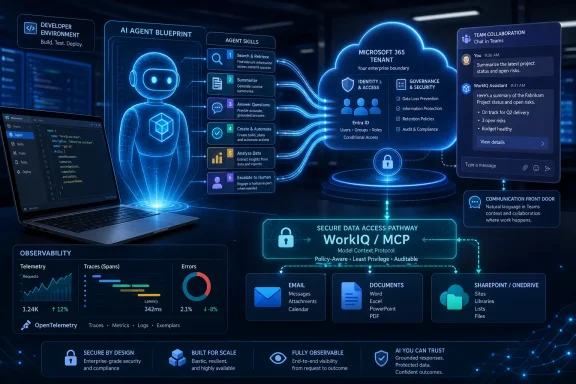
The six skills Microsoft describes map neatly onto this philosophy. The setup skill installs tooling, validates prerequisites, and detects the agent stack. The blueprint registration skill creates catalog visibility and observability for agents that may not need the full messaging layer. The observability skill wires telemetry into Microsoft’s security and compliance estate. The WorkIQ skill connects Microsoft 365 data through MCP servers. The AI teammate skill adds messaging and notification support so the agent can participate through Teams, email, and mentions. The local testing skill launches the agent in a sandbox for smoke testing.
Taken together, those are not just convenience commands. They are Microsoft’s preferred view of what a production-grade enterprise agent should be: registered, observable, identity-bound, testable, connected to Microsoft 365 data through approved channels, and reachable through collaboration surfaces employees already use.
This is also where the WindowsForum audience should pay attention. The interesting part is not that developers can type fewer commands. It is that Microsoft is defining the operational checklist for agent readiness before the rest of the market has settled on one.
Instead of clicking through a wizard, the developer asks for an outcome. “Add observability.” “Test this agent locally.” “Connect this agent to WorkIQ tools.” The coding assistant then becomes the interface to a bundle of Microsoft assumptions about what must happen next.
There is a real productivity argument here. Developers do not want to stop building agent logic to chase down every tenant prerequisite. Security teams do not want every team inventing its own way to expose telemetry. Admins do not want one-off agents appearing with undocumented permissions and unclear data access paths. A guided skill system gives each group a better default.
But natural language also changes accountability. If a developer asks a skill to make an agent enterprise-ready, who verifies that the generated changes meet internal policy? If the skill chooses a default authentication pattern, does that match the organization’s risk model? If it wires observability into Defender, Purview, and the Microsoft 365 admin center, does the security operations team know what signals to expect?
The answer cannot simply be “the tool handled it.” Agent 365 Skills may reduce mechanical complexity, but it does not eliminate governance judgment. It makes the path more repeatable, which is valuable, but repeatability is not the same thing as policy approval.
For Microsoft customers, much of that information sits inside Microsoft 365: mailboxes, calendars, Word documents, Teams conversations, SharePoint sites, OneDrive files, and organizational knowledge signals. The promise of connecting agents to WorkIQ MCP servers is that developers can give agents access to workplace context without building a bespoke data-access layer from scratch.
That promise has teeth because Microsoft 365 data is both valuable and dangerous. An agent that can read mail, summarize documents, schedule meetings, and act on files can save time. The same agent, misconfigured or compromised, can leak sensitive data, overstep permissions, or perform actions under unclear authority.
Microsoft’s strategy is to make agents inherit the security and compliance posture organizations already understand. That means Entra identity, Graph permissions, Defender telemetry, Purview governance, admin center visibility, and Microsoft 365-native collaboration channels. In theory, an agent becomes another managed actor in the tenant rather than a mysterious script running on someone’s workstation.
That is a compelling story for CIOs and CISOs. It is also self-serving in the way successful platform strategies usually are. The more agents depend on Microsoft’s governance, identity, observability, and data-access fabric, the more Microsoft 365 becomes the place where enterprise AI work must be anchored.
A developer working locally can iterate quickly, connect tools, test prompts, and build a useful assistant for a department or workflow. The trouble begins when that local agent becomes important. Someone wants to share it with a team. Then a business unit wants it connected to live data. Then the security team asks what it can access. Then compliance asks whether its activity is logged. Then IT asks who owns it.
Agent 365 Skills is Microsoft’s answer to that awkward transition. It gives developers a ramp from local code to managed agent without forcing them to manually reconstruct every enterprise control. If it works as advertised, that makes it easier for organizations to capture useful grassroots innovation before it becomes shadow AI.
The phrase shadow AI is doing a lot of work in the industry right now, sometimes more than it should. Not every unsanctioned prototype is a disaster waiting to happen. But agents do raise the stakes because they are designed to take actions, not merely generate text. Once an agent can call tools, read data, and communicate with users, the boundary between experimentation and production becomes harder to police.
Bringing local agents into a governed tenant structure is therefore not just a developer convenience. It is Microsoft trying to close the gap between bottom-up AI experimentation and top-down enterprise control.
Microsoft’s observability skill is designed to wire OpenTelemetry and Agent 365 tracing so agent spans appear in Microsoft Defender, Microsoft Purview, and the Microsoft 365 admin center. That is exactly the kind of plumbing most developers would rather not build manually, and exactly the kind of plumbing security teams will demand.
The inclusion of multiple authentication modes also points to a broader reality: enterprises will not have one kind of agent. Some agents will act on behalf of a user. Some will act as service principals. Some may operate in more agentic user contexts where the line between human instruction and autonomous behavior gets tricky. Each pattern has different implications for auditability and access control.
For administrators, the practical question is not whether the agent works. It is whether the organization can answer basic questions later. Which agent accessed which data? Under whose authority? What tool did it call? What did it attempt to do? Was the behavior expected, blocked, escalated, or ignored?
Without that evidence trail, agents become a governance liability. With it, they become manageable automation. Agent 365 Skills is Microsoft’s attempt to make the evidence trail part of the default build path rather than an afterthought.
That is powerful because Teams is already where many employees negotiate tasks, approvals, status updates, and interruptions. Dropping agents into that stream makes them more accessible than a separate app or dashboard. It also makes them harder to ignore.
The risk is that every workflow owner will want an agent that talks. If Microsoft and its customers are not careful, the enterprise could trade app sprawl for agent chatter. A bot for procurement, a bot for HR, a bot for security, a bot for sales operations, a bot for legal review, and a bot for every internal process can quickly become a new kind of noise.
This is where catalog visibility and governance become more than administrative niceties. Employees need to know which agents are approved, what they do, and when they are acting with authority. Admins need lifecycle controls so abandoned agents do not continue lurking in channels and inboxes after their business owner moves on.
Microsoft’s bet is that Teams can become a natural interaction layer for agents while Agent 365 keeps the backend orderly. That is plausible, but it will require discipline. The worst version of enterprise agent adoption is not a rogue superintelligence; it is a thousand mediocre bots interrupting workers with half-useful messages and unclear permissions.
That does not mean Microsoft is giving up control. Quite the opposite. MCP can be the bridge into Microsoft 365 data, but Agent 365 remains the control plane where access, observability, and governance are supposed to converge. Microsoft can support open-ish agent development patterns while still making its tenant infrastructure the place where enterprise readiness is judged.
This is a familiar Microsoft move. Embrace the broader developer ecosystem, integrate the popular standard or framework, then make the enterprise-grade version best inside Microsoft’s stack. It is not necessarily bad for customers; in many cases, it is exactly what they want. They get developer flexibility without abandoning the management tools their IT departments already use.
The tension is lock-in. If the cleanest path to governed agents runs through Agent 365, WorkIQ, Entra, Defender, Purview, and Teams, organizations may find that cross-platform agent governance remains more complicated than the marketing suggests. Agent 365 may support agents from varied origins, but the richest experience will almost certainly favor customers deep in Microsoft 365.
That is not a scandal. It is platform economics. But enterprises should understand the trade before they standardize on the workflow.
Agents magnify that anxiety. They can act across systems, interpret human intent, and combine data from multiple sources. A normal app usually does what its code says. An agent does what its code, model, prompt, tools, context, and permissions collectively allow. That is a larger attack surface and a more complicated audit problem.
If Agent 365 Skills can make observability and identity setup part of the standard developer loop, security teams gain leverage. They can insist that agents appear in the admin center, emit usable telemetry, and follow approved authentication paths before they are rolled out widely. That is better than discovering an agent after it has become business-critical.
The flip side is that a smoother onboarding path may increase the number of agents dramatically. Lower friction is not always safer. It can mean more experiments become semi-official, more teams deploy agents, and more admin review is needed. Governance systems must therefore scale not only technically, but organizationally.
Microsoft is effectively telling customers: do not try to stop agent proliferation; manage it. For many enterprises, that is probably the only realistic stance left.
Developers building agents still need to understand what permissions their agents request, what data they can access, what identity they act under, and what happens when a tool call fails. They need to know the difference between local smoke testing and production validation. They need to understand that Teams messaging support changes user expectations and risk. They need to treat prompts, tool schemas, and access controls as part of the application surface.
Agent 365 Skills can reduce ceremony. It cannot replace engineering literacy. In fact, by making enterprise rollout easier, it may raise the bar for developer responsibility. A local prototype that once would have died on a laptop can now travel more quickly toward production, where mistakes matter.
This is especially relevant for Windows and Microsoft 365 shops that have many power users and citizen developers. The line between professional developer, automation specialist, and business technologist is already blurry. Agent tooling will blur it further. Organizations will need policies that explain not just who can create agents, but who can connect them to corporate data and who can make them available to other users.
The future of agent development will not belong only to software engineers. That is precisely why the governance path needs to be understandable, repeatable, and enforceable.
But smoke testing should not be confused with readiness. Agents behave differently when they meet real users, real data, real permissions, and real ambiguity. A local sandbox can validate that the agent starts, connects, and performs surface-level tasks. It cannot prove that the agent will behave appropriately under every business condition.
This is where enterprises will need layered validation. Local testing is the first gate. Tenant-level registration and observability are another. Security review, compliance review, limited pilots, monitoring, and rollback plans are still necessary for agents that can affect important workflows.
Microsoft’s tooling can make those stages less painful, but customers should resist the temptation to compress them into a single happy path. The more consequential an agent’s actions, the more its testing should resemble the environment in which it will operate.
The broader lesson is that agent governance is not a one-time import step. It is a lifecycle. Microsoft’s six skills are useful because they map to that lifecycle, but they are not the whole lifecycle.
That is why enterprise controls are central, not peripheral. A personal assistant that helps one employee draft an email has one risk profile. An agent that reads customer data, updates records, messages colleagues, and triggers processes has another. The second category needs governance before it can be trusted at scale.
Microsoft’s announcement fits the company’s larger “frontier firm” narrative, in which organizations are imagined as networks of humans and agents working together. Whether one buys the branding or not, the operational direction is clear. Microsoft wants agents to become a normal part of business architecture.
Agent 365 Skills is therefore not just a developer feature. It is a way to industrialize the agent supply chain. Developers build them, skills prepare them, Agent 365 registers and governs them, Microsoft 365 surfaces them, and security tools watch them.
That is the architecture Microsoft is selling. Customers should evaluate it not by how exciting the demos look, but by how well it handles the dull, recurring, high-stakes details of enterprise operations.
Some organizations will use Agent 365 Skills to accelerate a disciplined program. They will define agent ownership, review permissions, monitor telemetry, and retire unused agents. Others will use the same tooling to create a faster path to sprawl. The difference will not be the feature set alone; it will be operating model.
Microsoft can provide defaults, but defaults are not strategy. Admins will need to decide which teams can register agents, which data sources are available, how Teams-enabled agents are approved, what telemetry must be reviewed, and what happens when an agent behaves unexpectedly. Security teams will need detection logic and incident response procedures that assume agents are first-class actors.
There is also a human adoption problem. Employees must understand when they are interacting with an approved agent, what the agent can do, and when to escalate to a person. If agents appear in Teams and email, trust cues matter. A governed agent estate that users cannot understand will still create confusion.
In other words, Agent 365 Skills lowers the technical activation energy. It does not eliminate the need for governance culture.
That strategy may prove effective because enterprise IT rarely rewards novelty on its own. It rewards systems that can be deployed, audited, explained, and defended. Agent 365 Skills is Microsoft’s attempt to make the governed path the easy path — and if it succeeds, the next generation of workplace agents may arrive not as rogue experiments on desktops, but as managed participants in the Microsoft 365 tenant.
 Microsoft Is Turning Agent Sprawl Into a Platform Problem
The phrase “AI agent” has already been stretched nearly beyond usefulness. It can mean a chatbot with tools, a scheduled automation, a workflow stitched together with a language model, or a semi-autonomous application that reads mail, files tickets, queries databases, and nudges humans in Teams. Enterprises are discovering that the ambiguity is not just semantic; it is operational.A developer can build an agent with LangChain, Semantic Kernel, OpenAI tooling, Azure AI Foundry, or any number of frameworks and get something useful running locally. That agent may have orchestration logic, tool calls, prompts, memory, and even a polished user experience. What it often lacks is the boring machinery enterprises actually require before something is allowed to touch production data.
That machinery includes identity, consent, telemetry, governance, cataloging, policy enforcement, and a way for security teams to understand what the agent is doing after launch. Microsoft’s Agent 365 pitch has always been that agents should be managed more like users, apps, and devices inside an enterprise control plane. Agent 365 Skills pushes that pitch down into the developer workflow.
This is a subtle but important shift. Microsoft is not merely saying, “Here is a dashboard where admins can see agents.” It is saying that the path from prototype to governed agent should be something a coding assistant can help execute, step by step, without forcing every developer to become an Entra, Purview, Defender, Graph, Teams, and Microsoft 365 admin specialist.
The Prototype Was Never the Hard Part
The history of enterprise software is littered with tools that made the first 80 percent feel magical and the last 20 percent feel like trench warfare. AI agents are becoming the newest example. The prototype can be built in a week; the enterprise version can spend months bouncing between developers, security architects, identity admins, compliance teams, and business owners.That last mile is where Microsoft is focusing Agent 365 Skills. According to Microsoft’s framing, developers previously had to work through a sequence of steps that included installing the Agent 365 CLI, checking Azure prerequisites, configuring Entra identity artifacts, connecting Model Context Protocol servers, validating local behavior, and wiring the agent into the broader Microsoft 365 environment. In a large organization, each of those steps can become a separate blocker.
The problem is not that any one step is impossible. It is that they are interdependent. A missing permission can derail a test. An incorrectly registered identity object can stop a tool connection. A telemetry mistake can leave the agent invisible to the very systems meant to watch it. A local test that passes without production-like access assumptions can lull a team into false confidence.
Agent 365 Skills turns these chores into natural-language developer tasks. A developer can ask to add observability, test locally, connect Microsoft 365 data, or make an agent available through Teams, and the skill is supposed to detect the project context, ask for required details, modify the project, and validate the result. That is not full automation of governance, but it is a meaningful attempt to reduce the friction that keeps useful agents trapped in prototype land.
The Control Plane Moves Left
For years, Microsoft’s enterprise advantage has come from owning the connective tissue: Windows, Entra, Microsoft 365, Defender, Purview, Intune, Teams, Azure, and the admin center. Agent 365 extends that pattern to autonomous software actors. Agent 365 Skills then moves part of that governance work left, into the development stage.That matters because governance added at the end of a project is usually brittle. It becomes a checklist, a retrofitted wrapper, or a negotiation between speed and risk. Governance added during development has a better chance of becoming part of the agent’s actual design.
The six skills Microsoft describes map neatly onto this philosophy. The setup skill installs tooling, validates prerequisites, and detects the agent stack. The blueprint registration skill creates catalog visibility and observability for agents that may not need the full messaging layer. The observability skill wires telemetry into Microsoft’s security and compliance estate. The WorkIQ skill connects Microsoft 365 data through MCP servers. The AI teammate skill adds messaging and notification support so the agent can participate through Teams, email, and mentions. The local testing skill launches the agent in a sandbox for smoke testing.
Taken together, those are not just convenience commands. They are Microsoft’s preferred view of what a production-grade enterprise agent should be: registered, observable, identity-bound, testable, connected to Microsoft 365 data through approved channels, and reachable through collaboration surfaces employees already use.
This is also where the WindowsForum audience should pay attention. The interesting part is not that developers can type fewer commands. It is that Microsoft is defining the operational checklist for agent readiness before the rest of the market has settled on one.
Natural Language Becomes the New Admin Wizard
Microsoft has spent decades building wizards. Windows setup wizards, Office configuration panes, Azure blades, Intune profiles, Exchange admin flows, SharePoint permission screens — the company knows that enterprise software often advances by burying complexity behind guided sequences. Agent 365 Skills is that instinct reimagined for the age of coding assistants.Instead of clicking through a wizard, the developer asks for an outcome. “Add observability.” “Test this agent locally.” “Connect this agent to WorkIQ tools.” The coding assistant then becomes the interface to a bundle of Microsoft assumptions about what must happen next.
There is a real productivity argument here. Developers do not want to stop building agent logic to chase down every tenant prerequisite. Security teams do not want every team inventing its own way to expose telemetry. Admins do not want one-off agents appearing with undocumented permissions and unclear data access paths. A guided skill system gives each group a better default.
But natural language also changes accountability. If a developer asks a skill to make an agent enterprise-ready, who verifies that the generated changes meet internal policy? If the skill chooses a default authentication pattern, does that match the organization’s risk model? If it wires observability into Defender, Purview, and the Microsoft 365 admin center, does the security operations team know what signals to expect?
The answer cannot simply be “the tool handled it.” Agent 365 Skills may reduce mechanical complexity, but it does not eliminate governance judgment. It makes the path more repeatable, which is valuable, but repeatability is not the same thing as policy approval.
Microsoft Wants Agents to Inherit the Microsoft 365 Trust Model
The most important phrase in this announcement is not “skills.” It is “secure data access.” Enterprise agents are only useful if they can act on real information, and most corporate information lives inside systems with messy permissions, retention requirements, compliance obligations, and audit trails.For Microsoft customers, much of that information sits inside Microsoft 365: mailboxes, calendars, Word documents, Teams conversations, SharePoint sites, OneDrive files, and organizational knowledge signals. The promise of connecting agents to WorkIQ MCP servers is that developers can give agents access to workplace context without building a bespoke data-access layer from scratch.
That promise has teeth because Microsoft 365 data is both valuable and dangerous. An agent that can read mail, summarize documents, schedule meetings, and act on files can save time. The same agent, misconfigured or compromised, can leak sensitive data, overstep permissions, or perform actions under unclear authority.
Microsoft’s strategy is to make agents inherit the security and compliance posture organizations already understand. That means Entra identity, Graph permissions, Defender telemetry, Purview governance, admin center visibility, and Microsoft 365-native collaboration channels. In theory, an agent becomes another managed actor in the tenant rather than a mysterious script running on someone’s workstation.
That is a compelling story for CIOs and CISOs. It is also self-serving in the way successful platform strategies usually are. The more agents depend on Microsoft’s governance, identity, observability, and data-access fabric, the more Microsoft 365 becomes the place where enterprise AI work must be anchored.
The Desktop Agent Is Being Pulled Into the Tenant
The source material emphasizes that previously built agents running locally on the desktop can be imported into Agent 365. That detail is more consequential than it sounds. Local agents are where experimentation flourishes, but they are also where enterprise visibility tends to disappear.A developer working locally can iterate quickly, connect tools, test prompts, and build a useful assistant for a department or workflow. The trouble begins when that local agent becomes important. Someone wants to share it with a team. Then a business unit wants it connected to live data. Then the security team asks what it can access. Then compliance asks whether its activity is logged. Then IT asks who owns it.
Agent 365 Skills is Microsoft’s answer to that awkward transition. It gives developers a ramp from local code to managed agent without forcing them to manually reconstruct every enterprise control. If it works as advertised, that makes it easier for organizations to capture useful grassroots innovation before it becomes shadow AI.
The phrase shadow AI is doing a lot of work in the industry right now, sometimes more than it should. Not every unsanctioned prototype is a disaster waiting to happen. But agents do raise the stakes because they are designed to take actions, not merely generate text. Once an agent can call tools, read data, and communicate with users, the boundary between experimentation and production becomes harder to police.
Bringing local agents into a governed tenant structure is therefore not just a developer convenience. It is Microsoft trying to close the gap between bottom-up AI experimentation and top-down enterprise control.
Observability Is the Difference Between Automation and Risk
In traditional software, observability is what lets teams understand a system after it leaves the developer’s machine. In AI agents, observability becomes even more important because behavior is probabilistic, tool-driven, and context-dependent. An agent might behave correctly in a smoke test and strangely when exposed to real data, ambiguous instructions, or adversarial inputs.Microsoft’s observability skill is designed to wire OpenTelemetry and Agent 365 tracing so agent spans appear in Microsoft Defender, Microsoft Purview, and the Microsoft 365 admin center. That is exactly the kind of plumbing most developers would rather not build manually, and exactly the kind of plumbing security teams will demand.
The inclusion of multiple authentication modes also points to a broader reality: enterprises will not have one kind of agent. Some agents will act on behalf of a user. Some will act as service principals. Some may operate in more agentic user contexts where the line between human instruction and autonomous behavior gets tricky. Each pattern has different implications for auditability and access control.
For administrators, the practical question is not whether the agent works. It is whether the organization can answer basic questions later. Which agent accessed which data? Under whose authority? What tool did it call? What did it attempt to do? Was the behavior expected, blocked, escalated, or ignored?
Without that evidence trail, agents become a governance liability. With it, they become manageable automation. Agent 365 Skills is Microsoft’s attempt to make the evidence trail part of the default build path rather than an afterthought.
Teams Is the New Runtime for Corporate Agents
The “make-ai-teammate” skill may sound cute, but it reveals where Microsoft thinks many agents will live: in the flow of work, especially Teams. An agent that can receive messages over Teams, email, and mentions is no longer just a backend automation. It is a participant in workplace communication.That is powerful because Teams is already where many employees negotiate tasks, approvals, status updates, and interruptions. Dropping agents into that stream makes them more accessible than a separate app or dashboard. It also makes them harder to ignore.
The risk is that every workflow owner will want an agent that talks. If Microsoft and its customers are not careful, the enterprise could trade app sprawl for agent chatter. A bot for procurement, a bot for HR, a bot for security, a bot for sales operations, a bot for legal review, and a bot for every internal process can quickly become a new kind of noise.
This is where catalog visibility and governance become more than administrative niceties. Employees need to know which agents are approved, what they do, and when they are acting with authority. Admins need lifecycle controls so abandoned agents do not continue lurking in channels and inboxes after their business owner moves on.
Microsoft’s bet is that Teams can become a natural interaction layer for agents while Agent 365 keeps the backend orderly. That is plausible, but it will require discipline. The worst version of enterprise agent adoption is not a rogue superintelligence; it is a thousand mediocre bots interrupting workers with half-useful messages and unclear permissions.
MCP Gives Microsoft a Bridge, Not a Surrender
The mention of Model Context Protocol servers is another important signal. MCP has become one of the industry’s preferred ways to connect AI systems to tools and data sources. By supporting MCP-based connections to WorkIQ servers, Microsoft is acknowledging that the agent ecosystem will not be built entirely inside one vendor’s proprietary framework.That does not mean Microsoft is giving up control. Quite the opposite. MCP can be the bridge into Microsoft 365 data, but Agent 365 remains the control plane where access, observability, and governance are supposed to converge. Microsoft can support open-ish agent development patterns while still making its tenant infrastructure the place where enterprise readiness is judged.
This is a familiar Microsoft move. Embrace the broader developer ecosystem, integrate the popular standard or framework, then make the enterprise-grade version best inside Microsoft’s stack. It is not necessarily bad for customers; in many cases, it is exactly what they want. They get developer flexibility without abandoning the management tools their IT departments already use.
The tension is lock-in. If the cleanest path to governed agents runs through Agent 365, WorkIQ, Entra, Defender, Purview, and Teams, organizations may find that cross-platform agent governance remains more complicated than the marketing suggests. Agent 365 may support agents from varied origins, but the richest experience will almost certainly favor customers deep in Microsoft 365.
That is not a scandal. It is platform economics. But enterprises should understand the trade before they standardize on the workflow.
The Security Team Gets a Seat Earlier in the Build
One of the better arguments for Agent 365 Skills is that it creates more consistent registration and instrumentation across the agent estate. Security teams generally do not object to automation because it is automation. They object because they cannot see it, cannot constrain it, and cannot reconstruct what happened when something goes wrong.Agents magnify that anxiety. They can act across systems, interpret human intent, and combine data from multiple sources. A normal app usually does what its code says. An agent does what its code, model, prompt, tools, context, and permissions collectively allow. That is a larger attack surface and a more complicated audit problem.
If Agent 365 Skills can make observability and identity setup part of the standard developer loop, security teams gain leverage. They can insist that agents appear in the admin center, emit usable telemetry, and follow approved authentication paths before they are rolled out widely. That is better than discovering an agent after it has become business-critical.
The flip side is that a smoother onboarding path may increase the number of agents dramatically. Lower friction is not always safer. It can mean more experiments become semi-official, more teams deploy agents, and more admin review is needed. Governance systems must therefore scale not only technically, but organizationally.
Microsoft is effectively telling customers: do not try to stop agent proliferation; manage it. For many enterprises, that is probably the only realistic stance left.
Developers Still Need to Understand the Machinery
There is a danger in making complex infrastructure feel conversational. When a tool can “add observability” or “connect WorkIQ tools” from a prompt, developers may treat the result as magic. That would be a mistake.Developers building agents still need to understand what permissions their agents request, what data they can access, what identity they act under, and what happens when a tool call fails. They need to know the difference between local smoke testing and production validation. They need to understand that Teams messaging support changes user expectations and risk. They need to treat prompts, tool schemas, and access controls as part of the application surface.
Agent 365 Skills can reduce ceremony. It cannot replace engineering literacy. In fact, by making enterprise rollout easier, it may raise the bar for developer responsibility. A local prototype that once would have died on a laptop can now travel more quickly toward production, where mistakes matter.
This is especially relevant for Windows and Microsoft 365 shops that have many power users and citizen developers. The line between professional developer, automation specialist, and business technologist is already blurry. Agent tooling will blur it further. Organizations will need policies that explain not just who can create agents, but who can connect them to corporate data and who can make them available to other users.
The future of agent development will not belong only to software engineers. That is precisely why the governance path needs to be understandable, repeatable, and enforceable.
Smoke Testing Is Useful, but Production Is the Real Exam
The “test-local” skill launches an agent alongside AgentsPlayground for local smoke testing without cloud deployment. That is a useful addition, particularly for developers who want quick feedback before pushing an agent through heavier deployment steps. It can catch obvious failures, broken tool calls, missing configuration, and basic interaction problems.But smoke testing should not be confused with readiness. Agents behave differently when they meet real users, real data, real permissions, and real ambiguity. A local sandbox can validate that the agent starts, connects, and performs surface-level tasks. It cannot prove that the agent will behave appropriately under every business condition.
This is where enterprises will need layered validation. Local testing is the first gate. Tenant-level registration and observability are another. Security review, compliance review, limited pilots, monitoring, and rollback plans are still necessary for agents that can affect important workflows.
Microsoft’s tooling can make those stages less painful, but customers should resist the temptation to compress them into a single happy path. The more consequential an agent’s actions, the more its testing should resemble the environment in which it will operate.
The broader lesson is that agent governance is not a one-time import step. It is a lifecycle. Microsoft’s six skills are useful because they map to that lifecycle, but they are not the whole lifecycle.
Enterprise AI Is Moving From Personal Productivity to Organizational Throughput
The business argument behind Agent 365 Skills is straightforward: Microsoft customers want AI to move beyond pilots and individual productivity boosts. Copilot summaries, drafting assistance, and meeting notes are useful, but they do not fully transform operations. Agents promise something larger: workflows that can coordinate, retrieve, act, escalate, and report across departments.That is why enterprise controls are central, not peripheral. A personal assistant that helps one employee draft an email has one risk profile. An agent that reads customer data, updates records, messages colleagues, and triggers processes has another. The second category needs governance before it can be trusted at scale.
Microsoft’s announcement fits the company’s larger “frontier firm” narrative, in which organizations are imagined as networks of humans and agents working together. Whether one buys the branding or not, the operational direction is clear. Microsoft wants agents to become a normal part of business architecture.
Agent 365 Skills is therefore not just a developer feature. It is a way to industrialize the agent supply chain. Developers build them, skills prepare them, Agent 365 registers and governs them, Microsoft 365 surfaces them, and security tools watch them.
That is the architecture Microsoft is selling. Customers should evaluate it not by how exciting the demos look, but by how well it handles the dull, recurring, high-stakes details of enterprise operations.
The Governance Dividend Will Not Arrive Automatically
There is a tempting story in which Agent 365 Skills solves the agent readiness problem by turning it into a set of guided commands. The reality will be messier. Enterprises differ in licensing, tenant configuration, data classification, compliance obligations, admin maturity, and tolerance for autonomous action.Some organizations will use Agent 365 Skills to accelerate a disciplined program. They will define agent ownership, review permissions, monitor telemetry, and retire unused agents. Others will use the same tooling to create a faster path to sprawl. The difference will not be the feature set alone; it will be operating model.
Microsoft can provide defaults, but defaults are not strategy. Admins will need to decide which teams can register agents, which data sources are available, how Teams-enabled agents are approved, what telemetry must be reviewed, and what happens when an agent behaves unexpectedly. Security teams will need detection logic and incident response procedures that assume agents are first-class actors.
There is also a human adoption problem. Employees must understand when they are interacting with an approved agent, what the agent can do, and when to escalate to a person. If agents appear in Teams and email, trust cues matter. A governed agent estate that users cannot understand will still create confusion.
In other words, Agent 365 Skills lowers the technical activation energy. It does not eliminate the need for governance culture.
The New Checklist for Microsoft 365 Agent Readiness
Microsoft’s announcement is best read as a signpost for what enterprise agent deployment is becoming: less artisanal, more standardized, and much more tightly bound to identity and observability. For WindowsForum readers who manage Microsoft-heavy environments, the practical implications are already visible.- Developers will have an easier route for moving locally built agents into Microsoft Agent 365 without manually assembling every prerequisite step.
- IT and security teams should expect more agents to reach the governance layer, which is good for visibility but also increases review and lifecycle-management demands.
- Observability is becoming a baseline requirement for serious enterprise agents, not an optional enhancement added after launch.
- Teams, email, and mentions are becoming front doors for agents, which means communication governance will matter as much as backend configuration.
- Microsoft 365 data access through WorkIQ and MCP will be powerful, but organizations will need clear permission models before broadly enabling it.
- Local smoke testing will help developers move faster, but production readiness will still require staged validation, monitoring, and ownership.
That strategy may prove effective because enterprise IT rarely rewards novelty on its own. It rewards systems that can be deployed, audited, explained, and defended. Agent 365 Skills is Microsoft’s attempt to make the governed path the easy path — and if it succeeds, the next generation of workplace agents may arrive not as rogue experiments on desktops, but as managed participants in the Microsoft 365 tenant.
References
- Primary source: Cloud Wars
Published: 2026-06-30T14:12:10.292145
Loading…
cloudwars.com - Official source: microsoft.com
Loading…
www.microsoft.com - Official source: adoption.microsoft.com
Loading…
adoption.microsoft.com - Official source: techcommunity.microsoft.com
Loading…
techcommunity.microsoft.com - Official source: learn.microsoft.com
Ecosystem partner agents available in Agent 365
Discover the ecosystem partner agents that are pre-integrated with Agent 365 at launch and learn what each agent can do in your Microsoft 365 environment.learn.microsoft.com - Official source: news.microsoft.com
Introducing the Frontier Suite - Source EMEA
 news.microsoft.com
- Related coverage: windowscentral.com
Microsoft doubles down on agentic AI — Agent 365 prepares for a future with over 1 billion agents | Windows Central
Microsoft kicked off Ignite with a major push into agentic AI, unveiling Agent 365 as its newest tool for automating workflows.www.windowscentral.com - Related coverage: tech.co
Microsoft Launches 'Agent 365' for AI Agent Management - Tech.co
The new dashboard can help businesses manage a broad range of AI agents - even from third party platforms. Here's how it all works. tech.co
- Related coverage: techradar.com
Microsoft reveals Agent 365 - the new and (hopefully) easy way to get a handle on all these new AI agents at work | TechRadar
Say hello to Agent 365www.techradar.com - Related coverage: computerworld.com
Loading…
www.computerworld.com - Related coverage: redmondmag.com
Loading…
redmondmag.com - Related coverage: venturebeat.com
Loading…
venturebeat.com - Related coverage: itpro.com
Microsoft's new Agent 365 platform is a one-stop shop for deploying, securing, and keeping tabs on AI agents | IT Pro
The new platform looks to shore up visibility and security for enterprises using AI agentswww.itpro.com - Related coverage: tomsguide.com
Biggest Microsoft Build 2026 announcements — agentic AI, RTX Spark Dev Box, GitHub Copilot app, new MAI models, and more | Tom's Guide
All the big news from Microsoft's AI-focused eventwww.tomsguide.com - Related coverage: licensingschool.co.uk
- Related coverage: news.adobe.com
Loading…
news.adobe.com - Official source: cdn-dynmedia-1.microsoft.com
- Related coverage: techriver.com