

Microsoft’s June 9, 2026 Windows updates exposed a dependency hiding in plain sight: many small and mid-sized businesses using Microsoft 365 Business Standard can still open Word and Excel directly, but some third-party business applications can no longer summon Office reliably through automation. That distinction sounds technical until an accountant, lawyer, dentist, or project manager clicks a document link inside line-of-business software and nothing happens. The bug is not just an Office nuisance; it is a reminder that Microsoft 365 has become the runtime environment for ordinary work.
Microsoft 365 Business Standard is easy to describe and harder to properly understand. On paper, it is the familiar middle tier in Microsoft’s small-business lineup: desktop Office apps, business email, OneDrive storage, SharePoint, and Teams under one per-user subscription. In practice, it is the thing many firms now mistake for the office itself.
The plan’s appeal is not subtle. A business gets Outlook, Word, Excel, PowerPoint, and Access on PCs, plus cloud services that make files, calendars, meetings, and mail follow employees between desks, laptops, phones, and home offices. Each user can install the apps across multiple devices, and the 1 TB OneDrive allowance per user gives even modest organizations enough cloud storage to stop thinking of shared drives as the only center of gravity.
That is why Business Standard is so common in the small and mid-sized market. It is not the cheapest Microsoft 365 business plan, and it is not the most secure or policy-rich. It is the version that says, in effect, “You still want real Office on the desktop, but you also want the cloud to carry the business.”
For Microsoft, that is a beautiful commercial position. For customers, it is convenient until the abstraction leaks.
That matters because line-of-business software often treats Office as a background component. Accounting workpaper tools generate Excel files. Document-management systems launch Word templates. Reference managers, healthcare software, legal workflows, and reporting tools use Office automation as a bridge between structured business data and the files humans still review, edit, and send.
The failure mode is especially maddening because it does not necessarily look like a catastrophic Office outage. A user may still open Excel from the Start menu and load a spreadsheet manually. Outlook may still deliver mail, Teams may still host meetings, and OneDrive may continue syncing. But the workflow that starts inside another application can stall, silently or ambiguously, leaving the user to decide whether the problem is Windows, Office, the third-party app, permissions, add-ins, or sheer bad luck.
That is the modern Windows support headache in miniature. The platform did not fall over. The seam between platforms did.
Microsoft’s public story in 2026 is Copilot, cloud security, endpoint management, and AI agents. The operational story in many small firms is still “click the button in the business app and let it create the Excel workbook.” The future may be API-first and browser-native, but the present is full of COM calls, Office templates, macros, add-ins, and automation paths that have survived because replacing them would be expensive and risky.
This is the bargain Windows has always made with business customers. Microsoft moves the platform forward while promising, implicitly and often explicitly, that the old plumbing will keep working long enough for customers to modernize on their own schedules. When a security update or cumulative patch breaks that assumption, the damage is not measured only in app crashes. It is measured in trust.
Business Standard intensifies the problem because it straddles eras. It sells the cloud subscription model, but it still depends heavily on installed desktop applications. That hybrid identity is exactly why customers buy it — and exactly why a Windows-level automation bug can travel so quickly from release notes into billable hours.
But buying simplicity does not make the stack simple. A typical Business Standard environment still includes Windows builds, Office update channels, identity configuration, OneDrive sync clients, Teams policies, Exchange mailboxes, SharePoint permissions, printer drivers, browser profiles, endpoint protection, and third-party applications that hook into Office in ways users never see. The subscription hides complexity from procurement, not from operations.
This is where the June bug is instructive. The customer may believe they bought Microsoft 365, but the workflow depends on Microsoft 365 apps, Windows servicing, Office automation, and a third-party vendor’s implementation. When the link breaks, accountability becomes a maze. Microsoft can say Office opens directly. The software vendor can say its integration worked before the Windows update. The admin is left to restore productivity before the blame chart is complete.
For larger enterprises, that is annoying but familiar. For smaller businesses, it can feel like a betrayal of the cloud promise. They moved to subscriptions partly to avoid maintaining fragile desktop estates, only to discover that the desktop estate is still there — just licensed differently.
The economics look different when Business Standard becomes the fabric of daily work. A ten-person office may spend roughly $1,500 a year on the annual plan before add-ons, taxes, backup services, security tools, support, or migration costs. That is not a giant software bill by enterprise standards, but it buys a workflow foundation that touches nearly every employee every day.
The return on that spending is obvious when everything works. Email is hosted, documents are editable, meetings have links, shared files have permissions, and employees can move between home and office without carrying the company file server in a backpack. The product earns its keep precisely because it becomes boring.
The risk is that boring infrastructure is noticed only when it interrupts something urgent. A broken Office automation path during payroll, month-end close, trial preparation, or client reporting is not a theoretical compatibility issue. It is lost time at the point where the business expected Microsoft’s stack to be invisible.
Yet Business Standard is a reminder that Microsoft’s cloud productivity business remains unusually dependent on the Windows desktop. Google Workspace can live more comfortably in the browser because its center of gravity has always been web applications. Microsoft’s advantage among many firms is the opposite: the installed Office apps are still richer, more familiar, and more compatible with decades of business process.
That advantage is real. Complex Excel workbooks, Word templates, Access databases, PowerPoint decks, Outlook habits, and Office add-ins are not trivial to replace. Microsoft has spent years moving collaboration and storage to the cloud without forcing customers to abandon the desktop applications that made Office dominant in the first place.
But that duality creates a bigger testing burden. Microsoft is not merely shipping a cloud suite and a desktop operating system. It is maintaining a living compatibility contract between Windows, Office, cloud services, and an enormous third-party ecosystem. The June automation issue is the sort of failure that occurs when the contract is stressed at one of its least glamorous joints.
But the June Office automation issue shows why many admins still stage rollouts, defer broad deployment, and keep rollback plans close. Patch management is not paranoia. It is the discipline of assuming that even necessary updates can have side effects in real environments that test labs and telemetry rings do not fully capture.
Small businesses are often the least equipped to practice that discipline. They may rely on default Windows Update behavior, a managed service provider, or a part-time administrator who supports everything from password resets to printer jams. When a compatibility regression appears after Patch Tuesday, the organization may not have a pilot group, application inventory, or documented workflow map to identify the break quickly.
That gap is where frustration grows. Microsoft can publish advisories, recommend direct document opening as a workaround, and prepare a future fix. But for the business that depends on integrated Office launch behavior, the practical choices may be unattractive: roll back a security update, wait for Microsoft, pressure the third-party vendor, or ask employees to perform manual detours until the stack heals.
But a workaround is not a workflow. The whole point of integrating Office into business applications is to preserve context, reduce manual steps, generate files consistently, and keep documents attached to the right client, matter, patient, project, or engagement. Asking users to leave the application, locate files manually, and reattach or update records afterward shifts risk from software to people.
That risk is easy to dismiss until it produces mistakes. The wrong spreadsheet is updated. A document is saved outside the expected folder. A generated report never makes it back into the system of record. Manual recovery processes are often survivable for a day; they become dangerous when they persist across departments and deadlines.
This is why the June issue deserves more attention than a routine “some apps may fail to launch Office” notice. It hits the automation layer that many businesses rely on precisely because they do not want users improvising with files.
Still, it is a useful window into Microsoft’s strength. The subscription model turns everyday productivity into recurring revenue. Seat growth, upsell paths, security add-ons, Teams usage, Copilot opportunities, and cloud storage consumption all build from the same base. A small firm that starts with Business Standard may later add Business Premium, Defender, Intune, Teams Phone, or Copilot licenses.
The June bug does not undermine that investment case by itself. If anything, it shows how deeply Microsoft products are woven into business operations. Vendors envy that kind of dependency because it lowers churn and creates expansion opportunities.
But dependency also creates obligation. The more Microsoft 365 becomes the operating layer for work, the more customers will judge Microsoft not only by feature velocity but by reliability across old and new interfaces. AI features may help sell the future, but a broken document automation path can dominate the present.
That framing sometimes makes Microsoft look old-fashioned, but it misses why many businesses remain loyal. Legacy compatibility is not merely technical debt. It is institutional memory encoded in templates, macros, shared practices, and documents that have accumulated over years. For a small firm, changing office suites can mean changing how work is reviewed, approved, billed, archived, and audited.
Google’s cleaner browser model avoids some of the Windows automation fragility because it does not depend on the same desktop plumbing. But that cleanliness comes at a cost for firms that still live in advanced Excel models, Word formatting, Access-era workflows, or vendor applications built around Office integration. Microsoft’s messiness is part of its moat.
The question is whether Microsoft can keep that moat from becoming a swamp. Customers tolerate complexity when it protects their existing work. They become less forgiving when complexity produces unexplained failures after routine updates.
Admins should also resist treating “Office opens normally” as a complete diagnostic result. In this incident, direct launch behavior and automated launch behavior can diverge. A clean Word startup from the Start menu does not prove that the accounting package, document manager, or reporting tool can still call Word through automation.
The better operational posture is boring but effective: test critical line-of-business workflows against Windows updates before broad rollout, identify machines that can serve as pilot endpoints, monitor Microsoft’s release health communications, and maintain a rollback plan that weighs security exposure against business interruption. None of that is glamorous, and all of it is cheaper than discovering a broken workflow at 4:45 p.m. on a deadline day.
Business Standard customers without dedicated IT staff should push managed service providers and software vendors for clearer answers. If a vendor’s application depends on Office automation, customers deserve to know how that dependency is tested, what workarounds exist, and whether the vendor has a plan for moving critical integrations toward more resilient APIs over time.
Microsoft understands this better than almost anyone. The company’s commercial success rests on its ability to sell modern subscriptions without making customers feel foolish for still depending on Windows applications, Office files, and decades of accumulated process. Business Standard is the productized version of that compromise.
That is why incidents like the June automation bug are reputationally important even when they are technically limited. They test whether Microsoft can move fast on security, cloud services, and AI while preserving the everyday compatibility that made businesses comfortable standardizing on its stack. The customer does not care which layer broke. The customer cares that the button used to open the spreadsheet.
If Microsoft wants Microsoft 365 to be the hub of work, it has to own the hub-and-spoke reality. The spokes include not only Teams meetings and OneDrive links but the third-party tools that still expect Office to appear on command.
 The Subscription Is No Longer Just a Bundle
Microsoft 365 Business Standard is easy to describe and harder to properly understand. On paper, it is the familiar middle tier in Microsoft’s small-business lineup: desktop Office apps, business email, OneDrive storage, SharePoint, and Teams under one per-user subscription. In practice, it is the thing many firms now mistake for the office itself.The plan’s appeal is not subtle. A business gets Outlook, Word, Excel, PowerPoint, and Access on PCs, plus cloud services that make files, calendars, meetings, and mail follow employees between desks, laptops, phones, and home offices. Each user can install the apps across multiple devices, and the 1 TB OneDrive allowance per user gives even modest organizations enough cloud storage to stop thinking of shared drives as the only center of gravity.
That is why Business Standard is so common in the small and mid-sized market. It is not the cheapest Microsoft 365 business plan, and it is not the most secure or policy-rich. It is the version that says, in effect, “You still want real Office on the desktop, but you also want the cloud to carry the business.”
For Microsoft, that is a beautiful commercial position. For customers, it is convenient until the abstraction leaks.
June’s Windows Bug Turned Office Into Infrastructure
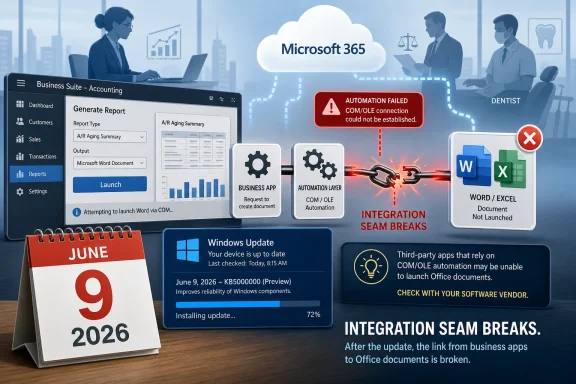
The reported June issue is narrow but revealing. Microsoft acknowledged that Windows updates released on or after June 9, 2026 can interfere with certain third-party applications launching Microsoft Office applications or opening Office documents through OLE automation. The affected behavior involves apps such as Word, Excel, PowerPoint, and Access being called by another program rather than opened directly by the user.That matters because line-of-business software often treats Office as a background component. Accounting workpaper tools generate Excel files. Document-management systems launch Word templates. Reference managers, healthcare software, legal workflows, and reporting tools use Office automation as a bridge between structured business data and the files humans still review, edit, and send.
The failure mode is especially maddening because it does not necessarily look like a catastrophic Office outage. A user may still open Excel from the Start menu and load a spreadsheet manually. Outlook may still deliver mail, Teams may still host meetings, and OneDrive may continue syncing. But the workflow that starts inside another application can stall, silently or ambiguously, leaving the user to decide whether the problem is Windows, Office, the third-party app, permissions, add-ins, or sheer bad luck.
That is the modern Windows support headache in miniature. The platform did not fall over. The seam between platforms did.
OLE Automation Is Old, Unglamorous, and Still Everywhere
Object Linking and Embedding automation belongs to an older era of Windows computing, but old does not mean obsolete in business IT. It is one of those technologies that rarely appears in glossy cloud-product keynotes yet remains embedded in workflows that generate invoices, reports, evidence binders, audit packages, mail merges, and client files.Microsoft’s public story in 2026 is Copilot, cloud security, endpoint management, and AI agents. The operational story in many small firms is still “click the button in the business app and let it create the Excel workbook.” The future may be API-first and browser-native, but the present is full of COM calls, Office templates, macros, add-ins, and automation paths that have survived because replacing them would be expensive and risky.
This is the bargain Windows has always made with business customers. Microsoft moves the platform forward while promising, implicitly and often explicitly, that the old plumbing will keep working long enough for customers to modernize on their own schedules. When a security update or cumulative patch breaks that assumption, the damage is not measured only in app crashes. It is measured in trust.
Business Standard intensifies the problem because it straddles eras. It sells the cloud subscription model, but it still depends heavily on installed desktop applications. That hybrid identity is exactly why customers buy it — and exactly why a Windows-level automation bug can travel so quickly from release notes into billable hours.
Small Businesses Bought Simplicity and Inherited a Stack
The genius of Microsoft 365 Business Standard is that it compresses a messy IT architecture into one purchase decision. Email hosting, Office licensing, file storage, meetings, and basic collaboration all arrive under a single administrative roof. For a ten-person firm without a full-time IT department, that is not merely convenient; it can be the difference between professional-grade infrastructure and a patchwork of consumer accounts.But buying simplicity does not make the stack simple. A typical Business Standard environment still includes Windows builds, Office update channels, identity configuration, OneDrive sync clients, Teams policies, Exchange mailboxes, SharePoint permissions, printer drivers, browser profiles, endpoint protection, and third-party applications that hook into Office in ways users never see. The subscription hides complexity from procurement, not from operations.
This is where the June bug is instructive. The customer may believe they bought Microsoft 365, but the workflow depends on Microsoft 365 apps, Windows servicing, Office automation, and a third-party vendor’s implementation. When the link breaks, accountability becomes a maze. Microsoft can say Office opens directly. The software vendor can say its integration worked before the Windows update. The admin is left to restore productivity before the blame chart is complete.
For larger enterprises, that is annoying but familiar. For smaller businesses, it can feel like a betrayal of the cloud promise. They moved to subscriptions partly to avoid maintaining fragile desktop estates, only to discover that the desktop estate is still there — just licensed differently.
The Price Looks Modest Until Work Stops
In the United States, Microsoft 365 Business Standard is commonly listed at $12.50 per user per month with an annual commitment, or $15 per user per month on a month-to-month basis. That makes it easy to underestimate. A small company can look at the monthly line item and see ordinary SaaS overhead rather than strategic dependency.The economics look different when Business Standard becomes the fabric of daily work. A ten-person office may spend roughly $1,500 a year on the annual plan before add-ons, taxes, backup services, security tools, support, or migration costs. That is not a giant software bill by enterprise standards, but it buys a workflow foundation that touches nearly every employee every day.
The return on that spending is obvious when everything works. Email is hosted, documents are editable, meetings have links, shared files have permissions, and employees can move between home and office without carrying the company file server in a backpack. The product earns its keep precisely because it becomes boring.
The risk is that boring infrastructure is noticed only when it interrupts something urgent. A broken Office automation path during payroll, month-end close, trial preparation, or client reporting is not a theoretical compatibility issue. It is lost time at the point where the business expected Microsoft’s stack to be invisible.
Microsoft’s Cloud Story Still Runs Through the Windows Desktop
Microsoft would like customers and investors to see Microsoft 365 as a cloud subscription platform, and that framing is mostly fair. Exchange Online, OneDrive, SharePoint, Teams, Entra identity, admin centers, and subscription licensing are cloud-native pillars of the business. Microsoft 365 revenue is recurring, expandable, and strategically tied to the company’s broader ambitions in security and AI.Yet Business Standard is a reminder that Microsoft’s cloud productivity business remains unusually dependent on the Windows desktop. Google Workspace can live more comfortably in the browser because its center of gravity has always been web applications. Microsoft’s advantage among many firms is the opposite: the installed Office apps are still richer, more familiar, and more compatible with decades of business process.
That advantage is real. Complex Excel workbooks, Word templates, Access databases, PowerPoint decks, Outlook habits, and Office add-ins are not trivial to replace. Microsoft has spent years moving collaboration and storage to the cloud without forcing customers to abandon the desktop applications that made Office dominant in the first place.
But that duality creates a bigger testing burden. Microsoft is not merely shipping a cloud suite and a desktop operating system. It is maintaining a living compatibility contract between Windows, Office, cloud services, and an enormous third-party ecosystem. The June automation issue is the sort of failure that occurs when the contract is stressed at one of its least glamorous joints.
The Security Update Dilemma Has Not Gone Away
Windows updates exist for good reasons. Administrators do not have the luxury of treating cumulative patches as optional decoration, especially in a threat environment where unpatched endpoints quickly become liabilities. A modern business that delays updates indefinitely is not being prudent; it is accepting a different and often larger risk.But the June Office automation issue shows why many admins still stage rollouts, defer broad deployment, and keep rollback plans close. Patch management is not paranoia. It is the discipline of assuming that even necessary updates can have side effects in real environments that test labs and telemetry rings do not fully capture.
Small businesses are often the least equipped to practice that discipline. They may rely on default Windows Update behavior, a managed service provider, or a part-time administrator who supports everything from password resets to printer jams. When a compatibility regression appears after Patch Tuesday, the organization may not have a pilot group, application inventory, or documented workflow map to identify the break quickly.
That gap is where frustration grows. Microsoft can publish advisories, recommend direct document opening as a workaround, and prepare a future fix. But for the business that depends on integrated Office launch behavior, the practical choices may be unattractive: roll back a security update, wait for Microsoft, pressure the third-party vendor, or ask employees to perform manual detours until the stack heals.
The Workaround Is Useful but Reveals the Damage
Microsoft’s suggested workaround — opening Office documents directly rather than through the affected third-party application — is reasonable as far as it goes. If a Word document or Excel file can be found and opened manually, the employee can continue some portion of the work. That is better than data loss, file corruption, or a total Office outage.But a workaround is not a workflow. The whole point of integrating Office into business applications is to preserve context, reduce manual steps, generate files consistently, and keep documents attached to the right client, matter, patient, project, or engagement. Asking users to leave the application, locate files manually, and reattach or update records afterward shifts risk from software to people.
That risk is easy to dismiss until it produces mistakes. The wrong spreadsheet is updated. A document is saved outside the expected folder. A generated report never makes it back into the system of record. Manual recovery processes are often survivable for a day; they become dangerous when they persist across departments and deadlines.
This is why the June issue deserves more attention than a routine “some apps may fail to launch Office” notice. It hits the automation layer that many businesses rely on precisely because they do not want users improvising with files.
Investors Should See the Moat and the Maintenance Bill
For Microsoft shareholders, Business Standard is not usually the star of the earnings call. The company’s Productivity and Business Processes segment includes a broad mix of Office commercial products, LinkedIn, Dynamics, consumer subscriptions, and related services. Business Standard is one SKU in a much larger machine.Still, it is a useful window into Microsoft’s strength. The subscription model turns everyday productivity into recurring revenue. Seat growth, upsell paths, security add-ons, Teams usage, Copilot opportunities, and cloud storage consumption all build from the same base. A small firm that starts with Business Standard may later add Business Premium, Defender, Intune, Teams Phone, or Copilot licenses.
The June bug does not undermine that investment case by itself. If anything, it shows how deeply Microsoft products are woven into business operations. Vendors envy that kind of dependency because it lowers churn and creates expansion opportunities.
But dependency also creates obligation. The more Microsoft 365 becomes the operating layer for work, the more customers will judge Microsoft not only by feature velocity but by reliability across old and new interfaces. AI features may help sell the future, but a broken document automation path can dominate the present.
Google Workspace Is the Rival, but Legacy Compatibility Is the Battleground
Microsoft 365 Business Standard competes most visibly with Google Workspace Business Standard. The comparison is familiar: Microsoft brings the installed Office apps, deep Windows integration, Exchange heritage, and Excel dominance; Google brings browser-first collaboration, simplicity, and a culture less tied to desktop software.That framing sometimes makes Microsoft look old-fashioned, but it misses why many businesses remain loyal. Legacy compatibility is not merely technical debt. It is institutional memory encoded in templates, macros, shared practices, and documents that have accumulated over years. For a small firm, changing office suites can mean changing how work is reviewed, approved, billed, archived, and audited.
Google’s cleaner browser model avoids some of the Windows automation fragility because it does not depend on the same desktop plumbing. But that cleanliness comes at a cost for firms that still live in advanced Excel models, Word formatting, Access-era workflows, or vendor applications built around Office integration. Microsoft’s messiness is part of its moat.
The question is whether Microsoft can keep that moat from becoming a swamp. Customers tolerate complexity when it protects their existing work. They become less forgiving when complexity produces unexplained failures after routine updates.
The Admin Lesson Is Inventory, Not Panic
The immediate lesson for IT teams is not to abandon Microsoft 365 Business Standard or freeze Windows updates. It is to understand which workflows depend on Office being launched by another application. That distinction should be part of application inventory, especially in industries where documents and spreadsheets are generated from specialized software.Admins should also resist treating “Office opens normally” as a complete diagnostic result. In this incident, direct launch behavior and automated launch behavior can diverge. A clean Word startup from the Start menu does not prove that the accounting package, document manager, or reporting tool can still call Word through automation.
The better operational posture is boring but effective: test critical line-of-business workflows against Windows updates before broad rollout, identify machines that can serve as pilot endpoints, monitor Microsoft’s release health communications, and maintain a rollback plan that weighs security exposure against business interruption. None of that is glamorous, and all of it is cheaper than discovering a broken workflow at 4:45 p.m. on a deadline day.
Business Standard customers without dedicated IT staff should push managed service providers and software vendors for clearer answers. If a vendor’s application depends on Office automation, customers deserve to know how that dependency is tested, what workarounds exist, and whether the vendor has a plan for moving critical integrations toward more resilient APIs over time.
Microsoft’s Most Important Feature Is Still Continuity
The software industry loves replacement narratives. Desktop gives way to cloud. Cloud gives way to AI. Files give way to agents. But business computing rarely moves by clean substitution. It layers new models on top of old ones and then dares the platform vendor to keep the whole tower standing.Microsoft understands this better than almost anyone. The company’s commercial success rests on its ability to sell modern subscriptions without making customers feel foolish for still depending on Windows applications, Office files, and decades of accumulated process. Business Standard is the productized version of that compromise.
That is why incidents like the June automation bug are reputationally important even when they are technically limited. They test whether Microsoft can move fast on security, cloud services, and AI while preserving the everyday compatibility that made businesses comfortable standardizing on its stack. The customer does not care which layer broke. The customer cares that the button used to open the spreadsheet.
If Microsoft wants Microsoft 365 to be the hub of work, it has to own the hub-and-spoke reality. The spokes include not only Teams meetings and OneDrive links but the third-party tools that still expect Office to appear on command.
The June Bug Draws a Map of the Real Microsoft 365 Estate
The practical picture for WindowsForum readers is more nuanced than either panic or dismissal. Microsoft 365 Business Standard remains a sensible default for many small and mid-sized firms, but the June issue shows why “cloud subscription” should not be confused with “low-maintenance appliance.” The plan is powerful because it binds cloud services to desktop applications; the same binding creates places where updates can hurt.- Microsoft 365 Business Standard is often the operational center of a small business, not merely a license for Word and Excel.
- The June 9, 2026 Windows update issue affects certain third-party applications that launch Office apps through automation, while direct Office use may still work.
- OLE and COM automation remain important in business workflows even though they rarely appear in modern cloud marketing.
- Opening files directly can keep work moving, but it does not fully replace integrated document-generation and line-of-business workflows.
- Administrators should test Office-dependent business applications during Windows update pilots, not just verify that Office itself launches.
- Microsoft’s commercial moat depends on preserving old compatibility paths while it sells customers on cloud services, security upgrades, and AI.
References
- Primary source: AD HOC NEWS
Published: 2026-06-30T22:20:09.160467
The Microsoft 365 Business Standard subscription - Windows bug highlights how much work now runs thr
Microsoft 365 Business Standard now sits at the center of daily work for small and mid-sized US companies, from email to spreadsheets to online meetings. Anyone holding Microsoft Corp. stock (NASDAQ: MSFT, ISIN US5949181045) should know this product.www.ad-hoc-news.de - Official source: microsoft.com
Your request has been blocked. This could be due to several reasons.
www.microsoft.com
- Official source: support.microsoft.com
Your request has been blocked. This could be due to several reasons.
- Related coverage: logicity.in
Microsoft Office apps fail to launch after June 9 updates | Logicity
Microsoft confirms a bug in June 2026 Windows updates breaks OLE automation, preventing third-party apps from opening Office documents. No fix yet.logicity.in - Related coverage: m365.de
Microsoft 365 Business Standard Features - M365 Support
Microsoft 365 (M365) Business Standard is a bundle that includes Microsoft 365 Business Basic and Microsoft 365 Apps for Business.m365.de
- Related coverage: csoonline.com
Microsoft broke some OLE automations with latest Windows update | CSO Online
Third-party applications can no longer open Office documents for you.www.csoonline.com
- Related coverage: windowsforum.com
Windows KB5094126 KB5093998 Break Office Launch via OLE Automation | Windows Forum
Microsoft confirmed on June 16, 2026, that Windows updates released on or after June 9, including Windows 11 KB5094126 and KB5093998, can prevent some...windowsforum.com - Related coverage: bleepingcomputer.com
Microsoft confirms Office apps launch issues after June updates
Microsoft is investigating a new issue preventing third-party applications from launching Microsoft Office applications or opening documents on up-to-date Windows systems.www.bleepingcomputer.com
- Related coverage: notebookcheck.net
Windows 11 update KB5095051 breaks Microsoft Office integration - Notebookcheck News
Microsoft confirms parallel enterprise flaws in Windows 11 KB5095051, including broken OLE automation, a deployment media error, and a Recycle Bin glitch. www.notebookcheck.net
- Related coverage: digitbin.com
Windows 11 June Update Breaks Office Apps, Fix Coming July 14
Windows 11 KB5094126 broke OLE automation, causing third-party apps to fail when opening Office products. Microsoft confirmed the fix arrives July 14, 2026.www.digitbin.com - Related coverage: procr.io
Microsoft 365 Pricing 2026 | Procr
Microsoft 365 prices increase July 1, 2026. Learn what mid-market teams pay now, what changes by SKU, and how to act before renewal.www.procr.io - Related coverage: aml-store.com
Microsoft 365 Business Standard | Licenza 1 Utente 15 Disp | AML STORE
Acquista Microsoft 365 Business Standard su AML Store. Licenza 100% originale, 1 TB cloud OneDrive e app Office premium. Consegna in 5-15 minuti e supporto tecnico. www.aml-store.com
- Related coverage: vpncentral.com
Microsoft Office Apps May Fail to Open After Windows 11 June Update
Microsoft has confirmed a new Windows 11 issue that can stop Office apps from opening when they are launched through certain third-party applications. The problem appeared after Windows updates released on or after June 9, 2026, including the KB5095051 release notes for Windows 11 version 26H1... vpncentral.com
- Related coverage: windowscentral.com
Microsoft 365 Family Deal: Save 47% with H&R Block Bundle | Windows Central
Don’t let the death of the $99 Microsoft 365 Family subscription catch you off guard; Newegg is essentially paying you to take 12 months of Office, OneDrive, and more.www.windowscentral.com - Official source: learn.microsoft.com
- Related coverage: rtgwebsiteresources.blob.core.windows.net
Microsoft 365 Business Basic to Business Standard Brochure
PDF documentrtgwebsiteresources.blob.core.windows.net