

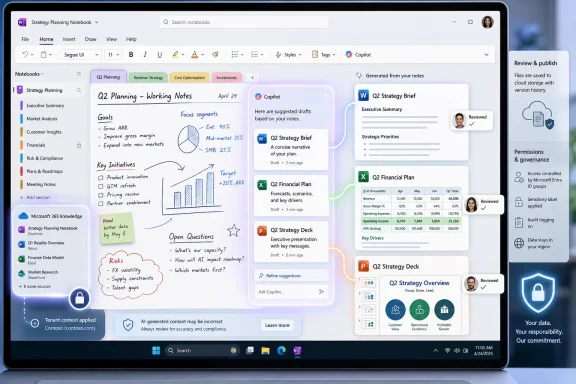
Microsoft added Roadmap ID 566870 on June 30, 2026, describing a OneNote Copilot Notebooks feature that will suggest creating Word documents, Excel workbooks, and PowerPoint presentations from notebook content and Microsoft 365 knowledge, with preview planned for July 2026 and general availability in August 2026. The feature sounds small because it is framed as a suggestion surface, not a new app. But it points to a bigger Microsoft bet: the notebook is becoming less a place where work is stored and more a place where work is manufactured. For Windows users and IT departments, that shift is both useful and uncomfortable.
OneNote has always been Microsoft’s most forgiving productivity app. Word wants structure, Excel wants logic, PowerPoint wants persuasion, and Outlook wants urgency. OneNote, by contrast, has survived because it accepts the half-formed: meeting notes, screenshots, pasted links, clipped research, handwritten diagrams, and the kind of project debris that does not yet deserve a file name.
Copilot Notebooks changes the center of gravity. Microsoft’s current description of the feature says Copilot will look at the content in a notebook, combine it with Microsoft 365 knowledge, and suggest artifacts worth creating. A notebook about a product launch might become a PowerPoint deck; a notebook full of budget notes might become an Excel workbook; a research notebook might become a Word brief.
That is not merely “AI in OneNote.” It is Microsoft training users to think of OneNote as an upstream workspace for the rest of Microsoft 365. The notebook becomes the place where raw context accumulates, and Copilot becomes the mechanism that decides when that context is ready to become a deliverable.
The feature is scheduled for desktop and web, with both preview and General Availability rings listed for Microsoft’s standard worldwide cloud. That platform choice matters. Microsoft is not pitching this as a mobile novelty or a consumer experiment; it is positioning the feature where Microsoft 365 work already happens, inside managed business tenants and on the machines where Office documents are still produced.
That distinction matters because generative AI has so far been most useful when users know exactly what to ask for. “Summarize this meeting,” “draft a project plan,” and “make a slide deck from this document” are straightforward commands. But many office workers do not begin with a prompt; they begin with a mess.
Microsoft’s bet is that Copilot can identify the deliverable hiding inside that mess. If the assistant can infer that a pile of notes is really a status report, a spreadsheet, or a presentation, Microsoft reduces the gap between gathering information and publishing something from it. That is the kind of friction Microsoft has spent decades trying to erase from Office.
The danger is that suggestions can become nudges, and nudges can become defaults. A system that repeatedly offers to turn notes into decks may train organizations to accept more AI-generated decks. A system that sees every research notebook as a potential Word document may encourage premature formalization. The productivity gain is real, but so is the risk that Copilot starts shaping not only how people produce work, but what kind of work they believe should exist.
If Copilot only read a OneNote page, this would be another file-generation shortcut. By grounding suggestions in Microsoft 365 knowledge, Microsoft is implying a broader context layer: files, conversations, organizational data, and the permissions-bound material that makes Copilot for Microsoft 365 different from a generic chatbot. The notebook becomes a curated workspace, but Copilot’s recommendation engine can look beyond the visible page when tenant policy and access allow it.
For users, that could be powerful. A project notebook may not contain the latest pricing spreadsheet, but Microsoft 365 might. A manager’s meeting notes may mention a launch date, while the authoritative schedule lives in SharePoint or Teams. In the best case, Copilot can suggest an artifact that reflects the broader work graph instead of merely reformatting whatever happened to be pasted into OneNote.
For administrators, this is where the governance conversation begins. Artifact creation is not just a convenience feature; it is a data movement event. A notebook with mixed sensitivity content could produce a Word document that is easier to share, forward, download, print, or retain in the wrong place. The generated artifact may inherit a user’s intent, but not necessarily the original context that made the source material safe.
Microsoft will likely lean on existing Microsoft 365 compliance, permissions, sensitivity labels, and Copilot controls. That is the right answer on paper. In practice, IT departments will need to test whether suggested artifacts respect the boundaries users assume exist between note-taking, file generation, and downstream collaboration.
Copilot Notebooks gives OneNote a sharper pitch. It becomes the personal and team staging ground for AI-grounded work. Instead of asking users to start in Word, Excel, or PowerPoint, Microsoft can tell them to collect the raw material in OneNote and let Copilot help decide the output.
That is strategically neat because OneNote already tolerates ambiguity. People do not need to know whether something is a memo, table, presentation, or plan when they capture it. They can put it in a notebook first. Copilot’s suggested artifact creation then becomes the bridge from ambiguity to format.
This also helps explain why Microsoft is putting so much energy into Copilot Notebooks rather than building yet another standalone AI workspace. OneNote is already installed, already familiar, and already embedded in Microsoft 365. It is not perfect, but it has the one thing most new productivity tools lack: decades of accumulated user trust.
This is classic Microsoft platform strategy. The company can experiment at the interface layer while preserving the formats, permissions, storage systems, and workflows that keep enterprises tied to Microsoft 365. Copilot can feel new, but the deliverables remain familiar enough for procurement teams, legal departments, executives, and auditors.
That may disappoint users hoping for something more radical. A generated PowerPoint deck is still a PowerPoint deck. A generated workbook still has to survive the scrutiny of formulas, assumptions, and source data. A generated Word document still has to be edited by someone who understands the subject.
But the conservatism is also the point. The enterprise does not run on vibes; it runs on files that can be reviewed, redlined, archived, and attached to meetings. By turning notebook context into traditional Office artifacts, Microsoft is making Copilot useful without asking organizations to abandon the document culture they already understand.
The less flattering version shifts labor from creation to review. Instead of writing the first draft, workers must inspect an AI-generated artifact for omissions, wrong emphasis, invented structure, stale data, and subtle misreadings. That can still be faster than starting from scratch, but it is not free.
This is especially true for Excel. A generated workbook is not merely prose in cells. It may imply calculations, categorization, assumptions, and relationships between data points. If Copilot creates a spreadsheet from notebook content, the most important question is not whether the workbook looks polished; it is whether the logic can be trusted.
PowerPoint has a different failure mode. AI-generated decks often look plausible before they are persuasive. They can flatten nuance, overstate certainty, and turn internal uncertainty into executive-ready confidence. Word documents, meanwhile, can bury weak sourcing inside fluent paragraphs.
That means the feature’s value will depend less on the magic of generation than on the clarity of provenance. Users need to know what source material Copilot relied on, what it ignored, and where it made interpretive leaps. If the artifact is a black box, the review burden grows. If it is traceable, Copilot becomes a useful junior drafter.
That timing is useful for Microsoft’s Copilot narrative. The company needs visible, workflow-level features that prove Copilot is more than a chat box bolted onto Office. Suggested artifact creation is the kind of feature that can be demoed quickly and understood by nontechnical managers. Open a notebook, select a suggestion, receive a document, workbook, or deck.
The roadmap status is still “in development,” so customers should treat dates as targets rather than guarantees. Microsoft 365 roadmap entries can slip, change scope, or roll out unevenly across tenants. The practical advice for admins is to watch message center communications and test behavior in preview before assuming August availability means universal day-one readiness.
Even if the exact rollout shifts, the direction is clear. Microsoft is turning Copilot Notebooks into a creation hub. The notebook is no longer just a reference point for chat; it is becoming a launchpad for generated work products.
For Windows enthusiasts, that is notable because OneNote has often felt like a survivor from an earlier Microsoft era. It is neither as glamorous as Teams nor as central as Outlook, but it remains one of the best examples of Microsoft’s “everything drawer” design philosophy. Copilot Notebooks gives that drawer a new role in the AI stack.
The feature also reflects Microsoft’s broader strategy on Windows PCs. AI value does not have to arrive only through operating-system features, NPUs, or new shell experiences. It can arrive through the apps people already use for ordinary work. For many users, the first genuinely useful AI workflow may not be a Windows feature at all; it may be a OneNote suggestion that turns project notes into a usable deliverable.
That said, desktop integration raises familiar questions. Will the experience be consistent between the Microsoft 365 Copilot app and OneNote? Will the same suggestions appear across web and desktop? Will users understand the difference between a standard OneNote notebook and a Copilot Notebook? Microsoft has a habit of naming adjacent things just similarly enough to confuse the people expected to adopt them.
That concern is not anti-AI panic. It is the ordinary reality of enterprise information management. Notes are messy because real work is messy. A notebook may contain customer names, internal pricing, draft strategy, personal reminders, meeting speculation, pasted emails, and outdated assumptions. Turning that into a polished artifact increases its perceived authority.
There is also a records-management angle. A OneNote page may be informal, but a generated Word document can look official. A PowerPoint deck generated from a planning notebook may circulate beyond the team that understands its caveats. An Excel workbook created from notes may be mistaken for a source of truth.
The burden will fall on policy and training. Organizations will need to decide which users can create artifacts from Copilot Notebooks, what labels apply, how generated files are stored, and whether audit logs make the creation path visible. The best deployments will treat this feature as a workflow change, not a novelty toggle.
That is why artifact creation is so important. A research assistant that summarizes documents is useful. A research assistant that turns organizational context into the specific files business users already need is more directly monetizable. Microsoft does not need Copilot Notebooks to be the most elegant AI notebook if it can be the one that produces the deck before Monday’s staff meeting.
The competition also explains the pace. AI notebook experiences are becoming a new front door for knowledge work. Whoever owns the notebook can influence the prompt, the context, the source set, and the output format. Microsoft wants that front door inside Microsoft 365, not in a separate consumer AI product that users adopt around the edges.
Still, Microsoft has to avoid the trap of making Copilot Notebooks feel like a branding layer over disconnected features. If users must constantly move between OneNote, the Microsoft 365 Copilot app, Word, PowerPoint, Teams, and SharePoint to understand what happened, the magic evaporates. The winning experience will feel like a coherent workspace, not a scavenger hunt through Microsoft’s product taxonomy.
If Copilot requires users to sanitize all of that before it can suggest useful artifacts, the feature becomes another productivity chore. If it ignores the mess and produces overconfident outputs, it becomes dangerous. The sweet spot is a system that can identify likely deliverables while making its uncertainty visible.
Microsoft has been moving toward more grounded Copilot experiences, but grounding is not the same as judgment. A model can cite the right source and still choose the wrong structure. It can summarize accurately and still miss the politics of a project. It can generate a beautiful slide deck that fails because the audience needed a decision memo.
That is why the suggested nature of the feature matters. The user remains in the loop at the moment of creation. Copilot proposes; the user chooses. The more Microsoft preserves that distinction, the easier it will be for organizations to adopt the feature without feeling that AI is silently turning internal knowledge into documents behind their backs.
That assumption is often correct. Much of knowledge work is format translation: meeting notes into status updates, research into briefs, plans into decks, lists into spreadsheets. If Copilot can reduce the repetitive portion of that translation, the productivity case is obvious.
But some of the most important work happens before format selection. A team may need to decide whether the output should be a memo or a meeting. A manager may need to ask whether a deck is hiding the absence of a decision. A researcher may need to resist turning ambiguity into a conclusion. Copilot can assist with artifacts, but it cannot be allowed to make artifact creation feel like strategy.
This is the cultural risk of the feature. In organizations already drowning in documents, easier document creation may create more documents. Microsoft is offering a tool that can save hours, but it is also lowering the cost of producing polished work-shaped material. The difference between productivity and content inflation will depend on human restraint.
Start with low-risk scenarios: internal project summaries, meeting follow-ups, training outlines, and draft planning documents. Watch how users interpret suggestions. Watch where generated artifacts are saved. Watch whether sensitivity labels and sharing defaults behave as expected. Most importantly, watch whether people verify the outputs or treat them as finished because they look finished.
The feature should also be tested across roles. An executive assistant, a project manager, a sales engineer, and a finance analyst will stress the system differently. PowerPoint generation may delight one team and annoy another. Excel generation may be useful for lightweight organization but inappropriate for regulated financial analysis. Word generation may be acceptable for drafts but not for policy language.
Admins should also prepare communications that explain the difference between a Copilot Notebook, a OneNote notebook, and the generated Office artifacts. Microsoft’s naming and placement may evolve, but users need a simple mental model: the notebook is the grounded workspace, Copilot suggests outputs, and the generated files still require review.
That is a profound shift. Instead of asking users to master prompt engineering, Microsoft is asking them to gather context in the ordinary course of work. The AI system then interprets that accumulated context and suggests what can be made from it. In a workplace setting, that is a more realistic model than expecting every employee to become a fluent AI operator.
It also gives Microsoft a strong answer to one of Copilot’s early adoption problems. Many users do not know what to ask. A suggestion engine gives them a starting point. It turns Copilot from a blank command line into a contextual assistant that can say, in effect, “This looks like it could become a proposal.”
That may be the feature’s real importance. The generated Word document, Excel workbook, or PowerPoint deck is the visible output. The invisible shift is that Microsoft is moving AI interaction away from explicit prompting and toward ambient context. OneNote, with all its mess and memory, is a natural place to try it.
 OneNote Moves From Memory Palace to Production Line
OneNote has always been Microsoft’s most forgiving productivity app. Word wants structure, Excel wants logic, PowerPoint wants persuasion, and Outlook wants urgency. OneNote, by contrast, has survived because it accepts the half-formed: meeting notes, screenshots, pasted links, clipped research, handwritten diagrams, and the kind of project debris that does not yet deserve a file name.Copilot Notebooks changes the center of gravity. Microsoft’s current description of the feature says Copilot will look at the content in a notebook, combine it with Microsoft 365 knowledge, and suggest artifacts worth creating. A notebook about a product launch might become a PowerPoint deck; a notebook full of budget notes might become an Excel workbook; a research notebook might become a Word brief.
That is not merely “AI in OneNote.” It is Microsoft training users to think of OneNote as an upstream workspace for the rest of Microsoft 365. The notebook becomes the place where raw context accumulates, and Copilot becomes the mechanism that decides when that context is ready to become a deliverable.
The feature is scheduled for desktop and web, with both preview and General Availability rings listed for Microsoft’s standard worldwide cloud. That platform choice matters. Microsoft is not pitching this as a mobile novelty or a consumer experiment; it is positioning the feature where Microsoft 365 work already happens, inside managed business tenants and on the machines where Office documents are still produced.
The Suggestion Is the Product
The word “suggests” is doing a lot of work here. Microsoft is not just adding a button that says “create document.” It is adding a layer that watches the workspace and proposes the next artifact.That distinction matters because generative AI has so far been most useful when users know exactly what to ask for. “Summarize this meeting,” “draft a project plan,” and “make a slide deck from this document” are straightforward commands. But many office workers do not begin with a prompt; they begin with a mess.
Microsoft’s bet is that Copilot can identify the deliverable hiding inside that mess. If the assistant can infer that a pile of notes is really a status report, a spreadsheet, or a presentation, Microsoft reduces the gap between gathering information and publishing something from it. That is the kind of friction Microsoft has spent decades trying to erase from Office.
The danger is that suggestions can become nudges, and nudges can become defaults. A system that repeatedly offers to turn notes into decks may train organizations to accept more AI-generated decks. A system that sees every research notebook as a potential Word document may encourage premature formalization. The productivity gain is real, but so is the risk that Copilot starts shaping not only how people produce work, but what kind of work they believe should exist.
Microsoft 365 Knowledge Is the Feature’s Real Engine
The roadmap wording says the suggested artifacts are based on both Microsoft 365 knowledge and the content in the notebook. That phrase is easy to skim past, but it is the heart of the feature.If Copilot only read a OneNote page, this would be another file-generation shortcut. By grounding suggestions in Microsoft 365 knowledge, Microsoft is implying a broader context layer: files, conversations, organizational data, and the permissions-bound material that makes Copilot for Microsoft 365 different from a generic chatbot. The notebook becomes a curated workspace, but Copilot’s recommendation engine can look beyond the visible page when tenant policy and access allow it.
For users, that could be powerful. A project notebook may not contain the latest pricing spreadsheet, but Microsoft 365 might. A manager’s meeting notes may mention a launch date, while the authoritative schedule lives in SharePoint or Teams. In the best case, Copilot can suggest an artifact that reflects the broader work graph instead of merely reformatting whatever happened to be pasted into OneNote.
For administrators, this is where the governance conversation begins. Artifact creation is not just a convenience feature; it is a data movement event. A notebook with mixed sensitivity content could produce a Word document that is easier to share, forward, download, print, or retain in the wrong place. The generated artifact may inherit a user’s intent, but not necessarily the original context that made the source material safe.
Microsoft will likely lean on existing Microsoft 365 compliance, permissions, sensitivity labels, and Copilot controls. That is the right answer on paper. In practice, IT departments will need to test whether suggested artifacts respect the boundaries users assume exist between note-taking, file generation, and downstream collaboration.
OneNote Finally Gets a Job in the Copilot Era
OneNote has long been beloved but oddly under-defined. It is indispensable to many users and invisible to others. It sits beside the core Office apps without having the same obvious business role.Copilot Notebooks gives OneNote a sharper pitch. It becomes the personal and team staging ground for AI-grounded work. Instead of asking users to start in Word, Excel, or PowerPoint, Microsoft can tell them to collect the raw material in OneNote and let Copilot help decide the output.
That is strategically neat because OneNote already tolerates ambiguity. People do not need to know whether something is a memo, table, presentation, or plan when they capture it. They can put it in a notebook first. Copilot’s suggested artifact creation then becomes the bridge from ambiguity to format.
This also helps explain why Microsoft is putting so much energy into Copilot Notebooks rather than building yet another standalone AI workspace. OneNote is already installed, already familiar, and already embedded in Microsoft 365. It is not perfect, but it has the one thing most new productivity tools lack: decades of accumulated user trust.
The Office File Still Rules the Enterprise
For all the talk of AI-native workspaces, the output formats listed in the roadmap are conservative: Word documents, Excel workbooks, and PowerPoint presentations. That is revealing. Microsoft is not trying to kill the Office file; it is trying to make the Office file the final form of AI-assisted work.This is classic Microsoft platform strategy. The company can experiment at the interface layer while preserving the formats, permissions, storage systems, and workflows that keep enterprises tied to Microsoft 365. Copilot can feel new, but the deliverables remain familiar enough for procurement teams, legal departments, executives, and auditors.
That may disappoint users hoping for something more radical. A generated PowerPoint deck is still a PowerPoint deck. A generated workbook still has to survive the scrutiny of formulas, assumptions, and source data. A generated Word document still has to be edited by someone who understands the subject.
But the conservatism is also the point. The enterprise does not run on vibes; it runs on files that can be reviewed, redlined, archived, and attached to meetings. By turning notebook context into traditional Office artifacts, Microsoft is making Copilot useful without asking organizations to abandon the document culture they already understand.
The Automation Tax Lands on Reviewers
The most optimistic version of this feature saves time. A user gathers notes, Copilot recognizes an emerging deliverable, and a draft appears in the right format. The user edits it, verifies it, and moves on.The less flattering version shifts labor from creation to review. Instead of writing the first draft, workers must inspect an AI-generated artifact for omissions, wrong emphasis, invented structure, stale data, and subtle misreadings. That can still be faster than starting from scratch, but it is not free.
This is especially true for Excel. A generated workbook is not merely prose in cells. It may imply calculations, categorization, assumptions, and relationships between data points. If Copilot creates a spreadsheet from notebook content, the most important question is not whether the workbook looks polished; it is whether the logic can be trusted.
PowerPoint has a different failure mode. AI-generated decks often look plausible before they are persuasive. They can flatten nuance, overstate certainty, and turn internal uncertainty into executive-ready confidence. Word documents, meanwhile, can bury weak sourcing inside fluent paragraphs.
That means the feature’s value will depend less on the magic of generation than on the clarity of provenance. Users need to know what source material Copilot relied on, what it ignored, and where it made interpretive leaps. If the artifact is a black box, the review burden grows. If it is traceable, Copilot becomes a useful junior drafter.
The Roadmap Timing Shows Microsoft Wants This in the Summer Work Cycle
The preview timing of July 2026 and General Availability target of August 2026 are not random calendar trivia. They suggest Microsoft wants this capability in customer hands before the heavy planning cycles that hit many organizations in late summer and early fall.That timing is useful for Microsoft’s Copilot narrative. The company needs visible, workflow-level features that prove Copilot is more than a chat box bolted onto Office. Suggested artifact creation is the kind of feature that can be demoed quickly and understood by nontechnical managers. Open a notebook, select a suggestion, receive a document, workbook, or deck.
The roadmap status is still “in development,” so customers should treat dates as targets rather than guarantees. Microsoft 365 roadmap entries can slip, change scope, or roll out unevenly across tenants. The practical advice for admins is to watch message center communications and test behavior in preview before assuming August availability means universal day-one readiness.
Even if the exact rollout shifts, the direction is clear. Microsoft is turning Copilot Notebooks into a creation hub. The notebook is no longer just a reference point for chat; it is becoming a launchpad for generated work products.
Windows Users Get the Most Natural Version of the Experience
The feature is listed for desktop and web, which is exactly where OneNote’s divided identity matters. OneNote on Windows remains the richest and most familiar environment for many longtime users, especially those who rely on keyboard shortcuts, pen input, local workflows, and multiple notebooks. The web version matters for accessibility and cross-device reach, but desktop is where this feature will feel most like part of the old Office muscle memory.For Windows enthusiasts, that is notable because OneNote has often felt like a survivor from an earlier Microsoft era. It is neither as glamorous as Teams nor as central as Outlook, but it remains one of the best examples of Microsoft’s “everything drawer” design philosophy. Copilot Notebooks gives that drawer a new role in the AI stack.
The feature also reflects Microsoft’s broader strategy on Windows PCs. AI value does not have to arrive only through operating-system features, NPUs, or new shell experiences. It can arrive through the apps people already use for ordinary work. For many users, the first genuinely useful AI workflow may not be a Windows feature at all; it may be a OneNote suggestion that turns project notes into a usable deliverable.
That said, desktop integration raises familiar questions. Will the experience be consistent between the Microsoft 365 Copilot app and OneNote? Will the same suggestions appear across web and desktop? Will users understand the difference between a standard OneNote notebook and a Copilot Notebook? Microsoft has a habit of naming adjacent things just similarly enough to confuse the people expected to adopt them.
The Admin Problem Is Not Whether Copilot Can Create Files
IT departments are not primarily worried that Copilot will fail to generate a document. They are worried that it will generate the wrong document, from the wrong context, with the wrong sensitivity, and make it easy for a well-meaning employee to share it too broadly.That concern is not anti-AI panic. It is the ordinary reality of enterprise information management. Notes are messy because real work is messy. A notebook may contain customer names, internal pricing, draft strategy, personal reminders, meeting speculation, pasted emails, and outdated assumptions. Turning that into a polished artifact increases its perceived authority.
There is also a records-management angle. A OneNote page may be informal, but a generated Word document can look official. A PowerPoint deck generated from a planning notebook may circulate beyond the team that understands its caveats. An Excel workbook created from notes may be mistaken for a source of truth.
The burden will fall on policy and training. Organizations will need to decide which users can create artifacts from Copilot Notebooks, what labels apply, how generated files are stored, and whether audit logs make the creation path visible. The best deployments will treat this feature as a workflow change, not a novelty toggle.
The Competitive Shadow Is NotebookLM, Not Word
Microsoft is not operating in a vacuum. Google’s NotebookLM helped popularize the idea of a source-grounded AI notebook that can synthesize a pile of material into summaries, study guides, and audio-style explanations. Microsoft’s advantage is not that it invented the category; it is that it owns the workplace where the output is expected to land.That is why artifact creation is so important. A research assistant that summarizes documents is useful. A research assistant that turns organizational context into the specific files business users already need is more directly monetizable. Microsoft does not need Copilot Notebooks to be the most elegant AI notebook if it can be the one that produces the deck before Monday’s staff meeting.
The competition also explains the pace. AI notebook experiences are becoming a new front door for knowledge work. Whoever owns the notebook can influence the prompt, the context, the source set, and the output format. Microsoft wants that front door inside Microsoft 365, not in a separate consumer AI product that users adopt around the edges.
Still, Microsoft has to avoid the trap of making Copilot Notebooks feel like a branding layer over disconnected features. If users must constantly move between OneNote, the Microsoft 365 Copilot app, Word, PowerPoint, Teams, and SharePoint to understand what happened, the magic evaporates. The winning experience will feel like a coherent workspace, not a scavenger hunt through Microsoft’s product taxonomy.
The Feature Will Succeed Only If It Respects the Mess
The charm of OneNote is that it does not force users to clean up before they think. That is also the challenge for Copilot. A notebook is rarely a tidy database. It is full of contradictions, stale snippets, shorthand, images, ink, pasted tables, and context that only the author understands.If Copilot requires users to sanitize all of that before it can suggest useful artifacts, the feature becomes another productivity chore. If it ignores the mess and produces overconfident outputs, it becomes dangerous. The sweet spot is a system that can identify likely deliverables while making its uncertainty visible.
Microsoft has been moving toward more grounded Copilot experiences, but grounding is not the same as judgment. A model can cite the right source and still choose the wrong structure. It can summarize accurately and still miss the politics of a project. It can generate a beautiful slide deck that fails because the audience needed a decision memo.
That is why the suggested nature of the feature matters. The user remains in the loop at the moment of creation. Copilot proposes; the user chooses. The more Microsoft preserves that distinction, the easier it will be for organizations to adopt the feature without feeling that AI is silently turning internal knowledge into documents behind their backs.
Microsoft’s Small Button Carries a Big Assumption
The big assumption behind Roadmap ID 566870 is that office work contains recognizable patterns before workers explicitly name them. A notebook becomes a Word document because the material has the shape of an argument. It becomes an Excel workbook because the notes imply rows, columns, and calculations. It becomes a PowerPoint because the context wants to be presented.That assumption is often correct. Much of knowledge work is format translation: meeting notes into status updates, research into briefs, plans into decks, lists into spreadsheets. If Copilot can reduce the repetitive portion of that translation, the productivity case is obvious.
But some of the most important work happens before format selection. A team may need to decide whether the output should be a memo or a meeting. A manager may need to ask whether a deck is hiding the absence of a decision. A researcher may need to resist turning ambiguity into a conclusion. Copilot can assist with artifacts, but it cannot be allowed to make artifact creation feel like strategy.
This is the cultural risk of the feature. In organizations already drowning in documents, easier document creation may create more documents. Microsoft is offering a tool that can save hours, but it is also lowering the cost of producing polished work-shaped material. The difference between productivity and content inflation will depend on human restraint.
The August Rollout Should Be Treated as a Governance Pilot
For IT pros, the practical path is not to block the feature reflexively or to celebrate it blindly. The right move is to pilot it with real workflows and skeptical reviewers.Start with low-risk scenarios: internal project summaries, meeting follow-ups, training outlines, and draft planning documents. Watch how users interpret suggestions. Watch where generated artifacts are saved. Watch whether sensitivity labels and sharing defaults behave as expected. Most importantly, watch whether people verify the outputs or treat them as finished because they look finished.
The feature should also be tested across roles. An executive assistant, a project manager, a sales engineer, and a finance analyst will stress the system differently. PowerPoint generation may delight one team and annoy another. Excel generation may be useful for lightweight organization but inappropriate for regulated financial analysis. Word generation may be acceptable for drafts but not for policy language.
Admins should also prepare communications that explain the difference between a Copilot Notebook, a OneNote notebook, and the generated Office artifacts. Microsoft’s naming and placement may evolve, but users need a simple mental model: the notebook is the grounded workspace, Copilot suggests outputs, and the generated files still require review.
The Notebook Is Becoming the New Prompt
The most interesting implication of suggested artifact creation is that the prompt may no longer be a sentence typed into a chat box. The prompt may be the notebook itself.That is a profound shift. Instead of asking users to master prompt engineering, Microsoft is asking them to gather context in the ordinary course of work. The AI system then interprets that accumulated context and suggests what can be made from it. In a workplace setting, that is a more realistic model than expecting every employee to become a fluent AI operator.
It also gives Microsoft a strong answer to one of Copilot’s early adoption problems. Many users do not know what to ask. A suggestion engine gives them a starting point. It turns Copilot from a blank command line into a contextual assistant that can say, in effect, “This looks like it could become a proposal.”
That may be the feature’s real importance. The generated Word document, Excel workbook, or PowerPoint deck is the visible output. The invisible shift is that Microsoft is moving AI interaction away from explicit prompting and toward ambient context. OneNote, with all its mess and memory, is a natural place to try it.
The OneNote Button IT Should Watch Before August
This feature is not ready to judge by demo alone. Its value will be determined by how well it handles permissions, provenance, review, and the very human tendency to trust anything that arrives already formatted.- Copilot Notebooks in OneNote is slated to preview in July 2026 and reach general availability in August 2026 for desktop and web users in standard worldwide Microsoft 365 tenants.
- The feature will suggest Word, Excel, and PowerPoint artifacts based on notebook content and Microsoft 365 knowledge, rather than merely waiting for a user prompt.
- The biggest enterprise risk is not file generation itself, but the movement of informal, mixed-sensitivity notebook material into polished, shareable Office documents.
- Windows users may see the most natural version of the workflow because OneNote on desktop remains a familiar collection point for project notes, research, and meeting debris.
- IT teams should test generated artifacts for labeling, sharing, auditability, source traceability, and user review behavior before encouraging broad adoption.
- The strategic importance is that Microsoft is turning the notebook into a context engine for Office, making OneNote a more central part of the Copilot workflow.
References
- Primary source: Microsoft 365 Roadmap
Published: 2026-06-30T22:57:58.6723014Z
Loading…
www.microsoft.com - Official source: support.microsoft.com
Loading…
support.microsoft.com - Official source: techcommunity.microsoft.com
Loading…
techcommunity.microsoft.com - Official source: cdn-dynmedia-1.microsoft.com