

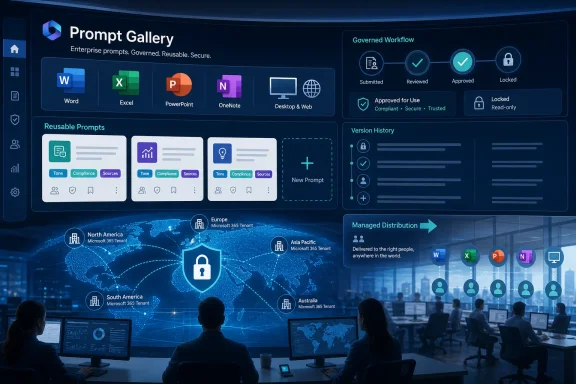
Microsoft updated Microsoft 365 Roadmap item 486695 on June 30, 2026, confirming that company-wide prompt publishing for the Copilot Prompt Gallery is in development for worldwide Microsoft 365 tenants across Word, Excel, PowerPoint, OneNote, desktop, and web. The feature is scheduled for general availability in June 2026, which makes this less a distant promise than a deployment-era signal. Microsoft is not merely adding another convenience button to Copilot; it is giving organizations a way to turn prompting into managed workplace infrastructure. That changes the adoption story from “teach every employee to prompt well” to “decide which prompts deserve institutional authority.”
The headline sounds modest: organizations can create tailored collections of prompts and distribute them to all users in a tenant. In Microsoft 365 terms, however, that is a familiar pattern. A thing begins as personal productivity, becomes shareable among teams, and eventually becomes an administrative surface.
The Copilot Prompt Gallery already exists as a place where users can discover examples, save prompts, and reuse instructions across Microsoft 365 Copilot experiences. Company-wide prompt publishing extends that idea from individual habit to organizational design. The difference is not whether a prompt can be copied around in Teams or pasted into a Word document; the difference is whether a business can make a prompt visible, reusable, and implicitly endorsed for everyone.
That matters because prompts are not just text snippets. In a Microsoft 365 tenant, a prompt can encode workflow, tone, document structure, compliance expectations, and assumptions about where Copilot should look for context. A sales prompt that asks Copilot to summarize account history is very different from a legal prompt that asks it to draft a clause comparison, even if both are only a few sentences long.
Microsoft’s move acknowledges an awkward truth about enterprise AI adoption: the model is only half the product. The other half is the accumulated craft of asking it for useful work in a way that maps to the organization’s actual files, meetings, policies, and business vocabulary.
A company-wide prompt is a template for intent rather than layout. Instead of giving employees a slide master, it gives them a reusable instruction for turning scattered context into a briefing deck. Instead of distributing a spreadsheet workbook, it gives finance teams a repeatable way to ask Copilot to explain variances, highlight anomalies, or prepare commentary for a monthly close.
The strategic value is obvious. If organizations are paying for Microsoft 365 Copilot licenses, they want usage that is consistent, measurable, and tied to business outcomes. Letting every user discover prompting from scratch is inefficient. Worse, it produces uneven results that can make Copilot look unreliable even when the real problem is that employees are asking vague, ungrounded, or context-free questions.
Prompt publishing gives IT, operations, enablement, and business units a shared object to improve. A bad prompt can be rewritten. A good prompt can be promoted. A risky prompt can be withdrawn. That is a more governable model than the current folklore economy of “try this prompt I found in a chat thread.”
The gap between a demo and daily use is especially wide with Microsoft 365 Copilot. In a keynote, Copilot turns a document into a presentation, summarizes a meeting, or extracts the action items from a messy thread. In an actual office, the user has to know which files matter, what outcome they want, how specific to be, and how to iterate when the first answer is mediocre.
That is why a company-wide Prompt Gallery is more than a training aid. It is a product correction. Microsoft is tacitly admitting that AI adoption cannot depend on every employee becoming a prompt engineer by osmosis.
The better analogy is search. Most employees never became expert Boolean search users, but organizations learned to create portals, metadata, intranets, and curated entry points. Prompt publishing performs a similar role for generative AI. It gives users a starting point that reflects the business rather than a generic example written for everyone and therefore optimized for no one.
Company-wide prompt publishing raises practical questions. Who gets to publish prompts? Who reviews them before they appear for every user? Can prompts be targeted by department, role, or group? What happens when a prompt becomes outdated because a policy, product name, regulatory requirement, or internal process changes?
Even without every implementation detail spelled out in the roadmap entry, the governance implications are clear. A published prompt becomes a sanctioned path through corporate data. It may not override Microsoft 365 permissions, but it can still shape what employees ask Copilot to retrieve, summarize, compare, or generate. That means prompt governance will sit alongside information governance, sensitivity labels, retention policies, and data-loss prevention rather than outside them.
The risk is not simply that Copilot will produce a wrong answer. The risk is that a widely distributed prompt will produce a wrong answer at scale, in the same style, under the same assumptions, across the same business process. Standardization improves quality when the standard is good. It multiplies mistakes when the standard is bad.
That is the enterprise bargain in miniature. A prompt library can reduce chaos, but only if someone owns the library.
Word is where policies, proposals, reports, and contracts take shape. Excel is where business logic often hides in plain sight. PowerPoint is where internal narratives become executive decisions. OneNote is where fragments of meetings, projects, and planning sessions accumulate before they become formal work.
A company-wide prompt that works across these surfaces can become part of the organization’s muscle memory. Employees may stop thinking of it as “using AI” and start treating it as a normal step in preparing a quarterly review, drafting a customer response, or analyzing meeting notes. That is exactly what Microsoft wants: Copilot as a layer of work, not a novelty tab.
The desktop and web scope is also important. Microsoft 365 remains a hybrid reality, with some users living in browser-based workflows and others anchored in classic desktop apps. If organizational prompts are visible across both, Microsoft reduces the chance that Copilot enablement becomes fragmented by app preference or device management strategy.
This is where Microsoft has an advantage over many AI vendors. It does not need to convince the enterprise to move work into a new application. It can insert managed AI behavior into the tools where work already happens.
A good HR prompt might ask Copilot to draft a manager communication using approved terminology, a neutral tone, and references to current policy documents. A good finance prompt might ask for variance commentary in the company’s standard format, with assumptions clearly separated from source-backed observations. A good engineering prompt might summarize a design review while preserving unresolved decisions and known risks.
That specificity is where the politics begin. The moment a prompt becomes official, it reflects a decision about whose workflow is canonical. Legal may want cautious language. Sales may want speed. Compliance may want traceability. Executives may want concise synthesis. Frontline workers may want something that saves time without requiring them to decode corporate process documents.
In other words, the Prompt Gallery may become a quiet battlefield over how work should sound, what “good” looks like, and which teams get to define reusable AI practice. That is not a flaw. It is what happens when software starts to formalize judgment.
Microsoft 365 Copilot is only as useful as the information environment it can access. If a tenant is full of obsolete files and unclear ownership, a company-wide prompt may simply make that mess easier to query. Employees may get more polished answers without getting more reliable answers.
This is where IT pros should be blunt with leadership. Prompt publishing is not a shortcut around content governance. It is an accelerant for whatever governance already exists. If the organization has invested in metadata, lifecycle management, sensitivity labeling, access reviews, and clear document ownership, published prompts can amplify that investment. If it has not, the Prompt Gallery may reveal the debt.
That does not mean organizations should wait for perfect hygiene before using the feature. Perfection is a fantasy in most Microsoft 365 tenants. But prompt publishing should push admins to ask a practical question before every rollout: what information will this prompt cause users to rely on, and how confident are we that the underlying content is current and properly permissioned?
The obvious concern is data exposure. A published prompt may encourage users to summarize sensitive material, combine context from multiple sources, or generate outputs that travel beyond their intended audience. Microsoft’s permission model remains a critical boundary, but permissions alone do not answer every question about appropriate use.
There is also the problem of prompt injection and adversarial content. Microsoft and the broader AI industry have spent the past few years grappling with cases where malicious or misleading instructions embedded in documents, emails, or pages can influence model behavior. Organizational prompts will not solve that class of problem. In some workflows, they may make it more important to define what sources Copilot should trust and how users should verify outputs.
Security review for published prompts should therefore be practical rather than theatrical. The goal is not to make every prompt pass through a months-long approval board. The goal is to identify prompts that touch regulated data, external communication, legal commitments, security operations, financial reporting, or personnel decisions, and to apply a higher bar where the blast radius is larger.
The more Copilot becomes part of routine work, the less useful it is to have a separate “AI policy” that nobody reads. The policy has to show up in the prompt itself, in the workflow, and in the review process behind the gallery.
That is not necessarily bad. Innovation often starts at the edge. The danger is that organizations end up with three competing layers: official prompts in the gallery, semi-official prompts maintained by departments, and informal prompts passed around by employees. If those layers conflict, users will follow the one that gives them the fastest answer.
Microsoft’s challenge is to make the official path easier than the unofficial one. If publishing is too locked down, people will route around it. If it is too open, the gallery becomes cluttered and loses trust. The sweet spot is a managed pipeline where useful local prompts can be nominated, reviewed, improved, and promoted.
The companies that handle this well will treat prompt management like product management. They will watch usage, retire stale prompts, test revisions, gather feedback, and assign owners. The companies that handle it poorly will dump a hundred prompts into the gallery on launch day and wonder why nobody uses them three months later.
The first step is ownership. Prompt publishing crosses IT, security, compliance, HR, legal, communications, finance, and line-of-business teams. If nobody owns the operating model, the gallery will either be neglected or captured by the loudest stakeholder.
The second step is inventory. Many organizations already have prompt examples in training decks, Teams chats, internal wikis, adoption materials, and department-specific guides. Those should be reviewed before creating a new library from scratch. The best candidates are prompts attached to repeatable workflows with measurable value.
The third step is lifecycle. Prompts need versioning, review dates, and retirement criteria. If a prompt references a policy, process, product, or data source, someone must know when that dependency changes. Otherwise, the gallery becomes another intranet page: well-intentioned, slowly aging, and increasingly ignored.
Finally, IT should prepare support channels for a subtle shift in user complaints. People will not always say “the prompt is bad.” They will say Copilot gave the wrong answer, missed context, wrote in the wrong tone, or failed to follow the process. Support teams will need a way to distinguish model limitations, permission issues, stale data, and prompt design problems.
Skeptics will argue that prompting is too situational. Every meeting, document, spreadsheet, and customer account is different. A static prompt library may become stale as quickly as any other corporate knowledge base. There is truth in that critique, especially if organizations treat prompts as magic phrases rather than workflow components.
But the opposite view is more compelling for Microsoft’s customer base. Enterprises standardize messy work all the time. They standardize onboarding, quarterly business reviews, incident reports, project updates, performance cycles, contract reviews, and budget narratives. None of those processes are identical every time, yet templates and playbooks still help.
Published prompts fit that tradition. They do not eliminate judgment; they create a default. They give employees a better first move and give organizations a way to improve that first move over time.
The danger for Microsoft is overpromising. A prompt gallery will not make Copilot universally useful overnight. It will not fix poor data governance, weak adoption programs, or unrealistic executive expectations. But it does make Copilot feel less like a blank text box and more like an enterprise tool.
 Microsoft Turns Prompting Into Tenant Policy by Another Name
The headline sounds modest: organizations can create tailored collections of prompts and distribute them to all users in a tenant. In Microsoft 365 terms, however, that is a familiar pattern. A thing begins as personal productivity, becomes shareable among teams, and eventually becomes an administrative surface.The Copilot Prompt Gallery already exists as a place where users can discover examples, save prompts, and reuse instructions across Microsoft 365 Copilot experiences. Company-wide prompt publishing extends that idea from individual habit to organizational design. The difference is not whether a prompt can be copied around in Teams or pasted into a Word document; the difference is whether a business can make a prompt visible, reusable, and implicitly endorsed for everyone.
That matters because prompts are not just text snippets. In a Microsoft 365 tenant, a prompt can encode workflow, tone, document structure, compliance expectations, and assumptions about where Copilot should look for context. A sales prompt that asks Copilot to summarize account history is very different from a legal prompt that asks it to draft a clause comparison, even if both are only a few sentences long.
Microsoft’s move acknowledges an awkward truth about enterprise AI adoption: the model is only half the product. The other half is the accumulated craft of asking it for useful work in a way that maps to the organization’s actual files, meetings, policies, and business vocabulary.
The Prompt Library Is Becoming the New Template Library
For decades, Microsoft Office has trained organizations to think in templates. There are branded PowerPoint decks, locked-down Word letterheads, Excel models, approved contract forms, and OneNote structures that quietly shape how work gets done. Prompt publishing is the AI-era version of that same pattern.A company-wide prompt is a template for intent rather than layout. Instead of giving employees a slide master, it gives them a reusable instruction for turning scattered context into a briefing deck. Instead of distributing a spreadsheet workbook, it gives finance teams a repeatable way to ask Copilot to explain variances, highlight anomalies, or prepare commentary for a monthly close.
The strategic value is obvious. If organizations are paying for Microsoft 365 Copilot licenses, they want usage that is consistent, measurable, and tied to business outcomes. Letting every user discover prompting from scratch is inefficient. Worse, it produces uneven results that can make Copilot look unreliable even when the real problem is that employees are asking vague, ungrounded, or context-free questions.
Prompt publishing gives IT, operations, enablement, and business units a shared object to improve. A bad prompt can be rewritten. A good prompt can be promoted. A risky prompt can be withdrawn. That is a more governable model than the current folklore economy of “try this prompt I found in a chat thread.”
Microsoft Is Solving the Adoption Problem It Helped Create
Copilot’s enterprise pitch has always leaned on proximity. It sits inside the Microsoft 365 apps people already use. It can reason over work data where permissions allow. It shows up in Word, Excel, PowerPoint, Outlook, Teams, and the broader Copilot experience. That ubiquity is powerful, but it also creates a usability problem: users often do not know what to ask.The gap between a demo and daily use is especially wide with Microsoft 365 Copilot. In a keynote, Copilot turns a document into a presentation, summarizes a meeting, or extracts the action items from a messy thread. In an actual office, the user has to know which files matter, what outcome they want, how specific to be, and how to iterate when the first answer is mediocre.
That is why a company-wide Prompt Gallery is more than a training aid. It is a product correction. Microsoft is tacitly admitting that AI adoption cannot depend on every employee becoming a prompt engineer by osmosis.
The better analogy is search. Most employees never became expert Boolean search users, but organizations learned to create portals, metadata, intranets, and curated entry points. Prompt publishing performs a similar role for generative AI. It gives users a starting point that reflects the business rather than a generic example written for everyone and therefore optimized for no one.
The Admin Story Is Governance, Even If Microsoft Markets It as Productivity
Microsoft’s roadmap language emphasizes business needs and workflows, which is sensible marketing. But administrators will hear a different word: governance.Company-wide prompt publishing raises practical questions. Who gets to publish prompts? Who reviews them before they appear for every user? Can prompts be targeted by department, role, or group? What happens when a prompt becomes outdated because a policy, product name, regulatory requirement, or internal process changes?
Even without every implementation detail spelled out in the roadmap entry, the governance implications are clear. A published prompt becomes a sanctioned path through corporate data. It may not override Microsoft 365 permissions, but it can still shape what employees ask Copilot to retrieve, summarize, compare, or generate. That means prompt governance will sit alongside information governance, sensitivity labels, retention policies, and data-loss prevention rather than outside them.
The risk is not simply that Copilot will produce a wrong answer. The risk is that a widely distributed prompt will produce a wrong answer at scale, in the same style, under the same assumptions, across the same business process. Standardization improves quality when the standard is good. It multiplies mistakes when the standard is bad.
That is the enterprise bargain in miniature. A prompt library can reduce chaos, but only if someone owns the library.
Office Apps Make This Feature More Consequential Than a Standalone Chatbot
The roadmap lists Word, Excel, PowerPoint, and OneNote, along with Microsoft 365 Copilot on desktop and web. That app footprint matters. Prompt publishing inside a standalone chatbot would be useful; prompt publishing across Office is operationally more significant.Word is where policies, proposals, reports, and contracts take shape. Excel is where business logic often hides in plain sight. PowerPoint is where internal narratives become executive decisions. OneNote is where fragments of meetings, projects, and planning sessions accumulate before they become formal work.
A company-wide prompt that works across these surfaces can become part of the organization’s muscle memory. Employees may stop thinking of it as “using AI” and start treating it as a normal step in preparing a quarterly review, drafting a customer response, or analyzing meeting notes. That is exactly what Microsoft wants: Copilot as a layer of work, not a novelty tab.
The desktop and web scope is also important. Microsoft 365 remains a hybrid reality, with some users living in browser-based workflows and others anchored in classic desktop apps. If organizational prompts are visible across both, Microsoft reduces the chance that Copilot enablement becomes fragmented by app preference or device management strategy.
This is where Microsoft has an advantage over many AI vendors. It does not need to convince the enterprise to move work into a new application. It can insert managed AI behavior into the tools where work already happens.
The Best Prompts Will Be Boring, Specific, and Political
The most valuable company-wide prompts will not be flashy. They will not be “write a viral LinkedIn post” or “summarize this document in five bullet points.” They will be the prompts that encode how a particular organization wants work performed.A good HR prompt might ask Copilot to draft a manager communication using approved terminology, a neutral tone, and references to current policy documents. A good finance prompt might ask for variance commentary in the company’s standard format, with assumptions clearly separated from source-backed observations. A good engineering prompt might summarize a design review while preserving unresolved decisions and known risks.
That specificity is where the politics begin. The moment a prompt becomes official, it reflects a decision about whose workflow is canonical. Legal may want cautious language. Sales may want speed. Compliance may want traceability. Executives may want concise synthesis. Frontline workers may want something that saves time without requiring them to decode corporate process documents.
In other words, the Prompt Gallery may become a quiet battlefield over how work should sound, what “good” looks like, and which teams get to define reusable AI practice. That is not a flaw. It is what happens when software starts to formalize judgment.
Prompt Publishing Will Expose Weaknesses in Corporate Knowledge Hygiene
There is a temptation to treat prompt quality as the central issue. It is important, but it is not enough. A brilliant prompt cannot compensate for broken permissions, stale SharePoint sites, duplicate policy documents, inconsistent naming, or unmanaged sensitive data.Microsoft 365 Copilot is only as useful as the information environment it can access. If a tenant is full of obsolete files and unclear ownership, a company-wide prompt may simply make that mess easier to query. Employees may get more polished answers without getting more reliable answers.
This is where IT pros should be blunt with leadership. Prompt publishing is not a shortcut around content governance. It is an accelerant for whatever governance already exists. If the organization has invested in metadata, lifecycle management, sensitivity labeling, access reviews, and clear document ownership, published prompts can amplify that investment. If it has not, the Prompt Gallery may reveal the debt.
That does not mean organizations should wait for perfect hygiene before using the feature. Perfection is a fantasy in most Microsoft 365 tenants. But prompt publishing should push admins to ask a practical question before every rollout: what information will this prompt cause users to rely on, and how confident are we that the underlying content is current and properly permissioned?
Security Teams Should Treat Prompts as Soft Control Surfaces
A prompt is not executable code in the traditional sense, but security teams should resist the urge to dismiss it as harmless text. In AI systems, instructions influence behavior. When those instructions are distributed at tenant scale, they become a soft control surface.The obvious concern is data exposure. A published prompt may encourage users to summarize sensitive material, combine context from multiple sources, or generate outputs that travel beyond their intended audience. Microsoft’s permission model remains a critical boundary, but permissions alone do not answer every question about appropriate use.
There is also the problem of prompt injection and adversarial content. Microsoft and the broader AI industry have spent the past few years grappling with cases where malicious or misleading instructions embedded in documents, emails, or pages can influence model behavior. Organizational prompts will not solve that class of problem. In some workflows, they may make it more important to define what sources Copilot should trust and how users should verify outputs.
Security review for published prompts should therefore be practical rather than theatrical. The goal is not to make every prompt pass through a months-long approval board. The goal is to identify prompts that touch regulated data, external communication, legal commitments, security operations, financial reporting, or personnel decisions, and to apply a higher bar where the blast radius is larger.
The more Copilot becomes part of routine work, the less useful it is to have a separate “AI policy” that nobody reads. The policy has to show up in the prompt itself, in the workflow, and in the review process behind the gallery.
The Feature Also Creates a New Kind of Shadow IT
Company-wide publishing sounds centralized, but it may also produce new forms of shadow IT. Departments will want their own prompt collections. Power users will create unofficial prompt catalogs. Consultants will arrive with libraries of “proven” prompts. Teams channels will fill with local variations of official instructions.That is not necessarily bad. Innovation often starts at the edge. The danger is that organizations end up with three competing layers: official prompts in the gallery, semi-official prompts maintained by departments, and informal prompts passed around by employees. If those layers conflict, users will follow the one that gives them the fastest answer.
Microsoft’s challenge is to make the official path easier than the unofficial one. If publishing is too locked down, people will route around it. If it is too open, the gallery becomes cluttered and loses trust. The sweet spot is a managed pipeline where useful local prompts can be nominated, reviewed, improved, and promoted.
The companies that handle this well will treat prompt management like product management. They will watch usage, retire stale prompts, test revisions, gather feedback, and assign owners. The companies that handle it poorly will dump a hundred prompts into the gallery on launch day and wonder why nobody uses them three months later.
For IT, the Work Starts Before General Availability
Because the roadmap item is listed as in development with general availability targeted for June 2026, administrators should treat this as a near-term planning item rather than a speculative future feature. The important work is not waiting for the button to appear. It is deciding what should happen when it does.The first step is ownership. Prompt publishing crosses IT, security, compliance, HR, legal, communications, finance, and line-of-business teams. If nobody owns the operating model, the gallery will either be neglected or captured by the loudest stakeholder.
The second step is inventory. Many organizations already have prompt examples in training decks, Teams chats, internal wikis, adoption materials, and department-specific guides. Those should be reviewed before creating a new library from scratch. The best candidates are prompts attached to repeatable workflows with measurable value.
The third step is lifecycle. Prompts need versioning, review dates, and retirement criteria. If a prompt references a policy, process, product, or data source, someone must know when that dependency changes. Otherwise, the gallery becomes another intranet page: well-intentioned, slowly aging, and increasingly ignored.
Finally, IT should prepare support channels for a subtle shift in user complaints. People will not always say “the prompt is bad.” They will say Copilot gave the wrong answer, missed context, wrote in the wrong tone, or failed to follow the process. Support teams will need a way to distinguish model limitations, permission issues, stale data, and prompt design problems.
Microsoft’s Real Bet Is That AI Workflows Can Be Standardized
The broader Copilot strategy depends on a claim Microsoft rarely states in blunt terms: AI-assisted knowledge work can be standardized enough to manage at enterprise scale. Company-wide prompt publishing is a step toward proving that claim.Skeptics will argue that prompting is too situational. Every meeting, document, spreadsheet, and customer account is different. A static prompt library may become stale as quickly as any other corporate knowledge base. There is truth in that critique, especially if organizations treat prompts as magic phrases rather than workflow components.
But the opposite view is more compelling for Microsoft’s customer base. Enterprises standardize messy work all the time. They standardize onboarding, quarterly business reviews, incident reports, project updates, performance cycles, contract reviews, and budget narratives. None of those processes are identical every time, yet templates and playbooks still help.
Published prompts fit that tradition. They do not eliminate judgment; they create a default. They give employees a better first move and give organizations a way to improve that first move over time.
The danger for Microsoft is overpromising. A prompt gallery will not make Copilot universally useful overnight. It will not fix poor data governance, weak adoption programs, or unrealistic executive expectations. But it does make Copilot feel less like a blank text box and more like an enterprise tool.
The June 2026 Copilot Prompt Shift IT Should Not Sleepwalk Into
The practical message is simple: company-wide prompt publishing deserves the same planning discipline as any other Microsoft 365 feature that changes user behavior at tenant scale. It is small enough to be overlooked and important enough to create real downstream effects.- Organizations will be able to publish their own Copilot prompts across the tenant rather than relying only on generic examples or informal sharing.
- The feature is listed for Word, Excel, PowerPoint, OneNote, Microsoft 365 Copilot, desktop, and web in the worldwide standard multi-tenant cloud.
- The strongest use cases will be repeatable business workflows where tone, structure, source expectations, and compliance constraints matter.
- IT and security teams should define ownership, review, retirement, and escalation processes before the gallery fills up.
- Published prompts should be treated as governed workplace assets, not casual productivity tips.
- The feature will reward tenants with clean permissions and content governance while exposing those that have allowed Microsoft 365 sprawl to accumulate unchecked.
References
- Primary source: Microsoft 365 Roadmap
Published: 2026-06-30T22:57:58.6723014Z
Loading…
www.microsoft.com - Official source: learn.microsoft.com
Loading…
learn.microsoft.com - Official source: support.microsoft.com
Loading…
support.microsoft.com - Related coverage: m365admin.handsontek.net
Loading…
m365admin.handsontek.net