

Microsoft’s latest Azure IaaS cost-optimization guidance, published as the third entry in its Azure IaaS infrastructure series, argues that long-term cloud efficiency depends on design choices across compute, storage, and networking rather than one-off discount hunting. The message is not subtle: Azure customers are no longer being told simply to migrate, modernize, and scale. They are being told to build cost discipline into the platform before waste becomes architecture. That is the right argument, but it also exposes the uncomfortable truth at the center of hyperscale cloud: the meter is not the problem so much as the systems we build around it.
For years, cloud cost optimization has been sold as a cleanup exercise. A bill spikes, finance complains, engineers open Cost Management, and someone starts deleting idle disks, shrinking virtual machines, or buying reservations after the fact. Microsoft’s Azure IaaS post pushes against that reactive model by treating cost as an architectural property, closer to resiliency or security than procurement.
That framing matters because the expensive mistakes in infrastructure rarely look reckless at the moment they are made. A team selects a larger VM because the launch window is tight. A storage account stays on a premium tier because nobody wants to be blamed for latency. Diagnostic logs are retained “just in case.” A highly available network design repeats components because duplication feels safer than nuance.
Individually, those choices are defensible. At scale, they become a tax on every workload that follows. The Azure blog’s strongest point is that IaaS waste compounds precisely because infrastructure decisions harden into templates, landing zones, runbooks, and organizational habits.
This is especially relevant now because Azure IaaS is not merely hosting legacy workloads anymore. It is the substrate beneath AI experiments, migrated enterprise applications, hybrid networks, development environments, and compliance-heavy production systems. The more Azure becomes the default platform for everything from GPU-heavy training jobs to ordinary Windows Server estates, the more cost efficiency stops being a quarterly review and becomes a design discipline.
Azure’s compute portfolio has become wide enough that “pick a VM size” is almost a misleading description of the problem. Customers are choosing architecture, processor family, memory ratio, accelerator availability, storage throughput, regional capacity, and pricing model at the same time. That is a lot of complexity to hide behind a single SKU.
The old IaaS model rewarded overprovisioning because overprovisioning was operationally simple. If the application might need more headroom, buy more headroom. If performance testing is incomplete, add more cores. If the business says the workload is mission-critical, choose the bigger instance and move on.
Cloud changes the economics but not automatically the behavior. Azure charges for that headroom every hour. The waste is not dramatic enough to trigger an outage review, but it is persistent enough to distort the cost base of an entire environment.
Microsoft’s recommended mix of Pay-As-You-Go, reservations, savings plans, Spot VMs, Virtual Machine Scale Sets, and Azure Compute Fleet reflects a more mature view: infrastructure purchasing should follow workload behavior. Stable baseline workloads are candidates for commitments. Interruptible batch jobs can use spare capacity. Elastic services should scale rather than sit at peak allocation. Large deployments should use fleet-style placement logic rather than hand-curated VM choices.
The hard part is not knowing these options exist. Most Azure administrators already do. The hard part is creating enough operational confidence to use them without turning every deployment into a pricing science project.
That is why Microsoft’s emphasis on matching compute to workload requirements is more important than the pricing menu itself. The ordering matters. First understand utilization, scaling behavior, availability requirements, and performance sensitivity. Then decide whether the workload belongs on Pay-As-You-Go, a reservation, a savings plan, Spot, or some blend.
Azure Compute Fleet is notable in this context because it acknowledges a reality that large cloud users have lived with for years: capacity, price, and SKU availability are now part of application operations. Fleet-style deployment lets customers draw from multiple VM types and purchasing options, including Spot and standard VMs, to improve placement and price-performance outcomes. That is not just a convenience feature. It is an admission that hand-picking a single perfect VM SKU is increasingly brittle at scale.
Virtual Machine Scale Sets make a similar point from the autoscaling side. If demand varies, fixed capacity is a cost smell. Scaling up and down in response to actual need is one of the central promises of cloud infrastructure, but it only works when applications, images, health checks, deployment pipelines, and monitoring are built for elasticity.
This is where cloud cost optimization gets uncomfortable for traditional infrastructure teams. The cheapest architecture may require more automation, better observability, more disciplined release engineering, and stronger application ownership. There is no free lunch; there is only a choice between paying Azure for idle capacity or paying engineering effort to avoid it.
Microsoft’s storage guidance is built around a simple principle: performance, capacity, and access patterns should remain aligned over time. That sounds obvious until you look at how many environments treat storage tiering as a provisioning-time decision. A blob container that made sense in a hot tier during active processing may not belong there six months later. A premium configuration chosen for one application phase may outlive that phase by years.
The Azure blog points to Blob Storage lifecycle management, automated tiering, and policy-based transitions as the antidote. This is exactly the kind of automation that cloud platforms should be good at. Data ages. Access patterns change. Retention rules differ. Humans are poor at manually revisiting thousands of objects, containers, and accounts with enough consistency to make meaningful savings.
The more important shift is cultural. Storage teams have to stop thinking of cost optimization as a periodic audit and start thinking of it as metadata-driven governance. Creation date, last access, blob tags, workload classification, compliance category, and business owner should influence what happens to data after it is created.
That does not mean every object should be shoved into archive storage as quickly as possible. The cheapest storage tier can become expensive if retrieval patterns are misunderstood. The optimization target is not the lowest monthly storage line item; it is the right balance of storage cost, access cost, operational risk, and application behavior.
Azure Blob Storage lifecycle policies can move data between tiers or delete it based on time-based and access-based conditions, depending on configuration and account capabilities. Azure Storage Actions extends that logic across broader estates, letting teams operate at scale rather than treating each storage account as an island. Microsoft’s newer cost-optimization messaging around Blob Storage fits into a broader pattern: visibility first, policy second, automation third.
That sequence is important. Automation without visibility can simply industrialize mistakes. A badly designed lifecycle rule can break workflows, increase retrieval costs, or violate retention expectations. But visibility without automation creates dashboards nobody has time to act on. The useful middle ground is an estate where teams can see access patterns, classify data, and then apply repeatable policies.
For WindowsForum’s sysadmin audience, this should sound familiar. The cloud version of storage hygiene is not fundamentally different from the file server version. The difference is that Azure makes every unreviewed choice billable at hyperscale speed.
The problem gets sharper with AI. Training datasets, embeddings, logs, checkpoints, model artifacts, and experimentation outputs can expand quickly. Many AI projects are exploratory by nature, which means they generate data before they generate governance. If lifecycle rules are bolted on later, the estate may already be sprawling.
Microsoft’s Azure IaaS post highlights ExpressRoute Metro, zone-redundant NAT Gateway, scalable network architectures, and more selective logging as ways to improve efficiency without abandoning resiliency. That phrasing matters because networking teams are rightly suspicious of cost-cutting that weakens availability. The better argument is not “remove redundancy.” It is “buy the redundancy that matches the failure mode.”
ExpressRoute Metro, for example, is aimed at improving private connectivity resilience within supported metropolitan areas by giving customers more robust options for redundant connectivity. Zone-redundant NAT Gateway addresses a different layer of the problem by providing outbound connectivity across availability zones in supported regions. These are not interchangeable features. They are examples of Azure pushing customers toward more precise resiliency constructs.
The danger in network architecture is that teams may duplicate components because duplication is easy to explain. Two of something looks safer than one. Multiple paths look safer than a single managed service. More logs look safer than fewer logs.
But the cloud punishes that instinct when it is not tied to a clear risk model. Every extra path, appliance, public IP, gateway, firewall policy, log category, and retention rule becomes part of the bill and the operational surface area. Complexity has a financial cost, but it also has a troubleshooting cost.
Microsoft’s post is careful here. It does not argue against network and firewall logs. It argues for filtering, analytics, and intelligent retention so that teams focus on actionable data instead of hoarding telemetry indefinitely.
That is the correct line. Logs are security evidence, operational memory, and troubleshooting fuel. But they are also data. They consume storage, generate ingestion costs, create noise for analysts, and require lifecycle management just like application data.
The modern Azure estate can generate an enormous amount of diagnostic information across virtual networks, firewalls, gateways, load balancers, private endpoints, DNS, and identity-integrated services. If every category is enabled everywhere with long retention defaults, the observability system becomes its own cost center.
The answer is not blind reduction. It is tiered intent. Some logs need near-real-time analysis. Some need short-term troubleshooting retention. Some need longer compliance retention. Some are useful only during a migration or incident window. Treating all telemetry the same is expensive and operationally lazy.
This is where the Azure IaaS message intersects with a larger industry shift. Cloud providers are trying to persuade customers that AI adoption should happen on their platforms, but AI also amplifies bill shock. The customer who modernized a few applications and tolerated some idle VMs may react differently when experimentation produces volatile spend across compute, storage, and networking.
The lesson from the Azure post is that AI cost control cannot be left to the end of the project. Workload scheduling, data lifecycle policies, model artifact retention, environment shutdown rules, quota governance, and capacity strategy need to be part of the platform before teams start scaling experiments.
Azure Copilot and AI-driven recommendations are part of Microsoft’s answer. The company is positioning AI not only as a workload to run on Azure, but as an operational assistant for finding waste, right-sizing resources, forecasting spend, and automating optimization. That is directionally useful, but it should not be mistaken for accountability.
Recommendations are only as good as the willingness of teams to act on them. In many enterprises, the blocker is not the absence of insight. It is unclear ownership. The platform team sees waste but cannot resize the application. The application team owns performance but not the budget. Finance owns the budget but not the architecture. AI may surface the recommendation faster, but it cannot resolve the organizational model by itself.
That shift is overdue. A cloud landing zone that does not encode cost expectations is incomplete. If teams can deploy any VM size, choose any storage tier, retain any log stream forever, and duplicate networking components without review, the environment is not self-service. It is self-service debt creation.
The practical answer is governance with escape hatches. Azure Policy, budgets, tagging standards, deployment templates, approved SKU lists, lifecycle defaults, and monitoring baselines can prevent the most common mistakes. But rigid governance that blocks legitimate engineering needs will be bypassed or resented. The goal is not to make cheap the default at all costs. The goal is to make intentional the default.
That requires collaboration between infrastructure teams, application owners, security, finance, and executives. The term FinOps sometimes makes this sound like a billing discipline, but in IaaS it is fundamentally an engineering-management discipline. Someone has to decide what “efficient enough” means for a production workload, a development environment, an AI experiment, and a regulated archive.
Microsoft’s Resource Center pitch fits this broader pattern. The company is centralizing guidance around compute, storage, and networking because customers need repeatable patterns, not just product pages. The usefulness of that center will depend on whether organizations treat it as a design input or a link forwarded after the bill arrives.
Azure makes infrastructure easy to create, but it does not guarantee that infrastructure remains appropriate. That is the central tension in IaaS. The platform gives teams flexibility, and flexibility without review becomes sprawl.
The Microsoft post’s best sentence, in effect, is its argument that continuous optimization is where long-term savings happen. That is the difference between a cleanup campaign and an operating model. Campaigns produce short-lived savings. Operating models change the default behavior of the estate.
Continuous optimization means measuring utilization, revisiting VM families, checking whether commitments still match usage, reviewing storage access patterns, pruning logs, and updating network designs as Azure releases new capabilities. It also means accepting that an architecture that was efficient two years ago may not be efficient today.
This is especially true in Azure, where services evolve quickly. New VM generations, pricing options, storage features, network SKUs, and management tooling can change the economics of an existing design. Standing still is a decision, and sometimes an expensive one.
There is a commercial tension here. Microsoft benefits when customers use more Azure services, but it also needs customers to believe Azure can be operated efficiently over the long term. If cloud bills become unpredictable or politically toxic, modernization slows. Cost optimization content is therefore both customer education and market reassurance.
That does not make the guidance wrong. In fact, most of it is sound. Right-size compute. Use commitments carefully. Apply Spot where interruption is acceptable. Scale elastically. Move data through lifecycle tiers. Improve storage estate visibility. Design resilient networks without unnecessary duplication. Filter logs. Revisit assumptions continuously.
The caution is that every optimization feature introduces its own management burden. Savings plans require usage analysis. Spot requires interruption handling. Autoscaling requires application readiness. Lifecycle policies require classification and testing. Network simplification requires risk modeling. Log filtering requires security agreement.
Cloud efficiency is not achieved by turning on features. It is achieved by building an organization capable of using those features responsibly.
Microsoft’s latest Azure IaaS post is not revolutionary, but it is revealing. The company is telling customers that the next phase of cloud maturity will be judged less by how quickly they can provision infrastructure and more by how deliberately they can sustain it. For Windows shops, sysadmins, and enterprise platform teams, that means the familiar virtues still matter: know the workload, automate the routine, document the exception, and revisit yesterday’s assumptions before they become tomorrow’s waste.
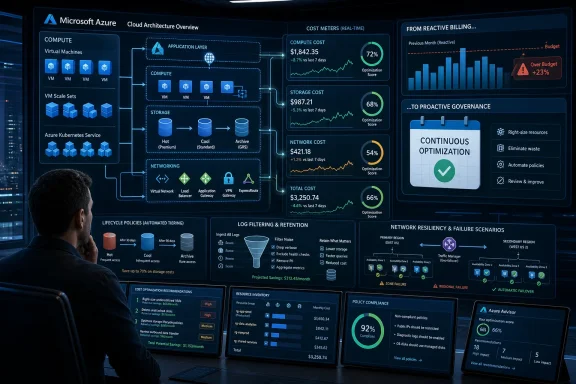 Microsoft Reframes Cost as an Architecture Problem
For years, cloud cost optimization has been sold as a cleanup exercise. A bill spikes, finance complains, engineers open Cost Management, and someone starts deleting idle disks, shrinking virtual machines, or buying reservations after the fact. Microsoft’s Azure IaaS post pushes against that reactive model by treating cost as an architectural property, closer to resiliency or security than procurement.That framing matters because the expensive mistakes in infrastructure rarely look reckless at the moment they are made. A team selects a larger VM because the launch window is tight. A storage account stays on a premium tier because nobody wants to be blamed for latency. Diagnostic logs are retained “just in case.” A highly available network design repeats components because duplication feels safer than nuance.
Individually, those choices are defensible. At scale, they become a tax on every workload that follows. The Azure blog’s strongest point is that IaaS waste compounds precisely because infrastructure decisions harden into templates, landing zones, runbooks, and organizational habits.
This is especially relevant now because Azure IaaS is not merely hosting legacy workloads anymore. It is the substrate beneath AI experiments, migrated enterprise applications, hybrid networks, development environments, and compliance-heavy production systems. The more Azure becomes the default platform for everything from GPU-heavy training jobs to ordinary Windows Server estates, the more cost efficiency stops being a quarterly review and becomes a design discipline.
The Cheapest VM Is Usually the Wrong Starting Point
Microsoft starts with compute because compute remains the most visible and politically legible part of an Azure bill. Everyone understands the idea of a VM being too large, left running too long, or placed in the wrong purchasing model. But the more interesting argument is not that customers should buy smaller machines. It is that they should stop treating VM selection as a static decision.Azure’s compute portfolio has become wide enough that “pick a VM size” is almost a misleading description of the problem. Customers are choosing architecture, processor family, memory ratio, accelerator availability, storage throughput, regional capacity, and pricing model at the same time. That is a lot of complexity to hide behind a single SKU.
The old IaaS model rewarded overprovisioning because overprovisioning was operationally simple. If the application might need more headroom, buy more headroom. If performance testing is incomplete, add more cores. If the business says the workload is mission-critical, choose the bigger instance and move on.
Cloud changes the economics but not automatically the behavior. Azure charges for that headroom every hour. The waste is not dramatic enough to trigger an outage review, but it is persistent enough to distort the cost base of an entire environment.
Microsoft’s recommended mix of Pay-As-You-Go, reservations, savings plans, Spot VMs, Virtual Machine Scale Sets, and Azure Compute Fleet reflects a more mature view: infrastructure purchasing should follow workload behavior. Stable baseline workloads are candidates for commitments. Interruptible batch jobs can use spare capacity. Elastic services should scale rather than sit at peak allocation. Large deployments should use fleet-style placement logic rather than hand-curated VM choices.
The hard part is not knowing these options exist. Most Azure administrators already do. The hard part is creating enough operational confidence to use them without turning every deployment into a pricing science project.
Discounts Are Not a Substitute for Knowing the Workload
Reservations and savings plans are powerful tools, but they can also become a way to paper over bad architecture. A discounted oversized VM is still oversized. A committed workload that should have been modernized remains a committed workload. A finance-led savings plan can make the bill look healthier while locking in assumptions the engineering team has not revisited.That is why Microsoft’s emphasis on matching compute to workload requirements is more important than the pricing menu itself. The ordering matters. First understand utilization, scaling behavior, availability requirements, and performance sensitivity. Then decide whether the workload belongs on Pay-As-You-Go, a reservation, a savings plan, Spot, or some blend.
Azure Compute Fleet is notable in this context because it acknowledges a reality that large cloud users have lived with for years: capacity, price, and SKU availability are now part of application operations. Fleet-style deployment lets customers draw from multiple VM types and purchasing options, including Spot and standard VMs, to improve placement and price-performance outcomes. That is not just a convenience feature. It is an admission that hand-picking a single perfect VM SKU is increasingly brittle at scale.
Virtual Machine Scale Sets make a similar point from the autoscaling side. If demand varies, fixed capacity is a cost smell. Scaling up and down in response to actual need is one of the central promises of cloud infrastructure, but it only works when applications, images, health checks, deployment pipelines, and monitoring are built for elasticity.
This is where cloud cost optimization gets uncomfortable for traditional infrastructure teams. The cheapest architecture may require more automation, better observability, more disciplined release engineering, and stronger application ownership. There is no free lunch; there is only a choice between paying Azure for idle capacity or paying engineering effort to avoid it.
Storage Waste Hides Because Nothing Looks Broken
If compute waste is visible, storage waste is patient. It grows quietly, survives reorganizations, and rarely announces itself as an emergency. Data is copied, retained, replicated, logged, exported, archived, and forgotten. Nobody wants to delete the wrong thing, so almost everything survives.Microsoft’s storage guidance is built around a simple principle: performance, capacity, and access patterns should remain aligned over time. That sounds obvious until you look at how many environments treat storage tiering as a provisioning-time decision. A blob container that made sense in a hot tier during active processing may not belong there six months later. A premium configuration chosen for one application phase may outlive that phase by years.
The Azure blog points to Blob Storage lifecycle management, automated tiering, and policy-based transitions as the antidote. This is exactly the kind of automation that cloud platforms should be good at. Data ages. Access patterns change. Retention rules differ. Humans are poor at manually revisiting thousands of objects, containers, and accounts with enough consistency to make meaningful savings.
The more important shift is cultural. Storage teams have to stop thinking of cost optimization as a periodic audit and start thinking of it as metadata-driven governance. Creation date, last access, blob tags, workload classification, compliance category, and business owner should influence what happens to data after it is created.
That does not mean every object should be shoved into archive storage as quickly as possible. The cheapest storage tier can become expensive if retrieval patterns are misunderstood. The optimization target is not the lowest monthly storage line item; it is the right balance of storage cost, access cost, operational risk, and application behavior.
Lifecycle Policies Are Where Good Intentions Become Real Savings
Lifecycle management is one of those cloud features that sounds mundane until it is missing. Without it, every storage estate becomes a museum of yesterday’s urgency. With it, an organization can express intent once and let the platform enforce that intent continuously.Azure Blob Storage lifecycle policies can move data between tiers or delete it based on time-based and access-based conditions, depending on configuration and account capabilities. Azure Storage Actions extends that logic across broader estates, letting teams operate at scale rather than treating each storage account as an island. Microsoft’s newer cost-optimization messaging around Blob Storage fits into a broader pattern: visibility first, policy second, automation third.
That sequence is important. Automation without visibility can simply industrialize mistakes. A badly designed lifecycle rule can break workflows, increase retrieval costs, or violate retention expectations. But visibility without automation creates dashboards nobody has time to act on. The useful middle ground is an estate where teams can see access patterns, classify data, and then apply repeatable policies.
For WindowsForum’s sysadmin audience, this should sound familiar. The cloud version of storage hygiene is not fundamentally different from the file server version. The difference is that Azure makes every unreviewed choice billable at hyperscale speed.
The problem gets sharper with AI. Training datasets, embeddings, logs, checkpoints, model artifacts, and experimentation outputs can expand quickly. Many AI projects are exploratory by nature, which means they generate data before they generate governance. If lifecycle rules are bolted on later, the estate may already be sprawling.
Networking Is the Cost Center Nobody Wants to Simplify
Networking cost optimization is trickier because the waste often masquerades as prudence. Redundant connectivity, firewalls, NAT gateways, private endpoints, diagnostic logs, cross-region paths, and high-availability designs all sound like responsible engineering. Often they are. But responsible engineering can still be inefficient engineering.Microsoft’s Azure IaaS post highlights ExpressRoute Metro, zone-redundant NAT Gateway, scalable network architectures, and more selective logging as ways to improve efficiency without abandoning resiliency. That phrasing matters because networking teams are rightly suspicious of cost-cutting that weakens availability. The better argument is not “remove redundancy.” It is “buy the redundancy that matches the failure mode.”
ExpressRoute Metro, for example, is aimed at improving private connectivity resilience within supported metropolitan areas by giving customers more robust options for redundant connectivity. Zone-redundant NAT Gateway addresses a different layer of the problem by providing outbound connectivity across availability zones in supported regions. These are not interchangeable features. They are examples of Azure pushing customers toward more precise resiliency constructs.
The danger in network architecture is that teams may duplicate components because duplication is easy to explain. Two of something looks safer than one. Multiple paths look safer than a single managed service. More logs look safer than fewer logs.
But the cloud punishes that instinct when it is not tied to a clear risk model. Every extra path, appliance, public IP, gateway, firewall policy, log category, and retention rule becomes part of the bill and the operational surface area. Complexity has a financial cost, but it also has a troubleshooting cost.
Logs Are Not Free Just Because They Feel Like Insurance
Operational visibility is a particularly sensitive part of the cost discussion. Nobody wants to be the person who disabled the log that would have explained an outage or security incident. As a result, many environments collect too much, retain too much, and send too much to analytics platforms without a clear plan for how the data will be used.Microsoft’s post is careful here. It does not argue against network and firewall logs. It argues for filtering, analytics, and intelligent retention so that teams focus on actionable data instead of hoarding telemetry indefinitely.
That is the correct line. Logs are security evidence, operational memory, and troubleshooting fuel. But they are also data. They consume storage, generate ingestion costs, create noise for analysts, and require lifecycle management just like application data.
The modern Azure estate can generate an enormous amount of diagnostic information across virtual networks, firewalls, gateways, load balancers, private endpoints, DNS, and identity-integrated services. If every category is enabled everywhere with long retention defaults, the observability system becomes its own cost center.
The answer is not blind reduction. It is tiered intent. Some logs need near-real-time analysis. Some need short-term troubleshooting retention. Some need longer compliance retention. Some are useful only during a migration or incident window. Treating all telemetry the same is expensive and operationally lazy.
AI Makes the Old IaaS Habits More Expensive
Microsoft’s blog repeatedly nods to AI, and for good reason. AI workloads make old cloud habits more costly because they combine bursty compute, large datasets, specialized accelerators, heavy storage movement, and experimental development patterns. The same overprovisioning that was tolerable for a line-of-business VM can become absurd when applied to GPU-backed infrastructure or large-scale data processing.This is where the Azure IaaS message intersects with a larger industry shift. Cloud providers are trying to persuade customers that AI adoption should happen on their platforms, but AI also amplifies bill shock. The customer who modernized a few applications and tolerated some idle VMs may react differently when experimentation produces volatile spend across compute, storage, and networking.
The lesson from the Azure post is that AI cost control cannot be left to the end of the project. Workload scheduling, data lifecycle policies, model artifact retention, environment shutdown rules, quota governance, and capacity strategy need to be part of the platform before teams start scaling experiments.
Azure Copilot and AI-driven recommendations are part of Microsoft’s answer. The company is positioning AI not only as a workload to run on Azure, but as an operational assistant for finding waste, right-sizing resources, forecasting spend, and automating optimization. That is directionally useful, but it should not be mistaken for accountability.
Recommendations are only as good as the willingness of teams to act on them. In many enterprises, the blocker is not the absence of insight. It is unclear ownership. The platform team sees waste but cannot resize the application. The application team owns performance but not the budget. Finance owns the budget but not the architecture. AI may surface the recommendation faster, but it cannot resolve the organizational model by itself.
FinOps Has Finally Reached the Landing Zone
The most useful reading of Microsoft’s Azure IaaS post is that cost optimization has moved into the landing-zone conversation. It is no longer an afterthought managed by reports and reserved-instance purchases. It belongs in the same design discussions as identity, network topology, security controls, policy enforcement, monitoring, and disaster recovery.That shift is overdue. A cloud landing zone that does not encode cost expectations is incomplete. If teams can deploy any VM size, choose any storage tier, retain any log stream forever, and duplicate networking components without review, the environment is not self-service. It is self-service debt creation.
The practical answer is governance with escape hatches. Azure Policy, budgets, tagging standards, deployment templates, approved SKU lists, lifecycle defaults, and monitoring baselines can prevent the most common mistakes. But rigid governance that blocks legitimate engineering needs will be bypassed or resented. The goal is not to make cheap the default at all costs. The goal is to make intentional the default.
That requires collaboration between infrastructure teams, application owners, security, finance, and executives. The term FinOps sometimes makes this sound like a billing discipline, but in IaaS it is fundamentally an engineering-management discipline. Someone has to decide what “efficient enough” means for a production workload, a development environment, an AI experiment, and a regulated archive.
Microsoft’s Resource Center pitch fits this broader pattern. The company is centralizing guidance around compute, storage, and networking because customers need repeatable patterns, not just product pages. The usefulness of that center will depend on whether organizations treat it as a design input or a link forwarded after the bill arrives.
The Cloud Bill Is a Delayed Architecture Review
One reason cloud cost conversations become emotional is that the bill often reveals decisions nobody remembers making. A forgotten premium disk, a chatty diagnostic setting, an oversized VM family, a redundant gateway, or a stale dataset is not just a charge. It is evidence of a missing feedback loop.Azure makes infrastructure easy to create, but it does not guarantee that infrastructure remains appropriate. That is the central tension in IaaS. The platform gives teams flexibility, and flexibility without review becomes sprawl.
The Microsoft post’s best sentence, in effect, is its argument that continuous optimization is where long-term savings happen. That is the difference between a cleanup campaign and an operating model. Campaigns produce short-lived savings. Operating models change the default behavior of the estate.
Continuous optimization means measuring utilization, revisiting VM families, checking whether commitments still match usage, reviewing storage access patterns, pruning logs, and updating network designs as Azure releases new capabilities. It also means accepting that an architecture that was efficient two years ago may not be efficient today.
This is especially true in Azure, where services evolve quickly. New VM generations, pricing options, storage features, network SKUs, and management tooling can change the economics of an existing design. Standing still is a decision, and sometimes an expensive one.
The Part Microsoft Does Not Quite Say Out Loud
The Azure blog is vendor guidance, so it naturally presents Azure capabilities as the solution to Azure cost problems. That is fair enough. But customers should also read it with a certain skepticism. Many cloud inefficiencies exist because the platform is both powerful and complicated, and because every additional managed capability has its own pricing model.There is a commercial tension here. Microsoft benefits when customers use more Azure services, but it also needs customers to believe Azure can be operated efficiently over the long term. If cloud bills become unpredictable or politically toxic, modernization slows. Cost optimization content is therefore both customer education and market reassurance.
That does not make the guidance wrong. In fact, most of it is sound. Right-size compute. Use commitments carefully. Apply Spot where interruption is acceptable. Scale elastically. Move data through lifecycle tiers. Improve storage estate visibility. Design resilient networks without unnecessary duplication. Filter logs. Revisit assumptions continuously.
The caution is that every optimization feature introduces its own management burden. Savings plans require usage analysis. Spot requires interruption handling. Autoscaling requires application readiness. Lifecycle policies require classification and testing. Network simplification requires risk modeling. Log filtering requires security agreement.
Cloud efficiency is not achieved by turning on features. It is achieved by building an organization capable of using those features responsibly.
The Azure IaaS Playbook Becomes a Discipline, Not a Shopping List
Microsoft’s guidance gives Azure customers a useful map, but the map only matters if it changes behavior. The concrete lessons are not exotic; they are the unglamorous practices that separate a mature cloud estate from an expensive one.- Organizations should treat VM sizing and pricing models as workload-specific engineering decisions, not as defaults inherited from migration templates.
- Reservations, savings plans, Spot VMs, Scale Sets, and Compute Fleet work best when they are matched to real utilization patterns rather than used as blanket cost-cutting tools.
- Storage lifecycle management should be designed at the beginning of a workload, because old data rarely becomes cheaper by accident.
- Network resiliency should be mapped to specific failure scenarios, not built through reflexive duplication of every component.
- Diagnostic logging should be filtered and retained according to operational, security, and compliance value rather than collected indefinitely because it feels safer.
- Continuous optimization needs named owners, governance mechanisms, and regular review cycles, or it will decay into another dashboard nobody opens.
Microsoft’s latest Azure IaaS post is not revolutionary, but it is revealing. The company is telling customers that the next phase of cloud maturity will be judged less by how quickly they can provision infrastructure and more by how deliberately they can sustain it. For Windows shops, sysadmins, and enterprise platform teams, that means the familiar virtues still matter: know the workload, automate the routine, document the exception, and revisit yesterday’s assumptions before they become tomorrow’s waste.
References
- Primary source: Microsoft Azure
Published: 2026-06-30T17:50:16.125810
Loading…
azure.microsoft.com - Official source: learn.microsoft.com
Loading…
learn.microsoft.com - Official source: microsoft.com
Loading…
www.microsoft.com - Related coverage: docs.netapp.com
Loading…
docs.netapp.com - Official source: download.microsoft.com
Loading…
download.microsoft.com