

Apple updated Creator Studio on June 30, 2026, adding AI-assisted features across Final Cut Pro, Pixelmator Pro, Logic Pro, Freeform, Motion, Compressor, and iWork for subscribers to its $12.99-per-month creative software bundle. The update matters less because of any single tool than because Apple is clarifying the bargain behind Creator Studio. The company is not merely bundling old pro apps at a friendlier price. It is building a subscription layer where the newest intelligence features, cross-app workflows, and premium content increasingly live.
When Apple introduced Creator Studio in January, the easiest read was that Cupertino had finally built its own answer to Adobe Creative Cloud. That comparison was useful, but incomplete. Adobe sells breadth, industry standardization, and a cloud-centric workflow; Apple is selling a narrower proposition built around Mac, iPad, iPhone, and the company’s long-running belief that hardware and software should make each other more valuable.
This week’s update makes that strategy clearer. Creator Studio is not just a cheaper way to get Final Cut Pro, Logic Pro, Pixelmator Pro, Motion, Compressor, MainStage, and extra capabilities in iWork. It is becoming the place where Apple tests how far it can move professional and prosumer creation into an AI-assisted, subscription-funded model without triggering the same backlash that has followed other creative software vendors.
That is a delicate line to walk. Many Apple customers bought into Final Cut Pro, Logic Pro, and Pixelmator Pro precisely because they were not Adobe-style subscriptions. Apple has kept one-time-purchase Mac versions available, but the feature split is now the story: some of the newest content, integrations, and AI-powered tools are tied to Creator Studio.
The update also arrives at a moment when “AI features” have become both marketing oxygen and user fatigue. Apple’s pitch is not that a machine will make your film, song, thumbnail, spreadsheet, or presentation. It is that tedious production work can be compressed into something closer to an editing decision. That is a much smarter argument, and a more dangerous one for competitors.
Generate Captions is not a gimmick in 2026. Captions are now part accessibility requirement, part platform convention, and part engagement strategy. YouTube, TikTok, Instagram, LinkedIn, and enterprise video pipelines have trained editors to think of text as a layer of the video itself, not an afterthought.
Edit Detection is similarly pragmatic. Anyone who has inherited a finished MP4 and been asked to “just make a few changes” knows the pain. If Apple’s implementation is accurate enough, this is the sort of tool that saves editors from the absurdity of manually finding cut points in a flattened file.
The Mac version also gets Auto Mask, enhanced Match Color, Advanced Trimming, and the ability to send frames directly to Pixelmator Pro. That last feature may sound small next to the AI headlines, but it is exactly the kind of workflow glue Apple needs if Creator Studio is going to feel like a suite rather than a folder of apps sharing a subscription receipt.
The stronger Final Cut becomes as a hub, the more Apple can argue that Creator Studio is not a defensive product. It is a workflow product. The company does not need every creator to abandon Adobe; it needs enough creators to decide that the fastest path from footage to post-ready media runs through Apple’s apps on Apple hardware.
That matters because creative professionals are generally not hostile to automation. They are hostile to automation that devalues their judgment, contaminates their work, or creates legal and ethical uncertainty. Apple’s best chance is to frame AI as production assistance rather than creative replacement.
Final Cut Pro’s AI features mostly fit that frame. Auto Mask is not making an aesthetic decision; it is saving the user from rotoscoping drudgery. Generate Captions is not writing a scene; it is turning audio into editable text. Edit Detection is not recutting a movie; it is reconstructing a timeline so a human can make changes.
This is the part of the AI market where Apple’s instincts are strongest. The company has historically been good at hiding complexity behind interfaces that make users feel more capable. The danger is that subscription gating can make the same feature feel less like empowerment and more like rent.
That tension will define Creator Studio. Apple can say the AI tools are premium capabilities that require ongoing development and compute investment. Users can fairly respond that they already paid for pro apps that once treated major updates as part of the bargain. Both positions can be true.
Subscribers can now open images from Keynote, Pages, and Numbers directly in Pixelmator Pro, edit them, and save the changes back to the source document. Final Cut Pro on Mac can send individual frames to Pixelmator Pro, which is a practical win for thumbnails, stills, posters, and quick visual polish. Pixelmator Pro also gains natural-language image generation and vector-shape creation, plus access to Apple’s Content Hub.
That integration is Apple doing what Apple does best: making the system feel smaller. Instead of exporting an image, finding it in Finder, opening an editor, saving a duplicate, and re-importing the result, the user stays inside a controlled circuit. The friction disappears, and the subscription feels less like a tax.
For WindowsForum readers, this is the part worth watching even if you never touch a Mac. Microsoft has been moving Copilot across Windows, Microsoft 365, Paint, Photos, Clipchamp, and Designer, but the experience often still feels like a set of adjacent bets. Apple is trying to make AI less like a chatbot bolted onto productivity and more like a shared capability running through creative objects.
Whether Apple succeeds depends on quality. A clumsy image generator is just another novelty. A fast, private-feeling, tightly integrated image tool that can round-trip from a presentation to a real editor and back is something else.
That is a subtle but important shift. Apple has long used iWork as ecosystem furniture: polished, free, good enough for many users, and especially attractive on new hardware. By putting advanced content and AI capabilities behind Creator Studio, Apple is testing whether even “free” productivity apps can become subscription upsell surfaces.
The update adds practical improvements, according to reports: Keynote gets new transitions and animation builds, Numbers gains features such as hiding individual sheets and color-coding spreadsheet tabs, and Pages on iPhone and iPad adds editing refinements such as auto-hyphenation and Show Invisibles. These are not earthshaking features, but they serve a purpose. They remind subscribers that Creator Studio is not only for video editors and music producers.
The risk is confusion. If Pages is free, but some Pages features are part of Creator Studio, the user has to understand which version of the app they are using, which features are tied to the subscription, and what happens if the subscription lapses. Apple can manage that with interface design, but it cannot fully escape the complexity.
This is where Adobe’s model may be cleaner than Apple’s, however unpopular it can be. Creative Cloud apps are subscription products. Apple’s model is more hybrid: free apps, one-time purchases, subscription versions, premium content, and AI features living across all of them. That gives users choice, but it also creates a new kind of product maze.
The Chord ID improvement is particularly telling. Identifying extended chords and inversions more accurately is not flashy in a keynote-demo sense, but it is meaningful to musicians working with harmony. A tool that understands a richer musical context can be useful without pretending to be the composer.
The Producer Project is also a smart piece of content strategy. Apple has long used artist sessions, loops, and project templates to teach users by letting them dissect real work. In a subscription bundle, that kind of premium learning material becomes part of the retention engine.
Logic Pro is where Apple must be careful not to over-AI the brand. Musicians may welcome session players, sound search, chord tools, and generative assistance, but the credibility of Logic comes from being a serious digital audio workstation. If the product ever starts to feel like an auto-song machine for content farms, Apple will have damaged one of its strongest creative assets.
So far, the update appears to lean toward augmentation rather than replacement. That is the right direction. In professional software, AI works best when it helps the user get to a decision faster, not when it pretends the decision no longer matters.
Clean HDMI Out lets an iPhone or iPad send a clean signal to external monitors and recorders. Expanded ProRes options give creators more control over quality, storage, and workflow. Disabling digital zoom matters because accidental or unwanted digital manipulation can compromise a shot.
This is Apple tightening the loop between capture and edit. The iPhone is already a serious camera in many contexts, but professional use depends on control, predictability, and clean output. Final Cut Camera becomes more valuable when it behaves less like a phone app and more like part of a production chain.
That also strengthens Creator Studio’s economics. If your capture app, editing app, motion tools, compressor, image editor, and productivity templates all live in one Apple-shaped workflow, the subscription begins to look less optional. The bundle becomes a gravitational field.
For independent creators, that may be welcome. For production shops, it raises familiar platform questions. Apple workflows can be elegant, but they can also be sticky. Once the team’s templates, codecs, project habits, and asset flows assume Apple tools, switching costs rise quickly.
The Vision Pro angle is especially interesting because it shows Apple using Creator Studio to feed another platform ambition. Immersive media remains a niche, but Apple needs tools if it wants creators to make content for visionOS. Compressor’s update is not a mass-market story; it is infrastructure.
Freeform’s changes are more broadly relatable. Dark Mode, folder organization, shape generation, the ability to open images in Pixelmator Pro, and support for drawing on Mac make Freeform feel less like a charming whiteboard experiment and more like a real creative planning surface. If Apple wants Creator Studio to serve teams as well as individuals, Freeform has to become more organized and more capable.
The Mac drawing support is bound to produce speculation about touch-enabled Macs, especially because Apple has historically resisted making the Mac a touch-first device. But the safer read is that Apple wants Freeform to behave consistently across input methods. Trackpads, styluses on iPad, external tablets, and continuity workflows all benefit from better drawing support.
Still, Apple rarely adds cross-device interaction features without thinking several hardware moves ahead. If touch Macs ever arrive, Freeform will look like one of the apps that was quietly prepared for them.
Creator Studio costs $12.99 per month or $129 per year in the United States, with lower education pricing and trial offers for new users or eligible hardware buyers. Apple still offers one-time purchases for several Mac apps, including Final Cut Pro, Logic Pro, Pixelmator Pro, Motion, Compressor, and MainStage. But the direction of travel is obvious: the newest cross-app features, premium assets, and AI capabilities are increasingly organized around the subscription.
That does not mean Apple will kill standalone purchases tomorrow. It does not have to. The more effective strategy is to let the standalone apps remain respectable while making the subscription feel more alive. The one-time purchase becomes the stable lane; Creator Studio becomes the lane where the new stuff happens first, or exclusively.
This is a familiar software-industry pattern. Vendors rarely begin by removing old purchase models. They begin by making the old model feel a little less exciting each quarter. Over time, customers who want the newest capabilities self-select into recurring revenue.
Apple’s advantage is trust. Its disadvantage is also trust. Users who have relied on Apple’s creative apps for years will give the company credit for performance, integration, and design. They will also notice quickly if the subscription boundary starts to feel arbitrary.
Microsoft is pursuing that future through Windows, Copilot, Microsoft 365, Azure AI, Designer, Clipchamp, Paint, Photos, Teams, and developer tooling. Apple is pursuing it through tighter vertical integration and a smaller set of creative apps. The philosophies differ, but the business model is converging: recurring subscriptions tied to intelligent features that are useful enough to become habits.
The Windows ecosystem has more diversity, which is both strength and weakness. A creator on Windows can choose Adobe, DaVinci Resolve, Affinity, Reaper, Ableton, Blender, Microsoft 365, open-source tools, and countless plug-ins. That flexibility is unmatched, but it also makes unified workflow integration harder.
Apple can move more cleanly because it controls the stack. It can make Pixelmator Pro talk to Keynote, Final Cut Pro send frames to Pixelmator, and Final Cut Camera behave as a companion to Final Cut Pro without negotiating with a dozen vendors. Microsoft can do similar things inside its own apps, but the broader Windows creative market is more pluralistic.
For IT departments, the lesson is not that Apple has solved creative software licensing. It is that AI features will increasingly arrive as subscription entitlements rather than traditional app upgrades. License management, data governance, model disclosure, content rights, and user training will become part of even “creative” app deployment.
But privacy is not the only concern. Creative AI also raises questions about training data, output ownership, usage limits, model provenance, and whether generated assets are safe for commercial use. Apple can reduce some anxiety by controlling the experience, but it cannot make the broader debate disappear.
The update’s AI tools range from relatively uncontroversial automation to more sensitive generation features. Captions, edit detection, masking, chord recognition, and vector creation are easier to defend as workflow enhancements. Image generation and natural-language creative tools sit closer to the contested center of the AI debate.
The practical test will be whether Apple gives users enough transparency. Professionals do not need a philosophy lecture inside every dialog box, but they do need to know when a feature uses third-party models, whether data leaves the device, what restrictions apply, and whether outputs can be used in client work. If that information is buried, trust will erode.
Apple tends to win when it turns complexity into confidence. Creator Studio will need that skill more than most Apple services because creative work often carries legal, reputational, and contractual consequences.
Apple’s pricing is aggressive by comparison. A $12.99 monthly bundle that includes Final Cut Pro, Logic Pro, Pixelmator Pro, Motion, Compressor, MainStage, and premium capabilities across productivity apps is easy to understand as a value play. For students and educators, the lower pricing is even more pointed.
But Apple is not offering a complete Adobe replacement. There is no direct Illustrator equivalent with industry-standard vector workflows, no InDesign replacement for serious publishing, no After Effects equivalent at the same ecosystem scale, and no Photoshop monopoly position. Pixelmator Pro is excellent for many users, but Photoshop remains embedded in professional pipelines.
The better comparison is not app-for-app. It is business-model-for-business-model. Adobe proved that creative professionals would eventually tolerate subscriptions if the tools were essential enough. Apple is betting that many creators will tolerate subscriptions if the bundle feels inexpensive, integrated, and native.
That is a different psychological pitch. Adobe often feels like a toll road on the professional creative economy. Apple wants Creator Studio to feel like a fast lane inside the Apple ecosystem. The toll is still there; the scenery is better.
That is why the smaller integrations in this update matter. Sending a Final Cut frame to Pixelmator Pro is not as marketable as AI image generation, but it is the kind of feature that changes daily behavior. Opening an image from Pages in Pixelmator and saving it back sounds mundane until you do it ten times a week.
Workflow gravity is also why Apple keeps tying Creator Studio to device capabilities. Final Cut Camera on iPhone, Pixelmator Pro on iPad, Logic Pro across Mac and iPad, and Vision Pro metadata in Compressor all point toward the same idea: creation is not a single app session. It is a chain of devices and contexts.
Microsoft understands this too, but its strategy is necessarily more federated. Windows must support many vendors, many device classes, and many enterprise policies. Apple can optimize for fewer paths and make those paths feel premium.
The risk for Apple is that creators often collaborate across mixed environments. A beautiful Apple-only workflow becomes less beautiful when a Windows editor, an Android social producer, a Linux render box, or an Adobe-dependent agency enters the room. Creator Studio’s long-term success will depend partly on how well it exports, shares, and interoperates beyond Apple’s garden.
That is important because subscription fatigue is real. Users are increasingly skeptical of paying monthly for software that does not visibly improve. Apple’s answer is cadence: make the bundle feel active, give every major creative discipline something new, and keep the price low enough that cancellation feels more trouble than it is worth.
The strongest additions are the ones that solve immediate pain: caption generation, edit detection, Auto Mask, Pixelmator round-tripping, Clean HDMI Out, better ProRes options, and Freeform organization. The weaker ones, at least from a messaging standpoint, are the generic AI creation features that risk blending into every other vendor’s pitch.
Still, breadth matters. A video editor may care about Final Cut and Pixelmator. A musician may care about Logic and MainStage. A student creator may care about iPad workflows and presentation tools. A small business may care about all of it enough to view Creator Studio as a low-cost media department.
That is Apple’s wedge. Creator Studio does not need to replace every professional suite in Hollywood, Nashville, or Madison Avenue. It needs to become the default paid creative layer for Apple users who have outgrown free apps but do not want the weight of Adobe.
 Apple’s Creative Bundle Stops Looking Like a Discount Bin
When Apple introduced Creator Studio in January, the easiest read was that Cupertino had finally built its own answer to Adobe Creative Cloud. That comparison was useful, but incomplete. Adobe sells breadth, industry standardization, and a cloud-centric workflow; Apple is selling a narrower proposition built around Mac, iPad, iPhone, and the company’s long-running belief that hardware and software should make each other more valuable.This week’s update makes that strategy clearer. Creator Studio is not just a cheaper way to get Final Cut Pro, Logic Pro, Pixelmator Pro, Motion, Compressor, MainStage, and extra capabilities in iWork. It is becoming the place where Apple tests how far it can move professional and prosumer creation into an AI-assisted, subscription-funded model without triggering the same backlash that has followed other creative software vendors.
That is a delicate line to walk. Many Apple customers bought into Final Cut Pro, Logic Pro, and Pixelmator Pro precisely because they were not Adobe-style subscriptions. Apple has kept one-time-purchase Mac versions available, but the feature split is now the story: some of the newest content, integrations, and AI-powered tools are tied to Creator Studio.
The update also arrives at a moment when “AI features” have become both marketing oxygen and user fatigue. Apple’s pitch is not that a machine will make your film, song, thumbnail, spreadsheet, or presentation. It is that tedious production work can be compressed into something closer to an editing decision. That is a much smarter argument, and a more dangerous one for competitors.
Final Cut Pro Is Where Apple Makes the Case Most Aggressively
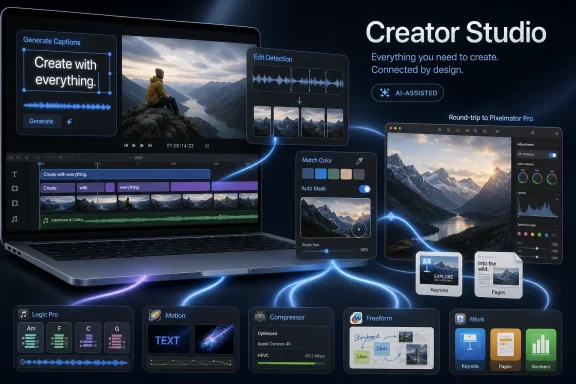
Final Cut Pro gets the most visible upgrade because video is where creator economics are most obvious. The new Generate Captions feature automatically turns spoken audio into timeline subtitles, while Edit Detection analyzes a rendered video and breaks it back into editable clips. Both features target the least glamorous parts of modern video work: transcription, social packaging, re-editing, repurposing, and fixing projects that arrive as flattened exports.Generate Captions is not a gimmick in 2026. Captions are now part accessibility requirement, part platform convention, and part engagement strategy. YouTube, TikTok, Instagram, LinkedIn, and enterprise video pipelines have trained editors to think of text as a layer of the video itself, not an afterthought.
Edit Detection is similarly pragmatic. Anyone who has inherited a finished MP4 and been asked to “just make a few changes” knows the pain. If Apple’s implementation is accurate enough, this is the sort of tool that saves editors from the absurdity of manually finding cut points in a flattened file.
The Mac version also gets Auto Mask, enhanced Match Color, Advanced Trimming, and the ability to send frames directly to Pixelmator Pro. That last feature may sound small next to the AI headlines, but it is exactly the kind of workflow glue Apple needs if Creator Studio is going to feel like a suite rather than a folder of apps sharing a subscription receipt.
The stronger Final Cut becomes as a hub, the more Apple can argue that Creator Studio is not a defensive product. It is a workflow product. The company does not need every creator to abandon Adobe; it needs enough creators to decide that the fastest path from footage to post-ready media runs through Apple’s apps on Apple hardware.
Apple’s AI Pitch Is Boring in the Right Way
The most interesting thing about this update is how little of it sounds like science fiction. Captions, masks, edit detection, natural-language shape generation, chord recognition, and image generation are not abstract demonstrations. They are features aimed at deadlines.That matters because creative professionals are generally not hostile to automation. They are hostile to automation that devalues their judgment, contaminates their work, or creates legal and ethical uncertainty. Apple’s best chance is to frame AI as production assistance rather than creative replacement.
Final Cut Pro’s AI features mostly fit that frame. Auto Mask is not making an aesthetic decision; it is saving the user from rotoscoping drudgery. Generate Captions is not writing a scene; it is turning audio into editable text. Edit Detection is not recutting a movie; it is reconstructing a timeline so a human can make changes.
This is the part of the AI market where Apple’s instincts are strongest. The company has historically been good at hiding complexity behind interfaces that make users feel more capable. The danger is that subscription gating can make the same feature feel less like empowerment and more like rent.
That tension will define Creator Studio. Apple can say the AI tools are premium capabilities that require ongoing development and compute investment. Users can fairly respond that they already paid for pro apps that once treated major updates as part of the bargain. Both positions can be true.
Pixelmator Pro Becomes the Suite’s Connective Tissue
Pixelmator Pro’s role in Creator Studio is increasingly strategic. Apple’s acquisition of Pixelmator gave it a modern image editor with a loyal Mac audience, a cleaner interface than Photoshop, and obvious potential as a bridge between casual productivity and professional design. This update pushes that bridge harder.Subscribers can now open images from Keynote, Pages, and Numbers directly in Pixelmator Pro, edit them, and save the changes back to the source document. Final Cut Pro on Mac can send individual frames to Pixelmator Pro, which is a practical win for thumbnails, stills, posters, and quick visual polish. Pixelmator Pro also gains natural-language image generation and vector-shape creation, plus access to Apple’s Content Hub.
That integration is Apple doing what Apple does best: making the system feel smaller. Instead of exporting an image, finding it in Finder, opening an editor, saving a duplicate, and re-importing the result, the user stays inside a controlled circuit. The friction disappears, and the subscription feels less like a tax.
For WindowsForum readers, this is the part worth watching even if you never touch a Mac. Microsoft has been moving Copilot across Windows, Microsoft 365, Paint, Photos, Clipchamp, and Designer, but the experience often still feels like a set of adjacent bets. Apple is trying to make AI less like a chatbot bolted onto productivity and more like a shared capability running through creative objects.
Whether Apple succeeds depends on quality. A clumsy image generator is just another novelty. A fast, private-feeling, tightly integrated image tool that can round-trip from a presentation to a real editor and back is something else.
iWork’s Upgrade Is Really About the Subscription Boundary
Keynote, Pages, and Numbers do not usually sit at the center of pro-creator debates, but their inclusion in Creator Studio is one of Apple’s more revealing choices. Apple’s office apps remain free in their standard form. The subscription version adds premium content and intelligent features, creating a new tier above the free baseline.That is a subtle but important shift. Apple has long used iWork as ecosystem furniture: polished, free, good enough for many users, and especially attractive on new hardware. By putting advanced content and AI capabilities behind Creator Studio, Apple is testing whether even “free” productivity apps can become subscription upsell surfaces.
The update adds practical improvements, according to reports: Keynote gets new transitions and animation builds, Numbers gains features such as hiding individual sheets and color-coding spreadsheet tabs, and Pages on iPhone and iPad adds editing refinements such as auto-hyphenation and Show Invisibles. These are not earthshaking features, but they serve a purpose. They remind subscribers that Creator Studio is not only for video editors and music producers.
The risk is confusion. If Pages is free, but some Pages features are part of Creator Studio, the user has to understand which version of the app they are using, which features are tied to the subscription, and what happens if the subscription lapses. Apple can manage that with interface design, but it cannot fully escape the complexity.
This is where Adobe’s model may be cleaner than Apple’s, however unpopular it can be. Creative Cloud apps are subscription products. Apple’s model is more hybrid: free apps, one-time purchases, subscription versions, premium content, and AI features living across all of them. That gives users choice, but it also creates a new kind of product maze.
Logic Pro’s Update Shows Apple Still Understands Craft
Logic Pro’s additions are less headline-friendly than Final Cut Pro’s, but they matter because music production users tend to be especially sensitive to fake innovation. The update reportedly improves Chord ID, adds a new Producer Project from Khris Riddick-Tynes, expands Beat Breaker with new controls, and brings a Granular Alchemy sound pack alongside a new granular sync mode in Alchemy.The Chord ID improvement is particularly telling. Identifying extended chords and inversions more accurately is not flashy in a keynote-demo sense, but it is meaningful to musicians working with harmony. A tool that understands a richer musical context can be useful without pretending to be the composer.
The Producer Project is also a smart piece of content strategy. Apple has long used artist sessions, loops, and project templates to teach users by letting them dissect real work. In a subscription bundle, that kind of premium learning material becomes part of the retention engine.
Logic Pro is where Apple must be careful not to over-AI the brand. Musicians may welcome session players, sound search, chord tools, and generative assistance, but the credibility of Logic comes from being a serious digital audio workstation. If the product ever starts to feel like an auto-song machine for content farms, Apple will have damaged one of its strongest creative assets.
So far, the update appears to lean toward augmentation rather than replacement. That is the right direction. In professional software, AI works best when it helps the user get to a decision faster, not when it pretends the decision no longer matters.
Final Cut Camera Quietly Gets More Professional
The update to Final Cut Camera may be the most understated sign of Apple’s hardware-software strategy. Clean HDMI Out, expanded ProRes support including ProRes LT, and the option to disable digital zoom are not consumer baubles. They are production features.Clean HDMI Out lets an iPhone or iPad send a clean signal to external monitors and recorders. Expanded ProRes options give creators more control over quality, storage, and workflow. Disabling digital zoom matters because accidental or unwanted digital manipulation can compromise a shot.
This is Apple tightening the loop between capture and edit. The iPhone is already a serious camera in many contexts, but professional use depends on control, predictability, and clean output. Final Cut Camera becomes more valuable when it behaves less like a phone app and more like part of a production chain.
That also strengthens Creator Studio’s economics. If your capture app, editing app, motion tools, compressor, image editor, and productivity templates all live in one Apple-shaped workflow, the subscription begins to look less optional. The bundle becomes a gravitational field.
For independent creators, that may be welcome. For production shops, it raises familiar platform questions. Apple workflows can be elegant, but they can also be sticky. Once the team’s templates, codecs, project habits, and asset flows assume Apple tools, switching costs rise quickly.
Motion, Compressor, and Freeform Reveal the Edges of the Strategy
Motion and Compressor are not the apps that will sell Creator Studio to most people, but they reveal how serious Apple is about making the bundle coherent. Motion’s native vector support should keep graphics crisp at any resolution, while Distribute Layers speeds up animation setup. Compressor adds an Immersive Metadata Viewer, support for 180-degree Apple Projected Media Profile for Vision Pro, and an Anaglyph View for stereoscopic video preview.The Vision Pro angle is especially interesting because it shows Apple using Creator Studio to feed another platform ambition. Immersive media remains a niche, but Apple needs tools if it wants creators to make content for visionOS. Compressor’s update is not a mass-market story; it is infrastructure.
Freeform’s changes are more broadly relatable. Dark Mode, folder organization, shape generation, the ability to open images in Pixelmator Pro, and support for drawing on Mac make Freeform feel less like a charming whiteboard experiment and more like a real creative planning surface. If Apple wants Creator Studio to serve teams as well as individuals, Freeform has to become more organized and more capable.
The Mac drawing support is bound to produce speculation about touch-enabled Macs, especially because Apple has historically resisted making the Mac a touch-first device. But the safer read is that Apple wants Freeform to behave consistently across input methods. Trackpads, styluses on iPad, external tablets, and continuity workflows all benefit from better drawing support.
Still, Apple rarely adds cross-device interaction features without thinking several hardware moves ahead. If touch Macs ever arrive, Freeform will look like one of the apps that was quietly prepared for them.
The Subscription Is the Product Now
The biggest mistake would be to judge this update app by app. That is how Apple lists features, but it is not how the business works. The product is the subscription.Creator Studio costs $12.99 per month or $129 per year in the United States, with lower education pricing and trial offers for new users or eligible hardware buyers. Apple still offers one-time purchases for several Mac apps, including Final Cut Pro, Logic Pro, Pixelmator Pro, Motion, Compressor, and MainStage. But the direction of travel is obvious: the newest cross-app features, premium assets, and AI capabilities are increasingly organized around the subscription.
That does not mean Apple will kill standalone purchases tomorrow. It does not have to. The more effective strategy is to let the standalone apps remain respectable while making the subscription feel more alive. The one-time purchase becomes the stable lane; Creator Studio becomes the lane where the new stuff happens first, or exclusively.
This is a familiar software-industry pattern. Vendors rarely begin by removing old purchase models. They begin by making the old model feel a little less exciting each quarter. Over time, customers who want the newest capabilities self-select into recurring revenue.
Apple’s advantage is trust. Its disadvantage is also trust. Users who have relied on Apple’s creative apps for years will give the company credit for performance, integration, and design. They will also notice quickly if the subscription boundary starts to feel arbitrary.
Windows Users Should Read This as a Microsoft Story, Too
At first glance, an Apple Creator Studio update looks like Mac news. For Windows users and IT pros, it is a preview of where the whole productivity market is headed. The operating system is becoming less important as a standalone destination and more important as the orchestration layer for AI-assisted workflows, subscriptions, identity, storage, and device-specific acceleration.Microsoft is pursuing that future through Windows, Copilot, Microsoft 365, Azure AI, Designer, Clipchamp, Paint, Photos, Teams, and developer tooling. Apple is pursuing it through tighter vertical integration and a smaller set of creative apps. The philosophies differ, but the business model is converging: recurring subscriptions tied to intelligent features that are useful enough to become habits.
The Windows ecosystem has more diversity, which is both strength and weakness. A creator on Windows can choose Adobe, DaVinci Resolve, Affinity, Reaper, Ableton, Blender, Microsoft 365, open-source tools, and countless plug-ins. That flexibility is unmatched, but it also makes unified workflow integration harder.
Apple can move more cleanly because it controls the stack. It can make Pixelmator Pro talk to Keynote, Final Cut Pro send frames to Pixelmator, and Final Cut Camera behave as a companion to Final Cut Pro without negotiating with a dozen vendors. Microsoft can do similar things inside its own apps, but the broader Windows creative market is more pluralistic.
For IT departments, the lesson is not that Apple has solved creative software licensing. It is that AI features will increasingly arrive as subscription entitlements rather than traditional app upgrades. License management, data governance, model disclosure, content rights, and user training will become part of even “creative” app deployment.
The Privacy Argument Is Necessary but Not Sufficient
Apple’s strongest rhetorical card in AI remains privacy. The company prefers to emphasize on-device processing, controlled model use, and a user experience that does not feel like handing your project to an opaque web service. For creators handling client footage, unreleased music, internal presentations, legal documents, or product imagery, that pitch matters.But privacy is not the only concern. Creative AI also raises questions about training data, output ownership, usage limits, model provenance, and whether generated assets are safe for commercial use. Apple can reduce some anxiety by controlling the experience, but it cannot make the broader debate disappear.
The update’s AI tools range from relatively uncontroversial automation to more sensitive generation features. Captions, edit detection, masking, chord recognition, and vector creation are easier to defend as workflow enhancements. Image generation and natural-language creative tools sit closer to the contested center of the AI debate.
The practical test will be whether Apple gives users enough transparency. Professionals do not need a philosophy lecture inside every dialog box, but they do need to know when a feature uses third-party models, whether data leaves the device, what restrictions apply, and whether outputs can be used in client work. If that information is buried, trust will erode.
Apple tends to win when it turns complexity into confidence. Creator Studio will need that skill more than most Apple services because creative work often carries legal, reputational, and contractual consequences.
The Adobe Comparison Is Useful Until It Isn’t
Every Creator Studio story eventually invokes Adobe, and for good reason. Adobe Creative Cloud defined the modern creative subscription. It also created a decade of resentment among users who felt they had lost ownership of their tools.Apple’s pricing is aggressive by comparison. A $12.99 monthly bundle that includes Final Cut Pro, Logic Pro, Pixelmator Pro, Motion, Compressor, MainStage, and premium capabilities across productivity apps is easy to understand as a value play. For students and educators, the lower pricing is even more pointed.
But Apple is not offering a complete Adobe replacement. There is no direct Illustrator equivalent with industry-standard vector workflows, no InDesign replacement for serious publishing, no After Effects equivalent at the same ecosystem scale, and no Photoshop monopoly position. Pixelmator Pro is excellent for many users, but Photoshop remains embedded in professional pipelines.
The better comparison is not app-for-app. It is business-model-for-business-model. Adobe proved that creative professionals would eventually tolerate subscriptions if the tools were essential enough. Apple is betting that many creators will tolerate subscriptions if the bundle feels inexpensive, integrated, and native.
That is a different psychological pitch. Adobe often feels like a toll road on the professional creative economy. Apple wants Creator Studio to feel like a fast lane inside the Apple ecosystem. The toll is still there; the scenery is better.
The Real Competition Is Workflow Gravity
Creative software competition used to be about flagship features. Today it is increasingly about workflow gravity. The winning suite is the one that makes it easiest to move from idea to asset to edit to publish without breaking context.That is why the smaller integrations in this update matter. Sending a Final Cut frame to Pixelmator Pro is not as marketable as AI image generation, but it is the kind of feature that changes daily behavior. Opening an image from Pages in Pixelmator and saving it back sounds mundane until you do it ten times a week.
Workflow gravity is also why Apple keeps tying Creator Studio to device capabilities. Final Cut Camera on iPhone, Pixelmator Pro on iPad, Logic Pro across Mac and iPad, and Vision Pro metadata in Compressor all point toward the same idea: creation is not a single app session. It is a chain of devices and contexts.
Microsoft understands this too, but its strategy is necessarily more federated. Windows must support many vendors, many device classes, and many enterprise policies. Apple can optimize for fewer paths and make those paths feel premium.
The risk for Apple is that creators often collaborate across mixed environments. A beautiful Apple-only workflow becomes less beautiful when a Windows editor, an Android social producer, a Linux render box, or an Adobe-dependent agency enters the room. Creator Studio’s long-term success will depend partly on how well it exports, shares, and interoperates beyond Apple’s garden.
The Update Makes Creator Studio Harder to Dismiss
The first version of Creator Studio could be dismissed by skeptics as a repackaging exercise. This update makes that harder. Apple has added enough feature movement across enough apps to show that the subscription will not sit still.That is important because subscription fatigue is real. Users are increasingly skeptical of paying monthly for software that does not visibly improve. Apple’s answer is cadence: make the bundle feel active, give every major creative discipline something new, and keep the price low enough that cancellation feels more trouble than it is worth.
The strongest additions are the ones that solve immediate pain: caption generation, edit detection, Auto Mask, Pixelmator round-tripping, Clean HDMI Out, better ProRes options, and Freeform organization. The weaker ones, at least from a messaging standpoint, are the generic AI creation features that risk blending into every other vendor’s pitch.
Still, breadth matters. A video editor may care about Final Cut and Pixelmator. A musician may care about Logic and MainStage. A student creator may care about iPad workflows and presentation tools. A small business may care about all of it enough to view Creator Studio as a low-cost media department.
That is Apple’s wedge. Creator Studio does not need to replace every professional suite in Hollywood, Nashville, or Madison Avenue. It needs to become the default paid creative layer for Apple users who have outgrown free apps but do not want the weight of Adobe.
The June Update Draws the New Creative Software Contract
Apple’s latest move leaves users with a clearer set of trade-offs than the January launch did. Creator Studio is becoming a real product, but it is also becoming a test of how comfortable Apple’s audience is with subscription-gated intelligence.- Apple is using Creator Studio to concentrate its newest creative AI features in a recurring subscription rather than spreading every capability evenly across standalone apps.
- Final Cut Pro receives the most consequential upgrades, especially automatic captions, edit detection, Auto Mask, better color matching, and closer Pixelmator Pro integration.
- Pixelmator Pro is emerging as the connective image-editing layer across Apple’s creative and productivity apps, not merely a Photoshop alternative.
- The update strengthens Apple’s device ecosystem by linking iPhone and iPad capture, Mac editing, iPad creation, and Vision Pro-oriented media preparation.
- Standalone purchases remain available for key Mac apps, but the subscription version is increasingly where Apple’s most integrated and premium experiences appear.
- For Windows and enterprise users, the broader lesson is that AI-enabled creative features are becoming licensing, governance, and workflow questions, not just app features.
References
- Primary source: Newsshooter
Published: Wed, 01 Jul 2026 00:34:52 GMT
Loading…
www.newsshooter.com - Independent coverage: Macworld
Published: Tue, 30 Jun 2026 21:04:00 GMT
Loading…
www.macworld.com - Independent coverage: thurrott.com
Published: 2026-06-30T21:00:27.661299
Loading…
www.thurrott.com - Independent coverage: AppleInsider
Published: 2026-06-30T19:00:27.675972
Loading…
appleinsider.com - Independent coverage: MacStories
Published: 2026-06-30T18:00:27.672353
Loading…
www.macstories.net - Independent coverage: MacRumors
Published: Tue, 30 Jun 2026 17:21:51 GMT
Loading…
www.macrumors.com
- Independent coverage: 9to5Mac
Published: Tue, 30 Jun 2026 17:15:00 GMT
Loading…
9to5mac.com - Official source: apple.com
Loading…
www.apple.com - Related coverage: gadgetbridge.com
Loading…
www.gadgetbridge.com - Related coverage: arstechnica.com
Loading…
arstechnica.com - Related coverage: digitalcameraworld.com
Loading…
www.digitalcameraworld.com - Related coverage: creativebloq.com
Loading…
www.creativebloq.com - Related coverage: techradar.com
Loading…
www.techradar.com - Related coverage: androidcentral.com
Loading…
www.androidcentral.com - Related coverage: musicradar.com
Loading…
www.musicradar.com - Official source: images.apple.com
Loading…
images.apple.com