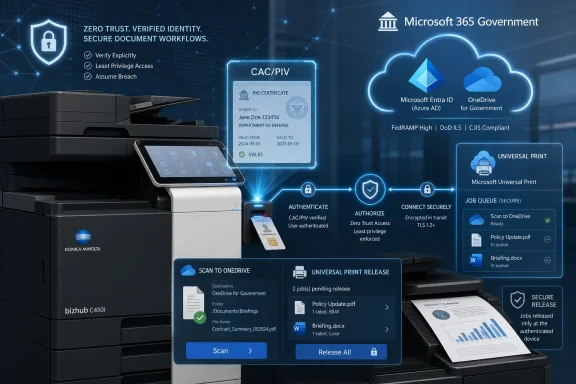
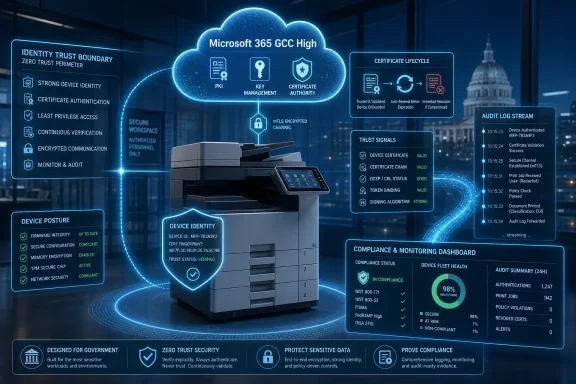
Konica Minolta Business Solutions U.S.A. introduced PKI Cloud Suite on July 1, 2026, for Microsoft 365 GCC and GCC High customers, bringing CAC/PIV card authentication, secure OneDrive scanning, and Microsoft Universal Print release workflows to bizhub multifunction printers used by government and regulated organizations. The announcement is not just another managed-print add-on; it is a sign that identity modernization has finally reached one of the least glamorous, most stubbornly exposed corners of enterprise IT. If Zero Trust is supposed to mean “verify explicitly” everywhere, the office MFP can no longer remain a trusted beige box in the hallway.
For years, printers and multifunction devices occupied an awkward place in security architecture. They handled sensitive documents, cached jobs, talked to email servers, scanned to file shares, and sat on internal networks, yet they were too often treated as facilities equipment rather than computing infrastructure. The result was a category of devices that touched regulated data but frequently lived outside the strongest identity and access controls.
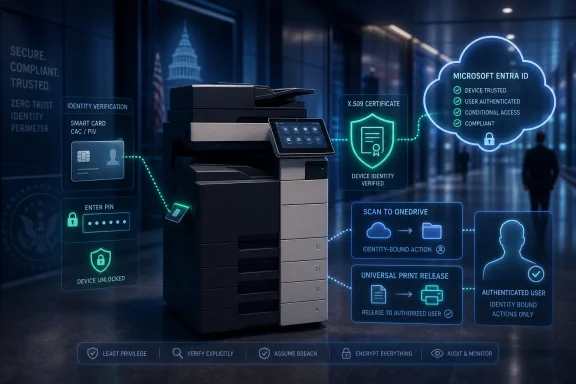
Konica Minolta’s PKI Cloud Suite is aimed squarely at that historical gap. The company is tying bizhub multifunction printers into Microsoft Entra ID-centered workflows for organizations operating in Microsoft 365 Government Community Cloud and GCC High environments. Users authenticate at the device with a Common Access Card or Personal Identity Verification card and PIN, then access permitted scan and print functions tied to their cloud identity.
That matters because GCC and GCC High are not marketing labels for ordinary office tenants. They exist for public-sector and defense-adjacent organizations that must deal with stricter compliance, data residency, identity assurance, and procurement expectations. In those environments, “scan to myself” is not a convenience feature; it is a document-control problem.
The deeper point is that Konica Minolta is not trying to replace Microsoft’s identity stack. It is trying to make the copier behave like it belongs inside that stack. That distinction is important because the winning security products in the Microsoft ecosystem increasingly look less like parallel platforms and more like connective tissue.
Certificate-based authentication in Entra ID is Microsoft’s bridge between those worlds. Instead of forcing every smart-card workflow through older federation designs, Entra certificate-based authentication allows organizations to validate X.509 certificates directly against cloud identity services. For agencies and contractors that already rely on CAC and PIV credentials, that is the difference between cloud modernization and a forklift migration nobody wants to approve.
But cloud identity only solves the parts of the workflow that participate in it. A user can authenticate to Microsoft 365 with a certificate, store documents in OneDrive, and print through Microsoft’s cloud print service, yet still walk to a multifunction printer governed by a separate card database, a local PIN list, or an aging print-management server. That is exactly the kind of seam attackers, auditors, and frustrated administrators notice.
PKI Cloud Suite is interesting because it addresses the seam rather than pretending it does not exist. The suite brings certificate-based identity to the physical act of scanning and print release, which is where many sensitive workflows leave the clean abstractions of cloud policy and enter the messy world of shared devices.
The authentication component is the foundation. Users present a CAC or PIV card and enter a PIN at the bizhub MFP. The device then uses certificate-based authentication with Microsoft Entra ID, rather than relying on a disconnected device credential or a proprietary identity island.
The scan component matters because scanning has long been a weak link in document security. Traditional scan-to-email and scan-to-folder workflows often depend on shared accounts, stored credentials, SMTP relays, SMB paths, or address books that age badly. Scanning directly to OneDrive through an authenticated session is not automatically perfect, but it is much easier to govern than a device that sprays PDFs across file shares and mailboxes.
The print-release component aligns with Microsoft Universal Print, which has become more relevant as organizations try to reduce on-premises print servers. Instead of jobs appearing for anyone who knows where to look, the device panel shows only the authenticated user’s queued jobs for release. That reduces abandoned sensitive printouts and makes the device interaction part of the identity trail.
This is why the suite is more than a smart-card login screen. It is an attempt to collapse three separate administrative planes — device access, scan routing, and print release — into a workflow that follows Microsoft cloud identity.
This is not a consumer-grade “tap your badge to print” scenario. CAC and PIV workflows involve certificates, PIN entry, PKI validation, and policy expectations that come from federal identity practice. A badge number alone is not the same thing as a certificate-backed identity assertion.
By putting ActivClient capability into the MFP, Konica Minolta is effectively saying the printer should participate in the same trust model as the workstation. That is the right framing for high-assurance environments, where a shared device should not become the exception that swallows the rule.
There are practical benefits, too. If the device can validate identity in a way that maps to the user’s cloud account, administrators can avoid some of the brittle glue that historically connected print systems to directory services. That does not eliminate PKI complexity, but it can move the complexity into a more coherent identity architecture.
The risk is that “embedded middleware” can become another dependency administrators must track across firmware versions, card reader compatibility, certificate policies, and Microsoft cloud endpoint changes. In government IT, every simplification has a lifecycle cost. The real test will be how cleanly Konica Minolta keeps this stack patched, documented, and supportable over the long term.
Microsoft Universal Print is available in government environments, including GCC and GCC High, but government cloud support has its own realities. Endpoints differ, feature availability can lag commercial cloud behavior, and client support often depends on Windows version and configuration. In other words, the phrase “works with GCC High” is rarely trivial.
For a printer vendor, this creates both opportunity and burden. The opportunity is obvious: many organizations want to retire old print servers without weakening document controls. The burden is that customers in these environments will ask hard questions about data flow, authentication, logging, job storage, firmware update paths, and whether every dependency is approved for the environment in question.
Konica Minolta is positioning PKI Cloud Suite as a modernization tool for precisely that class of organization. Agencies and contractors are under pressure to move away from legacy on-premises infrastructure, but they cannot treat print and scan workflows as informal exceptions. A cloud-first print architecture that still honors CAC/PIV identity is a more plausible migration path than asking government users to abandon credentials they are required to use elsewhere.
This is where the product’s value proposition becomes sharper. It is not promising that printing becomes exciting. It is promising that printing becomes less of an architectural embarrassment.
An MFP is an endpoint with a screen, storage, network services, firmware, authentication paths, and access to sensitive content. It may not look like a laptop, but from a security perspective it has enough of the same properties to deserve comparable scrutiny. The difference is that laptops usually have EDR agents, device compliance policies, and user-bound authentication, while printers often get a VLAN and a prayer.
Certificate-based authentication at the MFP does not solve every printer security problem. It does not automatically prove that firmware is current, that device logs are centralized, that stored data is encrypted, or that administrators have eliminated insecure protocols. But it does address one of the most basic failures: not knowing, with sufficient assurance, who is standing at the device and what they are allowed to do.
That is why Konica Minolta’s framing is correct even if the marketing language is predictable. The printer is part of the enterprise security posture. If it can scan a contract, print a personnel file, or route a document into a cloud repository, it is no longer credible to treat it as separate from identity governance.
The more organizations adopt Microsoft Entra ID as their policy center of gravity, the more pressure vendors will face to integrate there. A device that cannot participate in Entra-backed identity workflows will increasingly look like technical debt.
PKI Cloud Suite sits at the intersection of that shift. It does not replace Universal Print; it adds secure release at the device for Microsoft Universal Print jobs. That is an important distinction because the “last few feet” of printing remain stubbornly physical.
Cloud printing can manage queues and policies, but the output still lands on paper. A job containing sensitive information is not secure merely because it traveled through a modern service. It becomes secure when the person who requested it must authenticate before the pages emerge.
Secure release is old as a concept, but its integration target has changed. In the past, print vendors often built secure-release ecosystems around their own servers, card systems, and accounting platforms. Now the direction of travel is toward identity-native integration with Microsoft 365 services, especially where customers have already standardized on Entra ID, OneDrive, and Universal Print.
This is both a technical and commercial shift. The center of gravity moves away from the print vendor’s standalone management console and toward the customer’s Microsoft tenant. Vendors that embrace that reality may become more useful; vendors that resist it may find their devices treated as exceptions to be contained.
The old world often involved multiple systems that each knew a fragment of the truth. The copier knew a local address book. The print server knew a queue. The badge system knew a card identifier. The directory knew the user. The security team knew none of it well enough to love the audit trail.
A cloud-identity-based workflow has a better shot at coherence. If a user authenticates with a certificate-backed credential, scans to their own OneDrive, and releases their own print job, the administrative model maps more naturally to the user’s account and assigned permissions. That can reduce help desk friction, eliminate some shared credential patterns, and make policy enforcement easier to explain.
There will still be implementation work. CAC/PIV authentication depends on certificate lifecycle hygiene, trusted certificate authorities, revocation checking, card reader support, PIN handling, and correct mapping between certificates and user identities. Universal Print requires licensing, printer registration or connectors depending on the environment, and client compatibility planning.
The right expectation is not that PKI Cloud Suite removes complexity. The right expectation is that it moves complexity from scattered device-specific controls into a more centralized identity architecture. For many IT shops, that is a meaningful trade.
Requiring CAC/PIV authentication at the MFP narrows that ambiguity. The user must prove possession of the card and knowledge of the PIN before accessing workflows. The device can then present functions and jobs tied to that identity rather than treating the session as a generic interaction.
That does not mean every organization should celebrate prematurely. Logs must be retained and integrated. Device administrators must be controlled. Firmware must be maintained. Physical access to the device still matters. Certificate revocation must work reliably, because strong authentication loses meaning if revoked credentials continue to authenticate.
Still, the direction is right. Security architecture often fails not because one system lacks a cutting-edge feature, but because the handoff between systems is vague. PKI Cloud Suite tries to make the handoff between identity, cloud storage, cloud print, and the physical MFP less vague.
For compliance teams, that is the kind of improvement that can show up in policy language, audit narratives, and risk registers. For users, it may simply feel like inserting the same card they already use elsewhere. The best security improvements often look boring from the front panel.
The first question is scope. PKI Cloud Suite is described around bizhub MFP integration and applications delivered through Konica Minolta MarketPlace. Customers will need to understand which models, firmware versions, card readers, tenant types, and Microsoft configurations are supported at launch.
The second question is operational dependency. If authentication relies on embedded ActivClient middleware, administrators will want clarity on update cadence, vulnerability handling, certificate-policy support, and what happens when Microsoft changes authentication behavior in GCC or GCC High. Government cloud tenants are not places where vague compatibility promises age well.
The third question is evidence. Konica Minolta says the approach has received a 2026 Government Security Award from Security Today, which is useful market validation but not the same thing as a security assessment. Customers handling sensitive government data will still need their own review of data flows, administrative controls, and compliance fit.
That skepticism should not be read as dismissal. It is exactly because the product touches authentication, cloud storage, and print release that it deserves a serious evaluation. The old mistake was ignoring printers; the new mistake would be assuming that a Zero Trust label makes the risk disappear.
This is especially true in the public sector. Agencies and contractors increasingly want to demonstrate that their identity practices are consistent across applications, endpoints, and workflows. A printer that requires a different authentication pattern from the rest of the environment becomes harder to defend.
The trend also reflects a broader change in how IT thinks about documents. A scanned PDF is no longer just a file; it is a data object that may enter retention, eDiscovery, data loss prevention, classification, and access-control systems. Sending that object to the right OneDrive account under the right authenticated identity is materially different from dropping it into a shared network folder.
At the same time, hardware vendors have to prove they can keep pace with cloud services. Microsoft 365 changes constantly. Government cloud support evolves. Authentication methods mature. A product like PKI Cloud Suite is only as durable as the vendor’s willingness to maintain it as part of a living ecosystem rather than a one-time integration.
The announcement therefore says something larger about the future of office infrastructure. The devices that survive in regulated environments will be the ones that can speak the language of identity, policy, and auditability.
The less compelling version is also easy to imagine. The organization discovers that only some devices support the suite, that older clients need special handling, that certificate mapping is more painful than expected, that revocation behavior requires careful tuning, or that audit logs do not land where security operations wants them. In that version, the product still works, but the project becomes another half-modernized island.
That is why pilots will matter. High-assurance organizations should test not just happy-path authentication but expired certificates, revoked credentials, disabled accounts, network interruption, Universal Print queue behavior, OneDrive permission edge cases, and administrative override scenarios. Secure print and scan workflows are judged in exceptions, not demos.
Konica Minolta’s advantage is that the problem is real and the timing is good. Microsoft has made Entra ID and Universal Print more central to cloud-managed Windows environments, and government customers are under pressure to modernize without abandoning CAC/PIV assurance. A vendor that can make the MFP participate cleanly in that model has a credible story.
The unanswered question is whether the suite becomes a narrow feature for a subset of Konica Minolta government accounts or a pattern other vendors feel forced to match. If Microsoft’s cloud print and identity services continue to expand in government tenants, the latter outcome seems plausible.
 The Copier Has Become an Identity Endpoint
For years, printers and multifunction devices occupied an awkward place in security architecture. They handled sensitive documents, cached jobs, talked to email servers, scanned to file shares, and sat on internal networks, yet they were too often treated as facilities equipment rather than computing infrastructure. The result was a category of devices that touched regulated data but frequently lived outside the strongest identity and access controls.Konica Minolta’s PKI Cloud Suite is aimed squarely at that historical gap. The company is tying bizhub multifunction printers into Microsoft Entra ID-centered workflows for organizations operating in Microsoft 365 Government Community Cloud and GCC High environments. Users authenticate at the device with a Common Access Card or Personal Identity Verification card and PIN, then access permitted scan and print functions tied to their cloud identity.
That matters because GCC and GCC High are not marketing labels for ordinary office tenants. They exist for public-sector and defense-adjacent organizations that must deal with stricter compliance, data residency, identity assurance, and procurement expectations. In those environments, “scan to myself” is not a convenience feature; it is a document-control problem.
The deeper point is that Konica Minolta is not trying to replace Microsoft’s identity stack. It is trying to make the copier behave like it belongs inside that stack. That distinction is important because the winning security products in the Microsoft ecosystem increasingly look less like parallel platforms and more like connective tissue.
Microsoft’s Cloud Security Story Needed the Hallway Device
Microsoft has spent years pushing customers toward Entra ID, Conditional Access, cloud-managed authentication, and services such as Universal Print. For many commercial organizations, that story is familiar: move identity to the cloud, reduce reliance on legacy infrastructure, and apply policy consistently across apps and devices. For government and high-assurance customers, the same migration is more complicated because smart cards, certificates, and legacy federal workflows are not optional leftovers.Certificate-based authentication in Entra ID is Microsoft’s bridge between those worlds. Instead of forcing every smart-card workflow through older federation designs, Entra certificate-based authentication allows organizations to validate X.509 certificates directly against cloud identity services. For agencies and contractors that already rely on CAC and PIV credentials, that is the difference between cloud modernization and a forklift migration nobody wants to approve.
But cloud identity only solves the parts of the workflow that participate in it. A user can authenticate to Microsoft 365 with a certificate, store documents in OneDrive, and print through Microsoft’s cloud print service, yet still walk to a multifunction printer governed by a separate card database, a local PIN list, or an aging print-management server. That is exactly the kind of seam attackers, auditors, and frustrated administrators notice.
PKI Cloud Suite is interesting because it addresses the seam rather than pretending it does not exist. The suite brings certificate-based identity to the physical act of scanning and print release, which is where many sensitive workflows leave the clean abstractions of cloud policy and enter the messy world of shared devices.
Konica Minolta Is Selling Fewer Silos, Not Just Stronger Logins
The product consists of three applications available through the Konica Minolta MarketPlace: PKI Card Authentication Entra ID, PKI Card Scan to OneDrive, and PKI Card Universal Print Release. Together, they cover the three basic moments in a secure document workflow: proving who the user is, sending a scanned document to the correct cloud destination, and releasing only that user’s print jobs at the device.The authentication component is the foundation. Users present a CAC or PIV card and enter a PIN at the bizhub MFP. The device then uses certificate-based authentication with Microsoft Entra ID, rather than relying on a disconnected device credential or a proprietary identity island.
The scan component matters because scanning has long been a weak link in document security. Traditional scan-to-email and scan-to-folder workflows often depend on shared accounts, stored credentials, SMTP relays, SMB paths, or address books that age badly. Scanning directly to OneDrive through an authenticated session is not automatically perfect, but it is much easier to govern than a device that sprays PDFs across file shares and mailboxes.
The print-release component aligns with Microsoft Universal Print, which has become more relevant as organizations try to reduce on-premises print servers. Instead of jobs appearing for anyone who knows where to look, the device panel shows only the authenticated user’s queued jobs for release. That reduces abandoned sensitive printouts and makes the device interaction part of the identity trail.
This is why the suite is more than a smart-card login screen. It is an attempt to collapse three separate administrative planes — device access, scan routing, and print release — into a workflow that follows Microsoft cloud identity.
HID Middleware Gives the Announcement Its Government Accent
A key technical detail in the announcement is Konica Minolta’s use of embedded HID Global ActivID ActivClient software. ActivClient is a familiar name in smart-card environments, especially where CAC and PIV credentials are part of the normal authentication culture. Embedding that middleware directly into bizhub devices gives the announcement credibility with the audience Konica Minolta is targeting.This is not a consumer-grade “tap your badge to print” scenario. CAC and PIV workflows involve certificates, PIN entry, PKI validation, and policy expectations that come from federal identity practice. A badge number alone is not the same thing as a certificate-backed identity assertion.
By putting ActivClient capability into the MFP, Konica Minolta is effectively saying the printer should participate in the same trust model as the workstation. That is the right framing for high-assurance environments, where a shared device should not become the exception that swallows the rule.
There are practical benefits, too. If the device can validate identity in a way that maps to the user’s cloud account, administrators can avoid some of the brittle glue that historically connected print systems to directory services. That does not eliminate PKI complexity, but it can move the complexity into a more coherent identity architecture.
The risk is that “embedded middleware” can become another dependency administrators must track across firmware versions, card reader compatibility, certificate policies, and Microsoft cloud endpoint changes. In government IT, every simplification has a lifecycle cost. The real test will be how cleanly Konica Minolta keeps this stack patched, documented, and supportable over the long term.
GCC High Turns Routine Printing Into a Compliance Exercise
The mention of GCC High is doing a lot of work in this announcement. GCC High exists for organizations with heightened regulatory and contractual requirements, including many defense industrial base companies handling controlled unclassified information. These customers are not simply asking whether a printer can reach the cloud; they are asking whether the entire path fits their compliance boundary.Microsoft Universal Print is available in government environments, including GCC and GCC High, but government cloud support has its own realities. Endpoints differ, feature availability can lag commercial cloud behavior, and client support often depends on Windows version and configuration. In other words, the phrase “works with GCC High” is rarely trivial.
For a printer vendor, this creates both opportunity and burden. The opportunity is obvious: many organizations want to retire old print servers without weakening document controls. The burden is that customers in these environments will ask hard questions about data flow, authentication, logging, job storage, firmware update paths, and whether every dependency is approved for the environment in question.
Konica Minolta is positioning PKI Cloud Suite as a modernization tool for precisely that class of organization. Agencies and contractors are under pressure to move away from legacy on-premises infrastructure, but they cannot treat print and scan workflows as informal exceptions. A cloud-first print architecture that still honors CAC/PIV identity is a more plausible migration path than asking government users to abandon credentials they are required to use elsewhere.
This is where the product’s value proposition becomes sharper. It is not promising that printing becomes exciting. It is promising that printing becomes less of an architectural embarrassment.
Zero Trust Has No Room for “Just the Printer”
The phrase Zero Trust has been stretched so thin by vendors that it sometimes functions as a compliance perfume. Still, the underlying idea remains useful: access should be explicit, contextual, least-privileged, and continuously evaluated rather than assumed because a device sits on the internal network. Under that standard, many print environments have been living on borrowed time.An MFP is an endpoint with a screen, storage, network services, firmware, authentication paths, and access to sensitive content. It may not look like a laptop, but from a security perspective it has enough of the same properties to deserve comparable scrutiny. The difference is that laptops usually have EDR agents, device compliance policies, and user-bound authentication, while printers often get a VLAN and a prayer.
Certificate-based authentication at the MFP does not solve every printer security problem. It does not automatically prove that firmware is current, that device logs are centralized, that stored data is encrypted, or that administrators have eliminated insecure protocols. But it does address one of the most basic failures: not knowing, with sufficient assurance, who is standing at the device and what they are allowed to do.
That is why Konica Minolta’s framing is correct even if the marketing language is predictable. The printer is part of the enterprise security posture. If it can scan a contract, print a personnel file, or route a document into a cloud repository, it is no longer credible to treat it as separate from identity governance.
The more organizations adopt Microsoft Entra ID as their policy center of gravity, the more pressure vendors will face to integrate there. A device that cannot participate in Entra-backed identity workflows will increasingly look like technical debt.
The Microsoft Ecosystem Is Becoming the New Print Perimeter
Universal Print changed the conversation around Windows printing by moving print management toward Microsoft’s cloud service model. That was partly about convenience, partly about reducing print-server infrastructure, and partly about making printing less dependent on brittle driver and server arrangements. In government environments, however, cloud printing only becomes attractive when it can satisfy the identity and compliance expectations that came with the old architecture.PKI Cloud Suite sits at the intersection of that shift. It does not replace Universal Print; it adds secure release at the device for Microsoft Universal Print jobs. That is an important distinction because the “last few feet” of printing remain stubbornly physical.
Cloud printing can manage queues and policies, but the output still lands on paper. A job containing sensitive information is not secure merely because it traveled through a modern service. It becomes secure when the person who requested it must authenticate before the pages emerge.
Secure release is old as a concept, but its integration target has changed. In the past, print vendors often built secure-release ecosystems around their own servers, card systems, and accounting platforms. Now the direction of travel is toward identity-native integration with Microsoft 365 services, especially where customers have already standardized on Entra ID, OneDrive, and Universal Print.
This is both a technical and commercial shift. The center of gravity moves away from the print vendor’s standalone management console and toward the customer’s Microsoft tenant. Vendors that embrace that reality may become more useful; vendors that resist it may find their devices treated as exceptions to be contained.
The Admin Win Is Operational, Not Magical
For administrators, the appeal of PKI Cloud Suite is less about novelty than consolidation. A government IT team may already have CAC/PIV issuance, Entra ID policies, Microsoft 365 government tenants, OneDrive governance, and Universal Print licensing. The question is whether print and scan workflows can be brought into that same orbit without building a parallel world.The old world often involved multiple systems that each knew a fragment of the truth. The copier knew a local address book. The print server knew a queue. The badge system knew a card identifier. The directory knew the user. The security team knew none of it well enough to love the audit trail.
A cloud-identity-based workflow has a better shot at coherence. If a user authenticates with a certificate-backed credential, scans to their own OneDrive, and releases their own print job, the administrative model maps more naturally to the user’s account and assigned permissions. That can reduce help desk friction, eliminate some shared credential patterns, and make policy enforcement easier to explain.
There will still be implementation work. CAC/PIV authentication depends on certificate lifecycle hygiene, trusted certificate authorities, revocation checking, card reader support, PIN handling, and correct mapping between certificates and user identities. Universal Print requires licensing, printer registration or connectors depending on the environment, and client compatibility planning.
The right expectation is not that PKI Cloud Suite removes complexity. The right expectation is that it moves complexity from scattered device-specific controls into a more centralized identity architecture. For many IT shops, that is a meaningful trade.
The Security Win Is Accountability at the Moment of Use
The most important security gain may be mundane: accountability. In shared print environments, the point of use is where policy often becomes ambiguous. A user sends a job, someone else picks it up, a document sits in an output tray, or a scan is routed through a generic device account.Requiring CAC/PIV authentication at the MFP narrows that ambiguity. The user must prove possession of the card and knowledge of the PIN before accessing workflows. The device can then present functions and jobs tied to that identity rather than treating the session as a generic interaction.
That does not mean every organization should celebrate prematurely. Logs must be retained and integrated. Device administrators must be controlled. Firmware must be maintained. Physical access to the device still matters. Certificate revocation must work reliably, because strong authentication loses meaning if revoked credentials continue to authenticate.
Still, the direction is right. Security architecture often fails not because one system lacks a cutting-edge feature, but because the handoff between systems is vague. PKI Cloud Suite tries to make the handoff between identity, cloud storage, cloud print, and the physical MFP less vague.
For compliance teams, that is the kind of improvement that can show up in policy language, audit narratives, and risk registers. For users, it may simply feel like inserting the same card they already use elsewhere. The best security improvements often look boring from the front panel.
The Vendor Pitch Still Deserves Skepticism
Every product announcement in this category arrives wrapped in familiar claims: modernization, Zero Trust, reduced complexity, secure workflows, regulated environments. Those phrases are not wrong, but they are broad enough to hide implementation details that determine whether the product succeeds. Buyers should read the announcement as a promising architectural signal, not a substitute for due diligence.The first question is scope. PKI Cloud Suite is described around bizhub MFP integration and applications delivered through Konica Minolta MarketPlace. Customers will need to understand which models, firmware versions, card readers, tenant types, and Microsoft configurations are supported at launch.
The second question is operational dependency. If authentication relies on embedded ActivClient middleware, administrators will want clarity on update cadence, vulnerability handling, certificate-policy support, and what happens when Microsoft changes authentication behavior in GCC or GCC High. Government cloud tenants are not places where vague compatibility promises age well.
The third question is evidence. Konica Minolta says the approach has received a 2026 Government Security Award from Security Today, which is useful market validation but not the same thing as a security assessment. Customers handling sensitive government data will still need their own review of data flows, administrative controls, and compliance fit.
That skepticism should not be read as dismissal. It is exactly because the product touches authentication, cloud storage, and print release that it deserves a serious evaluation. The old mistake was ignoring printers; the new mistake would be assuming that a Zero Trust label makes the risk disappear.
The Bigger Market Is Moving Toward Identity-Aware Office Hardware
Konica Minolta is not alone in seeing the direction of travel. Office hardware vendors are under pressure from two sides: Microsoft is absorbing more infrastructure functions into cloud services, while customers are demanding stronger identity controls for every device that touches business data. The comfortable middle ground of proprietary device management is shrinking.This is especially true in the public sector. Agencies and contractors increasingly want to demonstrate that their identity practices are consistent across applications, endpoints, and workflows. A printer that requires a different authentication pattern from the rest of the environment becomes harder to defend.
The trend also reflects a broader change in how IT thinks about documents. A scanned PDF is no longer just a file; it is a data object that may enter retention, eDiscovery, data loss prevention, classification, and access-control systems. Sending that object to the right OneDrive account under the right authenticated identity is materially different from dropping it into a shared network folder.
At the same time, hardware vendors have to prove they can keep pace with cloud services. Microsoft 365 changes constantly. Government cloud support evolves. Authentication methods mature. A product like PKI Cloud Suite is only as durable as the vendor’s willingness to maintain it as part of a living ecosystem rather than a one-time integration.
The announcement therefore says something larger about the future of office infrastructure. The devices that survive in regulated environments will be the ones that can speak the language of identity, policy, and auditability.
The Fine Print Will Decide Whether This Becomes a Template
The most compelling version of PKI Cloud Suite is easy to imagine. A federal contractor moves print release into Universal Print, lets users authenticate at bizhub devices with CAC or PIV cards, scans directly to OneDrive, and retires a set of aging print servers and shared scan accounts. The security team gets stronger identity alignment, the help desk gets fewer credential exceptions, and users get a workflow that feels familiar.The less compelling version is also easy to imagine. The organization discovers that only some devices support the suite, that older clients need special handling, that certificate mapping is more painful than expected, that revocation behavior requires careful tuning, or that audit logs do not land where security operations wants them. In that version, the product still works, but the project becomes another half-modernized island.
That is why pilots will matter. High-assurance organizations should test not just happy-path authentication but expired certificates, revoked credentials, disabled accounts, network interruption, Universal Print queue behavior, OneDrive permission edge cases, and administrative override scenarios. Secure print and scan workflows are judged in exceptions, not demos.
Konica Minolta’s advantage is that the problem is real and the timing is good. Microsoft has made Entra ID and Universal Print more central to cloud-managed Windows environments, and government customers are under pressure to modernize without abandoning CAC/PIV assurance. A vendor that can make the MFP participate cleanly in that model has a credible story.
The unanswered question is whether the suite becomes a narrow feature for a subset of Konica Minolta government accounts or a pattern other vendors feel forced to match. If Microsoft’s cloud print and identity services continue to expand in government tenants, the latter outcome seems plausible.
The Copier Finally Gets Pulled Into the Entra Era
The practical reading of Konica Minolta’s announcement is straightforward: the MFP is being dragged into the same identity modernization project that has already reshaped Windows sign-in, Microsoft 365 access, and cloud storage. For WindowsForum readers managing real environments, the news is less about one vendor’s app suite than about where the control plane is moving.- Konica Minolta’s PKI Cloud Suite targets Microsoft 365 GCC and GCC High organizations using bizhub MFPs in government and high-assurance environments.
- The suite combines CAC/PIV card and PIN authentication, Entra ID certificate-based authentication, secure scan-to-OneDrive, and Microsoft Universal Print job release.
- Embedded HID ActivID ActivClient support is the technical clue that this is aimed at serious smart-card environments rather than ordinary office badge access.
- The strongest case for the product is reducing fragmented print and scan identity controls, not eliminating the complexity of PKI or government cloud administration.
- Administrators should evaluate device compatibility, firmware lifecycle, logging, certificate revocation behavior, Universal Print configuration, and GCC High-specific constraints before treating the suite as a compliance shortcut.
- The larger trend is clear: printers and MFPs are becoming identity-aware endpoints inside the Microsoft cloud ecosystem.
References
- Primary source: ACCESS Newswire
Published: Wed, 01 Jul 2026 13:01:13 GMT
Konica Minolta Debuts PKI Cloud Suite for Microsoft 365 GCC and GCC High Environments
New bizhub MFP integration brings CAC/PIV-based identity, secure cloud scan and secure print release to federal and other high-assurance organizations RAMSEY, ...www.accessnewswire.com - Official source: learn.microsoft.com
Set Up Microsoft Entra CBA - Microsoft Entra ID | Microsoft Learn
Learn how to configure Microsoft Entra certificate-based authentication (CBA) in Microsoft Entra ID.learn.microsoft.com - Official source: support.microsoft.com
GCC information | Microsoft Support
This article answers the most Frequently Asked Questions about GCC information for Microsoft Forms.support.microsoft.com - Official source: microsoft.com
Microsoft Entra ID: Enhancing identity security for US agencies | Microsoft Security Blog
Microsoft Entra ID helps United States Government agencies meet identity security requirements, reducing complexity and improving user experience.www.microsoft.com - Official source: microsoftnegotiations.com
Microsoft Entra Certificate-Based | Microsoft Negotiations
Microsoft Entra Certificate-Based Authentication (CBA) licensing explained — what's free, what requires Entra P1 or P2, CBA vs FIDO2 vs passkeys. microsoftnegotiations.com
- Related coverage: cloudknowledge.in
In-Depth Guide to Microsoft Entra Certificate-Based Authentication (CBA) - Cloud Knowledge
In-Depth Guide to Microsoft Entra Certificate-Based Authentication (CBA)cloudknowledge.in
- Official source: cdn-dynmedia-1.microsoft.com
- Related coverage: jornada365.cloud