

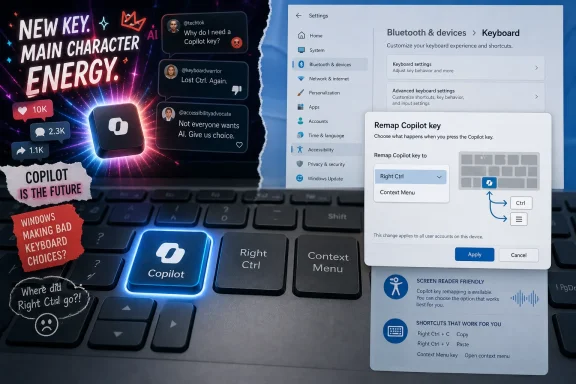
Microsoft’s late-June social ad framed the Windows 11 Copilot key as a magic button with “main character energy,” even as Microsoft’s own support guidance now says a future Windows 11 update will let users remap that key to Right Ctrl or the Context menu key. That is not just awkward timing; it is the whole Copilot problem compressed into one keyboard square. Microsoft wants the key to symbolize the AI PC era, but many users experience it as a missing key they already needed. The company is selling inevitability while quietly adding an escape hatch.
The Copilot key was never only a convenience feature. From the moment Microsoft announced it for new Windows PCs, it was a branding maneuver: a physical reminder that Windows was entering what Redmond wanted everyone to call the AI PC age. The key made Copilot harder to ignore than a taskbar icon, harder to uninstall than an app, and harder to dismiss than a splash screen.
That is why the “main character energy” ad landed so badly. The joke depends on the idea that pressing Copilot is an obvious, delightful answer to a broad computing problem. But the audience Microsoft needs to persuade does not see Copilot as a universal fix; it sees another forced surface, another shortcut grabbed by the platform owner, another place where Windows has decided what matters before the user does.
The internet reaction was predictable because the premise was backward. A key earns pride of place on a keyboard when it becomes muscle memory through utility. Microsoft tried to reverse that order: give the assistant a key, make the key visible on millions of laptops, and let habit follow.
For Windows enthusiasts and IT professionals, this is a familiar pattern. Microsoft often treats interface real estate as a strategic asset, then acts surprised when users treat it as personal property. The Start menu, taskbar, default browser prompts, search box, widgets, and Teams integrations have all passed through versions of this fight. The Copilot key is only the newest skirmish, but it is unusually visceral because it replaces something physical.
Right Ctrl is not glamorous. It does not appear in keynote videos. It does not promise to summarize your inbox or generate images of astronauts riding llamas through Excel workbooks. But for developers, accessibility users, spreadsheet operators, keyboard-heavy editors, remote desktop regulars, emulator users, and people with decades of muscle memory, it is part of the tacit contract of a PC keyboard.
The Context menu key is even easier to mock until you need it. For users who depend on keyboard navigation, screen readers, or consistent shortcut paths, it is not nostalgic clutter. It is a small access point into a computing model where the mouse is not mandatory and context remains reachable without a right-click.
That is why Microsoft’s own acknowledgment matters. The company has conceded that the Copilot key caused disruption to productivity and accessibility workflows for some users. The planned Windows 11 update that allows remapping to Right Ctrl or the Context menu key is not a cute customization feature; it is a partial admission that the original trade-off was too blunt.
A software toggle cannot fully erase a hardware choice. If the legend on the key says Copilot, the laptop still advertises Microsoft’s priority every time the lid opens. But allowing the key to act like the thing it displaced is a practical retreat, and practical retreats often reveal more about product-market fit than executive language does.
That story had momentum in 2024 and 2025 because the industry badly wanted a post-pandemic upgrade cycle. PC makers needed reasons to sell new machines. Chip vendors needed a consumer-facing reason to care about NPUs. Microsoft needed Windows to look central to the generative AI boom rather than adjacent to it.
The Copilot key was a tidy symbol for all of that. It gave OEMs a visible AI feature without forcing them to explain TOPS figures or model quantization. It let retailers point to a physical difference between old and new laptops. It let Microsoft argue that AI was not a downloadable add-on, but a native part of Windows.
The problem is that symbols are judged by what they summon. Pressing a key that opens a fast, local, context-aware assistant could have felt like the future. Pressing a key that opens a web-wrapped Copilot experience can feel like a shortcut to another Microsoft service, and that is a much harder sell.
This gap between symbol and experience is where the backlash lives. Users are not only rejecting a key. They are rejecting the feeling that Microsoft renamed a marketing campaign as a hardware requirement.
That distinction matters. If Copilot consistently solved hard local tasks inside Windows with speed and discretion, resentment over the key would likely soften. The problem is that Copilot often feels less like an operating-system capability than a brand funnel. It has too frequently been something Windows opens at you, rather than something Windows quietly does for you.
The best AI features disappear into workflows. They rename files intelligently, explain a crash dump, summarize a long Teams thread, identify why a Group Policy setting is not applying, or turn a messy screenshot into actionable text. They do not need to announce themselves as “main characters” because the user remains the main character.
Microsoft’s challenge is compounded by comparison. People who pay for other AI services know what a good assistant feels like, and they know how quickly web AI products evolve. If Copilot on Windows feels slower, less integrated, less trustworthy, or more promotional than alternatives, the dedicated key becomes a daily reminder of disappointment.
That is why the remap option is so symbolically dangerous. Once Microsoft gives users a sanctioned way to turn the Copilot key back into Right Ctrl or Menu, it invites a brutally simple referendum: is Copilot more valuable than the key it replaced? For a nontrivial slice of users, the answer is clearly no.
A dedicated hardware key also complicates standardization. Enterprises buy fleets across vendors and model years, then try to impose predictable images, policies, training, and support scripts. A key that behaves differently depending on Windows build, policy state, Copilot availability, region, account type, or remapping support is not a delightful innovation. It is another variable.
Administrators also understand that user frustration has a cost. A misplaced key might sound trivial until it generates tickets, accessibility complaints, training overhead, or shadow IT workarounds. If employees begin installing third-party remappers or AutoHotkey scripts to claw back Right Ctrl, the organization inherits an avoidable support and security mess.
Microsoft has been quietly building more administrative controls around Copilot, and that too tells a story. A product marketed as essential should not need so many off-switches so early in its life. But enterprise software succeeds by being governable, not merely visionary.
The remap option therefore helps IT, but it also undermines the original narrative. If Copilot is the defining interaction model of modern Windows, why must administrators be given tools to neutralize its dedicated key? Because in the real world, control beats theater.
When a familiar key disappears, the loss is not evenly distributed. A casual user may never press Right Ctrl. A power user may grumble and adapt. A user relying on keyboard navigation or assistive technology may experience the change as a broken workflow rather than a branding refresh.
Microsoft knows this better than almost anyone. Windows carries decades of accessibility engineering, from Narrator and keyboard navigation to high-contrast modes, input accommodations, and enterprise accessibility requirements. The company has often been at its best when it treats backward compatibility and accessibility as boring obligations that quietly protect millions of users.
That is what makes the Copilot key episode so frustrating. The risks were foreseeable. Replacing established keys on compact laptop layouts would obviously collide with shortcuts, screen-reader habits, and right-side modifier use. Microsoft did not need a comment pile-on to discover that keyboards are muscle-memory devices.
The coming remap feature is a useful correction, but the lesson is larger. AI interfaces must adapt to users; users should not be expected to surrender proven accessibility pathways so that AI branding can occupy a more prominent position.
Microsoft has increasingly adopted a casual, meme-adjacent voice around its products. Sometimes it works. Often it reads like a corporation trying to launder strategy through banter. When the underlying product decision is controversial, the tone can make the company look less self-aware rather than more approachable.
The Copilot key ad arrived in that danger zone. It did not merely praise a feature; it seemed to boast about a feature Microsoft had just agreed to make reversible. For users who feel Copilot has been pushed into too many corners of Windows and Microsoft 365, the joke sounded less like confidence and more like denial.
This is the trap of anthropomorphized platform marketing. When Edge jokes about being the best browser or Copilot is framed as the key that fixes everything, users respond as if Microsoft is arguing with them. And when users feel argued with, every annoyance becomes evidence.
The better message would have been humbler: Windows is adding more choice for the Copilot key because different users work differently. That would not have gone viral. It also would not have invited everyone to dunk on a button.
But the direction of travel matters. Microsoft introduced the key as the most visible expression of AI-first Windows. Now it is preparing to let users convert that expression back into a conventional keyboard function. That is not fatal, but it is humbling.
The move also changes the burden of proof. Before remapping, users who wanted the old behavior had to hunt for workarounds or live with the change. After remapping, Copilot has to win the key each day. It has to be more useful than a modifier or context key, not in abstract demos but in the ordinary mess of work.
This is the right outcome for users. The PC has always been powerful because it is general-purpose and configurable. A Windows laptop should not become less personal as Microsoft adds intelligence to it.
The question is whether Microsoft internalizes the lesson. A remappable Copilot key can be a sign of product maturity if it reflects a broader commitment to user control. It becomes a sign of retreat if Microsoft keeps jamming Copilot into every surface and then grudgingly adding escape hatches after backlash.
Microsoft once understood this almost instinctively. Windows succeeded not only because it added new features, but because it carried old behaviors forward long after designers might have preferred to simplify them away. That compatibility tax was frustrating, expensive, and often inelegant. It was also one of Windows’ greatest competitive advantages.
The Copilot key cut against that tradition. It privileged a strategic initiative over a stable input convention. It assumed the future deserved space before the future had earned trust.
That is not how the best platform changes happen. The Windows key itself became meaningful because it anchored real navigation. Function keys, media keys, fingerprint readers, precision touchpads, and touchscreens all found their footing when they solved recognizable problems. A dedicated AI key can earn a place too, but not by decree.
If Microsoft wants the key to matter, Copilot must become less like an app launch shortcut and more like a native capability. It must be fast, local where possible, policy-aware, privacy-transparent, and deeply useful inside the tasks Windows users already perform. Otherwise, the key will remain a logo in search of a habit.
The most concrete implications are already visible:
The next phase of Windows AI will be decided less by slogans than by restraint. If Microsoft makes Copilot optional, governable, fast, and genuinely useful, the dedicated key may eventually feel less like an imposition and more like a shortcut worth keeping. If not, the most popular Copilot feature of 2026 may be the one that lets people turn the Copilot key back into something else.
 Microsoft Turns a Keyboard Key Into an AI Billboard
The Copilot key was never only a convenience feature. From the moment Microsoft announced it for new Windows PCs, it was a branding maneuver: a physical reminder that Windows was entering what Redmond wanted everyone to call the AI PC age. The key made Copilot harder to ignore than a taskbar icon, harder to uninstall than an app, and harder to dismiss than a splash screen.That is why the “main character energy” ad landed so badly. The joke depends on the idea that pressing Copilot is an obvious, delightful answer to a broad computing problem. But the audience Microsoft needs to persuade does not see Copilot as a universal fix; it sees another forced surface, another shortcut grabbed by the platform owner, another place where Windows has decided what matters before the user does.
The internet reaction was predictable because the premise was backward. A key earns pride of place on a keyboard when it becomes muscle memory through utility. Microsoft tried to reverse that order: give the assistant a key, make the key visible on millions of laptops, and let habit follow.
For Windows enthusiasts and IT professionals, this is a familiar pattern. Microsoft often treats interface real estate as a strategic asset, then acts surprised when users treat it as personal property. The Start menu, taskbar, default browser prompts, search box, widgets, and Teams integrations have all passed through versions of this fight. The Copilot key is only the newest skirmish, but it is unusually visceral because it replaces something physical.
The Missing Right Ctrl Was the Real Product Review
The most damning critique of the Copilot key is not that some people dislike AI. It is that some people immediately missed Right Ctrl and the Context menu key more than they valued Copilot. That tells us more than a thousand launch decks could.Right Ctrl is not glamorous. It does not appear in keynote videos. It does not promise to summarize your inbox or generate images of astronauts riding llamas through Excel workbooks. But for developers, accessibility users, spreadsheet operators, keyboard-heavy editors, remote desktop regulars, emulator users, and people with decades of muscle memory, it is part of the tacit contract of a PC keyboard.
The Context menu key is even easier to mock until you need it. For users who depend on keyboard navigation, screen readers, or consistent shortcut paths, it is not nostalgic clutter. It is a small access point into a computing model where the mouse is not mandatory and context remains reachable without a right-click.
That is why Microsoft’s own acknowledgment matters. The company has conceded that the Copilot key caused disruption to productivity and accessibility workflows for some users. The planned Windows 11 update that allows remapping to Right Ctrl or the Context menu key is not a cute customization feature; it is a partial admission that the original trade-off was too blunt.
A software toggle cannot fully erase a hardware choice. If the legend on the key says Copilot, the laptop still advertises Microsoft’s priority every time the lid opens. But allowing the key to act like the thing it displaced is a practical retreat, and practical retreats often reveal more about product-market fit than executive language does.
The AI PC Was Supposed to Feel Inevitable
Microsoft’s larger AI PC push depends on a particular psychological trick: make the future feel already installed. Copilot+ PCs, neural processing units, AI-enhanced apps, Recall, image generation, natural-language search, and the dedicated key all point toward the same story. The PC is no longer merely a general-purpose machine; it is an assistant with a keyboard attached.That story had momentum in 2024 and 2025 because the industry badly wanted a post-pandemic upgrade cycle. PC makers needed reasons to sell new machines. Chip vendors needed a consumer-facing reason to care about NPUs. Microsoft needed Windows to look central to the generative AI boom rather than adjacent to it.
The Copilot key was a tidy symbol for all of that. It gave OEMs a visible AI feature without forcing them to explain TOPS figures or model quantization. It let retailers point to a physical difference between old and new laptops. It let Microsoft argue that AI was not a downloadable add-on, but a native part of Windows.
The problem is that symbols are judged by what they summon. Pressing a key that opens a fast, local, context-aware assistant could have felt like the future. Pressing a key that opens a web-wrapped Copilot experience can feel like a shortcut to another Microsoft service, and that is a much harder sell.
This gap between symbol and experience is where the backlash lives. Users are not only rejecting a key. They are rejecting the feeling that Microsoft renamed a marketing campaign as a hardware requirement.
Copilot’s Biggest Enemy Is Not ChatGPT, It Is Friction
The irony of the Copilot key debate is that Microsoft is not wrong about AI becoming important to everyday computing. Many WindowsForum readers already use ChatGPT, Claude, Gemini, local models, coding assistants, transcription tools, summarizers, and image generators. The audience is not uniformly anti-AI. It is anti-friction, anti-bloat, and anti-being-cornered.That distinction matters. If Copilot consistently solved hard local tasks inside Windows with speed and discretion, resentment over the key would likely soften. The problem is that Copilot often feels less like an operating-system capability than a brand funnel. It has too frequently been something Windows opens at you, rather than something Windows quietly does for you.
The best AI features disappear into workflows. They rename files intelligently, explain a crash dump, summarize a long Teams thread, identify why a Group Policy setting is not applying, or turn a messy screenshot into actionable text. They do not need to announce themselves as “main characters” because the user remains the main character.
Microsoft’s challenge is compounded by comparison. People who pay for other AI services know what a good assistant feels like, and they know how quickly web AI products evolve. If Copilot on Windows feels slower, less integrated, less trustworthy, or more promotional than alternatives, the dedicated key becomes a daily reminder of disappointment.
That is why the remap option is so symbolically dangerous. Once Microsoft gives users a sanctioned way to turn the Copilot key back into Right Ctrl or Menu, it invites a brutally simple referendum: is Copilot more valuable than the key it replaced? For a nontrivial slice of users, the answer is clearly no.
Enterprise IT Reads the Key as a Governance Problem
Consumer complaints are loud, but enterprise skepticism may be more consequential. In managed Windows environments, every new platform surface creates questions that do not fit neatly into a marketing caption. What data can Copilot see? Which tenant policies apply? Can the app be removed? Does the key trigger behavior that help desks must support? What happens in regulated environments?A dedicated hardware key also complicates standardization. Enterprises buy fleets across vendors and model years, then try to impose predictable images, policies, training, and support scripts. A key that behaves differently depending on Windows build, policy state, Copilot availability, region, account type, or remapping support is not a delightful innovation. It is another variable.
Administrators also understand that user frustration has a cost. A misplaced key might sound trivial until it generates tickets, accessibility complaints, training overhead, or shadow IT workarounds. If employees begin installing third-party remappers or AutoHotkey scripts to claw back Right Ctrl, the organization inherits an avoidable support and security mess.
Microsoft has been quietly building more administrative controls around Copilot, and that too tells a story. A product marketed as essential should not need so many off-switches so early in its life. But enterprise software succeeds by being governable, not merely visionary.
The remap option therefore helps IT, but it also undermines the original narrative. If Copilot is the defining interaction model of modern Windows, why must administrators be given tools to neutralize its dedicated key? Because in the real world, control beats theater.
Accessibility Should Have Been the First Design Constraint
The accessibility angle is not a side note; it is the clearest evidence that Microsoft overreached. Keyboard layouts are not neutral decoration. They are part of how people with different motor, visual, and cognitive needs build reliable ways to operate a computer.When a familiar key disappears, the loss is not evenly distributed. A casual user may never press Right Ctrl. A power user may grumble and adapt. A user relying on keyboard navigation or assistive technology may experience the change as a broken workflow rather than a branding refresh.
Microsoft knows this better than almost anyone. Windows carries decades of accessibility engineering, from Narrator and keyboard navigation to high-contrast modes, input accommodations, and enterprise accessibility requirements. The company has often been at its best when it treats backward compatibility and accessibility as boring obligations that quietly protect millions of users.
That is what makes the Copilot key episode so frustrating. The risks were foreseeable. Replacing established keys on compact laptop layouts would obviously collide with shortcuts, screen-reader habits, and right-side modifier use. Microsoft did not need a comment pile-on to discover that keyboards are muscle-memory devices.
The coming remap feature is a useful correction, but the lesson is larger. AI interfaces must adapt to users; users should not be expected to surrender proven accessibility pathways so that AI branding can occupy a more prominent position.
The Social-Media Tone Makes the Product Look Less Serious
There is also a communications problem here. “Main character energy” is a social-media phrase built for quick engagement, not sober trust. That may be fine for a sneaker drop or a streaming show. It is a stranger fit for a Windows feature already criticized as intrusive.Microsoft has increasingly adopted a casual, meme-adjacent voice around its products. Sometimes it works. Often it reads like a corporation trying to launder strategy through banter. When the underlying product decision is controversial, the tone can make the company look less self-aware rather than more approachable.
The Copilot key ad arrived in that danger zone. It did not merely praise a feature; it seemed to boast about a feature Microsoft had just agreed to make reversible. For users who feel Copilot has been pushed into too many corners of Windows and Microsoft 365, the joke sounded less like confidence and more like denial.
This is the trap of anthropomorphized platform marketing. When Edge jokes about being the best browser or Copilot is framed as the key that fixes everything, users respond as if Microsoft is arguing with them. And when users feel argued with, every annoyance becomes evidence.
The better message would have been humbler: Windows is adding more choice for the Copilot key because different users work differently. That would not have gone viral. It also would not have invited everyone to dunk on a button.
Remapping Is Not Defeat, But It Is a Vote of No Confidence
It would be too simple to say the remap option means the Copilot key failed. Hardware transitions are messy, and Microsoft can still improve Copilot enough that more users choose to keep the default behavior. The existence of choice does not automatically make the feature a loser.But the direction of travel matters. Microsoft introduced the key as the most visible expression of AI-first Windows. Now it is preparing to let users convert that expression back into a conventional keyboard function. That is not fatal, but it is humbling.
The move also changes the burden of proof. Before remapping, users who wanted the old behavior had to hunt for workarounds or live with the change. After remapping, Copilot has to win the key each day. It has to be more useful than a modifier or context key, not in abstract demos but in the ordinary mess of work.
This is the right outcome for users. The PC has always been powerful because it is general-purpose and configurable. A Windows laptop should not become less personal as Microsoft adds intelligence to it.
The question is whether Microsoft internalizes the lesson. A remappable Copilot key can be a sign of product maturity if it reflects a broader commitment to user control. It becomes a sign of retreat if Microsoft keeps jamming Copilot into every surface and then grudgingly adding escape hatches after backlash.
The Old Keyboard Contract Still Matters
The PC keyboard has survived because it is boring in the best way. Its conventions allow users to move between devices, operating systems, applications, and decades of habits with minimal translation. Every time a vendor changes that contract, the replacement has to justify itself.Microsoft once understood this almost instinctively. Windows succeeded not only because it added new features, but because it carried old behaviors forward long after designers might have preferred to simplify them away. That compatibility tax was frustrating, expensive, and often inelegant. It was also one of Windows’ greatest competitive advantages.
The Copilot key cut against that tradition. It privileged a strategic initiative over a stable input convention. It assumed the future deserved space before the future had earned trust.
That is not how the best platform changes happen. The Windows key itself became meaningful because it anchored real navigation. Function keys, media keys, fingerprint readers, precision touchpads, and touchscreens all found their footing when they solved recognizable problems. A dedicated AI key can earn a place too, but not by decree.
If Microsoft wants the key to matter, Copilot must become less like an app launch shortcut and more like a native capability. It must be fast, local where possible, policy-aware, privacy-transparent, and deeply useful inside the tasks Windows users already perform. Otherwise, the key will remain a logo in search of a habit.
Redmond’s Magic Button Now Has to Compete With Right Ctrl
The practical lesson is not that Microsoft should abandon Copilot or stop experimenting with AI hardware. It is that the company cannot mistake distribution for adoption. A keycap can put Copilot under the user’s finger, but it cannot make the user want to press it.The most concrete implications are already visible:
- Microsoft is preparing to let Windows 11 users remap the Copilot key to behave as Right Ctrl or the Context menu key in a future update.
- The remap option is a response to real workflow disruption, especially for users who rely on keyboard shortcuts, accessibility tools, and long-established input habits.
- The social-media push around the key clashes with Microsoft’s quieter admission that the default behavior does not work for everyone.
- Enterprises will likely welcome more control, but they will also treat the episode as another reason to scrutinize Copilot’s rollout, policies, and support costs.
- The Copilot key will only justify its place if Copilot becomes faster, more native, more trustworthy, and more useful than the functions it displaced.
The next phase of Windows AI will be decided less by slogans than by restraint. If Microsoft makes Copilot optional, governable, fast, and genuinely useful, the dedicated key may eventually feel less like an imposition and more like a shortcut worth keeping. If not, the most popular Copilot feature of 2026 may be the one that lets people turn the Copilot key back into something else.
References
- Primary source: Windows Latest
Published: Thu, 02 Jul 2026 04:46:00 GMT
Microsoft brags Copilot key has main character energy on Windows 11, but you can soon remap it
Microsoft called the Copilot key a fix for everything in a new ad, weeks after admitting the key hurts productivity. Facebook did not agree. www.windowslatest.com
- Related coverage: windowscentral.com
Microsoft admits Windows 11's dedicated Copilot key breaks certain workflows: Confirms plans to let users restore "Right Ctrl" or "Context menu" key later this year | Windows Central
Windows 11's special Copilot Key has not been the popular hit that Microsoft was hoping it would be, and has now confirmed plans to let users remap the button back to its old functionality.www.windowscentral.com - Official source: support.microsoft.com
Understand updates to the Copilot key on Windows devices | Microsoft Support
Understand updates to the Copilot key on Windows devicessupport.microsoft.com - Related coverage: windowsforum.com
Windows 11 Copilot Key Remap: Restore Right Ctrl or Context Menu Later in 2026 | Windows Forum
Microsoft said on May 18, 2026, that a future Windows 11 update will let owners of PCs with a dedicated Copilot key remap that key to Right Ctrl or the...windowsforum.com - Related coverage: techradar.com
Microsoft's finally letting you change the Copilot key back to what it was before Windows 11's AI assistant existed | TechRadar
Taking back Right Controlwww.techradar.com - Official source: learn.microsoft.com
How to replace keyboard's Copilot button with CTRL button? - Microsoft Q&A
Hello, I recently bought a new laptop (Lenovo Yoga Slim 7i 14"), and I noticed that the right CTRL button is replaced with a Copilot button. I used to use right CTRL button when I am using an IDE, and also when completing URL's on the address bar…learn.microsoft.com
- Related coverage: fdaytalk.com
How to Remap the Copilot Key in Windows 11
Learn how to remap the Copilot key in Windows 11 to Right Ctrl or Context Menu. Use PowerToys now or wait for the upcoming Windows Settings option.www.fdaytalk.com - Related coverage: windowsnews.ai
Windows 11 2026 Update Finally Adds Native Copilot Key Remapping to Settings - Windows News
The Windows 11 2026 Update finally allows remapping the dedicated Copilot key to Right Ctrl or Context Menu. Here's how it works and why users have been...windowsnews.ai - Related coverage: windowsreport.com
Microsoft Will Let Windows 11 Users Remap the Copilot Key Later This Year
Microsoft will finally let Windows 11 users remap the Copilot key back to Right Ctrl or the menu key later this year. windowsreport.com
- Related coverage: tomsguide.com
Microsoft admits Windows users 'experienced some challenges' with the forced CoPilot key — now it's finally doing something about it | Tom's Guide
Microsoft has acknowledged the dedicated Copilot key on Windows hasn't been universally loved, and a future Windows 11 update will allow users to remap it.www.tomsguide.com