

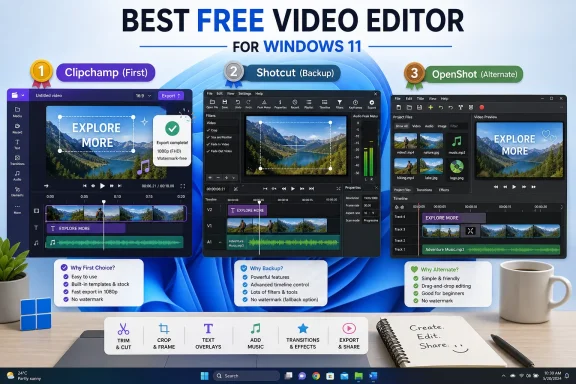
For most beginners on Windows 11, Microsoft Clipchamp is the best first free video editor because it is built into Windows, exports watermark-free at up to 1080p on the free plan, and covers basic trimming, cropping, speed changes, effects, stock media, and music. If Clipchamp gets in the way, Shotcut is the better free fallback than OpenShot for users who need broader format handling and more control over the project. OpenShot remains worth knowing, but in this three-way beginner choice it is the third option: friendly in spirit, less compelling as the first recommendation.
That answer is deliberately boring, because the right beginner tool usually is. The best free video editor is not the one with the longest feature list; it is the one that lets a new Windows user finish the birthday montage, YouTube clip, school project, or quick social post without learning video production as a second job. On that test, Clipchamp wins the first round, Shotcut wins the safety-net round, and OpenShot becomes the “try it if the other two do not click” candidate.
The practical starting point is simple: if you are on Windows 11, open Clipchamp first. Microsoft describes Clipchamp as the built-in video editor for Windows 11, and its free plan is enough for the beginner workload most people actually mean when they ask for a free editor: putting clips and photos together, trimming the boring parts, adding music, adding text, and exporting a clean 1080p file without a watermark.
That last phrase matters. “Free video editor” has historically been a trap category, full of downloads that let you edit for an hour and then stamp a watermark across the final export. Clipchamp’s free tier is not unlimited in the philosophical sense, because premium assets and higher-end capabilities can still sit behind paid plans, but the core promise is beginner-friendly: unlimited watermark-free exports up to 1080p.
For a new user, the cleanest path is to start a new Clipchamp project, import the videos and photos, drag them onto the timeline, trim each clip by pulling its edges, add audio or music, and export at 1080p. That is the level at which most first projects live. If you are making a family video, a short explainer, a simple YouTube upload, or a quick highlight reel, Clipchamp is the fastest route from “I have files” to “I have a finished video.”
It also has the least emotional overhead. There is no choosing between daily builds, installers, codecs, package formats, or third-party download mirrors. For Windows 11 users especially, that is not a small advantage; it is the whole product argument.
The difference is not that Shotcut is magically professional and Clipchamp is not. The difference is that Shotcut behaves more like a traditional desktop editor. It gives users more project control, more room to work with different media types, and a clearer sense that the files, timelines, and exports are under the user’s control rather than wrapped in a simplified Microsoft experience.
That comes with a cost. Shotcut is not as immediately comforting as Clipchamp, and beginners may find its interface less guided. The first ten minutes can feel like moving from a phone camera app to a manual camera: nothing is impossible, but the software assumes you are willing to learn.
For WindowsForum readers, that tradeoff is familiar. Clipchamp is the tool you recommend to a relative who needs a video finished tonight. Shotcut is the tool you install when that same relative comes back two months later and says the file from a camera, capture card, old phone, or screen recorder is giving them trouble.
But OpenShot’s problem in this particular comparison is positioning. If the user wants the easiest Windows-native path, Clipchamp is easier to justify. If the user wants the stronger open-source fallback with more format and project-control credibility, Shotcut is easier to justify. OpenShot sits between those poles without clearly beating either one.
That does not make it bad software. It makes it the third recommendation in a beginner chooser. The best reason to try OpenShot is not that it wins on paper; it is that interfaces are personal, and some users will find OpenShot’s way of arranging a timeline more intuitive than Shotcut’s.
There is a lesson here for anyone answering “best free editor” threads: the honest answer is not a universal champion. It is a sequence. Start with Clipchamp. If the project becomes more demanding, move to Shotcut. If Shotcut feels too technical and Clipchamp feels too constrained, try OpenShot.
That is why Clipchamp should be the first recommendation for most Windows users. A new editor does not yet know which settings matter. They may not understand resolution, aspect ratio, bitrate, timeline frame rate, codecs, proxies, or container formats. Giving that user a conventional editor too early can turn a simple project into a settings scavenger hunt.
But control becomes important quickly. The minute someone works with odd source files, mixed footage, longer projects, or more deliberate export requirements, the beginner-friendly guardrails can feel like walls. Shotcut is the better answer at that point because it is not trying to hide the editing model as aggressively.
This is also where “best” depends on the job. A five-clip family montage is not the same task as assembling gameplay footage, cutting a product demo, or preparing a clean archive copy of a local event recording. Beginners often think they are choosing one editor forever. In reality, they are choosing the editor for the next project.
Shotcut’s Windows support note is more explicit for older Windows 10 deployments: its current download page says Windows 10 1809 or newer is supported. That matters for hobbyists and small offices with machines that have not moved to Windows 11. It also matters for anyone maintaining a lightly managed fleet where “just use the built-in thing” is not a safe assumption.
OpenShot also supports Windows, with the current official Windows download listed as v3.5.1. For users who simply want a free open-source editor and do not like Shotcut’s interface, that is enough reason to test it. But testing is the operative word.
For sysadmins and IT pros, the advice is narrower than the consumer recommendation. Do not standardize on a free editor because it looks nice in a roundup. Standardize only after testing the actual file types, export expectations, account requirements, update behavior, and support burden your users will create.
Clipchamp’s free 1080p watermark-free export promise directly addresses that anxiety. It gives beginners a clean success condition: if your project is ordinary and 1080p is enough, you can finish without a surprise logo pasted onto the output. That is why Clipchamp is not merely convenient; it is trustworthy enough for a first attempt.
Shotcut and OpenShot, as free and open-source applications, also avoid the classic watermark upsell problem. Their tradeoff is not a watermark; it is complexity. They ask the user to understand more about the editing environment, and in return they give the user more independence from a vendor-managed beginner workflow.
That independence has value. Some users dislike account-tied services. Some prefer open-source tools on principle. Some need to work with media libraries in a way that feels more local and less template-driven. For those users, Shotcut is not Plan B because it is inferior; it is Plan B because it is less frictionless on day one.
In Clipchamp, the test should answer whether the user can finish without thinking about the software. Can they import clips, trim them, add a title, add music, and export at 1080p without searching for a tutorial every thirty seconds? If yes, the decision is over. Use Clipchamp until it gives you a reason not to.
In Shotcut, the test should answer whether the user is comfortable with a more conventional editing workspace. Can they understand the timeline, preview, filters, and export flow well enough to feel in control rather than lost? If yes, Shotcut is the more durable free editor to learn.
In OpenShot, the test is more subjective. Does its timeline make more sense to you than Shotcut’s? Does it feel friendlier for your project? If so, it can be a reasonable beginner tool, but it still has to earn that place on your machine by being easier for you, not by winning the category.
Clipchamp’s advantage in a Windows 11 environment is that it aligns with Microsoft’s consumer direction for basic video editing. That reduces discovery friction, and it gives nontechnical users a tool whose design language is familiar. For organizations that only need light editing, that matters more than advanced features.
Shotcut’s advantage is that it is a stronger fit where users need a local, open-source, cross-platform editor and are willing to learn it. It is also the better candidate for power users who would otherwise immediately bounce off a simplified editor. The support model changes, though: users may need more onboarding.
OpenShot’s role in managed environments is harder to generalize. It may be useful where its interface fits a class, club, or volunteer workflow better than Shotcut’s. But it should not be deployed merely because it is free and friendly-looking; it should be deployed because it passed the same project-based testing as the others.
Clipchamp dominates the confidence stage. It lowers the cost of starting, which is the biggest barrier for people who have never edited before. The user can learn the basic grammar of editing — clip order, trimming, music, text, export — before being forced to care about the deeper machinery.
Shotcut becomes more attractive in the speed and control stages. Once a user understands what they are trying to make, the ability to manage a project with fewer beginner guardrails becomes valuable. At that point, the same interface that felt intimidating can start to feel efficient.
OpenShot’s opportunity is the user who wants open source but does not bond with Shotcut. That is a narrower lane, but a real one. In creative software, the interface you will actually use often beats the interface someone else insists is more capable.
That answer is deliberately boring, because the right beginner tool usually is. The best free video editor is not the one with the longest feature list; it is the one that lets a new Windows user finish the birthday montage, YouTube clip, school project, or quick social post without learning video production as a second job. On that test, Clipchamp wins the first round, Shotcut wins the safety-net round, and OpenShot becomes the “try it if the other two do not click” candidate.
 The Smart Beginner Choice Is the Editor Already Waiting in Windows
The practical starting point is simple: if you are on Windows 11, open Clipchamp first. Microsoft describes Clipchamp as the built-in video editor for Windows 11, and its free plan is enough for the beginner workload most people actually mean when they ask for a free editor: putting clips and photos together, trimming the boring parts, adding music, adding text, and exporting a clean 1080p file without a watermark.That last phrase matters. “Free video editor” has historically been a trap category, full of downloads that let you edit for an hour and then stamp a watermark across the final export. Clipchamp’s free tier is not unlimited in the philosophical sense, because premium assets and higher-end capabilities can still sit behind paid plans, but the core promise is beginner-friendly: unlimited watermark-free exports up to 1080p.
For a new user, the cleanest path is to start a new Clipchamp project, import the videos and photos, drag them onto the timeline, trim each clip by pulling its edges, add audio or music, and export at 1080p. That is the level at which most first projects live. If you are making a family video, a short explainer, a simple YouTube upload, or a quick highlight reel, Clipchamp is the fastest route from “I have files” to “I have a finished video.”
It also has the least emotional overhead. There is no choosing between daily builds, installers, codecs, package formats, or third-party download mirrors. For Windows 11 users especially, that is not a small advantage; it is the whole product argument.
Shotcut Is the Escape Hatch for People Who Outgrow the Easy Button
Shotcut’s case begins where Clipchamp’s convenience ends. It is free, open source, cross-platform, and currently lists Windows 10 and Windows 11 support, with its download page showing version 26.4.30 and Windows 10 1809 or newer as the supported Windows baseline. That makes it the better “real editor” fallback when a user starts asking questions Clipchamp is not designed to answer.The difference is not that Shotcut is magically professional and Clipchamp is not. The difference is that Shotcut behaves more like a traditional desktop editor. It gives users more project control, more room to work with different media types, and a clearer sense that the files, timelines, and exports are under the user’s control rather than wrapped in a simplified Microsoft experience.
That comes with a cost. Shotcut is not as immediately comforting as Clipchamp, and beginners may find its interface less guided. The first ten minutes can feel like moving from a phone camera app to a manual camera: nothing is impossible, but the software assumes you are willing to learn.
For WindowsForum readers, that tradeoff is familiar. Clipchamp is the tool you recommend to a relative who needs a video finished tonight. Shotcut is the tool you install when that same relative comes back two months later and says the file from a camera, capture card, old phone, or screen recorder is giving them trouble.
OpenShot Is Friendly, Free, and Not Quite the Best First Answer
OpenShot deserves a place in this comparison because it is also free and open source for Windows, and its official site currently presents v3.5.1 as the Windows download. It has long appealed to beginners because it presents editing in approachable terms: clips, tracks, titles, transitions, and exports. For some users, that simplicity is enough.But OpenShot’s problem in this particular comparison is positioning. If the user wants the easiest Windows-native path, Clipchamp is easier to justify. If the user wants the stronger open-source fallback with more format and project-control credibility, Shotcut is easier to justify. OpenShot sits between those poles without clearly beating either one.
That does not make it bad software. It makes it the third recommendation in a beginner chooser. The best reason to try OpenShot is not that it wins on paper; it is that interfaces are personal, and some users will find OpenShot’s way of arranging a timeline more intuitive than Shotcut’s.
There is a lesson here for anyone answering “best free editor” threads: the honest answer is not a universal champion. It is a sequence. Start with Clipchamp. If the project becomes more demanding, move to Shotcut. If Shotcut feels too technical and Clipchamp feels too constrained, try OpenShot.
The Real Decision Is Friction Versus Control
The beginner video editor market is not really divided between “free” and “paid.” It is divided between software that removes decisions and software that exposes them. Clipchamp removes decisions, Shotcut exposes more of them, and OpenShot tries to stay approachable while still being a desktop editor.That is why Clipchamp should be the first recommendation for most Windows users. A new editor does not yet know which settings matter. They may not understand resolution, aspect ratio, bitrate, timeline frame rate, codecs, proxies, or container formats. Giving that user a conventional editor too early can turn a simple project into a settings scavenger hunt.
But control becomes important quickly. The minute someone works with odd source files, mixed footage, longer projects, or more deliberate export requirements, the beginner-friendly guardrails can feel like walls. Shotcut is the better answer at that point because it is not trying to hide the editing model as aggressively.
This is also where “best” depends on the job. A five-clip family montage is not the same task as assembling gameplay footage, cutting a product demo, or preparing a clean archive copy of a local event recording. Beginners often think they are choosing one editor forever. In reality, they are choosing the editor for the next project.
Windows 10 Users Should Read the Fine Print Before Copying Windows 11 Advice
The Clipchamp recommendation is strongest on Windows 11 because Microsoft positions it as the built-in video editor there. Windows 10 users are not excluded from Clipchamp, but the “already waiting for you” argument is not quite as clean. If you are on Windows 10, the practical question is whether Clipchamp is already installed or easily available on your system.Shotcut’s Windows support note is more explicit for older Windows 10 deployments: its current download page says Windows 10 1809 or newer is supported. That matters for hobbyists and small offices with machines that have not moved to Windows 11. It also matters for anyone maintaining a lightly managed fleet where “just use the built-in thing” is not a safe assumption.
OpenShot also supports Windows, with the current official Windows download listed as v3.5.1. For users who simply want a free open-source editor and do not like Shotcut’s interface, that is enough reason to test it. But testing is the operative word.
For sysadmins and IT pros, the advice is narrower than the consumer recommendation. Do not standardize on a free editor because it looks nice in a roundup. Standardize only after testing the actual file types, export expectations, account requirements, update behavior, and support burden your users will create.
The Watermark Question Is the Beginner’s Canary in the Coal Mine
WindowsForum has seen variations of the same video-editing question for years: users want to combine clips and photos, add music, make YouTube videos, or export to familiar formats without watermarks. Those questions are not naïve. They are the survival instincts of users who have been burned by “free” creative software before.Clipchamp’s free 1080p watermark-free export promise directly addresses that anxiety. It gives beginners a clean success condition: if your project is ordinary and 1080p is enough, you can finish without a surprise logo pasted onto the output. That is why Clipchamp is not merely convenient; it is trustworthy enough for a first attempt.
Shotcut and OpenShot, as free and open-source applications, also avoid the classic watermark upsell problem. Their tradeoff is not a watermark; it is complexity. They ask the user to understand more about the editing environment, and in return they give the user more independence from a vendor-managed beginner workflow.
That independence has value. Some users dislike account-tied services. Some prefer open-source tools on principle. Some need to work with media libraries in a way that feels more local and less template-driven. For those users, Shotcut is not Plan B because it is inferior; it is Plan B because it is less frictionless on day one.
The Best First Project Is a Test, Not a Commitment
The smartest way to choose among these editors is not to read another dozen rankings. It is to run the same small project through the likely candidates. Use one minute of phone video, one still image, one music track, one title, and one export. That miniature workload will tell a beginner more than a feature matrix.In Clipchamp, the test should answer whether the user can finish without thinking about the software. Can they import clips, trim them, add a title, add music, and export at 1080p without searching for a tutorial every thirty seconds? If yes, the decision is over. Use Clipchamp until it gives you a reason not to.
In Shotcut, the test should answer whether the user is comfortable with a more conventional editing workspace. Can they understand the timeline, preview, filters, and export flow well enough to feel in control rather than lost? If yes, Shotcut is the more durable free editor to learn.
In OpenShot, the test is more subjective. Does its timeline make more sense to you than Shotcut’s? Does it feel friendlier for your project? If so, it can be a reasonable beginner tool, but it still has to earn that place on your machine by being easier for you, not by winning the category.
IT Pros Should Care Because “Free” Still Creates Support Cost
The home-user version of this article ends with “try Clipchamp first.” The IT version does not. For administrators, trainers, school tech coordinators, and small-business support people, every free creative app has a downstream cost: installation questions, update questions, export questions, missing-file questions, and “why does this video not play on the conference-room PC?” questions.Clipchamp’s advantage in a Windows 11 environment is that it aligns with Microsoft’s consumer direction for basic video editing. That reduces discovery friction, and it gives nontechnical users a tool whose design language is familiar. For organizations that only need light editing, that matters more than advanced features.
Shotcut’s advantage is that it is a stronger fit where users need a local, open-source, cross-platform editor and are willing to learn it. It is also the better candidate for power users who would otherwise immediately bounce off a simplified editor. The support model changes, though: users may need more onboarding.
OpenShot’s role in managed environments is harder to generalize. It may be useful where its interface fits a class, club, or volunteer workflow better than Shotcut’s. But it should not be deployed merely because it is free and friendly-looking; it should be deployed because it passed the same project-based testing as the others.
The Winner Depends on When the Beginner Stops Being a Beginner
There is a hidden timeline in this comparison. On day one, the beginner wants confidence. On day ten, they want speed. On day thirty, they may want control. The right recommendation changes as the user moves along that curve.Clipchamp dominates the confidence stage. It lowers the cost of starting, which is the biggest barrier for people who have never edited before. The user can learn the basic grammar of editing — clip order, trimming, music, text, export — before being forced to care about the deeper machinery.
Shotcut becomes more attractive in the speed and control stages. Once a user understands what they are trying to make, the ability to manage a project with fewer beginner guardrails becomes valuable. At that point, the same interface that felt intimidating can start to feel efficient.
OpenShot’s opportunity is the user who wants open source but does not bond with Shotcut. That is a narrower lane, but a real one. In creative software, the interface you will actually use often beats the interface someone else insists is more capable.
The Windows Beginner’s Editing Ladder Is Shorter Than It Looks
The clean recommendation is not a three-way tie, and it is not a personality quiz. It is a ladder: start with Clipchamp, move to Shotcut when you need more control, and keep OpenShot as the alternate open-source editor if Shotcut’s workflow does not fit.- Clipchamp is the easiest first choice for most Windows 11 beginners because it is Microsoft’s built-in video editor and supports free watermark-free exports up to 1080p.
- Shotcut is the best free and open-source fallback because it supports Windows 10 and Windows 11 and gives users more room for format handling and project control.
- OpenShot is also free and open source for Windows, with v3.5.1 listed as the current official Windows download, but it is harder to recommend ahead of both Clipchamp and Shotcut.
- Windows 10 users should check availability and support details instead of assuming the Windows 11 Clipchamp experience applies exactly to them.
- New users should test each editor with the same small project before committing to a longer edit.
- IT teams should evaluate export needs, account friction, update behavior, and user training before standardizing on any free editor.
References
- Primary source: support.microsoft.com
Create films with a video editor | Microsoft Support
Learn how to use Clipchamp to create, edit, and share your own custom videos.support.microsoft.com - Independent coverage: kdenlive.org
Kdenlive - Free and Open Source Video Editor
Kdenlive is the acronym for KDE Non-Linear Video Editor. It works on Linux, Windows, macOS, and BSD.kdenlive.org - Independent coverage: microsoft.com
Your request has been blocked. This could be due to several reasons.
www.microsoft.com
- Primary source: WindowsForum
Best free video editing apps | Windows Forum
The thread discusses free video editing apps suitable for beginners, with initial recommendations for Android (InShot) and Windows 10 (Lightworks, DaVin...windowsforum.com