

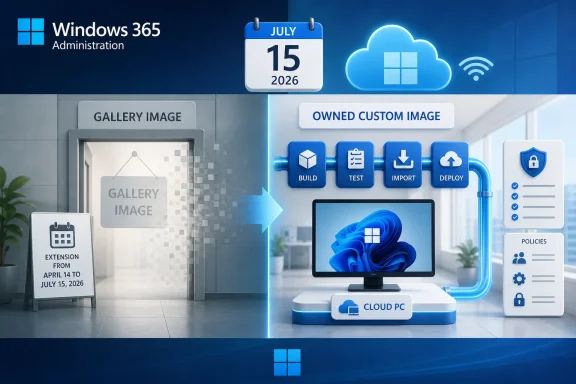
Microsoft updated its Windows 10 ESU guidance for Windows 365 on April 23, 2026, extending Windows 10 version 22H2 gallery-image provisioning for Windows 365 Cloud PCs from April 14, 2026 to July 15, 2026. That is the concrete change, and the operational answer is simple: any Windows 365 provisioning policy still depending on Windows 10 gallery images now has until July 15, 2026, before the gallery path closes. After that date, organizations that still need Windows 10 Cloud PC images must build a custom image and import it into Windows 365.
This is not a reprieve for Windows 10 in the broad sentimental sense. It is a short, specific extension for one provisioning path inside Windows 365: Windows 10 version 22H2 gallery images used by provisioning policies for Cloud PCs.
That distinction matters because enterprise administrators often hear “Windows 10 ESU” and mentally group together physical PCs, Azure Virtual Desktop, Windows 365 Cloud PCs, local endpoint entitlement, and image lifecycle policy. Microsoft’s latest change is narrower than that. Existing Windows 10 version 22H2 Cloud PCs in Azure remain eligible for Extended Security Updates at no additional cost, but the gallery image used to create or provision Windows 10 Cloud PCs now has a hard new runway ending July 15, 2026.
The operational task is therefore not “decide whether Windows 10 is supported.” The task is to identify any Windows 365 provisioning policies that still rely on Microsoft’s Windows 10 version 22H2 gallery image and convert the ones you still need into a custom-image workflow before the gallery disappears.
That is the quiet administrative trap in this update. Microsoft extended availability, but the extension is also a deadline notice.
For Windows 11, that convenience continues to align with Microsoft’s long-term desktop strategy. For Windows 10, it increasingly sits in tension with the end-of-support calendar and the ESU bridge that Microsoft is using to keep some legacy environments secure while nudging them toward migration.
The July 15, 2026 extension should be read as Microsoft keeping the runway open long enough for lagging Windows 365 tenants to finish image-transition work. It should not be read as a signal that Windows 10 gallery provisioning will become a long-term comfort zone. Microsoft’s stated end state is plain: after July 15, 2026, customers that still need Windows 10 images must create a custom image and import it into Windows 365.
That single sentence changes the shape of the admin job. A gallery image is a service-provided default; a custom image is an owned artifact. Once an organization crosses that line, it also owns the surrounding process: image creation, validation, update hygiene, application compatibility testing, documentation, and rollback planning.
For Windows 365 admins, the practical deadline is earlier: the date by which every still-required Windows 10 provisioning policy has either been retired, moved to Windows 11, or rebuilt around a custom Windows 10 image. The July 15 date is only the outer boundary of Microsoft’s gallery availability. Your internal deadline needs to leave room for testing, failed imports, app remediation, and change-control delays.
The first step is inventory. Admins should review Windows 365 provisioning policies and identify which ones are tied to Windows 10 version 22H2 gallery images. Those policies are the risk surface. If a policy provisions Windows 11 Cloud PCs, this specific gallery-image deadline is not the issue. If a Windows 10 policy is still needed beyond July 15, it needs a custom-image plan.
The second step is classification. Some Windows 10 Cloud PC policies exist because nobody cleaned them up. Others exist because a business unit still depends on a legacy application, a validated environment, or a user population that cannot yet move. Those are very different cases, and they deserve different migration handling.
The third step is conversion. Organizations that need Windows 10 beyond the gallery cutoff must create a custom image and import it into Windows 365. Microsoft’s change does not remove the need for ESU eligibility; it changes the provisioning source for future Windows 10 Cloud PCs after the gallery image is gone.
The Windows 365 wrinkle is that Cloud PCs blur the line between endpoint and service. A physical Windows 10 device sitting under a desk is one thing. A Windows 10 Cloud PC running in Azure, assigned through Windows 365, managed through enterprise policy, and provisioned from a gallery or custom image is another. The lifecycle burden is distributed differently, but it does not vanish.
That is why the gallery-image cutoff matters. It is not about whether an already-running Windows 10 Cloud PC can receive ESUs at no additional cost. Microsoft says existing Windows 10 version 22H2 Cloud PCs in Azure remain eligible. The issue is what happens when admins need to keep provisioning Windows 10 Cloud PCs after Microsoft removes the gallery shortcut.
A gallery image lets Windows 10 remain administratively convenient. A custom-image requirement makes the legacy status visible.
But Windows 365 customers that leaned on gallery images may not have treated Cloud PC image management as a first-class discipline. The July 15 cutoff forces that maturity step for any organization that still needs Windows 10 provisioning after the gallery image disappears.
That means administrators should not merely ask, “Can we import a custom image?” They should ask whether the organization has a repeatable image lifecycle. Who owns the base image? Who validates it? How are updates incorporated? How is the image tested against provisioning policy behavior? What is the rollback plan if a custom image produces broken Cloud PCs?
These are not theoretical questions. The moment a Windows 10 gallery image becomes a Windows 10 custom image, the organization becomes responsible for decisions that Microsoft’s gallery previously abstracted away.
But the new date also removes ambiguity. Microsoft is telling customers that Windows 10 gallery-image provisioning has a scheduled endpoint. That certainty is useful only if IT treats it as a forcing function rather than a snooze button.
For disciplined teams, the extension is enough time to inventory policies, validate which Windows 10 Cloud PCs are genuinely still needed, prepare custom images, and make Windows 11 the default path wherever possible. For less disciplined teams, it risks becoming another date that is acknowledged in a change-management meeting and then rediscovered during an incident.
The difference will show up in provisioning failures, help desk escalations, and emergency exceptions. Nobody wants to discover on July 16 that a legacy user group still depends on a Windows 10 provisioning policy that was never converted.
That does not mean every organization can finish Windows 11 migration immediately. WindowsForum readers know the blockers well: application certification, vendor support, regulated workflows, training inertia, and the long tail of line-of-business software. But the burden of proof should now sit with Windows 10, not Windows 11.
The question for each provisioning policy is not “Can we keep Windows 10 a little longer?” It is “Why does this policy still need Windows 10 after July 15, 2026?” If the answer is vague, the policy is probably a migration candidate. If the answer is concrete, the policy needs a custom-image plan with an owner and a deadline.
That is the practical dividing line. Windows 11 is the default future. Windows 10 is the exception that now requires more paperwork.
But image availability is about creating or provisioning Cloud PCs through policies. A running Cloud PC and a gallery image are not the same asset. The first is an already-deployed environment; the second is a source used to create more environments.
That distinction should shape admin triage. Existing Windows 10 Cloud PCs need lifecycle management, security policy, and migration planning. Windows 10 provisioning policies need image-source remediation. They overlap, but they are not identical workstreams.
A tenant can be safe on one axis and exposed on the other. You may have existing Cloud PCs covered by ESU, while still having future provisioning policies that depend on a gallery image scheduled to disappear.
That is where this deadline can bite. If administrators cannot quickly answer which policies use Windows 10 gallery images and why, the organization is already late.
Documentation should identify which Windows 10 policies are being retired, which are being moved to Windows 11, and which are being preserved through custom images. For preserved policies, the documentation should record the business owner, technical owner, custom-image source, testing status, and planned review date.
The review date matters because ESU can create a false sense of permanence. Security updates do not turn a legacy desktop estate into a strategic platform. They simply make the risk tolerable for a defined period while the real migration continues.
The Windows 365 gallery-image extension fits that strategy precisely. Microsoft is not slamming the door on Windows 10 Cloud PC provisioning overnight. It is giving administrators a short, explicit runway and then moving the remaining Windows 10 work into custom images.
That is a classic enterprise compromise. The vendor avoids an abrupt break for customers with real dependencies, while also making the legacy path less effortless over time. The friction is the policy.
For IT pros, the important part is not Microsoft’s tone but Microsoft’s mechanism. When a platform vendor removes the default image and requires a custom one, it is shifting the legacy workload from product convenience into customer responsibility.
 Microsoft Moved the Date, but Not the Destination
This is not a reprieve for Windows 10 in the broad sentimental sense. It is a short, specific extension for one provisioning path inside Windows 365: Windows 10 version 22H2 gallery images used by provisioning policies for Cloud PCs.That distinction matters because enterprise administrators often hear “Windows 10 ESU” and mentally group together physical PCs, Azure Virtual Desktop, Windows 365 Cloud PCs, local endpoint entitlement, and image lifecycle policy. Microsoft’s latest change is narrower than that. Existing Windows 10 version 22H2 Cloud PCs in Azure remain eligible for Extended Security Updates at no additional cost, but the gallery image used to create or provision Windows 10 Cloud PCs now has a hard new runway ending July 15, 2026.
The operational task is therefore not “decide whether Windows 10 is supported.” The task is to identify any Windows 365 provisioning policies that still rely on Microsoft’s Windows 10 version 22H2 gallery image and convert the ones you still need into a custom-image workflow before the gallery disappears.
That is the quiet administrative trap in this update. Microsoft extended availability, but the extension is also a deadline notice.
The Gallery Image Was Always a Convenience Layer
Windows 365 gallery images are attractive because they are boring in exactly the right way. They let administrators create Cloud PCs from Microsoft-provided operating system images without maintaining a separate image pipeline, testing capture workflows, or carrying the burden of image freshness.For Windows 11, that convenience continues to align with Microsoft’s long-term desktop strategy. For Windows 10, it increasingly sits in tension with the end-of-support calendar and the ESU bridge that Microsoft is using to keep some legacy environments secure while nudging them toward migration.
The July 15, 2026 extension should be read as Microsoft keeping the runway open long enough for lagging Windows 365 tenants to finish image-transition work. It should not be read as a signal that Windows 10 gallery provisioning will become a long-term comfort zone. Microsoft’s stated end state is plain: after July 15, 2026, customers that still need Windows 10 images must create a custom image and import it into Windows 365.
That single sentence changes the shape of the admin job. A gallery image is a service-provided default; a custom image is an owned artifact. Once an organization crosses that line, it also owns the surrounding process: image creation, validation, update hygiene, application compatibility testing, documentation, and rollback planning.
The Real Deadline Is the Last Successful Provisioning Policy Conversion
The mistake would be to treat July 15 as the day to start work. It is the day the easy path ends.For Windows 365 admins, the practical deadline is earlier: the date by which every still-required Windows 10 provisioning policy has either been retired, moved to Windows 11, or rebuilt around a custom Windows 10 image. The July 15 date is only the outer boundary of Microsoft’s gallery availability. Your internal deadline needs to leave room for testing, failed imports, app remediation, and change-control delays.
The first step is inventory. Admins should review Windows 365 provisioning policies and identify which ones are tied to Windows 10 version 22H2 gallery images. Those policies are the risk surface. If a policy provisions Windows 11 Cloud PCs, this specific gallery-image deadline is not the issue. If a Windows 10 policy is still needed beyond July 15, it needs a custom-image plan.
The second step is classification. Some Windows 10 Cloud PC policies exist because nobody cleaned them up. Others exist because a business unit still depends on a legacy application, a validated environment, or a user population that cannot yet move. Those are very different cases, and they deserve different migration handling.
The third step is conversion. Organizations that need Windows 10 beyond the gallery cutoff must create a custom image and import it into Windows 365. Microsoft’s change does not remove the need for ESU eligibility; it changes the provisioning source for future Windows 10 Cloud PCs after the gallery image is gone.
Windows 10 ESU Is a Bridge, Not a Platform Strategy
The larger Windows 10 story remains the same: Windows 10 is in its extended-support era, and ESU is a time-boxed security mechanism, not a modernization plan. WindowsForum readers have already been tracking the consumer and enterprise implications in related coverage of Windows 10’s final mainstream security-update window and the available ESU paths for users and organizations.The Windows 365 wrinkle is that Cloud PCs blur the line between endpoint and service. A physical Windows 10 device sitting under a desk is one thing. A Windows 10 Cloud PC running in Azure, assigned through Windows 365, managed through enterprise policy, and provisioned from a gallery or custom image is another. The lifecycle burden is distributed differently, but it does not vanish.
That is why the gallery-image cutoff matters. It is not about whether an already-running Windows 10 Cloud PC can receive ESUs at no additional cost. Microsoft says existing Windows 10 version 22H2 Cloud PCs in Azure remain eligible. The issue is what happens when admins need to keep provisioning Windows 10 Cloud PCs after Microsoft removes the gallery shortcut.
A gallery image lets Windows 10 remain administratively convenient. A custom-image requirement makes the legacy status visible.
The Admin Burden Moves from Microsoft’s Gallery to Your Image Pipeline
Custom images are not inherently bad. Many enterprise Windows environments have depended on custom images for years because standardized builds, preinstalled agents, baseline settings, and application bundles can reduce post-provisioning work. In well-run shops, the custom image is a controlled product.But Windows 365 customers that leaned on gallery images may not have treated Cloud PC image management as a first-class discipline. The July 15 cutoff forces that maturity step for any organization that still needs Windows 10 provisioning after the gallery image disappears.
That means administrators should not merely ask, “Can we import a custom image?” They should ask whether the organization has a repeatable image lifecycle. Who owns the base image? Who validates it? How are updates incorporated? How is the image tested against provisioning policy behavior? What is the rollback plan if a custom image produces broken Cloud PCs?
These are not theoretical questions. The moment a Windows 10 gallery image becomes a Windows 10 custom image, the organization becomes responsible for decisions that Microsoft’s gallery previously abstracted away.
The Fixed Window Helps Disciplined Shops and Exposes Everyone Else
There is one generous reading of Microsoft’s update: the extension gives administrators a cleaner transition window. If the prior April 14, 2026 deadline was too close for some tenants, July 15 gives them more time to finish planning without breaking immediate provisioning workflows.But the new date also removes ambiguity. Microsoft is telling customers that Windows 10 gallery-image provisioning has a scheduled endpoint. That certainty is useful only if IT treats it as a forcing function rather than a snooze button.
For disciplined teams, the extension is enough time to inventory policies, validate which Windows 10 Cloud PCs are genuinely still needed, prepare custom images, and make Windows 11 the default path wherever possible. For less disciplined teams, it risks becoming another date that is acknowledged in a change-management meeting and then rediscovered during an incident.
The difference will show up in provisioning failures, help desk escalations, and emergency exceptions. Nobody wants to discover on July 16 that a legacy user group still depends on a Windows 10 provisioning policy that was never converted.
Windows 11 Migration Still Wins When the App Estate Allows It
The cleanest answer remains migration to Windows 11 where possible. If a Cloud PC workload does not have a hard Windows 10 dependency, the July 15 gallery deadline should be used as another reason to move the policy forward rather than preserve a legacy image path.That does not mean every organization can finish Windows 11 migration immediately. WindowsForum readers know the blockers well: application certification, vendor support, regulated workflows, training inertia, and the long tail of line-of-business software. But the burden of proof should now sit with Windows 10, not Windows 11.
The question for each provisioning policy is not “Can we keep Windows 10 a little longer?” It is “Why does this policy still need Windows 10 after July 15, 2026?” If the answer is vague, the policy is probably a migration candidate. If the answer is concrete, the policy needs a custom-image plan with an owner and a deadline.
That is the practical dividing line. Windows 11 is the default future. Windows 10 is the exception that now requires more paperwork.
Existing Cloud PCs Are Not the Same Problem as Future Provisioning
One of the easiest ways to misread this update is to confuse existing Cloud PCs with future image availability. Microsoft’s verified position is that existing Windows 10 version 22H2 Cloud PCs in Azure remain eligible for ESUs at no additional cost. That is an important assurance for organizations already running Windows 10 Cloud PCs.But image availability is about creating or provisioning Cloud PCs through policies. A running Cloud PC and a gallery image are not the same asset. The first is an already-deployed environment; the second is a source used to create more environments.
That distinction should shape admin triage. Existing Windows 10 Cloud PCs need lifecycle management, security policy, and migration planning. Windows 10 provisioning policies need image-source remediation. They overlap, but they are not identical workstreams.
A tenant can be safe on one axis and exposed on the other. You may have existing Cloud PCs covered by ESU, while still having future provisioning policies that depend on a gallery image scheduled to disappear.
The Quiet Risk Is Documentation Drift
The most dangerous enterprise dependencies are often the ones nobody remembers owning. Windows 365 provisioning policies can be created for pilots, departmental exceptions, mergers, temporary contractors, application testing, or urgent business continuity needs. Months later, the policy name still looks official, but the original rationale is gone.That is where this deadline can bite. If administrators cannot quickly answer which policies use Windows 10 gallery images and why, the organization is already late.
Documentation should identify which Windows 10 policies are being retired, which are being moved to Windows 11, and which are being preserved through custom images. For preserved policies, the documentation should record the business owner, technical owner, custom-image source, testing status, and planned review date.
The review date matters because ESU can create a false sense of permanence. Security updates do not turn a legacy desktop estate into a strategic platform. They simply make the risk tolerable for a defined period while the real migration continues.
Microsoft’s Message Is Subtle but Consistent
Microsoft’s desktop strategy is not hidden. Windows 11 is the forward path, Windows 10 is in managed decline, and ESU is the paid-or-entitled bridge that prevents unsupported systems from becoming immediate security liabilities.The Windows 365 gallery-image extension fits that strategy precisely. Microsoft is not slamming the door on Windows 10 Cloud PC provisioning overnight. It is giving administrators a short, explicit runway and then moving the remaining Windows 10 work into custom images.
That is a classic enterprise compromise. The vendor avoids an abrupt break for customers with real dependencies, while also making the legacy path less effortless over time. The friction is the policy.
For IT pros, the important part is not Microsoft’s tone but Microsoft’s mechanism. When a platform vendor removes the default image and requires a custom one, it is shifting the legacy workload from product convenience into customer responsibility.
The July 15 Date Turns Windows 10 Cloud PCs into an Owned Exception
The concrete takeaway is that Windows 365 administrators should treat July 15, 2026 as a provisioning-policy migration deadline, not merely a documentation update. The extension buys time, but it also defines the last stretch in which Windows 10 version 22H2 gallery-image provisioning remains available for Windows 365 Cloud PCs.- Windows 365 provisioning policies that use Windows 10 version 22H2 gallery images continue to work until July 15, 2026.
- After July 15, 2026, organizations that still need Windows 10 images must create a custom image and import it into Windows 365.
- Existing Windows 10 version 22H2 Cloud PCs in Azure remain eligible for Extended Security Updates at no additional cost.
- Administrators should inventory Windows 10 provisioning policies now and decide whether each one will be retired, migrated to Windows 11, or converted to a custom-image workflow.
- The safest internal deadline is earlier than July 15, because custom-image validation, policy testing, and change approval all need time before Microsoft’s gallery path disappears.
References
- Primary source: learn.microsoft.com
Understanding Extended Security Updates (ESU) for Windows 10: Windows 365 Deployment Scenarios | Microsoft Learn
This document explains how ESU entitlement, activation, and administration work for deployments using Windows 365 – with focus on supported models, entitlement checks, policies, and technical implementation steps relevant for IT admins and customers planning for Windows 10 lifecycle management.learn.microsoft.com - Independent coverage: microsoft.com
Windows 10 Extended Security Updates | Microsoft Windows
Use Windows 10 securely with the Extended Security Updates program. See how it helps protect your PC and find out how to get it.www.microsoft.com - Primary source: WindowsForum
Windows 10 Security Update Ends Oct 2025; ESU Options Through 2026 | Windows Forum
Microsoft has formally told the public that the October 2025 security update will be the last monthly security rollup for a broad swath of Windows 10...windowsforum.com