

Windows Movie Maker 6.0 drew fresh attention on June 30, 2026, after an X user uploaded a classic installer to the Internet Archive and said it worked on Windows 7, Windows 10, and Windows 11. The news is not that Microsoft has revived Movie Maker; it has not. The story is that Windows users keep reviving it anyway, because Microsoft never really replaced what Movie Maker represented. In an era when even basic creative tools increasingly arrive wrapped in accounts, cloud sync, subscriptions, and AI branding, a dead video editor has become a small protest vote for software that simply opens and does the job.
The resurfaced Movie Maker 6.0 installer is best understood as a community artifact, not a sanctioned comeback. Microsoft’s official position has been clear for years: Windows Essentials 2012, the last suite that included Movie Maker, stopped being supported on January 10, 2017, and Microsoft no longer offers it for download. The company has also warned that sites offering “free” Movie Maker downloads are not providing sanctioned Microsoft products.
That distinction matters because nostalgia has a way of flattening software history. To longtime users, Movie Maker is a familiar blue-and-gray timeline, a few transitions, some titles, and an export button. To Microsoft, it is an unsupported binary from a different security era, tied to codecs, components, and assumptions that predate Windows 11’s app model.
Still, the attention around the upload is not hard to explain. Movie Maker occupies the same emotional shelf as Paint, Notepad, Winamp, and the old Windows Media Player: tools that were limited, imperfect, and nevertheless deeply understandable. They did not ask users to build a workflow around them. They fit into the workflow users already had.
That is why a 2000s-era editor can trend in 2026. It is not because Movie Maker 6.0 is secretly competitive with modern editors. It is because it reminds users of a bargain that once felt normal: the operating system came with approachable tools, and those tools respected the local PC as the center of the experience.
The program’s limitations were part of its power. A user did not have to choose among ten color-management pipelines, three proxy workflows, or a stack of export presets designed for professional delivery. The app encouraged a very specific kind of creation: put clips in order, add a transition if you must, make the title legible, and get the file out.
Modern software culture often treats that simplicity as a defect. If a program cannot upsell stock assets, collaborate in the cloud, generate captions, recommend templates, and integrate with an account system, it looks underdeveloped by today’s product-management standards. But for many users, the added surface area is friction masquerading as capability.
That is the opening Movie Maker still slips through. Its value is not that it does more. Its value is that it does less in a way that feels intentional.
That does not make Clipchamp bad. For many users, it is more capable than Movie Maker ever was. It can record screens and webcams, handle modern formats, offer templates, and produce videos that look more polished than the average Movie Maker slideshow. Microsoft has invested in it because video creation is now a mainstream productivity task, not a hobbyist corner of the operating system.
But Clipchamp also changes the emotional contract. Movie Maker felt like a local utility. Clipchamp feels like a service. That is a meaningful difference for Windows users who still think of the PC as a personal machine rather than a terminal for cloud-mediated experiences.
The recent criticism around Clipchamp’s OneDrive requirements sharpened that contrast. Even if Microsoft sees cloud project storage as a way to improve portability and resilience, users see a basic edit being routed through account infrastructure. The old Movie Maker installer became interesting at exactly the moment many users were primed to ask why trimming a clip should involve cloud storage at all.
Windows SmartScreen or Microsoft Defender may flag old installers for reasons that are not always proof of malware. Reputation systems are built around known publishers, modern signing practices, download prevalence, and behavioral signals. An old executable from an archive can look suspicious even when it is merely obscure.
The reverse is also true. A file that launches successfully and avoids warnings is not automatically safe. Old software can include outdated components, rely on codecs with long histories of vulnerabilities, or behave in ways that were normal in Windows Vista but awkward on Windows 11.
For enthusiasts, the safest path is a virtual machine, a non-production PC, or at minimum a carefully isolated test environment. Scan the installer, avoid random mirrors, and do not grant old software broad trust simply because it carries a familiar name. Nostalgia is not a security model.
But “works” is doing too much work. Video editors sit at the intersection of codecs, GPU behavior, file paths, shell components, media frameworks, and export pipelines. A program can appear functional until it meets a modern phone video, a high-resolution variable-frame-rate clip, or a codec it never expected.
Administrators and power users should also separate personal tinkering from fleet deployment. Installing Movie Maker on one enthusiast’s spare laptop is a different proposition from allowing unsupported creative software across a managed Windows environment. The former is a nostalgia trip; the latter is an audit finding waiting for a reason.
That is the real boundary. Movie Maker’s return is fun as a retro-computing story. It becomes risky when users confuse a successful launch with a supported lifecycle.
A local video editor is not a radical demand. It is the sort of thing a general-purpose operating system used to provide without ceremony. Open file, trim clip, add title, export file. That workflow remains common, especially for students, office workers, teachers, parents, creators, and support staff who do not need Adobe Premiere Pro or DaVinci Resolve.
Microsoft’s challenge is that Windows now serves two masters. It must remain a platform for local control, backward compatibility, and user choice. It also sits at the center of a cloud-and-services business that measures success through engagement, accounts, storage, and subscriptions.
Movie Maker belongs to the first Windows. Clipchamp belongs to the second. The tension between them is why an old installer can feel like news.
But nostalgia can still identify a real product gap. Users remember Movie Maker because it made the first step easy. The app assumed the user had a small job to do and wanted to finish it quickly. That assumption is increasingly rare.
The professionalization of everyday software has left a hole in the middle. On one side are heavyweight editors with steep learning curves. On the other are cloud-first apps that are easy to start but wrapped in service logic. Movie Maker sits in memory as a third path: modest, local, approachable, and included.
That memory is powerful because it aligns with how many people still use PCs. Not every task is a collaboration. Not every file belongs in the cloud. Not every creative act needs a template marketplace.
If you need a supported tool, use a supported tool. Clipchamp, for all its frustrations, is Microsoft’s official path. Third-party editors such as Shotcut, Kdenlive, OpenShot, DaVinci Resolve, and commercial packages all exist for users with different tolerance levels for complexity and cost. Even Microsoft Photos and Windows media tools may cover the narrowest trim-and-export cases depending on the workflow.
The resurfaced Movie Maker installer is more valuable as a mirror than as a recommendation. It reflects what users miss: speed, locality, and confidence that the software will not turn a simple task into a service relationship.
That is why Microsoft should pay attention rather than shrug. The lesson is not “bring back Movie Maker exactly as it was.” The lesson is “there is still demand for small, local-first Windows apps that feel complete without an account.”
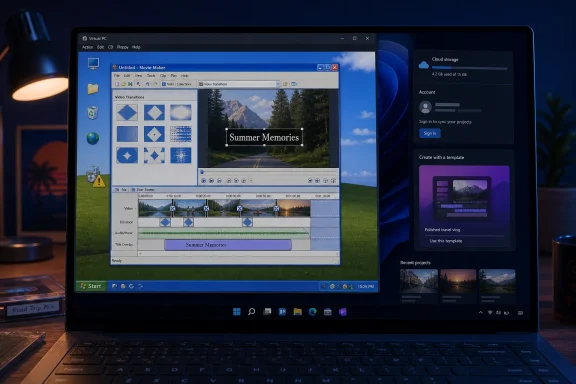 Movie Maker Returns as a Ghost, Not a Product
The resurfaced Movie Maker 6.0 installer is best understood as a community artifact, not a sanctioned comeback. Microsoft’s official position has been clear for years: Windows Essentials 2012, the last suite that included Movie Maker, stopped being supported on January 10, 2017, and Microsoft no longer offers it for download. The company has also warned that sites offering “free” Movie Maker downloads are not providing sanctioned Microsoft products.That distinction matters because nostalgia has a way of flattening software history. To longtime users, Movie Maker is a familiar blue-and-gray timeline, a few transitions, some titles, and an export button. To Microsoft, it is an unsupported binary from a different security era, tied to codecs, components, and assumptions that predate Windows 11’s app model.
Still, the attention around the upload is not hard to explain. Movie Maker occupies the same emotional shelf as Paint, Notepad, Winamp, and the old Windows Media Player: tools that were limited, imperfect, and nevertheless deeply understandable. They did not ask users to build a workflow around them. They fit into the workflow users already had.
That is why a 2000s-era editor can trend in 2026. It is not because Movie Maker 6.0 is secretly competitive with modern editors. It is because it reminds users of a bargain that once felt normal: the operating system came with approachable tools, and those tools respected the local PC as the center of the experience.
Microsoft Solved Video Editing, Then Unsolved Its Own Lesson
Movie Maker’s original achievement was not technical sophistication. It made importing clips, trimming scenes, adding titles, dropping in music, and exporting a finished video feel possible for people who did not think of themselves as editors. For school projects, family DVDs, YouTube’s early years, gaming montages, and photo slideshows, that was enough.The program’s limitations were part of its power. A user did not have to choose among ten color-management pipelines, three proxy workflows, or a stack of export presets designed for professional delivery. The app encouraged a very specific kind of creation: put clips in order, add a transition if you must, make the title legible, and get the file out.
Modern software culture often treats that simplicity as a defect. If a program cannot upsell stock assets, collaborate in the cloud, generate captions, recommend templates, and integrate with an account system, it looks underdeveloped by today’s product-management standards. But for many users, the added surface area is friction masquerading as capability.
That is the opening Movie Maker still slips through. Its value is not that it does more. Its value is that it does less in a way that feels intentional.
Clipchamp Is the Successor Microsoft Wants, Not the Successor Users Remember
Microsoft’s current answer to video editing on Windows is Clipchamp. It is the official Windows video editor, available on Windows 10 and Windows 11, and it fits Microsoft’s modern software strategy far better than Movie Maker ever could. It runs as a desktop app and web experience, connects to Microsoft accounts, leans into templates and online workflows, and sits comfortably inside the Microsoft 365 universe.That does not make Clipchamp bad. For many users, it is more capable than Movie Maker ever was. It can record screens and webcams, handle modern formats, offer templates, and produce videos that look more polished than the average Movie Maker slideshow. Microsoft has invested in it because video creation is now a mainstream productivity task, not a hobbyist corner of the operating system.
But Clipchamp also changes the emotional contract. Movie Maker felt like a local utility. Clipchamp feels like a service. That is a meaningful difference for Windows users who still think of the PC as a personal machine rather than a terminal for cloud-mediated experiences.
The recent criticism around Clipchamp’s OneDrive requirements sharpened that contrast. Even if Microsoft sees cloud project storage as a way to improve portability and resilience, users see a basic edit being routed through account infrastructure. The old Movie Maker installer became interesting at exactly the moment many users were primed to ask why trimming a clip should involve cloud storage at all.
The Resurfaced Installer Is a Warning Label in Disguise
The practical advice is straightforward: do not treat an old Movie Maker installer like a normal app download in 2026. Even if the file is exactly what it claims to be, it is still unsupported software retrieved from a community archive rather than Microsoft’s own distribution channel. That should change how users test it.Windows SmartScreen or Microsoft Defender may flag old installers for reasons that are not always proof of malware. Reputation systems are built around known publishers, modern signing practices, download prevalence, and behavioral signals. An old executable from an archive can look suspicious even when it is merely obscure.
The reverse is also true. A file that launches successfully and avoids warnings is not automatically safe. Old software can include outdated components, rely on codecs with long histories of vulnerabilities, or behave in ways that were normal in Windows Vista but awkward on Windows 11.
For enthusiasts, the safest path is a virtual machine, a non-production PC, or at minimum a carefully isolated test environment. Scan the installer, avoid random mirrors, and do not grant old software broad trust simply because it carries a familiar name. Nostalgia is not a security model.
Compatibility Is Not the Same Thing as Support
The claim that Movie Maker 6.0 works on Windows 11 is plausible in the narrowest sense: it may install, launch, import media, and export a project on some systems. Windows has a long tradition of dragging old Win32 applications into the present through sheer compatibility engineering. That is one of the platform’s strengths.But “works” is doing too much work. Video editors sit at the intersection of codecs, GPU behavior, file paths, shell components, media frameworks, and export pipelines. A program can appear functional until it meets a modern phone video, a high-resolution variable-frame-rate clip, or a codec it never expected.
Administrators and power users should also separate personal tinkering from fleet deployment. Installing Movie Maker on one enthusiast’s spare laptop is a different proposition from allowing unsupported creative software across a managed Windows environment. The former is a nostalgia trip; the latter is an audit finding waiting for a reason.
That is the real boundary. Movie Maker’s return is fun as a retro-computing story. It becomes risky when users confuse a successful launch with a supported lifecycle.
The Real Demand Is for Local, Boring, Trustworthy Software
The Movie Maker revival says less about video editing than it says about user fatigue. Windows users are not rejecting modern capability wholesale. They are rejecting the feeling that every simple action has become a funnel into identity, storage, telemetry, subscription tiers, or AI assistant layers.A local video editor is not a radical demand. It is the sort of thing a general-purpose operating system used to provide without ceremony. Open file, trim clip, add title, export file. That workflow remains common, especially for students, office workers, teachers, parents, creators, and support staff who do not need Adobe Premiere Pro or DaVinci Resolve.
Microsoft’s challenge is that Windows now serves two masters. It must remain a platform for local control, backward compatibility, and user choice. It also sits at the center of a cloud-and-services business that measures success through engagement, accounts, storage, and subscriptions.
Movie Maker belongs to the first Windows. Clipchamp belongs to the second. The tension between them is why an old installer can feel like news.
The Nostalgia Is Rational, Even When the Software Is Obsolete
It is tempting to dismiss this as another retro-computing flare-up. The internet regularly rediscovers dead Microsoft software, praises its simplicity, and forgets the crashes, missing features, and awkward limitations that made people move on. Movie Maker was not perfect. It froze, failed exports, mangled formats, and trained a generation to fear project files.But nostalgia can still identify a real product gap. Users remember Movie Maker because it made the first step easy. The app assumed the user had a small job to do and wanted to finish it quickly. That assumption is increasingly rare.
The professionalization of everyday software has left a hole in the middle. On one side are heavyweight editors with steep learning curves. On the other are cloud-first apps that are easy to start but wrapped in service logic. Movie Maker sits in memory as a third path: modest, local, approachable, and included.
That memory is powerful because it aligns with how many people still use PCs. Not every task is a collaboration. Not every file belongs in the cloud. Not every creative act needs a template marketplace.
The Archive Download Should Stay a Curiosity, Not Become a Recommendation
There is a responsible way to talk about the resurfaced installer, and it starts with restraint. Enthusiasts can test it. Historians can preserve it. Longtime users can enjoy seeing it run on Windows 11. But no one should pretend this is the best answer for ordinary users who need dependable editing in 2026.If you need a supported tool, use a supported tool. Clipchamp, for all its frustrations, is Microsoft’s official path. Third-party editors such as Shotcut, Kdenlive, OpenShot, DaVinci Resolve, and commercial packages all exist for users with different tolerance levels for complexity and cost. Even Microsoft Photos and Windows media tools may cover the narrowest trim-and-export cases depending on the workflow.
The resurfaced Movie Maker installer is more valuable as a mirror than as a recommendation. It reflects what users miss: speed, locality, and confidence that the software will not turn a simple task into a service relationship.
That is why Microsoft should pay attention rather than shrug. The lesson is not “bring back Movie Maker exactly as it was.” The lesson is “there is still demand for small, local-first Windows apps that feel complete without an account.”
A Dead Editor Exposes a Live Windows Problem
The concrete lesson from this episode is not that everyone should reinstall Movie Maker 6.0. It is that the Windows ecosystem keeps producing moments where old software feels more user-respecting than new software. That should make Redmond uncomfortable.- Windows Movie Maker has not been officially revived by Microsoft, and community uploads should not be treated as sanctioned downloads.
- The resurfaced Movie Maker 6.0 installer appears to appeal mainly because it offers a simple, local editing model that modern tools often complicate.
- Microsoft’s supported replacement path is Clipchamp, which is more capable but also more tied to accounts, web workflows, and cloud storage expectations.
- Users who experiment with old installers should scan files, avoid random mirrors, and test inside a virtual machine or secondary PC where possible.
- The larger Windows lesson is that basic creative tools still matter, especially when they preserve local control and do not turn every task into a cloud workflow.
References
- Primary source: Windows Report
Published: 2026-07-02T09:49:13.192446
Loading…
windowsreport.com - Official source: support.microsoft.com
Loading…
support.microsoft.com - Official source: learn.microsoft.com
Loading…
learn.microsoft.com - Related coverage: clipchamp.com
Loading…
clipchamp.com - Related coverage: techrepublic.com
Loading…
www.techrepublic.com - Related coverage: digitaltrends.com
Microsoft will stop supporting its Windows Essentials 2012 suite in January - Digital Trends
The support page for Microsoft's Windows Essentials 2012 states the company will pull the suite off life support in January. Microsoft lists several alternatives and also reveals that Movie Maker is coming to Windows Store.www.digitaltrends.com