

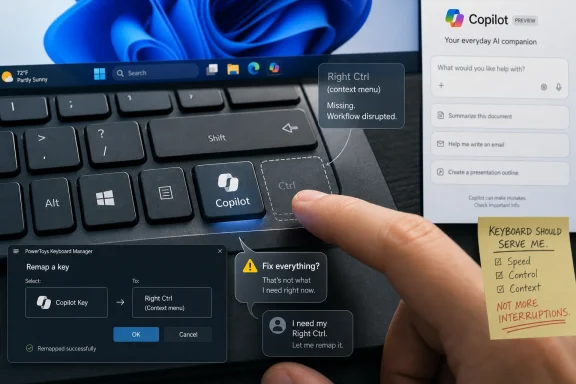
Microsoft promoted the dedicated Copilot key this week with social posts suggesting it is “the button you can press to fix everything,” reviving a familiar Windows 11 argument just as the company is preparing to let users remap that same key back to Right Ctrl or the context menu. The ad was meant to make Copilot feel playful, inevitable, and central to the PC. Instead, it landed as a reminder that Microsoft still has not learned the difference between giving users AI and taking something away to make room for it. The backlash is not really about one social graphic; it is about who gets to decide what the Windows keyboard is for.
The Copilot key was introduced in January 2024 as the first major change to the Windows keyboard in roughly three decades, a hardware declaration that Microsoft wanted AI to be as native to the PC as the Start menu. That was a big swing, and in isolation it was not irrational. If Microsoft truly believes Copilot is the next command layer for Windows, then giving it a physical affordance makes strategic sense.
But keyboards are not billboards. They are muscle memory made plastic. A key in the lower-right corner is not an empty patch of marketing real estate; for many users, it is part of a workflow that predates Windows 11, Copilot, and the current AI gold rush.
That is why the “fix everything” pitch was always going to be dangerous. It did not merely oversell Copilot’s usefulness. It invited users to compare Microsoft’s claim against their daily experience of Windows 11, where AI features have often arrived faster than requested fixes, cleanup work, and long-running quality-of-life improvements.
The result is a tidy example of modern Microsoft’s Windows problem: the company can be technically right about the long-term direction of computing while still being socially wrong about how aggressively to force that direction into users’ hands.
Right Ctrl matters in ways casual users may never notice. It is used by some power users for shortcuts, by virtualization software as a host key, by keyboard-driven workflows, and by people who rely on one-handed input patterns. The context menu key, similarly unfashionable but useful, remains a quiet accessibility and productivity tool for users who prefer or need keyboard navigation.
Microsoft has now acknowledged enough of that reality to promise a Windows 11 update later this year that will let users remap the Copilot key to act as Right Ctrl or the context menu key. That is the right move. It is also an implicit concession that the original rollout treated a physical key as if it were merely a software surface.
The distinction matters. Software experiments can be hidden behind feature flags, rolled back by update, or ignored by users who never click the icon. Hardware changes are more intimate. When a company changes the keyboard, it changes the boundary between intention and action.
The phrase landed badly because it echoed the very thing critics dislike about Microsoft’s AI push: the implication that Copilot is the answer before the user has asked a question. Windows users have spent the last few years watching AI entry points appear in the taskbar, Edge, Microsoft 365, Paint, Notepad, and Settings-adjacent experiences. Some of those features are useful. Some are half-promises. Some feel like product management trying to win a keynote slide.
So when Microsoft jokes that Copilot is the button that fixes everything, users hear a company congratulating itself for a solution that many still regard as unfinished, unwanted, or orthogonal to their actual problems. They hear a slogan where they expected restraint.
The “main character energy” line makes the same mistake in a different register. It tries to borrow internet language to make Copilot feel culturally fluent, but it accidentally frames the assistant as the star of a device that users still believe should star them. The PC has always been personal not because Microsoft decides what matters, but because the user does.
Recall’s original pitch — a searchable timeline of PC activity — was conceptually powerful and immediately polarizing. Microsoft later changed the rollout, added more security controls, and repositioned the feature more cautiously. But the reputational damage was instructive: users were not merely afraid of AI; they were afraid Microsoft would bolt AI into Windows faster than it could explain the consequences.
That concern has shaped reactions to far smaller features. An AI button in Notepad, Copilot prompts in productivity apps, and assistant hooks across Windows can each be defended on practical grounds. Together, they create a sense that Microsoft is colonizing familiar surfaces with a product agenda.
The Copilot key is the most literal version of that agenda. It is not an icon users can unpin. It is not a sidebar they can close. It is a dedicated piece of the keyboard saying, every day, that Microsoft’s priority deserves its own physical space.
But the concession comes after the symbolic damage. Microsoft first sold the Copilot key as a generational keyboard shift, then later had to accommodate users who wanted the old key behavior back. That does not make the original decision a disaster. It does make it look premature.
The company’s support language reportedly acknowledges that customers relying on Right Ctrl or the context menu key experienced workflow challenges. That phrasing is polite, but the underlying fact is blunt: Microsoft’s AI-first keyboard design broke some existing uses. The coming setting is not a bonus feature; it is a repair.
And that is why the “fix everything” ad feels so tone-deaf. Microsoft is marketing the Copilot key as a universal solution while simultaneously preparing a fix for the problems the key created. Even by the forgiving standards of tech advertising, the juxtaposition is awkward.
But Windows is not just another app platform. It is the operating environment for enterprises, governments, schools, developers, gamers, technicians, hobbyists, and home users who may have very different tolerance levels for AI experimentation. A feature that delights a Microsoft 365 power user may annoy a gamer, confuse a family PC owner, or create policy headaches for an administrator.
The company’s challenge is not proving that AI can be useful. It can be. Copilot can summarize pages, draft text, answer questions, and serve as a bridge into Microsoft services. The harder task is proving that AI belongs in the foreground of Windows without making the operating system feel less controllable.
That is where the Copilot key becomes a proxy battle. A user who does not want Copilot can ignore an app. It is harder to ignore a key that replaced something they used.
Enterprises care about predictability. A keyboard action should mean the same thing across a managed estate unless IT deliberately changes it. When Microsoft adds a consumer-facing AI key to business hardware, organizations must ask whether that key launches an approved experience, whether it exposes data to services they have governed, and whether users can change its behavior outside policy.
Microsoft has made progress in offering Copilot management controls across Windows and Microsoft 365 contexts, but the hardware layer adds a stubborn wrinkle. Even if Copilot is disabled, the key still exists. Even if the app is removed, the icon remains printed on the deck. Even if policy blocks the service, users still ask why the button is there.
That is the kind of small friction that accumulates in corporate deployments. It does not necessarily stop purchases. But it gives IT another reason to view Microsoft’s AI enthusiasm as something to be managed rather than embraced.
Microsoft knows this because it used the historical weight of the Windows key to sell the Copilot key. The comparison was intentional: just as the Windows key became a gateway to the Start menu and system shortcuts, the Copilot key was meant to become the gateway to an AI-mediated PC. That analogy is elegant, but it is incomplete.
The Windows key arrived as part of a new graphical operating system era and gradually became valuable because it made Windows faster to use. The Copilot key arrived before Copilot had earned the same status. The hardware bet came first; the universal habit has not yet followed.
That order is what irritates enthusiasts. Microsoft did not wait for users to demand a Copilot key. It declared that the key belonged there, then asked everyone to adapt.
A physical Copilot key should have launched with robust remapping from day one. Not because Copilot is useless, but because users are more likely to try new workflows when they trust they can retreat. The absence of a clean escape hatch turned the key into a loyalty test.
Microsoft is now moving toward the right model. Let the key open Copilot for users who want that. Let it become Right Ctrl or context menu for users who do not. Let OEMs ship AI PCs without pretending every buyer has the same relationship with AI.
That flexibility should not be treated as a grudging compromise. It should be the foundation of AI in Windows.
Against that backdrop, every new AI flourish competes with a backlog of familiar grievances. If Copilot gets a dedicated key while a long-requested Windows behavior remains absent, users infer priorities. Sometimes that inference is unfair. Often it is understandable.
Microsoft has recently signaled a renewed focus on performance, reliability, and everyday Windows quality. That is exactly the work Windows 11 needs. But the marketing machine can undermine that engineering message in a single afternoon if it makes AI sound like the only feature Microsoft is excited about.
This is the heart of the problem. Users are not asking Microsoft to stop building the future. They are asking it to stop acting as if the present is already fixed.
But that future is not guaranteed by engraving a logo on a keyboard. It requires Copilot to become fast, predictable, privacy-comprehensible, locally relevant where appropriate, and genuinely helpful inside Windows rather than merely adjacent to it. It also requires Microsoft to avoid turning every system surface into an upsell channel.
The phrase “fix everything” is particularly risky because troubleshooting is one of the places users most need trust. If Copilot can help explain errors, surface logs, guide repairs, and connect users to reliable recovery tools, it could be valuable. If it gives generic advice, hallucinates steps, or punts users into web-search mush, the key becomes a trapdoor into frustration.
AI assistants live or die by the gap between their promise and their behavior. Microsoft’s ad widened that gap.
Near-term, the practical path is clear:
Microsoft can still make Copilot useful enough that many users choose the key voluntarily. But this week’s backlash shows the cost of confusing placement with permission. The company won the right to put a key on the keyboard through its power over the Windows ecosystem; it still has to win the right for users to press it.
 Microsoft Turned a Keycap Into a Referendum on Trust
The Copilot key was introduced in January 2024 as the first major change to the Windows keyboard in roughly three decades, a hardware declaration that Microsoft wanted AI to be as native to the PC as the Start menu. That was a big swing, and in isolation it was not irrational. If Microsoft truly believes Copilot is the next command layer for Windows, then giving it a physical affordance makes strategic sense.But keyboards are not billboards. They are muscle memory made plastic. A key in the lower-right corner is not an empty patch of marketing real estate; for many users, it is part of a workflow that predates Windows 11, Copilot, and the current AI gold rush.
That is why the “fix everything” pitch was always going to be dangerous. It did not merely oversell Copilot’s usefulness. It invited users to compare Microsoft’s claim against their daily experience of Windows 11, where AI features have often arrived faster than requested fixes, cleanup work, and long-running quality-of-life improvements.
The result is a tidy example of modern Microsoft’s Windows problem: the company can be technically right about the long-term direction of computing while still being socially wrong about how aggressively to force that direction into users’ hands.
The Copilot Key Was Never Just a Shortcut
A keyboard shortcut is easy to dismiss until it is your shortcut. The controversy around the Copilot key has been strongest where Microsoft’s industrial design met real human habits: laptops and compact keyboards where the new key displaced the Right Ctrl key or context menu key. For some users, that replacement was a shrug. For others, it was a daily paper cut.Right Ctrl matters in ways casual users may never notice. It is used by some power users for shortcuts, by virtualization software as a host key, by keyboard-driven workflows, and by people who rely on one-handed input patterns. The context menu key, similarly unfashionable but useful, remains a quiet accessibility and productivity tool for users who prefer or need keyboard navigation.
Microsoft has now acknowledged enough of that reality to promise a Windows 11 update later this year that will let users remap the Copilot key to act as Right Ctrl or the context menu key. That is the right move. It is also an implicit concession that the original rollout treated a physical key as if it were merely a software surface.
The distinction matters. Software experiments can be hidden behind feature flags, rolled back by update, or ignored by users who never click the icon. Hardware changes are more intimate. When a company changes the keyboard, it changes the boundary between intention and action.
The Ad Failed Because It Said the Quiet Part Loudly
The social post’s “button you can press to fix everything” framing was obviously advertising hyperbole. Nobody sensible believes Microsoft literally thinks Copilot can repair every PC problem, solve every task, and soothe every user frustration with a single press. But good marketing does not have to be literal to be revealing.The phrase landed badly because it echoed the very thing critics dislike about Microsoft’s AI push: the implication that Copilot is the answer before the user has asked a question. Windows users have spent the last few years watching AI entry points appear in the taskbar, Edge, Microsoft 365, Paint, Notepad, and Settings-adjacent experiences. Some of those features are useful. Some are half-promises. Some feel like product management trying to win a keynote slide.
So when Microsoft jokes that Copilot is the button that fixes everything, users hear a company congratulating itself for a solution that many still regard as unfinished, unwanted, or orthogonal to their actual problems. They hear a slogan where they expected restraint.
The “main character energy” line makes the same mistake in a different register. It tries to borrow internet language to make Copilot feel culturally fluent, but it accidentally frames the assistant as the star of a device that users still believe should star them. The PC has always been personal not because Microsoft decides what matters, but because the user does.
Windows 11’s AI Hangover Made This Inevitable
This flare-up did not happen in a vacuum. Windows 11 has been carrying an AI hangover for more than a year, and Microsoft’s own messaging has not helped. The company spent 2024 talking about the “AI PC,” then used Copilot+ PCs to introduce a new class of hardware requirements and features, most controversially Recall.Recall’s original pitch — a searchable timeline of PC activity — was conceptually powerful and immediately polarizing. Microsoft later changed the rollout, added more security controls, and repositioned the feature more cautiously. But the reputational damage was instructive: users were not merely afraid of AI; they were afraid Microsoft would bolt AI into Windows faster than it could explain the consequences.
That concern has shaped reactions to far smaller features. An AI button in Notepad, Copilot prompts in productivity apps, and assistant hooks across Windows can each be defended on practical grounds. Together, they create a sense that Microsoft is colonizing familiar surfaces with a product agenda.
The Copilot key is the most literal version of that agenda. It is not an icon users can unpin. It is not a sidebar they can close. It is a dedicated piece of the keyboard saying, every day, that Microsoft’s priority deserves its own physical space.
The Remap Concession Is Sensible, but It Arrived After the Argument Was Lost
Microsoft’s planned remapping option is welcome precisely because it restores choice. For administrators and power users, a native setting is preferable to relying on PowerToys, AutoHotkey workarounds, registry edits, OEM utilities, or firmware quirks. It also matters for organizations that do not want endpoint behavior dependent on unsupported hacks.But the concession comes after the symbolic damage. Microsoft first sold the Copilot key as a generational keyboard shift, then later had to accommodate users who wanted the old key behavior back. That does not make the original decision a disaster. It does make it look premature.
The company’s support language reportedly acknowledges that customers relying on Right Ctrl or the context menu key experienced workflow challenges. That phrasing is polite, but the underlying fact is blunt: Microsoft’s AI-first keyboard design broke some existing uses. The coming setting is not a bonus feature; it is a repair.
And that is why the “fix everything” ad feels so tone-deaf. Microsoft is marketing the Copilot key as a universal solution while simultaneously preparing a fix for the problems the key created. Even by the forgiving standards of tech advertising, the juxtaposition is awkward.
The Real Competition Is Not Google or Apple, but the User’s Patience
Microsoft often frames Copilot as part of a broader industry race. Google has Gemini, Apple has Apple Intelligence, OpenAI has ChatGPT, and every productivity vendor wants an assistant that can summarize, draft, search, or automate. In that market, Microsoft cannot afford to look timid.But Windows is not just another app platform. It is the operating environment for enterprises, governments, schools, developers, gamers, technicians, hobbyists, and home users who may have very different tolerance levels for AI experimentation. A feature that delights a Microsoft 365 power user may annoy a gamer, confuse a family PC owner, or create policy headaches for an administrator.
The company’s challenge is not proving that AI can be useful. It can be. Copilot can summarize pages, draft text, answer questions, and serve as a bridge into Microsoft services. The harder task is proving that AI belongs in the foreground of Windows without making the operating system feel less controllable.
That is where the Copilot key becomes a proxy battle. A user who does not want Copilot can ignore an app. It is harder to ignore a key that replaced something they used.
Enterprise IT Sees the Button as Policy Surface
For sysadmins, the Copilot key is not just a culture-war ornament on a laptop deck. It is another endpoint behavior to inventory, document, configure, and support. If a fleet includes mixed devices with different keyboard layouts, different Copilot availability, and different remapping states, help desks inherit the mess.Enterprises care about predictability. A keyboard action should mean the same thing across a managed estate unless IT deliberately changes it. When Microsoft adds a consumer-facing AI key to business hardware, organizations must ask whether that key launches an approved experience, whether it exposes data to services they have governed, and whether users can change its behavior outside policy.
Microsoft has made progress in offering Copilot management controls across Windows and Microsoft 365 contexts, but the hardware layer adds a stubborn wrinkle. Even if Copilot is disabled, the key still exists. Even if the app is removed, the icon remains printed on the deck. Even if policy blocks the service, users still ask why the button is there.
That is the kind of small friction that accumulates in corporate deployments. It does not necessarily stop purchases. But it gives IT another reason to view Microsoft’s AI enthusiasm as something to be managed rather than embraced.
The Keyboard Is Sacred Because It Is Boring
The reason this story resonates is that keyboards are boring in the best possible way. Their stability is what makes them useful. A person can move across machines, operating systems, offices, and decades because the basic layout changes slowly.Microsoft knows this because it used the historical weight of the Windows key to sell the Copilot key. The comparison was intentional: just as the Windows key became a gateway to the Start menu and system shortcuts, the Copilot key was meant to become the gateway to an AI-mediated PC. That analogy is elegant, but it is incomplete.
The Windows key arrived as part of a new graphical operating system era and gradually became valuable because it made Windows faster to use. The Copilot key arrived before Copilot had earned the same status. The hardware bet came first; the universal habit has not yet followed.
That order is what irritates enthusiasts. Microsoft did not wait for users to demand a Copilot key. It declared that the key belonged there, then asked everyone to adapt.
AI Features Need Escape Hatches, Not Victory Laps
The most successful AI integrations in Windows will probably be the ones that feel optional until they become indispensable. Good AI can save clicks, reduce repetitive work, and make complex settings easier to discover. Bad AI, or merely premature AI, feels like a pop-up with better branding.A physical Copilot key should have launched with robust remapping from day one. Not because Copilot is useless, but because users are more likely to try new workflows when they trust they can retreat. The absence of a clean escape hatch turned the key into a loyalty test.
Microsoft is now moving toward the right model. Let the key open Copilot for users who want that. Let it become Right Ctrl or context menu for users who do not. Let OEMs ship AI PCs without pretending every buyer has the same relationship with AI.
That flexibility should not be treated as a grudging compromise. It should be the foundation of AI in Windows.
The Backlash Is Also About Windows 11’s Unfinished Business
The emotional charge behind this ad comes from Windows 11’s broader reputation. Users have complained for years about taskbar limitations, inconsistent interface layers, Settings and Control Panel overlap, File Explorer performance, account prompts, advertising-like surfaces, and update unpredictability. Microsoft has addressed some of these issues, ignored others, and reintroduced old capabilities slowly enough to make enthusiasts suspicious.Against that backdrop, every new AI flourish competes with a backlog of familiar grievances. If Copilot gets a dedicated key while a long-requested Windows behavior remains absent, users infer priorities. Sometimes that inference is unfair. Often it is understandable.
Microsoft has recently signaled a renewed focus on performance, reliability, and everyday Windows quality. That is exactly the work Windows 11 needs. But the marketing machine can undermine that engineering message in a single afternoon if it makes AI sound like the only feature Microsoft is excited about.
This is the heart of the problem. Users are not asking Microsoft to stop building the future. They are asking it to stop acting as if the present is already fixed.
Copilot Has to Earn the Button Every Day
There is a version of this story where the Copilot key becomes normal. Users press it to find settings, summarize documents, automate desktop chores, troubleshoot errors, and move between apps without memorizing where everything lives. In that future, the current backlash looks like the familiar discomfort that accompanies interface change.But that future is not guaranteed by engraving a logo on a keyboard. It requires Copilot to become fast, predictable, privacy-comprehensible, locally relevant where appropriate, and genuinely helpful inside Windows rather than merely adjacent to it. It also requires Microsoft to avoid turning every system surface into an upsell channel.
The phrase “fix everything” is particularly risky because troubleshooting is one of the places users most need trust. If Copilot can help explain errors, surface logs, guide repairs, and connect users to reliable recovery tools, it could be valuable. If it gives generic advice, hallucinates steps, or punts users into web-search mush, the key becomes a trapdoor into frustration.
AI assistants live or die by the gap between their promise and their behavior. Microsoft’s ad widened that gap.
The Copilot Key Fight Leaves Microsoft With a Smaller, Smarter Script
The lesson for Microsoft is not that it must apologize for Copilot’s existence. The company has invested heavily in AI, and Windows will inevitably become more AI-aware. The better lesson is that Microsoft should stop selling AI as destiny and start selling it as agency.Near-term, the practical path is clear:
- Microsoft should ship the promised native remapping option broadly and make it easy to find in Settings.
- Device makers should disclose clearly when the Copilot key replaces Right Ctrl, the context menu key, or another legacy key.
- Enterprise controls should make the key’s behavior predictable across managed fleets.
- Copilot features should be introduced with obvious off-switches and user-visible privacy boundaries.
- Windows marketing should emphasize solved user problems, not vibes about AI being the star of the PC.
Microsoft can still make Copilot useful enough that many users choose the key voluntarily. But this week’s backlash shows the cost of confusing placement with permission. The company won the right to put a key on the keyboard through its power over the Windows ecosystem; it still has to win the right for users to press it.
References
- Primary source: TechRadar
Published: Thu, 02 Jul 2026 14:00:00 GMT
Loading…
www.techradar.com - Official source: support.microsoft.com
Understand updates to the Copilot key on Windows devices | Microsoft Support
Understand updates to the Copilot key on Windows devicessupport.microsoft.com - Related coverage: windowscentral.com
Microsoft admits Windows 11's dedicated Copilot key breaks certain workflows: Confirms plans to let users restore "Right Ctrl" or "Context menu" key later this year | Windows Central
Windows 11's special Copilot Key has not been the popular hit that Microsoft was hoping it would be, and has now confirmed plans to let users remap the button back to its old functionality.www.windowscentral.com - Related coverage: windowsnews.ai
Windows 11 2026 Update Finally Adds Native Copilot Key Remapping to Settings - Windows News
The Windows 11 2026 Update finally allows remapping the dedicated Copilot key to Right Ctrl or Context Menu. Here's how it works and why users have been...windowsnews.ai - Related coverage: windowsreport.com
Microsoft Will Let Windows 11 Users Remap the Copilot Key Later This Year
Microsoft will finally let Windows 11 users remap the Copilot key back to Right Ctrl or the menu key later this year. windowsreport.com
- Related coverage: tomsguide.com
Microsoft admits Windows users 'experienced some challenges' with the forced CoPilot key — now it's finally doing something about it | Tom's Guide
Microsoft has acknowledged the dedicated Copilot key on Windows hasn't been universally loved, and a future Windows 11 update will allow users to remap it.www.tomsguide.com
- Official source: learn.microsoft.com
Updated Windows and Microsoft 365 Copilot Chat experience | Microsoft Learn
Learn about changes to the Copilot in Windows experience for commercial environments and how to configure it for your organization.learn.microsoft.com - Official source: answers.microsoft.com
Reprogram Copilot key - Microsoft Q&A
On my new Windows 11 computer, the right Ctrl button has been converted to a button that opens Copilot. I would like to reassign the button but to being a Ctrl button. There are a lot of posts out there about how the Copilot button is really a…answers.microsoft.com - Related coverage: fone.tips
Loading…
fone.tips - Related coverage: office-watch.com
Loading…
office-watch.com - Related coverage: buynowkey.com
Loading…
buynowkey.com - Official source: news.microsoft.com
- Related coverage: delltechnologies.com
Loading…
www.delltechnologies.com - Related coverage: techspot.com
Microsoft is adding a dedicated Copilot key to Windows keyboards | TechSpot
The Copilot key will appear on new PCs and laptops from Microsoft partners. It will, of course, be used to open Microsoft's Windows Copilot generative AI assistant...www.techspot.com - Official source: blogs.windows.com
Introducing a new Copilot key to kick off the year of AI-powered Windows PCs
Today, we are excited to take the next significant step forward and introduce a new Copilot key to Windows 11 PCs. In this new year, we will be ushering in a significant shift toward a more personal and intelligent computing future where AI will be s blogs.windows.com
- Related coverage: tomshardware.com
Windows 11 PCs to come with a Copilot key as Microsoft pushes forward with AI
It will be the first new standard Windows keyboard key since 1994.www.tomshardware.com
- Related coverage: arstechnica.com
Microsoft is adding a new key to PC keyboards for the first time since 1994
Copilot key will eventually be required in new PC keyboards, though not yet. arstechnica.com
- Related coverage: pcgamesn.com
Loading…
www.pcgamesn.com - Related coverage: axios.com
Microsoft gives AI a place on the Windows keyboard
It's the first change to the PC keyboard since the addition of the Windows button 30 years ago.www.axios.com
- Official source: wwps.microsoft.com