

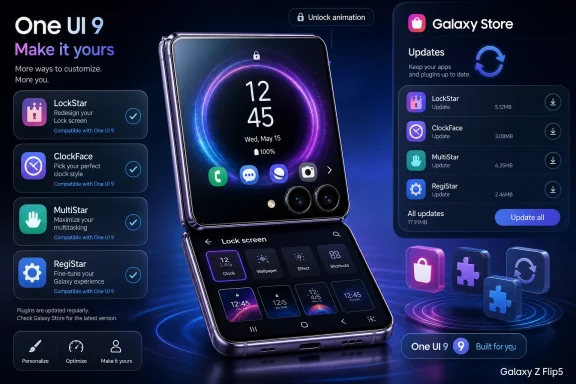
Samsung is updating Good Lock modules for One UI 9 in early July 2026, adding compatibility for LockStar, ClockFace, MultiStar, and RegiStar as it prepares Galaxy S26 users and upcoming Galaxy Z Fold 8 and Z Flip 8 buyers for Android 17. The news looks small because it arrives as app updates rather than a platform launch. But for Samsung’s most committed users, Good Lock is where One UI becomes less like a phone skin and more like a personal operating system. The quiet scramble to update these modules says something important about Samsung’s software strategy: the company now treats customization as a launch dependency, not an afterthought.
Good Lock has always occupied a strange place in Samsung’s ecosystem. It is official software, distributed through Samsung’s own channels, but it behaves like a power-user lab bolted onto the side of One UI. It lets users change lock screens, app behavior, foldable-screen workflows, gestures, clock styles, multitasking rules, and other details that mainstream settings panels either hide or avoid entirely.
That makes each One UI transition more complicated than a normal Android update. Samsung is not merely updating the base system and hoping third-party developers catch up. It also has to bring along its own constellation of optional-but-beloved modules, many of which poke directly at the parts of the interface most likely to change during a major OS release.
The latest batch matters because One UI 9 is based on Android 17 and is already available on the Galaxy S26 series, while Samsung is expected to ship the stable release on its next foldables later this month. LockStar’s new version, 9.0.00.5, restores compatibility with One UI 9 after being listed earlier as unsupported. ClockFace, MultiStar, and RegiStar have now joined the compatibility wave as well.
That chronology is the point. Samsung is not simply tidying up a few apps. It is aligning the enthusiast layer of One UI with the commercial launch calendar for its most visible hardware.
It is where notifications arrive before the user has committed to unlocking the device. It is where media controls, widgets, shortcuts, wallpapers, biometric prompts, and now AI-adjacent surfaces compete for attention. For Samsung, which has spent years making One UI visually distinct from stock Android, losing LockStar support during a major release is not merely a missing toy for theme obsessives.
The update to version 9.0.00.5 brings LockStar into the One UI 9 era and adds “Flip cover screen unlock animation support.” That second line is telling. Samsung’s lock-screen customization story can no longer be separated from foldables, cover displays, and devices that have more than one meaningful “front door.”
On a conventional slab phone, the lock screen is a single canvas. On a Galaxy Z Flip, it is part of a two-screen choreography. The cover display is not just a notification mirror anymore; it is an increasingly functional surface where users expect to check, launch, reply, authenticate, and move on without opening the phone.
The unlock animation support suggests Samsung is still smoothing that choreography. It is a small feature, but it sits exactly where hardware design, interface polish, and user habit intersect. If the animation between cover display and unlocked state feels wrong, the device feels less coherent.
That explains why MultiStar’s One UI 9 update is more interesting than its changelog might first suggest. According to the report, the module appears to add the ability to launch apps directly from a Galaxy Z Flip cover screen without requiring the Launcher Widget. If that behavior holds in the stable release, it removes a layer of friction from one of the most important foldable use cases.
The old model treated the cover screen like a curated sidecar. You enabled a widget, selected supported apps, and worked within Samsung’s chosen structure. A more direct launch model makes the cover screen feel less like an accessory and more like a real, if constrained, phone interface.
That is a meaningful philosophical shift. Foldables have long suffered from a mismatch between their physical promise and their software defaults. Users buy a clamshell because they want the small screen to do more than show a clock, but platform makers have to avoid turning a tiny display into a frustrating miniature desktop. Good Lock has often served as Samsung’s compromise: conservative defaults for everyone, extra control for users who ask for it.
The timing also matters. If the Galaxy Z Flip 8 and Galaxy Z Fold 8 arrive with stable One UI 9 later this month, Samsung needs its customization modules ready before reviewers and early adopters start poking at the edges. Foldable buyers are disproportionately likely to explore those edges. A broken or missing Good Lock module on launch week would not doom a device, but it would undercut the very audience most likely to evangelize it.
That pressure valve is especially useful because Android itself has become less chaotic and less customizable in visible ways than it was a decade ago. The old Android enthusiast culture thrived on ROMs, launchers, icon packs, root access, and aggressive system modification. Today’s phones are more locked down, more security-conscious, and more dependent on vendor-managed surfaces.
Samsung has responded by moving some of that old customization impulse inside the tent. Good Lock modules let users adjust behavior that would otherwise be unreachable without pretending that every customer wants those options in the Settings app. It is modular complexity, which is still complexity, but at least it is opt-in.
The downside is maintenance. A module such as LockStar does not live at arm’s length from the operating system. It depends on lock-screen internals, animation paths, display states, and permission assumptions that can change with a major Android release. RegiStar, which deals with settings behavior and input gestures, likewise touches parts of the system where compatibility breaks are plausible.
That is why these updates are more than housekeeping. They reveal the operational burden Samsung accepted when it turned Good Lock into a semi-official customization platform. Every major One UI release now has two launches: the broad platform launch everyone sees, and the Good Lock compatibility launch power users notice immediately.
The reported ClockFace update carries version 3.4.01.3 and a download size of 175.33MB. That is not tiny for what many users would describe as a customization plug-in. It hints at the amount of graphical and interface baggage required to keep visual personalization working across device families and screen states.
Samsung has long used display customization as a differentiator. Before Apple made the iPhone lock screen more flexible, Galaxy phones already had a reputation for letting users bend the interface farther than the default Android path. Good Lock reinforced that identity by giving Samsung loyalists tools that felt unofficially powerful while remaining officially sanctioned.
That is a clever brand play. Samsung can sell visual polish to mainstream users and deep personalization to enthusiasts without forcing those groups into the same interface. ClockFace may not generate headlines, but it supports the larger promise that a Galaxy phone is not merely updated by Samsung; it can be shaped by its owner.
Modern phones are not short of features. They are short of frictionless paths to the features people actually use. The longer a user has to dig through menus, the less likely a feature becomes part of daily behavior. RegiStar addresses that problem at the edges, where gestures, settings search, side-key behavior, and back-tap-style shortcuts become personal muscle memory.
That is also where OS updates can be most annoying. A visual redesign may be controversial, but a broken shortcut is immediately disruptive. If a user has trained themselves to launch an app, toggle a setting, or invoke a function through a customized input path, compatibility is not cosmetic. It is ergonomic.
Samsung’s broader challenge is that it wants One UI to keep evolving without invalidating the habits that make Galaxy phones feel sticky. RegiStar compatibility is therefore part of the retention story. It helps ensure that users upgrading to One UI 9 do not feel as though the system has confiscated the workflows they built under One UI 8 or earlier.
This is an important distinction because operating-system compatibility is often discussed as though it were binary. Either a phone receives the update or it does not. But for power users, the better question is whether the update preserves the whole working environment: modules, gestures, visual tweaks, foldable behaviors, and edge-case settings included.
Samsung’s May compatibility disclosure appears to have been an attempt to set expectations. It told users which Good Lock modules worked with One UI 9 and which did not, with LockStar among the missing pieces at the time. That kind of transparency is useful, but it also creates a public scoreboard.
Every module update now becomes a visible step toward completeness. LockStar, ClockFace, MultiStar, and RegiStar moving into the compatible column reduces the awkwardness of the S26’s early-adopter phase. It also gives Samsung more confidence before One UI 9 expands beyond the initial devices.
The risk is that Good Lock’s most loyal users are also the least forgiving. They know when something is missing. They notice if a widget workaround disappears, if a cover-screen behavior changes, or if a lock-screen layout no longer survives an update. The same enthusiasm that makes Good Lock valuable also makes its compatibility gaps more visible.
Samsung’s One UI cadence adds another layer to that graph. The company’s flagship launches, foldable launches, Android base versions, mid-cycle feature drops, and Good Lock modules all have to meet somewhere. The result is a recurring update crunch in which a single device launch can expose whether the software organization is synchronized.
Good Lock used to feel like it could trail behind. If a module took a few weeks to catch up, users might grumble, but the core phone still worked. That tolerance is shrinking as Samsung leans harder on customization and foldable-specific workflows. When modules enable behaviors that feel central to a device category, delay becomes more consequential.
The MultiStar update is the best example. Cover-screen app access on a Galaxy Z Flip is not a novelty anymore. It is part of why many people buy the device. If Samsung can make direct cover-screen launching easier through MultiStar, then the module is not just serving hobbyists; it is patching a product-experience gap.
That does not mean Samsung should expose every Good Lock function by default. The company still has good reasons to keep some features behind an enthusiast gate, especially when small displays create usability and support tradeoffs. But the more Good Lock solves real product problems, the less it can be treated like a side project.
That ambition creates a design problem. A small cover screen cannot simply duplicate the inner display. If Samsung allows everything, many apps will be cramped, awkward, or broken. If Samsung allows too little, the outer display feels artificially limited. The solution has been a mix of official support, curated widgets, and Good Lock-enabled expansion.
MultiStar’s apparent move away from requiring the Launcher Widget for app launches is therefore more than a convenience tweak. It suggests Samsung is reducing the ceremony around cover-screen use. The best small-screen interactions are the ones that feel immediate, not like a workaround you had to learn from a forum thread.
This is where Good Lock’s identity becomes complicated. It has always been the place where Samsung hides advanced functions from casual users. But on foldables, yesterday’s advanced function can become tomorrow’s expected behavior. The cover screen’s evolution keeps dragging niche features into the mainstream.
There is an obvious parallel with multi-window use on large-screen devices. What once felt like a power-user trick became a core justification for tablets and foldables. Cover-screen app access is following the same path. Samsung may not be ready to make it completely unrestricted by default, but it is clearly sanding down the rough edges for people who opt in.
Unlike many third-party apps, Good Lock modules live in Samsung’s own store ecosystem. That gives Samsung more control over rollout timing, regional availability, device targeting, and compatibility gating. It also means users who ignore the Galaxy Store can miss important pieces of the experience even after installing a major system update.
This is one of Samsung’s longstanding tensions. The company wants to offer an integrated Galaxy ecosystem, but Android users are trained to think of the Play Store as the primary app-update mechanism. Good Lock’s reliance on Samsung distribution makes sense technically and commercially, yet it also creates another update channel users must remember.
For enthusiasts, that is not a serious obstacle. They know where Good Lock lives and often check it obsessively after major updates. For mainstream users who discovered one or two modules through a guide, it is easier to lose track. A One UI 9 upgrade may arrive over the air, while the modules that restore familiar behavior wait elsewhere.
Samsung could solve some of this with clearer post-upgrade prompts or a more unified update dashboard. If Good Lock is now part of the broader One UI value proposition, its maintenance should feel less like a scavenger hunt. The modules may be optional, but the expectation of continuity is not.
In other words, the feature is that the feature still works. That may sound underwhelming, but it is increasingly central to mature platforms. As smartphones age into infrastructure, users value continuity as much as novelty. A major update that preserves workflows can be more successful than one that introduces flashy tools while breaking habits.
This is especially true for Samsung because its phones serve multiple constituencies. Casual users want reliability and battery life. Enthusiasts want customization. Enterprise administrators want predictable update behavior. Developers want stable APIs and device-class assumptions. Foldable buyers want their expensive hardware to feel purpose-built rather than experimental.
Good Lock sits in the middle of those demands. It lets Samsung move fast in some places while keeping the default OS calmer. But that bargain only works if compatibility arrives on time. When modules lag behind the OS, the modular strategy starts to look less like flexibility and more like fragmentation.
The July updates suggest Samsung understands the danger. By getting LockStar, ClockFace, MultiStar, and RegiStar ready before the expected foldable launch window, the company is reducing the chance that One UI 9 begins life with a visible enthusiast deficit.
The practical experience of One UI 9 will be shaped by Samsung’s launcher, lock screen, settings structure, multitasking tools, foldable behaviors, AI integrations, app ecosystem, and update policy. Good Lock modules extend that layer further. They are not part of Android in the abstract; they are part of what makes a Galaxy phone feel like a Galaxy phone.
That distinction matters because Android version numbers have become less meaningful to many consumers. Security patches, app updates, Play services components, and manufacturer skins all move on different clocks. A user may not care whether a feature came from Android 17, One UI 9, or a Good Lock plug-in. They care whether the phone does what it did yesterday and whether the new hardware earns its price.
Samsung’s ability to coordinate these layers is now a competitive advantage. Google controls Android’s direction, but Samsung controls the Galaxy experience most users actually touch. Good Lock gives the company a way to experiment and serve enthusiasts without waiting for Android platform consensus.
The catch is that Samsung then owns the whole stack emotionally, even where the stack is modular. If a Good Lock feature breaks after One UI 9, users will not blame the abstraction. They will blame Samsung.
Good Lock’s history has always included rough edges. Some modules arrive late. Some features vary by device. Some settings are powerful enough to be confusing. Samsung’s challenge is not to remove every quirk, because quirks are part of the appeal. The challenge is to make the core promises stable enough that users trust the platform through annual upgrades.
That trust will be tested first by S26 owners and then by buyers of the next foldables. If LockStar layouts survive, ClockFace behaves, RegiStar shortcuts remain dependable, and MultiStar makes cover-screen launching easier, the July updates will fade into the background. That is success. Infrastructure is most impressive when nobody has to think about it.
If problems appear, they will likely surface in the places Good Lock touches deepest: lock-screen state transitions, cover-screen app behavior, shortcut triggers, and visual consistency across display modes. Those are precisely the places where Samsung is trying to differentiate its hardware. Bugs there feel bigger than their file sizes.
For IT pros and fleet-minded readers, the lesson is straightforward. Good Lock is not usually an enterprise-management centerpiece, but it can affect user experience enough to matter in bring-your-own-device environments and enthusiast-heavy teams. Major One UI upgrades should be treated as ecosystem transitions, not just firmware installs.
The practical points are clear:
 Samsung’s Smallest Apps Now Carry Outsized Platform Weight
Good Lock has always occupied a strange place in Samsung’s ecosystem. It is official software, distributed through Samsung’s own channels, but it behaves like a power-user lab bolted onto the side of One UI. It lets users change lock screens, app behavior, foldable-screen workflows, gestures, clock styles, multitasking rules, and other details that mainstream settings panels either hide or avoid entirely.That makes each One UI transition more complicated than a normal Android update. Samsung is not merely updating the base system and hoping third-party developers catch up. It also has to bring along its own constellation of optional-but-beloved modules, many of which poke directly at the parts of the interface most likely to change during a major OS release.
The latest batch matters because One UI 9 is based on Android 17 and is already available on the Galaxy S26 series, while Samsung is expected to ship the stable release on its next foldables later this month. LockStar’s new version, 9.0.00.5, restores compatibility with One UI 9 after being listed earlier as unsupported. ClockFace, MultiStar, and RegiStar have now joined the compatibility wave as well.
That chronology is the point. Samsung is not simply tidying up a few apps. It is aligning the enthusiast layer of One UI with the commercial launch calendar for its most visible hardware.
LockStar’s Return Shows Why the Lock Screen Is No Longer Cosmetic
LockStar is easy to underestimate. On paper, it is a lock-screen customization module, which makes it sound like wallpaper-adjacent decoration. In practice, the lock screen has become one of the busiest and most contested spaces on a modern smartphone.It is where notifications arrive before the user has committed to unlocking the device. It is where media controls, widgets, shortcuts, wallpapers, biometric prompts, and now AI-adjacent surfaces compete for attention. For Samsung, which has spent years making One UI visually distinct from stock Android, losing LockStar support during a major release is not merely a missing toy for theme obsessives.
The update to version 9.0.00.5 brings LockStar into the One UI 9 era and adds “Flip cover screen unlock animation support.” That second line is telling. Samsung’s lock-screen customization story can no longer be separated from foldables, cover displays, and devices that have more than one meaningful “front door.”
On a conventional slab phone, the lock screen is a single canvas. On a Galaxy Z Flip, it is part of a two-screen choreography. The cover display is not just a notification mirror anymore; it is an increasingly functional surface where users expect to check, launch, reply, authenticate, and move on without opening the phone.
The unlock animation support suggests Samsung is still smoothing that choreography. It is a small feature, but it sits exactly where hardware design, interface polish, and user habit intersect. If the animation between cover display and unlocked state feels wrong, the device feels less coherent.
The Foldable Launch Is Driving the Software Timetable
Samsung’s foldables have become software showcases as much as hardware products. The hinge, display crease, and battery life still grab attention at launch events, but the real sales pitch is increasingly about workflows that ordinary phones do not perform as elegantly. Multi-window layouts, cover-screen app access, continuity between displays, and one-handed shortcuts are now part of the product.That explains why MultiStar’s One UI 9 update is more interesting than its changelog might first suggest. According to the report, the module appears to add the ability to launch apps directly from a Galaxy Z Flip cover screen without requiring the Launcher Widget. If that behavior holds in the stable release, it removes a layer of friction from one of the most important foldable use cases.
The old model treated the cover screen like a curated sidecar. You enabled a widget, selected supported apps, and worked within Samsung’s chosen structure. A more direct launch model makes the cover screen feel less like an accessory and more like a real, if constrained, phone interface.
That is a meaningful philosophical shift. Foldables have long suffered from a mismatch between their physical promise and their software defaults. Users buy a clamshell because they want the small screen to do more than show a clock, but platform makers have to avoid turning a tiny display into a frustrating miniature desktop. Good Lock has often served as Samsung’s compromise: conservative defaults for everyone, extra control for users who ask for it.
The timing also matters. If the Galaxy Z Flip 8 and Galaxy Z Fold 8 arrive with stable One UI 9 later this month, Samsung needs its customization modules ready before reviewers and early adopters start poking at the edges. Foldable buyers are disproportionately likely to explore those edges. A broken or missing Good Lock module on launch week would not doom a device, but it would undercut the very audience most likely to evangelize it.
Good Lock Is Samsung’s Safety Valve for Opinionated Design
One UI has become more polished over time, but Samsung still faces the same design dilemma every mature platform faces. The company must simplify the default experience for mainstream buyers while preserving enough control to keep enthusiasts from drifting toward launchers, ADB hacks, or rival ecosystems. Good Lock is the pressure valve that lets Samsung do both.That pressure valve is especially useful because Android itself has become less chaotic and less customizable in visible ways than it was a decade ago. The old Android enthusiast culture thrived on ROMs, launchers, icon packs, root access, and aggressive system modification. Today’s phones are more locked down, more security-conscious, and more dependent on vendor-managed surfaces.
Samsung has responded by moving some of that old customization impulse inside the tent. Good Lock modules let users adjust behavior that would otherwise be unreachable without pretending that every customer wants those options in the Settings app. It is modular complexity, which is still complexity, but at least it is opt-in.
The downside is maintenance. A module such as LockStar does not live at arm’s length from the operating system. It depends on lock-screen internals, animation paths, display states, and permission assumptions that can change with a major Android release. RegiStar, which deals with settings behavior and input gestures, likewise touches parts of the system where compatibility breaks are plausible.
That is why these updates are more than housekeeping. They reveal the operational burden Samsung accepted when it turned Good Lock into a semi-official customization platform. Every major One UI release now has two launches: the broad platform launch everyone sees, and the Good Lock compatibility launch power users notice immediately.
ClockFace Is the Boring Module That Explains the Strategy
ClockFace is the least dramatic of the newly updated modules, but it may be the clearest example of Samsung’s strategy. A clock face sounds trivial until you remember that clocks sit on always-on displays, lock screens, cover displays, themes, widgets, and accessibility-sensitive surfaces. They are part of the device’s ambient identity.The reported ClockFace update carries version 3.4.01.3 and a download size of 175.33MB. That is not tiny for what many users would describe as a customization plug-in. It hints at the amount of graphical and interface baggage required to keep visual personalization working across device families and screen states.
Samsung has long used display customization as a differentiator. Before Apple made the iPhone lock screen more flexible, Galaxy phones already had a reputation for letting users bend the interface farther than the default Android path. Good Lock reinforced that identity by giving Samsung loyalists tools that felt unofficially powerful while remaining officially sanctioned.
That is a clever brand play. Samsung can sell visual polish to mainstream users and deep personalization to enthusiasts without forcing those groups into the same interface. ClockFace may not generate headlines, but it supports the larger promise that a Galaxy phone is not merely updated by Samsung; it can be shaped by its owner.
RegiStar Points to the Hidden War Over Shortcuts
RegiStar’s One UI 9 compatibility update is smaller in reported file size, at 12.75MB, but its role is not minor. RegiStar has become one of those modules that matters because it changes how quickly users can reach things, invoke actions, and bend device input around personal habits. In a mature smartphone market, those seconds matter.Modern phones are not short of features. They are short of frictionless paths to the features people actually use. The longer a user has to dig through menus, the less likely a feature becomes part of daily behavior. RegiStar addresses that problem at the edges, where gestures, settings search, side-key behavior, and back-tap-style shortcuts become personal muscle memory.
That is also where OS updates can be most annoying. A visual redesign may be controversial, but a broken shortcut is immediately disruptive. If a user has trained themselves to launch an app, toggle a setting, or invoke a function through a customized input path, compatibility is not cosmetic. It is ergonomic.
Samsung’s broader challenge is that it wants One UI to keep evolving without invalidating the habits that make Galaxy phones feel sticky. RegiStar compatibility is therefore part of the retention story. It helps ensure that users upgrading to One UI 9 do not feel as though the system has confiscated the workflows they built under One UI 8 or earlier.
The Galaxy S26 Is the Canary in the One UI 9 Mine
For now, the Galaxy S26 series is reportedly the only phone family where One UI 9 is available. That makes S26 users the first real test group for this Good Lock transition. They are discovering not only Android 17’s Samsung-flavored changes, but also which pieces of Samsung’s customization ecosystem survived the jump.This is an important distinction because operating-system compatibility is often discussed as though it were binary. Either a phone receives the update or it does not. But for power users, the better question is whether the update preserves the whole working environment: modules, gestures, visual tweaks, foldable behaviors, and edge-case settings included.
Samsung’s May compatibility disclosure appears to have been an attempt to set expectations. It told users which Good Lock modules worked with One UI 9 and which did not, with LockStar among the missing pieces at the time. That kind of transparency is useful, but it also creates a public scoreboard.
Every module update now becomes a visible step toward completeness. LockStar, ClockFace, MultiStar, and RegiStar moving into the compatible column reduces the awkwardness of the S26’s early-adopter phase. It also gives Samsung more confidence before One UI 9 expands beyond the initial devices.
The risk is that Good Lock’s most loyal users are also the least forgiving. They know when something is missing. They notice if a widget workaround disappears, if a cover-screen behavior changes, or if a lock-screen layout no longer survives an update. The same enthusiasm that makes Good Lock valuable also makes its compatibility gaps more visible.
Samsung Is Learning From the Annual Update Crunch
The smartphone industry has normalized annual platform churn. Google moves Android forward, silicon vendors update drivers and frameworks, manufacturers re-skin and re-test, carriers certify, and app developers adapt. Users see a version number and a feature list; behind the scenes, everything is a dependency graph.Samsung’s One UI cadence adds another layer to that graph. The company’s flagship launches, foldable launches, Android base versions, mid-cycle feature drops, and Good Lock modules all have to meet somewhere. The result is a recurring update crunch in which a single device launch can expose whether the software organization is synchronized.
Good Lock used to feel like it could trail behind. If a module took a few weeks to catch up, users might grumble, but the core phone still worked. That tolerance is shrinking as Samsung leans harder on customization and foldable-specific workflows. When modules enable behaviors that feel central to a device category, delay becomes more consequential.
The MultiStar update is the best example. Cover-screen app access on a Galaxy Z Flip is not a novelty anymore. It is part of why many people buy the device. If Samsung can make direct cover-screen launching easier through MultiStar, then the module is not just serving hobbyists; it is patching a product-experience gap.
That does not mean Samsung should expose every Good Lock function by default. The company still has good reasons to keep some features behind an enthusiast gate, especially when small displays create usability and support tradeoffs. But the more Good Lock solves real product problems, the less it can be treated like a side project.
The Cover Screen Is Becoming Samsung’s Second Home Screen
The Galaxy Z Flip line has forced Samsung to rethink what a phone interface is allowed to be. A cover display began as a glanceable panel, but each generation has pushed it toward greater autonomy. Users want to check messages, control music, frame selfies, view widgets, launch apps, and perform quick tasks without opening the device.That ambition creates a design problem. A small cover screen cannot simply duplicate the inner display. If Samsung allows everything, many apps will be cramped, awkward, or broken. If Samsung allows too little, the outer display feels artificially limited. The solution has been a mix of official support, curated widgets, and Good Lock-enabled expansion.
MultiStar’s apparent move away from requiring the Launcher Widget for app launches is therefore more than a convenience tweak. It suggests Samsung is reducing the ceremony around cover-screen use. The best small-screen interactions are the ones that feel immediate, not like a workaround you had to learn from a forum thread.
This is where Good Lock’s identity becomes complicated. It has always been the place where Samsung hides advanced functions from casual users. But on foldables, yesterday’s advanced function can become tomorrow’s expected behavior. The cover screen’s evolution keeps dragging niche features into the mainstream.
There is an obvious parallel with multi-window use on large-screen devices. What once felt like a power-user trick became a core justification for tablets and foldables. Cover-screen app access is following the same path. Samsung may not be ready to make it completely unrestricted by default, but it is clearly sanding down the rough edges for people who opt in.
The Galaxy Store Remains Both Gatekeeper and Bottleneck
Users can install these updates through the Galaxy Store by opening the menu, going to updates, and choosing to update all, or by opening Good Lock, navigating to plug-ins, and tapping the update icon next to the relevant module. That distribution path is familiar to Samsung users, but it remains a peculiar part of the Android experience.Unlike many third-party apps, Good Lock modules live in Samsung’s own store ecosystem. That gives Samsung more control over rollout timing, regional availability, device targeting, and compatibility gating. It also means users who ignore the Galaxy Store can miss important pieces of the experience even after installing a major system update.
This is one of Samsung’s longstanding tensions. The company wants to offer an integrated Galaxy ecosystem, but Android users are trained to think of the Play Store as the primary app-update mechanism. Good Lock’s reliance on Samsung distribution makes sense technically and commercially, yet it also creates another update channel users must remember.
For enthusiasts, that is not a serious obstacle. They know where Good Lock lives and often check it obsessively after major updates. For mainstream users who discovered one or two modules through a guide, it is easier to lose track. A One UI 9 upgrade may arrive over the air, while the modules that restore familiar behavior wait elsewhere.
Samsung could solve some of this with clearer post-upgrade prompts or a more unified update dashboard. If Good Lock is now part of the broader One UI value proposition, its maintenance should feel less like a scavenger hunt. The modules may be optional, but the expectation of continuity is not.
Compatibility Is the New Feature
The most striking thing about these updates is how ordinary their changelogs are. ClockFace and RegiStar reportedly mention One UI 9 compatibility and little else. LockStar’s headline feature is compatibility, with a cover-screen unlock animation improvement attached. MultiStar has the most tangible behavioral change, but even that is tied to getting foldable workflows ready for the next OS.In other words, the feature is that the feature still works. That may sound underwhelming, but it is increasingly central to mature platforms. As smartphones age into infrastructure, users value continuity as much as novelty. A major update that preserves workflows can be more successful than one that introduces flashy tools while breaking habits.
This is especially true for Samsung because its phones serve multiple constituencies. Casual users want reliability and battery life. Enthusiasts want customization. Enterprise administrators want predictable update behavior. Developers want stable APIs and device-class assumptions. Foldable buyers want their expensive hardware to feel purpose-built rather than experimental.
Good Lock sits in the middle of those demands. It lets Samsung move fast in some places while keeping the default OS calmer. But that bargain only works if compatibility arrives on time. When modules lag behind the OS, the modular strategy starts to look less like flexibility and more like fragmentation.
The July updates suggest Samsung understands the danger. By getting LockStar, ClockFace, MultiStar, and RegiStar ready before the expected foldable launch window, the company is reducing the chance that One UI 9 begins life with a visible enthusiast deficit.
Android 17 Is Not the Whole Story
It is tempting to frame One UI 9 as Samsung’s Android 17 release and leave it there. That is technically accurate but incomplete. For Galaxy users, Android’s base version is only one layer of the experience, and often not the layer they interact with most directly.The practical experience of One UI 9 will be shaped by Samsung’s launcher, lock screen, settings structure, multitasking tools, foldable behaviors, AI integrations, app ecosystem, and update policy. Good Lock modules extend that layer further. They are not part of Android in the abstract; they are part of what makes a Galaxy phone feel like a Galaxy phone.
That distinction matters because Android version numbers have become less meaningful to many consumers. Security patches, app updates, Play services components, and manufacturer skins all move on different clocks. A user may not care whether a feature came from Android 17, One UI 9, or a Good Lock plug-in. They care whether the phone does what it did yesterday and whether the new hardware earns its price.
Samsung’s ability to coordinate these layers is now a competitive advantage. Google controls Android’s direction, but Samsung controls the Galaxy experience most users actually touch. Good Lock gives the company a way to experiment and serve enthusiasts without waiting for Android platform consensus.
The catch is that Samsung then owns the whole stack emotionally, even where the stack is modular. If a Good Lock feature breaks after One UI 9, users will not blame the abstraction. They will blame Samsung.
The Real Test Comes After Launch Week
The immediate story is compatibility. The longer story is durability. It is one thing for modules to launch with version numbers that support One UI 9. It is another for them to behave consistently across devices, regions, screen densities, foldable modes, and future monthly patches.Good Lock’s history has always included rough edges. Some modules arrive late. Some features vary by device. Some settings are powerful enough to be confusing. Samsung’s challenge is not to remove every quirk, because quirks are part of the appeal. The challenge is to make the core promises stable enough that users trust the platform through annual upgrades.
That trust will be tested first by S26 owners and then by buyers of the next foldables. If LockStar layouts survive, ClockFace behaves, RegiStar shortcuts remain dependable, and MultiStar makes cover-screen launching easier, the July updates will fade into the background. That is success. Infrastructure is most impressive when nobody has to think about it.
If problems appear, they will likely surface in the places Good Lock touches deepest: lock-screen state transitions, cover-screen app behavior, shortcut triggers, and visual consistency across display modes. Those are precisely the places where Samsung is trying to differentiate its hardware. Bugs there feel bigger than their file sizes.
For IT pros and fleet-minded readers, the lesson is straightforward. Good Lock is not usually an enterprise-management centerpiece, but it can affect user experience enough to matter in bring-your-own-device environments and enthusiast-heavy teams. Major One UI upgrades should be treated as ecosystem transitions, not just firmware installs.
Samsung’s One UI 9 Dress Rehearsal Is Happening in the Plug-Ins
Samsung’s latest Good Lock updates do not announce a grand new direction, but they reveal how One UI 9 is being staged. The company is moving the pieces that power users will notice first: the lock screen, clock styling, foldable multitasking, cover-screen app access, and shortcut customization. That is where the early narrative of a new Galaxy release is often won or lost.The practical points are clear:
- LockStar version 9.0.00.5 restores support for One UI 9 and adds Flip cover screen unlock animation support.
- ClockFace version 3.4.01.3, MultiStar version 11.1.04, and RegiStar version 1.0.73 are now being updated for One UI 9 compatibility.
- MultiStar appears to make Galaxy Z Flip cover-screen app launching easier by removing reliance on the Launcher Widget.
- Galaxy S26 users are the immediate beneficiaries because they are currently the reported One UI 9 audience.
- Galaxy Z Fold 8 and Galaxy Z Flip 8 buyers are the strategic audience because Samsung is expected to debut stable One UI 9 on those devices later this month.
- Users who rely on Good Lock should check both the Galaxy Store update page and the Good Lock plug-ins screen after moving to One UI 9.
References
- Primary source: SamMobile
Published: 2026-07-02T15:10:16.651728
Loading…
www.sammobile.com - Related coverage: technobezz.com
Samsung Begins Testing One UI 9 for Galaxy Z Fold 8 and Flip 8 | Technobezz
Samsung has started internal testing of One UI 9 for its 2026 Galaxy Z Fold 8 and Flip 8, based on Android 17.www.technobezz.com - Related coverage: phonearena.com
Loading…
www.phonearena.com - Related coverage: samlover.com
Loading…
samlover.com - Related coverage: techcabal.com
Loading…
techcabal.com - Related coverage: sammobile.blog
Loading…
sammobile.blog