

Opera released Paste Protect on July 2, 2026, as a free, default-on browser security feature that detects and blocks suspicious clipboard content used in ClickFix attacks before users paste malicious commands into Terminal, Command Prompt, Windows Run, or similar execution surfaces. The move is small in interface terms but unusually significant in security philosophy: Opera is treating the clipboard as an attack boundary, not just a convenience buffer. That matters because ClickFix succeeds precisely where many defenses are weakest, in the gap between “the website told me to do this” and “the user executed it locally.”
Most browser security stories are about keeping hostile code away from the machine. Paste Protect is different because the hostile code may never need to execute inside the browser at all. In a ClickFix attack, the browser’s job is often just to stage the con: display a fake CAPTCHA, fake video error, fake update prompt, or fake support warning, then persuade the user to copy a command and run it somewhere more powerful.
That is what makes Opera’s new feature interesting. The company is not merely adding another warning banner to a web page or another reputation check on a download. It is intervening at the moment when copied text becomes operational intent.
The clipboard has always been a strange trust zone. It is user-controlled, application-accessible, invisible most of the time, and routinely used to move sensitive material between contexts. Password managers, terminals, crypto wallets, banking portals, shell scripts, remote admin tools, and developer workflows all depend on it. Attackers noticed the same thing defenders did: the clipboard is where intent becomes action.
Paste Protect tries to make that invisible handoff visible. When Opera sees clipboard content that matches known malicious command patterns, it blocks the copy or paste flow and warns the user. According to Opera, the feature is tailored across Windows, macOS, and Linux, because a suspicious PowerShell line, a shell command, and a macOS Terminal payload do not look identical even when they serve the same criminal purpose.
For Windows users in particular, this lands in familiar territory. The Windows Run dialog, PowerShell, Command Prompt, Windows Terminal, and even File Explorer’s address bar have all become targets for “paste this to fix it” social engineering. The attacker does not need to defeat SmartScreen or sneak an executable past a download scanner if the victim can be persuaded to invoke the chain manually.
That framing is the whole attack. Traditional phishing often depends on impersonating a login page or tricking the user into opening an attachment. ClickFix goes a step further and recruits the user as the execution engine. The victim copies a command, opens a trusted local interface, pastes the command, and presses Enter.
This is why the technique can dodge so many familiar controls. Email filtering may never see the payload. Antivirus may not object until after execution has already begun. Browser download protections may have no file to inspect. The command may pull down a payload only after it is run, or it may abuse built-in operating-system tools that defenders cannot simply remove from every machine.
The user’s machine sees PowerShell, curl, mshta, wscript, bash, osascript, or another legitimate interpreter being invoked by the user. The attacker sees the same thing as an ideal delivery path. The browser sees a web page that may not have exploited a memory bug or violated a traditional sandbox boundary at all.
That inversion explains why ClickFix has moved so quickly from curiosity to mainstream attack pattern. It is cheap to deploy, easy to customize, and well suited to malvertising and compromised legitimate sites. It is also emotionally calibrated: a fake CAPTCHA borrows the rhythm of ordinary web friction, while a fake repair prompt borrows the authority of IT support.
Opera’s bet is that the browser can still do something useful even when the attack is designed to leave the browser. It can inspect the object being handed from the web context into the local execution context. That is a narrow intervention, but narrow is not the same as minor.
Paste Protect expands the idea. The danger is no longer only that something changes what the user copied. The danger is that the copied content is itself a weapon, whether the user selected it intentionally or a website injected it into the clipboard through trickery.
That distinction matters. Clipboard hijacking is a substitution attack: the user thinks they copied one thing, but malware swaps in another. ClickFix-style clipboard injection is more psychological: the user may knowingly copy the dangerous command because the page has convinced them the command is legitimate. In both cases, the clipboard becomes the final staging area before harm.
Opera’s naming is slightly confusing because the company previously used similar language for clipboard protection. But the product direction is clear enough. Paste Protect now folds together the older defense against clipboard tampering with a newer “Injection Protection” layer aimed at malicious commands copied from web pages or inserted into the clipboard.
This is the kind of feature that sounds obvious after someone ships it. Of course a browser should be suspicious when a web page tries to shepherd a user toward a terminal command. Of course the clipboard should not be treated as neutral when it contains an encoded PowerShell downloader or a shell pipeline fetched from a suspicious source. But browser makers have historically been reluctant to police what users copy, partly because copying text is one of the web’s most basic affordances.
That reluctance is understandable. Developers copy commands from documentation all day. Admins copy remediation scripts from support articles. Linux users copy package installation lines. Windows users copy registry edits, PowerShell snippets, DISM commands, and winget instructions. A browser that blocks too aggressively risks becoming the security equivalent of a smoke alarm that goes off whenever someone makes toast.
Opera therefore has to thread a difficult needle. If Paste Protect is too quiet, it becomes security theater. If it is too loud, users will disable it, whitelist too broadly, or train themselves to click through. The value of the feature will depend less on the press release than on detection quality, explanation quality, and restraint.
Browser extensions can and do help with malicious pages, scripts, and reputation checks, but extensions are unevenly installed, unevenly maintained, and unevenly trusted. The users most likely to fall for a fake CAPTCHA prompt are not necessarily the users running a carefully curated stack of security extensions. In enterprise environments, extensions can also create their own governance problems: permissions, update chains, vendor trust, and compatibility with managed browser policies.
A browser-native control starts from a better distribution position. It is there before the user knows they need it. It also has a better chance of integrating into the browser’s security model without asking users to grant yet another extension broad access to pages and clipboard events.
That said, “native” does not mean “complete.” Opera is not an endpoint detection platform. It cannot see everything that happens after a command is executed outside the browser. It cannot solve the broader problem of users being persuaded to run instructions from unknown pages. It cannot protect someone who retypes a malicious command manually, uses another browser, or disables the warning for a trusted-looking but compromised site.
Still, default-on controls have a long history of changing attack economics. Pop-up blockers did not end abusive advertising, but they changed the baseline. SmartScreen did not end malicious downloads, but it added friction at scale. Browser sandboxing did not make exploitation impossible, but it made entire classes of attacks harder and more expensive.
Paste Protect belongs in that category if it works as advertised. It does not need to be perfect to be useful. It needs to interrupt enough high-volume, low-sophistication attack chains to make ClickFix less reliable.
PowerShell is the obvious example. It is indispensable for administrators and defenders, but its power makes it attractive to attackers. A short command can download content, decode payloads, invoke scripts in memory, modify registry keys, create scheduled tasks, or launch additional tools. The same is true, in different ways, of mshta, rundll32, regsvr32, certutil, wscript, and other living-off-the-land binaries that security teams have spent years monitoring.
ClickFix does not require the attacker to introduce a suspicious executable at the first step. The initial lure may simply ask the user to press Windows-R, paste a command, and hit Enter. To a victim, that feels like performing a local troubleshooting step. To the attacker, it is initial access with a human-assisted bypass.
This is why WindowsForum readers should treat Opera’s feature as more than a browser curiosity. The relevant endpoint is not the browser tab. It is the local execution surface. Paste Protect is interesting because it acknowledges that the browser and the operating system are part of one continuous user journey, even if security products often divide them into separate boxes.
Microsoft has been moving in a similar conceptual direction with warnings around risky pasted commands and with broader hardening against script abuse, but the browser layer remains crucial. The web page is where the social engineering happens. If the first meaningful warning arrives only after the user has already opened a terminal, the attacker has already won half the battle.
Opera’s intervention is earlier and more contextual. It can say, in effect, “This thing you just copied from a website looks like the kind of command attackers use.” That is a more intelligible warning than a generic downstream alert about a script host or command interpreter.
Opera says Paste Protect will show a warning explaining what happened, with a red icon in the address bar, and will display only the first 120 characters of blocked content. That design choice is sensible. It gives the user evidence without turning the warning into a convenient copyable payload or overwhelming them with obfuscated script.
But the explanatory layer is where this kind of feature lives or dies. Users do not need to know every detail of command injection. They need to understand that normal websites should not require terminal commands to prove they are human or play media. They need the warning to break the spell of the fake troubleshooting flow.
There is an awkward truth here: the best security intervention may sound patronizing. “Do not paste commands from random websites into your terminal” is obvious to power users and frequently ignored by everyone else, including power users in a hurry. ClickFix works because context suppresses skepticism. A fake CAPTCHA looks routine. A fake Cloudflare page feels like familiar web bureaucracy. A fake “browser repair” instruction arrives at the moment the user already believes something is broken.
A good warning has to restore skepticism without requiring a lecture. It must make the hidden risk legible in one or two sentences. It must also avoid crying wolf on legitimate documentation sites, developer portals, and internal admin pages where copying commands is expected behavior.
Whitelisting trusted sites is therefore both necessary and dangerous. It is necessary because admins and developers need workable paths around false positives. It is dangerous because compromised trusted sites are a recurring part of the ClickFix story. If users whitelist a domain because they recognize the brand, attackers who compromise that site inherit the trust decision.
Some will move from copy buttons to images containing commands, forcing users to type or OCR them. Some will split payloads into multiple fragments that look harmless alone. Some will provide commands through downloadable text files, chat widgets, QR codes, or remote support impersonation. Some will try to detect Opera and change the lure. Some will shift from terminal commands to browser extension installation, OAuth consent abuse, remote desktop tools, or signed utilities.
That does not make Paste Protect pointless. Security is rarely about ending a tactic outright. It is about raising cost, reducing reliability, and buying time for detection elsewhere. A defense that blocks the simplest form of a high-volume attack can still matter, even if sophisticated actors evolve.
The bigger question is whether other browsers follow. If Chrome, Edge, Firefox, Safari, and Brave adopt similar protections, ClickFix operators lose a cheap universal playbook. If only Opera ships it, the feature becomes a meaningful advantage for Opera users but a limited ecosystem shift.
There is also a standards question lurking beneath the product announcement. Browsers already gate clipboard read access more tightly than they once did, but clipboard write behavior and user-mediated copy flows remain complicated. The web needs to support legitimate copying from documentation, code samples, ticketing systems, and admin consoles. It also needs to recognize that “copy this command and run it” is no longer an edge case; it is an attack surface.
The likely future is not a blanket ban. It is reputation-aware, context-aware friction. Commands copied from well-known developer documentation may pass quietly. Commands copied from a newly registered domain serving a fake CAPTCHA may not. Multi-line, encoded, obfuscated, or downloader-like commands may receive heavier scrutiny. Browser vendors will need to balance privacy, local analysis, cloud reputation, and enterprise manageability.
Organizations should review whether users can run PowerShell freely, whether script execution is constrained, whether application control is deployed, and whether endpoint tools alert on suspicious child processes from explorer.exe, powershell.exe, cmd.exe, mshta.exe, and wscript.exe. They should also examine whether training materials still focus too narrowly on attachments and credential harvesting while ignoring fake CAPTCHA and paste-to-run lures.
The user education piece needs updating. Telling employees not to click suspicious links is not enough when the compromised page may be reached from a search result, a malvertisement, or a legitimate site. Telling them not to download unknown executables is not enough when the payload is fetched by a command they pasted into Run.
The practical rule is simple: a website should almost never ask a normal user to run a terminal command to view content, complete verification, fix audio, repair a browser, or prove humanity. For administrators and developers, the standard is narrower but still important: commands should come from trusted documentation, internal runbooks, signed scripts, package managers, or reviewed sources, not from pop-ups.
Enterprises should also be careful with browser diversity. A feature in Opera may protect users who choose Opera, but many managed fleets standardize on Edge or Chrome. If Paste Protect proves effective, IT teams should pressure their primary browser vendors for equivalent policy-controlled protections rather than treating it as a niche browser perk.
For home users, the advice is less elegant but just as direct. If a page asks you to open Windows-R and paste something, stop. If a CAPTCHA tells you to copy a command, close the tab. If a video player says the fix is a terminal command, assume the page is hostile. Paste Protect may catch the attempt, but the habit matters more than the warning.
Paste Protect is more substantial because it addresses a real user harm at a real choke point. It is not a new tab decoration. It is not another assistant bolted onto the sidebar. It is a security feature that reflects how attacks are actually changing.
There is a brand argument here, too. Browser trust is no longer only about speed, rendering compatibility, or memory consumption. It is about whether the browser understands the hostile web as users encounter it. That includes scam pages, compromised ad chains, fake verification flows, malicious downloads, credential theft, notification spam, extension abuse, and now clipboard-mediated command execution.
By shipping Paste Protect as free and default-on, Opera is trying to claim the role of the browser that catches the trick before the operating system has to. That is a credible story, provided the implementation holds up under real-world pressure. Security features announced with flourish often look messier after weeks of false positives, bypasses, and edge cases.
The company’s claim that it is the first major browser with native protection against ClickFix-style clipboard attacks will also invite scrutiny. Operating systems and security products have warning mechanisms in adjacent areas, and extensions have attempted similar interventions. But Opera’s specific framing—browser-native, default-on clipboard command protection aimed at ClickFix—is meaningfully ahead of where mainstream browser UX has been.
That may matter beyond Opera’s own user base. Smaller browser vendors have often served as laboratories for features that later became expected elsewhere. If Paste Protect reduces harm without ruining legitimate workflows, it will be harder for larger browser makers to argue that this is outside their remit.
Security tools have trained people to fear downloads, attachments, and unsigned executables. ClickFix teaches attackers to avoid those cues. The dangerous object may be a line of text that looks technical enough to be plausible and opaque enough to discourage inspection.
This is especially potent in an era when normal computing has become more command-friendly again. Developers copy shell snippets constantly. Power users install tools with package managers. Support forums offer one-line fixes. AI assistants generate commands. Documentation sites assume users are comfortable pasting into terminals. The culture of “just run this” is productive, but it is also exploitable.
Opera’s feature does not condemn that culture. It tries to add a guardrail where the culture meets the open web. That distinction is important. Copying commands is not inherently reckless; copying commands from manipulative, unexpected, or unverifiable prompts is.
The hard part is that users cannot always tell the difference. A compromised site may look legitimate. A malvertisement may land above the real search result. A fake CAPTCHA may borrow familiar logos and language. A warning at the clipboard stage gives the user one more chance to reconsider before the machine obeys.
That hand-off is where ClickFix lives. The malicious page does not need to exploit the browser if it can exploit the user’s trust in local tools. The attacker does not need to bypass every protection if the victim can be coached into doing the dangerous part manually. Opera is placing friction exactly there.
The cleanest way to understand the feature is this: Opera is treating certain clipboard contents as executable risk, not inert text. That is a subtle but meaningful shift. Once a command is on the clipboard and headed for a terminal, the difference between text and action is one keystroke.
This is also why the feature will need enterprise controls, transparent behavior, and careful false-positive handling. A browser that silently blocks legitimate admin workflows will not last long in managed environments. A browser that warns clearly and predictably about genuinely suspicious command patterns could become part of a layered defense that includes endpoint monitoring, application control, script restrictions, DNS filtering, and user education.
The larger browser ecosystem should watch closely. If Opera demonstrates that clipboard command inspection can be done without breaking the web, the expectation will spread. In a few years, it may seem irresponsible for browsers to let fake CAPTCHA pages feed PowerShell commands to users without at least raising a hand.
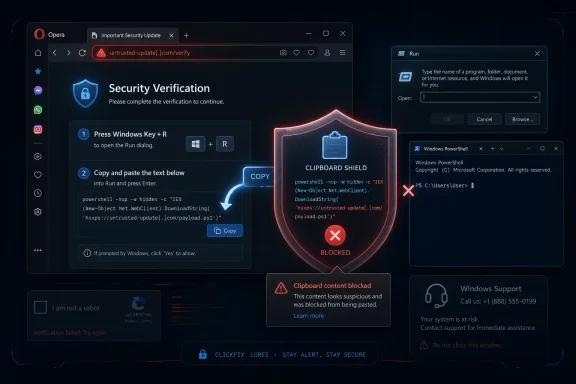 Opera Moves the Security Check to the Last Dangerous Inch
Most browser security stories are about keeping hostile code away from the machine. Paste Protect is different because the hostile code may never need to execute inside the browser at all. In a ClickFix attack, the browser’s job is often just to stage the con: display a fake CAPTCHA, fake video error, fake update prompt, or fake support warning, then persuade the user to copy a command and run it somewhere more powerful.That is what makes Opera’s new feature interesting. The company is not merely adding another warning banner to a web page or another reputation check on a download. It is intervening at the moment when copied text becomes operational intent.
The clipboard has always been a strange trust zone. It is user-controlled, application-accessible, invisible most of the time, and routinely used to move sensitive material between contexts. Password managers, terminals, crypto wallets, banking portals, shell scripts, remote admin tools, and developer workflows all depend on it. Attackers noticed the same thing defenders did: the clipboard is where intent becomes action.
Paste Protect tries to make that invisible handoff visible. When Opera sees clipboard content that matches known malicious command patterns, it blocks the copy or paste flow and warns the user. According to Opera, the feature is tailored across Windows, macOS, and Linux, because a suspicious PowerShell line, a shell command, and a macOS Terminal payload do not look identical even when they serve the same criminal purpose.
For Windows users in particular, this lands in familiar territory. The Windows Run dialog, PowerShell, Command Prompt, Windows Terminal, and even File Explorer’s address bar have all become targets for “paste this to fix it” social engineering. The attacker does not need to defeat SmartScreen or sneak an executable past a download scanner if the victim can be persuaded to invoke the chain manually.
ClickFix Turns Helpfulness Into an Exploit Primitive
ClickFix is effective because it weaponizes a trait that security training usually encourages: users trying to solve a problem. A page says the video cannot play, a CAPTCHA cannot verify, a browser component needs repair, or access is blocked until a quick command is run. The victim is not asked to install “malware.” The victim is asked to complete a technical chore.That framing is the whole attack. Traditional phishing often depends on impersonating a login page or tricking the user into opening an attachment. ClickFix goes a step further and recruits the user as the execution engine. The victim copies a command, opens a trusted local interface, pastes the command, and presses Enter.
This is why the technique can dodge so many familiar controls. Email filtering may never see the payload. Antivirus may not object until after execution has already begun. Browser download protections may have no file to inspect. The command may pull down a payload only after it is run, or it may abuse built-in operating-system tools that defenders cannot simply remove from every machine.
The user’s machine sees PowerShell, curl, mshta, wscript, bash, osascript, or another legitimate interpreter being invoked by the user. The attacker sees the same thing as an ideal delivery path. The browser sees a web page that may not have exploited a memory bug or violated a traditional sandbox boundary at all.
That inversion explains why ClickFix has moved so quickly from curiosity to mainstream attack pattern. It is cheap to deploy, easy to customize, and well suited to malvertising and compromised legitimate sites. It is also emotionally calibrated: a fake CAPTCHA borrows the rhythm of ordinary web friction, while a fake repair prompt borrows the authority of IT support.
Opera’s bet is that the browser can still do something useful even when the attack is designed to leave the browser. It can inspect the object being handed from the web context into the local execution context. That is a narrow intervention, but narrow is not the same as minor.
The Clipboard Was Always a Security Boundary; We Just Pretended It Was Plumbing
For years, clipboard security has mostly been discussed in privacy terms. Should websites be allowed to read clipboard contents? Should apps be able to monitor changes? Should a crypto wallet address copied from one app be silently replaced by malware before it is pasted into another? These are real concerns, and Opera’s older Paste Protection feature addressed part of that problem by guarding against clipboard hijacking by external applications.Paste Protect expands the idea. The danger is no longer only that something changes what the user copied. The danger is that the copied content is itself a weapon, whether the user selected it intentionally or a website injected it into the clipboard through trickery.
That distinction matters. Clipboard hijacking is a substitution attack: the user thinks they copied one thing, but malware swaps in another. ClickFix-style clipboard injection is more psychological: the user may knowingly copy the dangerous command because the page has convinced them the command is legitimate. In both cases, the clipboard becomes the final staging area before harm.
Opera’s naming is slightly confusing because the company previously used similar language for clipboard protection. But the product direction is clear enough. Paste Protect now folds together the older defense against clipboard tampering with a newer “Injection Protection” layer aimed at malicious commands copied from web pages or inserted into the clipboard.
This is the kind of feature that sounds obvious after someone ships it. Of course a browser should be suspicious when a web page tries to shepherd a user toward a terminal command. Of course the clipboard should not be treated as neutral when it contains an encoded PowerShell downloader or a shell pipeline fetched from a suspicious source. But browser makers have historically been reluctant to police what users copy, partly because copying text is one of the web’s most basic affordances.
That reluctance is understandable. Developers copy commands from documentation all day. Admins copy remediation scripts from support articles. Linux users copy package installation lines. Windows users copy registry edits, PowerShell snippets, DISM commands, and winget instructions. A browser that blocks too aggressively risks becoming the security equivalent of a smoke alarm that goes off whenever someone makes toast.
Opera therefore has to thread a difficult needle. If Paste Protect is too quiet, it becomes security theater. If it is too loud, users will disable it, whitelist too broadly, or train themselves to click through. The value of the feature will depend less on the press release than on detection quality, explanation quality, and restraint.
Browser-Native Defense Beats the Extension Lottery
Opera is emphasizing that Paste Protect is built into the browser and enabled by default. That is not a marketing footnote. It is the feature’s main security argument.Browser extensions can and do help with malicious pages, scripts, and reputation checks, but extensions are unevenly installed, unevenly maintained, and unevenly trusted. The users most likely to fall for a fake CAPTCHA prompt are not necessarily the users running a carefully curated stack of security extensions. In enterprise environments, extensions can also create their own governance problems: permissions, update chains, vendor trust, and compatibility with managed browser policies.
A browser-native control starts from a better distribution position. It is there before the user knows they need it. It also has a better chance of integrating into the browser’s security model without asking users to grant yet another extension broad access to pages and clipboard events.
That said, “native” does not mean “complete.” Opera is not an endpoint detection platform. It cannot see everything that happens after a command is executed outside the browser. It cannot solve the broader problem of users being persuaded to run instructions from unknown pages. It cannot protect someone who retypes a malicious command manually, uses another browser, or disables the warning for a trusted-looking but compromised site.
Still, default-on controls have a long history of changing attack economics. Pop-up blockers did not end abusive advertising, but they changed the baseline. SmartScreen did not end malicious downloads, but it added friction at scale. Browser sandboxing did not make exploitation impossible, but it made entire classes of attacks harder and more expensive.
Paste Protect belongs in that category if it works as advertised. It does not need to be perfect to be useful. It needs to interrupt enough high-volume, low-sophistication attack chains to make ClickFix less reliable.
Windows Is the Softest Target Because Windows Is the Biggest Prize
ClickFix is cross-platform, but Windows remains the gravitational center for many of these campaigns. That is not because Windows users are uniquely careless. It is because Windows has the largest consumer and business footprint, the richest malware ecosystem, and a deep administrative toolkit that can be abused from a single pasted line.PowerShell is the obvious example. It is indispensable for administrators and defenders, but its power makes it attractive to attackers. A short command can download content, decode payloads, invoke scripts in memory, modify registry keys, create scheduled tasks, or launch additional tools. The same is true, in different ways, of mshta, rundll32, regsvr32, certutil, wscript, and other living-off-the-land binaries that security teams have spent years monitoring.
ClickFix does not require the attacker to introduce a suspicious executable at the first step. The initial lure may simply ask the user to press Windows-R, paste a command, and hit Enter. To a victim, that feels like performing a local troubleshooting step. To the attacker, it is initial access with a human-assisted bypass.
This is why WindowsForum readers should treat Opera’s feature as more than a browser curiosity. The relevant endpoint is not the browser tab. It is the local execution surface. Paste Protect is interesting because it acknowledges that the browser and the operating system are part of one continuous user journey, even if security products often divide them into separate boxes.
Microsoft has been moving in a similar conceptual direction with warnings around risky pasted commands and with broader hardening against script abuse, but the browser layer remains crucial. The web page is where the social engineering happens. If the first meaningful warning arrives only after the user has already opened a terminal, the attacker has already won half the battle.
Opera’s intervention is earlier and more contextual. It can say, in effect, “This thing you just copied from a website looks like the kind of command attackers use.” That is a more intelligible warning than a generic downstream alert about a script host or command interpreter.
The Feature’s Success Depends on Warnings Users Can Understand
Security warnings fail when they describe risk in the language of the system rather than the language of the user’s decision. A dialog that says “Suspicious command detected” is better than nothing, but it may not be enough if the user believes the command is necessary to watch a video, complete a CAPTCHA, or fix their browser.Opera says Paste Protect will show a warning explaining what happened, with a red icon in the address bar, and will display only the first 120 characters of blocked content. That design choice is sensible. It gives the user evidence without turning the warning into a convenient copyable payload or overwhelming them with obfuscated script.
But the explanatory layer is where this kind of feature lives or dies. Users do not need to know every detail of command injection. They need to understand that normal websites should not require terminal commands to prove they are human or play media. They need the warning to break the spell of the fake troubleshooting flow.
There is an awkward truth here: the best security intervention may sound patronizing. “Do not paste commands from random websites into your terminal” is obvious to power users and frequently ignored by everyone else, including power users in a hurry. ClickFix works because context suppresses skepticism. A fake CAPTCHA looks routine. A fake Cloudflare page feels like familiar web bureaucracy. A fake “browser repair” instruction arrives at the moment the user already believes something is broken.
A good warning has to restore skepticism without requiring a lecture. It must make the hidden risk legible in one or two sentences. It must also avoid crying wolf on legitimate documentation sites, developer portals, and internal admin pages where copying commands is expected behavior.
Whitelisting trusted sites is therefore both necessary and dangerous. It is necessary because admins and developers need workable paths around false positives. It is dangerous because compromised trusted sites are a recurring part of the ClickFix story. If users whitelist a domain because they recognize the brand, attackers who compromise that site inherit the trust decision.
This Is Not the End of ClickFix; It Is the Start of a New Evasion Game
Attackers will adapt. They always do. If browser-native clipboard inspection becomes common, ClickFix campaigns will look for ways around it.Some will move from copy buttons to images containing commands, forcing users to type or OCR them. Some will split payloads into multiple fragments that look harmless alone. Some will provide commands through downloadable text files, chat widgets, QR codes, or remote support impersonation. Some will try to detect Opera and change the lure. Some will shift from terminal commands to browser extension installation, OAuth consent abuse, remote desktop tools, or signed utilities.
That does not make Paste Protect pointless. Security is rarely about ending a tactic outright. It is about raising cost, reducing reliability, and buying time for detection elsewhere. A defense that blocks the simplest form of a high-volume attack can still matter, even if sophisticated actors evolve.
The bigger question is whether other browsers follow. If Chrome, Edge, Firefox, Safari, and Brave adopt similar protections, ClickFix operators lose a cheap universal playbook. If only Opera ships it, the feature becomes a meaningful advantage for Opera users but a limited ecosystem shift.
There is also a standards question lurking beneath the product announcement. Browsers already gate clipboard read access more tightly than they once did, but clipboard write behavior and user-mediated copy flows remain complicated. The web needs to support legitimate copying from documentation, code samples, ticketing systems, and admin consoles. It also needs to recognize that “copy this command and run it” is no longer an edge case; it is an attack surface.
The likely future is not a blanket ban. It is reputation-aware, context-aware friction. Commands copied from well-known developer documentation may pass quietly. Commands copied from a newly registered domain serving a fake CAPTCHA may not. Multi-line, encoded, obfuscated, or downloader-like commands may receive heavier scrutiny. Browser vendors will need to balance privacy, local analysis, cloud reputation, and enterprise manageability.
Enterprises Should Treat Paste Protect as a Signal, Not a Strategy
For sysadmins, the most practical interpretation of Paste Protect is not “install Opera everywhere and declare victory.” It is that clipboard-mediated execution has become common enough that browser vendors are now defending against it directly. That should influence security policy.Organizations should review whether users can run PowerShell freely, whether script execution is constrained, whether application control is deployed, and whether endpoint tools alert on suspicious child processes from explorer.exe, powershell.exe, cmd.exe, mshta.exe, and wscript.exe. They should also examine whether training materials still focus too narrowly on attachments and credential harvesting while ignoring fake CAPTCHA and paste-to-run lures.
The user education piece needs updating. Telling employees not to click suspicious links is not enough when the compromised page may be reached from a search result, a malvertisement, or a legitimate site. Telling them not to download unknown executables is not enough when the payload is fetched by a command they pasted into Run.
The practical rule is simple: a website should almost never ask a normal user to run a terminal command to view content, complete verification, fix audio, repair a browser, or prove humanity. For administrators and developers, the standard is narrower but still important: commands should come from trusted documentation, internal runbooks, signed scripts, package managers, or reviewed sources, not from pop-ups.
Enterprises should also be careful with browser diversity. A feature in Opera may protect users who choose Opera, but many managed fleets standardize on Edge or Chrome. If Paste Protect proves effective, IT teams should pressure their primary browser vendors for equivalent policy-controlled protections rather than treating it as a niche browser perk.
For home users, the advice is less elegant but just as direct. If a page asks you to open Windows-R and paste something, stop. If a CAPTCHA tells you to copy a command, close the tab. If a video player says the fix is a terminal command, assume the page is hostile. Paste Protect may catch the attempt, but the habit matters more than the warning.
Opera’s Bigger Play Is Trust, Not Market Share Theater
Opera has long lived in the browser market’s awkward middle ground: technically inventive, culturally recognizable, but dwarfed by Chrome, Safari, and Edge. That position can encourage gimmicks, and the browser industry has not been short on AI buttons, crypto wallets, gaming skins, sidebar integrations, and productivity flourishes.Paste Protect is more substantial because it addresses a real user harm at a real choke point. It is not a new tab decoration. It is not another assistant bolted onto the sidebar. It is a security feature that reflects how attacks are actually changing.
There is a brand argument here, too. Browser trust is no longer only about speed, rendering compatibility, or memory consumption. It is about whether the browser understands the hostile web as users encounter it. That includes scam pages, compromised ad chains, fake verification flows, malicious downloads, credential theft, notification spam, extension abuse, and now clipboard-mediated command execution.
By shipping Paste Protect as free and default-on, Opera is trying to claim the role of the browser that catches the trick before the operating system has to. That is a credible story, provided the implementation holds up under real-world pressure. Security features announced with flourish often look messier after weeks of false positives, bypasses, and edge cases.
The company’s claim that it is the first major browser with native protection against ClickFix-style clipboard attacks will also invite scrutiny. Operating systems and security products have warning mechanisms in adjacent areas, and extensions have attempted similar interventions. But Opera’s specific framing—browser-native, default-on clipboard command protection aimed at ClickFix—is meaningfully ahead of where mainstream browser UX has been.
That may matter beyond Opera’s own user base. Smaller browser vendors have often served as laboratories for features that later became expected elsewhere. If Paste Protect reduces harm without ruining legitimate workflows, it will be harder for larger browser makers to argue that this is outside their remit.
The Red Flag Is Now the Command Itself
The most concrete lesson from Opera’s release is that maliciousness increasingly lives in the instruction, not just the file. A command can be short, textual, and user-copied while still being the first stage of a malware infection. That should change how users and administrators think about web trust.Security tools have trained people to fear downloads, attachments, and unsigned executables. ClickFix teaches attackers to avoid those cues. The dangerous object may be a line of text that looks technical enough to be plausible and opaque enough to discourage inspection.
This is especially potent in an era when normal computing has become more command-friendly again. Developers copy shell snippets constantly. Power users install tools with package managers. Support forums offer one-line fixes. AI assistants generate commands. Documentation sites assume users are comfortable pasting into terminals. The culture of “just run this” is productive, but it is also exploitable.
Opera’s feature does not condemn that culture. It tries to add a guardrail where the culture meets the open web. That distinction is important. Copying commands is not inherently reckless; copying commands from manipulative, unexpected, or unverifiable prompts is.
The hard part is that users cannot always tell the difference. A compromised site may look legitimate. A malvertisement may land above the real search result. A fake CAPTCHA may borrow familiar logos and language. A warning at the clipboard stage gives the user one more chance to reconsider before the machine obeys.
The Browser Finally Notices the Hand-Off
Paste Protect’s importance is not that Opera has solved malware. It has not. The importance is that the browser is acknowledging a hand-off that security models too often ignore: the transition from web persuasion to local execution.That hand-off is where ClickFix lives. The malicious page does not need to exploit the browser if it can exploit the user’s trust in local tools. The attacker does not need to bypass every protection if the victim can be coached into doing the dangerous part manually. Opera is placing friction exactly there.
The cleanest way to understand the feature is this: Opera is treating certain clipboard contents as executable risk, not inert text. That is a subtle but meaningful shift. Once a command is on the clipboard and headed for a terminal, the difference between text and action is one keystroke.
This is also why the feature will need enterprise controls, transparent behavior, and careful false-positive handling. A browser that silently blocks legitimate admin workflows will not last long in managed environments. A browser that warns clearly and predictably about genuinely suspicious command patterns could become part of a layered defense that includes endpoint monitoring, application control, script restrictions, DNS filtering, and user education.
The larger browser ecosystem should watch closely. If Opera demonstrates that clipboard command inspection can be done without breaking the web, the expectation will spread. In a few years, it may seem irresponsible for browsers to let fake CAPTCHA pages feed PowerShell commands to users without at least raising a hand.
The Copy-Paste Attack Now Has a Browser-Level Countermove
Opera’s Paste Protect release should be read as a practical response to a specific attack trend, not as a magic shield against social engineering. The feature is valuable because it narrows the window in which a ClickFix lure can succeed and gives users a warning at the moment their action becomes dangerous.- Opera released Paste Protect on July 2, 2026, and says it is free, enabled by default, and built into the browser rather than shipped as an optional extension.
- The feature targets ClickFix attacks that persuade users to copy and run malicious commands through terminals, command prompts, Windows Run, or similar local tools.
- Paste Protect builds on Opera’s earlier clipboard-hijacking protection by adding detection for suspicious command content copied from websites or injected into the clipboard.
- Windows users are a major risk group because PowerShell, Windows Run, Command Prompt, and other built-in tools can turn a short pasted command into a full malware delivery chain.
- The feature should reduce common attacks, but users should still treat any website that asks for a terminal command to complete a CAPTCHA, fix video playback, or repair a browser as hostile.
- Enterprises should treat Opera’s move as evidence that clipboard-mediated execution deserves policy, monitoring, and user-training attention across all managed browsers.
References
- Primary source: ZDNET
Published: 2026-07-02T08:52:08.251072
Opera is releasing a new feature that detects and blocks malicious clipboard content
If you tend to copy/paste content from websites, you might be surprised to find yourself under the thrall of a ClickFix attack, but Opera has a solution to fix it before you click it.www.zdnet.com - Related coverage: blogs.opera.com
Opera protects you from Clipboard attacks- Blog | Opera News
Opera is the first major browser to natively protect you from clipboard attacks – Introducing Paste Protect.blogs.opera.com
- Related coverage: 9to5mac.com
Opera's new Paste Protect feature blocks suspicious commands copied from websites - 9to5Mac
In an update rolling out today, Opera will now automatically block potentially malicious commands copied from websites to the clipboard.9to5mac.com - Related coverage: pcworld.com
Opera now blocks one of the sneakiest malware tricks around | PCWorld
Opera's new Paste Protect feature blocks ClickFix and other clipboard hijacking attacks in real time, natively in the browser.www.pcworld.com - Related coverage: engadget.com
Opera's New Security Feature Stops Copy Paste Attacks From Malicious Websites
Opera has introduced a new safety feature that protects against malicious 'ClickFix' clipboard attacks.www.engadget.com - Related coverage: bleepingcomputer.com
Opera rolls out Paste Protect feature to fight ClickFix attacks
Opera has introduced Paste Protect, a security feature designed to block ClickFix-style attacks that trick users into executing malicious commands through social engineering.www.bleepingcomputer.com
- Related coverage: tecmundo.com.br
Opera lança "Paste Protect", primeira defesa nativa contra golpes do Ctrl+C / Ctrl+V | Software
Nova ferramenta protege a área de transferência contra ataques do tipo ClickFix, técnica responsável por mais da metade das infecções por malware.www.tecmundo.com.br