

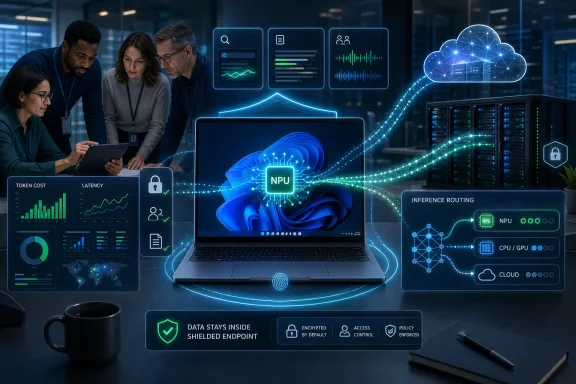
AMD-powered AI PCs are being positioned in July 2026 as a practical way for organizations to prepare for the next wave of Microsoft Copilot by moving more AI inference from distant cloud services onto Windows 11 endpoints with dedicated neural processing hardware. That is the plain version of a much larger strategic shift. The PC, after years of being treated as a managed commodity, is being recast as an AI execution tier. The interesting question is no longer whether Copilot lives in the cloud or on the desktop, but how much work enterprises can afford to leave in the cloud once AI becomes routine.
The argument from AMD and its partners is simple enough: the future of enterprise AI will be hybrid because the enterprise itself is hybrid. Data sits in Microsoft 365, SaaS platforms, line-of-business systems, local files, regulated repositories, branch offices, and occasionally on the laptop of a traveling executive who has not rebooted in three weeks. If AI is going to become a daily operating layer rather than a demo, some of that work has to happen close to the user.
The first wave of AI PC marketing was easy to dismiss because it arrived with the usual hardware-industry enthusiasm: new silicon, new stickers, new benchmark numbers, and a familiar promise that this time the upgrade cycle really would change everything. But the enterprise case for AI PCs is becoming less about novelty and more about cost control. Once organizations move from pilots to habitual use, the metered nature of cloud AI becomes painfully visible.
That is why the quote in BizTech from Matthew McGilvrey, AMD’s corporate vice president and general manager for commercial client, lands harder than a typical vendor sound bite. He argues that some organizations are burning through AI budgets in four months because of token consumption. Even if token prices keep falling, usage can rise faster than unit costs decline, especially when Copilot-style features become embedded in search, summarization, meetings, coding, business workflows, and eventually agentic automation.
The old assumption was that cloud AI would be the default because the largest models live there. That remains true for many workloads. But the assumption that all inference should happen in the cloud is starting to look like the early cloud-storage rush, when enterprises moved aggressively toward centralized infrastructure before rediscovering locality, compliance boundaries, egress costs, and the stubborn importance of latency.
This is the more interesting framing for AMD-powered AI PCs. They are not merely faster laptops with a neural processing unit. They are a bet that the endpoint can absorb a meaningful share of AI work precisely because not every task needs a frontier-scale model running in a hyperscale data center.
That is a major reversal from the last decade of Windows client strategy. For years, the local PC was often treated as an access device for cloud identity, cloud storage, browser-based apps, and managed SaaS. Windows remained essential, but much of the industry’s imagination moved elsewhere. Copilot+ changes that by making the Windows device itself a participant in AI execution.
AMD’s role in that story is to provide x86 silicon with NPUs capable of running local AI workloads efficiently. The point is not that every enterprise will suddenly run sophisticated models locally. The point is that Windows can start making routing decisions: some AI tasks go to the cloud, some run on the CPU or GPU, and increasingly some run on the NPU. The local machine becomes an orchestration surface instead of a passive terminal.
That is also why Microsoft’s Windows AI stack matters. Windows AI APIs, Windows ML, Foundry Local, and related developer tooling are attempts to make on-device inference usable beyond first-party demos. If developers have to write separate bespoke paths for every chip, the AI PC stalls. If Windows can abstract enough of the silicon complexity, local inference becomes a normal application capability.
AI is heading toward the same compromise. Large models in the cloud will remain indispensable for complex reasoning, broad knowledge tasks, cross-application orchestration, and workloads that demand constant model improvements. But smaller models running locally can be good enough for narrower tasks such as semantic search, summarization of local content, meeting assistance, image enhancement, transcription, classification, and personal productivity functions.
That division of labor is where AMD sees an opening. A Ryzen AI-based commercial PC does not need to replace Azure AI infrastructure to justify itself. It needs to shave enough latency, reduce enough cloud calls, and keep enough sensitive data local to make endpoint refresh planning look different.
For IT departments, this reframes the device lifecycle. The endpoint purchase is no longer just about CPU cores, RAM, storage, battery life, manageability, and Windows 11 readiness. It is about whether the device fleet has enough local AI capacity to support the software environment the organization expects to run three or four years from now.
A local semantic search over user files is different from shipping file contents to a remote service for every query. A local transcription or summarization task can avoid turning routine productivity assistance into a cloud data-transfer event. A small local model can classify or pre-process information before a larger model is invoked, reducing what must be sent elsewhere.
Performance is the second half of the equation. AI features that feel instantaneous are more likely to become habits. If a user has to wait on a round trip to the cloud for every minor assistive action, the feature feels like a service. If the response is immediate, it starts to feel like part of the operating system.
That distinction is subtle but important. Microsoft wants Copilot and related AI experiences to become woven into Windows 11, not simply summoned like a website. AMD’s NPU pitch supports that ambition by making low-latency, battery-conscious AI processing plausible on the endpoint.
The first practical challenge is inventory. Enterprises need to know which devices have NPUs, what performance class those NPUs belong to, whether they meet Copilot+ thresholds, and which Windows AI features are actually available on which hardware. A mixed fleet will be normal for years, which means support desks will face the usual problem: two users with Windows 11 may have very different AI capabilities.
The second challenge is policy. Local AI does not mean unmanaged AI. If models can index local data, perform actions, interact with files, or assist agents, administrators will need controls that are legible in existing endpoint-management frameworks. The governance problem does not disappear when inference moves closer to the user. In some ways, it becomes more intimate.
The third challenge is measurement. The industry is still early in proving how much money local inference can save, which workloads are best suited to NPUs, and how to account for avoided cloud consumption. Vendors can talk about reducing token burn, but CIOs will want dashboards, not metaphors.
That creates a planning problem for organizations. A company buying endpoint hardware in 2026 is not merely buying for today’s Office documents, Teams calls, browser tabs, and security agents. It is buying for a Windows environment in which more functions may assume local AI acceleration or at least benefit from it. The machine that looks adequate under a 2024 productivity model may age poorly under a 2027 Copilot model.
This does not mean every employee needs the most expensive AI PC. It means endpoint segmentation will become more strategic. Developers, analysts, executives, frontline managers, support teams, creative workers, and regulated-data users may have different local AI requirements. The old good-better-best laptop catalog will need a new dimension: how much AI work the device can execute locally.
AMD’s commercial pitch is strongest here because it is tied to refresh timing. Many organizations are already past the Windows 10 end-of-support inflection point and deep into Windows 11 modernization. If a business is refreshing devices anyway, ignoring AI capability may look fiscally conservative now and shortsighted later.
Microsoft has been explicit about building toward an agent-oriented ecosystem across Copilot Studio, Azure AI Foundry, GitHub, Dynamics 365, Windows 11, and standards such as the Model Context Protocol. The direction is clear even if the shipping details continue to evolve. Windows is being prepared for a world in which agents can interact with apps and files under governed conditions.
This is where local processing becomes more than a nice-to-have. Agents that constantly depend on cloud round trips may be expensive, slow, and harder to constrain. Agents that can perform some perception, retrieval, classification, or preparation locally may be more responsive and less data hungry. The endpoint becomes the place where context can be assembled before heavier reasoning is escalated.
The risk is equally obvious. If agents can act on a user’s behalf, enterprise IT must care deeply about permissions, audit trails, identity boundaries, data-loss prevention, prompt-injection resistance, and user consent. Local AI is not inherently safer if it is allowed to rummage through sensitive files without appropriate controls. The promise of an AI PC depends on management discipline as much as silicon.
A natural-language search over local documents, screenshots, images, or recent activity illustrates the tradeoff neatly. The value improves when the system understands intent rather than exact keywords. The privacy case improves if indexing and inference can remain on the machine. The user experience improves if results arrive quickly without a visible service boundary.
Search also exposes the governance issue. If Windows can find information more intelligently, it must also respect permissions more rigorously. Enterprise search has always been haunted by the risk of revealing what a user technically should not see. AI makes that risk more fluid because it can summarize, infer, and connect information rather than merely return matching files.
That is why the AI PC should not be understood as just client hardware. It is part of an information architecture. The same device that improves productivity can also change how discoverable corporate data becomes.
What changes is the default assumption. In the first phase of generative AI adoption, the question was often, “Which cloud model should we use?” In the next phase, the better question is, “Where should this inference run?” Sometimes the answer will be Azure. Sometimes it will be an on-premises accelerator. Sometimes it will be the NPU inside a Windows laptop.
This distributed model resembles the mature cloud conversation because it accepts tradeoffs. Cloud AI offers scale and sophistication. Local AI offers latency, privacy, resilience, and potential cost containment. On-premises AI may satisfy sovereignty, customization, or existing infrastructure requirements. The enterprise architecture that wins is unlikely to be pure.
AMD benefits if that hybrid logic becomes mainstream. The more organizations believe local inference has durable value, the more silicon capability matters during procurement. The NPU becomes a hedge against a software future that is arriving faster than normal refresh cycles can absorb.
AI gives the industry a fresh argument because it creates a workload that older systems were not designed to handle efficiently. That does not mean every AI PC claim deserves belief. The industry has a long history of turning legitimate transitions into sticker campaigns. But this transition has a stronger foundation than most because Microsoft is building OS-level support and because enterprise AI costs are becoming a board-level concern.
AMD’s opportunity is also partly competitive. Qualcomm used the first Copilot+ wave to push Arm-based Windows PCs into the spotlight. Intel has its own AI PC roadmap. AMD must persuade commercial buyers that they can get local AI acceleration while preserving the x86 compatibility, management habits, and procurement patterns they already understand.
For Windows administrators, that competition is healthy if it produces better drivers, clearer feature support, longer battery life, and more predictable management. It is less healthy if the market fragments into confusing claims about TOPS, branded AI features, and model compatibility. The buyer needs outcomes, not acronyms.
That separation is becoming untenable. The endpoint team may choose a fleet that constrains local AI adoption. The AI team may design workflows that assume capabilities the device fleet does not have. The security team may discover too late that local AI features touch sensitive data in ways existing policies did not anticipate. Finance may approve Copilot expansion without understanding how endpoint hardware could affect consumption.
A modern refresh conversation should include infrastructure, security, compliance, application owners, data governance, finance, and business units experimenting with Copilot. Not every meeting needs to become a committee festival, but the old laptop-standardization process is too narrow for what Windows is becoming.
This is especially true because device decisions last longer than AI roadmaps. A laptop bought in 2026 may still be in service when today’s preview features have become standard expectations. Underbuying now could create a hidden tax later, paid in cloud consumption, user frustration, or delayed adoption.
Microsoft has made enough moves to show direction, but the practical value will depend on which Copilot and Windows features are available, which are restricted to Copilot+ PCs, which work across CPU and GPU as well as NPU, and how third-party developers adopt Windows AI APIs. A powerful NPU that sits idle is not a strategy. It is unused silicon.
There is also a user-adoption problem. Many employees still experience Copilot as an occasionally helpful assistant rather than a transformed work environment. If local AI features are subtle, inconsistent, or hard to trust, users will not care where inference runs. They will simply ignore the feature.
That is why the next year or two are crucial. The AI PC category needs killer workflows, not just killer demos. Natural-language search, offline summarization, local meeting intelligence, privacy-preserving document assistance, and agent support are plausible candidates. But enterprise buyers should demand pilots that map hardware capability to measurable work, not just vendor roadmaps.
Security teams will need to ask familiar questions in unfamiliar forms. What data can the AI feature access? Where are embeddings stored? Can administrators disable or scope indexing? Are model outputs logged? Can agents write files, send messages, or invoke applications? How are actions audited? What happens when a device is lost, compromised, or shared?
These questions are not arguments against AI PCs. They are arguments against treating AI PCs as consumer gadgets inside enterprise fleets. The more capable the local machine becomes, the more it needs serious governance.
Microsoft’s advantage is that Windows already sits inside enterprise management and security ecosystems. If local AI capabilities can be governed through familiar tools and policies, adoption becomes easier. If controls remain scattered, opaque, or edition-dependent, administrators will push back.
That proximity matters. The endpoint sees what the user is doing in a way a cloud service often does not, or should not without explicit permission. It can provide just-in-time assistance, pre-process data, preserve responsiveness during weak connectivity, and reduce unnecessary exposure of sensitive content. In a world of agents, the endpoint may also become the safest place to stage and constrain certain actions.
AMD’s silicon story fits neatly into that architecture. The NPU is not replacing the cloud; it is giving Windows another place to run the AI work that does not belong in the cloud. That is a modest claim compared with the industry’s grander AI rhetoric, but it is also more believable.
The organizations that understand this will not ask whether AI PCs are “worth it” in the abstract. They will map specific workflows to execution locations. They will decide which roles need local inference, which workloads justify cloud calls, and which data should never leave controlled environments. That is real strategy, not procurement theater.
The argument from AMD and its partners is simple enough: the future of enterprise AI will be hybrid because the enterprise itself is hybrid. Data sits in Microsoft 365, SaaS platforms, line-of-business systems, local files, regulated repositories, branch offices, and occasionally on the laptop of a traveling executive who has not rebooted in three weeks. If AI is going to become a daily operating layer rather than a demo, some of that work has to happen close to the user.
 The AI PC Is Becoming a Budget Conversation, Not a Gadget Story
The first wave of AI PC marketing was easy to dismiss because it arrived with the usual hardware-industry enthusiasm: new silicon, new stickers, new benchmark numbers, and a familiar promise that this time the upgrade cycle really would change everything. But the enterprise case for AI PCs is becoming less about novelty and more about cost control. Once organizations move from pilots to habitual use, the metered nature of cloud AI becomes painfully visible.That is why the quote in BizTech from Matthew McGilvrey, AMD’s corporate vice president and general manager for commercial client, lands harder than a typical vendor sound bite. He argues that some organizations are burning through AI budgets in four months because of token consumption. Even if token prices keep falling, usage can rise faster than unit costs decline, especially when Copilot-style features become embedded in search, summarization, meetings, coding, business workflows, and eventually agentic automation.
The old assumption was that cloud AI would be the default because the largest models live there. That remains true for many workloads. But the assumption that all inference should happen in the cloud is starting to look like the early cloud-storage rush, when enterprises moved aggressively toward centralized infrastructure before rediscovering locality, compliance boundaries, egress costs, and the stubborn importance of latency.
This is the more interesting framing for AMD-powered AI PCs. They are not merely faster laptops with a neural processing unit. They are a bet that the endpoint can absorb a meaningful share of AI work precisely because not every task needs a frontier-scale model running in a hyperscale data center.
Microsoft Has Made Windows the Distribution Channel for Local AI
Microsoft’s Copilot+ PC requirements gave the industry a target: Windows 11 machines with an NPU capable of more than 40 trillion operations per second, alongside memory and storage baselines that raise the floor for AI-capable systems. That threshold matters less as a magic number than as a market signal. Microsoft told OEMs, silicon vendors, developers, and enterprise buyers that local AI was not a sidecar feature but part of the Windows roadmap.That is a major reversal from the last decade of Windows client strategy. For years, the local PC was often treated as an access device for cloud identity, cloud storage, browser-based apps, and managed SaaS. Windows remained essential, but much of the industry’s imagination moved elsewhere. Copilot+ changes that by making the Windows device itself a participant in AI execution.
AMD’s role in that story is to provide x86 silicon with NPUs capable of running local AI workloads efficiently. The point is not that every enterprise will suddenly run sophisticated models locally. The point is that Windows can start making routing decisions: some AI tasks go to the cloud, some run on the CPU or GPU, and increasingly some run on the NPU. The local machine becomes an orchestration surface instead of a passive terminal.
That is also why Microsoft’s Windows AI stack matters. Windows AI APIs, Windows ML, Foundry Local, and related developer tooling are attempts to make on-device inference usable beyond first-party demos. If developers have to write separate bespoke paths for every chip, the AI PC stalls. If Windows can abstract enough of the silicon complexity, local inference becomes a normal application capability.
AMD’s Pitch Works Because Enterprises Already Understand Hybrid
McGilvrey’s storage analogy is not accidental. Enterprise IT already knows what happens when a clean architectural ideology meets messy operational reality. Cloud-first became cloud-smart because businesses discovered that latency, cost, sovereignty, availability, and data gravity do not vanish just because a vendor slide says they should.AI is heading toward the same compromise. Large models in the cloud will remain indispensable for complex reasoning, broad knowledge tasks, cross-application orchestration, and workloads that demand constant model improvements. But smaller models running locally can be good enough for narrower tasks such as semantic search, summarization of local content, meeting assistance, image enhancement, transcription, classification, and personal productivity functions.
That division of labor is where AMD sees an opening. A Ryzen AI-based commercial PC does not need to replace Azure AI infrastructure to justify itself. It needs to shave enough latency, reduce enough cloud calls, and keep enough sensitive data local to make endpoint refresh planning look different.
For IT departments, this reframes the device lifecycle. The endpoint purchase is no longer just about CPU cores, RAM, storage, battery life, manageability, and Windows 11 readiness. It is about whether the device fleet has enough local AI capacity to support the software environment the organization expects to run three or four years from now.
Local Inference Is a Privacy Argument with a Performance Bonus
The privacy case for local AI is straightforward: if a workload can be processed on the device, the underlying data may not need to leave the device. That does not automatically make the system secure, and it does not eliminate governance obligations. But it changes the risk model in ways that matter for regulated industries, legal teams, healthcare environments, financial services, government contractors, and any business with sensitive intellectual property.A local semantic search over user files is different from shipping file contents to a remote service for every query. A local transcription or summarization task can avoid turning routine productivity assistance into a cloud data-transfer event. A small local model can classify or pre-process information before a larger model is invoked, reducing what must be sent elsewhere.
Performance is the second half of the equation. AI features that feel instantaneous are more likely to become habits. If a user has to wait on a round trip to the cloud for every minor assistive action, the feature feels like a service. If the response is immediate, it starts to feel like part of the operating system.
That distinction is subtle but important. Microsoft wants Copilot and related AI experiences to become woven into Windows 11, not simply summoned like a website. AMD’s NPU pitch supports that ambition by making low-latency, battery-conscious AI processing plausible on the endpoint.
The NPU Is the New Managed Resource
For administrators, the NPU introduces a new kind of capacity planning. IT teams are used to thinking about CPU load, memory pressure, disk health, battery degradation, network throughput, and GPU requirements for specialized users. AI PCs add a new execution unit whose value depends on software support, policy controls, driver maturity, model optimization, and workload routing.The first practical challenge is inventory. Enterprises need to know which devices have NPUs, what performance class those NPUs belong to, whether they meet Copilot+ thresholds, and which Windows AI features are actually available on which hardware. A mixed fleet will be normal for years, which means support desks will face the usual problem: two users with Windows 11 may have very different AI capabilities.
The second challenge is policy. Local AI does not mean unmanaged AI. If models can index local data, perform actions, interact with files, or assist agents, administrators will need controls that are legible in existing endpoint-management frameworks. The governance problem does not disappear when inference moves closer to the user. In some ways, it becomes more intimate.
The third challenge is measurement. The industry is still early in proving how much money local inference can save, which workloads are best suited to NPUs, and how to account for avoided cloud consumption. Vendors can talk about reducing token burn, but CIOs will want dashboards, not metaphors.
Copilot Is Becoming a Platform Dependency
The business reason this matters is Copilot’s trajectory. Microsoft is not treating Copilot as a single assistant bolted onto the taskbar. It is becoming a brand, an interface model, a developer target, and a subscription engine that spans Microsoft 365, Windows, GitHub, Security, Dynamics, Azure, and the broader agent ecosystem.That creates a planning problem for organizations. A company buying endpoint hardware in 2026 is not merely buying for today’s Office documents, Teams calls, browser tabs, and security agents. It is buying for a Windows environment in which more functions may assume local AI acceleration or at least benefit from it. The machine that looks adequate under a 2024 productivity model may age poorly under a 2027 Copilot model.
This does not mean every employee needs the most expensive AI PC. It means endpoint segmentation will become more strategic. Developers, analysts, executives, frontline managers, support teams, creative workers, and regulated-data users may have different local AI requirements. The old good-better-best laptop catalog will need a new dimension: how much AI work the device can execute locally.
AMD’s commercial pitch is strongest here because it is tied to refresh timing. Many organizations are already past the Windows 10 end-of-support inflection point and deep into Windows 11 modernization. If a business is refreshing devices anyway, ignoring AI capability may look fiscally conservative now and shortsighted later.
Agentic Windows Raises the Stakes Beyond Productivity
The phrase agentic AI is often abused, but the underlying shift is real. Chatbots answer questions; agents attempt tasks. Once AI systems begin taking actions across files, applications, calendars, workflows, and enterprise data sources, the endpoint becomes more than a place where users consume AI output. It becomes a workspace where AI may observe context and execute steps.Microsoft has been explicit about building toward an agent-oriented ecosystem across Copilot Studio, Azure AI Foundry, GitHub, Dynamics 365, Windows 11, and standards such as the Model Context Protocol. The direction is clear even if the shipping details continue to evolve. Windows is being prepared for a world in which agents can interact with apps and files under governed conditions.
This is where local processing becomes more than a nice-to-have. Agents that constantly depend on cloud round trips may be expensive, slow, and harder to constrain. Agents that can perform some perception, retrieval, classification, or preparation locally may be more responsive and less data hungry. The endpoint becomes the place where context can be assembled before heavier reasoning is escalated.
The risk is equally obvious. If agents can act on a user’s behalf, enterprise IT must care deeply about permissions, audit trails, identity boundaries, data-loss prevention, prompt-injection resistance, and user consent. Local AI is not inherently safer if it is allowed to rummage through sensitive files without appropriate controls. The promise of an AI PC depends on management discipline as much as silicon.
Windows Search Is the Canary in the AI Mine
One of the more grounded examples in the BizTech piece is intelligent Windows search that understands natural language requests. Search is not as glamorous as autonomous agents, but it is the perfect early workload for local AI. Users have too much information, file names are often useless, and the data being searched is frequently private or context-specific.A natural-language search over local documents, screenshots, images, or recent activity illustrates the tradeoff neatly. The value improves when the system understands intent rather than exact keywords. The privacy case improves if indexing and inference can remain on the machine. The user experience improves if results arrive quickly without a visible service boundary.
Search also exposes the governance issue. If Windows can find information more intelligently, it must also respect permissions more rigorously. Enterprise search has always been haunted by the risk of revealing what a user technically should not see. AI makes that risk more fluid because it can summarize, infer, and connect information rather than merely return matching files.
That is why the AI PC should not be understood as just client hardware. It is part of an information architecture. The same device that improves productivity can also change how discoverable corporate data becomes.
The Cloud Will Not Lose, but It Will Stop Being the Default Answer
There is a temptation to frame local AI as a backlash against the cloud. That would be too simple. The cloud remains where the largest models live, where central governance can be applied, where enterprise-scale telemetry can be analyzed, and where Microsoft can rapidly deploy new Copilot capabilities. No sensible enterprise AI strategy abandons that.What changes is the default assumption. In the first phase of generative AI adoption, the question was often, “Which cloud model should we use?” In the next phase, the better question is, “Where should this inference run?” Sometimes the answer will be Azure. Sometimes it will be an on-premises accelerator. Sometimes it will be the NPU inside a Windows laptop.
This distributed model resembles the mature cloud conversation because it accepts tradeoffs. Cloud AI offers scale and sophistication. Local AI offers latency, privacy, resilience, and potential cost containment. On-premises AI may satisfy sovereignty, customization, or existing infrastructure requirements. The enterprise architecture that wins is unlikely to be pure.
AMD benefits if that hybrid logic becomes mainstream. The more organizations believe local inference has durable value, the more silicon capability matters during procurement. The NPU becomes a hedge against a software future that is arriving faster than normal refresh cycles can absorb.
The Hardware Industry Finally Has a Reason to Talk About PCs Again
The PC market has spent years searching for a compelling upgrade narrative. Thin-and-light design matured. SSDs became standard. Battery life improved. Displays got better. Manageability and security evolved, but for many office workers, a five-year-old laptop remained annoyingly serviceable.AI gives the industry a fresh argument because it creates a workload that older systems were not designed to handle efficiently. That does not mean every AI PC claim deserves belief. The industry has a long history of turning legitimate transitions into sticker campaigns. But this transition has a stronger foundation than most because Microsoft is building OS-level support and because enterprise AI costs are becoming a board-level concern.
AMD’s opportunity is also partly competitive. Qualcomm used the first Copilot+ wave to push Arm-based Windows PCs into the spotlight. Intel has its own AI PC roadmap. AMD must persuade commercial buyers that they can get local AI acceleration while preserving the x86 compatibility, management habits, and procurement patterns they already understand.
For Windows administrators, that competition is healthy if it produces better drivers, clearer feature support, longer battery life, and more predictable management. It is less healthy if the market fragments into confusing claims about TOPS, branded AI features, and model compatibility. The buyer needs outcomes, not acronyms.
The Endpoint Refresh Meeting Needs New People in the Room
McGilvrey’s most practical observation may be that AI decision-makers now belong in endpoint planning. That sounds obvious only after someone says it. In many organizations, device procurement, AI strategy, security governance, and application modernization still sit in partially separate lanes.That separation is becoming untenable. The endpoint team may choose a fleet that constrains local AI adoption. The AI team may design workflows that assume capabilities the device fleet does not have. The security team may discover too late that local AI features touch sensitive data in ways existing policies did not anticipate. Finance may approve Copilot expansion without understanding how endpoint hardware could affect consumption.
A modern refresh conversation should include infrastructure, security, compliance, application owners, data governance, finance, and business units experimenting with Copilot. Not every meeting needs to become a committee festival, but the old laptop-standardization process is too narrow for what Windows is becoming.
This is especially true because device decisions last longer than AI roadmaps. A laptop bought in 2026 may still be in service when today’s preview features have become standard expectations. Underbuying now could create a hidden tax later, paid in cloud consumption, user frustration, or delayed adoption.
The Catch Is That the Software Still Has to Arrive
The case for AMD-powered AI PCs is persuasive, but it is not self-fulfilling. Hardware capability must meet real software demand. Enterprises should be wary of buying based only on promised future features, especially in a market where “AI-ready” can mean anything from a serious NPU to a marketing badge on an otherwise ordinary machine.Microsoft has made enough moves to show direction, but the practical value will depend on which Copilot and Windows features are available, which are restricted to Copilot+ PCs, which work across CPU and GPU as well as NPU, and how third-party developers adopt Windows AI APIs. A powerful NPU that sits idle is not a strategy. It is unused silicon.
There is also a user-adoption problem. Many employees still experience Copilot as an occasionally helpful assistant rather than a transformed work environment. If local AI features are subtle, inconsistent, or hard to trust, users will not care where inference runs. They will simply ignore the feature.
That is why the next year or two are crucial. The AI PC category needs killer workflows, not just killer demos. Natural-language search, offline summarization, local meeting intelligence, privacy-preserving document assistance, and agent support are plausible candidates. But enterprise buyers should demand pilots that map hardware capability to measurable work, not just vendor roadmaps.
Security Will Decide Whether Local AI Gets Trusted
The promise of keeping sensitive data local is powerful, but it can also become a rhetorical shortcut. Local processing reduces certain risks while introducing others. A model running on a device may still expose data through logs, plugins, compromised applications, malicious prompts, poorly isolated agent workspaces, or overbroad permissions.Security teams will need to ask familiar questions in unfamiliar forms. What data can the AI feature access? Where are embeddings stored? Can administrators disable or scope indexing? Are model outputs logged? Can agents write files, send messages, or invoke applications? How are actions audited? What happens when a device is lost, compromised, or shared?
These questions are not arguments against AI PCs. They are arguments against treating AI PCs as consumer gadgets inside enterprise fleets. The more capable the local machine becomes, the more it needs serious governance.
Microsoft’s advantage is that Windows already sits inside enterprise management and security ecosystems. If local AI capabilities can be governed through familiar tools and policies, adoption becomes easier. If controls remain scattered, opaque, or edition-dependent, administrators will push back.
The Copilot Era Turns the PC Into an AI Edge Device
The phrase “edge device” used to evoke factories, retail locations, sensors, and branch infrastructure. The AI PC stretches that idea into knowledge work. A laptop becomes an edge node for corporate intelligence, sitting close to the user, the screen, the keyboard, the microphone, the camera, and a meaningful slice of business context.That proximity matters. The endpoint sees what the user is doing in a way a cloud service often does not, or should not without explicit permission. It can provide just-in-time assistance, pre-process data, preserve responsiveness during weak connectivity, and reduce unnecessary exposure of sensitive content. In a world of agents, the endpoint may also become the safest place to stage and constrain certain actions.
AMD’s silicon story fits neatly into that architecture. The NPU is not replacing the cloud; it is giving Windows another place to run the AI work that does not belong in the cloud. That is a modest claim compared with the industry’s grander AI rhetoric, but it is also more believable.
The organizations that understand this will not ask whether AI PCs are “worth it” in the abstract. They will map specific workflows to execution locations. They will decide which roles need local inference, which workloads justify cloud calls, and which data should never leave controlled environments. That is real strategy, not procurement theater.
The Copilot Refresh Is Really a Fleet Architecture Decision
The practical lesson from AMD’s Copilot pitch is that the next endpoint refresh cycle should be treated as a design decision about distributed AI, not merely a hardware replacement exercise. The machines organizations buy now will shape how much flexibility they have as Microsoft pushes Windows further into local AI, hybrid inference, and agentic workflows.- Organizations should evaluate AI PCs by the workloads they can move locally, not by NPU specifications alone.
- Copilot planning should include endpoint teams because device capability will influence cost, latency, privacy, and feature availability.
- Local inference can reduce some cloud dependence, but it does not eliminate the need for governance, auditability, or data-loss controls.
- Mixed fleets will be unavoidable, so IT teams should prepare support models that distinguish ordinary Windows 11 PCs from Copilot+ class devices.
- The strongest near-term use cases are likely to be search, summarization, transcription, classification, and other frequent tasks where latency and privacy matter.
- AI agents will make endpoint strategy more important because devices may become controlled workspaces for actions, not just screens for answers.
References
- Primary source: BizTech Magazine
Published: 2026-07-02T20:50:20.620726
AMD-Powered AI PCs Help Organizations Prepare for the Next Wave of Copilot
AMD processors and Windows 11 are bringing artificial intelligence workloads closer to users and data.biztechmagazine.com - Official source: microsoft.com
Shop High-Performance Laptops, Computers, PCs, and Tablets | Microsoft Windows
Shop high-performance laptops, PCs, and tablets built for multitasking, advanced AI capabilities, powerful graphics, and all-day performance. Explore premium, high-spec Windows devices.www.microsoft.com - Official source: support.microsoft.com
Learn more about Copilot+ PCs and Windows 11 PCs from Surface | Microsoft Support
Learn more about Copilot + PCs with powerful neural processing units and AI experiences like Recall and Cocreator, as well as Windows 11 PCs from Surface.support.microsoft.com - Related coverage: windowscentral.com
Microsoft Copilot+ PC guide: What it is, features, how to access it, and PC requirements, and everything you need to know | Windows Central
Microsoft Copilot+ has been announced for upcoming AI PCs, but what exactly is it? Here's everything you need to know.www.windowscentral.com - Official source: news.microsoft.com
- Official source: cdn-dynmedia-1.microsoft.com
!! SpecificProject Only -MSSurface_Logo_horizontal_C-CoPilot Gray_RGB
PDF documentcdn-dynmedia-1.microsoft.com
- Related coverage: amd.com
- Related coverage: wiki.toku.us