

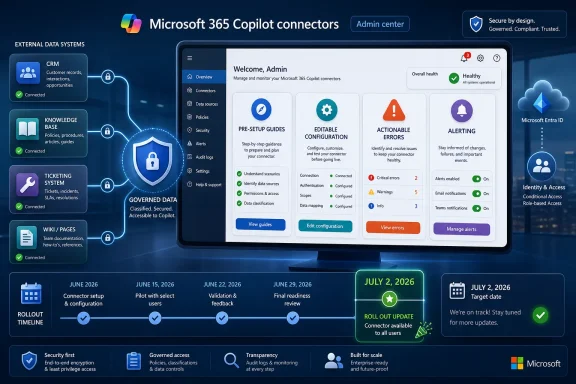
Microsoft has launched Roadmap ID 502529 for Microsoft 365 Copilot in worldwide general availability, giving Connector administrators web-based pre-setup guides, editable configuration support, more actionable error messages, and alerting capabilities after a June 2026 rollout updated on July 2, 2026. The feature sounds like admin-center plumbing, and in one sense it is. But for organizations trying to turn Copilot from a licensed chatbot into a governed interface for business data, this is exactly the kind of plumbing that determines whether the strategy works. Microsoft is quietly admitting that Copilot extensibility will not scale if connector setup remains a scavenger hunt through prerequisites, opaque failures, and post-deployment guesswork.
The public Copilot story is still dominated by prompts, agents, and demos in which a user asks a question and a machine produces something that looks useful. The enterprise story is less cinematic. It is about whether the assistant can safely reach the ticketing system, the product wiki, the CRM record, the HR policy library, and the internal knowledge base without making administrators regret the day they approved the license.
That is why this roadmap item matters more than its deliberately unglamorous name suggests. “Pre-setup guides, editability, actionable errors & alerting support” reads like a release note assembled by committee, but each part addresses a real operational weakness in the Copilot connector model. The problem is not merely that administrators need to add external data sources. The problem is that those data sources must be prepared, authenticated, scoped, monitored, repaired, and explained inside a Microsoft 365 environment that is already crowded with admin surfaces.
Microsoft 365 Copilot connectors are the mechanism by which external content becomes visible to Copilot and Microsoft 365 search experiences. That can include wikis, file repositories, knowledge bases, ticketing systems, line-of-business applications, and other systems that live outside the familiar Exchange-SharePoint-Teams triangle. In theory, this is the feature that makes Copilot useful beyond summarizing meetings and drafting emails.
In practice, connectors are where Copilot’s promise meets the oldest truths in IT: identity is messy, permissions drift, source systems are inconsistent, and “it should just work” is not a deployment plan. If Microsoft wants Copilot to become the front door to work, then administrators need better tools before the door opens.
That makes the “pre” in pre-setup the real story. Microsoft is trying to move friction earlier in the process, where it is cheaper to fix. A failed connector setup halfway through a wizard is not just an annoyance; it can send an administrator into Entra, Teams Developer Portal, Microsoft Graph documentation, vendor documentation, and the Microsoft 365 admin center in search of the missing dependency.
For synced connectors, administrators may need to think about indexing behavior, schema choices, permissions, and whether content should be staged before being broadly available. For newer federated connector patterns, including Model Context Protocol-based scenarios, the organization may also need a server endpoint, read-only tools, authentication registration, and a rollout model. These are not casual toggles.
The guide experience, if Microsoft implements it well, can reduce a classic enterprise-admin failure mode: discovering prerequisites only after a change window has already begun. Sysadmins have lived this pattern for decades. A wizard looks clean, the documentation looks manageable, the project sponsor expects completion by Friday, and then a missing consent grant or unclear identity mapping rule turns the deployment into an archaeology dig.
Pre-setup guides do not eliminate complexity, but they can make it visible. That is a meaningful shift. Microsoft is not making connectors simple; it is conceding that administrators need a map before they start.
If connector configuration cannot be edited cleanly, administrators face a bad choice. They can live with a flawed connection, delete and recreate it, or perform awkward workarounds that introduce downtime and uncertainty. In a small pilot, that may be tolerable. In a production Copilot environment with legal, compliance, service desk, and business users depending on external knowledge, it becomes unacceptable.
Editability is the difference between a connector as a deployment artifact and a connector as an operational asset. Microsoft needs the latter. Copilot’s usefulness depends on the freshness, relevance, and accessibility of the data it can reach, and those qualities change over time.
There is also a governance angle here. An administrator who knows a connector can be adjusted is more likely to stage it carefully, refine it, and respond to feedback. An administrator who fears that every change requires a rebuild may delay necessary corrections, especially in environments where change management is formal and downtime has to be justified.
This is where Copilot’s AI branding can obscure the boring reality underneath. The model may be probabilistic, but the connector lifecycle cannot be. IT departments need predictable controls over what is connected, who can use it, and how mistakes are corrected. Editability is not a convenience feature; it is part of making Copilot administrable.
The roadmap item’s promise of actionable errors therefore cuts to the heart of Copilot extensibility support. Connector failures can originate in many layers: authentication, permissions, endpoint availability, source throttling, schema mismatch, indexing issues, identity mapping, user assignment, or service-side changes. A generic failure message forces admins to troubleshoot the entire stack.
That is expensive. It also erodes trust. If Copilot cannot access a connector, users may not understand that the problem sits in configuration or source-system availability. They simply see Copilot fail to answer a question or omit a source they expected it to use. The administrator then inherits both the technical incident and the perception problem.
Actionable error handling is especially important because Copilot introduces a new kind of failure visibility. In traditional enterprise search, a broken connector may be noticed by power users or search administrators. In Copilot, the failure can surface in the middle of an executive prompt, a service desk workflow, or a frontline employee’s attempt to find policy information. The incident feels less like search maintenance and more like AI unreliability.
Microsoft has a strong incentive to prevent that interpretation. If Copilot produces weak answers because a connector is misconfigured, users blame Copilot. If admins cannot quickly diagnose the connector, admins blame Microsoft. Actionable errors are not just support hygiene; they are reputation management for the whole Copilot stack.
Once a connector becomes part of a business workflow, its health needs to be monitored. If a ServiceNow connector stops syncing, if a knowledge base source becomes unreachable, or if authentication expires, the organization needs to know before users build bad assumptions around missing information. Silent degradation is one of the worst outcomes for AI-assisted work because the user may not know what the assistant failed to see.
This matters because Copilot responses are only as trustworthy as the context available to them. A connector outage may not produce a dramatic error in every user interaction. It may simply reduce answer quality, omit relevant documents, or make Copilot appear less useful. That kind of soft failure is harder to detect than a server being down.
Alerting shifts connector health into the same mental category as mail flow, endpoint protection, identity synchronization, and service availability. That is where it belongs. If Microsoft wants customers to integrate Copilot into daily operations, then connector health cannot be treated as a background configuration detail.
There is also a compliance implication. Organizations need to know not only when too much data is exposed, but also when expected governed data is unavailable. In regulated environments, incomplete information can be its own risk. A legal team asking Copilot about policy, retention, or case history needs confidence that the relevant connected systems are actually reachable.
The Microsoft 365 admin center is where many organizations expect to manage Copilot access, agents, connectors, and related settings. But Copilot’s dependencies do not respect clean portal boundaries. A connector can involve Entra identity, Teams app registration, Graph permissions, third-party authentication, source-system configuration, staged rollout groups, and content governance. One pane of glass is easy to promise and hard to deliver.
AdminX, Microsoft’s shorthand here for the administrator experience, is therefore more than a UI improvement. It is a recognition that Copilot administration must become coherent enough for normal enterprise operations. Not every tenant has a dedicated Copilot architect. In many organizations, the same administrators who handle Exchange transport rules, Teams policies, Intune compliance, and Entra conditional access will also be asked why Copilot cannot see the customer support archive.
The danger for Microsoft is that Copilot extensibility becomes yet another specialist discipline before customers have even finished justifying the licensing cost. If every connector deployment requires deep documentation study and cross-portal debugging, adoption will bottleneck in IT. Better setup guidance and error handling are Microsoft’s attempt to lower that bottleneck without pretending the underlying system is simple.
This is also where Microsoft’s platform strategy becomes visible. Copilot is not being sold merely as an app. It is being built as an orchestration layer across Microsoft 365 and beyond. The admin center has to become the policy and operations surface for that orchestration layer, or the whole strategy risks fragmentation.
Microsoft’s standard line is that Copilot respects existing permissions. That remains essential, but it is not a complete governance strategy. Existing permissions are often messy. SharePoint sites accumulate broad access. Legacy file shares contain old material. Ticketing systems use role models that do not map cleanly to Entra groups. Wikis and knowledge bases may have looser access assumptions because, historically, nobody expected an AI assistant to synthesize their contents on demand.
Connectors intensify that problem because they expand Copilot’s reach beyond Microsoft 365-native content. The more external systems Copilot can query or index, the more administrators must understand the permission model of each source. “Respecting permissions” is only reassuring if the permissions are accurate, intentional, and understood.
Pre-setup guides can help by surfacing prerequisites, but they cannot decide governance policy. Editability can help correct mistakes, but it cannot tell an organization what should be connected. Actionable errors can identify failures, but they cannot resolve excessive access. Alerting can warn about health, but it does not replace data classification, access review, or business ownership.
This is the uncomfortable truth behind Copilot extensibility: the assistant makes data governance more urgent because it makes data more usable. Information that was technically accessible but practically buried may become easy to retrieve. That is productivity when the right person asks. It is exposure when the wrong audience has inherited access.
That means the number of connectors in real tenants is likely to grow. A cautious organization might start with one or two well-understood sources, such as a service desk knowledge base or intranet repository. A more ambitious one may connect multiple SaaS platforms, internal databases, customer systems, and custom MCP-backed services. At that point, connector administration becomes a portfolio problem.
Portfolios need consistency. Administrators need to know which connectors are deployed, which are staged, which are failing, which are disabled, and which owners are responsible for each source. They also need repeatable setup patterns so that every new connector does not become a bespoke project.
The roadmap item does not solve all of that, but it points in the right direction. Pre-setup guidance helps standardize deployment. Editability supports lifecycle management. Actionable errors reduce troubleshooting variance. Alerting creates the basis for ongoing operations. These are the ingredients of a connector estate that can be managed rather than merely accumulated.
Microsoft also has another reason to improve this experience: third-party and custom connectors are part of the ecosystem pitch. If partners and customers build extensions that are difficult to administer, the blame will not remain neatly assigned to the partner. In the eyes of Microsoft 365 customers, it will be a Copilot problem.
This is why admin experience should not be dismissed as back-office detail. A better connector setup flow can directly improve end-user trust because fewer deployments fail quietly. Better editability can improve answer quality because administrators can refine connections after observing real use. Better errors can shorten outages. Better alerts can prevent silent drift.
For WindowsForum readers, the analogy is familiar from decades of Windows administration. The desktop experience is shaped by group policy, update rings, drivers, identity, endpoint management, network reachability, and security baselines. Users experience “Windows works” or “Windows is broken,” but administrators know the operating system is only the visible edge of a much larger managed environment.
Copilot is following the same path. It is becoming an enterprise surface whose reliability depends on infrastructure most users will never understand. Microsoft’s challenge is to make that infrastructure manageable enough that Copilot does not become another black box sitting atop already fragile business data.
The company’s messaging often emphasizes how easy it is to ask Copilot for help. That is true at the prompt layer. It is not true at the organizational layer. The launch of Roadmap ID 502529 is valuable precisely because it addresses the less marketable layer where adoption succeeds or fails.
Modern Windows administration already assumes cloud identity, Microsoft 365 services, Defender telemetry, Intune policy, Teams collaboration, and SharePoint-backed content. Copilot overlays that estate. When a user on a Windows 11 device asks Copilot for information from a business system, the answer may depend on a connector configured in the Microsoft 365 admin center, governed by Entra identity, and constrained by permissions designed years earlier.
That makes connector administration part of the practical Windows environment, even if no one installs a driver or edits a local policy. The endpoint is where users experience the result, but the configuration lives in the cloud. This has been the direction of Microsoft’s enterprise stack for years; Copilot simply makes the dependency more visible.
For sysadmins, the lesson is not to treat Copilot as a separate “AI project” owned entirely by productivity teams. It touches identity, security, data lifecycle, application ownership, and support. Connector failures will become help desk tickets. Permission surprises will become security reviews. Missing data will become complaints about Copilot quality.
The organizations that handle this well will be the ones that fold Copilot connector management into existing operational practices. They will assign owners, document prerequisites, stage rollouts, monitor health, and review permissions before connecting sensitive systems. The organizations that treat connectors as a set-and-forget wizard will learn the harder way.
But incremental changes can reveal strategic pressure. Microsoft is trying to make Copilot extensibility believable at enterprise scale. That requires more than enthusiasm for generative AI. It requires a supportable path from “we own a lot of data” to “Copilot can safely use the right data at the right time.”
The hard part is that every customer’s data environment is different. Microsoft can standardize the admin experience, but it cannot standardize the internal politics of who owns a knowledge base, the historical sprawl of permissions, or the quality of metadata in a legacy repository. That is why the company must make the controllable parts as clear as possible.
This launch is best understood as one layer in that effort. It gives administrators more guidance before setup, more flexibility after setup, more useful information when something fails, and more visibility when attention is needed. None of those pieces is glamorous. All of them are necessary.
The larger bet is that Copilot becomes more valuable as it becomes more connected. If that is true, connector administration becomes one of the most important admin experiences in Microsoft 365. If it is painful, Copilot remains impressive in demos and uneven in production. If it improves, the assistant has a better chance of becoming part of everyday work.
 Microsoft Moves the Copilot Battle From Chat to Plumbing
The public Copilot story is still dominated by prompts, agents, and demos in which a user asks a question and a machine produces something that looks useful. The enterprise story is less cinematic. It is about whether the assistant can safely reach the ticketing system, the product wiki, the CRM record, the HR policy library, and the internal knowledge base without making administrators regret the day they approved the license.That is why this roadmap item matters more than its deliberately unglamorous name suggests. “Pre-setup guides, editability, actionable errors & alerting support” reads like a release note assembled by committee, but each part addresses a real operational weakness in the Copilot connector model. The problem is not merely that administrators need to add external data sources. The problem is that those data sources must be prepared, authenticated, scoped, monitored, repaired, and explained inside a Microsoft 365 environment that is already crowded with admin surfaces.
Microsoft 365 Copilot connectors are the mechanism by which external content becomes visible to Copilot and Microsoft 365 search experiences. That can include wikis, file repositories, knowledge bases, ticketing systems, line-of-business applications, and other systems that live outside the familiar Exchange-SharePoint-Teams triangle. In theory, this is the feature that makes Copilot useful beyond summarizing meetings and drafting emails.
In practice, connectors are where Copilot’s promise meets the oldest truths in IT: identity is messy, permissions drift, source systems are inconsistent, and “it should just work” is not a deployment plan. If Microsoft wants Copilot to become the front door to work, then administrators need better tools before the door opens.
Pre-Setup Guidance Is Microsoft’s Admission That Connectors Are Not Self-Explaining
The first part of the launch, pre-setup guidance, is deceptively important. Connector deployment often fails before the administrator clicks the final setup button, because the actual work starts elsewhere. Admin roles must be assigned, authentication must be planned, app registrations may be needed, content sources must be understood, and the organization needs to decide which users should see which external data.That makes the “pre” in pre-setup the real story. Microsoft is trying to move friction earlier in the process, where it is cheaper to fix. A failed connector setup halfway through a wizard is not just an annoyance; it can send an administrator into Entra, Teams Developer Portal, Microsoft Graph documentation, vendor documentation, and the Microsoft 365 admin center in search of the missing dependency.
For synced connectors, administrators may need to think about indexing behavior, schema choices, permissions, and whether content should be staged before being broadly available. For newer federated connector patterns, including Model Context Protocol-based scenarios, the organization may also need a server endpoint, read-only tools, authentication registration, and a rollout model. These are not casual toggles.
The guide experience, if Microsoft implements it well, can reduce a classic enterprise-admin failure mode: discovering prerequisites only after a change window has already begun. Sysadmins have lived this pattern for decades. A wizard looks clean, the documentation looks manageable, the project sponsor expects completion by Friday, and then a missing consent grant or unclear identity mapping rule turns the deployment into an archaeology dig.
Pre-setup guides do not eliminate complexity, but they can make it visible. That is a meaningful shift. Microsoft is not making connectors simple; it is conceding that administrators need a map before they start.
Editability Turns Connector Deployment Into a Lifecycle, Not a One-Shot Bet
The second part of the launch, editability, speaks to a subtler issue. Enterprise systems are not static. Source URLs change, authentication methods evolve, rollout groups expand, display names get revised, and early design choices turn out to be wrong once real users begin asking Copilot questions.If connector configuration cannot be edited cleanly, administrators face a bad choice. They can live with a flawed connection, delete and recreate it, or perform awkward workarounds that introduce downtime and uncertainty. In a small pilot, that may be tolerable. In a production Copilot environment with legal, compliance, service desk, and business users depending on external knowledge, it becomes unacceptable.
Editability is the difference between a connector as a deployment artifact and a connector as an operational asset. Microsoft needs the latter. Copilot’s usefulness depends on the freshness, relevance, and accessibility of the data it can reach, and those qualities change over time.
There is also a governance angle here. An administrator who knows a connector can be adjusted is more likely to stage it carefully, refine it, and respond to feedback. An administrator who fears that every change requires a rebuild may delay necessary corrections, especially in environments where change management is formal and downtime has to be justified.
This is where Copilot’s AI branding can obscure the boring reality underneath. The model may be probabilistic, but the connector lifecycle cannot be. IT departments need predictable controls over what is connected, who can use it, and how mistakes are corrected. Editability is not a convenience feature; it is part of making Copilot administrable.
Actionable Errors Are the Difference Between Supportability and Theater
Few phrases in enterprise software inspire more weary laughter than “an error occurred.” Administrators do not need error messages that merely confirm failure. They need error messages that identify what failed, where it failed, what changed, and what to do next.The roadmap item’s promise of actionable errors therefore cuts to the heart of Copilot extensibility support. Connector failures can originate in many layers: authentication, permissions, endpoint availability, source throttling, schema mismatch, indexing issues, identity mapping, user assignment, or service-side changes. A generic failure message forces admins to troubleshoot the entire stack.
That is expensive. It also erodes trust. If Copilot cannot access a connector, users may not understand that the problem sits in configuration or source-system availability. They simply see Copilot fail to answer a question or omit a source they expected it to use. The administrator then inherits both the technical incident and the perception problem.
Actionable error handling is especially important because Copilot introduces a new kind of failure visibility. In traditional enterprise search, a broken connector may be noticed by power users or search administrators. In Copilot, the failure can surface in the middle of an executive prompt, a service desk workflow, or a frontline employee’s attempt to find policy information. The incident feels less like search maintenance and more like AI unreliability.
Microsoft has a strong incentive to prevent that interpretation. If Copilot produces weak answers because a connector is misconfigured, users blame Copilot. If admins cannot quickly diagnose the connector, admins blame Microsoft. Actionable errors are not just support hygiene; they are reputation management for the whole Copilot stack.
Alerting Makes Copilot Connectors Part of Operations Instead of a Wizard Graveyard
Alerting support may be the most operationally significant piece of the launch. Without alerting, connector administration depends on someone checking a dashboard, reacting to user complaints, or discovering problems during periodic review. That is not how mature IT operations work.Once a connector becomes part of a business workflow, its health needs to be monitored. If a ServiceNow connector stops syncing, if a knowledge base source becomes unreachable, or if authentication expires, the organization needs to know before users build bad assumptions around missing information. Silent degradation is one of the worst outcomes for AI-assisted work because the user may not know what the assistant failed to see.
This matters because Copilot responses are only as trustworthy as the context available to them. A connector outage may not produce a dramatic error in every user interaction. It may simply reduce answer quality, omit relevant documents, or make Copilot appear less useful. That kind of soft failure is harder to detect than a server being down.
Alerting shifts connector health into the same mental category as mail flow, endpoint protection, identity synchronization, and service availability. That is where it belongs. If Microsoft wants customers to integrate Copilot into daily operations, then connector health cannot be treated as a background configuration detail.
There is also a compliance implication. Organizations need to know not only when too much data is exposed, but also when expected governed data is unavailable. In regulated environments, incomplete information can be its own risk. A legal team asking Copilot about policy, retention, or case history needs confidence that the relevant connected systems are actually reachable.
The Admin Center Is Becoming Copilot’s Real Control Plane
This launch also reflects a broader consolidation around the Microsoft 365 admin center as the place where Copilot extensibility is managed. That is sensible, but it is not trivial. Microsoft has spent years scattering administrative controls across Entra, Teams, Power Platform, SharePoint, Purview, Defender, Azure, and workload-specific portals. Copilot cuts across all of them.The Microsoft 365 admin center is where many organizations expect to manage Copilot access, agents, connectors, and related settings. But Copilot’s dependencies do not respect clean portal boundaries. A connector can involve Entra identity, Teams app registration, Graph permissions, third-party authentication, source-system configuration, staged rollout groups, and content governance. One pane of glass is easy to promise and hard to deliver.
AdminX, Microsoft’s shorthand here for the administrator experience, is therefore more than a UI improvement. It is a recognition that Copilot administration must become coherent enough for normal enterprise operations. Not every tenant has a dedicated Copilot architect. In many organizations, the same administrators who handle Exchange transport rules, Teams policies, Intune compliance, and Entra conditional access will also be asked why Copilot cannot see the customer support archive.
The danger for Microsoft is that Copilot extensibility becomes yet another specialist discipline before customers have even finished justifying the licensing cost. If every connector deployment requires deep documentation study and cross-portal debugging, adoption will bottleneck in IT. Better setup guidance and error handling are Microsoft’s attempt to lower that bottleneck without pretending the underlying system is simple.
This is also where Microsoft’s platform strategy becomes visible. Copilot is not being sold merely as an app. It is being built as an orchestration layer across Microsoft 365 and beyond. The admin center has to become the policy and operations surface for that orchestration layer, or the whole strategy risks fragmentation.
Connectors Are Where Data Governance Stops Being Theoretical
The appeal of Copilot connectors is obvious: employees ask questions in natural language and receive answers grounded in organizational data. The risk is equally obvious: employees ask questions in natural language and receive answers grounded in organizational data they should not have been able to discover so easily.Microsoft’s standard line is that Copilot respects existing permissions. That remains essential, but it is not a complete governance strategy. Existing permissions are often messy. SharePoint sites accumulate broad access. Legacy file shares contain old material. Ticketing systems use role models that do not map cleanly to Entra groups. Wikis and knowledge bases may have looser access assumptions because, historically, nobody expected an AI assistant to synthesize their contents on demand.
Connectors intensify that problem because they expand Copilot’s reach beyond Microsoft 365-native content. The more external systems Copilot can query or index, the more administrators must understand the permission model of each source. “Respecting permissions” is only reassuring if the permissions are accurate, intentional, and understood.
Pre-setup guides can help by surfacing prerequisites, but they cannot decide governance policy. Editability can help correct mistakes, but it cannot tell an organization what should be connected. Actionable errors can identify failures, but they cannot resolve excessive access. Alerting can warn about health, but it does not replace data classification, access review, or business ownership.
This is the uncomfortable truth behind Copilot extensibility: the assistant makes data governance more urgent because it makes data more usable. Information that was technically accessible but practically buried may become easy to retrieve. That is productivity when the right person asks. It is exposure when the wrong audience has inherited access.
Microsoft Is Smoothing the Road Because the Connector Estate Is About to Grow
The timing of this launch is not accidental. Microsoft has been steadily expanding the Copilot extensibility story with agents, plugins, Microsoft Graph connectors, prebuilt connectors, custom connectors, and federated connector patterns. The company wants Copilot to work across business systems rather than remain confined to Word, Outlook, Teams, and SharePoint.That means the number of connectors in real tenants is likely to grow. A cautious organization might start with one or two well-understood sources, such as a service desk knowledge base or intranet repository. A more ambitious one may connect multiple SaaS platforms, internal databases, customer systems, and custom MCP-backed services. At that point, connector administration becomes a portfolio problem.
Portfolios need consistency. Administrators need to know which connectors are deployed, which are staged, which are failing, which are disabled, and which owners are responsible for each source. They also need repeatable setup patterns so that every new connector does not become a bespoke project.
The roadmap item does not solve all of that, but it points in the right direction. Pre-setup guidance helps standardize deployment. Editability supports lifecycle management. Actionable errors reduce troubleshooting variance. Alerting creates the basis for ongoing operations. These are the ingredients of a connector estate that can be managed rather than merely accumulated.
Microsoft also has another reason to improve this experience: third-party and custom connectors are part of the ecosystem pitch. If partners and customers build extensions that are difficult to administer, the blame will not remain neatly assigned to the partner. In the eyes of Microsoft 365 customers, it will be a Copilot problem.
The User Experience Depends on Work Users Never See
One of the paradoxes of Copilot is that the most important work happens before the user asks a question. The quality of the answer depends on licensing, identity, permissions, indexing, connector health, semantic grounding, data freshness, and policy configuration. The user sees a chat box. The administrator sees the machinery.This is why admin experience should not be dismissed as back-office detail. A better connector setup flow can directly improve end-user trust because fewer deployments fail quietly. Better editability can improve answer quality because administrators can refine connections after observing real use. Better errors can shorten outages. Better alerts can prevent silent drift.
For WindowsForum readers, the analogy is familiar from decades of Windows administration. The desktop experience is shaped by group policy, update rings, drivers, identity, endpoint management, network reachability, and security baselines. Users experience “Windows works” or “Windows is broken,” but administrators know the operating system is only the visible edge of a much larger managed environment.
Copilot is following the same path. It is becoming an enterprise surface whose reliability depends on infrastructure most users will never understand. Microsoft’s challenge is to make that infrastructure manageable enough that Copilot does not become another black box sitting atop already fragile business data.
The company’s messaging often emphasizes how easy it is to ask Copilot for help. That is true at the prompt layer. It is not true at the organizational layer. The launch of Roadmap ID 502529 is valuable precisely because it addresses the less marketable layer where adoption succeeds or fails.
The Windows Angle Is an Admin Angle
At first glance, this is not a Windows story. The roadmap item is for Microsoft 365 Copilot, the platform is web, and the release is tied to cloud administration rather than a Windows client build. But for Windows shops, especially those managing Microsoft 365 estates alongside Windows 11 deployments, the distinction is increasingly artificial.Modern Windows administration already assumes cloud identity, Microsoft 365 services, Defender telemetry, Intune policy, Teams collaboration, and SharePoint-backed content. Copilot overlays that estate. When a user on a Windows 11 device asks Copilot for information from a business system, the answer may depend on a connector configured in the Microsoft 365 admin center, governed by Entra identity, and constrained by permissions designed years earlier.
That makes connector administration part of the practical Windows environment, even if no one installs a driver or edits a local policy. The endpoint is where users experience the result, but the configuration lives in the cloud. This has been the direction of Microsoft’s enterprise stack for years; Copilot simply makes the dependency more visible.
For sysadmins, the lesson is not to treat Copilot as a separate “AI project” owned entirely by productivity teams. It touches identity, security, data lifecycle, application ownership, and support. Connector failures will become help desk tickets. Permission surprises will become security reviews. Missing data will become complaints about Copilot quality.
The organizations that handle this well will be the ones that fold Copilot connector management into existing operational practices. They will assign owners, document prerequisites, stage rollouts, monitor health, and review permissions before connecting sensitive systems. The organizations that treat connectors as a set-and-forget wizard will learn the harder way.
The Feature Is Small Because the Bet Is Big
There is a temptation to view this launch as incremental, and in product terms it is. Microsoft is not announcing a new Copilot model, a dramatic interface, or a headline-grabbing agent capability. It is improving the administrative workflow around connectors.But incremental changes can reveal strategic pressure. Microsoft is trying to make Copilot extensibility believable at enterprise scale. That requires more than enthusiasm for generative AI. It requires a supportable path from “we own a lot of data” to “Copilot can safely use the right data at the right time.”
The hard part is that every customer’s data environment is different. Microsoft can standardize the admin experience, but it cannot standardize the internal politics of who owns a knowledge base, the historical sprawl of permissions, or the quality of metadata in a legacy repository. That is why the company must make the controllable parts as clear as possible.
This launch is best understood as one layer in that effort. It gives administrators more guidance before setup, more flexibility after setup, more useful information when something fails, and more visibility when attention is needed. None of those pieces is glamorous. All of them are necessary.
The larger bet is that Copilot becomes more valuable as it becomes more connected. If that is true, connector administration becomes one of the most important admin experiences in Microsoft 365. If it is painful, Copilot remains impressive in demos and uneven in production. If it improves, the assistant has a better chance of becoming part of everyday work.
Connector Admins Just Got a More Honest Copilot Contract
Microsoft’s launch does not remove the need for planning, governance, or testing, but it gives connector administrators a clearer operational contract. The company is effectively saying that setup should be guided, configuration should be revisable, failures should be explainable, and connector health should be visible. That is a modest promise, but it is the right one.- Connector admins now have general-availability support for pre-setup guides, editable configurations, actionable errors, and alerting in Microsoft 365 Copilot connector administration.
- The feature applies to Microsoft 365 Copilot on the web for worldwide standard multi-tenant cloud customers, with general availability listed for June 2026.
- The practical impact is faster connector setup and easier troubleshooting, especially when external data sources require authentication, permissions, staged rollout, or source-specific prerequisites.
- The governance burden remains with the organization, because better setup tooling does not automatically fix overbroad permissions, stale content, or unclear data ownership.
- The launch signals that Microsoft expects connector estates to grow and is trying to make Copilot extensibility manageable before it becomes unmanageable.
References
- Primary source: Microsoft 365 Roadmap
Published: 2026-07-02T23:12:48.2177075Z
Microsoft 365 Roadmap | Microsoft 365
The Microsoft 365 Roadmap lists updates that are currently planned for applicable subscribers. Check here for more information on the status of new features and updates.www.microsoft.com
- Related coverage: m365admin.handsontek.net
Microsoft Copilot (Microsoft 365): [Copilot Extensibility] [AdminX] Pre-setup guides, editability, actionable errors & alerting support available for Connector admins - M365 Admin
Pre-setup guides, editability, actionable errors & alerting support available for Connector admins. Product Release phase General Availability Release date December CY2025 Platform Web Cloud Instance Worldwide (Standard Multi-Tenant) Created 2025-10-16 Roadmap ID 502529 Roadmap Link...m365admin.handsontek.net - Related coverage: ryantechinc.com

Microsoft Copilot (Microsoft 365): [Copilot Extensibility] [AdminX] Pre-setup guides, editability, actionable errors & alerting support available for Connector admins
Microsoft Copilot (Microsoft 365): [Copilot Extensibility] [AdminX] Pre-setup guides, editability, actionable errors & alerting support available for Connector admins
ryantechinc.com
- Official source: learn.microsoft.com
Microsoft 365 Copilot Extensibility Planning Guide | Microsoft Learn
Plan your Copilot extensibility journey by following the key steps and considerations.learn.microsoft.com - Related coverage: app.cloudscout.one
2025 CW 42 Microsoft 365 Roadmap changes | cloudscout.one
Microsoft 365 Roadmap week 42 overview: 61 Microsoft 365 Roadmap Items were changed and 38 Microsoft 365 Roadmap Items were added…app.cloudscout.one - Official source: support.microsoft.com
Understand Copilot connectors | Microsoft Support
Understand Copilot connectorssupport.microsoft.com
- Official source: developer.microsoft.com
Microsoft 365 Copilot Connectors | Connect external data sources
Connect content from external data services into Microsoft Graph to power experiences such as Microsoft 365 Copilot, Copilot Search, and Microsoft Search.developer.microsoft.com - Official source: enablement.microsoft.com
Microsoft Graph – Microsoft Adoption
Microsoft Graph grounds Microsoft 365 Copilot with your organization’s productivity data. enablement.microsoft.com
- Official source: devblogs.microsoft.com
Enriching Microsoft 365 profiles with Microsoft 365 Copilot connectors for people data (public preview) - Microsoft 365 Developer Blog
Enrich Microsoft 365 profiles with Microsoft 365 Copilot connectors for people datadevblogs.microsoft.com - Related coverage: windowscentral.com
Windows 11 Copilot: How to link services
Connectors let Copilot search across different services, and here's how to set up the feature on Windows 11. www.windowscentral.com
- Related coverage: m365maps.com
- Official source: cdn-dynmedia-1.microsoft.com
- Official source: download.microsoft.com
Security Copilot – Purchase guidance
</rdf:Alt> </dc:description> <dc:creator> <rdf:Seq> <rdf:li>Joey Caparasdownload.microsoft.com
- Official source: techcommunity.microsoft.com